Appendix B. Solutions to End-of-Part Exercises
This appendix provides solutions for the book’s end-of-part exercises. Code files named by captions or narrative in these solutions are available in the book examples package’s AppendixB folder, which has one subfolder per part (e.g., AppendixB/Part1 is the first part’s files). See the Preface for more info on the examples package.
Part I, Getting Started
See “Test Your Knowledge: Part I Exercises” in Chapter 3 for the exercises.
Interaction. Assuming Python is configured properly, the interaction should look something like the following. You can run this any way you like—in IDLE, a console, an app, a notebook’s page, and so on:
$
python3…information lines… >>>'Hello World!"'Hello World!' >>># Use ctrl+D/ctrl+Z to exit on Unix/Windows, or close windowPrograms. Your code (i.e., module) file should look something like Example B-1:
Example B-1. Part1/module1.py
print('Hello module world!')And here is the sort of interaction you should have; for console launches, be sure to use your platform’s version of the “python3” command (e.g., try “py -3” on Windows):
$
python3 module1.pyHello module world!Again, feel free to run this other ways—by clicking or tapping the file’s icon, by using IDLE’s Run→Run Module menu option, by UI options in web notebooks or other IDEs, and so on.
Modules. The following interaction listing illustrates running a module file by importing it:
$
python3>>>import module1Hello module world! >>>Remember that you will need to reload the module to run it again without stopping and restarting the interactive interpreter (i.e., REPL). Moving the .py file to a different directory and importing it normally fails: Python likely generated a module1.*.pyc file in the __pycache__ subdirectory of the source code file’s folder, but it won’t use it when you import the module there if the source code (.py) file has been moved elsewhere and to a folder not in Python’s import search path. The .pyc file is written automatically if Python has access to the source file’s directory; it contains the compiled bytecode version of a module. See Chapter 3 for more on modules, Chapter 2 for more on bytecode, and Chapter 22 ahead for more on both. To really use the saved .pyc sans .py, as of Python 3.2, you must move it up one level and rename it without the “*” part in the middle, or generate it from and alongside the source code file with the Python
compileallmodule’s “legacy” (-b) mode. For example, the following compiles all source code files in the current directory into directly usable bytecode files (you can also list specific files or recurse into subfolders, per Python library docs):$
python3 -m compileall -b -l .Scripts. Assuming your platform supports the
#!trick, your solution will look like Example B-2, although your#!line may need to list a different path to Python on your machine. This line is significant under the Windows launcher shipped and installed with Python, where it is parsed to select a version of Python to run the script, despite the Unix path syntax, and subject to a default setting; see Appendix A and Python’s docs for more details. This launching scheme is optional and generally less portable than others.Example B-2. Part1/script1.py
#!/usr/local/bin/python3print('Hello module world!')Running this as a program by console command line:
$
chmod +x script1.py# See also: #!/usr/bin/env python3$./script1.py# "./" needed iff "." not on PATHHello module world! $python3 script1.py# Or run normally and portablyHello module world!Errors and debugging. The following interaction demonstrates the sorts of error messages you’ll get when you complete this exercise. Really, you’re triggering Python exceptions; the default exception-handling behavior terminates the running Python program and prints an error message and stack trace on the screen. The stack trace shows where you were in a program when the exception occurred (if function calls are active when the error happens, the “Traceback” section displays all active call levels). In Chapter 10 and Part VII, you will learn that you can catch exceptions using
trystatements and process them arbitrarily. You’ll also learn that Python includes a full-blown source code debugger (modulepdb) for special error-detection requirements. For now, notice that Python gives meaningful messages when programming errors occur, instead of crashing silently:$
python3>>>2 ** 50032733906078961418700131896968275991522166420460430647894832913680961337964046745 54883270092325904157150886684127560071009217256545885393053328527589376 >>>1 / 0Traceback (most recent call last): File "<stdin>", line 1, in <module> ZeroDivisionError: division by zero >>>oopsTraceback (most recent call last): File "<stdin>", line 1, in <module> NameError: name 'oops' is not definedBreaks and cycles. When you type this code:
$
python3>>>L = [1, 2]>>>L.append(L)>>>L[1, 2, [...]]you create a cyclic data structure in Python. In Python releases before 1.5.1, the Python printer wasn’t smart enough to detect cycles in objects, and it would print an unending stream of
[1, 2, [1, 2, [1, 2, [1, 2, and so on until you hit the Ctrl+C break-key combination on your machine (which, technically, raises a keyboard-interrupt exception that prints a default message). Beginning with Python 1.5.1, the printer is clever enough to detect cycles, prints[[...]]instead to let you know that it has detected a loop in the object’s structure, and avoids getting stuck printing forever.The reason for the cycle is subtle and requires information you will glean in Part II, so this is something of a preview. But in short, assignments in Python always generate references to objects, not copies of them. You can think of objects as chunks of memory and of references as implicitly followed pointers. When you run the first assignment above, the name
Lbecomes a named reference to a two-item list object—a pointer to a piece of memory. Python lists are really arrays of object references, with anappendmethod that changes the array in place by tacking on another object reference at the end. Here, theappendcall adds a reference to the front ofLat the end ofL, which leads to the cycle illustrated in Figure B-1: a pointer at the end of the list that points back to the front of the list.Besides being printed specially, as you’ll learn in Chapter 6, cyclic objects must also be handled specially by Python’s garbage collector, or their space will remain unreclaimed even when they are no longer in use. Though rare in practice, in some programs that traverse arbitrary objects or structures, you might have to detect such cycles yourself by keeping track of where you’ve been to avoid looping. Believe it or not, cyclic data structures can sometimes be useful, despite their special-case printing.
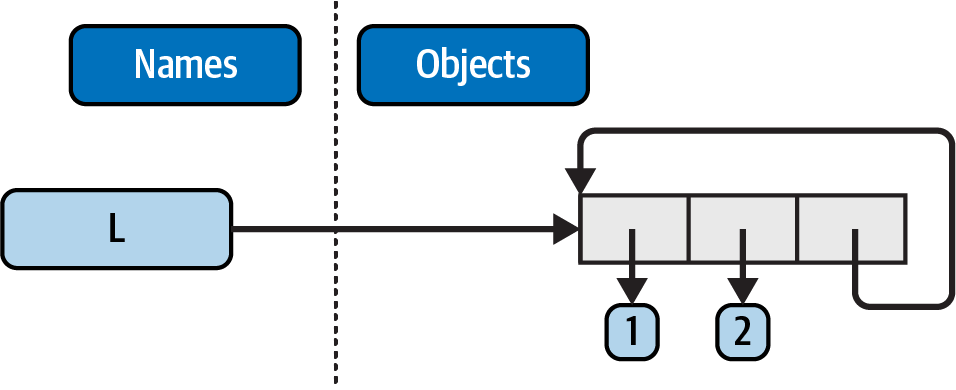
Figure B-1. A cyclic object, created by appending a list to itself
Part II, Objects and Operations
See “Test Your Knowledge: Part II Exercises” in Chapter 9 for the exercises.
The basics. Here are the sorts of results you should get, along with a few comments about their meaning. Again, note that
;is used in a few of these to squeeze more than one statement onto a single line (the;is a statement separator), and commas build up tuples displayed in parentheses. See file Part2/basics.txt for copy/paste sans emedia, though typing these manually is a good way to practice syntax:$
python3 # Numbers>>>2 ** 16# 2 raised to the power 1665536 >>>2 / 5, 2 / 5.0# Division keep remainders(0.4, 0.4)# Strings>>>'hack' + 'code'# Concatenation'hackcode' >>>S = 'Python'>>>'grok ' + S'grok Python' >>>S * 5# Repetition'PythonPythonPythonPythonPython' >>>S[0], S[:0], S[1:]# An empty slice at the front - [0:0]('P', '', 'ython')# Empty of same type as object sliced>>>how = 'fun'>>>'coding %s is %s!' % (S, how)# Formatting: expression, method, f-string'coding Python is fun!' >>>'coding {} is {}!'.format(S, how)'coding Python is fun!' >>>f'coding {S} is {how}!''coding Python is fun!'# Tuples>>>('x',)[0]# Indexing a single-item tuple'x' >>>('x', 'y')[1]# Indexing a two-item tuple'y'# Lists>>>L = [1, 2, 3] + [4, 5, 6]# List operations>>>L, L[:], L[:0], L[-2], L[-2:]([1, 2, 3, 4, 5, 6], [1, 2, 3, 4, 5, 6], [], 5, [5, 6]) >>>([1, 2, 3] + [4, 5, 6])[2:4][3, 4] >>>[L[2], L[3]]# Fetch from offsets; store in a list[3, 4] >>>L.reverse(); L# Method: reverse list in place[6, 5, 4, 3, 2, 1] >>>L.sort(); L# Method: sort list in place[1, 2, 3, 4, 5, 6] >>>L.index(4)# Method: offset of first 4 (search)3# Dictionaries>>>{'a': 1, 'b': 2}['b']# Index a dictionary by key2 >>>D = {'x': 1, 'y': 2, 'z': 3}>>>D['w'] = 0# Create a new entry>>>D['x'] + D['w']1 >>>D[(1, 2, 3)] = 4# A tuple used as a key (immutable)>>>D{'x': 1, 'y': 2, 'z': 3, 'w': 0, (1, 2, 3): 4} >>>list(D.keys()), list(D.values()), (1, 2, 3) in D# Methods, key test(['x', 'y', 'z', 'w', (1, 2, 3)], [1, 2, 3, 0, 4], True)# Empties>>>[[]], ["", [], (), {}, None]# Lots of nothings: empty objects([[]], ['', [], (), {}, None])Indexing and slicing. Indexing out of bounds (e.g.,
L[4]) raises an error; Python always checks to make sure that all offsets are within the bounds of a sequence.On the other hand, slicing out of bounds (e.g.,
L[-1000:100]) works because Python scales out-of-bounds slices so that they always fit (the limits are set to zero and the sequence length, if required).Extracting a sequence in reverse, with the lower bound greater than the higher bound (e.g.,
L[3:1]), doesn’t really work. You get back an empty slice ([]) because Python scales the slice limits to make sure that the lower bound is always less than or equal to the upper bound (e.g.,L[3:1]is scaled toL[3:3], the empty insertion point at offset3). Python slices are always extracted from left to right, even if you use negative indexes (they are first converted to positive indexes by adding the sequence length). Note that Python’s three-limit slices modify this behavior somewhat. For instance,L[3:1:-1]does extract from right to left:>>>
L = [1, 2, 3, 4]>>>L[4]Traceback (most recent call last): File "<stdin>", line 1, in <module> IndexError: list index out of range >>>L[-1000:100][1, 2, 3, 4] >>>L[3:1][] >>>L[1, 2, 3, 4] >>>L[3:1] = ['?']>>>L[1, 2, 3, '?', 4]Indexing, slicing, and del. Your interaction with the interpreter should look something like the following. Note that assigning an empty list to an offset stores an empty list object there, but assigning an empty list to a slice deletes the slice. Slice assignment expects another sequence, or you’ll get a type error; it inserts items inside the sequence assigned, not the sequence itself:
>>>
L = [1, 2, 3, 4]>>>L[2] = []>>>L[1, 2, [], 4] >>>L[2:3] = []>>>L[1, 2, 4] >>>del L[0]>>>L[2, 4] >>>del L[1:]>>>L[2] >>>L[1:2] = 1Traceback (most recent call last): File "<stdin>", line 1, in <module> TypeError: can only assign an iterableTuple assignment. The values of
XandYare swapped. When tuples appear on the left and right of an assignment symbol (=), Python assigns objects on the right to targets on the left according to their positions. This is probably easiest to understand by noting that the targets on the left aren’t a real tuple, even though they look like one; they are simply a set of independent assignment targets. The items on the right are a tuple, which gets unpacked during the assignment (this tuple provides the temporary assignment needed to achieve the swap effect):>>>
X = 'code'>>>Y = 'hack'>>>X, Y = Y, X>>>X'hack' >>>Y'code'Dictionary keys. Any immutable (technically, “hashable”) object can be used as a dictionary key, including integers, tuples, strings, and so on. This really is a dictionary, even though some of its keys look like integer offsets. Mixed-type keys work fine, too:
>>>
D = {}>>>D[1] = 'a'>>>D[2] = 'b'>>>D[(1, 2, 3)] = 'c'>>>D{1: 'a', 2: 'b', (1, 2, 3): 'c'}Dictionary indexing. Indexing a nonexistent key (
D['d']) raises an error; assigning to a nonexistent key (D['d']='hack') creates a new dictionary entry. On the other hand, out-of-bounds indexing for lists raises an error, too, but so do out-of-bounds assignments. Variable names work like dictionary keys; they must have already been assigned when referenced, but they are created when first assigned. In fact, variable names can be processed as dictionary keys if you wish (they’re made visible in the dictionaries of stack frames or module (or other object) namespaces):>>>
D = {'a': 1, 'b': 2, 'c': 3}>>>D['a']1 >>>D['d']Traceback (most recent call last): File "<stdin>", line 1, in <module> KeyError: 'd' >>>D['d'] = 4>>>D{'a': 1, 'b': 2, 'c': 3, 'd': 4} >>>L = [0, 1]>>>L[2]Traceback (most recent call last): File "<stdin>", line 1, in <module> IndexError: list index out of range >>>L[2] = 3Traceback (most recent call last): File "<stdin>", line 1, in <module> IndexError: list assignment index out of rangeGeneric operations. Question answers (with some error text omitted in listings):
The
+operator doesn’t work on different/mixed types (e.g., string+list, list+tuple).+doesn’t work for dictionaries, as they aren’t sequences (though|does)The
appendmethod works only for lists, not strings, andkeysworks only on dictionaries.appendassumes its target is mutable, since it’s an in-place extension; strings are immutable. Dictionarykeysis similarly type specific.Slicing and concatenation always return a new object of the same type as the objects processed:
>>>
'x' + 1TypeError: illegal argument type for built-in operation >>>{} + {}TypeError: bad operand type(s) for + >>>[].append(9)>>>''.append('s')AttributeError: attribute-less object >>>list({}.keys())[] >>>[].keys()AttributeError: keys >>>[][:][] >>>''[:]''
String indexing. This is a bit of a trick question—because strings are collections of one-character strings, every time you index a string, you get back a string that can be indexed again.
S[0][0][0][0][0]just keeps indexing the first character over and over. This generally doesn’t work for lists (lists can hold arbitrary objects) unless the list contains strings:>>>
S = 'hack'>>>S[0][0][0][0][0]'h' >>>L = ['h', 'a']>>>L[0][0][0]'h'Immutable types. Either of the following solutions works. Index assignment doesn’t because strings are immutable:
>>>
S = 'hack'>>>S = S[0] + 'e' + S[2:]>>>S'heck' >>>S = S[0] + 'i' + S[2] + S[3]>>>S'hick'(See also the
bytearraystring type in Chapter 37—it’s a mutable sequence of small integers that is essentially processed the same as a string, especially when its bytes are ASCII character code points)Nesting. Here is a sample (your specs will vary):
>>>
pat = {'name': ('Pat', 'Q', 'Jones'), 'age': None, 'job': 'engineer'}>>>pat['job']'engineer' >>>pat['name'][2]'Jones'Files. Examples B-3 and B-4 show one way to create and read back a text file in Python using Unicode encoding defaults on the host (which are generally moot for simple ASCII text like this):
Example B-3. Part2/maker.py
file = open('myfile.txt', 'w') file.write('Hello file world!\n')# Or: open().write()file.close()# close not always neededExample B-4. Part2/reader.py
file = open('myfile.txt')# 'r' is default open modeprint(file.read())# Or print(open().read())When run (here, from a console command line), the file shows up in the directory you’re working in because its name has no path prefix. The
lshere is a Unix command; usediron Windows:$
python3 maker.py$python3 reader.pyHello file world! $ls -l myfile.txt-rw-r--r-- 1 me staff 18 Aug 11 19:34 myfile.txt
Part III, Statements and Syntax
See “Test Your Knowledge: Part III Exercises” in Chapter 15 for the exercises.
Coding basic loops. As you work through this exercise, you’ll wind up with code that looks like the following:
>>>
S = 'hack'>>>for c in S:...print(ord(c))... 104 97 99 107 >>>x = 0>>>for c in S: x += ord(c)# Or: x = x + ord(c)... >>>x407 >>>chr(x)# Extra credit: non-ASCII, see Chapter 37'Ɨ' >>>x = []>>>for c in S: x.append(ord(c))# Manual list construction... >>>x[104, 97, 99, 107] >>>list(map(ord, S))[115, 112, 97, 109] >>>[ord(c) for c in S]# map and listcomps automate list builders[115, 112, 97, 109]Coding basic selections. Here is the sort of code expected. To handle out-of-range numbers, add an
elseforif, acase _formatch, agetmethod call orintest for the dictionary, and atryhandler for the list. For versions of this code that are easier way to copy/paste, see file Part3/selections.txt in the examples package.>>>
month = 3>>>if month == 1:...print('January')...elif month == 2:...print('February')...elif month == 3:...print('March')... March >>>match month:...case 1:...print('January')...case 2:...print('February')...case 3:...print('March')... March >>>{1: 'January', 2: 'February', 3: 'March'}[month]'March' >>>['January', 'February', 'March'][month - 1]'March'Backslash characters. The example prints the bell character (
\a) 50 times. Assuming your machine can handle it, and when it’s run outside of some interfaces like IDLE, you may get a series of beeps (or one sustained tone if your machine is fast enough). Hey—you were warned.Sorting dictionaries. Here’s one way to work through this exercise (see Chapter 8 or Chapter 14 if this doesn’t make sense. You really do have to split off the
keysandsortcalls like this becausesortreturnsNone. You can iterate through dictionary keys directly without callingkeys(e.g.,for key in D:), but the keys list will not be sorted like it is by this code. Thesortedbuilt-in is simpler but creates a new list object:>>>
D = {'a': 1, 'c': 3, 'e': 5, 'g': 7, 'f': 6, 'd': 4, 'b': 2}>>>D{'a': 1, 'c': 3, 'e': 5, 'g': 7, 'f': 6, 'd': 4, 'b': 2} >>>keys = list(D.keys())# Keys view has no sort method>>>keys.sort()# Sort list in place: returns None>>>for key in keys:# Iterate over sorted list...print(key, '=>', D[key])... a => 1 b => 2 c => 3 d => 4 e => 5 f => 6 g => 7 >>>D{'a': 1, 'c': 3, 'e': 5, 'g': 7, 'f': 6, 'd': 4, 'b': 2} >>> >>>for key in sorted(D):# Simpler alternative, but a new list...print(key, '=>', D[key])... …same output…Program logic alternatives. Here’s some sample code for the solutions, available in the examples package’s Part3/power*.py. For step
e, assign the result of2 ** Xto a variable outside the loops of stepsaandband use it inside the loop. Your results may vary; this exercise is mostly designed to get you playing with code alternatives, so anything reasonable gets full credit:# aL = [1, 2, 4, 8, 16, 32, 64] X = 5 i = 0 while i < len(L): if 2 ** X == L[i]: print('at index', i) break i += 1 else: print(X, 'not found')# bL = [1, 2, 4, 8, 16, 32, 64] X = 5 for p in L: if (2 ** X) == p: print((2 ** X), 'was found at', L.index(p)) break else: print(X, 'not found')# cL = [1, 2, 4, 8, 16, 32, 64] X = 5 if (2 ** X) in L: print((2 ** X), 'was found at', L.index(2 ** X)) else: print(X, 'not found')# dX = 5 L = [] for i in range(7): L.append(2 ** i) print(L) if (2 ** X) in L: print((2 ** X), 'was found at', L.index(2 ** X)) else: print(X, 'not found')# "Deeper thoughts"X = 5 L = list(map(lambda x: 2 ** x, range(7)))# Or [2 ** x for x in range(7)]print(L) if (2 ** X) in L: print((2 ** X), 'was found at', L.index(2 ** X)) else: print(X, 'not found')
Part IV, Functions and Generators
See “Test Your Knowledge: Part IV Exercises” in Chapter 21 for the exercises.
The basics. There’s not much to this one, but notice that using
print(and hence your function) is technically a polymorphic operation, which does the right thing for each type of object:$
python3>>>def echo(x):print(x)>>>echo('hack')hack >>>echo(3.12)3.12 >>>echo([1, 2, 3])[1, 2, 3] >>>echo({'edition': 6}){'edition': 6}Arguments. Example B-5 gives a sample solution. Remember that you have to use
printto see results in the test calls because a file isn’t the same as code typed interactively; Python doesn’t normally echo the results of expression statements in files:Example B-5. Part4/adder1.py
defadder(x,y):returnx+yprint(adder(5,1.0))print(adder('hack','code'))print(adder(['a','b'],['c','d']))And the output:
$
python3 adder1.py6.0 hackcode ['a', 'b', 'c', 'd']Arbitrary arguments. Two alternative
adderfunctions are shown in Example B-6. The hard part here is figuring out how to initialize an accumulator to an empty value of whatever type is passed in. The first solution uses manual type testing to look for an integer and an empty slice of the first argument (assumed to be a sequence) if the argument is determined not to be an integer. The second solution uses the first argument to initialize and scan items 2 and beyond, much like one of theminfunction variants shown in Chapter 18.The second solution may be better. Both of these assume all arguments are of the same type, and neither works on dictionaries (as we saw in Part II,
+doesn’t work on mixed types or dictionaries). You could add a type test and special code usingfor,update,**, or|to support dictionaries combos, too, but that’s extra credit; see solutions 5 and 6 ahead for related notes. And yes, there is asum(iterable)built-in in Python that would make this even simpler, but the point here is to write code of your own; you’ll have to eventually:Example B-6. Part4/adder2.py
def adder1(*args): print('adder1:', end=' ') if type(args[0]) == type(0):# Integer?sum = 0# Init to zeroelse:# else sequence:sum = args[0][:0]# Use empty slice of arg1for arg in args: sum = sum + arg return sum def adder2(*args): print('adder2:', end=' ') sum = args[0]# Init to arg1for next in args[1:]: sum += next# Add items 2..Nreturn sum for func in (adder1, adder2): print(func(2, 3, 4)) print(func('hack', 'code', 'well')) print(func(['a', 'b'], ['c', 'd'], ['e', 'f']))Here’s the sort of output you should get:
$
python3 adder2.pyadder1: 9 adder1: hackcodewell adder1: ['a', 'b', 'c', 'd', 'e', 'f'] adder2: 9 adder2: hackcodewell adder2: ['a', 'b', 'c', 'd', 'e', 'f']Keywords. Example B-7 gives a solution to the first part of this exercise, along with its output in a console.
Example B-7. Part4/adder3.py
def adder(red=1, green=2, blue=3): return red + green + blue print(adder()) print(adder(5)) print(adder(5, 6)) print(adder(5, 6, 7)) print(adder(blue=7, red=6, green=5)) print(adder(blue=1, red=2)) $python3 adder3.py6 10 14 18 18 5Example B-8 gives the second part’s solution and its output. To iterate over keyword arguments, use the
**argsform in the function header and use a loop (e.g.,for x in args.keys(): use args[x]), or useargs.values()to make this the same as summing*argspositionals in exercise number 3:Example B-8. Part4/adder4.py
def adder1(*args):
# Sum any number of positional argstot = args[0]# Same as #3, for comparison and reusefor arg in args[1:]: tot += arg return tot def adder2(**args):# Sum any number of keyword argsargskeys = list(args.keys())# list required to index!tot = args[argskeys[0]] for key in argskeys[1:]: tot += args[key] return tot def adder3(**args):# Same, but convert to list of valuesargs = list(args.values())# list needed to index!tot = args[0] for arg in args[1:]: tot += arg return tot def adder4(**args):# Same, but reuse positional versionreturn adder1(*args.values()) print(adder1(1, 2, 3), adder1('aa', 'bb', 'cc')) print(adder2(a=1, b=2, c=3), adder2(a='aa', b='bb', c='cc')) print(adder3(a=1, b=2, c=3), adder3(a='aa', b='bb', c='cc')) print(adder4(a=1, b=2, c=3), adder4(a='aa', b='bb', c='cc')) $python3 adder4.py6 aabbcc …repeated 4 times…(5 and 6) Dictionary tools. Solutions for exercises 5 and 6 are combined and listed in Example B-9. These are just coding exercises because Python now provides dictionary methods
D.copy()andD1.update(D2)to handle things like copying and adding (merging) dictionaries. In fact, there are four ways to merge dictionaries today, as hinted in solution 3:forloops like those here,D1.update(D2),{**D1,**D2}, andD1|D2. See Chapter 8 for more info on and examples of these tools.X[:]doesn’t work for dictionaries, as they’re not sequences (see Chapter 8 for details). Also, remember that if you assign (e = d) rather than copying, you generate a reference to a shared dictionary object; changingdchangese, too:Example B-9. Part4/dicttools.py
defcopyDict(old):new={}forkeyinold.keys():new[key]=old[key]returnnewdefaddDict(d1,d2):new={}forkeyind1.keys():new[key]=d1[key]forkeyind2.keys():new[key]=d2[key]returnnewHere is the expected behavior of this code demoed in a REPL:
$
python3>>>from dicttools import *>>>d = {1: 1, 2: 2}>>>e = copyDict(d)>>>d[2] = '?'>>>d{1: 1, 2: '?'} >>>e{1: 1, 2: 2} >>>x = {1: 1}>>>y = {2: 2}>>>z = addDict(x, y)>>>z{1: 1, 2: 2}See #5 (where solutions were combined).
More argument-matching examples. Here is the sort of interaction you should get, along with comments that explain the matching that goes on. It may be easiest to paste the functions into a file and import them all with a
*for testing in a REPL; they’re repeated in Example B-10 for reference (and in the examples package for copying):Example B-10. Part4/testfuncs.py
def f1(a, b): print(a, b)
# Normal argsdef f2(a, *b): print(a, b)# Positional collectorsdef f3(a, **b): print(a, b)# Keyword collectorsdef f4(a, *b, **c): print(a, b, c)# Mixed modesdef f5(a, b=2, c=3): print(a, b, c)# Defaultsdef f6(a, b=2, *c): print(a, b, c)# Defaults and positional collectorThe expected REPL interaction:
$
python3>>>from testfuncs import *>>>f1(1, 2)# Matched by position (order matters)1 2 >>>f1(b=2, a=1)# Matched by name (order doesn't matter)1 2 >>>f2(1, 2, 3)# Extra positionals collected in a tuple1 (2, 3) >>>f3(1, x=2, y=3)# Extra keywords collected in a dictionary1 {'x': 2, 'y': 3} >>>f4(1, 2, 3, **dict(x=2, y=3))# Extras of both kinds, star unpacking1 (2, 3) {'x': 2, 'y': 3} >>>f5(1)# Both defaults kick in1 2 3 >>>f5(1, 4)# Only one default used1 4 3 >>>f5(1, c=4)# Middle default applied1 2 4 >>>f6(1)# One argument: matches "a"1 2 () >>>f6(1, *[3, 4])# Extra positional collected, star unpacking1 3 (4,)Primes revisited. Example B-11 is the primes example, wrapped up in a function and a module (file primes.py) so it can be run multiple times. An
iftest was added to trap negatives,0, and1. It’s crucial to use//floor division instead of the/true division we studied in Chapter 5 to avoid fractional remainders (5 / 2 would yield a false factor 2.5 but 5 / 2 truncates down to 2). Change//to/to see the difference for yourself:Example B-11. Part4/primes.py
def prime(y): if y <= 1:# For some y > 1print(y, 'is nonprime') else: x = y // 2# But / failswhile x > 1: if y % x == 0:# No remainder?print(y, 'has factor', x) break# Skip elsex -= 1 else: print(y, 'is prime') tests = (27, 24, 13, 13.0, 15, 15.0, 3, 2, 1, -3) for test in tests: prime(test)Here is the module in action; the
//operator also allows it to work for floating-point numbers by truncating to the floor (5.0 // 2 is 2.0, not 2.5):$
python3 primes.py27 has factor 9 24 has factor 12 13 is prime 13.0 is prime 15 has factor 5 15.0 has factor 5.0 3 is prime 2 is prime 1 is nonprime -3 is nonprimeThis function still isn’t very reusable—it could return values, instead of printing—but it’s enough to run experiments. It’s also not a strict mathematical prime (floating-point numbers work, but shouldn’t), and it’s still perhaps inefficient. Improvements are left as exercises for more mathematically minded readers. (Hint: a
forloop overrange(x, 1, −1)may be a bit quicker than thewhile, but the algorithm may be the real bottleneck here.) To time alternatives, use the homegrowntimeror standard librarytimeitmodules and coding patterns like those used in Chapter 21’s benchmarking sections (and solution 10 ahead).Iterations and comprehensions. Here is the sort of code you should write; coding alternatives are notoriously subjective, so there’s no right or wrong preference (though see the next solution for an objective factor):
>>>
values = [2, 4, 9, 16, 25]>>>import math>>>res = []>>>for x in values: res.append(math.sqrt(x))# Manual loop... >>>res[1.4142135623730951, 2.0, 3.0, 4.0, 5.0] >>>list(map(math.sqrt, values))# map built-in call[1.4142135623730951, 2.0, 3.0, 4.0, 5.0] >>>[math.sqrt(x) for x in values]# List comprehension[1.4142135623730951, 2.0, 3.0, 4.0, 5.0] >>>list(math.sqrt(x) for x in values)# Generator expression[1.4142135623730951, 2.0, 3.0, 4.0, 5.0]Timing tools. The code file in Example B-13 times the three square root options. Each test takes the best of 5 runs; each run takes the total time required to call the test function 1,000 times; and each test function iterates 10,000 times. The last result of each function is printed to verify that all three do the same work.
This code also uses a preview (really, cheat) to remotely access the timer2.py module in Chapter 21’s code folder (Example B-12) with an
importrun its own folder, assumed to be the examples’ AppendixB/Part4. Appendingsys.pathis one way to augment the search path used to find imported modules, along withPYTHONPATHenvironment settings. This avoids a file copy; we’ll explore it in this book’s next part, so take it on faith for now.Example B-12. ../../Chapter21/timer2.py
…
Example 21-7 in Chapter 21…Example B-13. Part4/timesqrt.py
import sys
# Add timer2.py's folder to search pathsys.path.append('../../Chapter21')# Assuming running in AppendixB/Part4import timer2# A cheat! - see Part V for path inforeps = 10_000 repslist = list(range(reps))# Pull out range list timefrom math import sqrt# Not math.sqrt: adds attr fetch timedef mathMod(): for i in repslist: res = sqrt(i) return res def powCall(): for i in repslist: res = pow(i, .5) return res def powExpr(): for i in repslist: res = i ** .5 return res print(sys.version) for test in (mathMod, powCall, powExpr): elapsed, result = timer2.bestoftotal(test, _reps1=5, _reps=1000) print (f'{test.__name__}: {elapsed:.5f} => {result}')Following are the test results for CPython 3.12 (the standard) and PyPy 7.3 (which implements Python 3.10) on macOS. In short, the
mathmodule is quicker than the**expression on both Pythons, and**is quicker than thepowbuilt-in function in CPython but the same in PyPy:$
python3 timesqrt.py3.12.2 (v3.12.2:6abddd9f6a, Feb 6 2024, 17:02:06) [Clang 13.0.0 (clang-1300.0.29.30)] mathMod: 0.40860 => 99.99499987499375 powCall: 0.68245 => 99.99499987499375 powExpr: 0.57762 => 99.99499987499375 $pypy3 timesqrt.py3.10.14 (75b3de9d9035, Apr 21 2024, 10:56:19) [PyPy 7.3.16 with GCC Apple LLVM 15.0.0 (clang-1500.1.0.2.5)] mathMod: 0.05246 => 99.99499987499375 powCall: 0.33288 => 99.99499987499375 powExpr: 0.33244 => 99.99499987499375PyPy is also some 8X to 2X faster than CPython on floating-point math and iterations here, but CPython may sprout a JIT, which evens the gap (see Chapter 2). The results for CPython jive with the prior edition’s tests for CPython 3.3 that follow, which used different repeat counts and hosts but were relatively similar. As always, you should try this with your code and on your own machine and version of Python for more definitive results:
c:\code>
py −3 timesqrt.py3.3.0 (v3.3.0:bd8afb90ebf2, Sep 29 2012, 10:57:17) [MSC v.1600 64 bit (AMD64)] mathMod: 2.04481 => 99.99499987499375 powCall: 3.40973 => 99.99499987499375 powExpr: 2.56458 => 99.99499987499375To time the relative speeds of dictionary comprehensions and equivalent
forloops interactively, you can run a session like the following. At least on this test in CPython 3.12, the two are roughly the same in speed, with a slight advantage to comprehensions—though the difference isn’t exactly earth-shattering. As verification, these results relatively match those we obtained from apybenchtest in Chapter 21’s Example 21-10 (sans the slowerdictcall). Do similar to vet the speed of comprehensions withifandfor. And again, rather than taking any of these results as gospel, you should investigate further on your own with your computer and your Python:$
python3>>>def dictcomp(I): return {i: i for i in range(I)}>>>def dictloop(I): new = {} for i in range(I): new[i] = i return new>>>dictcomp(10){0: 0, 1: 1, 2: 2, 3: 3, 4: 4, 5: 5, 6: 6, 7: 7, 8: 8, 9: 9} >>>dictloop(10){0: 0, 1: 1, 2: 2, 3: 3, 4: 4, 5: 5, 6: 6, 7: 7, 8: 8, 9: 9} >>>import sys; sys.path.append('../../Chapter21')>>>from timer2 import bestoftotal>>>bestoftotal(dictcomp, 10_000, _reps1=5, _reps=500)[0]0.17137739405734465 >>>bestoftotal(dictloop, 10_000, _reps1=5, _reps=500)[0]0.18112968490459025 >>>len(bestoftotal(dictcomp, 10_000, _reps1=5, _reps=500)[1])10000 >>>len(bestoftotal(dictloop, 10_000, _reps1=5, _reps=500)[1])10000Recursive functions. One way to code this function follows (typed in a REPL here, but also coded in file Part4/countdown.py of the examples package). A simple
range, comprehension, ormapwill do the job here as well, of course, but recursion is useful enough to warrant the experimentation here:>>>
def countdown(N):if N == 0:print('stop')else:print(N, end=' ')countdown(N - 1)>>>countdown(5)5 4 3 2 1 stop >>>countdown(20)20 19 18 17 16 15 14 13 12 11 10 9 8 7 6 5 4 3 2 1 stop# Nonrecursive options>>>list(range(5, 0, -1))[5, 4, 3, 2, 1] >>>t = [print(i, end=' ') for i in range(5, 0, -1)]5 4 3 2 1 >>>t = list(map(lambda x: print(x, end=' '), range(5, 0, -1)))5 4 3 2 1A generator-based solution isn’t required for this exercise, but one is listed below; all the other techniques seem much simpler in this case—a good example of contexts where generators should probably be avoided. Remember that generators produce no results until iterated, so we need a
forloop oryield fromhere (yieldingcountdown2(N-1)directly simply returns a generator, not its products):>>>
def countdown2(N):# Generator function, recursiveif N == 0:yield 'stop'else:yield Nfor x in countdown2(N - 1): yield x # Or: yield from countdown2(N - 1)>>>list(countdown2(5))[5, 4, 3, 2, 1, 'stop']# Nonrecursive options>>>def countdown3():# Generator function, simpleryield from range(5, 0, -1)# Or: for x in range(): yield x>>>list(countdown3())[5, 4, 3, 2, 1] >>>list(x for x in range(5, 0, -1))# Equivalent generator expression[5, 4, 3, 2, 1]Computing factorials. Example B-14 shows one way to code this exercise, using Python’s standard library
timeitmodule of Chapter 21. Naturally, there are many possible variations on its code; its ranges, for instance, could run from2..N+1to skip an iteration, andfact2could usereduce(operator.mul, range(N, 1, −1))to avoid alambda. Improve freely.Example B-14. Part4/factorials.py
from functools import reduce from timeit import repeat import math def fact0(N):
# Recursiveif N == 1:# Fails at stack limitreturn N else: return N * fact0(N - 1) def fact1(N): return N if N == 1 else N * fact1(N - 1)# Recursive, one-linerdef fact2(N):# Functionalreturn reduce(lambda x, y: x * y, range(1, N + 1)) def fact3(N): res = 1 for i in range(1, N + 1): res *= i# Iterativereturn res def fact4(N): return math.factorial(N)# Stdlib "batteries"# Testsprint(fact0(6), fact1(6), fact2(6), fact3(6), fact4(6))# 6*5*4*3*2*1: all 720print(fact0(500) == fact1(500) == fact2(500) == fact3(500) == fact4(500))# Truefor test in (fact0, fact1, fact2, fact3, fact4): print(test.__name__, min(repeat(stmt=lambda: test(500), number=1000, repeat=5)))This code uses Python’s
timeitmodule to benchmark alternatives. Its results for CPython 3.12 on macOS:$
python3 factorials.py720 720 720 720 720 True fact0 0.08720566902775317 fact1 0.08635473699541762 fact2 0.06704489700496197 fact3 0.05152398400241509 fact4 0.00873392098583281Conclusions: recursion is slowest on this Python and machine and fails once
Nreaches the maximum stack-size setting insys. Per Chapter 19, this limit can be increased, but simple loops or the standard library tool seem the best route here in any event, and the built-in wins soundly.This general finding holds true often. For instance,
''.join(reversed(S))may be the preferred way to reverse a string, even though recursive solutions are possible. Time the code in Example B-15 to see for yourself:Example B-15. Part4/reverses.py
def rev1(S): if len(S) == 1: return S else: return S[-1] + rev1(S[:-1])# Recursivedef rev2(S): return ''.join(reversed(S))# Nonrecursive iterabledef rev3(S): return S[::-1]# Sequence reversal by slice
Part V, Modules and Packages
See “Test Your Knowledge: Part V Exercises” in Chapter 25 for the exercises.
Import basics. When you’re done, your file and REPL interaction with it should look similar to Example B-16. Remember that Python can read a whole file into a list of line strings, and the
lenbuilt-in returns the lengths of strings and lists:Example B-16. Part5/mymod.py (initial code, mymod_start.py)
def countLines(name): file = open(name) return len(file.readlines()) def countChars(name): return len(open(name).read()) def test(name):# Or pass file objectreturn countLines(name), countChars(name)# Or return a dictionary$python3>>>import mymod>>>mymod.test('mymod.py')(10, 281)Your counts may vary for comments, an extra line at the end, and so on, and you don’t need to set
PYTHONPATHif the module is in the automatically searched current working directory. Note that these functions load the entire file in memory all at once, so they won’t work for pathologically large files that are too big for your device’s memory. To be more robust, you could read line by line with iterators instead and count as you go (see Part5/mymod_lines.py in the examples package):def countLines(name): tot = 0 for line in open(name): tot += 1 return tot def countChars(name): tot = 0 for line in open(name): tot += len(line) return totA generator expression can have the same effect (though the excessive magic may cost you some points):
def countLines(name): return sum(+1 for line in open(name))
def countChars(name): return sum(len(line) for line in open(name))
On Unix, you can verify your output with a
wccommand; on Windows, right-click on your file to view its properties. Note that your script may report fewer characters than Windows does—for portability, Python converts Windows\r\nline-end markers to\n, thereby dropping one byte (character) per line. To match byte counts with Windows exactly, you must open in binary mode ('rb') or add the number of bytes corresponding to the number of lines. See Chapters 9 and 37 for more on end-of-line translations in text files.The “ambitious” part of this exercise (passing in a file object so you only open the file once) will require you to use the
seekmethod of the built-in file object. It works like C’sfseekcall (and may call it behind the scenes):seekresets the current position in the file to a passed-in offset. After aseek, future input/output operations are relative to the new position. To rewind to the start of a file without closing and reopening it, callfile.seek(0); the filereadmethods all pick up at the current position in the file, so you need to rewind to reread. Example B-17 shows what this tweak would look like, along with its output in a REPL:Example B-17. Part5/mymod2.py
def countLines(file): file.seek(0)# Rewind to start of filereturn len(file.readlines()) def countChars(file): file.seek(0)# Ditto (rewind if needed)return len(file.read()) def test(name): file = open(name)# Pass file objectreturn countLines(file), countChars(file)# Open file only once$python3>>>import mymod2>>>mymod2.test('mymod2.py')(12, 414)from/from *. Here’s thefrom *part; replace*withcountCharsto do the rest:$
python3>>>from mymod import *>>>countChars('mymod.py')281__main__. If you code it properly, this file works in either mode—program run or module import, as Example B-18 and the REPL session following it demo:Example B-18. Part5/mymod.py (edited)
def countLines(name): file = open(name) return len(file.readlines()) def countChars(name): return len(open(name).read()) def test(name):# Or pass file objectreturn countLines(name), countChars(name)# Or return a dictionaryif __name__ == '__main__':# Added: self-test codeprint(test('mymod.py'))# When run, not when imported$python3 mymod.py(13, 434)This is where you would probably begin to consider using command-line arguments or user input to provide the filename to be counted instead of hardcoding it in the script. Examples B-19 and B-20 show the required mods (see Chapters 21 and 25 for more on
sys.argv, and Chapter 10 for more oninput):Example B-19. Part5/mymod_argv.py (changed parts)
… if __name__ == '__main__': import sys# Command-line argumentprint(test(sys.argv[1])) $python3 mymod_argv.py mymod.py(13, 434)Example B-20. Part5/mymod_input.py (changed parts)
… if __name__ == '__main__': print(test(input('Enter file name: ')))# Console/user input$python3 mymod_input.pyEnter file name:mymod.py(13, 434)Nested imports. It’s not much, but Example B-21 gives one solution and its results (the point here is to experiment with importing one module from another in a variety of ways):
Example B-21. Part5/myclient.py
from mymod import countLines, countChars print(countLines('mymod.py'), countChars('mymod.py')) $python3 myclient.py13 434As for the rest of this question,
mymod’s functions are accessible (that is, importable) from the top level ofmyclient, sincefromsimply assigns to names in the importer (it works as ifmymod’sdefs appeared inmyclient). For example, another file can say:import myclient myclient.countLines(…) from myclient import countChars countChars(…)
If
myclientusedimportinstead offrom, you’d need to use a path to get to the functions inmymodthroughmyclient:import myclient myclient.mymod.countLines(…) from myclient import mymod mymod.countChars(…)
In general, you can define collector modules that import all the names from other modules so they’re available in a single convenience module. The following hypothetical code, for example, creates three different copies of the name
somename—mod1.somename,collector.somename, and__main__.somename; all three share the same integer object initially, and only the namesomenameexists at the interactive prompt as is:# File mod1.py (hypothetical)somename = 99# File collector.py (hypothetical)from mod1 import *# Collect lots of names herefrom mod2 import *# "from" assigns to my namesfrom mod3 import * >>>from collector import somenamePackage imports. For this, copy the mymod.py solution file listed for exercise 3 (Example B-18) into a directory package. The following commands run in a Unix console set up the directory and an optional __init__.py file; you’ll need to interpolate for other platforms and tools (e.g., use
copyandnotepadon Windows instead ofcpandvi). This works in any directory, and you can do some of this from a file-explorer GUI, too.When finished, you’ll have a mypkg subdirectory that contains the files __init__.py and mymod.py. Technically, mypkg is located in the “home” directory component of the module search path. Notice how a
printstatement coded in the directory’s initialization file fires only the first time it is imported, not the second. Raw strings (r'…') can also avoid\escape issues in the file paths if you’re working on Windows, but/works there too:$
mkdir mypkg# Windows: same$cp mymod.py mypkg/mymod.py# Windows: copy mymod.py mypkg\mymod.py$vi mypkg/__init__.py# Windows: notepad mypkg\__init__.py…code a print statement… $python3# Windows: py -3 (probably)>>>import mypkg.mymodinitializing mypkg >>>mypkg.mymod.countLines('mypkg/mymod.py')# Windows: same13 >>>from mypkg.mymod import countChars>>>countChars('mypkg/mymod.py')# Windows: same434If you copy the module to __main__.py, the copy will run if you run the directory as a whole (though there may be no reason to do so in practice, as the original module can be run directly too):
$
cp mypkg/mymod.py mypkg/__main__.py# Windows: copy$python3 mypkg(13, 434) $python3 mypkg/mymod.py(13, 434)Reloads. This exercise just asks you to experiment with changing the changer.py example in the book’s Example 23-10, so there’s nothing to show here.
Circular imports. The short story is that importing
recur2first works because the recursive import then happens at the import inrecur1, not at afrominrecur2.The long story goes like this: importing
recur2first works because the recursive import fromrecur1torecur2fetchesrecur2as a whole instead of getting specific names.recur2is incomplete when it’s imported fromrecur1, but because it usesimportinstead offrom, you’re safe: Python finds and returns the already createdrecur2module object and continues to run the rest ofrecur1without a glitch. When therecur2import resumes, the secondfromfinds the nameYinrecur1(it’s been run completely), so no error is reported.Running a file as a script is not the same as importing it as a module; these cases are the same as running the first
importorfromin the script interactively. For instance, runningrecur1as a script works because it is the same as importingrecur2interactively, asrecur2is the first module imported inrecur1. Runningrecur2as a script fails for the same reason—it’s the same as running its first import interactively.
Part VI, Classes and OOP
See “Test Your Knowledge: Part VI Exercises” in Chapter 32 for the exercises.
Inheritance. Example B-22 lists a solution for this exercise, along with some interactive tests. The
__add__overload has to appear only once, in the superclass, as it invokes type-specificaddmethods in subclasses:Example B-22. Part6/adder.py
class Adder: def add(self, x, y): print('not implemented!') def __init__(self, start=[]): self.data = start def __add__(self, other):# Or in subclasses?return self.add(self.data, other)# Or return type?class ListAdder(Adder): def add(self, x, y): return x + y class DictAdder(Adder): def add(self, x, y): new = {} for k in x.keys(): new[k] = x[k] for k in y.keys(): new[k] = y[k] return new $python3>>>from adder import *>>>x = Adder()>>>x.add(1, 2)not implemented! >>>x = ListAdder()>>>x.add([1], [2])[1, 2] >>>x = DictAdder()>>>x.add({1: 1}, {2: 2}){1: 1, 2: 2} >>>x = Adder([1])>>>x + [2]not implemented! >>> >>>x = ListAdder([1])>>>x + [2][1, 2] >>>[2] + xTypeError: can only concatenate list (not "ListAdder") to listNotice in the last test that you get an error for expressions where a class instance appears on the right of a
+; if you want to fix this, use__radd__methods, as described in Chapter 30.If you are saving a value in the instance anyhow, you might as well rewrite the
addmethod to take just one argument, in the spirit of other examples in this part of the book. Example B-23 sketches this mutation:Example B-23. Part6/adder2.py
class Adder: def __init__(self, start=[]): self.data = start def __add__(self, other):# Pass a single argumentreturn self.add(other)# The left side is in selfdef add(self, y): print('not implemented!') class ListAdder(Adder): def add(self, y): return self.data + y class DictAdder(Adder): def add(self, y): d = self.data.copy()# Change to use self.data instead of xd.update(y)# Or "cheat" by using quicker built-insreturn d x = ListAdder([1, 2, 3]) y = x + [4, 5, 6] print(y)# Prints [1, 2, 3, 4, 5, 6]z = DictAdder(dict(name='x')) + {'a': 1} print(z)# Prints {'name': 'x', 'a': 1}Because values are attached to objects rather than passed around, this version is arguably more object-oriented. And, once you’ve gotten to this point, you’ll probably find that you can get rid of
addaltogether and simply define type-specific__add__methods in the two subclasses.Operator overloading. The solution code and its REPL results in Example B-24 demo a handful of operator-overloading methods we explored in Chapter 30. Copying the initial value in the constructor is important because it may be mutable; you don’t want to change or have a reference to an object that’s possibly shared somewhere outside the class. The
__getattr__method routes calls to the wrapped list. For tips on a possibly easier way to code this, See “Extending Types by Subclassing” in Chapter 32:Example B-24. Part6/mylist.py
class MyList: def __init__(self, start): #self.wrapped = start[:]# Copy start: no side effectsself.wrapped = list(start)# Make sure it's a list heredef __add__(self, other): return MyList(self.wrapped + other) def __mul__(self, time): return MyList(self.wrapped * time) def __getitem__(self, offset):# Also passed a slice on [:]return self.wrapped[offset]# For iteration if no __iter__def __len__(self): return len(self.wrapped)# Also fallback for truth testsdef append(self, node): self.wrapped.append(node) def __getattr__(self, name):# Other methods: sort/reverse/etcreturn getattr(self.wrapped, name) def __repr__(self):# Catchall display methodreturn repr(self.wrapped) if __name__ == '__main__': x = MyList('hack') print(x) print(x[2]) print(x[1:]) print(x + ['code']) print(x * 3) x.append('1'); x.extend(['z']) x.sort() print(' '.join(c for c in x)) $python3 mylist.py['h', 'a', 'c', 'k'] c ['a', 'c', 'k'] ['h', 'a', 'c', 'k', 'code'] ['h', 'a', 'c', 'k', 'h', 'a', 'c', 'k', 'h', 'a', 'c', 'k'] 1 a c h k zNote that it’s also important to copy the start value by calling
listinstead of slicing here, because otherwise the result may not be a true list, and so will not respond to expected list methods, such asappend(e.g., slicing a string returns another string, not a list). You would be able to copy aMyListstart value by slicing because its class overloads the slicing operation and provides the expected list interface; however, you need to avoid slice-based copying for objects such as strings.Subclassing. One solution appears in Example B-25; your solution will be similar. You can also use
superhere instead of explicit superclass names for methods and attributes, as partly noted in the code’s comments:Example B-25. Part6/mysub.py
from mylist import MyList class MyListSub(MyList): calls = 0# Shared by instancesdef __init__(self, start): self.adds = 0# Varies in each instanceMyList.__init__(self, start)# Or: super().__init__(start)def __add__(self, other): print('add: ' + str(other)) MyListSub.calls += 1# Class-wide counterself.adds += 1# Per-instance countsreturn MyList.__add__(self, other)# Or: super().__add__(other)def stats(self): return self.calls, self.adds# All adds, my addsif __name__ == '__main__': x = MyListSub('read') y = MyListSub('code') print(x[2]) print(x[1:]) print(x + ['lp6e']) print(x + ['book']) print(y + ['py312']) print(x.stats()) $python3 mysub.pya ['e', 'a', 'd'] add: ['lp6e'] ['r', 'e', 'a', 'd', 'lp6e'] add: ['book'] ['r', 'e', 'a', 'd', 'book'] add: ['py312'] ['c', 'o', 'd', 'e', 'py312'] (3, 2)Attribute methods. The following works through this exercise. As noted in Chapter 28 and elsewhere,
__getattr__is not called for built-in operations in Python 3.X, so the expressions aren’t intercepted at all here; a class like this must somehow redefine__X__operator-overloading methods explicitly. You can find more on this limitation in Chapters 28, 31, 32, and the online-only “Managed Attributes” chapter, as well as workarounds for it in the online-only “Decorators” chapter and its inheritance special case in Chapter 40. Its impacts are potentially broad but can be addressed with code.$
python3>>>class Attrs: def __getattr__(self, name): print('get:', name) def __setattr__(self, name, value): print('set:', name, value)>>>x = Attrs()>>>x.appendget append >>>x.lang = 'py312'set: lang py312 >>>x + 2TypeError: unsupported operand type(s) for +: 'Attrs' and 'int' >>>x[1]TypeError: 'Attrs' object is not subscriptable >>>x[1:5]TypeError: 'Attrs' object is not subscriptableSet objects. Here’s the sort of interaction you should get. To make the import of Chapter32/setwrapper.py work, either run this in the folder where this file resides, copy this file to your working directory, or add this file’s folder to your import search path per Part V. Comments explain which methods are called. Also, bear in mind that sets are a built-in type in Python, so this is mostly just a coding exercise (see Chapter 5 for more on sets).
$
python3>>>from setwrapper import Set# Run there, copy here, or mod path>>>x = Set([1, 2, 3, 4])# Runs __init__>>>y = Set([3, 4, 5])>>>x & y# __and__, intersect, then __repr__Set:[3, 4] >>>x | y# __or__, union, then __repr__Set:[1, 2, 3, 4, 5] >>>z = Set('hello')# __init__ removes duplicates>>>z[0], z[-1], z[2:]# __getitem__('h', 'o', ['l', 'o']) >>>for c in z: print(c, end=' ')# __iter__ (else __getitem__)... h e l o >>>''.join(c.upper() for c in z)# __iter__ (else __getitem__)'HELO' >>>len(z), z# __len__, __repr__(4, Set:['h', 'e', 'l', 'o']) >>>z & 'mello', z | 'mello'(Set:['e', 'l', 'o'], Set:['h', 'e', 'l', 'o', 'm'])A solution to the multiple-operand extension subclass looks like the class in Example B-26. It needs to replace only two methods in the original set. The class’s documentation string explains how it works:
Example B-26. Part6/multiset.py
from setwrapper import Set class MultiSet(Set): """ Inherits all Set names, but extends intersect and union to support multiple operands. Note that "self" is still the first argument (stored in the *args argument now). Also note that the inherited & and | operators call the new methods here with 2 arguments, but processing more than 2 requires a method call, not an expression. intersect doesn't remove duplicates here: the Set constructor does. """ def intersect(self, *others): res = [] for x in self:# Scan first sequencefor other in others:# For all other argsif x not in other: break# Item in each one?else:# No: break out of loopres.append(x)# Yes: add item to endreturn Set(res) def union(*args):# self is args[0]res = [] for seq in args:# For all argsfor x in seq:# For all nodesif not x in res: res.append(x)# Add new items to resultreturn Set(res)Your interaction with this extension will look something like the following. Note that you can intersect by using
&or callingintersect, but you must callintersectfor three or more operands;&is a binary (two-sided) operator. Also, note that we could have calledMultiSetsimplySetto make this change more transparent if we usedsetwrapper.Setto refer to the original withinmultiset(theasclause in an import could rename the class too if desired):>>>
from multiset import *>>>x = MultiSet([1, 2, 3, 4])>>>y = MultiSet([3, 4, 5])>>>z = MultiSet([0, 1, 2])>>>x & y, x | y# Two operands(Set:[3, 4], Set:[1, 2, 3, 4, 5]) >>>x.intersect(y, z)# Three operandsSet:[] >>>x.union(y, z)Set:[1, 2, 3, 4, 5, 0] >>>x.intersect([1,2,3], [2,3,4], [1,2,3])# Four operandsSet:[2, 3] >>>x.union(range(10))# Non-MultiSets work, tooSet:[1, 2, 3, 4, 0, 5, 6, 7, 8, 9] >>>w = MultiSet('soap')# String sets>>>wSet(['s', 'o', 'a', 'p']) >>>''.join(w | 'super')'soapuer'' >>>(w | 'super') & MultiSet('slots')Set(['s', 'o'])Class tree links. Example B-27 lists one way to change the lister class in Example 31-10, along with a rerun of the associated tester to show its augmented format. For full credit, do the same for the
dir-based version, and also do this when formatting class objects in the tree-climber variant. To import testmixin.py as a test, either copy it over from the Chapter 31 examples folder or add that folder tosys.pathas we did earlier in Part IV’s solutions. It was copied here for variety:Example B-27. Part6/listinstance-mod.py
class ListInstance: def __attrnames(self): …unchanged… def __str__(self): return (f'<Instance of {self.__class__.__name__}'# My class's namef'({self.__supers()}), '# My class's supersf'address {id(self):#x}:'# My address (hex)f'{self.__attrnames()}>')# name=value listdef __supers(self): names = [] for super in self.__class__.__bases__:# One level up from classnames.append(super.__name__)# name, not str(super)return ', '.join(names)# Or: ', '.join(super.__name__ for super in self.__class__.__bases__)if __name__ == '__main__': import testmixin# Assume testmixin.py copied to "."testmixin.tester(ListInstance)# Test class in this module$python3 listinstance-mod.py<Instance of Sub(Super, ListInstance), address 0x10edc66c0: data1='code' data2='Python' data3=3.12Composition. A full-points solution is coded in Example B-28, with comments from the description mixed in with the code. This is one case where it’s probably easier to express a problem in code than it is in narrative:
Example B-28. Part6/lunch.py
class Lunch: def __init__(self):# Make/embed Customer, Employeeself.cust = Customer() self.empl = Employee() def order(self, foodName):# Start Customer order simulationself.cust.placeOrder(foodName, self.empl) def result(self):# Ask the Customer about its Foodself.cust.printFood() class Customer: def __init__(self):# Initialize my food to Noneself.food = None def placeOrder(self, foodName, employee):# Place order with Employeeself.food = employee.takeOrder(foodName) def printFood(self):# Print the name of my foodprint(self.food.name) class Employee: def takeOrder(self, foodName):# Return Food, with desired namereturn Food(foodName) class Food: def __init__(self, name):# Store food nameself.name = name if __name__ == '__main__': x = Lunch()# Self-test codex.order('burritos')# If run, not importedx.result() x.order('pizza') x.result()When run, customers place orders and get food from employees. This could be much more involved, but it suffices to demo the routing of messages between objects that’s typical in OOP code:
$
python3 lunch.pyburritos pizzaZoo animal hierarchy. Example B-29 shows one way to code the taxonomy in Python; it’s artificial, but the general coding pattern applies to many real structures, from GUIs to employee databases to spacecraft. Notice that the
self.speakcall inAnimaltriggers an independent inheritance search, which generally findsspeakin a subclass. Test this interactively by calling thereplymethod for instances per the exercise description. Try extending this hierarchy with new classes and making instances of various classes in the tree:Example B-29. Part6/zoo.py
class Animal: def reply(self): self.speak()# Back to subclassdef speak(self): print('blah')# Custom messageclass Mammal(Animal): def speak(self): print('huh?') class Cat(Mammal): def speak(self): print('meow') class Dog(Mammal): def speak(self): print('bark') class Primate(Mammal): def speak(self): print('Hello world!') class Hacker(Primate): pass# Inherit from Primate
Part VII, Exceptions
See “Test Your Knowledge: Part VII Exercises” in Chapter 36 for the exercises.
try/except. One possible coding of theoopsfunction is listed in Example B-30. As for the noncoding questions, changingoopsto raise aKeyErrorinstead of anIndexErrormeans that thetryhandler won’t catch the exception—it “percolates” to the top level and triggers Python’s default error message. The namesKeyErrorandIndexErrorcome from the outermost built-in names scope (the B in “LEGB”). Importbuiltinsand pass it as an argument to thedirfunction to see this for yourself, per Chapter 17.Example B-30. Part7/oops.py
def oops(): raise IndexError() def doomed(): try: oops() except IndexError: print('caught an index error!') else: print('no error caught...') if __name__ == '__main__': doomed() $python3 oops.pycaught an index error!Exception objects and lists. Example B-31 is one way to extend this module for an exception of its own:
Example B-31. Part7/oops2.py
class MyError(Exception): pass def oops(): raise MyError('Hack!') def doomed(): try: oops() except IndexError: print('caught an index error!') except MyError as exc: print('caught error:', MyError, exc) else: print('no error caught...') if __name__ == '__main__': doomed() $python3 oops2.pycaught error: <class '__main__.MyError'> Hack!Like all class exceptions, the raised instance is accessible via the
asvariabledata; the error message shows both the class’s (<...>) and its instance’s (Hack!) displays. The instance must be inheriting both an__init__and a__repr__or__str__from Python’sExceptionclass, or it would print much as the class does. See Chapter 35 for details on how these defaults work in built-in exception classes.Error handling. Example B-32 is one way to solve this exercise. It codes tests in a file rather than interactively, but the results are similar enough for full credit. Notice that the empty
exceptandsys.exc_infoapproach used here will catch exit-related exceptions that listingExceptionwith anasvariable won’t; that’s probably not ideal in most applications code but might be useful in a tool like this designed to work as a sort of exceptions firewall.Example B-32. Part7/exctools.py
import sys, traceback def safe(callee, *pargs, **kargs): try: callee(*pargs, **kargs)# Catch everything elseexcept:# Or "except Exception as E:"traceback.print_exc() print(f'Got {sys.exc_info()[0]} {sys.exc_info()[1]}') if __name__ == '__main__': import oops2 safe(oops2.oops) $python3 exctools.pyTraceback (most recent call last): File "/…/LP6E/AppendixB/Part7/exctools.py", line 5, in safe callee(*pargs, **kargs) # Catch everything else ^^^^^^^^^^^^^^^^^^^^^^^ File "/…/LP6E/AppendixB/Part7/oops2.py", line 4, in oops raise MyError('Hack!') oops2.MyError: Hack! Got <class 'oops2.MyError'> Hack!Bonus points: the sort of code in Example B-33 could turn this into a function decorator that could wrap and catch exceptions raised by any function, using techniques introduced briefly in Chapter 32, but covered more fully in the online-only “Decorators” chapter—it augments a function, rather than expecting it to be passed in explicitly, and produced similar output when run (there’s an extra call level, and filenames differ):
Example B-33. Part7/exctools_deco.py
import sys, traceback def safe(callee): def callproxy(*pargs, **kargs): try: return callee(*pargs, **kargs) except Exception as E: traceback.print_exc() print(f'Got {E.__class__} {E}') return callproxy if __name__ == '__main__': import oops2 @safe def test():# test = safe(test)oops2.oops() test()Self-study examples. In closing, here are ten examples for you to study on your own. Their code and supporting files are in the Self-Study-Demos subfolder of the examples package’s AppendixB/Part7 folder. These require no extra installs as they use standard library tools, though
tkinteris sketchy on phones (see Appendix A). For more examples, see follow-up books and resources for the application domains you’ll be exploring next:Example B-34. Part7/Self-Study-Demos/largest-dir.py
# Find the largest Python source file in a single directoryimport os, glob dirname = '/Users/me/Downloads'# Edit me to use (or use input() or sys.argv)allsizes = [] allpy = glob.glob(dirname + os.sep + '*.py') for filename in allpy: filesize = os.path.getsize(filename) allsizes.append((filesize, filename)) allsizes.sort() print(allsizes[:2]) print(allsizes[-2:])Example B-35. Part7/Self-Study-Demos/largest-tree.py
# Find the largest Python source file in an entire directory treeimport sys, os, pprint if sys.platform[:3] == 'win': dirname = r'C:\Users\me\Downloads'# Edit me to useelse: dirname = '/Users/me/Downloads' allsizes = [] for (thisDir, subsHere, filesHere) in os.walk(dirname): for filename in filesHere: if filename.endswith('.py'): fullname = os.path.join(thisDir, filename) fullsize = os.path.getsize(fullname) allsizes.append((fullsize, fullname)) allsizes.sort() pprint.pprint(allsizes[:2]) pprint.pprint(allsizes[-2:])Example B-36. Part7/Self-Study-Demos/largest-import.py
# Find the largest Python source file on the module import search pathimport sys, os, pprint visited = {} allsizes = [] for srcdir in sys.path: for (thisDir, subsHere, filesHere) in os.walk(srcdir): thisDir = os.path.normpath(thisDir) if thisDir.upper() in visited: continue else: visited[thisDir.upper()] = True for filename in filesHere: if filename.endswith('.py'): pypath = os.path.join(thisDir, filename) try: pysize = os.path.getsize(pypath) except: print('skipping', pypath) allsizes.append((pysize, pypath)) allsizes.sort() pprint.pprint(allsizes[:3]) pprint.pprint(allsizes[-3:])Example B-37. Part7/Self-Study-Demos/summer1.py
# Sum columns in a text file separated by commasfilename = 'data.txt'# Edit me for otherssums = {} for line in open(filename): cols = line.split(',') nums = [int(col) for col in cols] for (ix, num) in enumerate(nums): sums[ix] = sums.get(ix, 0) + num for key in sorted(sums): print(key, '=', sums[key])Example B-38. Part7/Self-Study-Demos/summer2.py
# Similar to summer1, but using lists instead of dictionaries for sumsimport sys filename = sys.argv[1]# "python3 summer2.py data.txt 3"numcols = int(sys.argv[2]) totals = [0] * numcols for line in open(filename): cols = line.split(',') nums = [int(x) for x in cols] totals = [(x + y) for (x, y) in zip(totals, nums)] print(totals)Example B-39. Part7/Self-Study-Demos/regrtest.py
# Simple test for regressions in the output of a set of scriptsimport os testscripts = [dict(script='test1.py', args=''),# Edit me to use (or glob)dict(script='test2.py', args='-opt')]# Add encodings if neededfor testcase in testscripts: commandline = '%(script)s %(args)s' % testcase output = os.popen(commandline).read() result = testcase['script'] + '.result' if not os.path.exists(result): open(result, 'w').write(output) print('Created:', result) else: priorresult = open(result).read() if output != priorresult: print('FAILED:', testcase['script']) print(output) else: print('Passed:', testcase['script'])Example B-40. Part7/Self-Study-Demos/gui1.py
"""Build a GUI with tkinter having buttons that change color and grow.Caution: this GUI may grow until you close its window manually!"""fromtkinterimport*importrandomfontsize=25colors=['red','green','blue','yellow','orange','white','cyan','purple']defreply(text):print(text)popup=Toplevel()color=random.choice(colors)Label(popup,text='Popup',bg='black',fg=color).pack()L.config(fg=color)defcycle():L.config(fg=random.choice(colors))win.after(250,cycle)defgrow():globalfontsizefontsize+=5L.config(font=('arial',fontsize,'italic'))win.after(100,grow)win=Tk()L=Label(win,text='Hack',font=('arial',fontsize,'italic'),fg='yellow',bg='navy',relief=RAISED)L.pack(side=TOP,expand=YES,fill=BOTH)Button(win,text='popup',command=(lambda:reply('new'))).pack(side=BOTTOM,fill=X)Button(win,text='cycle',command=cycle).pack(side=BOTTOM,fill=X)Button(win,text='grow',command=grow).pack(side=BOTTOM,fill=X)win.mainloop()Example B-41. Part7/Self-Study-Demos/gui2.py
""" Similar to gui1, but use classes so each window has own state info. Caution: this GUI may grow until you press Stop or kill its window! """ from tkinter import * import random class MyGui: """ A GUI with buttons that change color and make the label grow """ colors = ['blue', 'green', 'orange', 'red', 'brown', 'yellow'] def __init__(self, parent, title='popup'): parent.title(title) self.growing = False self.fontsize = 10 self.lab = Label(parent, text='Hack2', fg='white', bg='navy') self.lab.pack(expand=YES, fill=BOTH) Button(parent, text='Hack', command=self.reply).pack(side=LEFT) Button(parent, text='Grow', command=self.grow).pack(side=LEFT) Button(parent, text='Stop', command=self.stop).pack(side=LEFT) def reply(self): "change the button's color at random on Hack presses" self.fontsize += 5 color = random.choice(self.colors) self.lab.config(bg=color, font=('courier', self.fontsize, 'bold italic')) def grow(self): "start making the label grow on Grow presses" self.growing = True self.grower() def grower(self): "multiple presses schedule multiple growers" if self.growing: self.fontsize += 5 self.lab.config(font=('courier', self.fontsize, 'bold')) self.lab.after(500, self.grower) def stop(self): "stop all button grower loops on Stop presses" self.growing = False class MySubGui(MyGui): colors = ['black', 'purple']# Customize to change color choicesMyGui(Tk(), 'main') MyGui(Toplevel()) MySubGui(Toplevel()) mainloop()Example B-42. Part7/Self-Study-Demos/popmail.py
""" POP email inbox scanning and deletion utility. Scan pop email box, fetching just headers, allowing deletions without downloading the complete message. """ import poplib, getpass, sys mailserver = 'your pop email server name here'
# Edit me: your pop.server.netmailuser = 'your pop email user name here'# Edit me: your useridmailpasswd = getpass.getpass(f'Password for {mailserver}? ') print('Connecting...') server = poplib.POP3(mailserver) server.user(mailuser) server.pass_(mailpasswd) try: print(server.getwelcome()) msgCount, mboxSize = server.stat() print('There are', msgCount, 'mail messages, size ', mboxSize) msginfo = server.list() print(msginfo) for i in range(msgCount): msgnum = i+1 msgsize = msginfo[1][i].split()[1] resp, hdrlines, octets = server.top(msgnum, 0)# Get hdrs onlyprint('-'*80) print('[%d: octets=%d, size=%s]' % (msgnum, octets, msgsize)) for line in hdrlines: print(line) if input('Print?') in ['y', 'Y']: for line in server.retr(msgnum)[1]: print(line)# Get whole msgif input('Delete?') in ['y', 'Y']: print('deleting') server.dele(msgnum)# Delete on srvrelse: print('skipping') finally: server.quit()# Make sure we unlock mboxinput('Bye.')# Keep window up on WindowsExample B-43. Part7/Self-Study-Demos/sqldbase.py
# Database script to populate and query an SQLite database, stored in people.dbimport sqlite3, time conn = sqlite3.connect('people.db')# Filename for database storagecurs = conn.cursor()# Submit SQL through cursor# Make+fill table if doesn't yet existtbl = curs.execute('select name from sqlite_master where name = \'people\'') if tbl.fetchone() is None: print('Making table anew') curs.execute('create table people (name, job, pay)') recs = [('Pat', 'mgr', 40000), ('Sue', 'dev', 60000), ('Bob', 'dev', 50000)] for rec in recs: curs.execute('insert into people values (?, ?, ?)', rec) conn.commit()# Show all rowsprint('Rows:') curs.execute('select * from people') for row in curs.fetchall(): print(row)# Show just devsprint('Devs:') curs.execute("select name, pay from people where job = 'dev'") colnames = [desc[0] for desc in curs.description] while row := curs.fetchone(): print('-' * 30) for (name, value) in zip(colnames, row): print(f'{name:<4} => {value}')# Update devs' pay: shown on next runsecs = int(time.time())# UTC!curs.execute('update people set pay = ? where job = ?', [secs, 'dev']) conn.commit()