Chapter 18. Arguments
The preceding chapter explored Python’s scopes—the places where variables are defined and looked up. As we saw, the place where a name is defined in our code determines much of its meaning. This chapter continues the function story by studying the concepts in Python argument passing—the way that objects are sent to functions as inputs. As you’ll see, arguments (a.k.a. parameters) are assigned to names in a function, but have more to do with object references than with variable scopes. You’ll also find that Python provides extra tools, such as keywords, defaults, and argument collectors and extractors that allow arguments to be sent to functions flexibly.
Argument-Passing Basics
Earlier in this part of the book, we learned that def and lambda are function definitions, and both include argument-list headers that name variables which receive values passed by calls. These arguments are used in function bodies, and may be matched between call and header by position, name, and other means we’ll explore later in this chapter.
More fundamentally, though, it was also noted that all Python arguments are passed by assignment—which means object reference. This has some subtle ramifications that aren’t always obvious to newcomers. Let’s start our arguments adventure by exploring how this works. Here is a rundown of the key points in this model:
Arguments are passed by automatically assigning objects to local variable names. Function arguments are just another instance of Python assignment at work: they are references to objects sent by, and possibly shared with, the caller. Because references are implemented as pointers, all arguments are passed by opaque pointer. As for all assignments, objects passed as arguments are never automatically copied.
Assigning to argument names inside a function does not affect the caller. Per assignment norms, when the function is run by a call, argument names in the function header simply become new names in the local scope of the function. There is no aliasing between function argument names and variable names in the caller’s scope.
Changing a mutable object argument in a function may impact the caller. On the other hand, as arguments are simply references to passed-in objects, functions can change passed-in mutable objects in place, and the results may affect the caller. Hence, mutable arguments can be both input and output for functions.
For more details on references, see Chapter 6; everything we studied there also applies to function arguments, though the assignment to argument names is automatic and implicit.
Python’s pass-by-assignment scheme isn’t quite the same as C++’s reference parameters option, but it turns out to be similar to the argument-passing model of the C language (and others) in practice. You don’t need to know these languages to use Python, of course, but the comparison might help those with backgrounds in other tools:
Immutable arguments have the same effect as passing “by value.” Objects such as integers and strings are passed by object reference instead of by copying, but because you can never change immutable objects in place anyhow, the net result is much like making a copy in other languages: the caller’s values never morph.
Mutable arguments have the same effect as passing “by pointer.” Objects such as lists and dictionaries are also passed by object reference, which has similar consequences to passing arrays as pointers in C: mutable objects can be changed in place within the function, with side effects like those for C’s arrays.
If you’ve never used C, Python’s argument-passing mode will seem simpler still—it involves just the assignment of objects references to names, and it works the same whether the objects are mutable or not.
Arguments and Shared References
To demo argument-passing properties at work, consider the following code:
>>>def f(a):# a is assigned a reference to the passed objecta = 99# Changes local variable a only>>>b = 88>>>f(b)# a and b both reference same 88 initially>>>b# But b is not changed by assignment to a in f88
In this example, the variable a is assigned the object 88 at the moment the function is called with f(b), but a lives only within the called function’s local scope. Changing a inside the function has no effect on the place where the function is called; it simply resets the local variable a to a completely different object, 99.
That’s what is meant by a lack of name aliasing—assignment to an argument name inside a function (e.g., a=99) does not magically change a variable like b in the scope of the function call. Argument names may share passed objects initially (they are essentially pointers to those objects), but only temporarily, when the function is first called. As soon as an argument name is reassigned, this relationship ends.
At least, that’s the case for assignment to argument names themselves. When arguments are passed mutable objects like lists and dictionaries, we also need to be aware that in-place changes to such objects may live on after a function exits, and hence impact callers. Here’s an example that demonstrates this behavior:
>>>def changer(a, b):# Arguments assigned references to objectsa = 2# Changes local name's value onlyb[0] = 'mod'# Changes shared object in place: outlives call>>>X = 1>>>L = [1, 2]# Caller:>>>changer(X, L)# Pass immutable and mutable objects>>>X, L# X is unchanged, but L is different!(1, ['mod', 2])
In this code, the changer function assigns values to argument a itself, and to a component of the object referenced by argument b. These two assignments within the function are only slightly different in syntax but have radically different results:
Because
ais a local variable name in the function’s scope, the first assignment has no effect on the caller—it simply changes the local variableato reference a completely different object, and does not change the value of the nameXin the caller’s scope. This is the same as in the prior example.Argument
bis a local variable name, too, but it is passed a mutable object—the list thatLalso references in the caller’s scope. Because the assignment tob[0]in the function is an in-place change to a shared object, its result impacts the value ofLafter the function returns.
Really, the second assignment statement in changer doesn’t change b—it changes part of the object that b currently references. This in-place change impacts the caller only because the changed object outlives the function call. The name L hasn’t changed either—it still references the same, changed object—but it seems as though L differs after the call because the value it references has been modified within the function. In effect, the list name L serves as both input to and output from the function.
Figure 18-1 illustrates the name/object bindings that exist immediately after the function has been called, and before its code has run. When the call begins, two objects are shared among four names.
If this example is still confusing, it may help to notice that the effect of the automatic assignments of the passed-in arguments is the same as running a series of simple assignment statements. In terms of the first argument, the assignment has no effect on the caller:
>>>X = 1>>>a = X# They share the same object>>>a = 2# Name change resets 'a' only, 'X' is still 1>>>X1
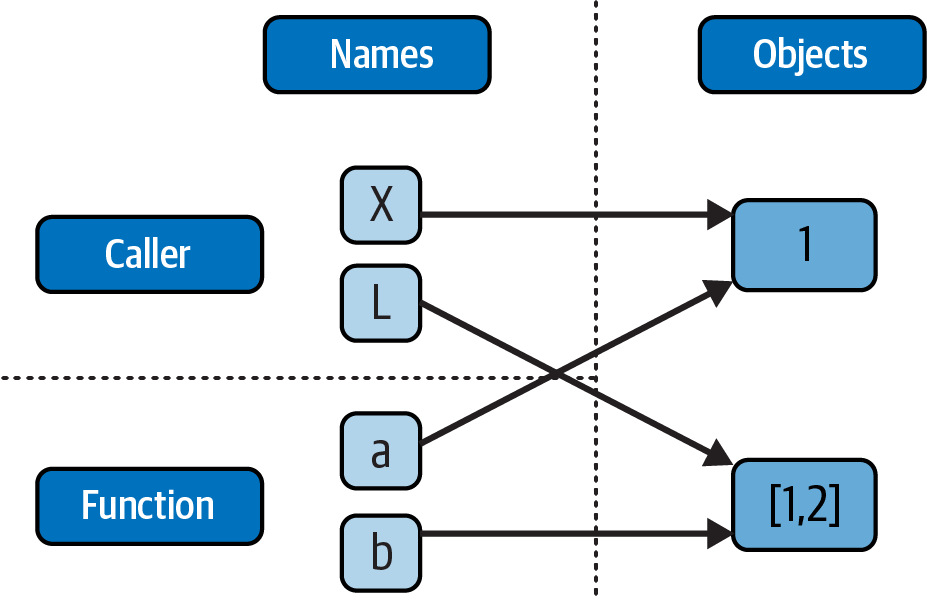
Figure 18-1. Function arguments and shared object references
The assignment through the second argument does affect a variable at the call, though, because it is an in-place object change:
>>>L = [1, 2]>>>b = L# They share the same object>>>b[0] = 'mod'# In-place change from 'b': 'L' sees the change too>>>L['mod', 2]
If you recall our discussions about shared mutable objects in Chapters 6 and 9, you’ll recognize the phenomenon at work: changing a mutable object in place can impact other references to that object. Here, the effect is to make one of the arguments work like both an input and an output of the function.
Avoiding Mutable Argument Changes
This behavior of in-place changes to mutable arguments isn’t a bug—it’s simply the way argument passing works in Python, and turns out to be widely useful in practice. Arguments are normally passed to functions by reference because that is what we normally want. It means we can pass large objects around our programs without making multiple copies along the way, and we can easily update these objects as we go. In fact, as you’ll see in Part VI, Python’s class and OOP model depends upon changing a passed-in “self” argument in place, to update mutable object state.
If we don’t want in-place changes within functions to impact objects we pass to them, though, we can simply make explicit copies of mutable objects, as we saw in Chapter 6. For function arguments, we can always copy the list at the point of call with tools like list, list.copy, or an empty slice (dictionaries have similar copy tools):
L = [1, 2] changer(X,L[:])# Pass a copy, so our 'L' does not change
We can also copy within the function itself, if we never want to change passed-in objects, regardless of how the function is called:
def changer(a, b):
    b = b.copy()        # Copy input list so we don't impact caller
    a = 2
    b[0] = 'mod'        # Changes our list copy only
Both of these copying schemes don’t stop the function from changing the object—they just prevent those changes from impacting the caller. To really prevent changes, we can always convert to immutable objects to force the issue. Tuples, for example, raise an exception when changes are attempted:
L = [1, 2] changer(X,tuple(L))# Pass a tuple, so changes are errorsTypeError: 'tuple' object does not support item assignment
This scheme uses the built-in tuple function, which builds a new tuple out of all the items in a sequence (really, any iterable). It’s also something of an extreme—because it forces the function to be written to never change passed-in arguments, this solution might impose more limitations on the function than it should, and so should generally be avoided (you never know when changing arguments might come in handy for other calls in the future). Using this technique will also make the function lose the ability to call any list-specific methods on the argument, including methods that do not change the object in place (e.g. copy, though tuples have adopted list count and index).
The main point to remember here is that functions might update mutable objects like lists and dictionaries passed into them. This isn’t necessarily a problem if it’s expected, and often serves useful purposes. Moreover, functions that change passed-in mutable objects in place are probably designed and intended to do so—the change is likely part of a well-defined API that you shouldn’t violate by making copies.
However, you do have to be aware of this property—if objects change out from under you unexpectedly, check whether a called function might be responsible, and make copies when objects are passed if needed.
Simulating Output Parameters and Multiple Results
Here’s another function topic from the assignments department. We’ve already discussed the return statement and used it in examples. What we haven’t yet seen is a common though unusual coding technique it enables: because return can send back any sort of object, it can return multiple values by packaging them in a tuple or other collection type. In fact, although Python doesn’t support what some languages label “call by reference” argument passing, we can simulate it by returning tuples and assigning the results back to the original argument names in the caller:
>>>def multiple(x, y):x = 2# Changes local names onlyy = [3, 4]return x, y# Return multiple new values in a tuple>>>X = 1>>>L = [1, 2]>>>X, L = multiple(X, L)# Assign results to caller's names>>>X, L(2, [3, 4])
It looks like the code is returning two values here, but it’s really just one—a two-item tuple with the optional surrounding parentheses omitted. After the call returns, we can use tuple (a.k.a. sequence) assignment to unpack the parts of the returned tuple. (If you’ve forgotten why this works, flip back to “Tuples” in Chapter 4 and Chapter 9, and “Assignments” in Chapter 11.) The net effect of this coding pattern is to both send back multiple results and simulate the output parameters of other languages by explicit assignments. Here, X and L change after the call—but only because the code said so. Lists would work, too, but tuples sans () are less to type, and hence common.
Special Argument-Matching Modes
As we’ve just seen, arguments are always passed by assignment in Python; names in a def or lambda definition’s header are assigned references to passed-in objects. On top of this model, though, Python provides additional tools that alter the way the argument objects in a call are matched with argument names in the definition prior to assignment. These tools are all optional, but allow us to code functions that support more flexible calling patterns and are commonly used by libraries you’re likely to encounter.
By default, arguments are matched between call and definition by position, from left to right, and you must pass exactly as many arguments as there are argument names in the function definition. However, you can also specify matching by name, provide default values, unpack and collect arbitrarily many arguments, and even specify passing-mode requirements. This section presents all these extra tools with a quick overview followed by examples, and a formal look at how they interact at the end after we’ve had a chance to see the basics.
Argument Matching Overview
Before we get into syntax details, it’s important to stress that these special modes are optional and deal only with matching objects to names; the underlying passing mechanism after the matching takes place is still assignment. In fact, some of these tools are intended more for people writing libraries than for application developers. That said, you may stumble across these modes even if you don’t code them yourself, so the following summarizes all the options:
- Positionals: matched from left to right
- The normal case, which we’ve mostly been using so far, is to match argument values (passed in a call) to argument names (listed in a function definition) by position, from left to right.
- Keywords: matched by argument name
- Alternatively, callers can explicitly specify which argument in the function is to receive a value, by giving the definition’s name for the argument with
name=valuesyntax. - Defaults: specify values for optional arguments that aren’t passed
- Functions themselves can specify default values for arguments to receive if the call passes too few values, again using the
name=valuesyntax. - Starred collectors: collect arbitrarily many positional or keyword arguments
- Function definitions can use special arguments preceded with one or two
*characters to collect an arbitrary number of arguments after other matching. This feature is sometimes referred to as varargs, after a variable-length argument list tool in the C language; in Python, the arguments are collected in a normal object. - Starred unpackers: pass arbitrarily many positional or keyword arguments
- Function calls can also use the one or two
*syntax to unpack argument collections into separate arguments. This is the inverse of a*in a function definition—in the definition it means collect arbitrarily many arguments, while in the call it means unpack arbitrarily many arguments, and pass them individually as discrete values. - Keyword-only arguments: arguments that must be passed by name
- Function definitions can also use a “*” in their headers to specify arguments that must be passed by name as keyword arguments, not position. This is often used for configuration options that augment primary arguments.
- Positional-only arguments: arguments that must be passed by position
- As of Python 3.8, function definitions may additionally use a “/” in their header’s arguments list to specify that all arguments preceding it must be passed by position, not keyword-argument name.
Argument Matching Syntax
As a reference and preview, Table 18-1 summarizes the syntax that invokes the argument-matching modes.
| Syntax | Location | Interpretation |
|---|---|---|
func(value) |
Caller | Normal argument: matched by position |
func(name=value) |
Caller | Keyword argument: matched by name |
func(*iterable) |
Caller | Pass all objects in iterable as individual positional arguments |
func(**dict) |
Caller | Pass all key/value pairs in dict as individual keyword arguments |
def func(name) |
Function | Normal argument: matches any passed value by position or name |
def func(name=value) |
Function | Default argument value, if not passed in the call |
def func(*name) |
Function | Matches and collects remaining positional arguments in a tuple |
def func(**name) |
Function | Matches and collects remaining keyword arguments in a dictionary |
def func(*name, name) |
Function | Arguments that must be passed by keyword only in calls |
def func(*, name) |
Function | Arguments that must be passed by keyword only in calls |
def func(name, /) |
Function | Arguments that must be passed by position only in calls |
The argument-matching modes listed in this table break down between function calls and definitions as follows:
- In a function call (the first four rows of the table)
- Simple values are matched to definition arguments by position, but using the
name=valueform tells Python to match arguments by name instead; these are called keyword arguments. Any number of*iterableor**dictforms can be used in a call, allowing us to bundle many positional or keyword objects in iterables and mappings, respectively, and unpack them as separate, individual arguments when they are passed to the function. - In a function definition (the rest of the table)
- A simple
nameis matched by position or name depending on how the caller passes it, but thename=valueform specifies a default value. The*nameform collects any extra unmatched positional arguments in a tuple, and**namecollects unmatched keyword arguments in a dictionary. In addition, any normal or defaulted argument names following a*nameor a bare*are keyword-only arguments and must be passed by keyword in calls, and arguments preceding a/are positional-only arguments that must not be passed by keyword name.
Of these, keyword arguments and defaults are probably the most commonly used in Python code. We’ve informally used both of these earlier in this book:
We’ve already used keywords to specify options to the
printfunction, but they are more general—keywords allow us to label any argument with its name, to make calls more explicit and informational.We met defaults earlier, too, as a way to pass in values from the enclosing function’s scope, but they are also more general—they allow us to make any argument optional, providing its default value in a function definition.
As you’ll see ahead, the combination of defaults in a function definition and keywords in a call further allows us to pick and choose which defaults to override per call.
In short, special argument-matching modes let you be fairly liberal about how many arguments must be passed to a function. If a function specifies defaults, they are used if you pass too few arguments. If a function uses the * argument-collector forms, you can seemingly pass too many arguments; the * names collect the extra arguments in data structures for processing within the function.
Argument Passing Details
If you choose to use and combine the special argument-matching modes, Python will ask you to follow some ordering rules among the modes’ optional components. We’re going to defer full and formal coverage of these until we’ve had a chance to observe these modes in action, but as some initial tips:
In a function call, any number of positionals, keywords, and starred unpackings can be used, but positional arguments must precede keyword arguments and
**dictunpackings, and*iterableunpackings must precede**dictunpackings.In a function definition, arguments must appear in this order: any positional-only arguments; followed by any positional-or-keyword arguments; followed by the optional
*namepositional collector or*and any keyword-only arguments; followed by the optional**namekeyword collector. Arguments can have optional defaults (name=value), but once a default is used, all arguments must use defaults up to a*, after which keyword-only arguments allow defaults and nondefaults to be freely mixed.
If you mix arguments in any other order, you will get a syntax error because the combinations can be ambiguous. The steps that Python internally carries out to match arguments before assignment can roughly be described as follows:
Unpack all
*argsat the call into nonkeyword arguments.Unpack all
**argsat the call into keyword arguments.Assign nonkeyword arguments by position.
Assign keyword arguments by matching names.
Collect extra nonkeyword arguments in the
*nametuple.Collect extra keyword arguments in the
**namedictionary.Assign default values to unassigned arguments.
After arguments in call and definition are matched, Python checks to make sure each argument is passed just one value (or else an error is raised) and then assigns argument names to the objects passed to them and runs the function body.
The actual matching algorithm Python uses is a bit more complex, so we’ll defer to Python’s standard language manual for a more exact description. It’s not required reading, but tracing Python’s matching algorithm may help you to understand some convoluted cases, especially when modes are mixed.
We’ll return to the ordering rules in function calls in definitions with higher fidelity after we’ve had a chance to meet all the players. Let’s get started in the next section with the most common of the bunch.
Note
But annotations are moot: Argument names in a def statement (only) can also have annotation values, specified as name:annot, or name:annot=default when defaults are present. This is simply additional syntax for arguments and does not augment or change argument-ordering rules. The function itself can also have an annotation value, given as def f(…)->annot, and Python attaches all annotation values to the function object. See the discussion of function annotation in Chapter 19 for more details, and the section on their role in unused type hinting in Chapter 6.
Keyword and Default Examples
Argument passing is simpler in code than the preceding descriptions may imply. First off, if you don’t use any special matching syntax, Python matches names by position from left to right. For instance, if you define a function that requires three arguments, you must call it with three arguments:
>>>def f(a, b, c): print(a, b, c)>>>f(1, 2, 3)1 2 3
Here, we pass by position—a is matched to 1, b is matched to 2, and so on. This works like it does in most other programming languages.
Keywords
In Python, though, you can be more specific about what goes where when you call a function. Keyword arguments allow us to match by name, instead of by position. Using the same function definition but a different call:
>>> f(c=3, b=2, a=1)
1 2 3
The c=3 in this call, for example, means send 3 to the argument named c. More formally, Python matches the name c in the call to the argument named c in the function definition, and then assigns the value 3 to that argument. The net effect of this call is the same as that of the prior call, but notice that the left-to-right order of the arguments no longer matters when keywords are used because arguments are matched by name, not by position.
It’s even possible to combine positional and keyword arguments in a single call. In this case, all positionals are matched first from left to right in the definition, before keywords are matched by name:
>>>f(1, c=3, b=2)# a gets 1 by position, b and c passed by name1 2 3
When most people see this the first time, they wonder why one would use such a tool. Keywords typically have two roles in Python. First, they make your calls a bit more self-documenting (assuming that you use better argument names than a, b, and c!). For example, a call of this form:
func(title='Learning Python', edition=6, year=2024, python=3.12)
is much more meaningful than a call with three naked values separated by commas, especially in larger programs—the keywords serve as labels for the data in the call:
func(title='Learning Python', 6, 2024, 3.12)
The second major use of keywords occurs in conjunction with defaults, which we turn to next.
Defaults
We talked about defaults in brief earlier, when discussing nested function scopes. In short, defaults allow us to make selected function arguments optional; if not passed a value, the argument is assigned its default before the function runs. For example, here is a function that requires one argument and defaults two others:
>>>def f(a, b=2, c=3): print(a, b, c)# a required, b and c optional
As noted earlier, defaults must appear after nondefaults at this point in a header (they can be mixed after a * as you’ll see ahead). When we call this function, we must provide a value for a, either by position or by keyword; however, providing values for b and c is optional. If we don’t pass values to b and c, they default to 2 and 3, respectively:
>>>f(1)# Use defaults1 2 3 >>>f(a=1)1 2 3
If we pass two values, only c gets its default, and when passing three values, no defaults are used:
>>>f(1, 4)# Override defaults1 4 3 >>>f(1, 4, 5)1 4 5
Finally, here is how the keyword and default features interact. Because they subvert the normal left-to-right positional mapping, keywords allow us to essentially skip over arguments with defaults:
>>>f(1, c=6)# Choose defaults: b in the middle1 2 6
Here, a gets 1 by position, c gets 6 by keyword, and b, in between, defaults to 2.
Be careful not to confuse the special name=value syntax in a function definition and a function call; in the call it means a match-by-name keyword argument, while in the definition it specifies a default for an optional argument. In both cases, this is not an assignment statement (despite its appearance); it is special syntax for these two contexts, which modifies the default argument-matching mechanics.
Combining keywords and defaults
Here is a slightly larger example that demonstrates keywords and defaults in action. In the following, the caller must always pass at least two arguments (to match code and hack), but the other two are optional. If they are omitted, Python assigns script and app to the defaults specified in the definition:
def func(code, hack, script=0, app=0):# First 2 requiredprint((code, hack, script, app)) func(1, 2)# Output: (1, 2, 0, 0)func(1, app=1, hack=0)# Output: (1, 0, 0, 1)func(code=1, hack=0)# Output: (1, 0, 0, 0)func(script=1, hack=2, code=3)# Output: (3, 2, 1, 0)func(1, 2, 3, 4)# Output: (1, 2, 3, 4)
Notice again that when keyword arguments are used in the call, the order in which the arguments are listed doesn’t matter; Python matches by name, not by position. The caller must supply values for code and hack, but they can be given by position or by name.
Also keep in mind that all the special definition-side argument-matching syntax we’re exploring in this chapter works the same in def and lambda, though most examples use the former, and the latter returns results implicitly:
>>>func = lambda code, hack, script=0, app=0: (code, hack, script, app)>>>func(1, 2)(1, 2, 0, 0) >>>func(script=1, hack=2, code=3)(3, 2, 1, 0)
Note
Beware mutable defaults: As noted in the prior chapter, if you code a default to be a mutable object (e.g., def f(a=[])), the same, single mutable object is reused every time the function is later called—even if it is changed in place within the function. The net effect is that the argument’s default retains its value from the prior call and is not reset to its original value coded in the function header. To reset anew on each call, move the assignment into the function body instead. Mutable defaults allow state retention, but this is often an unpleasant surprise. Since this is such a common trap, we’ll postpone further exploration until this part’s “gotchas” list at the end of Chapter 21.
Arbitrary Arguments Examples
The last two argument-matching extensions, * and **, are designed to support any number of arguments. Both can appear in either the function definition or a function call, and they have related purposes in the two locations.
Definitions: Collecting arguments
The first use, in the function definition, collects unmatched positional arguments into a tuple:
>>> def f(*args): print(args)
When this function is called, Python collects all the positional arguments into a new tuple and assigns the variable args to that tuple. Because it is a normal tuple object, it can be indexed, stepped through with a for loop, and so on:
>>>f()() >>>f(1)(1,) >>>f(1, 2, 3, 4)(1, 2, 3, 4)
The ** feature is similar, but it only works for keyword arguments—it collects them into a new dictionary, which can then be processed with normal dictionary tools. In a sense, the ** form allows you to convert from keywords to dictionaries, which you can then step through with keys calls, dictionary iterators, and the like (this is roughly what the dict call does when passed keywords, but it returns the new dictionary):
>>>def f(**args): print(args)>>>f(){} >>>f(a=1, b=2){'a': 1, 'b': 2}
Finally, function definitions can combine normal arguments, the *, and the ** to implement wildly flexible call signatures. For instance, in the following, 1 is passed to a by position, 2 and 3 are collected into the pargs positional tuple, and x and y wind up in the kargs keyword dictionary:
>>>def f(a, *pargs, **kargs): print(a, pargs, kargs)>>>f(1, 2, 3, x=1, y=2)1 (2, 3) {'x': 1, 'y': 2}
Notice that the dictionary’s keys are ordered here: as of Python 3.6, the ** collector’s keys preserve the order in which keyword arguments were passed to the function. This relies on the insertion order of keys in dictionaries at large (see Chapter 8 for a refresher if you’ve forgotten what that means).
Functions with both * and ** may be rare, but they show up in functions that need to support multiple call patterns (for backward compatibility, for instance). In fact, these features can be combined in even more complex ways that may seem ambiguous at first glance—an idea we will revisit later in this chapter when we lock down ordering rules. First, though, let’s see what happens when * and ** are coded in function calls instead of definitions.
Calls: Unpacking arguments
It turns out that we can use the * syntax when we call a function, too. In this context, its meaning is the inverse of its meaning in the function definition—it unpacks a collection of arguments, rather than building a collection of arguments. For example, we can pass four arguments to a function in a tuple or other iterable, and let Python unpack them into individual positional arguments:
>>>def func(a, b, c, d): print(a, b, c, d)>>>args = (1, 2)>>>args += (3, 4)>>>func(*args)# Same as func(1, 2, 3, 4)1 2 3 4
Similarly, the ** syntax in a function call unpacks a dictionary or other mapping of key/value pairs into separate keyword arguments:
>>>args = {'a': 1, 'b': 2, 'c': 3}>>>args['d'] = 4>>>func(**args)# Same as func(a=1, b=2, c=3, d=4)1 2 3 4
Moreover, we can use other iterables like lists and other dictionary syntax like dict, and we may combine star, positional, and keyword arguments in the call in very flexible ways:
>>>func(*(1, 2), **{'d': 4, 'c': 3})# Same as func(1, 2, d=4, c=3)1 2 3 4 >>>func(1, *[2, 3], **dict(d=4))# Same as func(1, 2, 3, d=4)1 2 3 4 >>>func(1, c=3, *[2], **{'d': 4})# Same as func(1, 2, c=3, d=4)1 2 3 4 >>>func(1, *(2, 3), d=4)# Same as func(1, 2, 3, d=4)1 2 3 4 >>>func(1, *[2], c=3, **dict(d=4))# Same as func(1, 2, c=3, d=4)1 2 3 4
While the preceding serves to demo the possibilities, it’s use of stars and literals is overkill when arguments are known; more typical code would build up argument collections ahead of the call and unpack by names:
>>>pargs, kargs = (1, 2), dict(d=4, c=3)>>>func(*pargs, **kargs)1 2 3 4
Star unpacking is convenient when you cannot predict the number of arguments that will be passed to a function when you write your script; you can build up a collection of arguments at runtime instead and call the function generically this way. Here again, though, don’t confuse the */** starred-argument syntax in the function definition and the function call—in the definition it collects any number of arguments, while in the call it unpacks any number of arguments. In both, one star means positionals, and two applies to keywords.
Finally, as of Python 3.5, and as noted in Chapter 11’s sidebar “The Many Stars of Python”, we can even use multiple * and ** items in calls to unpack multiple iterables and mappings, respectively. The * unpacks into positional arguments, and ** into keyword arguments, though single stars must precede double stars, per formal rules coming up ahead. Again, the following uses literals to demo, but these would usually be names assigned to prebuilt values:
>>>def func(a, b, c, d): print(a, b, c, d)>>>func(*[1], *(2,), **dict(c=3), **{'d': 4})# *Positionals + **keywords1 2 3 4 >>>func(*[1], *(2,), *[3, 4])# All *positionals1 2 3 4 >>>func(**dict(a=1, b=2), **dict(c=3), **{'d': 4})# All **keywords1 2 3 4 >>>func(*[1], 2, **dict(c=3), d=4)# All call modes at once!1 2 3 4 >>>func(*[1], **dict(b=2, c=3), *[4])SyntaxError: iterable argument unpacking follows keyword argument unpacking
Note
Unpacking generality—and inconsistency: As previewed in Chapter 14, the * form in a call is an iteration tool, so it accepts any iterable object, not just tuples or other sequences used in examples here. For instance, iterables like zip and range work after a * too and unpack into individual arguments, and file objects automatically read and unpack their lines:
func(*range(4))# Same as func(0, 1, 2, 3)func(*open('filename'))# Read+pass lines as arguments
Watch for more examples of this utility in Chapter 20, after we study generators.
On the downside, stars also come with inconsistencies. For one, this generality holds true only for calls—a * unpacking in a call allows any iterable, but a * in a function definition always collects extra arguments into a tuple. Moreover, this collection behavior in definitions is similar in spirit and syntax to the * in the extended-unpacking assignment forms we met in Chapter 11 (e.g., x, *y = z), but that star usage always creates lists, not tuples. Again: these are different rules for different tools—despite the same syntax.
Why arbitrary arguments?
The prior section’s examples may seem academic (if not downright esoteric), but they are used more often than you might expect. Some programs need to call arbitrary functions in a generic fashion, without hardcoding their names or arguments ahead of time. In fact, the real power of the special starred-unpacking call syntax is that you don’t need to know how many arguments a function call requires before you write a script. For example, you can use if logic to select from a set of functions and argument lists, and call any of them generically (functions here are hypothetical):
ifsometest: action, args = func1, (1,)# Call func1 with one arg in this caseelse: action, args = func2, (1, 2, 3)# Call func2 with three args instead… action(*args)# Dispatch generically
This leverages both the * form, and the fact that functions are objects that may be both referenced by, and called through, any variable. More generally, this unpacking call syntax is useful anytime you cannot predict the arguments list. If your user selects an arbitrary function via a user interface, for instance, you may be unable to hardcode a function call when writing your script. To work around this, simply build up the arguments list with sequence operations, and call it with starred-argument syntax to unpack the arguments:
args = (2,3)
args += (4,)
…
func3(*args)
Because the arguments list is passed in as a tuple here, the program can build it at runtime. This technique also comes in handy for functions that test or time other functions. For instance, the code in Example 18-1 supports any function with any arguments by passing along whatever arguments were sent in (see tracer0.py in the example package).
Example 18-1. tracer0.py
def tracer(func, *pargs, **kargs):# Accept arbitrary argumentsprint('calling:', func.__name__) return func(*pargs, **kargs)# Pass along arbitrary argumentsdef func(a, b, c, d): return a + b + c + d print(tracer(func, 1, 2, c=3, d=4))
This code uses the built-in __name__ attribute attached to every function (as you might expect, it’s the function’s name string), and uses stars to collect and then unpack the arguments intended for the traced function. In other words, when this code is run, arguments are intercepted by the tracer and then propagated with unpacking call syntax:
$ python3 tracer0.py
calling: func
10
For another example of this technique, see the preview near the end of the preceding chapter, where it was used to reset the built-in open function (though it probably makes more sense to you now). We’ll code additional examples of such roles later in this book; see especially the sequence timing examples in Chapter 21 and the various decorator utilities we will code in the online-only “Decorators” chapter (after a preview in the next chapter). It’s a common technique in general tools.
Keyword-Only Arguments
Besides accepting keyword (i.e., pass-by-name) arguments in general, function definitions can also specify that some arguments must always be passed by keyword only and will never be filled in by a positional argument. This extension, known as keyword-only arguments, can be useful if we want a function to both process any number of arguments and accept possibly optional configuration options.
Syntactically, keyword-only arguments are coded as named arguments that may appear after *name in the arguments list. All such arguments must be passed using keyword syntax in the call. For example, in the following, a may be passed by name or position, b collects any extra positional arguments, and c must be passed by keyword only:
>>>def kwonly(a, *b, c): print(a, b, c)>>>kwonly(1, 2, c=3)1 (2,) 3 >>>kwonly(a=1, c=3)1 () 3 >>>kwonly(1, 2, 3)TypeError: kwonly() missing 1 required keyword-only argument: 'c'
If we don’t need to collect arbitrary positionals, we can also use a bare * character by itself in the arguments list to introduce keyword-only arguments. This indicates that a function does not accept a variable-length argument list but still expects all arguments following the * to be passed as keywords. In the next function, a may be passed by position or name again, but b and c must be keywords, and no extra positionals are allowed:
>>>def kwonly(a, *, b, c): print(a, b, c)>>>kwonly(1, c=3, b=2)1 2 3 >>>kwonly(c=3, b=2, a=1)1 2 3 >>>kwonly(1, 2, 3)TypeError: kwonly() takes 1 positional argument but 3 were given >>>kwonly(1)TypeError: kwonly() missing 2 required keyword-only arguments: 'b' and 'c'
You can still use defaults for keyword-only arguments, even though they appear after the * in the function. In the following, a may be passed by name or position, and b and c are optional but must be passed by keyword if used:
>>>def kwonly(a, *, b='code', c='app'): print(a, b, c)>>>kwonly(1)1 code app >>>kwonly(1, c='hack')1 code hack >>>kwonly(a='py')py code app >>>kwonly(c=3, b=2, a=1)1 2 3 >>>kwonly(1, 2)TypeError: kwonly() takes 1 positional argument but 2 were given
In fact, keyword-only arguments with defaults are optional, but those without defaults effectively become required keywords for the function—like b in the following:
>>>def kwonly(a, *, b, c='hack'): print(a, b, c)>>>kwonly(1, b='code')1 code hack >>>kwonly(1, c='code')TypeError: kwonly() missing 1 required keyword-only argument: 'b' >>>kwonly(1, 2)TypeError: kwonly() takes 1 positional argument but 2 were given
As noted earlier, keyword-only arguments also allow defaults and nondefaults to be mixed, unlike their otherwise more flexible cohorts coded before the optional *—an ostensible inconsistency we’ll return to later:
>>>def kwonly(a, *, b=2, c, d=4): print(a, b, c, d)>>>kwonly(1, c=3)1 2 3 4 >>>kwonly(1, c=5, b=6)1 6 5 4 >>>kwonly(1)TypeError: kwonly() missing 1 required keyword-only argument: 'c' >>>kwonly(1, 2, 3)TypeError: kwonly() takes 1 positional argument but 3 were given >>>def badmix(b=2, c, d=5): …SyntaxError: parameter without a default follows parameter with a default
Finally, note that keyword-only arguments must be specified after a single star, not two—nothing can appear after the **args arbitrary-keywords form, and, unlike *, a ** can’t appear by itself in the arguments list. More generally, keyword-only arguments must be coded between the * and the optional **, and an argument that appears before * is a possibly default argument that can be passed by position or keyword, not keyword-only:
>>>def kwonly(a, **kargs, b, c):SyntaxError: arguments cannot follow var-keyword argument >>>def kwonly(a, **, b, c):SyntaxError: invalid syntax >>>def mixed(a, *b, **d, c=6):SyntaxError: arguments cannot follow var-keyword argument
These failures will make more sense after we get formal about argument ordering rules later in this chapter. They may also appear to be worst cases in the artificial examples here, but they can come up in real practice, especially for people who write libraries for other Python programmers to use—which leads to the next point.
Why keyword-only arguments?
So why care about keyword-only arguments? In short, they make it easier to allow a function to accept both any number of positional arguments to be processed, and configuration options passed as keywords. While their use is optional, without keyword-only arguments extra work may be required to provide defaults for such options and to verify that no superfluous keywords were passed.
Imagine a function that processes a set of passed-in objects and allows a tracing flag to be passed:
process(X, Y, Z)# Use flag's defaultprocess(X, Y, notify=True)# Override flag default
Without keyword-only arguments we have to use both *args and **args and manually inspect the keywords, but with keyword-only arguments less code is required. The following guarantees that no positional argument will be incorrectly matched against notify and requires that it be a keyword if passed:
def process(*args, notify=False): …
Since we’re going to explore a more realistic example of this later in this chapter, in “Example: Rolling Your Own Print”, we’ll postpone the rest of this story until then. For an additional example of keyword-only arguments in action, see the upcoming iteration-options timing case study in Chapter 21.
Positional-Only Arguments
Beginning with Python 3.8, function definitions may also include a / in the arguments list to designate that all arguments preceding it (i.e., to its left) must be passed by position, not by keyword-argument name. Though arguably ad hoc on first sighting in an arguments list, this notation was being used in documentation for built-in functions that did not accept keywords; making it available to function coders as part of Python’s syntax was deemed a logical extension for library developers who may not want to expose argument names for use by clients as keywords.
To demo, the following function specifies that a and b must be passed by position, though c is more flexible:
>>>def mostlypos(a, b, /, c): print(a, b, c)>>>mostlypos(1, 2, 3)1 2 3 >>>mostlypos(1, 2, c=3)1 2 3
Passing either of the first two arguments by keyword, however, fails:
>>>mostlypos(1, b=2, c=3)TypeError: mostlypos() got some positional-only arguments passed as keyword arguments: 'b' >>>mostlypos(c=3, b=2, a=1)TypeError: mostlypos() got some positional-only arguments passed as keyword arguments: 'a, b'
To define a function that allows only positional arguments, simply code the slash at the end:
>>>def allpos(a, b, c, /): print(a, b, c)... >>>allpos(1, 2, 3)1 2 3 >>>allpos(1, 2, c=3)TypeError: mostlypos() got some positional-only arguments passed as keyword …
As you should expect, the slash works the same in a lambda argument list:
>>>f = lambda a, b, /, c: print(a, b, c)>>>f(1, 2, c=3)1 2 3 >>>f(1, b=2, c=3)TypeError: <lambda>() got some positional-only arguments passed as keyword …
And functions can combine positional- and keyword-only arguments to be as rigid as they wish:
>>>def combo(a, b, /, *, c, d): print(a, b, c, d)... >>>combo(1, 2, c=3, d=4)1 2 3 4 >>>combo(1, 2, 3, 4)TypeError: combo() takes 2 positional arguments but 4 were given >>>combo(a=1, b=2, c=3, d=4)TypeError: combo() got some positional-only arguments passed as keyword …
It’s up to you to ponder whether or not use cases for this syntax justify its convolution of function definitions that follows in the next section. Given that Python users somehow got by without it for over three decades, though, this seems a tough sell. For more on the rationale and usage of the positional-only slash, see Python’s standard manuals. Also watch for an example in Chapter 21 that uses it to avoid name clashes—and may or may not be compelling.
Argument Ordering: The Gritty Details
So far, we’ve been fairly loose about the rules surrounding argument-matching tools, because they don’t crop up very often in the simpler usage patterns of typical code. In more sophisticated roles, though, you need to verify that your code follows Python’s expectations. Now that we’ve seen all of its subjects, the ordering rules for function arguments can finally be summarized in full. While function definitions and calls share some similar syntax, their rules are completely different, owing to their different roles. Let’s take a more formal look at both.
Definition Ordering
In function definitions, argument lists are enclosed in parenthesis in a def statement and coded before a colon in a lambda expression, but follow the same format in both. In short, they consist of four optional parts that must appear in the following order, where position means a simple value in calls, and keyword means a name=value pair:
One or more arguments that must be passed by position only, followed by a single
/Any number of arguments that can be passed by either position or keyword
A single
*by itself or a single*namepositional-argument collector, optionally followed by any number of arguments that must be passed by keyword onlyA single
**namekeyword-argument collector
In all cases, individual arguments, including a bare / or *, are separated by commas. In addition, any nonstarred argument name can have a name=expression default, but all names must have defaults after the first that does, up to the * (keyword-only argument runs following a star may freely mix default and nondefault names).
Inherent in this ordering, positional-only arguments must appear first, *name ends positional-argument runs and collects unmatched positionals, and **name ends the entire arguments list and collects unmatched keywords. As noted earlier, the **name collector’s keys retain the order in which keyword arguments were passed to the function.
Formal definition
More concisely, the ordering of arguments in function definitions can be defined as follows, where -or- is notation for a choice and [] encloses an optional part (neither is part of the actual code you type):
defname(arguments-list):statementslambdaarguments-list:expressionarguments-list= [positional-only-arguments, /] [positional-or-keyword-arguments] [*-or-*positional-collector, [keyword-only-arguments]][**keyword-collector]
As a real example, the following defines a function with all these parts in actions:
>>>def f(a, /, b, c=3, *ps, e=4, **ks):print(f'{a=}, {b=}, {c=}, {ps=}, {e=}, {ks=}')>>>f(0, 1, 2, 3, 4, e=5, f=6, g=7)a=0, b=1, c=2, ps=(3, 4), e=5, ks={'f': 6, 'g': 7}
Boundary cases
As consequences of the ordering in function definitions, / must precede a star, and the double-star keyword collector must be coded last:
>>>def f(a, *ps, /, b): passSyntaxError: / must be ahead of * >>>def f(a, **ks, b): passSyntaxError: arguments cannot follow var-keyword argument
Though enforced separately from basic argument-ordering rules, once a default is used in a definition, all subsequent arguments must also have defaults—including those following the positional-only / delimiter:
>>>def f(a, b, c=3, d, e): passSyntaxError: parameter without a default follows parameter with a default >>>def f(a, b=2, /, c): passSyntaxError: parameter without a default follows parameter with a default
However, this constraint applies only to arguments preceding a * or *name—defaults and nondefaults can be mixed freely in keyword-only arguments, which seems inconsistent, though a case for sanity could be made here on the grounds that keyword-only arguments never match by position, which reduces ambiguity of defaults:
>>>def f(a, *, x=1, y): ...# OK: x and y must be keywords>>>def f(a=1, b, *, x=1): ...# Not OK: a and b may be positionalSyntaxError: parameter without a default follows parameter with a default
Not shown here, def can also be preceded by a decorator (e.g., @value), and, as noted earlier, any of its arguments may be followed by annotations (e.g., :value)—extensions we’ll explore in the next chapter and later in this book. Neither of these impact argument ordering or matching, and neither work in lambda due to its limited syntax.
Calls Ordering
On the other side of the fence, the syntax is similar but the rules differ. In function calls, all positional arguments must precede all keyword arguments, and any number of starred unpackings can be mixed in with individual values: one star unpacks into multiple positional arguments, two unpacks into keywords, and all positional arguments and one-star unpackings must precede all two-star unpackings.
In more detail, function (and by extension, method) calls consist of three optional parts in the following order:
Any combination of one or more
expressionpositional arguments, and*expressioniterable unpackings transformed into positional argumentsAny combination of one or more
name=expressionkeyword arguments, and*expressioniterable unpackings transformed into positional argumentsAny combination of one or more
name=expressionkeyword arguments, and**expressionmapping unpackings transformed into keyword arguments
In all cases, all arguments, starred or otherwise, are separated by commas.
Formal definition
More concisely again, the ordering of arguments in function calls can be defined as follows, where function is an expression that evaluates to a callable object, and -or- and [] here again mean a choice and optional part, respectively (they’re not part of the code you type):
function([positional-values -or-*iterable-positional-unpackings] [keyword-arguments -or-*iterable-positional-unpackings] [keyword-arguments -or-**mapping-keyword-unpackings])
As a concrete example, the following passes a variety of positional, keyword, and unpacking arguments (this code serves as a demo here, but is not exactly the sort of thing you should strive to craft in practice!):
>>>def f(a, b, c, d, e, f, g, h, i):print(a, b, c, d, e, f, g, h, i)>>>f(*[1], 2, *[3], 4, f=6, *[5], **dict(g=7), h=8, **{'i': 9})1 2 3 4 5 6 7 8 9
Boundary cases
As one consequence of the argument ordering in calls, once you use a keyword argument, you can no longer use any unstarred positionals—all subsequent arguments must also be keywords, or single or double stars:
>>> f(1, 2, c=3, 4)
SyntaxError: positional argument follows keyword argument unpacking
This is similar to defaults in definitions—but not exactly. Again, try not to conflate function definitions and calls. Despite their reuse of similar syntax, it has very different roles and rules in these tools. The * and =, for example, are used for unpacking and keywords in calls, but mean collection and defaults in definitions.
Once you code a double star, both positionals and single stars are also out of the game, though this seems inconsistent too—single stars can be freely mixed with keywords arguments (which is what a double star unpacks into), and keyword arguments cannot be mixed with positionals (which is what a single star unpacks into):
>>>f(1, 2, **{'d': 3}, 4)SyntaxError: positional argument follows keyword argument unpacking >>>f(1, 2, **{'d': 3}, *[4])SyntaxError: iterable argument unpacking follows keyword argument unpacking >>>f(1, 2, d=3, *[4])# OK, but why? – like first error above>>>f(1, 2, d=3, 4)# Not OK, but why? – like preceding lineSyntaxError: positional argument follows keyword argument
Perspective
And if this is starting to make your head spin, it probably should. Python’s argument-matching rules have been accumulated over time to incorporate new convolutions, and they are complex and perhaps even kludgy. The first rule or programming applies to function definitions and calls as everywhere else: keep it simple, unless it has to be complex. If you have to agonize over argument-ordering rules to understand code, it’s probably time to reevaluate priorities.
Example: The min Wakeup Call
OK—it’s time for something more realistic. To make the concepts here more concrete, the rest of this chapter works through a set of examples that demonstrate practical applications of argument-matching tools. First up is an exercise borrowed from live classes and used to rouse learners like you starting to succumb to the knottiness of argument rules.
Here’s the problem statement: suppose you’re asked to code a function that is able to compute the minimum value from an arbitrary set of arguments, which may be arbitrary sorts of objects. That is, the function should accept zero or more arguments—as many as you wish to pass. Moreover, the function should work for all kinds of Python object types: numbers, strings, lists, lists of lists, files, and even None. To keep this fair, you don’t need to support dictionaries or mixed nonnumeric types, because neither supports direct comparisons, per Chapters 8 and 9.
The first requirement provides a natural example of how the * feature can be put to good use—we can handle arbitrary arguments by collecting them in a tuple, and stepping over each with a simple for loop. The second part of the problem definition is easy in Python: because nearly every object type supports comparisons, we don’t have to specialize the function per type (an application of polymorphism); we can simply compare objects blindly and let Python worry about what sort of comparison to perform according to the objects being compared.
Full Credit
The following script file, mins.py in Example 18-2, shows four ways to code this operation (some of which were suggested by students in a group exercise designed to prevent post-lunch napping):
The first function fetches the first argument from its
argstuple, and traverses the rest by slicing off the first (there’s no point in comparing the first object to itself, especially if it might be a large structure).The second version lets Python pick off the first and rest of the arguments automatically, and so avoids an index and slice; the code is simpler, and may be faster (though it would take many calls to matter).
The third converts from a tuple to a list with the built-in
listcall and employs the listsortmethod: the first item has lowest value after an ascending-value sort.The fourth sorts too, but skips the list conversion (and two lines) by using the
sortedbuilt-in function.
Python sorting tools are coded in C, so they can be quicker than the other approaches at times, but the linear scans of the first two techniques may often make them faster.1
Example 18-2. mins.py
"Find minimum value among all passed arguments of comparable types"defmin1(*args):res=args[0]forarginargs[1:]:ifarg<res:res=argreturnresdefmin2(first,*rest):forarginrest:ifarg<first:first=argreturnfirstdefmin3(*args):tmp=list(args)tmp.sort()returntmp[0]defmin4(*args):returnsorted(args)[0]forfuncin(min1,min2,min3,min4):# Test all 4 functions(func.__name__+'...')(func(3,4.0,1,2))# Mixed numerics(func('bb','aa'))# Strings: code points(func([2,2],[1,1],[3,3]))# Lists: recursive(func(*'hack'))# Unpacked characters
This script’s testing code uses the __name__ attribute we met earlier, along with a for loop to run each function one at a time (remember, functions are objects that work in a tuple too). All four solutions produce the same result when the file is run, so we’ll list just the first’s output here. Run this file live, or import it as a module and type a few calls to its function interactively to experiment with them on your own (see Chapter 3 for tips on both modes):
$python3 mins.pymin1... 1 aa [1, 1] a …and the same for others…
Notice that none of these four variants tests for the case where no arguments are passed in. They could, but there’s probably no point in doing so here—in all four solutions, Python will automatically raise an exception to signal the error if no arguments are sent. The first variant raises an exception when we try to fetch argument 0, the second when Python detects an argument list mismatch, and the third and fourth when we try to return item 0 post sort.
This is exactly what we want to happen—because these functions support any object (including None), there is no value that we could pass back to designate an error, so we may as well let the exception be raised. There are exceptions to this exceptions rule (e.g., you might test for errors yourself if you’d rather avoid actions that run before reaching the code that triggers an error automatically). But in general—and especially when errors aren’t common—it’s better to assume that arguments will work in your functions’ code, and let Python raise errors for you when they do not.
Bonus Points
You can get bonus points here for changing these functions to compute the arguments’ maximum, rather than minimum, value. This one’s trivial: the first two versions only require changing < to >, and the last two simply require that we return item [−1] instead of [0]. For an extra point, be sure to mod the function name to “max” as well (though this part is strictly optional).
True curve busters might also note that it’s possible to generalize a single function to compute either a minimum or a maximum value, by evaluating comparison expression strings with a tool like the eval built-in function (described in Python’s library manual, and at various appearances here, especially its note in Chapter 10), or by passing in an arbitrary comparison function. Example 18-3 shows how to implement the latter scheme for one of the coding options.
Example 18-3. minmax.py
"Find minimum -or- maximum value of arguments"

def minmax(test, *args):
    res = args[0]
    for arg in args[1:]:
        if test(arg, res):
            res = arg
    return res

def lessthan(x, y): return x < y                # See also: lambda, eval
def grtrthan(x, y): return x > y

print(minmax(lessthan, 4, 2, 1, 5, 6, 3))       # Self-test code
print(minmax(grtrthan, 4, 2, 1, 5, 6, 3))
Running this script prints both minimum and maximum, per its self-test code at the end:
$ python3 minmax.py
1
6
Again, functions are just another kind of object, which allows them to be passed into other functions as done here. To make this a max (or other) function, for example, we simply pass in the right sort of test function to minmax. This may seem like extra work, but the main point of generalizing functions this way—instead of cutting and pasting to change just a single character—is that we’ll only have one version to change in the future, not two.
The Punch Line
Of course, all this was just a coding exercise. There’s really no reason to write min or max functions, because both are built-ins in Python! We met them briefly in Chapter 5 in conjunction with numeric tools, and again in Chapter 14 when exploring iteration contexts. The built-in versions work almost exactly like ours, but they’re coded in C for optimal speed and accept either a single iterable or multiple arguments. Still, though it’s superfluous in this context, the general coding pattern we used here might be useful in other scenarios.
Example: Generalized Set Functions
Our next example also demos special argument-matching modes at work. At the end of Chapter 16, we wrote a function that returned the intersection of two sequences (really, it picked out items that appeared in both). Example 18-4 codes an augmented version that intersects an arbitrary number of sequences (one or more) by using the argument-matching form *args to collect all the passed-in arguments. Because the arguments come in as a tuple, we can process them in a simple for loop. Just for fun, we’ll code a union function that also accepts an arbitrary number of arguments to collect items that appear in any of the operands.
Example 18-4. inter2.py
"""
Implement intersection and union for one or more arguments.
Inputs may be any sort of iterable that supports multiple in
tests, and results are always lists.  This intersect avoids
duplicates in results by in test, but may be slow: improve me.
"""

def intersect(*args):
    res = []
    for x in args[0]:                    # Scan first sequence
        if x in res: continue            # Skip duplicates in [0]
        for other in args[1:]:           # For all other args
            if x not in other: break     # Item in each one?
        else:                            # No: break out of loop
            res.append(x)                # Yes: add items to end
    return res

def union(*args):
    res = []
    for seq in args:                     # For all args
        for x in seq:                    # For all in this arg
            if not x in res:
                res.append(x)            # Add new items to result
    return res
Because these tools are potentially worth reusing (and are too big to retype interactively), we’ll store the functions in a module file called inter2.py. Again, if you’re unsure about how modules and imports work, see the introduction in Chapter 3, or stay tuned for in-depth coverage in Part V. This chapter’s module usage is simple, but per Chapter 3, be sure to launch your REPL in the same folder as the file, so imports can find it.
Like Chapter 16’s original intersect, both of the functions in this module work on any kind of sequence. Here they are live at the REPL, processing strings, mixed types, and more than two sequences:
$python3>>>from inter2 import intersect, union>>>s1, s2, s3 = 'HACKK', 'CODE', 'CASH'>>>intersect(s1, s2), union(s1, s3)# Two operands(['C'], ['H', 'A', 'C', 'K', 'S']) >>>intersect([1, 2, 3, 4], (1, 4))# Mixed types[1, 4] >>>intersect(s1, s2, s3)# Three operands['C']>>>union(s1, s2, s3)['H', 'A', 'C', 'K', 'O', 'D', 'E', 'S']
Testing the Code
To test more thoroughly, the following continues our REPL session to code a function that applies the two tools to arguments in different orders using a simple shuffling technique that we saw in Chapter 13—it slices to move the first to the end on each loop, uses a * to unpack arguments, and sorts so results are comparable. Notice that arguments for the function are sent as a sequence (not discrete items), and the trace configuration option is keyword-only here:
>>>def tester(func, items, *, trace=True): for i in range(len(items)): items = items[1:] + items[:1]# Move front item to back if trace: print(items) print(sorted(func(*items)))# Test with reordered items>>>tester(intersect, (s1, s2, s3))# Use strings from prior listing('CODE', 'CASH', 'HACKK') ['C'] ('CASH', 'HACKK', 'CODE') ['C'] ('HACKK', 'CODE', 'CASH') ['C'] >>>tester(union, (s1, s2, s3), trace=False)['A', 'C', 'D', 'E', 'H', 'K', 'O', 'S'] ['A', 'C', 'D', 'E', 'H', 'K', 'O', 'S'] ['A', 'C', 'D', 'E', 'H', 'K', 'O', 'S'] >>>tester(intersect, (s1, s2, s3), trace=False)['C'] ['C'] ['C']
Two context notes here: first, because duplicates won’t appear in these intersection and union functions, they qualify as set operations mathematically, but may not be optimal in term of speed. Still, there’s not much point in improving this demo’s code—intersection and union, like min and max, are built-in operations today: the set object we explored in Chapter 5 does intersection and union with & and |, and has methods that take multiple operands too. Hence, optimizing this code is left as suggested exercise, but see inter3.py in the examples package for pointers.
Second, the argument scrambling in the tester here doesn’t generate all possible argument orders (that would require a full permutation, and 6 orderings for 3 arguments), but suffices to check if argument order impacts results. As a preview, though, the tester would be simpler and more flexible if it delegated scrambling to a reusable function. Watch for this revision in Chapter 20, after we’ve explored how to code user-defined generators. We’ll also recode set tools one last time in Chapter 32 and a solution to a Part VI exercise, as classes that add them to the list object as methods.
Example: Rolling Your Own Print
To close out the chapter, let’s look at one last example of argument matching at work: this section uses both * and ** arbitrary-arguments collectors up front, and keyword-only arguments later, to emulate most of what Python’s print function does. Like the preceding examples, there’s no urgent reason to code tools that Python provides. Also like the others, though, this is both instructive, and may be a basis for custom variants of built-in tools.
For both purposes, the module file in Example 18-5 does roughly the same job as print in a small amount of reusable and modifiable code, by building and routing the print string per configuration arguments.
Example 18-5. print3.py
r"""
Emulate most of the Python 3.X print function as customizable code.
Call signature: print3(*args, sep=' ', end='\n', file=sys.stdout).
"""
import sys

def print3(*args, **kargs):
    sep  = kargs.get('sep', ' ')            # Keyword arg defaults
    end  = kargs.get('end', '\n')
    file = kargs.get('file', sys.stdout)
    output = ''                             # Build+print a string
    first  = True
    for arg in args:
        output += ('' if first else sep) + str(arg)
        first = False
    file.write(output + end)
Notice that this module’s docstring uses a raw string to retain its backslash for help (per Chapter 15). Also note that this module’s function need not be called “print3” because “print” is a built-in but not a reserved word, but using a different name avoids inadvertently hiding the built-in. To test it, import this into another file or the interactive prompt, and use it like the print built-in. Example 18-6 codes a test script that imports our printer as a demo.
Example 18-6. test-print3.py
from print3 import print3 print3(1, 2, 3)# Defaultsprint3(1, 2, 3, sep='')# Suppress separatorprint3(1, 2, 3, sep='...')# Custom separatorprint3(1, [2], (3,), sep='...')# Various object typesprint3(4, 5, 6, sep='', end='')# Suppress newlineprint3(7, 8, 9)# Finish lineprint3()# Blank lineimport sys print3(1, 2, 3, sep='?', end='.\n', file=sys.stderr)# Redirect to streamprint3('LP6E was here', file=open('log.txt', 'w'))# Redirect to a fileprint3(open('log.txt').read())
When this is run, our print3 produces the same results as the print built-in. Fine points here: stderr goes to your console by default, and it’s OK to use a dash in this script’s name because it’s run, not imported (again, we’ll be focusing on such module details in this book’s next part):
$ python3 test-print3.py
1 2 3
123
1...2...3
1...[2]...(3,)
4567 8 9

1?2?3.
LP6E was here
As usual, the generality of its toolset allows us to prototype or develop concepts in the Python language itself. In this case, argument-matching tools are as flexible in Python code as they are in Python’s internal implementation.
Using Keyword-Only Arguments
Our print emulator works, but has a minor flaw baked in: it assumes that all positional arguments are to be printed, and all keywords are for options only. Any extra keyword arguments are silently ignored, and neither printed nor reported. A call like the following, for instance, will ignore the extra—and likely erroneous—sap argument:
$python3>>>from print3 import print3>>>print3(3.12, 'py', sap='@')3.12 py
It may not make sense to print superfluous keywords, but we can detect them manually by using dict.pop() to delete fetched keywords, and checking if the dictionary is not empty when we’re done. The version in Example 18-7 does—it’s equivalent to the original, but triggers a built-in exception with a raise statement when unexpected keyword arguments are sent by a call (this is partly preview: we’ll study exceptions and raise in depth in Part VII).
Example 18-7. print3_pops.py
"Use keyword-collector arguments with deletion and defaults"importsysdefprint3(*args,**kargs):sep=kargs.pop('sep',' ')end=kargs.pop('end','\n')file=kargs.pop('file',sys.stdout)ifkargs:raiseTypeError(f'extra keywords:{kargs}')output=''first=Trueforarginargs:output+=(''iffirstelsesep)+str(arg)first=Falsefile.write(output+end)
Notice that this file’s name uses an underscore instead of a dash: because it’s to be imported, its name must follow the rules for variables of Chapter 11. This version works as before, but it now catches extraneous keyword arguments:
>>>from print3_pops import print3>>>print3(3.12, 'py', sep='@')3.12@py >>>print3(3.12, 'py', sap='@')TypeError: extra keywords: {'sap': '@'}
It’s OK to reimport the same print3 name from a different file here: this simply replaces the prior version just like reassigning any other variable (more on this later in this book). That being coded, this example could also use keyword-only arguments to automatically validate configuration arguments, as the final variant in Example 18-8 illustrates.
Example 18-8. print3_kwonly.py
"Use keyword-only arguments to emulate print"importsysdefprint3(*args,sep=' ',end='\n',file=sys.stdout):output=''first=Trueforarginargs:output+=(''iffirstelsesep)+str(arg)first=Falsefile.write(output+end)
This version works the same way for valid calls, but catches invalid keywords with keyword-only arguments instead of manual code, and is a prime example of how keyword-only arguments can address coding needs:
>>>from print3_kwonly import print3>>>print3(3.12, 'py', sep='@')3.12@py >>>print3(3.12, 'py', sap='@')TypeError: print3() got an unexpected keyword argument 'sap'
Given that this version of the function also requires four fewer lines of code than its predecessor, keyword-only arguments can simplify a specific category of functions that accept both arguments and options. A similar case can be made for positional-inly arguments versus manual code, but it’s more obscure, and this chapter has run out of space. For another example of keyword-only arguments at work, stay tuned for the iteration-timing case study in Chapter 21.
And for more inspiration, also see the sidebar “Why You Will Care: Customizing open” at the end of the previous chapter. Much as we did there, our print emulator could be assigned to builtins.print to replace the built-in with our custom version everywhere in a program. There’s no reason to do that for a version that’s the same, of course, but this technique can be used to install a replacement printer that mods or extends the built-in (e.g., with logging).
Chapter Summary
In this chapter, we studied the second of two key concepts related to functions: the arguments used to send objects to a function. As we saw, arguments are passed to a function by assignment, which means by object reference (which really means by pointer), and are open to the usual side effects for shared mutable objects, desired or not. We also studied some advanced extensions that generalize argument matching, including default and keyword arguments, tools for collecting and unpacking arbitrarily many arguments, and keyword- and positional-only arguments. Finally, we explored a few larger examples that employed argument tools, and previewed module topics of this book’s next part.
The next chapter continues our look at functions with a grab bag of more advanced function-related ideas: function annotations, recursion, and more on lambda and functional tools such as map and filter. Many of these concepts stem from the fact that functions are normal objects in Python, and so support flexible processing tools and modes. Before diving into those topics, however, take this chapter’s quiz to review the argument ideas we’ve studied here.
Test Your Knowledge: Quiz
This quiz asks you to trace through examples of function definitions and calls to predict their outputs. Try to work out the answers on your own before resorting to cut and paste in a REPL:
What is the output of the following code, and why?
>>>
def func(a, b=4, c=5): print(a, b, c)>>>func(1, 2)What is the output of this code, and why?
>>>
def func(a, b, c=5): print(a, b, c)>>>func(1, c=3, b=2)How about this code: what is its output, and why?
>>>
def func(a, *pargs): print(a, pargs)>>>func(1, 2, 3)What does this code print, and why?
>>>
def func(a, **kargs): print(a, kargs)>>>func(a=1, c=3, b=2)What gets printed by this, and why?
>>>
def func(a, b, c=3, d=4): print(a, b, c, d)>>>func(1, *(5, 6))One last time: what is the output of this code, and why?
>>>
def func(a, b, c):a = 2; b[0] = 'x'; c['a'] = 'y'>>>L=1; M=[1]; N={'a': 0}>>>func(L, M, N)>>>L, M, N
Test Your Knowledge: Answers
The output here is
1 2 5, because1and2are passed toaandbby position, andcis omitted in the call and hence defaults to5.The output this time is
1 2 3:1is passed toaby position, andbandcare passed2and3by name (the left-to-right order doesn’t matter when keyword arguments are used like this).This code prints
1 (2, 3), because1is passed toaand the*pargscollects the remaining positional arguments into a new tuple object. We can step through the extra positional arguments tuple with any iteration tool (e.g.,for arg in pargs: …).This time the code prints
1 {'c': 3, 'b': 2}, because1is passed toaby name and the**kargscollects the remaining keyword arguments into a dictionary. We could step through the extra keyword arguments dictionary by key with any iteration tool (e.g.,for key in kargs: …). Note that the order of the dictionary’s keys reflects the order in which keyword arguments are passed, in recent Pythons.The output here is
1 5 6 4: the1matchesaby position,5and6matchbandcby*positional unpacking (6overridesc’s default), andddefaults to4because it was not passed a value.This displays
(1, ['x'], {'a': 'y'})—the first assignment in the function doesn’t impact the caller, but the second two do because they change passed-in mutable objects in place.
1 Actually, it’s complicated. CPython’s sort (used by both list.sort and sorted) is coded in C and uses a heavily optimized algorithm that attempts to take advantage of partial ordering in the items to be sorted. Still, sorting is an inherently busy operation (it must chop up the sequence and put it back together many times), and the other versions simply perform one linear left-to-right scan. This suggests that sorting may be quicker if the arguments are partially ordered, but is likely to be slower otherwise. Even so, Python performance changes regularly; the fact that sorting is implemented in the C language can help greatly; and the speed difference may not matter in many programs. For an exact analysis, you should time the alternatives with the time or timeit modules—you’ll see how soon in Chapter 21, but file mins-timings.txt in the examples package demos the idea if you can’t wait. The gist: in CPython, the nonsort mins are faster for random arguments, but slower for ordered—today!