Chapter 6. The Dynamic Typing Interlude
In the prior chapter, we began exploring Python’s core object types in depth by studying Python numbers and their operations. We’ll resume our object type tour in the next chapter, but before we move on, it’s important that you get a handle on what may be the most fundamental idea in Python programming and is certainly the basis of much of both the conciseness and flexibility of the Python language: dynamic typing, and the polymorphism it implies.
As you’ll see here and throughout this book, in Python, we do not need to declare the specific types of the objects our scripts use. In fact, most programs should not care about specific types—on purpose. By avoiding constraints this way, code naturally works in many contexts and often more than expected. Because dynamic typing is the root of this flexibility, and is also a potential stumbling block for newcomers, let’s take a brief side trip to explore the model here. At the end of the trip, we’ll also make a short stop at the paradox of type hinting, to learn why you should avoid it.
The Case of the Missing Declaration Statements
If you have a background in statically typed languages like C, C++, or Java, you might find yourself a bit perplexed at this point in the book. So far, we’ve been using variables without declaring their existence or their types, and it somehow works. When we type a = 3 in an interactive session or program file, for instance, how does Python know that a should stand for an integer? For that matter, how does Python know what a is at all?
Once you start asking such questions, you’ve crossed over into the domain of Python’s dynamic typing model. In Python, types are determined automatically at runtime (“dynamically”), not in response to declarations added to code ahead of time (“statically”). This means that you never need to declare variables—a concept that may be simpler to grasp if you keep in mind that it all boils down to variables, objects, and the links between them, as the next section explains.
Variables, Objects, and References
As you’ve seen in many of the examples used so far in this book, when you run an assignment statement such as a = 3 in Python, it works even if you’ve never told Python to use the name a as a variable, or that a should stand for an integer-type object. In the Python language, this all pans out in a very natural way, as follows:
- Variable creation
- A variable (also known in Python as a name), like
a, is created when your code first assigns it a value. Future assignments change the value of the already created name. Technically, Python detects some names before your code runs (e.g., locals in functions), but you can think of it as though initial assignments make variables. - Variable types
- A variable itself never has any type information or constraints associated with it. In Python, the notion of type lives with objects, not names. Variables are generic in nature; they always simply refer to a particular object at a particular point in time.
- Variable use
- When a variable appears in an expression, it is immediately replaced with the object that it currently refers to, whatever that may be. Further, all variables must be explicitly assigned before they can be used; referencing unassigned variables results in errors.
In sum, variables are created when assigned, can reference any type of object, and must be assigned before they are referenced. This means that you never need to declare names used by your script, but you must initialize names before you can update them; counters, for example, must be initialized to zero before you can add to them.
This dynamic typing model is strikingly different from the typing model of traditional languages. When you are first starting out, the model is usually easier to understand if you keep clear the distinction between names and objects. For example, when we say this to assign a variable a value in a Python REPL or script:
>>>a = 3# Assign a name to an object
at least conceptually, Python will perform three distinct steps to carry out the request. These steps reflect the operation of all assignments in the Python language:
Create an object to represent the value
3.Create the variable
a, if it does not yet exist.Link the variable
ato the new object3.
The net result will be a structure inside Python that resembles Figure 6-1. As sketched, variables and objects are stored in different parts of memory and are associated by links (the link is shown as a pointer in the figure). Variables always link to objects and never to other variables, but larger objects may link to other objects (for instance, a list object has links to the objects it contains).
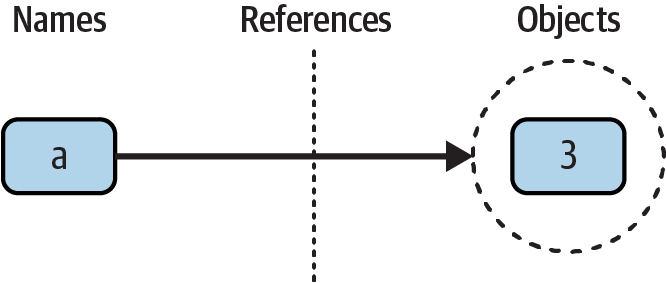
Figure 6-1. Names (a.k.a. variables) and objects after running the assignment a = 3
These links from variables to objects are called references in Python—a kind of association, implemented as an object’s address in memory. Whenever variables are later used (i.e., referenced), Python automatically follows the variable-to-object links. This is all simpler than the terminology may imply. In concrete terms:
Variables are named entries in a system table, with spaces for links to objects.
Objects are pieces of allocated memory, with enough space to represent the values for which they stand.
References are automatically followed pointers from variables to objects.
At least conceptually, each time you generate a new value in your script by running an expression, Python creates a new object (i.e., a chunk of memory) to represent that value. As an optimization, Python internally caches and reuses certain kinds of unchangeable objects, such as small integers and strings (each 0 is not really a new piece of memory—more on this caching behavior later). But from a logical perspective, it works as though each expression’s result value is a distinct object and each object is a distinct piece of memory.
Technically speaking, objects have more structure than just enough space to represent their values. Each object also has two standard header fields: a type designator used to mark the type of the object, and a reference counter used to determine when it’s OK to reclaim the object. To understand how these two header fields factor into the model, we need to move on.
Types Live with Objects, Not Variables
To see how object types come into play, watch what happens if we assign a variable multiple times:
>>>a = 3 # It's an integer>>>a = 'hack'# Now it's a string>>>a = 1.23 # Now it's a floating point
This isn’t typical Python code, but it does work—a starts out as an integer, then becomes a string, and finally becomes a floating-point number. This example tends to look especially odd to ex-C programmers, as it appears as though the type of a changes from integer to string when we say a = 'hack'.
However, that’s not really what’s happening. In Python, things work more simply. Names have no types; as stated earlier, types live with objects, not names. In the preceding listing, we’ve simply changed a to reference different objects. Because variables have no type, we haven’t actually changed the type of the variable a; we’ve simply made the variable reference a different type of object. In fact, again, all we can ever say about a variable in Python is that it references a particular object at a particular point in time.
Objects, on the other hand, know what type they are—each object contains a header field that tags the object with its type. The integer object 3, for example, will contain the value 3, plus a designator that tells Python that the object is an integer (strictly speaking, a pointer to an object called int, the name of the integer type). The type designator of the 'hack' string object points to the string type (called str) instead, and 1.23 points to float. Because objects know their types, variables don’t have to.
To recap, types are associated with objects in Python, not with variables. In typical code, a given variable usually will reference just one kind of object. Because this isn’t a requirement, though, you’ll find that Python code tends to be much more flexible than you may be accustomed to—if you use Python well, your code might work on many types automatically.
As mentioned, objects have two header fields, a type designator and a reference counter. To understand the latter of these, we need to move on and take a brief look at what happens at the end of an object’s life.
Objects Are Garbage-Collected
In the prior section’s listings, we assigned the variable a to different types of objects in each assignment. But when we reassign a variable, what happens to the value it was previously referencing? For example, after the following statements, what happens to the object 3?
>>>a = 3>>>a = 'text'
The answer is that in Python, whenever a name is assigned to a new object, the space held by the prior object is reclaimed if it is not referenced by any other name or object. This automatic reclamation of objects’ space is known as garbage collection and makes life much simpler for programmers of languages like Python that support it.
To illustrate, consider the following example, which sets the name x to a different object on each assignment:
>>>x = 99>>>x = 'Python'# Reclaim 99 now (unless referenced elsewhere)>>>x = 3.1415# Reclaim 'Python' now (ditto)>>>x = [1, 2, 3] # Reclaim 3.1415 now (ditto)
First, notice that x is set to a different type of object each time. Again, the effect is as though the type of x is changing over time, but this is not really the case. Remember, in Python types live with objects, not names. Because names are just generic references to objects, this sort of code works naturally.
Second, notice that references to objects are discarded along the way. Each time x is assigned to a new object, Python reclaims the prior object’s space. For instance, when it is assigned the string 'Python', the object 99 is immediately reclaimed (assuming it is not referenced anywhere else)—that is, the object’s space is automatically thrown back into the free space pool, to be reused for a future object.
Internally, Python accomplishes this feat by keeping a counter in every object that keeps track of the number of references currently pointing to that object. As soon as—and exactly when—this counter drops to zero, the object’s memory space is automatically reclaimed. In the preceding listing, we’re assuming that each time x is assigned to a new object, the prior object’s reference counter drops to zero, causing it to be reclaimed.
The most immediately tangible benefit of garbage collection is that it means you can use objects liberally without ever needing to allocate or free up space in your script. Python will make objects clean up their unused space for you as your program runs. In practice, this eliminates a substantial amount of bookkeeping code required in lower-level languages such as C and C++.
Shared References
So far, we’ve explored what happens as a single variable is assigned references to objects. Now let’s introduce another variable into our interaction and watch what happens to its names and objects:
>>>a = 3>>>b = a
Typing these two statements generates the scene captured in Figure 6-2. The second command causes Python to create the variable b; the variable a is being used and not assigned here, so it is replaced with the object it references (3), and b is made to reference that object. The net effect is that the variables a and b wind up referencing the same object—that is, pointing to the same chunk of memory.
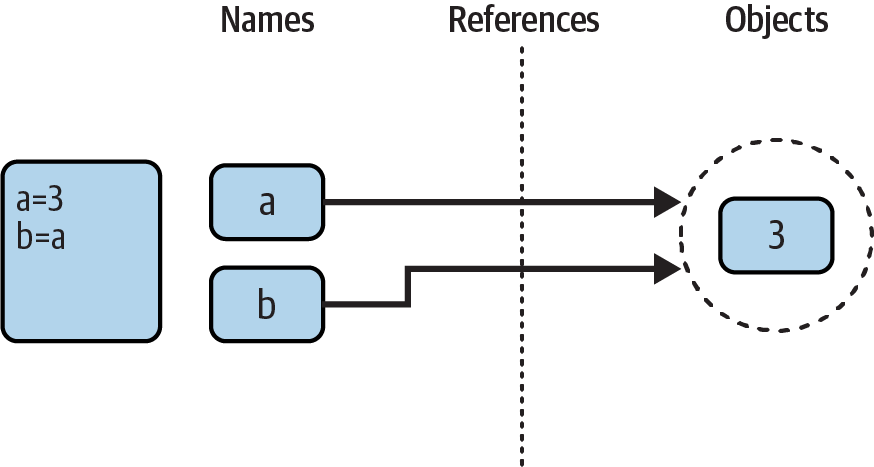
Figure 6-2. Names and objects after next running the assignment b = a
This scenario in Python—with multiple names referencing the same object—is usually called a shared reference (and sometimes and perhaps more accurately, shared object). Note that the names a and b are not linked to each other directly when this happens; in fact, there is no way to ever link a variable to another variable in Python. Rather, both variables point to the same object via their references.
Next, suppose we extend the session with one more statement:
>>>a = 3>>>b = a>>>a = 'hack'
As with all Python assignments, this statement simply makes a new object to represent the string value 'hack' and sets a to reference this new object. It does not, however, change the value of b; b still references the original object, the integer 3. The resulting reference structure is shown in Figure 6-3.
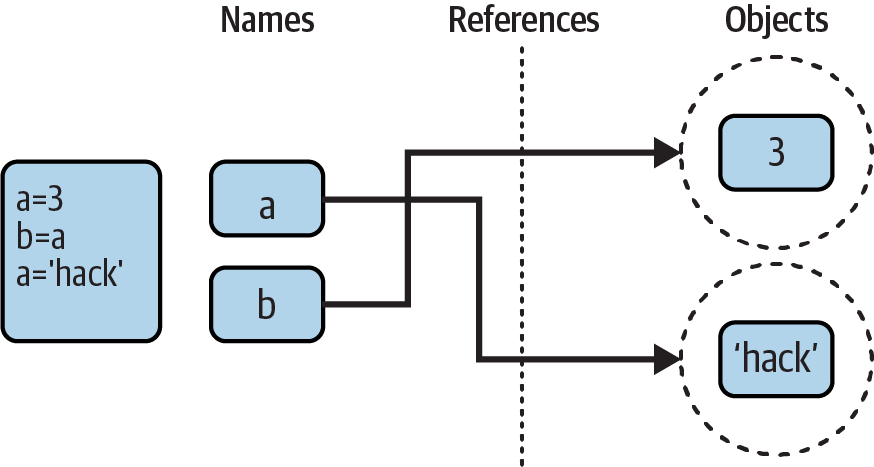
Figure 6-3. Names and objects after finally running the assignment a = 'hack'
The same sort of thing would happen if we changed b to 'hack' instead—the assignment would change only b, not a. This behavior also occurs if there are no type differences at all. For example, consider these three statements:
>>>a = 3>>>b = a>>>a = a + 2
In this sequence, the same events transpire. Python makes the variable a reference the object 3 and makes b reference the same object as a, as in Figure 6-2; as before, the last assignment then sets a to a completely different object (in this case, the integer 5, which is the result of the + expression). It does not change b as a side effect. In fact, there is no way to ever overwrite the value of the object 3—as introduced in Chapter 4, integers are immutable and thus can never be changed in place (see why this stuff matters?). All we can ever do is make a new integer object.
One way to think of this is that, unlike in some languages, variables in Python are always pointers to objects, not labels of changeable memory areas: setting a variable to a new value does not alter the original object, but rather causes the variable to reference an entirely different object. The net effect is that assignment to a variable itself can impact only the single variable being assigned. When mutable objects and in-place changes enter the equation, though, the picture changes somewhat; to see how, let’s move on.
Dynamic Typing Is Everywhere
Of course, you don’t really need to draw name/object diagrams with circles and arrows to use Python. When you’re starting out, though, it sometimes helps you understand unusual cases if you can trace their reference structures as we’ve done here. If a mutable object changes out from under you when passed around your program, for example, chances are you are witnessing some of this chapter’s subject matter firsthand.
Moreover, even if dynamic typing seems a little abstract at this point, you probably will care about it eventually. Because everything seems to work by assignment and references in Python, a basic understanding of this model is useful in many different contexts. As you’ll see, it works the same in assignment statements, function arguments, for loop variables, module imports, class attributes, and more. The good news is that there is just one assignment model in Python; once you get a handle on dynamic typing, you’ll find that it works the same everywhere in the language.
At the most practical level, dynamic typing means there is less code for you to write. Just as importantly, though, dynamic typing is also the root of Python’s polymorphism, a concept introduced in Chapter 4 that we’ll revisit again later in this book. Because we do not constrain types in Python code, it is both concise and highly flexible. As you’ll see, when used well, dynamic typing—and the polymorphism it implies—produces code that automatically adapts to new requirements as your systems evolve.
Type Hinting: Optional, Unused, and Why?
Finally, an implausible plot twist. If you’ve read Python code written in recent years, you may have stumbled across some type declarations for variable names that look like the following—and seem curious and out of place for a dynamically typed language like Python, and at first glance contradictory to some of this chapter’s claims:
>>>a: int>>>b: int = 0>>>c: list[int] = [1, 2, 3]
As previewed in Chapter 4, this is known as type hinting. Syntactically, it takes the form of a colon and object type, between a variable and an optional assignment. The object type can be a name or an expression to denote collections (list[int] means a list of integers) and can use names predefined in the standard-library typing module (e.g., Iterable, Union, and Any) to express richer types per elaborate theory. As of Python 3.12, a new type statement can even define type aliases to use in hints, though simple assignments that predated it can too:
>>>type Data = list[float]>>>Data = list[float]
As also noted in Chapter 4, though, type hints are optional, unused, and largely academic. Python does not require them and does not use them in any way and has no intentions of ever doing so. They are meant solely for use in third-party tools like type checkers, and as a form of documentation that’s an alternative to code comments. You can say the same things more simply in both # comments and documentation strings you’ll meet later.
Even when used, type hints do not constrain your code’s types in any way. The preceding type hint for a, for instance, does not create name a (only assignment does), and b’s and c’s hints are not enforced in the least:
>>>aNameError: name 'a' is not defined >>>b = 'hack'>>>c = 'code'>>>b, c('hack', 'code')
Type hints can also appear in definitions of functions (and class methods) to document types of parameters and results, commandeering an earlier feature known as function annotations. We haven’t covered these yet, but as a preview, the following function hints that it accepts an integer and list of strings and returns a float—extraneous info that shows up in __annotations__ dictionaries of hosting objects:
>>>def func(a: int, b: list[str]) -> float:return 'anything' + a + b
Yet as for simple variables, these hints are fully unused, and anything goes when this function is actually run. Strings, for example, work fine for both inputs and outputs, despite the seemingly rigid hints:
>>> func('You', 'Want')
'anythingYouWant'
That is, type hinting is a conceptually heavy tool adopted by Python but completely unused by Python. It’s at best just another form of documentation in Python itself, albeit one that comes with complex rules. External tools might use type hints to check for type mismatches (e.g., mypy) or boost performance, but such tools are also optional, uncommon, and wholly separate from the Python language. Furthermore, programs require runtime testing in any language, and optimized Pythons introduced in Chapter 2 do not use type hints today, and in some cases cannot (see PyPy).
More to the point, though, type hinting is also completely at odds with Python’s core notion of dynamic typing. Type declarations in a dynamically typed language are a pointless paradox that negates much of Python’s value proposition. Teaching this bizarre extension to Python learners would be a disservice to both Python and learners.
Hence, this book recommends that beginners avoid type hinting at least until they are comfortable with Python’s dynamic-typing paradigm. This book also won’t be covering it further, because it’s far too much extra heft sans benefit for newcomers struggling to master Python’s already sizable fundamentals. If and when you opt to delve into this inane yet convoluted corner of Python, consult its docs for more information.
In the end—and despite what you may see in Python code written by programmers coming from other languages—type hinting does not mean that Python is statically typed. Python still uses only dynamic typing, and hopefully always will. After all, this is the root of most of its advantages over other tools. Let’s hope that Python developers of the future learn this well before bloating or breaking a tool used and beloved by millions.
Chapter Summary
This chapter took a deeper look at Python’s dynamic typing model—that is, the way that Python keeps track of object types for us automatically, rather than requiring us to code declaration statements in our scripts.
Along the way, we learned how variables and objects are associated by references in Python that enable type flexibility. We also explored the topic of garbage collection, learned how shared references to mutable objects can affect multiple variables, and saw how references impact the notion of equality in Python. Lastly, we briefly glimpsed type hinting—a subdomain that weirdly adds unused type declarations to a dynamically typed language.
Because there is just one assignment model in Python, and because assignment pops up everywhere in the language, it’s important that you have a handle on the model before moving on. The following quiz should help you review some of this chapter’s ideas. After that, we’ll resume our core object tour in the next chapter, with strings.
Test Your Knowledge: Quiz
Consider the following three statements. Do they change the value printed for
A?A = 'code' B = A B = 'Python'
Consider these three statements. Do they change the printed value of
A?A = ['code'] B = A B[0] = 'Python'
How about these—is
Achanged now?A = ['code'] B = A[:] B[0] = 'Python'
Test Your Knowledge: Answers
No:
Astill prints as'code'. WhenBis assigned to the string'Python', all that happens is that the variableBis reset to point to the new string object.AandBinitially share (i.e., reference/point to) the same single string object'code', but two names are never linked together in Python. Thus, settingBto a different object has no effect onA. The same would be true if the last statement here wereB = B + 'coding', by the way—the concatenation would make a new object for its result, which would then be assigned toBonly. We can never overwrite a string (or number, or tuple) in place, because strings are immutable.Yes:
Anow prints as['Python']. Technically, we haven’t really changed eitherAorB; instead, we’ve changed part of the object they both reference (point to) by overwriting that object in place through the variableB. BecauseAreferences the same object asB, the update is reflected inAas well.No:
Astill prints as['code']. The in-place assignment throughBhas no effect this time because the slice expression made a copy of the list object before it was assigned toB. After the second assignment statement, there are two different list objects that have the same value—in Python, we say they are==, but notis. The third statement changes the value of the list object pointed to byB, but not that pointed to byA.