Chapter 2. How Python Runs Programs
This chapter and the next cover program execution—how you launch code and how Python runs it. In this chapter, we’ll begin by studying how the Python interpreter executes programs in general, from an abstract vantage point. With that perspective in hand, Chapter 3 will dive into the nuts and bolts of getting your own programs up and running.
Startup details are inherently platform specific, and some of the material in these two chapters may not apply to the ways you’ll be using Python, so you should feel free to skip parts not relevant to your goals. Likewise, readers who have used similar tools in the past and prefer to get to the meat of the language quickly may want to file some of these chapters away for future reference. For the rest of us, let’s take a brief look at the way that Python will run our code, before we get into the details of writing or running it.
Introducing the Python Interpreter
So far, we’ve mostly been talking about Python as a programming language. In its most widely used form, though, it’s also a software system called an interpreter. An interpreter is a kind of program that executes other programs. When you write a Python program, the Python interpreter reads your program and carries out the instructions it contains. In effect, the interpreter is a layer of logic between your code and the computer hardware on your machine.
When Python is installed, it generates a number of components—minimally, an interpreter and a support library. Depending on how you use it, the Python interpreter may take the form of an executable program, or a set of libraries linked into another program. Depending on which flavor of Python you run, the interpreter itself may be implemented as a C program, a set of Java classes, or something else. Whatever form it takes, the Python code you write must always be run by this interpreter. And to enable that, you usually must install a Python interpreter on your computer.
You don’t need to install Python at this point unless you want to work along with the sole trivial example coming up, and this book won’t assume that you’ve got a Python ready to go until the next chapter. When you’re ready, Python installation details vary by platform and are discussed briefly in Chapter 3, and covered in full in Appendix A.
Program Execution
What it means to run a Python script depends on whether you look at this task as a programmer, or as a Python interpreter. Both views offer important perspectives on Python programming.
The Programmer’s View
In its simplest but most common form, a Python program is just a text file containing Python statements. For example, the file listed in Example 2-1, named script0.py, may be one of the most trivial Python scripts one could dream up, but it passes for a fully functional Python program:
Example 2-1. script0.py
('hello world')(2**100)
This file contains two Python print statements, which simply print a string (the text in quotes) and a numeric expression result (2 to the power 100) to the output stream (the GUI or window where the file is run, normally). Don’t worry about the syntax of this code yet—for now, we’re interested only in how it runs. This book will explain the print statement, and why you can raise 2 to the power 100 so easily in Python, in its later chapters.
You can create such a file of statements with any text editor you like; see Appendix A for suggestions. By convention, Python program files are given names that end in .py; technically, this naming scheme is required only for files that are “imported”—a term clarified in the next chapter—but most Python files have .py names for consistency.
After you’ve typed these statements into a text file, you must tell Python to execute the file—which simply means to run all the statements in the file from top to bottom, one after another. As you’ll see in the next chapter, you can launch Python program files by typing command lines, by clicking their icons, from within coding GUIs, and with other techniques. If all goes well, when you execute the file, you’ll see the results of the two print statements show up somewhere on your computer—usually and by default, in the same window you were in when you ran the program:
hello world
1267650600228229401496703205376
For example, here’s what happened when this script was run in a Command Prompt window with a command line on a Windows laptop, to make sure it didn’t have any silly typos:
C:\Users\me\code> py script0.py
hello world
1267650600228229401496703205376
See Chapter 3 for the full story on this process, especially if you’re new to programming; we’ll get into all the details of writing and launching programs there. For our purposes here, we’ve just run a Python script that prints a string and a number. We probably won’t attract venture capital or go viral on GitHub with this code, but it’s enough to capture the basics of program execution.
Python’s View
The brief description in the prior section is fairly standard for scripting languages, and it’s usually all that most new Python programmers need to know. You type code into text files, and you run those files through the interpreter. Under the hood, though, a bit more happens when you tell Python to “go.” Although knowledge of Python internals is not strictly required for Python programming, having a basic understanding of Python’s runtime structure up front can help you grasp how your code fits into the bigger picture of program execution.
When you instruct Python to run your script, there are a few steps that Python carries out before your code actually starts crunching away. Specifically, it’s first compiled to something called “bytecode” and then routed to something called a “virtual machine.” This holds true only for the most common version of Python, and you’ll meet variations on this model in a moment. Since the most common is, well, most common, let’s see how this works first.
Bytecode compilation
Internally, and almost completely hidden from you, when you execute a program Python first compiles your source code (the statements in your text file) into a format known as bytecode. Compilation is simply a translation step, and bytecode is a lower-level, platform-independent representation of your source code. Roughly, Python translates each of your source statements into a group of bytecode instructions by decomposing them into individual steps. This bytecode translation is performed to speed execution—bytecode can be run much more quickly than the original source code statements in your text file.
You’ll notice that the prior paragraph said that this is almost completely hidden from you. If the Python program has write access on your machine, it will save the bytecode of your programs in files that end with a .pyc extension (.pyc means .py source, compiled). Technically, this save doesn’t happen when running a single file as we did in the preceding section but does for all but the topmost file in meatier multifile programs (more on this in a moment).
Python saves its bytecode files in a subdirectory named __pycache__ located in the directory where your source files reside, and in files whose names identify the Python version that created them (e.g., script0.cpython-312.pyc for 3.12). The __pycache__ subdirectory avoids clutter, and the naming convention for bytecode files prevents different Python versions installed on the same computer from overwriting each other’s saved bytecode. We’ll study this bytecode file model in more detail in Chapter 22, though it’s automatic and irrelevant to most Python programs and is free to vary among the alternative Python implementations described ahead.
So why all the bother? In short, Python saves bytecode like this as a startup-speed optimization. The next time you run your program, Python will load the .pyc files and skip the compilation steps, as long as the bytecode is present, you haven’t changed your source code since the bytecode was last saved, and you aren’t running with a different Python than the one that created the bytecode. It works like this:
Source changes: Python saves the last-modified timestamp and size (or hash value, optionally) of a source code file in its bytecode file, and compares this info to the source when the bytecode is loaded to know when it must recompile—if you edit and resave your source code, its bytecode is re-created the next time your program is run.
Python versions: Python also adds a version-information suffix to bytecode filenames to know when it must recompile—if you run your program on a different Python implementation or version, its bytecode is generated and saved for that Python too.
The result is that both source code changes and differing Python versions will trigger a new bytecode file automatically. If Python cannot write the bytecode files to your machine, your program still works—the bytecode is generated in memory and simply discarded on program exit.
Because .pyc files speed startup time, though, you’ll want to make sure they are written for larger programs. Bytecode files are also one way to ship Python programs—Python is happy to run a program if all it can find are compatible .pyc files, even if the original .py source files are absent. This isn’t as simple as deleting the .py files, though, and may require file moves and renames, or special techniques discussed later in Chapter 22. See Python’s compileall module to force compiles when needed for packaging, and frozen binaries (see the section “Standalone Executables”) for another shipping option.
Strictly speaking, bytecode is an import optimization. Bytecode is saved in .pyc files only for files that are imported, not for the top-level files of a program that are only run as scripts. Moreover, a given file is imported and possibly compiled only once per program run; later imports use what’s already been loaded. We’ll explore import basics in Chapter 3 and take a deeper look at imports in Part V. For now, keep in mind that bytecode is never saved for code typed at the interactive prompt—a programming mode you’ll learn about in Chapter 3 and use early in this book.
The Python Virtual Machine (PVM)
Once your program has been compiled to bytecode (or the bytecode has been loaded from existing .pyc files), it is shipped off for execution to something generally known as the Python Virtual Machine (PVM, for acronym-inclined readers). The PVM sounds more impressive than it is; really, it’s not a separate program, and it need not be installed by itself. In fact, the PVM is just a big code loop that iterates through your bytecode instructions, one by one, to carry out their operations. That is, the PVM is the runtime engine in Python. It’s always present as part of the Python system, is the component that truly runs your scripts, and is really just the last step of the “Python interpreter.”
Figure 2-1 illustrates this runtime structure. Bear in mind that all of this complexity is deliberately hidden from Python programmers. Bytecode compilation is automatic, and the PVM is just part of the Python system that you have installed on your machine. Again, programmers simply code and run files of statements, and Python handles the logistics of running them behind the scenes.
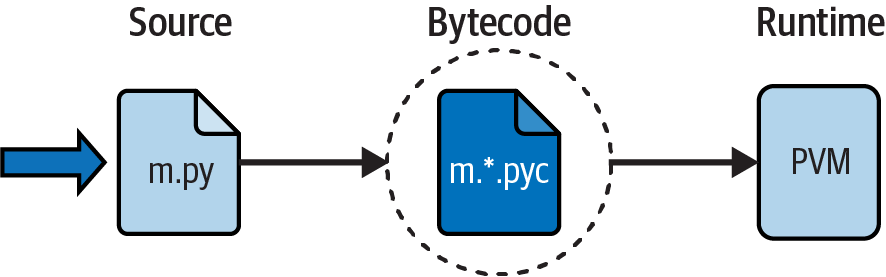
Figure 2-1. Python’s traditional execution model: the PVM runs compiled bytecode
Performance implications
Readers with a background in fully compiled languages such as C and C++ might notice some glaring differences in the Python model. For one thing, there is usually no build or “make” step in Python work: code runs immediately after it is written. For another, Python bytecode is not binary machine code (e.g., instructions for an Intel or ARM chip, known as a CPU): it’s a Python-specific format. There are exceptions to these rules (e.g., app builds for smartphones can take some time, and full compilers do exist, as you’ll see ahead), but we’re focusing on the common here first.
These differences explain why some Python code may not run as fast as C or C++ code, as described in Chapter 1—the PVM loop, not the CPU chip, still must interpret the bytecode, and bytecode instructions require more work than CPU instructions. On the other hand, unlike in classic interpreters, there is still an internal compile step—Python does not need to reanalyze and reparse each source statement’s text repeatedly. The net effect is that pure Python code runs at speeds somewhere between those of a traditional compiled language and a traditional interpreted language.
Development implications
Another ramification of Python’s execution model is that there is really no distinction between the development and execution environments: the systems that compile and execute your source code are really one and the same. This similarity may have a bit more significance to readers with a background in traditional compiled languages, but in Python, the compiler is always present at runtime and is part of the system that runs programs.
This makes for a much more rapid development cycle. There is no need to precompile and link before execution can begin; simply type and run the code. This also adds a much more dynamic flavor to the language—it is possible, and often very convenient, for Python programs to construct and execute other Python programs at runtime. The eval and exec built-ins, for instance, accept and run strings containing Python program code. This structure is also why Python lends itself to product customization—because Python code can be changed on the fly, users can modify the Python parts of a system on-site without needing to compile or even possess the rest of the system’s code.
At a more fundamental level, keep in mind that all we really have in Python is runtime—there is no initial compile-time phase at all, and everything happens as the program is running. This even includes operations such as the creation of functions and classes and the linkage of modules. Such events often occur before execution in more static languages, but happen during execution in Python. As you’ll see, this makes for a much more dynamic programming experience than that to which some readers may be accustomed.
Execution-Model Variations
Now that you’ve studied the internal execution flow described in the prior section, you should also know that it reflects just the standard implementation of Python today and is not a requirement of the Python language itself. Because of that, the execution model is prone to change with time. In fact, many systems already modify the picture in Figure 2-1 in one way or another. Before moving on, let’s briefly explore the most prominent of these variations.
Python Implementation Alternatives
As of this writing, there are multiple implementations of the Python language. Although there is much cross-fertilization of ideas and work between these Pythons, each is a separately installed software system, with its own project and user base. All but one of these systems are optional reading for most Python beginners, but a quick look at the ways they modify the execution model might help demystify what it means to run code in general.
The short story is that CPython is the standard implementation—what we’ve called the “common” version so far. It’s the usual Python on PCs and smartphones, and the system that most readers will be using (and if you’re not sure, this probably includes you). This is also the version used in this book, though the Python language fundamentals presented here apply to all the alternatives too. All the other Python implementations have specific goals and may or may not implement the full Python language defined by CPython, but come close enough to qualify as Pythons.
For example, PyPy is a drop-in replacement for CPython that runs many programs quicker by compiling parts of them further as they run. Jython and IronPython instead reimplement CPython to provide access to Java and .NET components; although standard CPython programs can access such components too (e.g., via pyjnius and Chaquopy for Java), Jython and IronPython aim to be more seamless. Other options accelerate numeric code, or code in general.
In more detail, the following list is a quick rundown on the most prominent Python implementations available today—with the usual apologies to current options omitted for space, and future options omitted for lack of a crystal ball:
- CPython: the standard
- The original, standard, and reference implementation of Python is usually called CPython when you want to contrast it with the other options (and just plain “Python” otherwise). This name comes from the fact that it is coded in portable ANSI C language code. This is the Python that you fetch from python.org for PCs, get with most alternative distributions and Linux repos, and have inside Python apps on Android and iOS smartphones. This is also the flavor whose implementation is captured in Figure 2-1, though this it prone to change (and in fact may: see the section “Future Possibilities”).
- Jython: Python for Java
- The Jython system is an alternative implementation of the Python language. It’s targeted at integration with the Java programming language, much as CPython integrates with C and C++ components. Jython consists of Java classes that compile Python source code to Java bytecode, which is then routed to the Java Virtual Machine (JVM). Programmers still code Python statements in .py text files as usual; the Jython system essentially just replaces the rightmost two bubbles in Figure 2-1 with Java-based equivalents for seamless Java linkage. At this writing, Jython implements the older Python 2.X not used in this book but is working toward 3.X.
- IronPython: Python for .NET
- IronPython is another alternative implementation of Python. Coded in C#, it is designed to allow Python programs to integrate with applications written to work with Microsoft’s .NET Framework for Windows, as well as the Mono open source equivalent. Like Jython, IronPython replaces the last two bubbles in Figure 2-1 with equivalents for execution in the .NET environment. With it, Python code can gain accessibility both to and from other .NET languages and leverage .NET libraries.
- Stackless: Python for concurrency
- The Stackless Python system is an enhanced version of the standard CPython language oriented toward concurrency. Because it does not save state on the C language call stack, Stackless can make Python easier to port to small-stack architectures. Stackless also provides efficient multiprocessing options that some find more straightforward than CPython’s later
asynccoroutines, and fosters novel programming structures. As an example, the game EVE Online uses Stackless Python to achieve high performance for massively parallel tasks. - PyPy: a JIT compiler for speed
- PyPy is a reimplementation of Python for speed. It was one of the first systems to employ a just-in-time (JIT) compiler for normal Python code. A JIT compiler is just an extension to the PVM—the rightmost bubble in Figure 2-1—that translates portions of your bytecode all the way to machine code for faster execution. PyPy does this as your program is running, not in a prerun compile step, and is able to create type-specific machine code for the dynamic Python language by keeping track of the data types of the objects your program processes. By replacing portions of your bytecode this way, your program runs faster and faster as it is executing. In addition, some Python programs may also take up less memory under PyPy.
- Numba: a JIT compiler for numeric speed
- The Numba extension for Python adds a JIT compiler that optimizes numerically oriented code by compiling it all the way to machine code while your program runs. To direct Numba’s compiler, functions are augmented with Python “@” decorators supplied with the Numba install. While not all Python code can be sped up by Numba, it works well for code that uses NumPy arrays and functions, as well as math-oriented loops. Numba also supports code parallelization paradigms commonly used in scientific programming.
- Shed Skin: an AOT compiler for conforming code
Shed Skin is an ahead-of-time (AOT) compiler that translates unadorned Python code to C++ code, which is then compiled to machine code before it is run. With an AOT, the two rightmost bubbles in Figure 2-1 are replaced with precompiled machine code. Shed Skin can yield both standalone programs, and extension modules for use in other programs. In exchange, it implements a restricted subset of Python that requires Python variables to meet an implicit statically typed constraint and does not support some Python features or libraries today. Nevertheless, Shed Skin may outperform both CPython and JIT-based options for some conforming code.
- PyThran: an AOT compiler for numeric speed
- PyThran implements another AOT compiler for a subset of the Python language, with a focus on scientific programming. Like Shed Skin, it translates Python code to C++, using static type declarations provided in either formatted comments or separate command files. The result of compiling the generated C++ is a native module that can be imported and used by other Python code.
- Cython: a Python/C hybrid for speed
- The Cython system defines a Python/C hybrid language, that combines Python code with the ability to call C functions and use C type declarations for variables, parameters, and class attributes. Cython code can be AOT-compiled to C code that uses the Python/C API, which may then be compiled completely to machine code. Though not compatible with standard Python, Cython can be useful both for wrapping external C libraries, and for implementing performance-critical parts of a system as efficient C extensions for use in CPython programs.
- MicroPython: a Python subset for constraints
- The MicroPython system is an alternative Python with a focus on efficiency. It implements a limited dialect of the CPython language and a small subset of its standard library, in order to optimize Python to run in constrained environments. Though originally targeted at microcontrollers, MicroPython is also compiled for the WebAssembly system you’ll meet in Chapter 3, to support Python programs in web browsers without the full heft of CPython.
- And (naturally) more
- For other Python alternatives, see the list at Python’s wiki, as well as the results of a web search. Among the others, Cinder is a performance-focused implementation of CPython with a JIT compiler and more, created by Meta and used for Instagram; Pyston is a fork of CPython with a JIT compiler and other optimizations, started by Dropbox; and Nuitka is a free and paid optimizing AOT compiler that translates standard Python code to C, and is used by the emerging py2wasm to translate Python code to WebAssembly for use in browsers.
All that being said, unless you have a specific need met only by one of the alternatives, you’ll probably want to use the standard CPython system. Because it is the reference implementation of the language, it’s always the most complete, and also tends to be more up-to-date and robust than others. Still, it’s unlikely that CPython will ever subsume all the optimization projects afoot in the Python world, so be sure to vet the alternatives when your goals gel.
Standalone Executables
Sometimes when people ask for a “real” Python compiler, what they’re actually seeking is simply a way to generate standalone executables from their Python programs. This is more a packaging and shipping topic than an execution-flow concept—and of more interest to software developers than Python beginners—but it’s a related idea.
In short, with the help of third-party tools that you can fetch off the web, it is possible to turn your Python programs into true self-contained executables, sometimes also called frozen binaries in the Python world. Whatever they’re called, these programs can be run without requiring a Python installation or shipping your source code files.
Standalone executables bundle together the bytecode of your program files, along with the PVM (interpreter) and any Python support files and libraries your program needs, into a single package. There are some variations on this theme, but the end result can be a single executable (e.g., a .exe file on Windows) or app (e.g., a .app on macOS, and .apk or .aab on Android) that can easily be shipped to customers. In Figure 2-1, it is as though the two rightmost bubbles—bytecode and PVM—are merged into a single component: a standalone executable bundle.
Today, a variety of systems are capable of generating standalone executables and vary in platforms and features. For example, py2exe builds standalones for Windows; PyInstaller and cx_freeze make them for Windows, macOS, and Linux; py2app creates them for macOS; and Buildozer and Briefcase generate apps for Android and iOS.
Frozen binaries are not the same as the output of a true compiler—they run bytecode through a virtual machine. Hence, apart from a possible startup improvement, frozen binaries run at the same speed as the original source files. Frozen binaries are also not generally small (they contain a PVM), but by current standards they are not unusually large either. Because Python is embedded in the frozen bundle, though, it does not have to be installed on the receiving end to run your program. Moreover, because your bytecode is embedded in the bundle, it isn’t as easily viewed.
For more details, see the alternative coverage of standalones in this book’s Appendix A, which includes tips on building them on multiple platforms from the same code base.
Future Possibilities
Finally, note that the runtime execution model sketched here is really an artifact of the current implementation of Python, not of the language itself. For instance, it’s possible that an AOT compiler for translating unrestricted and unadorned Python source code to machine code may appear during the shelf life of this book (although the fact that one has not in over three decades makes this seem unlikely!), and JIT compilers seem to be cropping up everywhere.
Either way, the bytecode model will likely be standard for some time to come. The portability and flexibility of bytecode are important features of many Python systems. Moreover, adding type-constraint declarations to support static compilation would break much of the flexibility, conciseness, simplicity, and spirit of Python coding we’re about to explore. Python’s type hinting also covered later comes close, but is thankfully still unused by Python itself today.
Note
JIT futurism: While CPython currently follows the bytecode/PVM model in Figure 2-1, it may augment it in the future. Version 3.13, still under development as this is being written, will add an experimental JIT compiler. As in PyPy and others, this will translate some bytecode all the way to machine code as your program is running. In 3.13 it will have a negligible speed boost and will be disabled by default. Though prescience is perilous in publishing, the JIT compiler may be enabled by default for CPython in the future if it ever yields a significant net gain for Python programs.
Chapter Summary
This chapter introduced the execution model of Python—how Python runs your programs—and explored some common variations on that model designed for both different roles and better performance. Although you don’t really need to come to grips with Python internals to write Python scripts, a passing acquaintance with this chapter’s topics will help you truly understand how your programs run once you start coding them, as you will in the next chapter. First though, here’s the usual chapter quiz to review what you’ve learned so far.
Test Your Knowledge: Quiz
What is the Python interpreter?
What is source code?
What is bytecode?
What is the PVM?
What is machine code?
Name two or more variations on Python’s standard execution model.
How are CPython, Jython, and IronPython different?
What are PyPy, Shed Skin, and Cython?
Test Your Knowledge: Answers
The Python interpreter is a program that runs the Python programs you write. It essentially intermediates between your Python instructions and those available in a CPU’s machine code.
Source code is the statements you write for your program. It consists of text in text files whose names normally end with a .py extension.
Bytecode is the lower-level form of your program after Python compiles it. Python automatically stores bytecode in files with a .pyc extension when possible, and automatically re-creates it when needed.
The PVM is the Python Virtual Machine—the runtime engine of Python that interprets your compiled bytecode.
Machine code is the low-level instructions of the underlying CPU on a computing device like a PC or phone. Because this is what every program ultimately runs, Python code must be translated to this by a software layer like the PVM interpreter, or JIT or AOT compilers.
Numba, Shed Skin, and standalone executables are all variations on the execution model. In addition, the alternative implementations of Python named in the next two answers modify the model in some fashion as well—by replacing bytecode and VMs, or by adding JIT and AOT compilers.
CPython is the standard and reference implementation of the language. Jython and IronPython process Python programs for use in Java and .NET environments, respectively; they are alternative compilers for Python.
PyPy and Shed Skin are reimplementations of Python targeted at speed. PyPy speeds normal Python programs by using runtime type information and a JIT compiler to replace some Python bytecode with machine code as the program runs. Shed Skin speeds programs with an AOT compiler that translates a restricted subset of Python to C++, from which it can be fully compiled to machine code to be run as a program or used in others. Cython is a Python/C combination which can be compiled into machine-code extensions accessible to CPython code.