Chapter 14. Iterations and Comprehensions
In the prior chapter, we met Python’s two looping statements, while and for. Although they can handle most repetitive tasks programs need to perform, iterating over collections is so common and pervasive that Python provides additional tools to make it simpler and more efficient. This chapter begins our exploration of these tools. Specifically, it presents Python’s iteration protocol, a method-call model used by the for loop, and fills in some details on comprehensions, which are a close cousin to the for loop that apply an expression to each item in a collection.
Because these tools are related to both the for loop and functions, we’ll take a two-pass approach to covering them in this book—along with a postscript:
This chapter introduces their basics in the context of looping-based tools, serving as something of a continuation of the prior chapter.
Chapter 20 revisits them in the context of function-based tools, and extends the topic to include built-in and user-defined generators.
Chapter 30 provides a shorter final installment in this story, which will show us how to code user-defined iterable objects with classes.
One note up front: some of the concepts presented in these chapters may seem advanced at first glance. With practice, though, you’ll find that these tools are useful and natural. Although never strictly required, they’ve also become commonplace in Python code, so a basic understanding can help if you must read programs written by others.
Iterations
In the preceding chapter, we learned that the for loop can work on any sequence type in Python, including lists, tuples, and strings, like this (with blank lines required by REPLs after compound statements omitted for brevity):
>>>for x in [1, 2, 3, 4]: print(x ** 2, end=' ')1 4 9 16 >>>for x in (1, 2, 3, 4): print(x ** 3, end=' ')1 8 27 64 >>>for x in 'text': print(x * 2, end=' ')tt ee xx tt
As we’ve also learned, the for loop is even more generic than this—it works on any iterable object. In fact, this is true of all iteration tools that scan objects from left to right in Python, including for loops, comprehensions of all stripes, some in membership tests, the zip, enumerate, and map built-in functions, and more. Any iterable object will do, even nonsequences like dictionaries:
>>> for k in dict(a=1, b=2, c=3): print(k, end=' ')
a b c
The concept of iterable objects was added to Python after its inception, but it has come to permeate the language’s toolset. It’s essentially a generalization of the notion of sequences—an object is considered iterable if it is either a physically stored sequence or an object that produces one result at a time in the context of an iteration tool like for.
In a sense, iterable objects include both real sequences and virtual sequences computed on demand. The virtual sequences both save memory and avoid delays by producing results one at a time, instead of all at once. These are not true sequences, however: virtual iterables do not support the full range of operations defined for lists and tuples. Rather, they simply materialize a series of values over time and on request.
Whether an iterable is physical or virtual, it announces its support for iterations by implementing the iteration protocol—a set of callable methods used by all iteration tools, and the subject of the next section.
Note
Terminology moment: The Python world sometimes uses the terms “iterable” and “iterator” interchangeably (and confusingly!) to refer to an object that supports iteration in general. For clarity, this book uses the term iterable to refer to an object that has the iter call at the top of the protocol we’re about to meet, and iterator to refer to an object that has the next call to produce results.
That is, an iterable returns an iterator that advances on next. This book also uses the phrase iteration tool for language tools that run an iteration, like for loops and zip calls. Chapter 20 will muddle this jargon with the term generator—which refers to objects that automatically support the iteration protocol, and hence are iterable—even though all iterables generate results!
The Iteration Protocol
One of the easiest ways to understand the iteration protocol is to see how it works with a built-in type such as the file object we first explored in Chapter 9. In this chapter, we’ll be using the following three-line input file as a demo:
>>>print(open('data.txt').read())Testing file IO Learning Python, 6E Python 3.12 >>>open('data.txt').read()'Testing file IO\nLearning Python, 6E\nPython 3.12\n'
Recall from Chapter 9 that open file objects have a method called readline, which reads one line of text from a file at a time—each time we call the readline method, we advance to the next line. At the end of the file, an empty string is returned, which we can detect to break out of a line-reading loop (remember, empty means false):
>>>f = open('data.txt')# Read a three-line file in this directory>>>f.readline()# readline loads one line on each call'Testing file IO\n' >>>f.readline()# Newlines are \n everywhere in text mode'Learning Python, 6E\n' >>>f.readline()# Last lines may have a \n or not'Python 3.12\n' >>>f.readline()# Returns empty string at end-of-file''
Files, however, also have a method named __next__ that has a nearly identical effect—it returns the next line from a file each time it is called. The only noticeable difference is that __next__ raises a built-in StopIteration exception (that is, invokes a signaling event) at end-of-file instead of returning an empty string:
>>>f = open('data.txt')# __next__ loads one line on each call too>>>f.__next__()# But raises an exception at end-of-file'Testing file IO\n' >>>f.__next__()'Learning Python, 6E\n' >>>f.__next__()'Python 3.12\n' >>>f.__next__()Traceback (most recent call last): File "<stdin>", line 1, in <module> StopIteration
And this interface is most of what we call the iteration protocol in Python. Any object with a __next__ method to advance to a next result, which raises StopIteration at the end of the series of results, is considered an iterator in Python. Any such object may also be stepped through with a for loop or any other iteration tool, because all iteration tools normally work internally by calling __next__ on each iteration and catching the StopIteration exception to know when to exit. As you’ll see in a moment, for some objects the full protocol includes an additional first step to call iter, but this isn’t required for files.
The upshot of all this magic is that, as mentioned in Chapters 9 and 13, the generally best way to read a text file line by line today is to not read it at all—instead, allow the for loop to automatically call __next__ to advance to the next line on each iteration. The file object’s iterator will do the work of automatically loading lines as you go, both one at a time and efficiently. The following, for example, reads line by line, printing the uppercase version of each line along the way—without ever explicitly reading from the file at all:
>>>for line in open('data.txt'):# Use file iterators to read by linesprint(line.upper(), end='')# Calls __next__, catches StopIterationTESTING FILE IO LEARNING PYTHON, 6E PYTHON 3.12
Notice that the print uses end='' here to suppress adding a \n, because line strings already have one (without this, our output would be double-spaced). This for coding pattern is usually the best way to read text files line by line, for three reasons: it’s the simplest to code, might be the quickest to run, and uses memory space sparingly. Prior to the advent of the iteration protocol in Python, programmers achieved the same effect with a for loop by calling the file readlines method to load the file’s content into memory as a list of line strings:
>>>for line in open('data.txt').readlines():print(line.upper(), end='')TESTING FILE IO LEARNING PYTHON, 6E PYTHON 3.12
This readlines technique still works, but is not considered the best practice today because it performs poorly in terms of memory usage. In fact, because this version really does load the entire file into memory all at once, it will not even work for files too big to fit into the memory space available on your device. By contrast, the iterator-based version is immune to such memory-explosion issues, because it reads just one line at a time. The iterator version might run quicker too, though this can vary per Python release (but see the upcoming note for a few specs).
As mentioned in the prior chapter’s closing sidebar, “Why You Will Care: File Scanners”, it’s also possible to read a file line by line with a while loop:
>>>f = open('data.txt')>>>while line := f.readline():print(line.upper(), end='')TESTING FILE IO LEARNING PYTHON, 6E PYTHON 3.12
However, this may run slower than the iterator-based for loop version, because file iterators run at C-language speed inside the standard CPython, whereas the while version must run Python bytecode through the Python virtual machine. Anytime we trade Python code for C code, speed tends to increase. This is not an absolute truth, though; again, we’ll explore timing techniques in Chapter 21 for measuring the relative speed of alternatives like these, though the following note ruins some of the surprise for the impatient.
Note
Spoiler alert: Per calls to min(timeit.repeat(code, repeat=50, number=10)) in CPython 3.12 on macOS, the file iterator is still slightly faster than readlines, which is faster than the while loop. With a 9k-line file and this chapter’s code (using pass for loop bodies), the iterator, readlines, and while alternatives check in at 0.0073, 0.0077, and 0.0102 seconds, respectively. The while is slowest and using := doesn’t help much (it’s 0.0104 sans :=). For more info, see the examples package and Chapter 21. Caveats: your test variables may vary, memory matters too, and 0.0029 seconds may not be enough to get excited about in some programs.
The iter and next built-ins
To simplify manual iteration code, Python also provides a built-in function, next, that has the same net effect as calling an object’s __next__ method. That is, given an iterator object X, the call next(X) is the same as X.__next__(), but is noticeably simpler to type and read (and actually runs slightly faster in CPython 3.12 for tested cases). With files, for instance, either form may be used:
>>>f = open('data.txt')>>>f.__next__()# Call iteration method directly'Testing file IO\n' >>>next(f)# next(f) is the same as f.__next__()'Learning Python, 6E\n' >>>next(f)'Python 3.12\n' >>>next(f)…exception text omitted from here on… StopIteration
Technically, there is one more piece to the iteration protocol alluded to earlier. When the for loop begins, it first obtains an iterator from an iterable object, by calling the iterable’s __iter__ method. The object returned by this call in turn has the required __next__ method to advance. For convenience again, the iter built-in function internally runs the equivalent of the __iter__ method, much as next runs the equivalent of __next__.
Hence, for loops run the internal equivalent of the following, though the iter step is moot and optional for files—they are their own iterators, because files don’t support multiple scans per open:
>>>f = open('data.txt')>>>I = iter(f)# Fetch an iterator from an iterable>>>next(I)# Fetch the next result form the iterator'Testing file IO\n' >>>next(I)# Files iterables are iterators themselves'Learning Python, 6E\n' …etc…
The full iteration protocol
With all these pieces in place, Figure 14-1 sketches this full iteration protocol, used by every iteration tool in Python and supported by a wide variety of object types. It’s based on two objects used in two distinct steps by iteration tools:
The iterable object for which iteration is requested. Calling this object’s
__iter__returns an iterator, and is the same as callingiter.The iterator object returned by the iterable. Calling this object’s
__next__produces results during the iteration and raisesStopIterationwhen no more results remain, and is the same as callingnext.
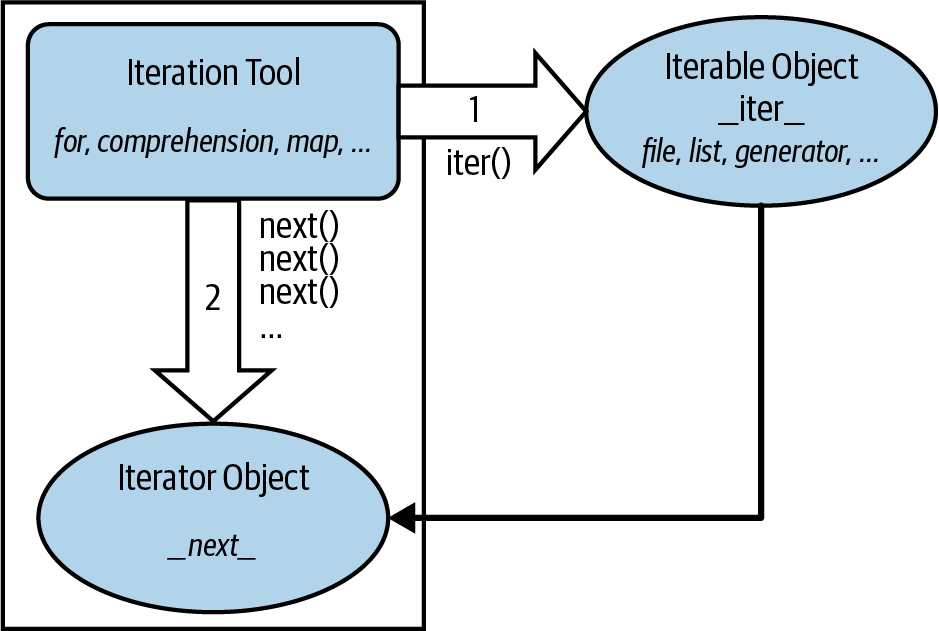
Figure 14-1. The iteration protocol, used by for loops, comprehensions, maps, and more
These steps are orchestrated automatically by iteration tools in most cases, but it helps to understand these two objects’ roles. For example, in some cases these two objects are the same when only a single scan is supported (e.g., files), and the iterator object is often a temporary, used internally by the iteration tool.
Moreover, some objects are both an iteration tool (they iterate) and an iterable object (their results are iterable)—including the enumerate and zip built-ins, and Chapter 20’s generator expressions. Such iterables already avoid constructing result lists in memory themselves, but applying them to other iterables saves even more space. When such tools are combined, no work is done until an iteration tool requests results.
In code, the protocol’s first step becomes obvious if we look at how for loops internally process built-in sequence types such as lists (for uses the internal equivalents of the “__” methods, but you use either in your code):
>>>L = [1, 2]>>>I = iter(L)# Obtain an iterator object from an iterable>>>next(I)# Call next(iterator) to advance to next item1 >>>next(I)# Or use L.__iter__() and I.__next__() calls2 >>>next(I)StopIteration
As we saw earlier, the initial iter step is not required for files, because a file object supports just one scan and hence is its own iterator. You can see this yourself with is (recall from Chapter 9 that this means object identity—the same exact piece of object memory, not just the same value):
>>>f = open('data.txt')>>>iter(f) is f# Files are iterators themselves: iter() optionalTrue >>>iter(f) is f.__iter__()# Both calls return file object f itselfTrue >>>next(f)# Which responds to next requests directly'Testing file IO\n'
Lists and many other built-in objects, though, are not their own iterators because they do support multiple open iterations—there may be any number of iterations active in nested loops, and all may be at different positions at a given point in time. For such objects, we must call iter to start iterating manually:
>>>L = [1, 2, 3]>>>iter(L) is L# Lists are not their own iterators: use iter()False >>>next(L)TypeError: 'list' object is not an iterator >>>I = iter(L)# Same as L.__iter__()>>>next(I)# Same as I.__next__()1
Manual iteration
Although Python iteration tools call these functions automatically, we can also use them to apply the iteration protocol manually when needed. The following demonstrates the equivalence between automatic and manual iteration (again, for runs the internal equivalent of I.__next__ instead of the next(I) used here, but the effect is the same):
>>>L = [1, 2, 3]>>> >>>for X in L:# Automatic iterationprint(X ** 2, end=' ')# Obtain iter, call __next__, catch exceptions1 4 9 >>>I = iter(L)# Manual iteration: what for loops usually do>>>while True:# Use try statements to catch stop exceptiontry:X = next(I)except StopIteration:breakprint(X ** 2, end=' ')1 4 9
To understand this code, you need to know that try statements run an action and catch exceptions that occur while the action runs (we met exceptions briefly in Chapter 10 but will explore them in depth in Part VII).
More on iter and next
For full fidelity, it should also be noted that for loops and other iteration tools can sometimes work differently for user-defined classes—repeatedly indexing an object instead of running the iteration protocol—but they prefer the iteration protocol when supported (more on this story when we study operator overloading in Chapter 30).
Though not commonly used, it’s also worth noting that next accepts an optional second default argument for an exit value; if passed, it’s returned at the end instead of raising a stop exception:
>>>L = [1]>>>I = iter(L)# Result instead of exception>>>next(I, 'end of list')1 >>>next(I, 'end of list')'end of list'
Combined with the := named-assignment expression, this can shave multiple lines off the preceding manual-iteration code—but will also fail if the passed default can appear as a valid result:
>>>I = iter(L)>>>while (X := next(I, None)) != None:# Same effect, less codeprint(X ** 2, end=' ')# Assuming None is safe!
Though also uncommon, iter accepts a second sentinel argument to signal stop from a callable. This very different mode provides an arguably tricky way to use for to read files by blocks—but requires info on functions or lambda, which we don’t yet have:
>>>f = open('data.txt')>>>I = iter(lambda: f.read(5), '')# Callables and sentinels>>>for block in I: print(block, end='')# Assuming you know lambda!
Watch for lambda in the next part of this book, and see Python’s docs for more on next and iter modes.
Other Built-in Iterables
Besides files and physical sequences like lists, many other objects in Python have useful iterators as well. Now that we have a better handle on how the iteration protocol works, this section revisits some tools we’ve already seen in this context, and introduces a handful of additional iterables along the way.
Reprise: dictionaries, range, enumerate, and zip
As we saw in the last chapter, the usual way to step through the keys of a dictionary is with a for loop:
>>>D = dict(a=1, b=2)>>>for key in D:# Dictionaries are implicitly iterableprint(key, D[key])a 1 b 2
This works simply because dictionaries are iterables with an iterator that automatically returns one key at a time in an iteration tool like for:
>>>I = iter(D)# Which just means they support the protocol>>>next(I)'a' >>>next(I)'b' >>>next(I)StopIteration
The iteration protocol is also the reason that we’ve had to wrap range results in a list call to see their values all at once in a REPL. Objects that are nonsequence iterables return results one at a time, not in a physical list:
>>>R = range(5)>>>Rrange(0, 5) >>>I = iter(R)# Use iteration protocol to produce results>>>next(I)0 >>>next(I)1 >>>list(range(5))# Or use list() to collect all results at once[0, 1, 2, 3, 4]
Note that the list call here is not needed and shouldn’t be used in contexts where iteration happens automatically—such as within for loops. It is needed for displaying values all at once, though, and may also be required when list-like behavior or multiple scans are required for objects that normally produce results on demand (more on this later).
Now that you have a better understanding of this protocol, you should also be able to see how it explains why the enumerate tool introduced in the prior chapter works the way it does:
>>>E = enumerate('text')# enumerate is an iterable too>>>E<enumerate object at 0x1010ab880> >>>I = iter(E)>>>next(I)# Generate results with iteration protocol(0, 't') >>>next(I)# Or use list() to force generation to run(1, 'e') >>>list(enumerate('text'))[(0, 't'), (1, 'e'), (2, 'x'), (3, 't')]
Unlike range, the enumerate built-in’s result is its own iterator, much like files. This means it supports just one scan per call, and iter is optional (more on this ahead too):
>>>R = range(5)>>>iter(R) is RFalse >>>E = enumerate('text')>>>iter(E) is ETrue >>>next(E)(0, 't')
The zip built-in, covered in the prior chapter, work the same way in iteration tools. Like enumerate, zip is also its own iterator, so we have to call it again to iterate again:
>>>Z = zip((1, 2, 3), (10, 20, 30))>>>Z<zip object at 0x101236240> >>>I = iter(Z)>>>next(I)(1, 10) >>>next(I)(2, 20) >>>I is ZTrue >>>list(Z)[(3, 30)] >>>list(zip((1, 2, 3), (10, 20, 30)))[(1, 10), (2, 20), (3, 30)]
Iterator nesting
More interestingly, zip is both iteration tool and iterable: it iterates over its arguments’ results, but also returns an iterable object with an iterator for its own results. In the following, for example, it’s a tool that receives results from two range iterables, but its own results are produced on demand as well. In other words, there are three iterables and two levels of iteration at work here:
>>>Z = zip(range(1, 4), range(10, 40))>>>next(Z)(1, 10) >>>next(Z)(2, 11) >>>next(Z)(3, 12) >>>list(zip(range(1, 4), range(10, 40)))[(1, 10), (2, 11), (3, 12)]
In fact, iterators can be nested arbitrarily. Because enumerate is both iteration tool and object too, in the following, range, enumerate, and zip all produce their results on demand, and list makes all the dances run:
>>>list(enumerate(range(1, 4)))[(0, 1), (1, 2), (2, 3)] >>>list(zip(enumerate(range(1, 4)), enumerate(range(5, 8))))[((0, 1), (0, 5)), ((1, 2), (1, 6)), ((2, 3), (2, 7))]
Similarly, the following enumerates the zipped results of ranges—but only when requested by for:
>>> for x in enumerate(zip(range(1, 4), range(5, 8))): print(x)
...
(0, (1, 5))
(1, (2, 6))
(2, (3, 7))
There are three levels of iterables in this, all deferring their results until they are activated. In practice, this works naturally, but nothing happens in such code until a tool like list or for asks for results at the top. In response, all the actors here return just one result at a time, to minimize memory requirements and avoid delays.
Functional iterables: map and filter
Like range, enumerate, and zip, the map and filter built-ins produce their results individually to conserve space and avoid pauses. Like enumerate and zip, these tools also are both iterable tools and iterable objects themselves: they scan other iterables, and produce their own results on demand.
Unlike other iterables we’ve met, though, map and filter apply function calls instead of expressions, so their complete story requires function-coding skills we won’t gain until the next part of the book. Still, we can preview their fundamentals here using built-in functions without having to code new functions of our own.
For example, the map built-in, which made a brief cameo appearance in Chapter 8 (and has nothing directly to do with mappings like dictionaries!), calls a provided function for each item in a provided iterable, and returns the collected results as another iterable. In the following, it applies the ord built-in to collect character code points:
>>>ord('p')# Return a single character's code point112 >>>M = map(ord, 'py3')# map returns an iterable, not a list>>>M# Runs ord(x) for every x in iterable<map object at 0x101227550> >>>next(M)# Iterating manually: exhausts results112# map supports no sequence ops like [i]>>>next(M)121 >>>next(M)51 >>>next(M)StopIteration
As usual, you can force results with list if you must treat them as a list, and for automates iterations:
>>>list(map(ord, 'py3'))# Force a real list - only if needed[112, 121, 51] >>>M = map(ord, 'py3')# Must call again to scan again>>>for x in M: print(x, end=' ')# Iteration tools auto call next()112 121 51
The filter built-in, which we met momentarily in Chapter 12 and will study more fully in the next part of this book, is analogous. It returns items in an iterable for which a passed-in function returns True. In the following, we’re leveraging concepts we’ve already learned—True includes nonempty and nonzero objects, the bool built-in returns a single object’s truth value, and the str string’s isdigit method is true for all-digit text):
>>>filter(bool, ['lp6e', '', 2024])<filter object at 0x101227850> >>>list(filter(bool, ['lp6e', '', 2024]))# Collect "true" items['lp6e', 2024] >>>list(filter(str.isdigit, ['lp6e', '2024']))# Collect all-digit strings['2024']
Like most of the tools discussed in this section, filter both accepts an iterable to process and returns an iterable to generate results. It doesn’t do any work until code like a for loop asks it to. As a preview, both map and filter can be emulated roughly with list comprehensions and more closely with Chapter 20’s generator expressions; but to grok the following code in full, we have to await this chapter’s presentation of comprehensions coming up soon:
>>>[ord(x) for x in 'py3'][112, 121, 51] >>>[x for x in ['lp6e', '2024'] if x.isdigit()]['2024']
Multiple-pass versus single-pass iterables
We’ve noted a few times that some iterables that don’t allow multiple scans are their own iterables. Since this is a subtle difference that can impact the way you’ll use them, it’s worth a separate callout here.
In particular, the range built-in’s result, along with objects like dictionaries and lists, differ from other built-ins described in this section. They are not their own iterators (you must make one with iter when iterating manually), and they support multiple iterators (each remembers its position independently):
>>>R = range(3)# range allows multiple iterators>>>next(R)TypeError: range object is not an iterator >>>I1 = iter(R)>>>next(I1)0 >>>next(I1)1 >>>I2 = iter(R)# Two iterators on one range>>>next(I2)0 >>>next(I1)# I1 is at a different spot than I22
By contrast, the results of enumerate, zip, map, filter, as well as open for files, are their own iterators, because none of these tools support multiple active iterations on the same call result. Because of this, the iter call is optional for stepping through such objects’ results (though harmless: their iter is themselves), and we must call these tools again to start a fresh iteration from the start:
>>>Z = zip((1, 2, 3), (10, 11, 12))>>>I1 = iter(Z)>>>I2 = iter(Z)# Two iterators on one zip>>>next(I1)(1, 10) >>>next(I1)(2, 11) >>>next(I2)# But I2 is at same spot as I1!(3, 12) >>>M = map(ord, 'py3')# Ditto for map (and others)>>>I1, I2 = iter(M), iter(M)>>>next(I1), next(I1)(112, 121) >>>next(I2)51 >>>L = [0, 1, 2]# But lists (and others) do many scans>>>I1, I2 = iter(L), iter(L)>>>next(I1), next(I1)(0, 1) >>>next(I2)# Multiple active scans, like range0
When we code our own iterable objects with classes later in the book (Chapter 30), you’ll see that multiple iterators are usually supported by returning new objects for the iter call; a single iterator generally means an object returns itself and supports next directly. In Chapter 20, you’ll also find that generator functions and expressions behave like map and zip instead of range in this regard, supporting just a single active iteration scan. Also in that chapter, you’ll see some subtle implications of single-pass iterators in loops that attempt to scan multiple times—code that treats these as lists may fail without manual list conversions.
Standard-library iterables in Python
Finally, while out of scope here, and technically part of its standard library instead of its language, Python provides additional tools that support the iteration protocol and thus may also be used in for loops other iteration tools.
For instance, shelves (an access-by-key filesystem for Python objects), as well as the results of os.popen (a tool for reading the output of shell commands), are iterables that can be processed with the full set of iteration tools. The standard directory (a.k.a. folder) walker in Python, os.walk, is iterable too, but we’ll save details and an example until Chapter 20’s coverage of this tool’s basis—generators and yield.
Ultimately, all such tools implement the iter/next interface defined by the iteration protocol. We don’t normally see this machinery because for and its kin run it for us automatically to step through results. In fact, everything that scans left to right in Python employs the iteration protocol in the same way—including the topic of the next section.
Comprehensions
Now that we’ve seen how the iteration protocol works, let’s turn to one of its most common use cases. Together with for loops, list comprehensions are one of the most prominent contexts in which the iteration protocol is applied.
In the previous chapter, we learned how to use range to change a list as we step across it:
>>>L = [1, 2, 3, 4, 5]>>>for i in range(len(L)):L[i] += 10>>>L[11, 12, 13, 14, 15]
This works, but as mentioned there, it may not be the optimal “best practice” approach in Python. Today, the list comprehension expression makes many such prior coding patterns obsolete. Here, for example, we can replace the loop with a single expression that produces the desired result list:
>>>L = [x + 10 for x in L]>>>L[21, 22, 23, 24, 25]
The net result is similar, but it requires less coding on our part and is likely to run substantially faster—in fact, it’s often twice as fast as tested in CPython 3.12. The list comprehension isn’t exactly the same as the for loop statement version because it makes a new list object, which might matter if there are multiple references to the original list, but it’s close enough for most applications and is a common and convenient enough approach to merit a closer look here.
List Comprehension Basics
The list comprehension was introduced in Chapter 4, and it’s been demoed often. Syntactically, its syntax is derived from a construct in set theory notation that applies an operation to each item in a set, but you don’t have to know set theory to use this tool. In Python, most people find that a list comprehension simply looks like a backward for loop.
To get a handle on the syntax, let’s dissect the prior section’s example in more detail:
L = [x + 10 for x in L]
List comprehensions are written in square brackets because they are ultimately a way to construct a new list. They begin with an arbitrary expression that we make up, which uses a loop variable that we make up (x + 10). That is followed by what you should now recognize as the header of a for loop, which names the loop variable, and an iterable object (for x in L).
To run the expression, Python executes an iteration across L inside the interpreter, assigning x to each item in turn, and collects the results of running the items through the expression on the left side. The result list we get back is exactly what the list comprehension says—a new list containing x + 10, for every x in L.
Technically speaking, list comprehensions are never really required because we can always build up a list of expression results manually with for loops that append results as we go:
>>>res = []>>>for x in L:res.append(x + 10)>>>res[31, 32, 33, 34, 35]
In fact, this is exactly what the list comprehension does internally (using internal equivalents, of course).
However, list comprehensions are more concise to write, and widely useful in Python programs because building result lists is such a common task. Moreover, depending on your Python and code, list comprehensions might run much faster than manual for loop statements (often 2X as stated earlier) because their iterations are performed at the speed of optimized (and usually compiled) code inside the interpreter, rather than with manual Python code. Especially for larger data sets, there is often a major performance advantage to using this expression.
List Comprehensions and Files
Let’s work through another common application of list comprehensions to explore them in more detail. Recall that the file object has a readlines method that loads the file into a list of line strings all at once:
>>>f = open('data.txt')>>>lines = f.readlines()>>>lines['Testing file IO\n', 'Learning Python, 6E\n', 'Python 3.12\n']
This works as we saw earlier, but the lines in the result all include the newline character (\n) at the end. For many programs, the newline character gets in the way—we have to be careful to avoid double-spacing when printing, and so on. It would be nice if we could get rid of these newlines all at once, wouldn’t it?
Anytime we start thinking about performing an operation on each item in a sequence, we’re in the realm of list comprehensions. For example, assuming the variable lines is as it was in the prior interaction, the following code does the job by running each line in the list through the string rstrip method to remove whitespace on the right side (a line[:−1] slice would work, too, but only if we can be sure all lines are properly \n terminated, and this may not always be the case for the last line in a file):
>>>lines = [line.rstrip() for line in lines]>>>lines['Testing file IO', 'Learning Python, 6E', 'Python 3.12']
This works as planned. Because list comprehensions are an iteration tool just like for loop statements, though, we don’t even have to open the file ahead of time. If we open it inside the expression, the list comprehension will automatically use the iteration protocol we met earlier in this chapter. That is, it will read one line from the file at a time by calling the file’s next handler method, run the line through the rstrip expression, and add it to the result list. Again, we get what we ask for—the rstrip result of a line, for every line in the file:
>>>lines = [line.rstrip() for line in open('data.txt')]>>>lines['Testing file IO', 'Learning Python, 6E', 'Python 3.12']
This expression does a lot implicitly, but we’re getting a lot of work for free here—Python scans the file line by line and builds a list of operation results automatically. It’s also an efficient way to code this operation: because most of this work is done inside the Python interpreter, it’s likely faster than an equivalent for statement. Just as importantly, its use of file iterators means that it won’t load the file into memory all at once, like readlines does. Again, especially for large files, the advantages of list comprehensions can be significant.
Besides their efficiency, list comprehensions are also remarkably expressive. In our example, we can run any string operation on a file’s lines as we iterate. To illustrate, here’s the list comprehension equivalent to the file iterator uppercase example we met earlier, along with a few other representative operations to sample the possibilities:
>>>[line.upper() for line in open('data.txt')]['TESTING FILE IO\n', 'LEARNING PYTHON, 6E\n', 'PYTHON 3.12\n'] >>>[line.rstrip().upper() for line in open('data.txt')]['TESTING FILE IO', 'LEARNING PYTHON, 6E', 'PYTHON 3.12'] >>>[line.split() for line in open('data.txt')][['Testing', 'file', 'IO'], ['Learning', 'Python,', '6E'], ['Python', '3.12']] >>>[line.replace('\n', '!') for line in open('data.txt')]['Testing file IO!', 'Learning Python, 6E!', 'Python 3.12!'] >>>[('Py' in line, line.split()[0]) for line in open('data.txt')][(False, 'Testing'), (True, 'Learning'), (True, 'Python')]
Recall that the method chaining in the second of these examples works because string methods return a new string, to which we can apply another string method. The last of these shows how we can also collect multiple results, as long as they’re wrapped in a collection like a tuple or list.
One fine point here: recall from Chapter 9 that file objects close themselves automatically in CPython when garbage-collected if still open. Hence, these list comprehensions will also automatically close the file when their temporary file object is garbage-collected after the expression runs. Outside CPython, though, you may want to code these to close manually if this is run in a loop, to ensure that file resources are freed immediately: open before the comprehension, and close after. See Chapter 9 for more on file close calls if you need a refresher on this.
Extended List Comprehension Syntax
Handy as they may already seem, list comprehensions can be even richer in practice, and even constitute a sort of iteration mini-language in their fullest forms. Let’s take a quick look at their extra syntax tools here.
Filter clauses: if
As one particularly useful extension, the for loop nested in a comprehension expression can have an associated if clause to filter out of the result items for which the test is not true. (It’s really a filter in, but it works out the same).
For example, suppose we want to repeat the prior section’s file-scanning example, but we need to collect only lines that begin with the letters L or P (perhaps the first character on each line is an action code of some sort). Adding a simple if filter clause to our expression does the trick:
>>>lines = [line.rstrip() for line in open('data.txt') if line[0] in 'LP']>>>lines['Learning Python, 6E', 'Python 3.12']
Here, the if clause checks each line read from the file to see whether its first character matches; if not, the line is omitted from the result list, and the iteration continues. This is a fairly big expression, but it’s easy to understand if we translate it to its simple for loop statement equivalent:
>>>res = []>>>for line in open('data.txt'):if line[0] in 'LP':res.append(line.rstrip())>>>res['Learning Python, 6E', 'Python 3.12']
In general, we can always translate a list comprehension to a for statement by appending as we go and further indenting each successive part. The converse isn’t true: for statements are more general and can address additional roles out of scope for comprehensions, but the latter’s results collection is a very common task.
This for statement equivalent works, but it takes up four lines instead of one and may run slower. In fact, you can squeeze a substantial amount of logic into a list comprehension when you need to—the following works like the prior but selects only lines that end in a digit (before the newline at the end), by filtering with a more sophisticated expression on the right side (which uses [-1:] instead of [-1] to handle files with blank lines empty after rstrip):
>>> [line.rstrip() for line in open('data.txt') if line.rstrip()[-1:].isdigit()]
['Python 3.12']
As another if filter example, the first result in the following gives the total lines in a text file, and the second strips whitespace on both ends to omit blank lines in the tally in just one line of code:
>>>fname = 'data-blank-lines.txt'>>>len(open(fname).readlines())# All lines5 >>>len([line for line in open(fname) if line.strip() != ''])# Nonblank lines3
Nested loops: for
List comprehensions can become even more complex if we need them to—for instance, they may contain nested loops, coded as a series of for clauses. In fact, their full syntax allows for any number of for clauses, each of which can have an optional associated if clause.
For example, the following builds a list of the concatenation of x + y for every x in one string and every y in another. It effectively collects all the ordered combinations of the characters in two strings:
>>> [x + y for x in 'abc' for y in '123']
['a1', 'a2', 'a3', 'b1', 'b2', 'b3', 'c1', 'c2', 'c3']
Again, one way to understand this expression is to convert it to statement form by indenting its parts. The following is an equivalent, but likely slower, alternative way to achieve the same effect (it’s the same as the first nested for example in the prior chapter, but builds a list of results instead of simply printing them):
>>>res = []>>>for x in 'abc':for y in '123':res.append(x + y)>>>res['a1', 'a2', 'a3', 'b1', 'b2', 'b3', 'c1', 'c2', 'c3']
Beyond this complexity level, though, list comprehension expressions can sometimes become too compact for their own good. In general, they are intended for simple types of iterations; for more involved work, a simpler for statement structure will probably be easier to understand and modify in the future. As usual in programming, if something is difficult for you to understand, it’s probably not the best idea.
Comprehensions Cliff-Hanger
Because comprehensions are generally better taken in multiple doses, we’ll cut this story short here for now. We’ll revisit list comprehensions in Chapter 20 in the context of functional programming tools, and will define their syntax more formally and explore additional examples there. As you’ll find, comprehensions turn out to be just as related to functions as they are to looping statements.
List comprehensions are also related to—and predate—the set and dictionary comprehensions introduced in this book’s prior part, as well as the generator expression you’ll meet later that produces items on request instead of building a list. All share the same syntax, but are coded slightly differently and produce different sorts of stuff:
[x + 10 for x in L if x > 0]# List comprehension{x + 10 for x in L if x > 0}# Set comprehension{x: x + 10 for x in L if x > 0}# Dictionary comprehension(x + 10 for x in L if x > 0)# Generator expression
We’ll put the last three of these to work on files briefly in the next section. To better expand this plotline to generators, though, we have to move on to this book’s next part.
Note
Speed disclaimer: As a blanket qualification for all performance claims in this book, the relative speed of code depends much on the exact code tested and version of Python used, and is prone to vary and change. For example, list comprehensions have been consistently twice as fast as corresponding for loops on most tests for all CPythons through 3.12, but may be just marginally quicker on some tests, and perhaps even slower when if filter clauses are used. You’ll learn how to time your own code and Python in Chapter 21. For now, keep in mind that absolutes in performance benchmarks are as elusive as consensus in open source projects.
Iteration Tools
Later in this book, you’ll learn how user-defined classes can implement the iteration protocol too. Because of this, it’s sometimes important to know which built-in tools make use of it—any tool that employs the iteration protocol will automatically work on any built-in type or user-defined class that provides it. This section closes out this chapter with a summary and sort of “grand finale” of tools in this domain.
So far, we’ve mostly seen iterators at work in the context of the for loop statement, because this part of the book is focused on statements. Keep in mind, though, that every built-in tool that scans from left to right across collection objects uses the iteration protocol. This includes the for loops we’ve seen:
>>>for line in open('data.txt'):print(line.upper(), end='')TESTING FILE IO LEARNING PYTHON, 6E PYTHON 3.12
But also much more. For instance, the prior section’s list comprehensions and the map built-in function we met earlier use the same protocol as their for loop cousin. When applied to a file, they both leverage the file object’s iterator automatically to scan line by line, fetching an iterator with __iter__ and calling __next__ each time through:
>>>uppers = [line.upper() for line in open('data.txt')]>>>uppers['TESTING FILE IO\n', 'LEARNING PYTHON, 6E\n', 'PYTHON 3.12\n'] >>>list(map(str.upper, open('data.txt')))['TESTING FILE IO\n', 'LEARNING PYTHON, 6E\n', 'PYTHON 3.12\n']
As we saw earlier, the map built-in applies a function call to each item in an iterable object. map is similar to a list comprehension but is more limited because it requires a function instead of an arbitrary expression. It also returns an iterable object, so we must wrap it in a list call to force it to give us all its values at once. Because map, like the list comprehension, is related to both for loops and functions, watch for its revival in Chapter 20.
Many of Python’s other built-ins process iterables, too. We’ve seen how zip combines items from iterables, enumerate pairs items in an iterable with relative positions, and filter selects items for which a function is true. In addition, sorted sorts items in an iterable, and reduce (now oddly relegated to a module) runs pairs of items in an iterable through a function. All of these accept iterables, and zip, enumerate, and filter also return an iterable like map. Here they are in action running the file’s iterator automatically to read line by line:
>>>sorted(open('data.txt'))['Learning Python, 6E\n', 'Python 3.12\n', 'Testing file IO\n'] >>>list(zip(range(99), open('data.txt')))[(0, 'Testing file IO\n'), (1, 'Learning Python, 6E\n'), (2, 'Python 3.12\n')] >>>list(enumerate(open('data.txt')))[(0, 'Testing file IO\n'), (1, 'Learning Python, 6E\n'), (2, 'Python 3.12\n')] >>>list(filter(bool, open('data.txt')))['Testing file IO\n', 'Learning Python, 6E\n', 'Python 3.12\n'] >>>import functools, operator>>>functools.reduce(operator.add, open('data.txt'))'Testing file IO\nLearning Python, 6E\nPython 3.12\n'
All of these are iteration tools, but they have unique roles. We met zip and enumerate in this chapter; filter and reduce are in Chapter 19’s functional programming domain, so we’ll defer their details for now; the point to notice here is their use of the iteration protocol for files and other iterables.
We first saw the sorted function used here at work in Chapter 4, and we used it in Chapter 8. sorted is a built-in that employs the iteration protocol—it’s like the original list sort method, but it returns the new sorted list as a result and runs on any iterable object. Notice that, unlike map and others, sorted returns an actual list instead of an iterable. Per the prior chapter’s closer, its reversed cohort returns an iterable but does not run the iteration protocol.
In general, though, everything in Python’s built-in toolset that scans object is defined to use the iteration protocol on their subject. This even includes tools such as the list and tuple built-in functions (which build new objects from iterables), and Chapter 7’s string join method (which makes a new string by putting a substring between strings in an iterable). Hence, these will also work on an open file and automatically read one line at a time:
>>>list(open('data.txt'))['Testing file IO\n', 'Learning Python, 6E\n', 'Python 3.12\n'] >>>tuple(open('data.txt'))('Testing file IO\n', 'Learning Python, 6E\n', 'Python 3.12\n') >>>'&&'.join(open('data.txt'))'Testing file IO\n&&Learning Python, 6E\n&&Python 3.12\n'
Even some tools you might not expect fall into this category. For example, Chapter 11’s sequence assignment (original and starred), the in membership test, slice assignment, the list’s extend method, and single-star literal unpacking also leverage the iteration protocol to scan, and thus read a file by lines automatically:
>>>a, b, c = open('data.txt')# Sequence assignment>>>b, c('Learning Python, 6E\n', 'Python 3.12\n') >>>a, *b = open('data.txt')# Extended-unpacking assignment>>>a, b('Testing file IO\n', ['Learning Python, 6E\n', 'Python 3.12\n']) >>>'Python 2.7\n' in open('data.txt')# Membership testFalse >>>'Python 3.12\n' in open('data.txt')True >>>L = [11, 22, 33, 44]# Slice assignment>>>L[1:3] = open('data.txt')>>>L[11, 'Testing file IO\n', 'Learning Python, 6E\n', 'Python 3.12\n', 44] >>>L = [11]>>>L.extend(open('data.txt'))# list.extend method>>>L[11, 'Testing file IO\n', 'Learning Python, 6E\n', 'Python 3.12\n'] >>>L = [11, *open('data.txt'), 44]# List-literal unpacking>>>L[11, 'Testing file IO\n', 'Learning Python, 6E\n', 'Python 3.12\n', 44]
Remember that extend iterates automatically, but append does not—though you can use the latter to add an iterable to a list without iterating, and iterated across it later:
>>>L = [11]>>>L.append(open('data.txt'))>>>list(L[-1])['Testing file IO\n', 'Learning Python, 6E\n', 'Python 3.12\n']
Nor does the iteration grand finale end here. In the prior chapter, we saw that the built-in dict call accepts an iterable zip result too. For that matter, so does the set call, as well as the set and dictionary comprehension expressions we met earlier and will revisit later:
>>>set(open('data.txt')){'Python 3.12\n', 'Learning Python, 6E\n', 'Testing file IO\n'} >>>{line for line in open('data.txt')}{'Python 3.12\n', 'Learning Python, 6E\n', 'Testing file IO\n'} >>>{ix: line for ix, line in enumerate(open('data.txt'))}{0: 'Testing file IO\n', 1: 'Learning Python, 6E\n', 2: 'Python 3.12\n'}
As noted, both set and dictionary comprehensions support the extended syntax of list comprehensions we met earlier in this chapter, including if tests:
>>>{line for line in open('data.txt') if line[0] in 'LP'}{'Python 3.12\n', 'Learning Python, 6E\n'} >>>{ix: line for (ix, line) in enumerate(open('data.txt')) if line[0] in 'LP'}{1: 'Learning Python, 6E\n', 2: 'Python 3.12\n'}
Like the list comprehension, both of these scan the file line by line and pick out lines that begin with the specific letters. They also happen to build sets and dictionaries in the end, but we get a lot of work “for free” by combining file iteration and comprehension syntax. In the next part of this book, you’ll meet a relative of comprehensions—generator expressions—that deploys the same syntax and works on iterables too, but is also iterable itself:
>>> list(line.upper() for line in open('data.txt'))
['TESTING FILE IO\n', 'LEARNING PYTHON, 6E\n', 'PYTHON 3.12\n']
Other built-in functions support the iteration protocol as well, but frankly, some are harder to cast in interesting examples related to files. For example, the sum call computes the sum of all the numbers in any iterable; the any and all built-ins return True if any or all items in an iterable are True, respectively; and max and min return the largest and smallest item in an iterable, respectively. Like reduce, all of the tools in the following examples accept any iterable as an argument and use the iteration protocol to scan it, but return a single result:
>>>sum(range(5))# Punt (requires numbers)10 >>>any(open('data.txt'))# Any/all lines true (nonempty)True >>>all(open('data.txt'))# Mostly pointless for filesTrue >>>max(open('data.txt'))# Line with highest string value'Testing file IO\n' >>>min(open('data.txt'))# Use cases wanted!'Learning Python, 6E\n'
There’s one last iteration tool worth mentioning, although it’s a preview of this book’s next part: in Chapter 18, you’ll learn that a special * form can be used in function calls to unpack a collection of values into individual arguments, much as it does in list (and other) literals. As you can probably predict by now, this accepts any iterable too:
>>>def f(a, b, c):# See Part IVprint(a, b, c, sep='&')>>>f(*open('data.txt'))# Iterates by lines too!Testing file IO &Learning Python, 6E &Python 3.12
In fact, because this argument-unpacking syntax in calls accepts iterables, it’s also possible to use the zip built-in to unzip zipped tuples, by making prior or nested zip results arguments for another zip call (warning: you probably shouldn’t read the following example if you plan to operate heavy machinery anytime soon!):
>>>X, Y = (1, 2), (3, 4)>>>list(zip(X, Y))# Zip tuples: returns an iterable[(1, 3), (2, 4)] >>>A, B = zip(*zip(X, Y))# Unzip a zip, really!>>>A, B((1, 2), (3, 4))
And that concludes our iteration-tools finale. It’s probably not complete, but you probably get the point.
Other Iteration Topics
As mentioned in this chapter’s introduction, there is more coverage of both list comprehensions and iterables in Chapter 20, in conjunction with functions, and again in Chapter 30 when we study classes. As you’ll see later:
User-defined functions can be turned into iterable generator functions, with
yieldstatements.List comprehensions morph into iterable generator expressions when coded in parentheses.
User-defined classes are made iterable with
__iter__or__getitem__in operator overloading.
In particular, user-defined iterables defined with classes allow arbitrary objects and operations to be used in any of the iteration tools we’ve met in this chapter. By supporting just a single operation—iteration—objects may be used in a wide variety of contexts and tools.
Chapter Summary
In this chapter, we explored concepts related to looping in Python. We took our first substantial look at the iteration protocol in Python—a way for nonsequence objects to take part in iteration loops—and at list comprehensions. As we saw, a list comprehension is an expression similar to a for loop that applies another expression to all the items in any iterable object. Along the way, we also saw many of the other built-in iteration tools in Python’s arsenal.
This wraps up our tour of specific procedural statements and related tools. The next chapter closes out this part of the book by discussing documentation options for Python code. Though a bit of a diversion from the more detailed aspects of coding, documentation is also part of the general syntax model, and it’s an important component of well-written programs. In the next chapter, we’ll also dig into a set of exercises for this part of the book before we turn our attention to larger structures such as functions. As usual, though, let’s first exercise what we’ve learned here with a quiz.
Test Your Knowledge: Quiz
How are
forloops and iterable objects related?How are
forloops and list comprehensions related?Name four iteration tools in the Python language.
What is the best way to read line by line from a text file today?
Test Your Knowledge: Answers
The
forloop normally uses the iteration protocol to step through items in the iterable object across which it is iterating. It first fetches an iterator from the iterable by calling the iterable’s__iter__, and then calls this iterator object’s__next__method on each iteration to advance and catches itsStopIterationexception to determine when to stop looping. Any object that supports this model works in aforloop and in all other iteration tools. The protocol’s methods can also be run manually with built-insiterandnext. For some objects that are their own iterator, the initialitercall is extraneous but harmless.Both are iteration tools. List comprehensions are a concise and often efficient way to perform a common
forloop task: collecting the results of applying an expression to all items in an iterable object. It’s always possible to translate a list comprehension to aforloop, and part of the list comprehension expression looks like the header of aforloop syntactically. Theforloop, however, can be used in additional looping roles that comprehensions do not address.Iteration tools in Python include the
forloop; list comprehensions; themapbuilt-in function; theinmembership test expression; and the built-in functionssorted,sum,any, andall. This category also includes thelistandtuplebuilt-ins, stringjoinmethods, and sequence assignments (starred or not), all of which use the iteration protocol (see answer #1) to step across iterable objects one item at a time.The “best” way to read lines from a text file today is to not read it explicitly at all: instead, open the file within an iteration tool such as a
forloop or list comprehension, and let the iteration tool automatically scan one line at a time by running the file’snexthandler method on each iteration. This approach is generally best in terms of coding simplicity, memory space, and possibly execution speed requirements.