Chapter 12. if and match Selections
This chapter presents Python’s two statements used for selecting from alternative actions based on test results:
if/elif/else- The main selection workhorse in most programs, capable of coding arbitrary logic
match/case- A tool for narrower multiple-choice selection, with advanced matching operations
Because this is our first in-depth look at compound statements—statements that embed other statements—we will also explore the general concepts behind the Python statement syntax model here in more detail than we did in the introduction in Chapter 10. Because the if statement introduces the notion of tests, this chapter will also deal with Boolean expressions, cover the “ternary” if expression, and fill in some details on truth tests in general.
if Statements
In simple terms, the Python if statement selects actions to perform. Along with its if expression counterpart, it’s the primary selection tool in Python and represents much of the logic a Python program possesses. It’s also our first compound statement. Like all such statements, the if statement may contain other statements, including other ifs. In fact, Python lets you combine statements in a program both sequentially (so that they execute one after another), and in an arbitrarily nested fashion (so that they execute only under certain conditions, such as selections and loops).
General Format
The Python if is typical of if statements in most procedural languages. It takes the form of an if test, followed by one or more optional elif (for “else if”) tests, and a final and optional else block. The tests and the else part each have an associated block of nested statements, indented under a header line. When the if statement runs, Python executes the block of code associated with the first test that evaluates to true, or the else block if all tests prove false. The general form of an if statement looks like this:
iftest1:# Main if teststatements1# Associated blockeliftest2:# Optional elif test(s)statements2 # Associated blockelse:# Optional else defaultstatements3 # Associated block
Basic Examples
To demonstrate, let’s turn to a few simple examples of the if statement at work, in the REPL as usual. All parts are optional, except the initial if test and its associated statements. Thus, in the simplest case, the other parts are omitted:
$python3>>>if 1:...print('true')... true
As you’ve seen before, the prompt changes to ... for continuation lines in many REPLs; in IDLE, you’ll simply drop down to an indented line instead (and tap Backspace to back up when needed). A blank line, input by pressing Enter twice, terminates and runs the entire statement in most interactive interfaces.
Remember that 1 is Boolean true (as we’ll review later, the word True is its equivalent), so this statement’s test always succeeds. To handle a false result here, code the else to be run when the if test is not true:
>>>if not 1:...print('true')...else:...print('false')... false
If you’re working along: this chapter would like to omit all the ... prompts for easier emedia copy and paste, but this would throw off indentation of associated lines like else. Instead, prompts are left off where possible, and code of some longer examples is listed without prompts, before its output. The book’s examples package also has code sans prompts.
Here’s a more complex if statement with all its optional parts present; it aims to display the roots of today’s mobile operating systems (though it’s not fully inclusive, and is prone to grow dated in a discriminating future near you):
if os in ['iOS', 'iPhoneOS']:
    print('macOS')
elif mode == 'mobile' and os != 'Windows':
    print('Linux')
else:
    print('unknown?')

>>> os, mode = 'Windows', 'mobile'
>>> …insert the code above here…
unknown?
This multiline statement extends from the if line through the block nested under the else. When it’s run, Python executes the statements nested under the first test that is true, or the else part if all tests are false (in this example, they are). In practice, both the elif and else parts may be omitted, and there may be more than one statement nested in each section. Note that the words if, elif, and else are associated by the fact that they line up vertically, with the same indentation (ignoring the REPL prompts you may see if you paste and run this live).
The and expression in the preceding example is true if the expressions on its left and right sides are both true (more on such logical tests ahead). The if statement can also be nested to code choices that depend on others, and arbitrary logic in general. The following, for example, first ensures that it’s dealing with a mobile before checking specific system names—logically speaking, there is an implied and between the enclosing and nested ifs:
if mode == 'mobile':
    if os == 'Android':
        print('Linux')
    elif os != 'Windows':
        print('macOS')

>>> os, mode = 'Android', 'mobile'
>>> …insert the code above here…
Linux
Multiple-Choice Selections
Until Python’s version 3.10, it had no multiple-choice selection statement similar to a “switch” in some other languages that selects an action based on a variable’s value. As you’ll learn ahead, Python today has sprouted a match statement that achieves the same goals (and substantially more!). Even so, multiple-choice logic can usually be coded just as easily by a series of if/elif tests and occasionally by indexing dictionaries or searching lists. Because dictionaries and lists can be built at runtime dynamically, they are often more flexible than hardcoded if (or match) logic in your script. The following, for instance, picks an operating system’s release year, more or less, from its name:
>>>choice = 'Windows'>>>print({'macos': 2001,# A dictionary-based 'switch''Linux': 1991,# Use get() for a default (ahead)'Windows': 1985}[choice])1985
Although it may take a few moments for this to sink in the first time you see it, this dictionary is a multiple-choice branch—indexing on the key choice branches to one of a set of values, much like a “switch” statement in other languages. An almost equivalent but more verbose Python if statement might look like the following:
if choice == 'macos':# The equivalent if statementprint(2001) elif choice == 'Linux': print(1991) elif choice == 'Windows': print(1985) else: print('Bad choice') >>> …insert the code above here… 1985
Though it’s perhaps more readable, the potential downside of an if like this is that, short of constructing it as a string and running it with tools like the eval or exec tools noted in Chapter 10, it cannot handle choices unknown until the program runs as easily as a dictionary. In more dynamic programs, data structures offer added flexibility.
Handling switch defaults
Notice the else clause on the if here to handle the default case when no key matches. As demoed in Chapter 8, dictionary defaults can be coded with in expressions, get method calls, or exception catching with the try statement introduced in the preceding chapter. All of these same techniques can be used here to code a default action in a dictionary-based multiple choice. As a review in the context of this role, here’s the get scheme at work with defaults (which also uses the more compact dict call to make the same dictionary):
>>>branch = dict(macos=2001, Linux=1991, Windows=1985)>>>print(branch.get('Windows', 'Bad choice'))1985 >>>print(branch.get('Solaris', 'Bad choice'))Bad choice
An in membership test in an if statement can have the same default effect:
>>>choice = 'AmigaOS'>>>if choice in branch:...print(branch[choice])...else:...print('Bad choice')... Bad choice
And the try statement is a general way to handle dictionary-based defaults by catching and handling the errors they’d otherwise trigger (for more on exceptions, see Chapter 11’s overview and Part VII’s full treatment):
>>>choice = 'GEM'>>>try:...print(branch[choice])...except KeyError:...print('Bad choice')... Bad choice
Handling larger actions
As you can tell, dictionaries are good for associating values with keys, but what about the more complicated actions you can code in the statement blocks associated with if statements? In Part IV, you’ll learn that dictionaries can also contain functions to represent more complex actions and implement general “jump tables.” Such functions appear as dictionary values, may be coded as function names or inline lambdas, and are run by simply adding parentheses to trigger their actions.
Here’s an abstract sample of this technique, but stay tuned for a rehash in Chapter 19 after you’ve learned more about function definition:
def action(): …def default(): …branch = {'Android': lambda: …,# A table of callable function objects 'iOS': action,# Via inline lambdas, or def elsewhere'Symbian OS': lambda: …}choice = 'Android' branch.get(choice, default)()# Fetch and run associated action
Although dictionary-based multiple-choice branching is useful in programs that deal with more dynamic data, most programmers will probably find that coding an if statement is a straightforward way to perform this task. As a rule of thumb in coding, when in doubt, err on the side of simplicity and readability; it’s the “Pythonic” way.
And the punch line here, of course, is that the match statement may handle basic multiple-choice selections better today—though it’s doesn’t do general logic like if, can’t handle dynamic data like dictionary indexing, and comes with substantial extra convolution for other roles. You’ll have to move on to the next section to see all this for yourself.
Match Statements
For most of Python’s three-decade career, it resisted adding a multiple-choice selection statement, in large part because of all the options for coding such logic with existing tools that we just explored. Those options permeate vast amounts of Python code and remain relatively simple techniques that are perfectly valid to use in Python code written today.
Nevertheless, programming languages have a tendency to get caught up in arms races with each other—copying other language’s features and eroding their own distinctions in the process, and often for no better reason than familiarity with other tools. One of the fruits of this process is the match statement, new as of Python 3.10.
At its basic level, match is a potentially useful tool that adds a multiple-choice statement to Python. At this level, it works very much like “switch” statements in other languages and can be used instead of both if/elif/else combos and dictionary indexing in some contexts. In its full-blown form, however, match implements something known as structural pattern matching, which quickly falls off a complexity cliff, and seems a highly convoluted answer to a question that most Python programmers never asked. Especially for newcomers, it’s a lot to justify.
Because of all that, this section is going to focus on the basic roles of match, and touch on its advanced pattern-matching roles only briefly, with delegation to Python’s manuals for more of the story.
Basic match Usage
The good news is that match’s basic usage is straightforward. In its first-level form, match works the same as both an if statement and a dictionary index—like the following abstract snippets that emulate traffic lights in some locales (to run most examples here live, first assign variables to one of the options listed in their opening comments):
# state = 'go' or 'stop' or otherif state == 'go': print('green') elif state == 'stop':# if-based multiple choiceprint('red') else: print('yellow') colors = dict(go='green', stop='red')# Dictionary-based mltiple choiceprint(colors.get(state, 'yellow'))
The equivalent match statement provides explicit syntax for such multiple-choice logic, at the cost of extra lines and extra indentation:
match state:
    case 'go':
        print('green')                       # match-based multiple choice: 3.10+
    case 'stop':
        print('red')
    case _:
        print('yellow')
This statement works like this: match first evaluates the expression given in its header line (e.g., state) and then compares its result to values given in case header lines indented below it (e.g., 'go')—one after another, and top to bottom. As soon as a first match is found, the block of code nested under the matching case is run, and the entire match is exited. If no case values match, the match statement either runs the block under the case with value _ (which provides a fallback default, and must appear last), or simply exits silently if no _ case is present.
As usual, case blocks can contain multiple statements and nesting, and match itself can be nested in other statements. Moreover, case headers can also designate multiple values separated by | (“or”) which are all checked for a match, name a variable to be assigned to the matched value with as, and give a simple variable that is assigned the match expression’s result and always matches (and hence ends the statement, much like the anonymous _):
# state = 'go' or 'proceed' or 'start', or 'stop' or 'halt', or any othermatch state: case 'go' | 'proceed' | 'start':# Match any one of these 3print('green')# First left-to-right match winsprint('means go') case 'stop' | 'halt' as what:# Match any, and assign it to whatprint('red')# what outlives match if assignedprint('means', what) case other:# Set other to state, and matchprint('catchall', other)# other outlives match if assigned
In general, variables (like this example’s what and other) embedded in case headers and assigned during a successful match outlive the match statement itself: they can be used in code after the match exits, as long as that code is part of the same scope—which roughly means the same module or function, per coverage later in this book.
Match versus if live
As a live match example, the following maps statements to categories and assigns some variables along the way for later use; we’ll get formal about for loop used here in the next chapter:
>>>for stmt in ['if', 'while', 'try']:match stmt:case 'if' | 'match':print('logic')case 'for' | 'while' as which:print('loop')case other:print('tbd')logic loop tbd >>>which, other('while', 'try')
The equivalent if must assign the variables explicitly—though it requires less indentation, this example is artificial, and the if can handle more complex logic that the match cannot; it’s not just a multiple-choice tool:
>>>for stmt in ['if', 'while', 'try']:if stmt in ['if', 'match']:print('logic')elif stmt in ['for', 'while']:which = stmtprint('loop')else:other = stmtprint('tbd')…same results…
Watch for more basic match statements to show up later in this book (e.g., in Chapters 25, 30, and the online-only “Managed Attributes” chapter). Though it cannot be used to code general logic like if, match can make multiple-choice selection explicit in its basic form. Its extension to the structural pattern matching of the next section, however, is more difficult to rationalize—but you’ll have to read on to judge for yourself.
Advanced match Usage
As noted, beyond its basic level shown so far, match becomes too complex to cover usefully here. In this guise, it goes well beyond multiple-choice logic, to define a language of its own for extracting components of structured objects. As a very brief survey, this over-caffeinated match treats case values as patterns, which may be:
Literal patterns: a literal
Xmatches the same value, by equality or identityWildcard patterns:
_matches anything, but the value is not assigned to_Capture patterns: variable
Xmatches anything, and will be assigned to itOr patterns:
X | Y | Zmatches patternsXorYorZ, stopping at the first matchAs patterns:
X as Ymatches patternX, and assigns the matched value toYAdditional patterns that match sequences, mappings, attributes, and instances by structure
As an artificial (if frightening) example, Example 12-1 demos literal, sequence, and mapping patterns. Its […] and (…) patterns both match any sequence and are interchangeable; its {…} matches a mapping; and its single * or ** names in patterns collect unmatched parts of a sequence or mapping, respectively. Using a * in this context is similar to Chapter 11’s extended-unpacking assignments, though here ** is unique, not all parts of a pattern must be variables, and assignment to starred names is really a side effect of a Boolean test for a match (pasters beware: blank lines added for readability here won’t work in a REPL, and […] patterns preclude (…)s; run from a file and experiment freely).
Example 12-1. matchdemo.py
# state = 1 or# [1, 2, 3] or [0, 2, 3] or (1, 2, 3) or (0, 2, 3) or# dict(a=1, b=2, c=3) or dict(a=0, b=2, c=3) or othermatch state: case 1 | 2 | 3 as what:# Match integer literals, what = 1print('or', what) case [1, 2, what]:# Match sequence (1), what = 3print('list', what) case [0, *what]:# Match sequence (0), what = [2, 3]print('list', what) case {'a': 1, 'b': 2, 'c': what}:# Match mapping, what = 3print('dict', what) case {'a': 0, **what}:# Match mapping, what = {'b': 2, 'c': 3}print('dict', what) case (1, 2, what):# Match sequence: same as [1, 2, what]print('tuple', what) case (0, *what):# Match sequence: same as [0, *what]print('tuple', what) case _ as what:# Match all other, what = otherprint('other', what)
Subtly, the […], {…}, and (…) patterns in this code’s case headers are not normal object literals. They’re really special-case syntax forms that contain nested patterns, many of which just happen to be literal patterns here. Nested patterns can also be capture patterns (possibly after at most one * or **), and may use | ors, or _ wildcards. The case header [*a, 2 | 3, _], for example, is a valid sequence pattern, but has little to do with list literals.
Attribute and instance patterns require knowledge you haven’t yet gained (a recurring theme in Python today), but they check for attribute values and inheritance-tree membership, and some of their components are nested patterns again, which may be literals, captures, and more. As a preview—which you can revisit after reading Part VI:
class Emp:
    def __init__(self, name): self.name = name

pat = Emp('Pat')                         # pat.name becomes 'Pat': see Part VI!

# state = 'Pat' or pat

match state:
    case pat.name as what:               # Match object's attribute, what = 'Pat'
        print('attr', what)
    case Emp(name=what):                 # Match an Emp instance, what = 'Pat'
        print('instance', what)
And if that’s not already overkill for your multiple-choice logic needs, parentheses may be used around any pattern for grouping (as in general expressions); nested structures match recursively as they do in sequence assignment; and each case header can also end with an optional guard expression introduced by an if (after the optional as capture) which must be true for the case to be selected and its code block run:
state = ((1, 2), 3) guard1 = True# a=1, b=3 if True; a=(1, 2) if Falsematch state: case ((a, 2), b) if guard1:# Match+run only if guard1 is Trueprint(f'case1 {a=} {b=}') case (a, 3) as what:# Reached only if guard1 is Falseprint(f'case2 {a=} {what=}') case [a, (3 | 4)] as what if guard1: print(f'case3 {a=} {what=}')
All of which seems a blizzard of functionality to address usage that’s overwhelmingly straightforward. Hence, this is where this book’s match coverage must stop short for space (and mercy). For more on advanced roles of match, including all the gory details of its special-case patterns, consult Python’s online resources.
Before you do, though, ponder just for a moment on the fact that Python was used successfully for three decades and rose to the top of the programming-languages heap without a match statement. Saddling the language with yet another convoluted subdomain that obviates a trivial amount of code might owe at least as much to hubris as user need.
That said, match may be useful in simpler roles, though you’ll still need to choose between if, dictionaries fetches, and match when coding multiple-choice logic. While you should generally strive to avoid doing something just because you’ve done it in other languages (you’re now using Python, after all), such choices are yours to make.
Python Syntax Revisited
Python’s syntax model was introduced in Chapter 10. Now that we’re stepping up to larger statements like if and match, this section reviews and expands on the syntax ideas introduced earlier. In general, Python has a simple, statement-based syntax. Among its highlights:
Statements execute one after another, until you say otherwise. Python normally runs statements in a file or nested block in order from first to last, but statements like
if(as well as loops and exceptions) cause the interpreter to jump around in your code. Because Python’s path through a program is called the control flow, statements such asifthat affect it are often called control-flow statements.Block and statement boundaries are detected automatically. As we’ve seen, there are no braces or “begin/end” delimiters around blocks of code in Python; instead, Python uses the indentation of statements under a header to group the statements in a nested block. Similarly, Python statements are not normally terminated with semicolons; rather, the end of a line usually marks the end of the statement coded on that line. As special cases you’ll meet later, statements can both span lines and be combined on a line when it’s useful.
Compound statements = header + “:” + indented statements. All Python compound statements—those with nested statements—follow the same pattern: a header line terminated with a colon, followed by one or more nested statements, usually indented under the header. The indented statements are called a block (or sometimes, a suite). In the
ifstatement, theelifandelseare part of theif, but they are also header lines with nested blocks of their own. As a special case, blocks can be on the same line as the header if they are not compound.Blank lines, spaces, and comments are usually ignored. Blank lines are both optional and ignored in files (but not at the interactive prompt, when they terminate compound statements). Spaces inside statements and expressions are almost always ignored (except in string literals, and when used for indentation). Comments are always ignored: they start with a
#character (not inside a string literal) and extend to the end of the current line.Docstrings are ignored but are saved and displayed by tools. Python supports an additional comment form called documentation strings (docstrings for short), which, unlike
#comments, are retained at runtime for inspection. Docstrings are simply strings that show up at the top of program files and some statements. Their contents is ignored, but they are attached to objects and may be displayed with tools covered later in this book.
For most Python newcomers, the lack of the braces and semicolons used to mark blocks and statements in many other languages seems to be the most novel syntactic feature of Python, so let’s explore what this means in more depth.
Block Delimiters: Indentation Rules
As introduced in Chapter 10, Python detects block boundaries automatically, by line indentation—that is, the empty space to the left of your code. This section is a rehash of the rules, with a few more details sprinkled in along the way.
In short, all statements indented the same distance to the right belong to the same block of code. In other words, the statements within a block line up vertically, as in a column. The block ends when a lesser-indented line or the end of the file is encountered (or you enter a blank like in a REPL), and more deeply nested blocks are simply indented further to the right than the statements in the enclosing block.
For instance, Figure 12-1 demonstrates the block structure of the following code:
x = 1
if x:
    y = 2
    if y:
        print('block2')
    print('block1')
print('block0')
This code contains three blocks: the first (the top-level code of the file) is not indented at all, the second (within the outer if statement) is indented four spaces, and the third (the print statement under the nested if) is indented eight spaces.
Top-level (unnested) code must start in column 1, but nested blocks can start in any column; indentation may consist of any number of spaces and tabs, as long as it’s the same for all the statements in a given single block. That is, Python doesn’t care how you indent your code; it only cares that it’s done consistently. Four spaces or one tab per indentation level are common conventions, but there is no absolute standard or rule in the Python world.
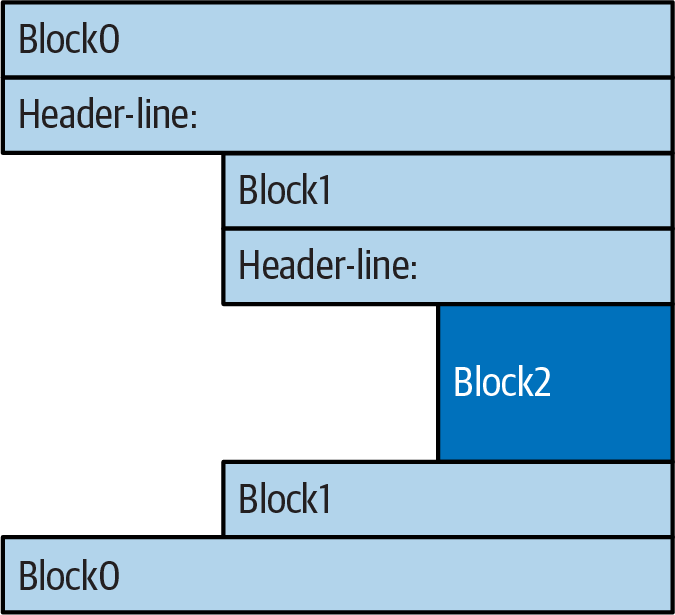
Figure 12-1. Nested blocks of code denoted by their indentation
Indenting code is quite natural in practice. For example, the following fully frivolous code snippet demonstrates common indentation errors in Python code, which are easy to spot because they’re visually askew:
x = 'Hack'# Error: first line indentedif 'tho' in 'python': print(x * 8) x += 'More!'# Error: unexpected indentationif x.endswith('re!'): x *= 2 print(x)# Error: inconsistent indentation
The properly indented version of this code looks like the following—even for an artificial example like this, proper indentation makes the code’s intent much more apparent:
x = 'Hack'
if 'tho' in 'python':
    print(x * 8)                    # Prints 8 Hack
    x += 'More!'
    if x.endswith('re!'):
        x *= 2
        print(x)                    # Prints HackMore!HackMore!
It’s important to know that the only major place in Python where whitespace matters is where it’s used to the left of your code, for indentation; in most other contexts, space can be coded or not. However, indentation is really part of Python syntax, not just a stylistic suggestion: all the statements within any given single block must be indented to the same level, or Python reports a syntax error. This is intentional—because you don’t need to explicitly mark the start and end of a nested block of code, some of the syntactic clutter found in other languages is unnecessary in Python.
As described in Chapter 10, making indentation part of the syntax model also enforces consistency, a crucial component of readability in structured programming languages like Python. In Python’s syntax, the indentation of each line of code unambiguously tells readers what it is associated with. This uniform and consistent appearance in turn makes Python code easier to maintain and reuse.
In the end, indentation is easier than you may think. Consistently indented code always satisfies Python’s rules, and most text editors (including IDLE) make it easy to follow Python’s model by automatically indenting as you type.
Avoid mixing tabs and spaces
That said, there’s one rule of thumb you should know: although you can use spaces or tabs to indent, it’s usually not a good idea to mix the two within a block—use one or the other. Technically, tabs count for enough spaces to move the current column number up to a multiple of 8, and your code will work if you mix tabs and spaces consistently. However, mixing tabs and spaces makes code difficult to read and change completely apart from Python’s syntax rules—tabs may look very different in the next programmer’s editor than they do in yours.
For these reasons, Python issues an error when a script mixes tabs and spaces for indentation inconsistently within a block (that is, in a way that makes it dependent on a tab’s equivalent in spaces). So don’t do that: when in Python do as Pythoneers do and use consistent indentation instead of block delimiters.
Statement Delimiters: Lines and Continuations
While blocks are indented, a statement in Python normally ends at the end of the line on which it appears. When a statement is too long to fit on a single line, though, a few special rules may be used to make it span multiple lines:
Statements may span multiple lines if you’re continuing an “open pair.” The code of a statement can always be continued on the next line if it’s enclosed in a
(),{}, or[]pair. For instance, expressions in parentheses and dictionary and list literals can span any number of lines; the statement doesn’t end until the end of the line containing the closing part of the pair (a),}, or]). Continuation lines—lines 2 and beyond of the statement—can start at any indentation level, but it’s best to align vertically for readability in some fashion.Statements may span multiple lines if they end in a backslash. Though best used as a fallback option, if a statement needs to span multiple lines, you can also add a backslash—a
\not embedded in a string literal or comment—at the end of the prior line to indicate you’re continuing on the next line. Because you can also continue by adding parentheses around most constructs, backslashes are rarely used today. This approach is also error-prone: accidentally forgetting a\may generate a syntax error or cause the next line to run independently.Statements may be combined if separated with a semicolon. Though uncommon, you can terminate a statement with a semicolon. This is sometimes used to squeeze more than one statement onto a single line by separating them with semicolons, but this works only when the combined statements are not compound.
Special rules for string literals. As we learned in Chapter 7, triple-quoted string blocks are designed to span multiple lines normally. We also learned in Chapter 7 that adjacent string literals are implicitly concatenated; when this is used in conjunction with the open-pairs rule mentioned earlier, wrapping this construct in parentheses allows it to span multiple lines.
Special Syntax Cases in Action
Here’s what a continuation line looks like using the open-pairs rule just described. Delimited constructs, such as lists in square brackets, can span across any number of lines:
L = ['app',
     'script',
     'program']                  # Open pairs may span lines
This also works for list comprehensions enclosed in []; anything in () (tuples, expressions, function argument and headers, and generators expressions); and anything in {} (dictionary and set literals and comprehensions). Some of these are tools we’ll study in later chapters, but this rule naturally covers most constructs that span lines in practice.
If you’re accustomed to using backslashes to continue lines, you can in Python, too, but it’s not common practice:
if a == b and c == d and   \
   d == e and f == g:
   print('old school')           # Backslashes allow continuations...
Because any expression can be enclosed in parentheses, you can usually use the open-pairs technique instead if you need your code to span multiple lines—simply wrap a part of your statement in parentheses:
if (a == b and c == d and
    d == e and e == f):
    print('new school')          # But parentheses usually do too, and are obvious
In fact, backslashes are generally discouraged, because they’re too easy to not notice and too easy to omit altogether. In the following, x is assigned 10 with the backslash, as intended; if the backslash is accidentally omitted, though, x is assigned 6 instead, and no error is reported (the +4 is a valid expression statement by itself). In a real program with a more complex assignment, this could be the source of a very obscure bug:
x = 1 + 2 + 3 \                  # Omitting the \ makes this very different!
+4
As another special case, Python allows you to write more than one noncompound statement (i.e., statements without nested statements) on the same line, separated by semicolons. Some coders use this form to save program file real estate, but it usually makes for more readable code if you stick to one statement per line for most of your work:
x = 1; y = 2; print(x) # More than one simple statement
As covered in Chapter 7, triple-quoted string literals span lines too. In addition, if two string literals appear next to each other, they are concatenated as if a + had been added between them—when used in conjunction with the open-pairs rule, wrapping in parentheses allows this form to span multiple lines. For example, the first of the following inserts newline characters at line breaks and assigns S to '\naaaa\nbbbb\ncccc', and the other two implicitly concatenate and assign S to 'aaaabbbbcccc'; as we also saw in Chapter 7, # comments are ignored in the second form but included in the string in the first, and f-strings require f prefixes even on continuations lines:
S = """
aaaa
bbbb
cccc"""

S = ('aaaa'
     'bbbb'              # Comments here are ignored, add \n if needed
     'cccc')
S = (f'{'a' * 4}'        # Also makes 'aaaabbbbcccc'
     f'{'b' * 4}'        # Use f'' on each f-string part
     r'cccc')            # And ditto for r'' raw-string parts
Finally, and also as a review, Python lets you move a compound statement’s body up to the header line, provided the body contains just simple (noncompound) statements. You’ll most often see this used for simple if statements with a single test and action, as in the interactive loops we coded in Chapter 10:
if 1: print('hello') # Simple statement on header line
With a little effort, you can combine some of these special cases to write Python code that is difficult to read, but it’s not generally recommended. As a rule of thumb, try to keep each statement on a line of its own, and indent all but the simplest of blocks. Six months down the road, you’ll be happy you did.
Truth Values Revisited
The notions of comparison, equality, and truth values were introduced in Chapter 9. Like syntax, though, the if is the first statement we’ve studied that actually uses these tools, so we’ll rehash these ideas with additional info. All told, Python’s Boolean operators are a bit different from their counterparts in some other languages. In Python:
All objects have an inherent Boolean true or false value.
Any nonzero number or nonempty object is true.
Zero numbers, empty objects, and the special object
Noneare considered false.Comparisons and equality tests are applied recursively to data structures.
Comparisons and equality tests return
TrueorFalse(custom versions of1and0).Boolean
andandoroperators return a true or false operand object.Boolean operators stop evaluating (short circuit) as soon as a result is known.
The if statement takes action on truth values, but Boolean operators are used to combine the results of other tests in richer ways to produce new truth values. More formally, there are three Boolean expression operators in Python:
X and Y- Is true if both
XandYare true—and returns eitherXorY X or Y- Is true if either
XorYis true—and returns eitherXorY not X- Is true if
Xis false—and returns eitherTrueorFalse
Here, X and Y may be any truth value, or any expression that returns a truth value (e.g., an == equality test, an in membership check, and so on). Boolean operators are typed out as words in Python (instead of C’s &&, ||, and !), and shouldn’t be confused with Python’s &, |, and ^ operators that work on numbers and sets (and dictionaries).
Most uniquely, Boolean and and or operators return a true or false object in Python, not the values True or False. Let’s turn to a few examples to see how this works:
>>>2 < 3, 3 < 2# Less than: return True or False (1 or 0)(True, False)
Magnitude comparisons such as these return True or False as their truth results, which, as we learned in Chapters 5 and 9, are really just custom versions of the integers 1 and 0 (they print themselves differently but are otherwise the same).
Boolean operators and and or, on the other hand, always return an object—either the object on the left side of the operator or the object on the right. If we test their results in if or other statements, they will be as expected (remember, every object is inherently true or false), but we won’t get back a simple True or False.
For or tests, Python evaluates the operand objects from left to right and returns the first one that is true. Moreover, Python stops at the first true operand it finds. This is usually called short-circuit evaluation, as determining a result short-circuits (terminates) the rest of the expression as soon as the result is known:
>>>2 or 3, 3 or 2# Return left operand if true(2, 3)# Else, return right operand (true or false)>>>[] or 33 >>>[] or {}{}
In the first line of the preceding example, both operands (2 and 3) are true (i.e., are nonzero), so Python always stops and returns the one on the left—which determines the result because true or anything is always true. In the other two tests, the left operand is false (an empty object), so Python simply evaluates and returns the object on the right—which may have either a true or a false value when tested, but determines the result of the or at large.
Python and operations also stop (short circuit) as soon as the result is known. However, in this case Python evaluates the operands from left to right and stops if the left operand is a false object because it determines the result—false and anything is always false:
>>>2 and 3, 3 and 2# Return left operand if false(3, 2)# Else, return right operand (true or false)>>>[] and {}[] >>>3 and [][]
Here, both operands are true in the first line, so Python evaluates both sides and returns the object on the right—which determines the result of the and. In the second test, the left operand is false ([]), so Python stops and returns it as the and result without ever running the code on the right side. In the last test, the left side is true (3), so Python evaluates and returns the object on the right—which happens to be a false [].
The net effect of all this apparent nonsense is the same as in most other languages—you get a value that is logically true or false if tested in an if or while according to the normal definitions of or and and. However, in Python Booleans return either the left or the right object, not a simple integer flag.
This behavior of and and or may seem esoteric at first glance, but see this chapter’s sidebar “Why You Will Care: Booleans” for examples of how it is sometimes used to advantage in Python coding. The next section also shows a common way to leverage this behavior, and its more mnemonic alternative.
The if/else Ternary Expression
One common role for the prior section’s Boolean operators is to code an expression that runs the same as an if statement. To get started, consider the following very common code, which sets A to either Y or Z, based on the truth value of X:
if X:
    A = Y
else:
    A = Z
Sometimes, though, the items involved in such a statement are so simple that it seems like overkill to spread them across four lines. At other times, we may want to nest such a construct in a larger statement instead of assigning its result to a variable separately. For such reasons (and possibly to appease ex-C programmers), Python includes a “ternary” (three-part) expression that allows us to say the same thing in just one line of code:
A = Y if X else Z
This expression has the exact same effect as the preceding four-line if statement, but it’s simpler to code. In some sense, it is to if statements what the prior chapter’s := is to assignment statements: an expression equivalent with more limited syntax and narrower roles, which is nevertheless useful in some code. For example, you can’t code full statements in the parts of this expression, but you can embed it anywhere that Python allows an expression.
As in the statement equivalent, the ternary expression runs expression Y only if X turns out to be true and runs expression Z only if X turns out to be false. That is, it short-circuits, just like the Boolean operators described in the prior section, running just Y or Z but not both. Here are some examples of it in action:
>>>tone = 'formal'>>>a = 'code' if tone == 'formal' else 'hack'>>>a'code' >>>tone = 'informal'>>>a = 'code' if tone == 'formal' else 'hack'>>>a'hack'
The same effect can often be achieved by a careful combination of and and or operators, because they return either the object on the left side or the object on the right as the preceding section described. The ternary expression in the following works the same as the Boolean expression below it:
A = Y if X else Z# Ternary if/elseA = ((X and Y) or Z)# and+or equivalent
This works, but there is a catch—you have to be able to assume that Y will be Boolean true. If that is the case, the effect is the same: the and runs first and returns Y if X is true; if X is false the and skips Y and returns false X, and the or simply returns Z. In other words, we get “if X then Y else Z”—which is exactly what the ternary expression says, albeit in a different order.
The and/or combination form also seems to require a “moment of great clarity” to understand the first time you see it, which qualifies as an argument against its deployment. As a guideline: use the equivalent and more robust and mnemonic if/else expression when you need this structure, or use a full if statement when the parts are nontrivial.
As a side note (and just in case this section hasn’t made your head explode yet), using the following expression is similar to the prior Boolean and ternary expressions, because the bool function will translate any X into the equivalent of integer 1 or 0 (i.e., True or False), which can then be used as an offset to pick true and false values from a list:
A = [Z, Y][bool(X)]
Truth be told, the bool is not required when X already yields a truth value, but is when X is an object like a string:
>>>['hack', 'code'][tone == 'formal']'hack' >>>['hack', 'code'][bool('formal')]'code'
But alas, this isn’t exactly the same, because Python will not short-circuit—it will always run both Z and Y, regardless of the value of X. Because of such complexities, you’re better off using the simpler a more easily digested if/else expression. Even then, common sense goes a long way here as always. Like most nestable tools, the ternary expression is naturally prone to yield code that’s tough to read. If you find yourself working hard at packing logic into one, consider taking a moment to consider how hard it will be to unpack later. Your coworkers will be glad you did.
Chapter Summary
In this chapter, we studied the Python if statement. Additionally, because this was our first compound and logical statement, we reviewed Python’s general syntax rules and explored the operation of truth values and tests in more depth than we were able to previously. Along the way, we also looked at how to code multiple-choice logic in Python with both dictionaries and match, learned about the if/else ternary expression, and explored Boolean operators.
The next chapter continues our look at procedural statements by expanding the coverage of while and for loops. There, you’ll learn about alternative ways to code loops in Python, some of which may be better than others. Before that, though, here is the usual chapter quiz to review before moving ahead.
Test Your Knowledge: Quiz
How might you code a multiple-choice branch in Python?
How can you code an
if/elsestatement as an expression in Python?How can you make a single statement span many lines?
What do the words
TrueandFalsemean?What does “short circuiting” mean, and where does it crop up?
Test Your Knowledge: Answers
An
ifstatement with multipleelifclauses is often the most straightforward way to code a multiple-choice branch, though not necessarily the most concise or flexible. Dictionary indexing can often achieve the same result, especially if the dictionary contains callable functions coded withdefstatements orlambdaexpressions. As of Python 3.10, thematchstatement provides explicit syntax for multiple-choice selections; it works well in basic roles but can’t code logic as general as that in theifstatement and comes with substantial heft in support of structural pattern matching, a very different tool.The expression form
Y if X else ZreturnsYifXis true, orZotherwise; it’s the same as a four-lineifstatement and works well in limited contexts, but can’t code actions as rich as those in the fullifstatement, and has potential for producing code that’s hard to read. Theand/orcombination (((X and Y) or Z)) can work the same way, but it’s more obscure and requires that theYpart be true.Wrap up the statement in an open syntactic pair (
(),[], or{}), and it can span as many lines as you like; the statement ends when Python sees the closing (right) half of the pair, and lines 2 and beyond of the statement can begin at any indentation level. Backslash continuations work, too, but are broadly discouraged in the Python world.This is partly a review from Chapter 9, but is reinforced in the sidebar at the end of this chapter.
TrueandFalseare just custom versions of the integers1and0, respectively: they always stand for Boolean true and false values in Python. They’re available for use in truth tests and variable initialization and are printed for expression results at the interactive prompt. In all these roles, they serve as a more mnemonic and hence readable alternative to1and0.Short circuiting happens when Python stops evaluating an expression early, because its result can already be determined from the expression so far. It comes up in
andandorexpressions, which run their right side only if their left sides don’t determine their results. It also comes up in theif/elseternary expression, which runs either its true or false parts, depending on its test part’s logical result.