Chapter 17. Scopes
The preceding chapter introduced basic function definitions and calls. As we saw, Python’s core function model is simple to use, but even simple function examples quickly lead to questions about the meaning of variables in code. This chapter moves on to present the details behind Python’s scopes—the places where variables are defined and looked up. Like module files, scopes help prevent same-name clashes across a program’s code: names defined in one program unit don’t interfere with names in another.
As you’ll learn here, the place where a name is assigned in your code is crucial to determining what the name means. You’ll also find that scope usage can have a major impact on program maintenance effort; overuse of globals, for example, is a generally bad idea. On the plus side, you’ll also learn that scopes can provide a way to retain state information between function calls, and they offer an alternative to classes in some roles.
Python Scopes Basics
Now that we’re starting to write our own functions, we need to get more formal about what names mean in Python. When we use a name in a program, Python creates, changes, or looks up the name in what is known as a namespace—a place where names live. And when we talk about names in relation to code, namespaces correspond to scopes: the location of a name’s assignment in your source code determines the scope of the name’s visibility in your program.
Just about everything related to names, including scope classification, happens at assignment time in Python. As we’ve seen, names in Python spring into existence when they are first assigned values, and they must be assigned before they are used. Because names are not declared ahead of time, Python uses the location of the assignment of a name to associate it with (i.e., bind it to) a particular namespace and scope. In other words, the place where you assign a name in your source code determines the namespace it will live in, and hence its scope of visibility.
Besides packaging code for reuse, functions add an extra namespace layer to your programs to minimize the potential for collisions among variables of the same name—by default, all names assigned inside a function are associated with that function’s namespace, and no other. This rule means that:
Names assigned inside a
defcan be seen only by the code within thatdef. You cannot even refer to such names from outside the function.Names assigned inside a
defdo not clash with variables outside thedef, even if the same names are used elsewhere. A nameXassigned outside a givendef(i.e., in a differentdefor at the top level of a module file) is a completely different variable from a nameXassigned inside thatdef.Names assigned in a
lambdawork the same way, though assignment in their expressions can happen only for arguments and:=named assignments, and is much less common than indef.
In all cases, the scope of a variable (where it can be used) is wholly determined by where it is assigned in your source code, and has nothing to do with which functions call which. In fact, as you’ll learn in this chapter, variables may be assigned in three different places, corresponding to three different scopes:
If a variable is assigned inside a
deforlambda, it is local to that function.If a variable is assigned in an enclosing
deforlambda, it is nonlocal to nested functions.If a variable is assigned outside all
defs andlambdas, it is global to the entire file.
We call this lexical scoping because variable scopes are determined entirely by the locations of the variables in the source code of your program files, not by function calls. Hence, a simple visual inspection is enough to make the call.
For example, in the following module file, the X = 99 assignment creates a global variable named X (visible everywhere in this file), but the X = 88 assignment creates a local variable X (visible only within the def statement). If we refer to X inside the function, we’ll get the function’s X, not the global:
X = 99# Global (module) scope Xdef func(): X = 88# Local (function) scope X: a different variable
Even though both variables are named X, their scopes make them different. The net effect is that function scopes help to avoid name clashes in your programs and help to make functions more self-contained program units—their code need not be concerned with names used elsewhere.
Scopes Overview
Before we started writing functions, none of the code we wrote was nested in a def, so the names we used either lived in a module or were built-ins predefined by Python like open and zip. This includes code typed at the REPL: the interactive prompt is technically a module named __main__ that prints results and doesn’t correspond to a real file; in all other ways, though, it’s like the top level of a module file.
Functions, though, provide nested namespaces (scopes) that localize the names they use, such that names inside a function won’t clash with those outside it (in a module or another function). Specifically, functions define a local scope and modules define a global scope with the following properties:
The enclosing module is a global scope. Each module is a global scope—that is, a namespace in which variables created by assignment at the top level of the module file live. Global variables become attributes of a module object to the outside world after imports but can also be used as simple variables within the module file itself.
The global scope spans a single file only. Don’t be fooled by the word “global” here—names at the top level of a file are global to code within that single file only. There is no notion of an all-encompassing global scope that corresponds to user code in Python (built-ins are truly global, but not user defined). Instead, names are partitioned into modules, and you must always import a module explicitly if you want to be able to use the names its file defines. When you hear “global” in Python, think “module.”
Assigned names are local unless declared global or nonlocal. By default, all the names assigned inside a function definition are put in its local scope—the namespace associated with the function itself. To assign a name that lives at the top level of the module enclosing a function, declare it in a
globalstatement inside the function. To assign a name that lives in an enclosingdefinstead, declare it in anonlocalstatement. Becauselambdabodies are limited to expressions, these two statements are just fordef.All other names are enclosing function locals, globals, or built-ins. Names not assigned a value in the function definition are assumed to be either locals defined in a physically enclosing function, globals that live in the enclosing module’s namespace, or built-ins in the predefined built-ins module that Python provides. Enclosing scopes can arise for any
defandlambdacombo, thoughdefcan’t be coded inlambda.Each call to a function creates a new local scope. Every time you call a function, you create a new local scope—that is, a namespace in which the names created inside that function will live, barring
globalornonlocalstatements. You can think of eachdefstatement andlambdaexpression as defining a new local scope, but the local scope actually corresponds to a function call, for reasons the next bullet explains.Per-call scopes matter in recursion and closures. It’s crucial that each active call receive its own copy of the function’s local variables when using recursion, an advanced technique that allows functions to loop by calling themselves, and noted briefly in Chapter 9 for comparisons. Recursion is useful in functions we write as well, to process structures whose shapes can’t be predicted ahead of time; we’ll explore it more fully in Chapter 19. Per-call scopes are also required for the closure functions covered ahead here: each call gets a fresh packet of the function’s locals, which can remember state-information objects to be used later.
Beyond those basics, there are three subtleties worth underscoring. First, as noted, code typed at the Python interactive prompt lives in a module, too, and follows the normal scope rules: names assigned there are global variables, accessible to the entire interactive session. You’ll learn more about modules in the next part of this book.
Second, also bear in mind that any type of assignment classifies a name as local or global, based on where the assignment appears. This includes = statements and := expressions; module names in import; function and argument names in def; names in class covered later; and so on. If you assign a name in any way within a function, it will be local to that function by default. This includes its arguments listed in its header, but also names in its body’s code.
Third, in-place changes to objects do not classify names as locals; only actual name assignments do. For instance, if the name L is assigned to a list at the top level of a module, a statement L = X within a function will classify L as a local, but L.append(X) will not. In the latter case, we are changing the list object that L references, not L itself—hence, L is found in the global scope as usual, and Python happily modifies it without requiring a global declaration. As usual, it helps to keep the distinction between names and objects clear: changing an object is not an assignment to a name.
Name Resolution: The LEGB Rule
If the prior section sounds complicated, it really boils down to three simple rules. Within a def statement:
Name assignments create or change local names by default.
Name references search at most four scopes: local, then enclosing functions (if any), then global, then built-in.
Names declared in
globalandnonlocalstatements map assigned names to enclosing module and function scopes, respectively.
The same goes for lambda, except for the last bullet: it doesn’t support statements.
In other words, all names assigned inside a function def statement or lambda expression are locals by default. Functions can freely use names assigned in syntactically enclosing functions and the global scope, but they must declare such nonlocals and globals in order to change them.
Python’s name-resolution scheme is usually called the LEGB rule, after the names of the scopes it searches:
When you use an unqualified name (not after a “.”) inside a function, Python searches up to four scopes—the local (L) scope of the function itself, then the local scopes of any enclosing (E)
defs andlambdas, then the global (G) scope of surrounding module, and finally the built-in (B) scope—and stops at the first place the name is found. If the name is not found during this search, Python reports an error.When you assign a name inside a function (instead of just referring to it in an expression), Python always creates or changes the name in the assigner’s local scope, unless it’s declared to be global or nonlocal there.
When you assign a name outside any function (i.e., at the top level of a module file, or at the interactive prompt), the local and global scope are one and the same—the module’s namespace.
Because names must be assigned before they can be used (as we saw in Chapter 6), there are no automatic components in this model: assignments always determine name scopes unambiguously. Figure 17-1 illustrates Python’s four scopes and LEGB rule. Note that the second scope lookup layer, E—the scopes of enclosing defs or lambdas—can technically correspond to more than one lookup level. This layer only comes into play when you nest functions within functions for reasons you’ll meet ahead, and is enhanced by the nonlocal statement.1
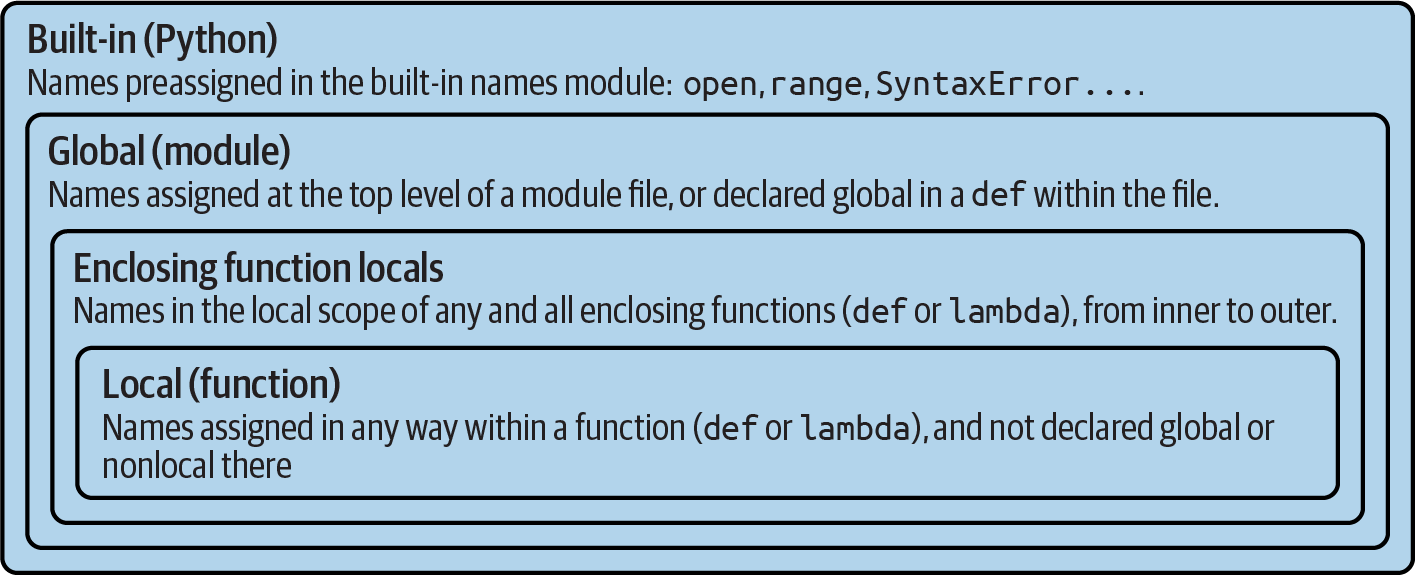
Figure 17-1. The LEGB scope lookup rule for names
Also keep in mind that these rules apply only to simple variable names (e.g., name). In Part V and Part VI, you’ll see that qualified attribute names (e.g., object.name) live in particular objects and follow a completely different set of lookup rules than those covered here. References to attribute names following periods (.) search one or more objects, not scopes, and in fact may invoke something called inheritance in Python’s OOP model; more on this in Part VI.
Preview: Other Python scopes
Though obscure at this point in the book, there are technically three more scopes in Python—temporary loop variables in comprehensions, exception reference variables in try handlers, and local scopes in class statements. The first two of these are special cases that rarely impact real code, and the third falls under the LEGB umbrella rule.
Importantly, most statement blocks and other constructs do not localize the names used within them. This includes loop variables in for loop statements, and the targets of := named assignment which works the same as all others with regard to scopes. There are, however, some boundary cases whose variables are not available to (and do not clash with) surrounding code, and which involve topics covered in full elsewhere in this book:
Comprehension loop variables—the variable (or variables)
Xin[X for X in I]used to refer to the current iteration item in comprehension expressions. Because they might clash with other names and reflect internal state in generators, such names are local to the expression itself in all comprehension forms: list, dictionary, set, and generator. By contrast,forloop statements never localize their loop variable (e.g.,Xinfor X in I:) to the statement block as noted, despite the similarity. Moreover, names assigned by:=within a comprehension do leak out to the enclosing scope, per the info and demos in Chapter 20.Exception variables—the variable
Xinexcept E as Xused to reference the raised exception in atrystatement handler. Because this might defer garbage collection’s memory recovery, such variables are local to thatexceptblock, and in fact are removed from the containing scope when the block is exited (even if you’ve used them earlier in your code!). You’ll learn all abouttrystatements in Chapter 34.Named-assignments in
lambda—the variableXinX := Yused in assignment expressions. In terms of scopes, the:=works the same as an unnested=assignment statement in general. Keep in mind, though, that alambdafunction expression creates a new local function scope just like adefstatement. Hence, any names assigned by a:=nested in alambdaare local variables that can be used within the body of thelambdaitself, but are not available to code outside thelambdaexpression. That said, this is likely a rare coding pattern in most code (and pushes the envelope on complexity). For a refresher on:=, see Chapter 11.
Most of these contexts augment the LEGB rule, rather than modifying it. Loop variables assigned in a comprehension, for example, are simply bound to a further nested and special-case local scope; all other names referenced within these expressions follow the usual LEGB lookup rules.
It’s also worth noting that the class statement you’ll meet in Part VI creates a new local scope, too, for the names assigned inside the top level of its block. As for def, names assigned inside a class don’t clash with names elsewhere, and follow the LEGB lookup rule, where the class block is the L level. As for imported modules, these class-local names also morph into class object attributes after the class statements ends. For all practical purposes, classes are a local scope (despite some rare border cases which likely qualify as glitches, and be safely omitted here).
Unlike functions, though, class names are not created per call: class object calls generate instances, which inherit names assigned in the class and record per-object state as per-instance attributes of their own. As you’ll also learn in Chapter 29, although the LEGB rule is used to resolve names used in both the top level of a class itself as well as the top level of method functions nested within it, classes themselves are skipped by scope lookups—their names must be fetched as object attributes. Hence, because Python searches enclosing functions for referenced names, but not enclosing classes, the LEGB rule sketched in Figure 17-1 still applies to OOP code.
Scopes Examples
But enough theory! Let’s step through a live example that demos scope ideas. Suppose we wrote the code in Example 17-1 and saved it in a module file named scopes101.py.
Example 17-1. scopes101.py
# Global scopeX = 99# X and func assigned in module: globaldef func(Y):# Y and Z assigned in function: locals# Local scopeZ = X + Y# X is a global when referenced herereturn Z func(1)# func in module: result=100 (not printed)
To see this example’s result, import and call its function; the file’s global func is a module attribute to importers (be sure to run this in the same folder as the file if it matters for imports in your REPL, as introduced in Chapter 3):
>>>import scopes101>>>scopes101.func(1)100
This module and the function it contains use a number of names to do their business. Applying Python’s scope rules, we can classify these names as follows:
- Global names:
X,func Xis global because it’s assigned at the top level of the module file; it can be referenced inside the function as a simple unqualified variable without being declared global.funcis global for the same reason; thedefstatement makes a function object and assigns it to the namefuncat the top level of the module.- Local names:
Y,Z YandZare local to the function (and exist only while the function runs) because they are both assigned values in the function definition:Zby virtue of the=statement, andYbecause arguments are always passed by assignment. Hence both are assigned during a function call, and both are locals.
The underlying rationale for this name-segregation scheme is that local variables serve as temporary names that you need only while a function is running. For instance, in the preceding example, the argument Y and the addition result Z exist only inside the function; these names don’t interfere with the enclosing module’s namespace—or any other function, for that matter. In fact, local variables are removed from memory when the function call exits, and objects they reference may be garbage-collected if not referenced elsewhere. This is an automatic, internal step, but it helps minimize memory requirements.
The local/global distinction also makes functions easier to understand, as most of the names a function uses appear in the function itself, not at an arbitrarily distant place in a module file. Also, because you can be sure that local names will not be changed by some remote function in your program, they tend to make programs easier to debug and modify. In the following sort of code, for instance, each function’s variable cannot be changed—or even seen—anywhere else:
def func1():
    X = 'hack'       # This X...

def func2():
    X = 'code'       # ...is not the same as this X
The net effect helps make functions self-contained units of software, by design.
The Built-in Scope
We’ve been talking about the built-in scope in the abstract, but it’s a bit simpler than you may think. Really, the built-in scope is just a built-in module called builtins, but you have to import builtins to query built-ins because the name builtins is not itself a built-in...
Yes, seriously! The built-in scope is implemented as a standard library module named builtins, but that name itself is not placed in the built-in scope, so you have to import it in order to inspect it. Once you do, you can run a dir call to see which names are predefined (run this on your own for full fidelity: it can vary across Python versions):
>>>import builtins>>>dir(builtins)['ArithmeticError', 'AssertionError', 'AttributeError', 'BaseException', 'BaseExceptionGroup', 'BlockingIOError', 'BrokenPipeError', 'BufferError', …many more names omitted: 158 total in 3.12… 'ord', 'pow', 'print', 'property', 'quit', 'range', 'repr', 'reversed', 'round', 'set', 'setattr', 'slice', 'sorted', 'staticmethod', 'str', 'sum', 'super', 'tuple', 'type', 'vars', 'zip']
The names in this list constitute the built-in scope in Python. Roughly the first half are built-in exceptions, and the second half are built-in functions. Also in this list are the special names None, True, False, and Ellipsis we met earlier. Because Python automatically searches this module last in its LEGB lookup (it’s B), you get all the names in this list “for free.” That is, you can use them without importing any modules. Thus, there are really two ways to refer to a built-in function—by taking advantage of the LEGB rule, or by manually importing the builtins module:
>>>zip# The normal way, per LEGB's B<class 'zip'> >>>import builtins# The hard way: for customizations>>>builtins.zip<class 'zip'> >>>zip is builtins.zip# Same object, different lookup routesTrue
The second of these approaches, though more to type, can be useful in advanced roles you’ll meet in the sidebar “Why You Will Care: Customizing open” at the end of the chapter.
Redefining built-in names: For better or worse
Careful readers might notice that because the LEGB lookup procedure takes the first occurrence of a name that it finds, names in the local scope may override variables of the same name in both the global and built-in scopes, and global names may override built-ins. A function can, for instance, create a local variable called open by assigning to it:
def hider():
    open = 'text'              # Local variable, hides built-in here (L before B)
    …
    open('data.txt')           # Error: this no longer opens files in this scope!
However, this will hide the built-in function called open that lives in the built-in (outer) scope, such that the name open will no longer work within the function to open files—it’s now a string, not the opener function. This is sometimes called “shadowing” a built-in. This isn’t a problem if you don’t need to open files in this function, but triggers an error if you attempt to open through this name in this scope; your open is no longer the built-in open.
This can even occur more simply at the interactive prompt, which works as a global, implicit-module scope:
>>>open = 99# Assign in global scope, hides built-in here too
That being said, there is nothing inherently wrong with using a built-in name for variables of your own, as long as you don’t need the original built-in version. After all, if these were truly off limits, we would need to memorize the entire built-in names list and treat all its names as reserved. With some 150 usable names in this module in Python 3.12, that would be far too restrictive and daunting:
>>> len(dir(builtins)), len([x for x in dir(builtins) if not x.startswith('__')])
(158, 150)
In fact, there are times in advanced programming where you may really want to replace a built-in name by redefining it in your code—to define a custom open that augments access attempts, for instance (again, more in the sidebar at the end of the chapter). Exception: the special names None, True, and False in the built-in scope are also treated as reserved words today, so they can no longer be reassigned (fun though it once was!). All other built-in names, though, are fair game.
Nevertheless, redefining a built-in name is often a bug, and a nasty one at that, because Python will not issue a warning message about it. You may find tools on the web that can warn you of such mistakes, but knowledge may be your best defense on this point: don’t redefine a built-in name you need. If you accidentally reassign a built-in name at the interactive prompt this way, though, you can either restart your session or run a del name statement to remove the redefinition from your scope, thereby restoring the original in the built-in scope per LEGB.
Note that functions can similarly hide global variables of the same name with locals, but this is more broadly useful, and in fact is much of the point of local scopes—because they minimize the potential for name clashes, your functions are self-contained namespaces:
X = 88# Global Xdef func(): X = 99# Local X: hides global, but we want this herefunc() print(X)# Prints 88: unchanged
Here, the assignment within the function creates a local X that is a completely different variable from the global X in the module outside the function. As a consequence, though, there is no way to change a name outside a function without adding a global or nonlocal declaration to the def; the next section takes up the former.
Note
More built-in tongue twisters: Technically, the name __builtins__ is preset in most global scopes, including the interactive session, to reference the module known as builtins, so you can often use __builtins__ without an import, but cannot run an import on the name __builtins__ itself—it’s a preset variable, not a module’s name. Thus, builtins is __builtins__ is True after you import builtins. The upshot is that we can often inspect the built-in scope by simply running dir(__builtins__) sans imports, but are advised to use builtins for real work and customization. Who said documenting this stuff was easy?
The global Statement
The global statement and its nonlocal cousin are the only declaration statements in Python that are actually used by Python (for contrast, see Chapter 6’s discussion of unused type hinting). They are not type or size declarations, though; they are namespace declarations. The global statement, for instance, tells Python that a function plans to change one or more global names—that is, names that live in the enclosing module’s scope (namespace).
We’ve talked about global in passing already. Here’s a summary:
Global names are variables assigned at the top level of the enclosing module file.
Global names must be declared only if they are assigned within a function.
Global names may be referenced within a function without being declared, per the LEGB rule.
In other words, global allows us to change names that live outside a def at the top level of a module file. As you’ll see later, the nonlocal statement is almost identical but applies to names in an enclosing def’s local scope, rather than names in the enclosing module.
The global statement, usable in def but not lambda, simply consists of the reserved word global, followed by one or more names separated by commas. All the listed names will be mapped to the enclosing module’s scope when assigned or referenced within the function body. For instance, the following is a takeoff on the preceding example:
X = 88# Global Xdef func(): global X X = 99# Global X: outside deffunc() print(X)# Prints 99
We’ve added a global declaration to the example here, such that the X inside the def now refers to the X outside the def; they are the same variable this time, so changing X inside the function changes the X outside it. Here is a slightly more involved example of global at work:
y, z = 1, 2# Global variables in moduledef all_global(): global x# Declare globals assignedx = y + z# No need to declare y or z: LEGB rule
Here, x, y, and z are all globals inside the function all_global. Names y and z are global because they aren’t assigned in the function, and x is global because it was listed in a global statement to map it to the module’s scope explicitly. Without the global here, x would be considered local by virtue of the assignment.
Notice that y and z are not declared global; Python’s LEGB lookup rule finds them in the module (G) automatically. Also notice that x does not even exist in the enclosing module before the function runs; in this case, the first assignment in the function creates x in the module. All of which works when needed, but you really should try to avoid using globals like this whenever possible—as the next section will explain.
Program Design: Minimize Global Variables
Functions in general, and global variables in particular, raise some larger design questions. How, for example, should functions communicate? Although some answers will become more apparent when you begin writing larger functions of your own, a few guidelines up front might spare you from problems later. In general, functions should rely on arguments and return values instead of globals, but this may not at all be obvious to newcomers to programming.
By default, names assigned in functions are locals, so if you want to change names outside functions you have to write extra code (e.g., global statements). This is deliberate—you have to say more to do the potentially “wrong” thing. Although there are times when globals are useful (and even required), variables assigned in a def are local by default because that is normally the best policy. Changing globals can lead to well-known software-engineering problems: because the variables’ values are dependent on the order of calls to arbitrarily distant functions, programs can become difficult to debug, or understand at all.
Consider this module file, for example, which is presumably imported and used elsewhere:
X = 99

def func1():
    global X              # Change global X when called
    X = 88

def func2():
    global X              # But so does this, and when?
    X = 77
Now, imagine that it is your job to modify or reuse this code. What will the value of X be here? Really, that question has no meaning unless it’s qualified with a point of reference in time—the value of X is timing-dependent, as it depends on which function was called last (something we can’t tell from this file alone).
The net effect is that to understand this code, you have to trace the flow of control through the entire program. Hence, if you need to reuse or modify the code, you have to keep the entire program in your head all at once. In fact, you can’t really use one of these functions without bringing along the other. They are dependent on—that is, coupled with—the global variable. And that is the problem with globals: they generally make code more difficult to understand and reuse than code consisting of self-contained functions that rely on locals.
On the other hand, short of using tools like the nested scope closures covered ahead or OOP with classes covered later, global variables are the most basic way to retain shared state information—information that a function needs to remember for use the next time it is called. Local variables disappear when the function returns, but globals do not. As you’ll see later, other techniques can achieve this, too, and allow for multiple copies of the retained information; but they are more complex than pushing values out to the global scope for retention in simple cases where this applies.
Moreover, some programs designate a single module to collect shared globals; as long as this is expected, it is not as harmful. Programs that use multithreading for parallel processing also commonly depend on global variables—they become shared memory between functions running in parallel threads, and so act as a communication device.2
For now, though, and especially if you are relatively new to programming, avoid the temptation to use globals whenever you can—they tend to make programs difficult to understand and reuse, and won’t work for cases where one copy of saved data is not enough. That’s why they are not the default in Python. Try to communicate with passed-in arguments and return values instead. Six months from now, both you and your coworkers may be glad you did.
Program Design: Minimize Cross-File Changes
While we’re on the subject of globals, here’s another related design note: although we can change global variables in another file directly, we usually shouldn’t. Module files were introduced in Chapter 3 and are covered in depth in the next part of this book, but their basics are simple. To demo their relationship to scopes, consider these two module files:
# first.pyX = 99# This code doesn't know about second.py# second.pyimport first print(first.X)# OK: references a name in another filefirst.X = 88# But changing it can be too subtle and implicit
The first defines a variable X, which the second prints and then changes by assignment. Notice that we must import the first module into the second to get to its variable at all—as we’ve learned, each module is a self-contained namespace (package of variables), and we must import one module to see inside it from another. That’s the main purpose of modules: by segregating variables on a per-file basis, they avoid name collisions across files, in much the same way that local variables avoid name clashes across functions.
Really, though, in terms of this chapter’s topic, the global scope of a module file becomes the attribute namespace of the module object once it is imported—importers automatically have access to all of the file’s global variables, because a file’s global scope morphs into an object’s attribute namespace when it is imported.
After importing the first module, the second module prints its variable and then assigns it a new value. Referencing the module’s variable to print it is fine—this is how modules are linked together into a larger system normally. The problem with the assignment to first.X, however, is that it is far too implicit: whoever’s charged with maintaining or reusing the first module probably has no clue that some arbitrarily far-removed module on the import chain can change X at runtime. In fact, the second module may be in a different folder, and so difficult to notice at all.
Although such cross-file variable changes are always possible in Python, they are usually much more subtle than you will want. Again, this sets up too strong a coupling between two components—because the files are both dependent on the value of the variable X, it’s difficult to understand or reuse one file without the other. Such implicit cross-file dependencies can lead to inflexible code at best, and surprising bugs at worst.
Here again, and generally speaking, don’t do that—the better way to communicate across file boundaries is to call functions, passing in arguments and getting back return values. In this specific case, we would probably be better off coding an accessor function to manage the change:
# first.pyX = 99 def setX(new):# Accessors make external changes explicitglobal X# And can manage access in a single placeX = new# second.pyimport first first.setX(88)# Call the function instead of changing directly
This requires more code and may seem like a trivial change, but it makes a huge difference in terms of readability and maintainability—when a person reading the first module by itself sees a function, that person will know that it is a point of interface and will expect the change to the X. In other words, it removes the element of surprise that is rarely a good thing in software projects. Although we cannot prevent cross-file changes from happening (sans obscure hacks that we’ll omit here), common sense dictates that they should be minimized unless widely known across the program.
Other Ways to Access Globals
Interestingly, because global-scope variables morph into the attributes of a loaded module object, we can emulate the global statement by importing the enclosing module and assigning to its attributes, as in the module file in Example 17-2. Code in this file accesses its enclosing module, first by importing it, and then by indexing the sys.modules dictionary that records all loaded modules and is used in advanced roles (there’s more on this dictionary in Part V).
Example 17-2. thismod.py
"Change a global three ways" var = 99# Global variable == module attributedef local(): var = 0# Change local vardef glob1(): global var# Declare global (normal)var += 1# Change global vardef glob2(): var = 0# Change local varimport thismod# Import myselfthismod.var += 1# Change global vardef glob3(): var = 0# Change local varimport sys# Import system tablethismod = sys.modules['thismod']# Get module object (or use __name__)thismod.var += 1# Change global vardef test(): print(var) local(); glob1(); glob2(); glob3() print(var)
When we import and call this module’s test to invoke its other functions, this adds 3 to the global variable var—only its first function, local, does not impact the global:
>>>import thismod>>>thismod.test()99 102 >>>thismod.var102
All these global-access techniques work, and illustrate the equivalence of the global scope to module attributes, but they’re noticeably more work than using the global statement to make your intentions explicit.
As we’ve seen, global allows us to easily change names in a module outside a function. It has a close relative named nonlocal that can be used to change names in enclosing functions, too—but to understand how that can be useful, we first need to explore function nesting in general, the topic we turn to next.
Nested Functions and Scopes
So far, this chapter has largely omitted one part of Python’s scope rules on purpose, because it’s relatively uncommon to encounter it in practice. However, it’s time to take a deeper look at layer E in the LEGB lookup rule. This layer was added during Python 2.X’s reign. It takes the form of the local scopes of any and all enclosing function’s local scopes. Enclosing scopes are sometimes also called statically nested scopes. Really, the nesting is a lexical one—nested scopes correspond to physically and syntactically nested code structures in your program’s source code text.
Nested Scopes Overview
With the addition of nested function scopes, variable lookup rules become slightly more complex. Within a function:
A name reference (
X) looks for the nameXfirst in the current local scope (function); then in the local scopes of any lexically enclosing functions in your source code, from inner to outer; then in the current global scope (the module file); and finally in the built-in scope (which we’ve seen means the built-in modulebuiltins).globaldeclarations in adefmake the search begin in the global (module file) scope instead.A name assignment (e.g.,
X = value) creates or changes the nameXin the current local scope, by default. IfXis declaredglobalwithin the function, the assignment creates or changes the nameXin the enclosing module’s scope instead. If, on the other hand,Xis declarednonlocalwithin adeffunction, the assignment changes the nameXin the local scope of the closest enclosing function which assigns the same name.
Notice that the global declaration still maps variables to the enclosing module. When nested functions are present, variables in enclosing functions may be referenced, but require nonlocal declarations to be changed. Also note that, unlike global, nonlocal does not create a name in an enclosing def if it’s not assigned there; nonlocal makes sense only if the variables it names are also assigned by an enclosing def—and is an error to use otherwise.
This section is primarily concerned with the first bullet in the preceding list: nested scope references. We’ll explore nested assignments and nonlocal in a moment, but first we need to grok function nesting in general.
Nested Scopes Examples
Let’s turn to code to illustrate some of the preceding points. Here is what an enclosing function scope looks like (type this into a script file or at the interactive prompt to run it live):
X = 99# Global scope name: not useddef f1(): X = 88# Enclosing def localdef f2(): print(X + 1)# Reference made in nested deff2() f1()# Prints 89: enclosing def local + 1
First off, this is legal Python code: the def is simply an executable statement, which can appear anywhere any other statement can—including nested in another def. Here, the nested def runs while a call to the function f1 is running; it makes a function and assigns it to the name f2, a local variable within f1’s local scope. In a sense, f2 is a temporary function that lives only during the execution of (and is visible only to code in) the enclosing f1. As such, its name won’t clash with any other part of the program—which is one reason to nest it this way.
But notice what happens inside f2: when it uses the variable X, it refers to the X that lives in the enclosing f1 function’s local scope. Because functions can access names in all physically enclosing functions, the X in f2 is automatically mapped to the X in f1, by the LEGB lookup rule’s level E.
In fact, this enclosing scope lookup works even if the enclosing function’s call has already ended. For example, the following code defines a function that makes and returns another function, and introduces a common nesting role:
def f1():
    X = 88
    def f2():
        print(X + 1)     # Remembers X in enclosing def scope
    return f2            # Return f2 but don't call it

action = f1()            # Make, return function
action()                 # Call it now: prints 89
In this code, the call to action is really running the function we named f2 when f1 ran. This works naturally because functions are objects in Python like everything else and can be passed back as return values from other functions. More subtly, f2 “remembers” the enclosing scope’s X in f1—even though f1 is no longer active when f2 is run. Though abstract here, this memory behavior turns out to be one of the main reasons to nest functions, and warrants a closer look in the next section.
Closures and Factory Functions
Depending on whom you ask, the preceding example’s behavior is sometimes called a closure or a factory function—the former describing a functional programming technique, and the latter denoting a design pattern. In code, a factory function creates and returns a function that has a stateful closure, but the two terms are intertwined.
Whatever the label, the function object in question remembers values in enclosing scopes regardless of whether those scopes are still active for a call. In effect, it has attached packets of memory (a.k.a. state retention), which are made anew for each copy of the nested function created, and often provide a simple alternative to classes in this role.
Closures (a.k.a. factory functions) are sometimes used by programs that need to generate event handlers on the fly in response to conditions at runtime. For instance, imagine a GUI that must define actions according to user inputs that cannot be anticipated when the GUI is built and vary per action. In such cases, we need a function that creates and returns another function, with information (i.e., state) that differs per function made.
To demo this live in simplified terms, consider the following function, typed at the interactive prompt:
>>>def maker(N):def action(X):# Make and return actionreturn X ** N# action retains N from enclosing scopereturn action
This defines an outer function that simply makes and returns a nested function, without calling it—maker makes action, but simply returns action without running it. If we then call the outer function:
>>>f = maker(2)# Pass 2 to argument N>>>f<function maker.<locals>.action at 0x101ae7ba0>
What we get back is a reference to the nested function built—the one created and assigned to action when the nested def runs. If we now call what we got back from the outer function:
>>>f(3)# Pass 3 to action's X9# And maker's N remembers 2: 3 ** 2>>>f(4)# Pass 4 to X, N is still 2: 4 ** 216
We invoke the nested function—the one called action within maker. In other words, we’re calling the nested function that maker created and passed back.
Perhaps the most unusual part of this, though, is that the nested function remembers integer 2, the value of the variable N in maker, even though maker has returned and exited by the time we call action. In effect, N from the enclosing local scope is retained as state information attached to the generated action, which is why we get back its argument squared whenever it is later called.
Just as important, if we now call the outer function again, we get back a new nested function with different state information attached. In the following, we compute the argument cubed instead of squared when calling the new function, but the original still squares as before:
>>>g = maker(3)# g remembers 3, f remembers 2>>>g(4)# 4 ** 364 >>>f(4)# 4 ** 216
This works because each call to a closure/factory function like this gets its own set of state information. In our demo, the function we assign to name g remembers 3, and f remembers 2, because each has its own state information retained by the variable N in maker. In a GUI, N might be a username, email address, or other per-function state.
This is all literal inside Python. Nested functions have an attached closure storage area for the enclosing scope names they use. It’s available as the __closure__ attribute of such functions (and fetching cell_contents after indexing this tuple yields a state item), but we don’t need to understand Python internals to use closures in our code.
This is also a somewhat advanced technique that you may not see commonly in most code, and may be more popular among programmers with backgrounds in functional programming languages. On the other hand, enclosing scopes are often employed by the lambda function-creation expressions introduced in the prior chapter—because lambda is an expression, it is almost always nested in a def. For example, a lambda can serve in place of a def in our demo, and also relies on enclosing scope references to retain state—like N in the following variation:
>>>def maker(N):return lambda X: X * N# lambda functions retain state too>>>h, i = maker(2), maker(3)# Make two closure functions>>>h('Py'), i('Py')# Run lambdas: ('Py' * 2) and ('Py' * 3)('PyPy', 'PyPyPy')
For a more tangible example of closures at work, see the sidebar at the end of the chapter. It uses similar techniques to store information for later use in an enclosing scope. As you’ll also see after the next section’s closer, closures become more useful when their state becomes changeable with nonlocal.
Arbitrary Scope Nesting
Finally, this tour of nested-function scopes would be remiss if it didn’t point out that scopes may nest arbitrarily, though only enclosing functions (not classes, described in Part VI) are searched when names are referenced:
>>>def f1(): x = 99 def f2(): def f3(): print(x)# Found in f1's local scope!f3()f2()>>>f1()99
This does work: Python will search the local scopes of all enclosing defs, from inner to outer, after the referencing function’s own local scope and before the module’s global scope or built-ins. However, this sort of code is even less likely to crop up in practice. Per coding aphorism, flat is better than nested, and this still holds generally true even with nested scope closures in the toolbox. Except in limited contexts, your life (and the lives of your fellow travelers in the software realm) will generally be better if you minimize nesting in function definitions.
The nonlocal Statement
In the prior section, we saw how nested functions can reference variables in an enclosing function’s scope, even if that function has already returned. As suggested earlier, we can also change such enclosing scope variables, as long as we declare them in nonlocal statements. With this statement, nested functions gain both read and write access to names in enclosing functions. This makes nested scope closures more useful, by making state changeable.
The nonlocal statement, usable in def but not lambda, is similar in both form and role to global, covered earlier. Like global, nonlocal declares that a name (or names) will be changed in an enclosing scope. Unlike global, though, nonlocal applies to a name in an enclosing function’s scope, not to the global module scope outside all functions. Also unlike global, nonlocal names must exist in an enclosing function’s scope—they are mapped only to enclosing functions and cannot be created by a first assignment in a nested def that uses nonlocal.
In other words, nonlocal both allows assignment to names in enclosing function scopes, and limits scope lookups for such names to enclosing functions. The net effect is a direct and reliable implementation of changeable state information, for contexts that do not desire or need to use classes or other stateful tools.
nonlocal Basics
The nonlocal statement has meaning only inside a function, and is an error to use elsewhere. More specifically, it applies and is usable only when def is nested in another def: because the body of a lambda allows just an expression, it supports neither nonlocal nor nested def statements.
When used within a def, the nonlocal statement seals the fate of references—much like the global statement, nonlocal causes searches for the names listed in the statement to begin in the enclosing defs’ scopes, not in the local scope of the declaring function. That is, nonlocal also means “skip my local scope entirely.” In fact, the names listed in a nonlocal must be assigned in an enclosing def, and never refer to names in the global or built-in scopes.
Importantly, the addition of nonlocal does not alter name reference scope rules in general; they still work as before, per the LEGB rule described earlier. The nonlocal statement simply serves to allow names in enclosing scopes to be changed rather than just referenced. The global and nonlocal statements, though, tighten up and even restrict the lookup rules within a function for the names that they list:
globalmakes scope lookup begin in the enclosing module’s scope and allows names there to be assigned. Scope lookup continues on to the built-in scope if the name does not exist in the module, but assignments to global names always create or change them in the module’s scope.nonlocalrestricts scope lookup to just enclosingdefs, requires that the names exist there, and allows them to be reassigned. Scope lookup does not continue on to the global or built-in scopes.
nonlocal in Action
Let’s move on to examples to make this more concrete. Simple references to enclosing def scopes work as we’ve already seen—in the following, outer builds and returns the function inner to be called later, and the state reference in inner maps the local scope of outer using the normal scope LEGB lookup rules:
>>>def outer(start): state = start# Referencing nonlocals works normallydef inner(label): print(label, state)# Remembers state in enclosing scopereturn inner>>>F = outer(0)>>>F('code')# State is the same on every inner runcode 0 >>>F('hack')hack 0
Changing a name in an enclosing def’s scope, however, is not allowed by default:
>>>def outer(start): state = start def inner(label): state += 1# Cannot change by defaultprint(label, state)return inner>>>F = outer(0)>>>F('code')UnboundLocalError: cannot access local variable 'state' …
Now, if we declare state in the outer scope as nonlocal within inner, we get to both reference and change it inside the nested function. Again, this works even though outer has returned and exited by the time we call the returned inner function through the name F:
>>>def outer(start): state = start# Each call gets its own statedef inner(label): nonlocal state# <= Remembers state in enclosing scopestate += 1# Allowed to change it if nonlocalprint(label, state)return inner>>>F = outer(0)>>>F('code')# Increments state on each callcode 1 >>>F('hack')hack 2
As usual with enclosing scope references, we can call the outer factory (closure) function multiple times to get multiple copies of its state in memory. The state object in the enclosing scope is essentially attached to the new inner function object returned; each call makes a new, distinct state object, such that updating one function’s state won’t impact the other. The following continues the prior listing’s interaction:
>>>G = outer(24)# Make a new outer that starts at 24>>>G('code')code 25 >>>G('hack')# G's state information updated to 26hack 26 >>>F('more')# But F's state is where it left off: at 2py3x 3# Each call has different state information
As you can see, Python’s nonlocals are much more functional than “static” function locals typical in some other languages: in a closure function, nonlocals are per-call, multiple copy data.
nonlocal Boundary Cases
Though useful, nonlocals come with some subtleties to be aware of. First, unlike the global statement, nonlocal names really must be assigned in an enclosing def’s scope—you cannot create them dynamically by assigning them anew in a nested function. The enclosing function’s assignment can appear either before or after the nested function, but you’ll get an error if it’s missing. In fact, nonlocals are checked for an enclosing function assignment at function definition time, before either an enclosing or nested function is ever called:
>>>def outer(start): def inner(label): nonlocal state# Nonlocals must be exist in an enclosing defstate = 0 print(label, state) return innerSyntaxError: no binding for nonlocal 'state' found >>>def outer(start): def inner(label): global state# But globals don't have to exist when declaredstate = 0print(label, state) return inner>>>F = outer(0)>>>F('glob')glob 0 >>>state# Created by the assignment in nested inner0
Second, nonlocal restricts the scope lookup to just enclosing defs; nonlocals are not looked up in the enclosing module’s global scope or the built-in scope outside all defs, even if they are already there:
>>>state = 0>>>def outer(): def inner(): nonlocal state# Must be located in a def, not the modulestate += 1# Use global for globals, not nonlocal return innerSyntaxError: no binding for nonlocal 'chapter' found >>>def outer():def inner():nonlocal ord# Ditto for built-ins (and immediate calls)print(ord)inner()SyntaxError: no binding for nonlocal 'ord' found
These restrictions make sense once you realize that Python would not otherwise generally know which enclosing scope to create a brand-new name in. In the prior listing, should state be assigned in outer, or the module outside? Because this is ambiguous, Python must resolve nonlocals at function creation time, not function call time.
Finally, this chapter has been careful to say that nonlocal names must be assigned in an enclosing function, not the enclosing function. This can matter when function nesting runs deep: a name listed in nonlocal can technically appear anywhere in the hierarchy of enclosing functions—not just one level up—and the closest appearance is used. Even so, because such code seems unlikely to crop up in practice (and probably qualifies as cruel and unusual punishment), we’ll forgo a formal demo here, but see the section “Arbitrary Scope Nesting” for most of the morass.
State-Retention Options
Given the extra complexity of nested functions, you might wonder why they’re worth the fuss. Although it’s difficult to see in our small examples, state information becomes essential in many programs. While functions can return results, their local variables won’t normally retain other values that must live on between calls. Moreover, many applications require such values to differ per context of use.
Broadly speaking, there are multiple ways for Python functions to retain state between calls. These include the global variables and enclosing scope references we’ve already met, but also class-instance attributes and function attributes. To close out this chapter, let’s review these options to see how they stack up.
Nonlocals: Changeable, Per-Call, LEGB
First off, the following code is a recap from the prior section, repeated here for compare and contrast. As we’ve seen, its nonlocal allows state in an enclosing scope to be saved and modified. Each call to outer makes a self-contained package of changeable information, whose names and objects do not clash with any other part of the program:
>>>def outer(start): state = start# Each call gets its own statedef inner(label): nonlocal state# Remembers state in enclosing scope state += 1# Allowed to change it if nonlocalprint(label, state)return inner>>>F = outer(0)# State to be saved in enclosing scope>>>F('nonlocal1')# State visible within closure onlynonlocal1 1 >>>F('nonlocal2')nonlocal2 2 >>>F.stateAttributeError: 'function' object has no attribute 'state'
We need to declare variables nonlocal only if they must be changed (other enclosing scope name references are automatically retained as usual per LEGB), and nonlocal names are not visible outside the enclosing function.
While this scheme works well, the next three sections present some alternatives. Some of the code in these sections uses tools we haven’t covered yet and is intended partially as preview, but we’ll keep the examples simple here so that you can compare and contrast along the way.
Function Attributes: Changeable, Per-Call, Explicit
As another state-retention option, we can often achieve the same effect as nonlocals with function attributes—user-defined names attached to functions explicitly. When you attach user-defined attributes to nested functions generated by factory functions, they can also serve as per-call, multiple copy, and writeable state, just like nonlocal scope closures. Such user-defined attribute names won’t clash with names Python creates itself, and as for nonlocal, need be used only for state variables that must be changed; other scope references are retained and work normally.
Because factory functions make a new function on each call anyhow, this does not require extra objects—the new function’s attributes become per-call state in much the same way as nonlocals, and are similarly associated with the new function in memory. In contrast, function attributes are perhaps less magical than scopes, and allow state variables to be accessed outside the nested function. With nonlocal, state variables can be seen directly only within the nested def; with attributes, state access is a simple function-attribute fetch.
Here’s a mutation of our example based on this technique—it replaces a nonlocal with an attribute attached to the nested function. This scheme may not seem as intuitive to some at first glance; you must access state explicitly through the function’s name instead of as simple variables, and must initialize after the nested def. Still, it allows state to be accessed externally, saves a line by eliminating a nonlocal declaration, and makes state usage more explicit:
>>>def outer(start): def inner(label):inner.state += 1# Change object attr, not inner itselfprint(label, inner.state)# inner is in the enclosing scopeinner.state = start# Initialize state after inner definedreturn inner>>>F = outer(0)>>>F('attr1')# F is an inner with state attachedattr1 1 >>>F('attr2')attr2 2 >>>F.state# Can access state outside defs too2
Because each call to the outer function produces a new nested function object, this scheme supports multiple-copy, per-call changeable data just like nonlocal closures—a usage mode that global variables cannot provide:
>>>G = outer(24)# G has own state, doesn't overwrite F's>>>G('attr3')attr3 25 >>>F('attr4')# F's state variesattr4 3 >>>F.state# State is accessible and per-call3 >>>G.state25 >>>F is G# Different function objectsFalse
Fine points: this code relies on the fact that the function name inner is a local variable in the outer scope enclosing inner; as such, it can be referenced freely inside inner per LEGB’s E. This code also relies on the fact that changing an object in place is not an assignment to a name; when it increments inner.state, it is changing part of the object inner references, not the name inner itself (much like the L.append call we saw earlier). Because we’re not really assigning a name in the enclosing scope, no nonlocal declaration is required.
We’ll explore function attributes further in Chapter 19. Importantly, you’ll see there that Python uses naming conventions that ensure that the arbitrary names you assign as function attributes won’t clash with names related to internal implementation, making the namespace equivalent to a user scope. At the end of the day, function attributes both predate nonlocal and provide similar utility, making the latter technically redundant in some roles.
Note
State with enclosing scope mutables: On a related note, it’s also possible to change a mutable object like a list in the enclosing scope without declaring its name nonlocal. The following, for example, implements changeable per-call state information, and largely works the same as the preceding version (though it does not support access to state info from outside the functions):
def outer(start):
    def inner(label):
        state[0] += 1              # Clever hack or dark magic?
        print(label, state[0])     # Leverage in-place mutable change
    state = [start]
    return inner
This exploits the mutability of lists, and like function attributes, relies on the fact that in-place object changes do not classify a name as local. This is perhaps more obscure than either function attributes or nonlocal, though—it’s a technique that predates others, and seems to lie today somewhere on the spectrum from arcane hack to dated workaround. You’re probably better off using named function attributes than lists and numeric offsets this way (but you can’t control what others code).
Classes: Changeable, Per-Call, OOP
Another standard prescription for changeable state information in Python is to use classes with attributes. Like function attributes, this scheme makes state information access more explicit than the implicit magic of scope lookup rules. In addition, each instance of a class gets a fresh copy of the state information, as a natural byproduct of Python’s object model. Classes also support inheritance, multiple behaviors, and other OOP tools above and beyond functions.
As an abstract and partial illustration, the following defines two stateful instances of a class:
class Book:
    …code to define method functions that manage and use state…

lp6e = Book()               # Make an instance of the class
lp6e.year = 2024            # Access instance state via attributes
lp6e.python = 3.12

lp5e = Book()               # Make another instance of the class
lp5e.year = 2013            # Each instance has its own attributes/state
lp5e.python = 3.3
Because classes support a broader array of tools, they tend to require more code than closure functions, but may be better in more demanding roles. We haven’t explored classes in any sort of detail yet, though, so we’ll have to cut this section short here. Watch for classes, and their explicit flavor of multiple-copy state information, in Part VI.
And the Winner Is…
As a wrap-up, globals, nonlocals, function attributes, and classes, all offer changeable state-retention options. Globals support only single-copy shared data, but nonlocals, function attributes, and classes all support multiple-copy changeable state. Of the latter, nonlocals rely on an implicit LEGB lookup, function attributes are manual but explicit and allow state access outside of functions, and classes are a larger solution that comes with OOP’s complexities.
As usual, the best tool for your program depends upon your program’s goals. We’ve seen that nonlocal provides changeable state for nested functions with a dedicated statement, and is especially useful for simpler state-retention needs where global variables do not apply and classes may not be warranted. That being said, function attributes can often serve the same roles as nonlocal, with arguably less implicit behavior.
We’ll revisit state-retention options introduced here in the online-only “Decorators” chapter for a more realistic use case—decorators, a tool that by nature involves multilevel state retention. State options have additional selection factors (e.g., performance), which we’ll have to leave unexplored here for space (you’ll learn how to time code speed in Chapter 21). For now, it’s time to explore one more technique, which both confounds the LEGB rule, and segues to the next chapter.
Scopes and Argument Defaults
In early versions of Python, the enclosing scope references we’ve used in this chapter failed because nested functions did not do anything about scopes—a reference to an enclosing function’s variable would search only the local, global, and built-in scopes. Because it skipped the scopes of enclosing functions, an error would result. To work around this, programmers typically used default argument values to pass in and remember the objects in an enclosing scope.
Though a preview of the next chapter’s arguments coverage, this also bears on scopes. In the following, a takeoff of an earlier example, a value from the enclosing function’s scope is passed into a nested function via an unused argument’s default:
def f1():
    X = 88
    def f2(X=X):            # Remember enclosing scope X with defaults
        print(X + 1)
    f2()

f1()                        # Prints 89
This syntax also works in lambda, which, as we’ve learned, naturally and normally creates nested-function scopes:
def f1():
    X = 88
    f2 = lambda X=X: print(X + 1)
    f2()
Both of these examples still work in all Python releases, and rely on argument defaults. In short, the syntax arg=val in a function header means that the argument arg will default to the value val if no real value is passed to arg in a call. In the preceding code, this is used to explicitly assign enclosing scope state to be retained.
Specifically, in the modified f2s here, the X=X means that the argument X on the left will default to the value of X in the enclosing scope—because the X on the right is evaluated before Python steps into the nested function, it still refers to the X in f1. In effect, each f2’s default argument X remembers what X was in the enclosing f1: the object 88.
That’s fairly subtle, and it depends entirely on the timing of default-value evaluations. It’s also an incidental—if not accidental—feature: this works only if a real value is never passed to argument X to overwrite the default. In fact, the nested scope lookup rule was added to Python in part to make defaults unnecessary for this role: today, Python automatically remembers any values required from the enclosing scope for use in nested defs and lambdas. As we’ve seen, this example today works the same sans defaults:
def f1():
    X = 88
    def f2():               # Remember enclosing scope X per LEGB rule
        print(X + 1)        # And likewise for lambda
    f2()
That said, flat is generally better than nested again, and function nesting in some such code makes programs more complex than they need be. The following, for instance, is an equivalent of the prior examples that avoids nesting altogether. Notice the forward reference to f2 inside f1 in this code—it’s OK to call a function defined after the function that calls it, as long as the second def runs before the first function is actually called. Code inside a function’s body is never evaluated until the function is later called:
def f1():X = 88# Pass x along instead of nestingf2(X)# Forward reference OKdef f2(X):print(X + 1)# Flat is still often better than nested
If you avoid nesting this way, you can almost forget about the nested scopes concept in Python. On the other hand, nested functions can avoid name clashes by localizing the names of functions used nowhere else, and nesting is the basis of closure functions, which support stateful callable objects useful in a variety of roles. When functions are nested for such reasons, the LEGB rule almost makes defaults unnecessary for saving state from an enclosing function’s scope—except in the following case.
Loops Require Defaults, not Scopes
So why bother learning an outdated scope-reference scheme? Because it’s still required in one common case: if a lambda or def is nested in a loop, and the nested function references an enclosing scope variable that is changed by that loop, then all functions generated within the loop will have the same value—the value the referenced variable had in the last loop iteration. In such cases, you must still use defaults to save the variable’s current value instead.
This may seem obscure, but it can come up in practice more often than you may think, especially in code that generates event-handler functions for a number of widgets in a GUI—for instance, handlers for button-clicks for all the buttons in a panel. If these are created in a loop (and they often will be), you need to be careful to save state with defaults, or all your buttons’ callbacks may wind up doing the same thing.
Here’s an illustration of this phenomenon reduced to simple code: the following attempts to build up a list of functions that each remember the current variable i from the enclosing scope:
>>>def makeActions(): acts = [] for i in range(5):# Try to remember each i in 0..4acts.append(lambda x: i ** x)# But all remember same last i!return acts>>>acts = makeActions()>>>acts[0]<function makeActions.<locals>.<lambda> at 0x101ae7ec0>
Interestingly, this can also be coded as a list comprehension, where a lambda can be used as the collection result, and the list comprehension serves as a local scope for its loop variable:
>>>acts = [(lambda x: i ** x) for i in range(5)]>>>acts[0]<function <lambda> at 0x10de6bce0>
Either way, though, this doesn’t quite work—because the enclosing scope variable i is looked up when the nested functions are later called, they all effectively remember the same value: the value the loop variable had on the last loop iteration. That is, when we pass a power argument of 2 to x in each of the following calls, we get back 4 to the power of 2 for each function in the list, because i is the same in all of them—4:
>>>acts[0](2)# All are 4 ** 2, 4=last i16 >>>acts[1](2)# This should be 1 ** 2 (1)16 >>>acts[2](2)# This should be 2 ** 2 (4)16 >>>acts[4](2)# Only this should be 4 ** 2 (16)16
In this case, we still have to explicitly retain enclosing scope values with default arguments, rather than enclosing scope references. That is, to make this sort of code work, we must pass in the current value of the enclosing scope’s variable with a default. Here’s the required mod for both the def and comprehension versions:
>>>def makeActions(): acts = [] for i in range(5):# Use defaults insteadacts.append(lambda x, i=i: i ** x)# Remember _current_ ireturn acts>>>acts = [(lambda x, i=i: i ** x) for i in range(5)]
In either coding, because defaults are evaluated when the nested function is created (not when it’s later called), each remembers its own value for i:
>>>acts = makeActions()>>>acts[0](2)# 0 ** 20 >>>acts[1](2)# 1 ** 21 >>>acts[2](2)# 2 ** 24 >>>acts[4](2)# 4 ** 216
Nor are function attributes a fix here: because a function’s own name is a variable from the enclosing scope that changes in the loop too, in every function it may reference the last function made by the last loop iteration. We’ll omit the gory details here, but keep in mind that any enclosing scope reference changed by a loop may require defaults.
This may seem an odd special case, but it reflects Python’s implementation of variable scopes, and will become more likely to crop up as you start writing larger programs. This case is also rooted in both scopes and arguments defaults, and to understand the latter in full, we have to move on to the next chapter.
Note
State with argument-default mutables: Also on a related note, it’s possible to retain state too with mutable argument defaults like lists and dictionaries (e.g., def f(a=[])). Because defaults are implemented as objects attached to functions at function creation time, mutable defaults retain state from call to call, rather than being initialized anew on each call. Defaults can also retain mutables from an enclosing function’s scope, thereby enabling changeable per-call state information.
Depending on whom you ask—and when you ask them—this is either a feature that supports state retention, or a perilous and dark corner of the language to be avoided. Usually, programmers expect defaults initialized with literals like [] to be re-created on every call, and are surprised when they retain prior calls’ values. More on this in the section “Function Gotchas” in Chapter 21.
Chapter Summary
In this chapter, we studied one of two key concepts related to functions: scopes, which determine how variables are looked up when used. As we learned, variables are considered local to the function definitions in which they are assigned, unless they are specifically declared to be global or nonlocal. We also explored some more advanced scope concepts here, including nested function scopes and function attributes. Finally, we looked at some general design ideas, such as the need to minimize globals and cross-file changes.
In the next chapter, we’re going to continue our function tour with the second key function-related concept: argument passing. As you’ll find, arguments are passed into a function by assignment, but Python also provides tools that allow functions to be flexible in how items are passed, including the defaults we previewed here. Before we move on, let’s take this chapter’s quiz to review the scope concepts we’ve covered here.
Test Your Knowledge: Quiz
What is the output of the following code, and why?
>>>
X = 'Hack'>>>def func(): print(X)>>>func()What is the output of this code, and why?
>>>
X = 'Hack'>>>def func(): X = 'Py!'>>>func()>>>print(X)What does this code print, and why?
>>>
X = 'Hack'>>>def func(): X = 'Py!' print(X)>>>func()>>>print(X)What output does this code produce? Why?
>>>
X = 'Hack'>>>def func(): global X X = 'Py!'>>>func()>>>print(X)What about this code—what’s the output, and why?
>>>
X = 'Hack'>>>def func(): X = 'Py!' def nested(): print(X) nested()>>>func()>>>print(X)How about this example: what is its output, and why?
>>>
def func(): X = 'Py!' def nested(): nonlocal X X = 'Hack' nested() print(X)>>>func()Name three or more ways to retain state information across calls in a Python function.
Test Your Knowledge: Answers
The output here is
Hack, because the function references a global variable in the enclosing module (because it is not assigned in the function, it is considered global).The output here is
Hackagain because assigning the variable inside the function makes it a local and effectively hides the global of the same name. Theprintstatement finds the variable unchanged in the global (module) scope.It prints
Py!on one line andHackon another, because the reference to the variable within the function finds the assigned local and the reference in theprintstatement finds the global.This time it just prints
Py!because the global declaration forces the variable assigned inside the function to refer to the variable in the enclosing global scope, even though the variable is assigned inside the function.The output in this case is again
Py!on one line andHackon another, because theprintstatement in the nested function finds the name in the enclosing function’s local scope, and the display at the end finds the variable in the global scope.This example prints
Hack, because thenonlocalstatement means that the assignment toXinside the nested function changesXin the enclosing function’s local scope. Without this statement, this assignment would classifyXas local to the nested function, making it a different variable; the code would then printPy!instead.Although the values of local variables go away when a function returns, you can make a Python function retain state information by using shared global variables, nonlocal enclosing scope references within nested functions, or using default argument values. Function attributes also allow state to be attached to the function itself, instead of looked up in scopes. Another alternative, using classes and OOP, sometimes supports state retention better than any of the scope-based techniques because it makes it explicit with attribute assignments; we’ll explore this option in Part VI. Changing mutable objects in scopes and defaults works too, but may not be legal in some locales.
1 The scope lookup rule was branded the “LGB rule” in the first edition of this book. The enclosing “E” layer was added later in Python to obviate the task of passing in enclosing scope names explicitly with default arguments—an advanced topic that we’ll sample later in this chapter. Since this scope is now addressed by the nonlocal statement, the lookup rule might have been better named “LNGB,” but backward compatibility matters in books, too. The present form of this acronym also does not account for the newer obscure scopes of comprehensions and exception handlers, but acronyms longer than four letters tend to defeat their purpose!
2 Multithreading runs function calls in parallel with the rest of a program and is supported by Python’s standard library modules _thread, threading, and queue. Because all threaded functions run in the same process, global scopes often serve as one form of shared memory between them (threads may share both names in global scopes, as well as objects in a process’s memory space). Threading is commonly used for long-running tasks in GUIs, to implement nonblocking IO, and to utilize CPU capacity. Threading is also well beyond this language book’s scope (a property it shares with async functions, which are nevertheless part of Python syntax today, as you’ll learn in Chapter 20). See Python’s library manual for more details.