Chapter 29. Class Coding Details
If you haven’t quite grasped all of Python OOP yet, don’t worry—now that we’ve taken a first pass, we’re going to dig a bit deeper and study the concepts introduced earlier in further detail. In this and the following chapter, we’ll take another look at class mechanics. Here, we’ll study classes, methods, and inheritance, formalizing and expanding on some of the coding ideas introduced in Chapter 27 and demoed in Chapter 28. Because the class is our last namespace tool, we’ll summarize Python’s namespace and scope concepts as well.
If you’ve been reading linearly, some of this chapter will be partly review and summary of topics introduced in the preceding chapter’s case study, revisited here by language topics with self-contained examples that may help readers new to OOP. While you may be tempted to skip some material here, it includes extra details worth a browse and unveils more subtleties in Python’s class model along the way.
The next chapter continues this in-depth second pass over class mechanics by covering one specific aspect: operator overloading. First though, let’s fill in more of the Python OOP picture.
The class Statement
Although the Python class statement may seem similar to tools in other OOP languages on the surface, on closer inspection, it is quite different from what some programmers may be used to.
For example, as in C++, the class statement is Python’s main OOP tool, but unlike in C++, Python’s class is not a declaration. Like a def, a class statement is an object builder and an implicit assignment—when run, it generates a class object and stores a reference to it in the name used in the header. Also like a def, a class statement is true executable code—your class doesn’t exist until Python reaches and runs the class statement that defines it. This typically occurs while importing the module it is coded in, but not before.
General Syntax and Usage
As we’ve seen, class is a compound statement with a body of statements typically indented under the header. In the header, superclasses are listed in parentheses after the class name, separated by commas. Listing more than one superclass leads to multiple inheritance, which we’ll discuss more formally in Chapter 31 (in brief, the left-to-right order of superclasses in parentheses gives the search order). Here is the statement’s general form and usage:
classname(superclass,…):# Assign to nameattr= value# Shared class datadefmethod(self,…):# Methodsself.attr= value# Per-instance datax =name(…)# Make an instancex.method(…)# Call a method
Within the class statement, any assignments generate class attributes (both data items and callable functions known as methods); specially named methods implement built-in operations (e.g., a function named __init__ is run at instance-object construction time if defined); and calling the class after its class has run makes instances of it.
Example: Class Attributes
As we’ve also seen, classes are mostly just namespaces—tools for defining names (i.e., attributes) that export data and logic to clients. Just as in a module file, the statements nested in a class statement body create its namespace and attributes. When Python reaches and runs a class statement, it runs all the statements nested in its body, from top to bottom. Assignments that happen during this process create names in the class’s local scope, which become attributes in the associated class object. Because of this, classes resemble both modules and functions:
Like functions,
classstatements are local scopes where names created by nested assignments live.Like modules, names assigned in a
classstatement become attributes in a class object.
The main distinction for classes is that their namespaces are also the basis of inheritance in Python: referenced attributes that are not found in a class or instance object may be fetched from other classes.
Because class is a compound statement, any sort of statement can be nested inside its body—print, assignments, if, def, and so on. All the statements inside the class statement run when the class statement itself runs (not when the class is later called to make an instance). Typically, assignment statements inside the class statement make data attributes and nested defs make method attributes. In general, though, any type of name assignment at the top level of a class statement creates a same-named attribute in the resulting class object.
For example, assignments of simple nonfunction objects to class attributes produce data attributes shared by all instances. In the REPL of your choosing:
>>>class SharedData: attr = 16# Generates a class data attribute>>>x = SharedData()# Make two instances>>>y = SharedData()>>>x.attr, y.attr# They inherit and share 'attr' (a.k.a. SharedData.attr)(16, 16)
Here, because the name attr is assigned at the top level of a class statement, it is attached to the class—which means it will be shared by all instances via the usual inheritance search from instance to class. We can change it by going through the class name, and we can refer to it through either instances or the class:
>>>SharedData.attr = 32>>>x.attr, y.attr, SharedData.attr(32, 32, 32)
Such class attributes can be used to manage information that spans all the instances—a counter of the number of instances generated, for example (an idea we’ll expand on by example in Chapter 32). Now, watch what happens if we assign the name attr through an instance instead of the class:
>>>x.attr = 64>>>x.attr, y.attr, SharedData.attr(64, 32, 32)
Assignments to instance attributes create or change the names in the instance, not the shared class. More generally, inheritance searches occur only on attribute references, not on attribute assignments: assigning to an object’s attribute always changes that object and no other (subject to the note ahead). For example, y.attr is still looked up in the class by inheritance, but the assignment to x.attr attaches a name to x itself and so replaces the version in the class.
Readers who’ve done OOP before may recognize class attributes like SharedData.attr as similar to other languages’ “static” data members—values that are stored in the class, independent of instances. In Python, it’s nothing special: all class attributes are just names assigned in the class statement, whether they happen to reference functions or something else. When they are functions (a.k.a. methods), they simply receive an instance when called through one.
Here’s a more comprehensive example of this behavior that stores the same name in two places. Suppose we run the following class in a REPL:
>>>class MixedNames: # Define classdata = 'text' # Assign class attrdef __init__(self, value): # Assign method nameself.data = value# Assign instance attrdef display(self):print(self.data, MixedNames.data) # Instance attr, class attr
This class contains two defs, which assign class attributes to method functions. It also contains a top-level = assignment statement; because this assignment assigns the name data inside the class, it lives in the class’s local scope and becomes an attribute of the class object. Like all class attributes, this data is inherited and shared by all instances of the class that don’t have data attributes of their own.
When we make instances of this class, though, the name data is also attached to those instances by the assignment to self.data in the __init__ method run automatically at instance-construction time:
>>>x = MixedNames(1)# Make two instance objects>>>y = MixedNames(2)# Each has its own data>>>x.display(); y.display()# self.data differs, MixedNames.data is the same1 text 2 text
The net result is that data lives in two places: in the instance objects (created by the self.data assignment in __init__) and in the class from which they inherit names (created by the data assignment in the class). The class’s display method prints both versions by first qualifying the self instance and then the class.
By using these techniques to store attributes in different objects, we determine their scope of visibility. When attached to classes, names are shared. When attached to instances, names record per-instance data, not shared behavior or data. Although inheritance searches look up names for us, we can always get to an attribute anywhere in a tree by accessing the desired object directly. The object from which an attribute is requested focuses and limits search.
In the preceding example, for instance, specifying x.data or self.data will return an instance name, which normally hides the same name in the class. However, MixedNames.data grabs the class’s version of the name explicitly. The next section describes another common role for such through-the-class coding patterns and explains more about the way we deployed class-level fetches in the prior chapter.
Note
Assignment-rule exceptions: Assigning to an object’s attribute always changes only that object—unless, that is, the object inherits from a class that has redefined attribute assignment to do something unique with the __setattr__ operator-overloading method (discussed in Chapter 30) or uses advanced attribute-management tools such as properties and descriptors (discussed in Chapter 32 and the online-only “Managed Attributes” chapter). Much of this chapter presents the normal case, which suffices at this point in the book and for most Python code. As you’ll see later, though, Python classes are, well, richly endowed with hooks that allow programs to deviate from the norm—and render simple rules fanciful.
Methods
Because you already know about functions, you also know about methods in classes. As you’ve learned, methods are just function objects created by def statements nested in a class statement’s body. From an abstract perspective, methods provide behavior for instance objects to inherit. From a programming perspective, methods work in exactly the same way as simple functions, with one crucial exception: a method’s first argument receives the instance object that is the implied subject of the method call.
By way of review from the last chapter, a method call made through an instance like this:
instance.method(args…)
is automatically translated into a call of method function in a class like this:
class.method(instance,args…)
where Python determines the class to use by locating the method name using the inheritance search procedure. In fact, both call forms are valid in Python: in the second, the class name narrows the method search, and the instance is provided explicitly, but the net result is the same for the same method.
Besides the inheritance of method names, the special first argument is the only real magic behind method calls. In a class’s method, the first argument is usually called self by convention (technically, only its position is significant, not its name). This argument provides methods with a hook back to the instance that is the subject of the call—because classes generate many instance objects, they use self to manage per-instance data.
In Python, self is always explicit in your code: methods must always both list and use self to fetch or change attributes of the instance being processed by the current method call. This is by design—the presence of this name makes it obvious that you are using instance attribute names in your script, not names in the local or global scope.
Method Example
To solidify these concepts, let’s turn to an example. Define the following class by running its code in a REPL:
>>>class NextClass:# Define classdef printer(self, text):# Define methodself.message = text# Change instanceprint(self.message)# Access instance
The name printer references a normal function object; because it’s assigned in the class statement’s scope, it becomes a class-object attribute and is inherited by every instance made from the class—and earns the title method. Normally, because methods like printer are designed to process instances, we call them through instances:
>>>x = NextClass()# Make instance>>>x.printer('instance call')# Call its methodinstance call >>>x.message# Instance changed'instance call'
When we call the method by qualifying an instance like this, printer is first located by inheritance, and then its self argument is automatically assigned the instance object (x); the text argument gets the string passed at the call ('instance call'). Notice that because Python automatically passes the first argument to self for us, we can (and must) pass in just one argument. Inside printer, the name self is used to access or set per-instance data because it refers back to the instance currently being processed.
As we’ve seen, though, methods may be called in one of two ways—through an instance or through the class itself. For example, we can also call printer by going through the class name, provided we pass an instance to the self argument explicitly:
>>>NextClass.printer(x, 'class call')# Direct class callclass call >>>x.message# Instance changed again'class call'
Calls routed through the instance and the class have the exact same effect—as long as we pass the same instance object ourselves in the class form. In fact, you get an error message if you try to call our method without any instance:
>>> NextClass.printer('bad call')
TypeError: NextClass.printer() missing 1 required positional argument: 'text'
Really, class methods are just functions assigned to class attributes, some of which happen to expect an instance that Python provides automatically only when methods are called through an instance. Moreover, calling a method through a class this way uses the same pattern we coded previously to fetch nonfunction class attributes. This same expression, class.attribute, works the same, whether the result is a callable object or not. It’s a general tool.
Other Method-Call Possibilities
This pattern of calling methods through a class is the general basis of extending—instead of completely replacing—inherited method behavior. It requires an explicit instance to be passed because all methods do by default. Technically, this is because methods called through instances are instance methods in the absence of any special code.
In Chapter 32, we’ll also study a less common option, static methods, that allow us to code methods that do not expect instance objects in their first arguments, even when called through an instance. Such methods can act like simple instanceless functions, with names that are local to the classes in which they are coded, and may be used to manage class data. A related concept we’ll explore in the same chapter, class methods receive a class when called instead of an instance and can be used to manage per-class data, and are implied in metaclasses—yet another topic we’ll reach later.
These are all advanced, optional, and atypical extensions, though. Normally, an instance must always be passed to a method—whether automatically when it is called through an instance, or manually when you call through a class.
Inheritance
Of course, the whole point of the namespace created by the class statement is to support name inheritance. This section expands on some of the mechanisms and roles of attribute inheritance in Python.
As we’ve seen, in Python, inheritance happens when an object is qualified, and it involves searching an attribute definition tree—one or more namespaces. Every time you use an expression of the form object.attr where object is an instance or class object, Python searches the namespace tree from bottom to top, beginning with object, and looking for the first attr it can find. This also happens for references to self attributes in your methods. Because lower definitions in the tree override higher ones, inheritance forms the basis of specialization.
Attribute Tree Construction
Figure 29-1summarizes the way namespace trees are constructed and populated with names. Generally:
Instance attributes are generated by assignments to
selfattributes in methods.Class attributes are created by statements (assignments) nested in
classstatements.Superclass links are made by listing classes in parentheses in a
classstatement header.
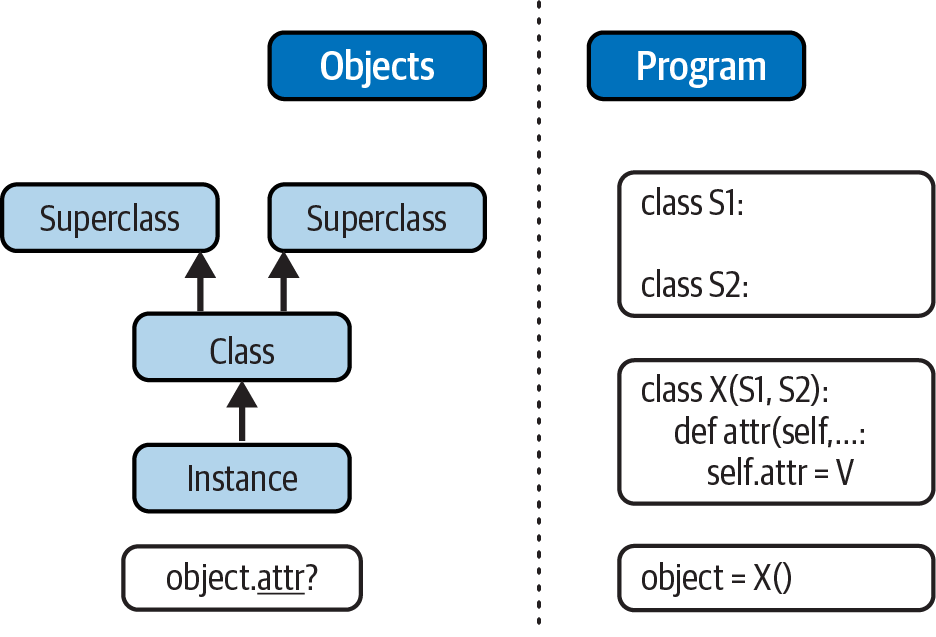
Figure 29-1. Program code creates a tree of objects searched by attribute inheritance
The net result is a tree of attribute namespaces that leads from an instance to the class it was generated from to all the superclasses listed in the class header. Python searches upward in this tree—from instances to superclasses, and left to right through multiple superclasses—each time you fetch an attribute name from an instance object.
Inheritance Fine Print
Technically speaking, the preceding description isn’t complete because we can also create instance and class attributes by assigning them to objects outside of class statements. In Python, all attributes are always accessible by default, and privacy is an add-on (we’ll talk about attribute privacy in Chapter 30 when we study __setattr__, in Chapter 31 when we meet __X names, and again in the online-only “Decorators” chapter when we implement it with a class decorator). Even so, changes outside of a class are uncommon and error-prone: classes work best when they manage their instances.
Also technically speaking, as hinted in Chapter 27, the full inheritance story grows more convoluted when advanced topics we haven’t yet met are added to the mix. Metaclasses, diamond-pattern MROs, and descriptors, for example, may all play a role in some programs. Because of this, we’ll begin formalizing the inheritance algorithm in Chapter 31 but won’t finish it until Chapter 40. In the vast majority of Python code, though, inheritance is a simple way to redefine, and hence customize, behavior coded in classes—as the next section demos.
Specializing Inherited Methods
The tree-searching model of inheritance just described turns out to be a great way to specialize systems. Because inheritance finds names in subclasses before it checks superclasses, subclasses can replace default behavior by redefining their superclasses’ attributes. In fact, you can build entire systems as hierarchies of classes, which you extend by adding new external subclasses rather than copying existing logic or changing it in place.
The idea of redefining inherited names leads to a variety of specialization techniques. For instance, subclasses may replace inherited attributes completely, provide attributes that a superclass expects to find, and extend superclass methods by calling back to the superclass from an overridden method. We’ve already seen some of these patterns in action; here’s a self-contained example of extension at work:
>>>class Super: def method(self): print('in Super.method')>>>class Sub(Super): def method(self):# Override methodprint('starting Sub.method')# Add actions hereSuper.method(self)# Run default actionprint('ending Sub.method')
Direct superclass method calls are the crux of the matter here. The Sub class replaces Super’s method function with its own specialized version, but within the replacement, Sub calls back to the version exported by Super to carry out the default behavior. In other words, Sub.method just extends Super.method’s behavior rather than replacing it completely:
>>>x = Super()# Make a Super instance>>>x.method()# Runs Super.methodin Super.method >>>x = Sub()# Make a Sub instance>>>x.method()# Runs Sub.method, calls Super.methodstarting Sub.method in Super.method ending Sub.method
Perhaps the most common places that superclass-method calls show up is in constructors. The __init__ method, like all attributes, is looked up by inheritance. This means that at construction time, Python locates and calls just one __init__, not one in every superclass. If subclass constructors need to ensure that superclass construction-time logic runs too, they must call the superclass’s __init__ method explicitly. Calling it through the class name leverages the same general coding pattern we’ve been using in multiple roles:
>>>class Super:def __init__(self, x):print('default code')>>>class Sub(Super):def __init__(self, x, y):Super.__init__(self, x)# Run superclass __init__print('custom code')# Do my extra init actions>>>I = Sub(1, 2)default code custom code
This is one of the few contexts in which your code is likely to call an operator-overloading method directly. Naturally, you should call the superclass constructor this way only if you really want it to run—without the call, the subclass replaces it completely. For a more realistic illustration of this technique in action, see the Manager class example in the prior chapter’s tutorial.
On a related note, readers with prior OOP experience may also be interested to know that redefining the constructor with differing argument lists in the same class means that only the last is used—later defs simply reassign the method name in Python. Starred arguments can be used in this role, but rarely are. We’ll explore this phenomenon more fully in Chapter 31’s coverage of polymorphism (short story: it’s about interfaces, not call signatures).
Note
The super reminder: Per the sidebar “The super Alternative” in Chapter 28, Python also has a super built-in function that allows calling back to a superclass’s methods more generically, but we’re deferring its coverage until Chapter 32 due to its downsides and complexities. As a preview, though, the prior section’s first of the following can also be coded as the second—which essentially automates the self argument via deep magic beyond our scope here (note its lowercase):
Super.method(self)           # Explicit, general tool
super().method()             # Implicit, special case
Likewise, the same equivalence goes for the constructor calls of this section:
Super.__init__(self, x) # Explicit fundamentalsuper().__init__(x) # Implicit alternative
Per the aforementioned sidebar, though, super has well-known trade-offs in basic usage and an esoteric advanced use case that requires universal deployment to be most effective. Because of such issues, this book prefers to call superclasses by explicit name instead of super. If you’re new to Python, consider following the same policy, especially for your first pass over OOP. Learn the simple and general now so you can weigh it against the complicated and narrow later.
Class Interface Techniques
Broadly speaking, the prior section’s extension is only one way to interface with a superclass. The file listed in Example 29-1, specialize.py, defines multiple classes that illustrate a variety of common techniques:
Super- Defines a
methodfunction and adelegatethat expects anactionin a subclass. Inheritor- Doesn’t provide any new names, so it gets everything defined in
Super. Replacer- Overrides
Super’smethodwith a version of its own. Extender- Customizes
Super’smethodby overriding and calling back to run the default. Provider- Implements the
actionmethod expected bySuper’sdelegatemethod.
Study each of these subclasses to get a feel for the various ways they customize their common superclass.
Example 29-1. specialize.py
class Super:
    def method(self):
        print('in Super.method')             # Default behavior
    def delegate(self):
        self.action()                        # Expected to be defined

class Inheritor(Super):                      # Inherit method verbatim
    pass

class Replacer(Super):                       # Replace method completely
    def method(self):
        print('in Replacer.method')

class Extender(Super):                       # Extend method behavior
    def method(self):
        print('starting Extender.method')
        Super.method(self)                   # Or: super().method()
        print('ending Extender.method')

class Provider(Super):                       # Fill in a required method
    def action(self):
        print('in Provider.action')

if __name__ == '__main__':
    for klass in (Inheritor, Replacer, Extender):
        print('\n' + klass.__name__ + '...')
        klass().method()

    print('\nProvider...')
    x = Provider()
    x.delegate()
Two things are worth pointing out here. First, notice how the self-test code at the end of this example creates instances of three different classes in a for loop. Because classes, like functions, are first-class objects, you can store them in a tuple and create instances generically with no extra syntax. Second, classes also have a built-in __name__ attribute, like modules; it’s preset to a string containing the name in the class header. Here’s what happens when we run the file:
$ python3 specialize.py

Inheritor...
in Super.method

Replacer...
in Replacer.method

Extender...
starting Extender.method
in Super.method
ending Extender.method

Provider...
in Provider.action
Trace through the code to see how each of these outputs is produced.
Abstract Superclasses
Of the prior example’s classes, Provider may be one of the most crucial to understand. When we call the delegate method through a Provider instance, two independent inheritance searches occur:
On the initial
x.delegatecall, Python finds thedelegatemethod inSuperby searching theProviderinstance and above. The instancexis passed into the method’sselfargument as usual.Inside the
Super.delegatemethod,self.actioninvokes a new, independent inheritance search ofselfand above. Becauseselfreferences aProviderinstance, theactionmethod is located in theProvidersubclass.
This “filling in the blanks” sort of coding structure is typical of OOP frameworks. In a more realistic context, the method filled in this way might handle an event in a GUI, provide data to be rendered as part of a web page, process a tag’s text in an XML file, and so on—your subclass provides specific actions, but the framework handles the rest of the overall job and runs your actions when needed.
At least in terms of the delegate method, the superclass in this example is what is sometimes called an abstract superclass—a class that expects parts of its behavior to be provided by its subclasses. If an expected method is not defined in a subclass, Python raises an undefined name exception when the inheritance search fails.
Class coders sometimes make such subclass requirements more obvious with assert statements or by raising the built-in NotImplementedError exception with raise statements. We’ll study statements that may trigger exceptions in depth in the next part of this book; as a quick preview, here’s the assert scheme in action:
>>>class Super:def delegate(self):self.action()def action(self):assert False, 'action must be defined!'# Error if called>>>X = Super()>>>X.delegate()AssertionError: action must be defined!
We’ll study assert in Chapters 33 and 34; in short, if its first expression evaluates to false, it raises an exception with the provided error message. Here, the expression is always false so as to trigger an error message if a method is not redefined, and inheritance locates the stub version here. Alternatively, some classes simply raise a NotImplementedError exception directly in such method stubs to signal the mistake:
>>>class Super:def delegate(self):self.action()def action(self):raise NotImplementedError('action must be defined!')>>>X = Super()>>>X.delegate()NotImplementedError: action must be defined!
For instances of subclasses, we still get the exception unless the subclass provides the expected method to replace the default in the superclass:
>>>class Sub(Super): pass>>>X = Sub()>>>X.delegate()NotImplementedError: action must be defined! >>>class Sub(Super): def action(self): print('okay')>>>X = Sub()>>>X.delegate()okay
For a somewhat more realistic example of this section’s concepts in action, see the “Zoo animal hierarchy” exercise (Exercise 8) at the end of Chapter 32 and its solution in “Part VI, Classes and OOP” of Appendix B. Such taxonomies are a traditional way to introduce OOP, but they’re a bit removed from most developers’ job descriptions (with apologies to any readers who happen to work at the zoo).
Preview: Abstract superclasses with library tools
The prior section’s abstract superclasses (a.k.a. “abstract base classes”), which require methods to be filled in by subclasses, may also be implemented with special class syntax and a library module. This is coded with a keyword argument in a class header, along with special @ decorator syntax, both of which we’ll study later in this book. While necessarily a preview in part, here is the special syntax equivalent of the prior section’s example:
>>>from abc import ABCMeta, abstractmethod>>>class Super(metaclass=ABCMeta):def delegate(self):self.action()@abstractmethoddef action(self):pass
The net effect more rigidly prevents instance creation unless the method is defined lower in the class tree.
>>>X = Super()TypeError: Can't instantiate abstract class Super without an implementation for abstract method 'action' >>>class Sub(Super): pass>>>X = Sub()TypeError: Can't instantiate abstract class Sub without an implementation For abstract method 'action' >>>class Sub(Super): def action(self): print('okay')>>>X = Sub()>>>X.delegate()okay
Coded this way, a class with an abstract method cannot be instantiated (that is, we cannot create an instance by calling it) unless all of its abstract methods have been defined in subclasses. Although this requires more code and extra knowledge, the potential advantage of this approach is that errors for missing methods are issued when we attempt to make an instance of the class, not later when we try to call a missing method. This scheme may also be used to define an expected interface, automatically verified in client classes.
Unfortunately, this scheme also relies on two advanced language tools we have not mastered yet—function decorators, introduced in Chapter 32 and covered in depth in the online-only “Decorators” chapter, as well as metaclass declarations, mentioned in Chapter 32 and covered in Chapter 40—so we will postpone other facets of this option here. See Python’s standard manuals for more on this, as well as precoded abstract superclasses Python provides.
Namespaces: The Conclusion
Now that we’ve examined class and instance objects, the Python namespace story is complete. For reference, this section summarizes all the rules used to resolve names and extends them to classes. The first things you need to remember are that qualified and unqualified names are treated differently, and that some scopes serve to initialize object namespaces:
Unqualified names (e.g.,
X) deal with scopes.Qualified attribute names (e.g.,
object.X) use object namespaces.Some scopes initialize object namespaces (for modules and classes).
These concepts sometimes interact—in object.X, for example, object is first looked up per scopes, and then X is looked up in the located object. Since scopes and namespaces are essential to understanding Python code, let’s flesh out the rules in more detail.
Simple Names: Global Unless Assigned
As we’ve seen, unqualified simple names follow the LEGB lexical scoping rule outlined when we explored functions in Chapter 17:
- Assignment (
X = value) - Makes names local by default: creates or changes the name
Xin the current local scope, unless declaredglobalornonlocalin that scope. These declarations work in bothdeffor functions andclassfor classes. - Reference (
X) - Looks for the name
Xin the current local scope (L), then any and all enclosing functions from inner to outer (E), then the current global-scope module (G), then the built-ins module (B)—per the LEGB rule. Notably absent here, enclosing classes are not searched; class names are referenced as object attributes instead.
Also per Chapter 17, some special-case constructs localize names further (e.g., variables in some comprehensions and some try statement clauses), and nested class scopes currently have some peculiarities that reflect longstanding bug reports and are too obscure to merit coverage here. The vast majority of names, however, follow the LEGB rule.
New here, the class statement allows global and nonlocal to modify assignment rules the same as def, though we have to nest it to see how the latter of these come online:
>>>gvar = 111>>>class C:global gvar# Change name gvar in enclosing modulegvar = 222# Else it would be class attribute C.gvar>>>gvar222 >>>def outer():nvar = 111class C:nonlocal nvar# Change name nvar in enclosing functionnvar = 222# Else it would be class attribute C.nvarprint(nvar)>>>outer()222
Though rare, namespace declarations in class map assignments to outer scopes, instead of making class attributes—the same way they prevent assignments from making local variables in functions. There’s more on how nested classes interact with scopes in default cases later in this section.
Attribute Names: Object Namespaces
We’ve also seen that qualified attribute names refer to attributes of specific objects and obey the rules for modules and classes. For class and instance objects, the reference rules are augmented to include the inheritance search procedure:
- Assignment (
object.X = value) - Creates or alters the attribute name
Xin the namespace of theobjectbeing qualified, and none other. Inheritance-tree climbing happens only on attribute reference, not on attribute assignment. - Reference (
object.X) - For class-based objects, searches for the attribute name
Xinobject, then in all accessible classes above it, using the inheritance search procedure. For nonclass objects such as modules, fetchesXfromobjectdirectly.
As noted earlier, the preceding captures the normal case for typical code, but these attribute rules can vary in classes that utilize more advanced tools you’ll meet later. For example, reference inheritance can be richer than implied here when metaclasses are deployed, and classes that leverage attribute management tools such as properties, descriptors, and __setattr__ can intercept and route attribute assignments arbitrarily.
In fact, some inheritance is run on assignment, too, to locate descriptors with a __set__ method; such tools override the normal rules for both reference and assignment. We’ll explore attribute management tools in depth in the online-only “Managed Attributes” chapter and formalize inheritance and its use of descriptors in Chapter 40. For now, most readers should focus on the normal rules given here, which cover most Python application code you’re likely to read, write, or run.
The “Zen” of Namespaces: Assignments Classify Names
With distinct search procedures for qualified and unqualified names, and multiple lookup layers for both, it can sometimes be difficult to tell where a name will wind up going. In Python, the place where you assign a name is crucial—it fully determines the scope or object in which a name will reside. The file in Example 29-2, manynames.py, illustrates how this principle translates to code and summarizes the namespace ideas we have seen throughout this book (sans obscure special-case scopes like comprehensions):
Example 29-2. manynames.py (first half)
X = 11# Global (module) X (manynames.X post import)def f(): print(X)# Access global X per LEGB lookupdef g(): X = 22# Local (function) X (hides module X)print(X) class C: X = 33# Class attribute C.X (self.X pre self.m())def m(self): X = 44# Local (function) X in method (unused here)self.X = 55# Instance attribute self.X (hides class X)
This file assigns the same name, X, five times—illustrative, though not exactly best practice! Because this name is assigned in five different locations, though, all five Xs in this program are completely different variables. From top to bottom, the assignments to X here generate a module attribute (11), a local variable in a function (22), a class attribute (33), a local variable in a method (44), and an instance attribute (55). Although all five are named X, the fact that they are all assigned at different places in the source code or to different objects makes all of these unique variables.
You should study this example carefully because it collects ideas we’ve been exploring throughout the last few parts of this book. When it makes sense to you, you will have achieved Python namespace enlightenment. Or you can run the code and see what happens—Example 29-3 lists the remainder of the source file in Example 29-2, with self-test code that makes an instance and prints all the Xs that it can fetch.
Example 29-3. manynames.py (second half)
if __name__ == '__main__':
    print(X)                 # 11: module (a.k.a. manynames.X outside file)
    f()                      # 11: global
    g()                      # 22: local
    print(X)                 # 11: module name unchanged

    I = C()                  # Make instance
    print(I.X)               # 33: class name inherited by instance
    I.m()                    # Attach attribute name X to instance now
    print(I.X)               # 55: instance
    print(C.X)               # 33: class (a.k.a. I.X if no X in I)

    #print(C.m.X)            # FAILS: only visible in method
    #print(g.X)              # FAILS: only visible in function
The outputs that are printed when the file is run are noted in the comments in the code; trace through them to see which variable named X is being accessed each time. Notice in particular that we can go through the class to fetch its attribute (C.X), but we can never fetch local variables in functions or methods from outside their def statements. Locals are visible only to other code within the def, and, in fact only live in memory while a call to the function or method is executing.
Some of the names defined by this file are visible outside the file to other modules, too, but recall that we must always import before we can access names in another file—name segregation is the main point of modules, after all. Example 29-4 shows how names appear outside the module in Example 29-3, again with expected outputs in comments:
Example 29-4. manynames-client.py
import manynames X = 66 print(X)# 66: the global hereprint(manynames.X)# 11: globals become attributes after importsmanynames.f()# 11: manynames's X, not the one here!manynames.g()# 22: local in other file's functionprint(manynames.C.X)# 33: attribute of class in other moduleI = manynames.C() print(I.X)# 33: still from class hereI.m() print(I.X)# 55: now from instance!
Notice here how manynames.f() prints the X in manynames, not the X assigned in this file—scopes are always determined by the position of assignments in your source code (i.e., lexically) and are never influenced by what imports what or who imports whom. Also, notice that the instance’s own X is not created until we call I.m()—attributes, like all variables, spring into existence when assigned, and not before. Normally, we create instance attributes by assigning them in class __init__ constructor methods, but this isn’t the only option.
Finally, as covered in Chapter 17, it’s also possible for a function to change names outside itself with global and nonlocal statements—these statements provide write access, but also modify assignment’s namespace binding rules. Example 29-5 provides a refresher on these points.
Example 29-5. funcscope.py
X = 11# Global in moduledef g1(): print(X)# Reference global in module (11)def g2(): global X X = 22# Change global in moduledef h1(): X = 33# Local in functiondef nested(): print(X)# Reference local in enclosing scope (33)def h2(): X = 33# Local in functiondef nested(): nonlocal X X = 44# Change local in enclosing scope
Of course, you generally shouldn’t use the same name for every variable in your script—but as this example demonstrates, even if you do, Python’s namespaces will work to keep names used in one context from accidentally clashing with those used in another.
Nested Classes: The LEGB Scopes Rule Revisited
The preceding example summarized the effect of nested functions on scopes, which we studied in Chapter 17. As we saw briefly near the start of this section, classes can be nested, too—a useful coding pattern in some types of programs. This has scope implications that follow naturally from what you already know, but that may not be obvious on first encounter. This section illustrates the concept by example.
Though they are normally coded at the top level of a module, classes also appear nested in functions that generate them—a variation on the “factory function” (a.k.a. closure) theme in Chapter 17, with similar state retention roles. There, we noted that class statements introduce new local scopes, much like function def statements, which follow the same LEGB scope lookup rule as function definitions.
This rule applies both to the top level of the class itself as well as to the top level of method functions nested within it. Both form the L layer in this rule—they are local scopes with access to their names, names in any enclosing functions, globals in the enclosing module, and built-ins. Like modules, the class’s local scope morphs into an attribute namespace after the class statement is run, but its top-level code is a local scope while the class runs.
Importantly, though, although classes have access to enclosing functions’ scopes, they do not themselves act as enclosing scopes to code nested within the class—Python searches enclosing functions for referenced names but never any enclosing classes. That is, a class is a local scope and has access to enclosing local scopes, but it does not serve as an enclosing local scope to further nested code. Because the search for names used in method functions skips the enclosing class, class attributes must be fetched as object attributes using inheritance.
For example, in the nester function of Example 29-6, all references to X are routed to the global scope except the last, which picks up a local-scope redefinition in method2 (the output of each example in this section is described in its last two comments).
Example 29-6. classscope1.py
X = 1 def nester(): print(X)# Global: 1class C: print(X)# Global: 1def method1(self): print(X)# Global: 1def method2(self): X = 3# Hides globalprint(X)# Local: 3I = C() I.method1() I.method2() print(X)# Global: 1nester()# Rest: 1, 1, 1, 3
Watch what happens, though, when we reassign the same name in nested function layers in Example 29-7: the redefinitions of X create locals that hide those in enclosing scopes, just as for simple nested functions; the enclosing class layer does not change this rule, and in fact is irrelevant to it.
Example 29-7. classscope2.py
X = 1 def nester(): X = 2# Hides globalprint(X)# Local: 2class C: print(X)# In enclosing def (nester): 2def method1(self): print(X)# In enclosing def (nester): 2def method2(self): X = 3# Hides enclosing (nester)print(X)# Local: 3I = C() I.method1() I.method2() print(X)# Global: 1nester()# Rest: 2, 2, 2, 3
Finally, Example 29-8 shows what happens when we reassign the same name at multiple stops along the way: assignments in the local scopes of both functions and classes hide globals or enclosing function locals of the same name, regardless of the nesting involved.
Example 29-8. classscope3.py
X = 1 def nester(): X = 2# Hides globalprint(X)# Local: 2class C: X = 3# Class local hides nester's: C.X or I.X (not scoped)print(X)# Local: 3def method1(self): print(X)# In enclosing def (not 3 in class!): 2print(self.X)# Inherited class local: 3def method2(self): X = 4# Hides enclosing (nester, not class)print(X)# Local: 4self.X = 5# Hides class'sprint(self.X)# Located in instance: 5I = C() I.method1() I.method2() print(X)# Global: 1nester()# Rest: 2, 3, 2, 3, 4, 5
Most importantly, the lookup rules for simple names like X never search enclosing class statements—just defs, modules, and built-ins (it’s the LEGB rule, not LCEGB!). In method1, for example, X is found in a def outside the enclosing class that has the same name in its local scope. To get to names assigned in the class (e.g., methods), we must fetch them as class or instance object attributes, via self.X in this case.
Believe it or not, you’ll see valid roles for this nested-classes coding pattern later in this book, especially in some of the online-only “Decorators” chapter’s decorators. In this role, the enclosing function usually both serves as a class or instance factory and provides retained state for later use in the enclosed class or its methods.
Namespace Dictionaries: Review
In Chapter 23, we saw that module namespaces have a concrete implementation as dictionaries, exposed with the built-in __dict__ attribute. In Chapters 27 and 28, we saw that the same holds true for class and instance objects—attribute qualification is mostly a dictionary indexing operation internally, and attribute inheritance is largely a matter of searching linked dictionaries. In fact, within Python, instance and class objects are mostly just dictionaries with links between them. Python exposes these dictionaries, as well as their links, for use in advanced roles.
We put some of these tools to work in the prior chapter but to summarize and help you better understand how attributes work internally, let’s work through an interactive session that traces the way namespace dictionaries grow when classes are involved. Now that we know more about methods and superclasses, we can also embellish the coverage here for a better look. First, let’s define a superclass and a subclass with methods that will store data in their instances:
>>>class Super: def hello(self): self.data1 = 'hack'>>>class Sub(Super): def hola(self): self.data2 = 'code'
When we make an instance of the subclass, the instance starts out with an empty namespace dictionary, but it has links back to the class for the inheritance search to follow. In fact, the inheritance tree is explicitly available in special attributes, which you can inspect. Instances have a __class__ attribute that links to their class, and classes have a __bases__ attribute that is a tuple containing links to higher superclasses:
>>>X = Sub()>>>X.__dict__# Instance namespace dict{} >>>X.__class__# Class of instance<class '__main__.Sub'> >>>Sub.__bases__# Superclasses of class(<class '__main__.Super'>,) >>>Super.__bases__# Implied above top-levels(<class 'object'>,)
As classes assign to self attributes, they populate the instance objects—that is, attributes wind up in the instances’ attribute namespace dictionaries, not in the classes’. An instance object’s namespace records data that can vary from instance to instance, and self is a hook into that namespace:
>>>Y = Sub()>>>X.hello()>>>X.__dict__{'data1': 'hack'} >>>X.hola()>>>X.__dict__{'data1': 'hack', 'data2': 'code'} >>>list(Sub.__dict__.keys())['__module__', 'hola', '__doc__'] >>>list(Super.__dict__.keys())['__module__', 'hello', '__dict__', '__weakref__', '__doc__'] >>>Y.__dict__{}
Notice the extra underscore names in the class dictionaries; Python sets these automatically, and we can filter them out with the generator expressions we coded in Chapters 27 and 28 omitted here for space. Most are not used in typical programs but may be used by tools (e.g., __doc__ holds the docstrings discussed in Chapter 15).
Also, observe that Y, a second instance made at the start of this series, still has an empty namespace dictionary at the end, even though X’s dictionary has been populated by assignments in methods. Again, each instance has an independent namespace dictionary, which starts out empty and can record completely different attributes than those recorded by the namespace dictionaries of other instances of the same class.
Because instance attributes are actually dictionary keys inside Python, there are really two ways to fetch and assign their values—by qualification or by key indexing:
>>>X.data1, X.__dict__['data1']('hack', 'hack') >>>X.data3 = 'docs'>>>X.__dict__{'data1': 'hack', 'data2': 'code', 'data3': 'docs'} >>>X.__dict__['data3'] = 'apps'>>>X.data3'apps'
This equivalence applies only to attributes actually attached to the instance, though. Because attribute fetch qualification also performs an inheritance search, it can access inherited attributes that namespace dictionary indexing cannot. The inherited attribute X.hello, for instance, cannot be accessed by X.__dict__['hello'].
Experiment with these special attributes on your own to get a better feel for how namespaces actually do their attribute business. Also, try running these objects through the dir function we met in the prior two chapters—dir(X) is similar to X.__dict__.keys(), but dir sorts its list and includes inherited attributes. Even if you will never use these in the kinds of programs you write, seeing how attributes are stored can help solidify namespaces in general.
Note
The slots exception: In Chapter 32, you’ll learn about slots, an advanced class tool that stores attributes in instances but not in their namespace dictionaries. It’s tempting to treat these as class attributes, and indeed, they appear in class namespaces where they manage per-instance values. As you’ll find, though, slots may prevent a __dict__ from being created in the instance—a potential that generic tools must sometimes account for by using storage-neutral built-ins like dir to list and getattr to fetch. The good news is that slots are used very rarely—as they should be!
Namespace Links: A Tree Climber
The prior section demonstrated the special __class__ and __bases__ instance and class attributes without really explaining why you might care about them. In short, these attributes allow you to inspect inheritance hierarchies within your own code. For example, they can be used to display a class tree, as coded in the module of Example 29-9.
Example 29-9. classtree.py
"""
classtree.py: Climb inheritance trees using namespace links,
displaying higher superclasses with indentation for height
"""

def classtree(cls, indent):
    print('.' * indent + cls.__name__)     # Print class name here
    for supercls in cls.__bases__:         # Recur to all superclasses
        classtree(supercls, indent+3)      # May visit super > once

def instancetree(inst):
    print('Tree of', inst)                 # Show instance
    classtree(inst.__class__, 3)           # Climb to its class

def selftest():
    class A:      pass
    class B(A):   pass
    class C(A):   pass
    class D(B,C): pass
    class E:      pass
    class F(D,E): pass
    instancetree(B())
    instancetree(F())

if __name__ == '__main__': selftest()
The classtree function in this script is recursive—it prints a class’s name using __name__, then climbs up to the superclasses by calling itself. This allows the function to traverse arbitrarily shaped class trees; the recursion climbs to the top and stops at root superclasses that have empty __bases__ attributes. As explored in Chapter 19, when using recursion, each active level of a function gets its own copy of the local scope. Here, this means that cls and indent are different at each classtree level.
Most of this file is self-test code. When run standalone, it builds an empty class tree, makes two instances from it, and prints their class tree structures. The trees include the implied object superclass that is automatically added above standalone root (i.e., topmost) classes; there’s more on object in Chapter 32:
$ python3 classtree.py
Tree of <__main__.selftest.<locals>.B object at 0x10733a000>
...B
......A
.........object
Tree of <__main__.selftest.<locals>.F object at 0x10733a000>
...F
......D
.........B
............A
...............object
.........C
............A
...............object
......E
.........object
Here, indentation marked by periods is used to denote class tree height. Of course, we could improve on this output format and perhaps even sketch it in a GUI display. Even as is, though, we can import these functions anywhere we want a quick display of a physical class tree:
$python3>>>class Employee: pass>>>class Person(Employee): pass>>>pat = Person()>>>import classtree>>>classtree.instancetree(pat)Tree of <__main__.Person object at 0x1072a1b80> ...Person ......Employee .........object
Regardless of whether you will ever code or use such tools, this example demonstrates one of the many ways that you can make use of special attributes that expose interpreter internals. You’ll see others when we code general-purpose class display tools in Chapter 31’s section “Multiple Inheritance and the MRO”—there, we will extend this technique to also display attributes in each object in a class tree and function as a reusable superclass.
In the last part of this book, we’ll revisit such tools in the context of Python tool building at large, to code tools that implement attribute privacy, argument validation, and more. While not in every Python programmer’s job description, access to internals enables powerful development tools.
Documentation Strings Revisited
The last section’s example includes a docstring for its module, but remember that docstrings can be used for class components as well. Docstrings, which we covered in detail in Chapter 15, are string literals that show up at the top of various structures and are automatically saved by Python in the corresponding objects’ __doc__ attributes. This works for module files, function defs, and classes and methods.
Now that we’ve seen more about classes and methods, Example 29-10, a.k.a. docstr.py, provides a quick but comprehensive example that summarizes the places where docstrings can show up in your code. All of these can be triple-quoted blocks or simpler one-liner literals like those here.
Example 29-10. docstr.py
"I am: docstr.__doc__"deffunc(args):"I am: docstr.func.__doc__"passclassKlass:"I am: Klass.__doc__ or docstr.Klass.__doc__ or self.__doc__"defmethod(self):"I am: Klass.method.__doc__ or self.method.__doc__"(self.__doc__)(self.method.__doc__)
The main advantage of documentation strings is that they stick around at runtime. Thus, if it’s been coded as a docstring, you can qualify an object with its __doc__ attribute to fetch its documentation (calling print on the result interprets line breaks if it’s a multiline string):
$python3>>>import docstr>>>docstr.__doc__'I am: docstr.__doc__' >>>docstr.func.__doc__'I am: docstr.func.__doc__' >>>docstr.Klass.__doc__'I am: Klass.__doc__ or docstr.Klass.__doc__ or self.__doc__' >>>docstr.Klass.method.__doc__'I am: Klass.method.__doc__ or self.method.__doc__' >>>x = docstr.Klass()>>>x.method()I am: Klass.__doc__ or docstr.Klass.__doc__ or self.__doc__ I am: Klass.method.__doc__ or self.method.__doc__
A discussion of the PyDoc tool, which knows how to format all these strings in reports and web pages, appears in Chapter 15. Here it is running its help function on our code:
>>> help(docstr)
Help on module docstr:
NAME
    docstr - I am: docstr.__doc__

CLASSES
    builtins.object
        Klass

    class Klass(builtins.object)
     |  I am: Klass.__doc__ or docstr.Klass.__doc__ or self.__doc__
     |
     |  Methods defined here:
     |
     |  method(self)
     |      I am: Klass.method.__doc__ or self.method.__doc__
     |
     |  ----------------------------------------------------------------------
     |  Data descriptors defined here:
     |
     |  __dict__
     |      dictionary for instance variables
     |
     |  __weakref__
     |      list of weak references to the object

FUNCTIONS
    func(args)
        I am: docstr.func.__doc__

FILE
    /…/LP6E/Chapter29/docstr.py
Documentation strings are available at runtime, but they are less flexible syntactically than # comments, which can appear anywhere in a program. Both forms are useful, and any program documentation is good (as long as it’s accurate, of course!). As stated before, the Python “best practice” rule of thumb is to use docstrings for higher-level functional documentation and hash-mark comments for more fine-grained coding documentation.
Classes Versus Modules
Finally, let’s wrap up this chapter by briefly comparing the topics of this book’s last two parts: modules and classes. Because they’re both about namespaces, the distinction can be confusing. In short:
Modules
Implement data+logic packages
Are created with Python files or other-language extensions
Are used by being imported
Form the top level in Python program structure
Classes
Implement new full-featured objects
Are created with
classstatementsAre used by being called
Always live within a module
Classes also support extra features that modules don’t, such as operator overloading, multiple instance generation, and inheritance. Although both classes and modules are namespaces, you should be able to tell by now that they are very different things. We need to move ahead to see just how unique classes can be.
Chapter Summary
This chapter took us on a second, more in-depth tour of the OOP mechanisms of the Python language. We learned more about classes, methods, and inheritance, and we wrapped up the namespaces and scopes story in Python by extending it to cover its application to classes. Along the way, we encountered core OOP concepts such as abstract superclasses, class data attributes, namespace links, and manual calls to superclass methods and constructors.
Now that we’ve explored all the basic mechanics of coding classes in Python, the next chapter turns to a specific facet of those mechanics: operator overloading. After that, we’ll explore common design patterns, looking at some of the ways that classes are commonly used and combined to optimize code reuse. Before you read ahead, though, be sure to work through the usual chapter quiz to review what we’ve covered here.
Test Your Knowledge: Quiz
What is an abstract superclass?
What happens when a simple assignment statement appears at the top level of a
classstatement?Why might a class need to manually call the
__init__method in a superclass?How can you augment, instead of completely replacing, an inherited method?
How does a class’s local scope differ from that of a function?
Test Your Knowledge: Answers
An abstract superclass is a class that calls a method, but does not inherit or define it—it expects the method to be filled in by a subclass. This is often used as a way to generalize classes when behavior cannot be predicted until a more specific subclass is coded. OOP frameworks also use this as a way to dispatch to client-defined, customizable operations.
When a simple assignment statement (
X = Y) appears at the top level of aclassstatement, it attaches a data attribute to the class (Class.X). Like all class attributes, this will be shared by all instances that do not have the same attribute. Methods are generally created instead bydefstatements nested in aclass.A class must manually call the
__init__method in a superclass if it defines an__init__constructor of its own and still wants the superclass’s construction code to run (and it often will). Python itself automatically runs just one constructor—the lowest one in the inheritance tree. Superclass constructors are often called through the class name, passing in theselfinstance manually:Superclass.__init__(self, …); they may also be called bysuper().__init__(…), though we haven’t yet studied this form in full.To augment instead of completely replacing an inherited method, redefine it in a subclass, but call back to the superclass’s version of the method manually from the new version of the method in the subclass. That is, pass the
selfinstance to the superclass’s version of the method manually:Superclass.method(self, …); or do so implicitly withsuper().method(…). The prior answer is really just a special case of this one.A class is a local scope and has access to enclosing local scopes, but it does not serve as an enclosing local scope to further nested code. Like modules, the class local scope morphs into an attribute namespace after the
classstatement is run.