Chapter 27. Class Coding Basics
Now that we’ve talked about OOP in the abstract, it’s time to see how this translates to actual code. This chapter begins to fill in the syntax details behind the class model in Python.
If you’ve never been exposed to OOP in the past, classes can seem somewhat complicated if taken in a single dose. To make class coding easier to absorb, we’ll begin our detailed exploration of OOP by taking a first look at some basic classes in action in this chapter. We’ll expand on the details introduced here in later chapters of this part of the book, but in their basic form, Python classes are easy to understand.
In fact, classes have just three primary distinctions. At a base level, they are mostly just namespaces, much like the modules we studied in Part V. Unlike modules, though, classes also have support for generating multiple objects, for namespace inheritance, and for operator overloading. Let’s begin our class statement tour by exploring each of these three distinctions in turn.
Classes Generate Multiple Instance Objects
To understand how the multiple objects idea works, you have to first understand that there are two kinds of objects in Python’s OOP model: class objects and instance objects. Class objects provide default behavior and are used to create instance objects. Instance objects are the tangible objects your programs process—each is a namespace in its own right but inherits (i.e., has automatic access to) names in the class from which it was created. Class objects come from statements, and instances come from calls; each time you call a class, you get a new instance of that class.
This object-generation concept is very different from most of the other program constructs we’ve seen so far in this book. In effect, classes are essentially factories for generating multiple instances. By contrast, only one copy of each module is ever imported into a single program. In fact, this is why reload works as it does, updating a single instance and shared object in place. With classes, each instance can have its own, independent data, supporting multiple versions of the object that the class models.
In this role, class instances are similar to the per-call state of the closure (a.k.a. factory) functions of Chapter 17, but this is a natural part of the class model, and state in classes is explicit attributes instead of implicit scope references. Moreover, this is just part of what classes do—they also support customization by inheritance, operator overloading, and multiple behaviors via methods. Hence, classes are a more complete programming tool, though OOP and functional programming are not mutually exclusive paradigms. We may combine them by using functional tools in methods, by coding methods that are themselves generators, by writing user-defined iterators, and so on.
The following is a quick summary of the bare essentials of Python OOP in terms of its two object types. As you’ll see, Python classes are in some ways similar to both defs and modules, but they may be quite different from what you’re used to in other languages.
Class Objects Provide Default Behavior
When we run a class statement, we get a class object. Here’s a rundown of the main properties of Python classes:
The
classstatement creates a class object and assigns it a name. Just like the functiondefstatement, the Pythonclassis an executable statement. When reached and run, it generates a new class object and assigns it to the first name in theclassheader. Also, likedefs,classstatements typically run when the files they are coded in are first imported or run as a top-level script.Assignments inside
classstatements make class attributes. Just like in module files, top-level assignments within aclassstatement (not nested in adef) generate attributes in a class object. Technically, theclassstatement defines a local scope that morphs into the attribute namespace of the class object, just like a module’s global scope. After running aclassstatement, class attributes may be accessed by name qualification:class.name.Class attributes provide object state and behavior. Attributes of a class object record state information and behavior to be shared by all instances created from the class. Most notably and commonly, function
defstatements nested inside aclassgenerate methods, which process instances.
Instance Objects Are Concrete Items
When we call a class object, we get an instance object. Here’s an overview of the key points behind class instances:
Calling a class object like a function makes a new instance object. Each time a class is called, it creates and returns a new instance object. Instances represent material items in your program’s domain.
Each instance object inherits class attributes and gets its own namespace. Instance objects created from classes are new namespaces; they start out empty but inherit attributes that live in the class objects from which they were generated.
Assignments to attributes of
selfin methods make per-instance attributes. Inside a class’s method functions, the first argument (calledselfby convention) references the instance object being processed; assignments to attributes ofselfcreate or change data in the instance, not the class.
The end result is that classes define common, shared data and behavior, and generate instances. Instances reflect palpable application entities and record per-instance data that may vary per object.
A First Example
Let’s turn to a real example to show how these ideas work in practice. To begin, let’s define a class named FirstClass by running a Python class statement interactively in any REPL:
>>>class FirstClass:# Define a class objectdef setdata(self, value):# Define class's methodsself.data = value# self is the instancedef display(self): print(self.data)# self.data: per instance
We’re working interactively here, but typically, such a statement would be run when the module file it is coded in is imported. Like functions created with defs, this class won’t even exist until Python reaches and runs this statement.
Like all compound statements, the class starts with a header line that lists the class name, followed by a body of one or more nested and (usually) indented statements. Here, the nested statements are defs; they define functions that implement the behavior the class means to export.
As we learned in Part IV, def is really an assignment. Here, it assigns function objects to the names setdata and display in the class statement’s scope, and so generates attributes attached to the class—FirstClass.setdata and FirstClass.display. In fact, any name assigned at the top level of the class’s nested block becomes an attribute of the class.
Functions inside a class are usually and traditionally called methods. They’re coded with normal defs, and they support everything we’ve learned about functions already—they can have defaults, return values, yield items on request, and so on. But in a method function, the first argument automatically receives an implied instance object when called—the subject of the call. Let’s create a couple of instances of our class to see how this works:
>>>x = FirstClass()# Make two instances>>>y = FirstClass()# Each is a new namespace
By calling the class this way (notice the parentheses), we generate instance objects, which are just namespaces that have access to their classes’ attributes. Properly speaking, at this point, we have three objects: two instances and a class. And really, we have three linked namespaces, as sketched in Figure 27-1. In OOP terms, we say that x “is a” FirstClass, as is y—they both inherit names attached to the class.
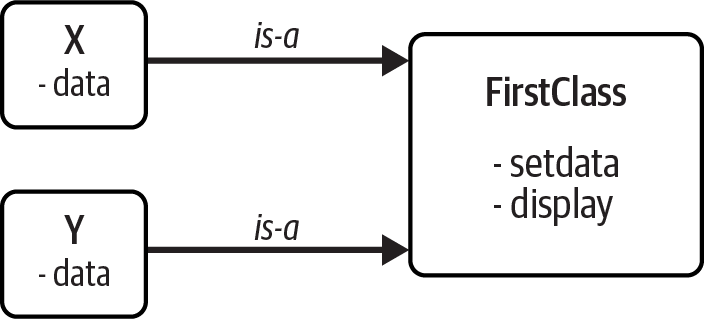
Figure 27-1. Classes and instances: namespaces in a class tree searched by inheritance
The two instances start out empty but have links back to the class from which they were generated. If we qualify an instance with the name of an attribute that lives in the class object, Python fetches the name from the class by inheritance search (unless it also lives in the instance):
>>>x.setdata('coding')# Call methods: self is x>>>y.setdata(3.14159)# Runs: FirstClass.setdata(y, 3.14159)
Neither x nor y has a setdata attribute of its own, so to find it, Python follows the link from instance to class. And that’s about all there is to inheritance in Python: it happens at attribute qualification time, and it just involves looking up names in linked objects—here, by following the is-a links in Figure 27-1.
In the setdata function inside FirstClass, the value passed in is assigned to self.data. Within a method, self—the name given to the leftmost argument by convention—automatically refers to the instance being processed (x or y at this point), so the assignments store values in the instances’ namespaces, not the class’s. That’s how the data names in Figure 27-1 are created.
Because classes can generate multiple instances, methods must go through the self argument to get to the instance to be processed. When we call the class’s display method to print self.data, we see that it’s different in each instance; on the other hand, the name display itself is the same in x and y, as it comes (is inherited) from the class:
>>>x.display()# Runs: FirstClass.display(x)coding >>>y.display()# self.data differs in each instance3.14159
Notice that we stored different object types in the data member in each instance—a string and a floating-point number. As with everything else in Python, instance attributes (sometimes called members) are not predeclared and have no type constraints; they spring into existence the first time they are assigned values, just like simple variables. In fact, if we were to call display on one of our instances before calling setdata, we would trigger an undefined name error—the attribute named data doesn’t even exist in memory until it is assigned within the setdata method.
As another way to appreciate how dynamic this model is, consider that we can change instance attributes either inside the class itself, by assigning to self in methods, or outside the class, by assigning to an explicit instance object:
>>>x.data = 'hacking'# Can get/set attributes>>>x.display()# Outside the class toohacking
Although less common, we could even generate an entirely new attribute in the instance’s namespace by assigning to its name outside the class’s method functions:
>>>x.anothername = 'apps'# Can set new attributes here too!
This would attach a new attribute called anothername, which may or may not be used by any of the class’s methods, to the instance object x. Classes usually create all of the instance’s attributes by assignment to the self argument, but they don’t have to—programs can fetch, change, or create attributes on any objects to which they have references.
It usually doesn’t make sense to add data that the class cannot use, and it’s possible to prevent this with extra “privacy” code based on attribute-access operator overloading, as we’ll discuss elsewhere in this book (in Chapter 30 and the online-only “Decorators” chapter). Still, free attribute access translates to less syntax, and there are cases where it’s even useful—for example, in coding data records of the sort we’ll build later in this chapter.
Classes Are Customized by Inheritance
Let’s move on to the second major distinction of classes. Besides serving as factories for generating multiple instance objects, classes also allow us to make changes by introducing new components (called subclasses), instead of changing existing components in place.
As we’ve seen, instance objects generated from a class inherit the class’s attributes. Python also allows classes to inherit from other classes, opening the door to coding hierarchies of classes that specialize behavior—by redefining attributes in subclasses that appear lower in the hierarchy, we override the more general definitions of those attributes higher in the tree. In effect, the further down the hierarchy we go, the more specific the software becomes. Here, too, there is no parallel with modules, whose attributes live in a single, flat namespace that is not as amenable to customization.
In Python, instances inherit from classes, and classes inherit from superclasses. Here are the key ideas behind the machinery of attribute inheritance:
Superclasses are listed in parentheses in a
classheader. To make a class inherit attributes from another class, just list the other class in parentheses in the newclassstatement’s header line. The class that inherits is usually called a subclass, and the class that is inherited from is its superclass.Classes inherit attributes from their superclasses. Just as instances inherit the attribute names defined in their classes, classes inherit all of the attribute names defined in their superclasses. Python finds these names automatically when they’re accessed if they don’t exist in the subclasses.
Instances inherit attributes from all accessible classes. Each instance gets names from the class it’s generated from, as well as all of that class’s superclasses. When looking for a name, Python checks the instance, then its class, then all superclasses above its class.
Each
object.attributereference invokes a new, independent search. Python performs an independent search of the class tree for each attribute fetch expression. This includes references to instances and classes made outsideclassstatements (e.g.,X.attr), as well as references to attributes of theselfinstance argument in a class’s method functions. That is, eachself.attrexpression in a method invokes a new search forattrinselfand above.
The net effect—and the main purpose of all this searching—is that classes support factoring and customization of code better than any other language tool we’ve seen so far. On the one hand, they allow us to minimize code redundancy (and so reduce maintenance costs) by factoring operations into a single, shared implementation; on the other, they allow us to program by customizing what already exists, rather than changing it in place or starting from scratch.
Note
Full inheritance disclosure: Strictly speaking, Python’s inheritance is richer than described here, when we factor in “diamond” inheritance patterns and “metaclasses”—advanced topics we’ll study later—but we can safely restrict our scope to instances and their classes, both at this point in the book and in most Python application code. We’ll explore diamonds and the “MRO” inheritance search order that accommodates them in Chapter 31, but our definition of inheritance won’t be fully complete until Chapter 40, because it regrettably requires metaclass info that’s beyond almost all Python programmers’ interest levels and pay grades (thankfully!).
A Second Example
To illustrate the role of inheritance, this next example builds on the previous one. First, we’ll define a new class, SecondClass, that inherits all of FirstClass’s names and provides one of its own:
>>>class SecondClass(FirstClass):# Inherits setdatadef display(self):# Changes displayprint(f'Current value = "{self.data}"')
SecondClass defines the display method to print with a different format. By defining an attribute with the same name as an attribute in FirstClass, SecondClass effectively replaces the display attribute in its superclass.
Recall that inheritance searches proceed upward from instances to subclasses to superclasses, stopping at the first appearance of the attribute name that it finds. In this case, since the display name in SecondClass will be found before the one in FirstClass, we say that SecondClass overrides FirstClass’s display. Sometimes we call this act of replacing attributes by redefining them lower in the tree overloading.
The net effect here is that SecondClass specializes FirstClass by changing the behavior of the display method. On the other hand, SecondClass (and any instances created from it) still inherits the setdata method in FirstClass verbatim. Let’s make a new instance to demonstrate:
>>>z = SecondClass()>>>z.setdata('LP6e')# Finds setdata in FirstClass>>>z.display()# Finds overridden method in SecondClassCurrent value = "LP6e"
As before, we make a SecondClass instance object by calling it. The setdata call still runs the version in FirstClass, but this time the display attribute comes from SecondClass and prints a custom message. Figure 27-2 sketches the namespaces involved.
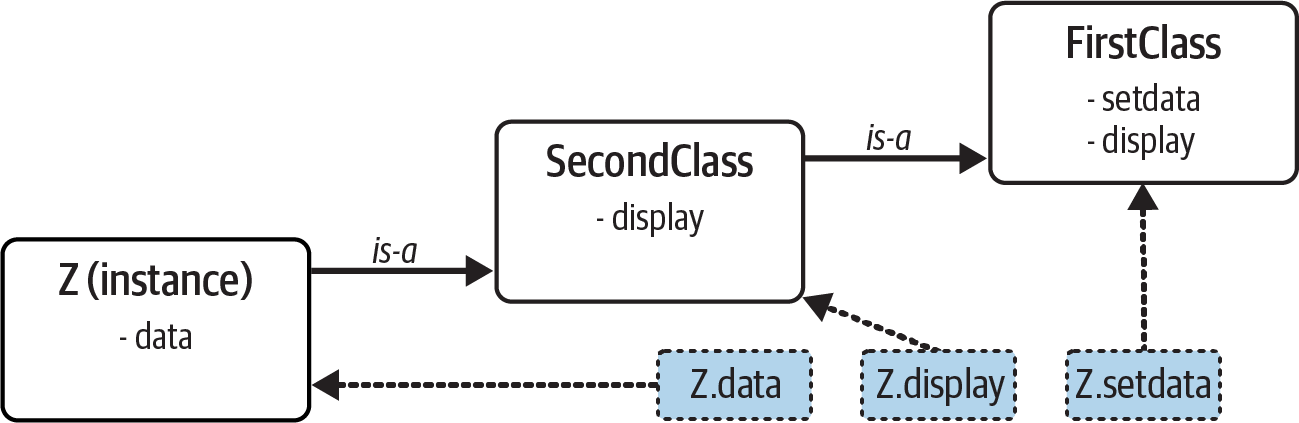
Figure 27-2. Specialization: overriding inherited names by redefining them in subclasses
Now, here’s a crucial thing to notice about OOP: the specialization introduced in SecondClass is completely external to FirstClass. That is, it doesn’t affect existing or future FirstClass objects, like the x from the prior example (assuming we’re continuing the same REPL session):
>>>x.display()# x is still a FirstClass instance (old message)hacking
Rather than changing FirstClass, we customized it. Naturally, this is an artificial example, but as a rule, because inheritance allows us to make changes like this in external components (i.e., in subclasses), classes often support extension and reuse better than functions or modules can.
Classes Are Attributes in Modules
Before we move on, remember that there’s nothing magic about a class name. It’s just a variable assigned to an object when the class statement runs, and the object can be referenced with any normal expression. For instance, if our FirstClass were coded in a module file instead of being typed interactively, we could import it and use its name normally in a class header line:
frommodulenameimport FirstClass# Copy name into my scopeclass SecondClass(FirstClass):# Use class name directlydef display(self): …
Or equivalently:
importmodulename# Access the whole moduleclass SecondClass(modulename.FirstClass):# Qualify to referencedef display(self): …
Like everything else, class names always live within a module, so they must follow all the rules we studied in Part V. For example, more than one class can be coded in a single module file—like other statements in a module, class statements are run during imports to define names, and these names become distinct module attributes. More generally, each module may arbitrarily mix any number of variables, functions, and classes, and all names in a module behave the same way. The following hypothetical file demonstrates:
# names.pyvar1 = 6# names.var1var2 = 3.12 def func1(): …# names.func1def func2(): … class Cls1: …# names.Cls1class Cls2: …# names.Cls2
This holds true even if the module and class happen to have the same name. For example, given the following imaginary file, person.py:
class person: …
we need to go through the module to fetch the class as usual:
import person# Import modulex = person.person()# Class within module
Although this path may look redundant, it’s required: person.person refers to the person class inside the person module. Saying just person gets the module, not the class, unless the from statement is used:
from person import person# Get class from modulex = person()# Use class name
As with any other variable, we can never see a class in a file without first importing and somehow fetching it from its enclosing file. If this seems confusing, don’t use the same name for a module and a class within it. In fact, common convention in Python recommends that class names should begin with an uppercase letter, and module names with a lowercase letter, to help make them more distinct (it’s not required, but nearly common enough to be a rule):
import person# Lowercase for modulesx = person.Person()# Uppercase for classes
Also, keep in mind that although classes and modules are both namespaces for attaching attributes, they correspond to very different source code structures: a module reflects an entire file, but a class is a statement within a file. We’ll say more about such distinctions later in this part of the book.
Classes Can Intercept Python Operators
Let’s move on to the third and final major difference between classes and modules: operator overloading. In simple terms, operator overloading lets objects coded with classes intercept and respond to operations that work on built-in types: addition, slicing, printing, qualification, and so on. It’s mostly just an automatic dispatch mechanism—expressions and other built-in operations route control to implementations in classes. Here, too, there is nothing similar in modules: modules can implement function calls, but not the behavior of expressions (apart, that is, from the odd special case added in Python 3.7 for module __getattr__ and __dir__ functions covered in Chapter 25, and bemoaned there as a confusing conflation with classes—for reasons you’re about to see for yourself).
Although we could implement all class behavior as normally named methods, operator overloading lets objects be more tightly integrated with Python’s object model. Moreover, because operator overloading makes our own objects act like built-ins, it tends to foster object interfaces that are more consistent and easier to learn, and it allows class-based objects to be processed by code written to expect a built-in object’s interface. Here is a quick rundown of the main ideas behind overloading operators:
Methods named with double underscores (
__X__) are special hooks. In Python classes, we implement operator overloading by providing specially named methods to intercept operations. The Python language defines a fixed and unchangeable mapping from each of these operations to a specially named method.Such methods are called automatically when instances appear in built-in operations. For instance, if an instance object inherits an
__add__method, that method is called whenever the object appears in a+expression. The method’s return value becomes the result of the corresponding expression.Classes may override most built-in type operations. There are dozens of special operator-overloading method names for intercepting and implementing nearly every operation available for built-in object types. This includes expressions, but also basic operations like printing and object creation.
Most operator-overloading methods have no default, and none are required. If a class does not define or inherit an operator-overloading method, it just means that the corresponding operation is not supported for the class’s instances. If there is no
__add__, for example,+expressions raise exceptions. As you’ll learn later, a root class namedobjectthat’s an implicit superclass to every class does provide defaults for some__X__methods, but not for many (e.g.,objecthas a default for print strings, but not+).
Importantly, operator overloading is an optional feature; it’s used primarily by people developing tools for other Python programmers, not by application developers. And, candidly, you probably shouldn’t use it just because it seems clever. Unless a class needs to mimic built-in object interfaces, it should usually stick to nonoperator method names whose calls are more explicit. Expressions like * and +, for example, may make sense for a numeric object like a matrix, but other code would generally serve its clients better with mnemonically named methods.
Because of this, we won’t go into details on every operator-overloading method available in Python in this learner’s book. Still, as previewed in the prior chapter, there is one operator-overloading method you are likely to see in almost every Python class: the __init__ method, which is known as the constructor method and is used to initialize instance objects’ state. Pay special attention to this method, because __init__, along with the self argument and inheritance search, turns out to be a core requirement for reading and understanding most OOP code in Python.
A Third Example
On to another example. This time, we’ll define a subclass of the prior section’s SecondClass that implements three specially named attributes that Python will call automatically:
__init__is run when a new instance object is created:selfis the newThirdClassobject.1__add__is run when aThirdClassinstance appears in a+expression.__str__is run when an object is printed (technically, when it’s converted to its print string by thestrbuilt-in function or its Python-internals equivalent).
Our new subclass also defines a normally named method called mul, which changes the instance object in place. Here’s the new subclass (copy-and-pasters: in REPLs, you may need to omit blank lines added here for clarity):
>>>class ThirdClass(SecondClass):# Inherit from SecondClassdef __init__(self, value):# On "ThirdClass(value)"self.data = valuedef __add__(self, other):# On "self + other"return ThirdClass(self.data + other)def __str__(self):# On "print(self)", "str()"return f'[ThirdClass: {self.data}]'def mul(self, other):# In-place change: namedself.data *= other
ThirdClass “is a” SecondClass, so its instances inherit the customized display method from SecondClass of the preceding section. This time, though, ThirdClass creation calls pass an object to the value argument in the __init__ constructor, where it is assigned to self.data. The net effect is that ThirdClass arranges to set the data attribute automatically at construction time, instead of requiring later setdata calls:
>>>a = ThirdClass(3)# __init__ called>>>a.display()# Inherited method calledCurrent value = "3"
ThirdClass objects can also now show up in + expressions and print calls. For +, Python passes the instance object on the left to the self argument in __add__ and the value on the right to other, as illustrated in Figure 27-3; whatever __add__ returns becomes the result of the + expression (more on its result in a moment):
>>>b = a + 3# __add__: makes a new instance>>>b.display()# b has all ThirdClass methodsCurrent value = "6"
For print, Python passes the object being printed to self in __str__; whatever string this method returns is taken to be the print string for the object. With __str__ (or its broader twin __repr__, which we’ll leverage in the next chapter), we can use a normal print to display objects of this class, instead of calling the display method. As a contrast, the added mul method also changes the instance in place for a named call:
>>>print(b)# __str__: returns display string[ThirdClass: 6] >>>a.mul(3)# mul: changes instance in place>>>print(a)# Print this instance's data[ThirdClass: 9]
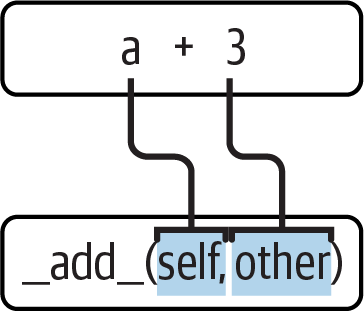
Figure 27-3. Operator overloading: class methods are run for operators and operations
Specially named methods such as __init__, __add__, and __str__ are inherited by subclasses and instances, just like any other names assigned in a class. If they’re not coded in a class, Python looks for such names in all its superclasses, as usual. As for all attributes, the lowest (most specific) version is used.
Operator-overloading method names are also not built-in or reserved words; they are just attributes that Python looks for when objects appear in various contexts. Python usually calls them automatically, but they may occasionally be called by your code as well. For example, the __init__ method is often called manually to trigger required initialization steps in a superclass constructor, as you’ll see in the next chapter.
Returning results—or not
Some operator-overloading methods like __str__ require results, but others are more flexible. For example, notice how the __add__ method makes and returns a new instance object of its class, by calling ThirdClass with the result value—which in turn triggers __init__ to initialize the result. This is a common convention, and explains why b in the listing has a display method; it’s a ThirdClass object too, because that’s what + returns for this class’s objects. This essentially propagates the object type.
By contrast, mul changes the current instance object in place, by reassigning the self attribute. We could overload the * expression to do the same with __mul__, but this would be too different from the behavior of * for built-in types such as numbers and strings, for which it always makes new objects. Per common practice, overloaded operators should work the same way that built-in operations do. Because operator overloading is really just an expression-to-method dispatch mechanism, though, you can interpret operators any way you like in your own classes. Also, stay tuned for Chapter 30’s related coverage of in-place operator methods (preview: __imul__ handles *=).
Other operator-overloading methods
Although we won’t cover every operator-overloading method in this book, we’ll survey additional common operator-overloading techniques in Chapter 30. Again, while this is an optional tool that doesn’t apply to most application programs, __str__ is not uncommon, and the __init__ constructor method is a norm that will be present in most Python classes you’ll come across. In fact, even though instance attributes need not be predeclared in Python, you can usually find out which attributes an instance will have by inspecting its class’s __init__ method.
The World’s Simplest Python Class
Despite the details of the class statement that we’ve begun to uncover in this chapter, you should keep in mind that the basic inheritance model behind classes is very simple—all it really involves is searching for attributes in trees of linked objects. In fact, we can create a class with nothing in it at all. The following statement makes a class with no attributes attached, an empty namespace object:
>>>class rec: pass# Empty namespace object
We need the no-operation pass placeholder statement (discussed in Chapter 13) here because we don’t have any methods to code. After we make the class by running this statement interactively, we can start attaching attributes to the class by assigning names to it completely outside of the original class statement:
>>>rec.name = 'Pat'# Just objects with attributes>>>rec.age = 40
And, after we’ve created these attributes by assignment, we can fetch them with the usual syntax. When used this way, a class is roughly similar to a “struct” in C, or a “record” in Pascal. It’s basically an object with field names attached to it, and may be easier to code than alternatives like dictionaries:
>>>print(rec.name)# Like a C struct or a recordPat
Notice that this works even though there are no instances of the class yet; classes are objects in their own right, even without instances. In fact, they are just self-contained namespaces; as long as we have a reference to a class, we can set or change its attributes anytime we wish. Watch what happens when we do create two instances, though:
>>>x = rec()# Instances inherit class names>>>y = rec()
These instances begin their lives as completely empty namespace objects. Because they remember the class from which they were made, though, they will obtain the attributes we attached to the class by inheritance:
>>>x.name, y.name# name is stored on the class only('Pat', 'Pat')
Really, these instances have no attributes of their own; they simply fetch the name attribute from the class object where it is stored. If we do assign an attribute to an instance, though, it creates (or changes) the attribute in that object, and no other—crucially, attribute references kick off inheritance searches, but attribute assignments affect only the objects in which the assignments are made. Here, this means that x gets its own name, but y still inherits the name attached to the class above it:
>>>x.name = 'Sue'# But assignment changes x only>>>rec.name, x.name, y.name('Pat', 'Sue', 'Pat')
Classes: Under the Hood
In fact, as we’ll explore in more detail in Chapter 29, the attributes of a namespace object are usually implemented as dictionaries, and class inheritance trees are, generally speaking, just dictionaries with links to other dictionaries. If you know where to look, you can see this explicitly.
For example, the __dict__ attribute is the namespace dictionary for most class-based objects, much as in modules. Some classes may also—or instead—define attributes in __slots__, an advanced and seldom-used feature called slots with impacts that we’ll note along the way, but whose full coverage we’ll largely postpone until Chapter 32. Normally, though, __dict__ literally is the attribute namespace of an instance or class.
To illustrate, the following inspects the namespaces of objects in the prior section’s REPL session, filtering out built-ins in the class with a generator expression as we’ve done before leaving just the names we’ve assigned:
>>>list(key for key in rec.__dict__ if not key.startswith('__'))['name', 'age'] >>>list(x.__dict__)['name'] >>>list(y.__dict__)[]
Here, the class’s namespace dictionary shows the name and age attributes we assigned to it, x has its own name, and y is still empty. Because of this model, an attribute can often be fetched by either dictionary indexing or attribute notation, but only if it’s present on the object in question—attribute notation kicks off inheritance search, but indexing looks in the single object only. As you’ll see later, both have valid roles, and the dir built-in collects inherited names:
>>>x.name, x.__dict__['name']# Attributes present here are dict keys('Sue', 'Sue') >>>x.age# But attribute fetch checks classes too40 >>>x.__dict__['age']# Indexing dict does not do inheritanceKeyError: 'age' >>>x.__dict__# Object namespace versus inheritance{'name': 'Sue'} >>>[attr for attr in dir(x) if attr[:2] != '__']['age', 'name']
In addition, to facilitate inheritance search on attribute fetches, each instance has a link to its class that Python creates for us—it’s called __class__, if you want to inspect it:
>>>x.__class__# Instance-to-class link<class '__main__.rec'>
Classes also have a __bases__ attribute, which is a tuple of references to a class’s superclass objects—in this example just the implicit and automatic object root class we’ll explore later:
>>>rec.__bases__# Class-to-superclasses link(<class 'object'>,)
These two attributes are how class trees are literally represented in memory by Python. Internal details like these are not required knowledge—class trees are implied by the code you run, and their search is normally automatic—but they can often help demystify the model.
The main point here is that Python’s class model is extremely dynamic. Classes and instances are just linked namespace objects, with attributes created on the fly by assignment. Those assignments usually happen within the class statements you code, but they can occur anywhere you have a reference to one of the objects in the tree.
In fact, even methods, normally created by a def nested in a class, can be created completely independently of any class object. The following, for example, defines a simple function outside of any class that takes one argument:
>>>def uppername(obj): return obj.name.upper()# Still needs a self argument (obj)
There is nothing about a class here yet—it’s a simple function, and it can be called as such at this point, provided we pass in an object obj with a name attribute, whose value in turn has an upper method—our class and instances happen to fit the expected interface and kick off string uppercase conversion:
>>> uppername(rec), uppername(x), uppername(y)
('PAT', 'SUE', 'PAT')
If we assign this simple function to an attribute of our class, though, it becomes a method, callable through any instance, as well as through the class name itself as long as we pass in an instance manually—a technique we’ll leverage further in the next chapter:2
>>>rec.method = uppername# Now it's a class's method!>>>x.method()# Run method to process x'SUE' >>>y.method()# Same, but pass y to self'PAT' >>>rec.method(x)# Can call through instance or class'SUE'
Normally, classes are filled out by class statements, and instance attributes are created by assignments to self attributes in method functions. The point again, though, is that they don’t have to be; OOP in Python really is mostly about looking up attributes in linked namespace objects.
Records Revisited: Classes Versus Dictionaries
Although the simple classes of the prior section are meant to illustrate class model basics, the techniques they employ can also be used for real work. For example, Chapters 8 and 9 showed how to use dictionaries, tuples, and lists to record properties of entities in our programs, generically called records. It turns out that classes can often serve better in this role—they package information like dictionaries, but can also bundle processing logic in the form of methods. For reference, here is an example for tuple- and dictionary-based records we used earlier in the book (using one of many dictionary coding techniques):
>>>rec = ('Pat', 40.5, ['dev', 'mgr'])# Tuple-based record>>>print(rec[0])Pat >>>rec = {}>>>rec['name'] = 'Pat'# Dictionary-based record>>>rec['age'] = 40.5# Or {...}, dict(n=v), etc.>>>rec['jobs'] = ['dev', 'mgr']>>>>>>print(rec['name'])Pat
As we just saw, though, there are also multiple ways to do the same with classes. Perhaps the simplest is this—trading keys for attributes:
>>>class rec: pass>>>rec.name = 'Pat'# Class-based record>>>rec.age = 40.5>>>rec.jobs = ['dev', 'mgr']>>>>>>print(rec.name)Pat
This code has substantially less syntax than the dictionary equivalent. It uses an empty class statement to generate an empty namespace object, which we then fill out by assigning class attributes over time, as before. This works, but a new class statement will be required for each distinct record we will need. Perhaps more typically, we can instead generate instances of an empty class to represent each distinct entity:
>>>class rec: pass>>>pers1 = rec()# Instance-based records>>>pers1.name = 'Bob'>>>pers1.jobs = ['dev', 'mgr']>>>pers1.age = 40.5>>>>>>pers2 = rec()>>>pers2.name = 'Sue'>>>pers2.jobs = ['dev', 'cto']>>>>>>pers1.name, pers2.name('Bob', 'Sue')
Here, we make two records from the same class. Instances start out life empty, just like classes. We then fill in the records by assigning to attributes. This time, though, there are two separate objects, and hence two separate name attributes. In fact, instances of the same class don’t even have to have the same set of attribute names; in this example, one has a unique age name. Instances really are distinct namespaces, so each has a distinct attribute dictionary. Although they are normally filled out consistently by a class’s methods, they are more flexible than you might expect.
Finally, we might instead code a more full-blown class to implement the record and its processing—something that data-oriented dictionaries do not directly support:
>>>class Person: def __init__(self, name, jobs, age=None):# class = data + logicself.name = name self.jobs = jobs self.age = age def info(self): return (self.name, self.jobs)>>>rec1 = Person('Bob', ['dev', 'mgr'], 40.5)# Construction calls>>>rec2 = Person('Sue', ['dev', 'cto'])>>> >>>rec1.jobs, rec2.info()# Attributes + methods(['dev', 'mgr'], ('Sue', ['dev', 'cto']))
This scheme also makes multiple instances, but the class is not empty this time: we’ve added logic (methods) to initialize instances at construction time and collect attributes into a tuple on request. The constructor imposes some consistency on instances here by always setting the name, job, and age attributes, even though the latter can be omitted when an object is made. Together, the class’s methods and instance attributes create a package, which combines both data and logic.
We could further extend this code by adding logic to compute salaries, parse names, and so on. Ultimately, we might link the class into a larger hierarchy to inherit and customize an existing set of methods via the automatic attribute search of classes, or perhaps even store instances of the class in a file with Python object pickling to make them persistent. In fact, we will—in the next chapter, we’ll expand on this analogy between classes and records with a more realistic running example that demonstrates class basics in action.
To be fair to other tools, in this form, the two class construction calls above more closely resemble dictionaries made all at once, but still seem less cluttered and provide extra processing methods. In fact, the class’s construction calls more closely resemble Chapter 9’s named tuples—which makes sense, given that named tuples really are classes with extra logic to map attributes to tuple offsets:
>>>rec = dict(name='Pat', jobs=['dev', 'mgr'], age=40.5)# Dictionaries>>>rec = {'name': 'Pat', 'jobs': ['dev', 'mgr'], 'age': 40.5} # Ditto>>> …setup code… >>>rec = Rec('Pat', ['dev', 'mgr'], 40.5)# Named tuples
In the end, although types like dictionaries and tuples are flexible, classes allow us to add behavior to objects in ways that built-in types and simple functions do not directly support. Although we can store functions in dictionaries too (e.g., under key info to mimic the class’s method), using them to process implied instances is nowhere near as natural and structured as it is in classes, and key lookup has no notion of inheritance to enable customization.
But to vet the purported benefits of classes firsthand, you’ll have to move ahead to the next chapter.
Chapter Summary
This chapter introduced the basics of coding classes in Python. We studied the syntax of the class statement and learned how to use it to build up a class inheritance tree. We also studied how Python automatically fills in the first argument in method functions, how attributes are attached to objects in a class tree by simple assignment, and how specially named operator-overloading methods intercept and implement built-in operations for our instances (e.g., expressions and printing).
Now that we’ve explored the mechanics of classes in Python, the next chapter turns to a larger and more realistic example that ties together much of what we’ve learned about OOP so far and introduces some new topics. After that, we’ll continue our look at class coding, taking a second pass over the model to fill in some of the details that were omitted here to keep things simple. First, though, let’s work through a quiz to review the basics we’ve covered so far.
Test Your Knowledge: Quiz
How are classes related to modules?
How are instances and classes created?
Where and how are class attributes created?
Where and how are instance attributes created?
What does
selfmean in a Python class?How is operator overloading coded in a Python class?
When might you want to support operator overloading in your classes?
Which operator-overloading method is most commonly used?
What are the three key concepts required to understand Python OOP code?
Test Your Knowledge: Answers
Classes are always nested inside a module; they are attributes of a module object. Classes and modules are both namespaces, but classes correspond to statements (not entire files) and support the OOP notions of multiple instances, inheritance, and operator overloading (modules mostly do not). In a sense, a module is like a single-instance class, without inheritance, which corresponds to an entire file of code.
Classes are made by running class statements; instances are created by calling a class as though it were a function.
Class attributes are created by assigning attributes to a class object. They are normally generated by top-level assignments nested in a
classstatement—each name assigned in theclassstatement block becomes an attribute of the class object (technically, theclassstatement’s local scope morphs into the class object’s attribute namespace, much like a module). Class attributes can also be created, though, by assigning attributes to the class anywhere a reference to the class object exists—even outside theclassstatement.Instance attributes are created by assigning attributes to an instance object. They are normally created within a class’s method functions coded inside the
classstatement, by assigning attributes to theselfargument (which is always the implied instance). Again, though, they may be created by assignment anywhere a reference to the instance appears, even outside theclassstatement. Usually, all instance attributes are initialized in the__init__constructor method; that way, later method calls can assume the attributes already exist.selfis the name commonly given to the first (leftmost) argument in a class’s method function; Python automatically fills it in with the instance object that is the implied subject of the method call. This argument need not be calledself(though this is a very strong convention); its position is what is significant. (Ex-C++ or Java programmers might prefer to call itthisbecause in those languages that name reflects the same idea; in Python, though, this argument must always be explicit in method headers and code).Operator overloading is coded in a Python class with specially named methods; they all begin and end with double underscores to make them unique. These are not built-in or reserved names; Python just runs them automatically when an instance appears in the corresponding operation. Python itself defines the mappings from operations to special method names.
Operator overloading is useful to implement objects that resemble built-in types (e.g., sequences or numeric objects such as matrixes), and to mimic the built-in type interface expected by a piece of code. Mimicking built-in type interfaces enables you to pass in class instances that also have state information (i.e., attributes that remember data between operation calls). You generally shouldn’t use operator overloading when a simple named method will suffice, though.
The
__init__constructor method is the most commonly used; almost every class uses this method to set initial values for instance attributes and perform other startup tasks. The__str__method (and its__repr__sibling) is not uncommon, but not as much of a fixture as__init__.The special
selfargument in method functions, the inheritance search for attributes, and the__init__constructor method are the cornerstones of OOP code in Python. If you get these, you should be able to read the text of most OOP Python code—apart from these, it’s largely just packages of functions. In classes,selfrepresents the automatic object argument, and__init__is commonly used to initialize instances.
1 Not to be confused with the __init__.py files in module packages! The method here is a class constructor function used to initialize the newly created instance, not a namespace for a module-package folder. See Chapter 24 for more details.
2 In fact, this is one of the reasons the self argument must always be explicit in Python methods—because methods can be created as simple functions independent of a class, they need to include the implied instance argument explicitly. They can be called as either functions or methods, and Python can neither guess nor assume that a simple function might eventually become a class’s method. The main reason for the explicit self argument, though, is to make the meanings of names more apparent: names not referenced through self are simple variables mapped to scopes, while names referenced through self with attribute notation are obviously instance attributes.