Chapter 36. Exception Odds and Ends
This chapter rounds out this part of the book with the usual collection of stray topics, common-usage examples, and design concepts, followed by this part’s gotchas and exercises. Because this chapter also closes out the fundamentals portion of the book at large, it includes a brief overview of concepts and development tools to help as you make the transition from Python language beginner to Python application developer.
Nesting Exception Handlers
Most of our examples so far have used only a single try to catch exceptions, but what happens if one try is physically nested inside another? For that matter, what does it mean if a try calls a function that runs another try? Technically, try statements can nest in terms of both syntax and the runtime control flow through your code. This was mentioned earlier in brief but merits clarification here.
Both of these cases can be understood if you realize that Python stacks try statements at runtime. When an exception is raised, Python returns to the most recently entered try statement with a matching except clause. Because each try statement leaves a marker on the top of a LIFO stack, Python can jump back to earlier trys by inspecting the stacked markers. This nesting of active handlers is what we mean when we talk about propagating exceptions up to “higher” handlers—such handlers are simply try statements entered earlier in the program’s execution flow.
Figure 36-1 illustrates what occurs when try statements with except clauses nest at runtime. The amount of code that goes into a try block can be substantial, and it may contain function calls that invoke other code watching for the same exceptions. When an exception is eventually raised, Python jumps back to the most recently entered try statement that names that exception, runs that statement’s except clause, and then resumes execution after that try.
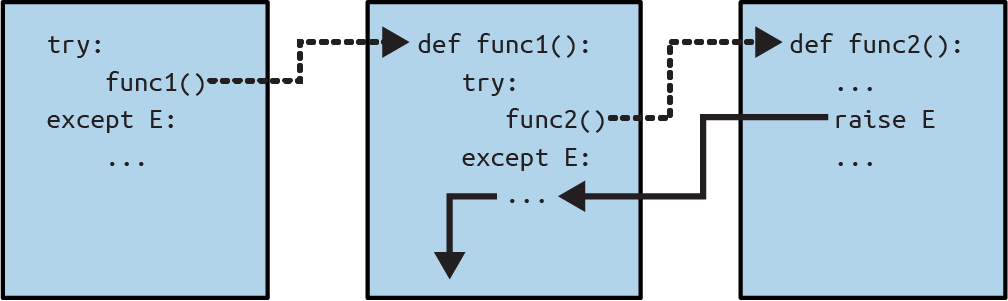
Figure 36-1. Nested try/except combinations
Once the exception is caught, its life is over—control does not jump back to all matching trys that name the exception; only the first (i.e., most recent) one is given the opportunity to handle it. In Figure 36-1, for instance, the raise statement in the function func2 sends control back to the handler in func1, and then the program continues within func1.
By contrast, when try statements that contain only finally clauses are nested, each finally block is run in turn when an exception occurs—Python continues propagating the exception up to other trys, and eventually perhaps to the top-level default handler (the standard error-message printer). As Figure 36-2 illustrates, the finally clauses do not kill the exception—they just specify code to be run on the way out of each try during the exception propagation process. If there are many try/finally combos active when an exception occurs, they will all be run unless a except clause catches the exception somewhere along the way.
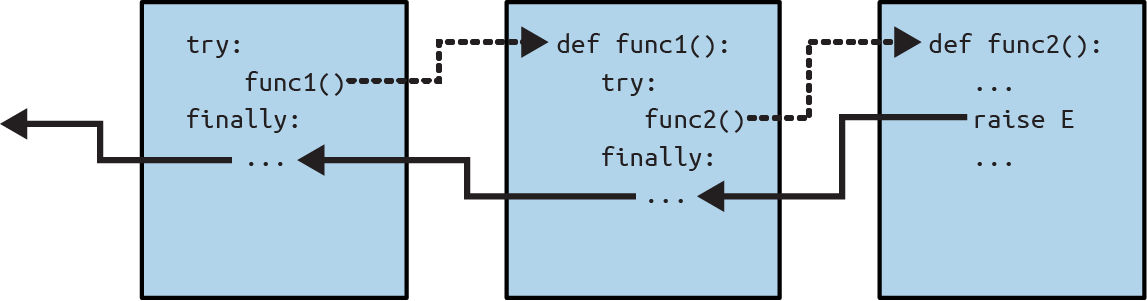
Figure 36-2. Nested try/finally combinations
In other words, where the program goes when an exception is raised depends entirely upon where it has been—it’s a function of the runtime flow of control through the script, not just its syntax. The propagation of an exception essentially proceeds backward through time to try statements that have been entered but not yet exited. This propagation stops as soon as control is unwound to a matching except clause, but not as it passes through finally clauses on the way.
The prior chapter’s except* clauses don’t change this story—if they consume every exception in the raised group, the aggregate exception ends in the try as usual. As we saw, unmatched excepts are reraised after the except* clauses have their chance and are propagated on to other try statements or the top-level handler, but this is not fundamentally different from exceptions unmatched by an except.
Example: Control-Flow Nesting
Let’s turn to examples to make this nesting concept more concrete. The module file in Example 36-1 defines three functions: action1 wraps a call to action2 in a try handler, action2 does likewise for a call to action3, and action3 is coded to trigger a built-in TypeError exception (you can’t add numbers and sequences).
Example 36-1. nested_exc_normal.py
def action3():
    print(1 + [])              # Generate TypeError

def action2():
    try:                       # Most recent matching try
        action3()
    except TypeError:
        print('Inner try')     # Match kills the exception
        raise                  # Unless manually reraised

def action1():
    try:
        action2()
    except TypeError:
        print('Outer try')     # Run only if action2 re-raises

if __name__ == '__main__': action1()
Notice, though, that when action3 triggers the exception, there will be two active try statements—the older one in action1 and the newer one in action2. Python picks and runs just the most recent try with a matching except—which in this case is the try inside action2. In this demo, action2 also manually reraises the TypeError with raise to trigger the try in action1, but the exception would otherwise die in action2:
$ python3 nested_exc_normal.py
Inner try
Outer try
The same happens for an exception group, though the exception doesn’t die until the entire group has been matched. In Example 36-2, for instance, action2 picks off IndexError, action1 consumes TypeError, and SyntaxError propagates to the top-level default handler (or an earlier matching try, if one had been run).
Example 36-2. nested_exc_group.py
def action3():
    raise ExceptionGroup('Nest*', [IndexError(1), TypeError(2), SyntaxError(3)])

def action2():
    try:
        action3()
    except* IndexError:        # Consume matches, rest propagate
        print('Got IE')

def action1():
    try:
        action2()
    except* TypeError:         # Consume matches, rest propagate
        print('Got TE')

if __name__ == '__main__': action1()
When run, each function’s try consumes exceptions it matches, and the top-level handler prints an error message for the last remaining unmatched item in the group:
$python3 nested_exc_group.pyGot IE Got TE + Exception Group Traceback (most recent call last): …etc… | ExceptionGroup: Nest* (1 sub-exception) +-+---------------- 1 ---------------- | SyntaxError: 3 +------------------------------------
Whether groups or individual exceptions are raised, the place where an exception winds up jumping to depends on the control flow through the program at runtime. Because of this, to know where you will go, you need to know where you’ve been. In other words, routing for exceptions nested at runtime is more a function of control flow than of statement syntax. That said, we can also nest exception handlers syntactically—an equivalent case we turn to next.
Example: Syntactic Nesting
As discussed when we studied clause combinations of the try statement in Chapter 34, it is also possible to nest try statements syntactically by their position in your source code:
>>>from nested_exc_normal import action3>>>try:...try:...action3()...except TypeError:# Most-recent matching try...print('Inner try')...raise...except TypeError:# Here, only if nested handler re-raises...print('Outer try')... Inner try Outer try
Really, though, this code just sets up the same handler-nesting structure as, and behaves identically to, the try statements in Example 36-1. In fact, syntactic nesting works just like the cases sketched in Figures 36-1 and 36-2. The only difference is that the nested handlers are physically embedded in a try block, not coded elsewhere in functions that are called from the try block. For example, nested finally handlers all fire on an exception, whether they are nested syntactically or by means of the runtime flow through physically separated parts of your code:
>>>try:...try:...action3()...finally:...print('Inner try')...finally:...print('Outer try')... Inner try Outer try Traceback (most recent call last): …etc… TypeError: unsupported operand type(s) for +: 'int' and 'list'
See Figure 36-2 for a graphic illustration of this code’s operation; the effect is the same, but the function logic has been inlined as nested statements here. As a more comprehensive example of syntactic nesting at work, consider the file listed in Example 36-3.
Example 36-3. except-finally.py
defraise1():raiseIndexErrordefnoraise():returndefraise2():raiseSyntaxErrorforfuncin(raise1,noraise,raise2):(f'<{func.__name__}>')try:try:func()exceptIndexError:('caught IndexError')finally:('finally run')('...')
This code catches an exception if a matching one is raised and performs a finally termination-time action regardless of whether an exception occurs. This may take a few moments to digest, but the effect is the same as combining an except and a finally clause in a single try statement:
$python3 except-finally.py<raise1> caught IndexError finally run ... <noraise> finally run ... <raise2> finally run Traceback (most recent call last): …etc… SyntaxError: None
As we saw in Chapter 34, except and finally clauses can be mixed in the same try statement. While this, along with multiple except clauses, makes the syntactic nesting shown in this section largely academic, the equivalent runtime nesting is common in larger Python programs. Moreover, syntactic nesting can make the disjoint roles of except and finally explicit and might be useful for implementing alternative exception-handling behaviors.
Exception Idioms
We’ve seen the mechanics behind exceptions. Now, let’s survey the ways they are typically used. Some of these are reviews of roles we’ve explored in earlier chapters, collected here as part of a referable set.
Breaking Out of Multiple Nested Loops: “go to”
As mentioned at the start of this part of the book, exceptions can often be used to serve the same roles as other languages’ “go-to” statements to implement more arbitrary control transfers. Exceptions, however, provide a more structured option that localizes the jump to a specific block of nested code.
In this role, raise is like “go to,” and except clauses and exception names take the place of program labels. You can jump only out of code wrapped in a try this way, but that’s a crucial feature—truly arbitrary “go to” statements can make code extraordinarily difficult to understand and maintain (“spaghetti code” in developer lingo).
For example, Python’s break statement exits just the single closest enclosing loop, but we can always use exceptions to break out of more than one loop level if needed, as in Example 36-4.
Example 36-4. breaker.py
class Exitloop(Exception): pass

try:
    while True:
        while True:
            for i in range(10):
                 if i > 3: raise Exitloop          # break exits just one level
                 print('loop3: %s' % i)            # raise can exit many
            print('loop2')
        print('loop1')
except Exitloop:
    print('continuing')                            # Or just pass, to move on

print(f'{i=}')                                     # Loop variable not undone
When run, the raise in the for breaks out of three nested loops immediately:
$ python3 breaker.py
loop3: 0
loop3: 1
loop3: 2
loop3: 3
continuing
i=4
If you change the raise in this to break, you’ll get an infinite loop because you’ll break only out of the most deeply nested for loop, and wind up in the second-level while loop nesting. The code would then print “loop2” and start the for again. Make the mod to see for yourself—but get ready to type Ctrl+C to stop the code!
Also, notice that variable i is still what it was in for after the try statement exits. As previously noted, variable assignments made in a try are not undone in general, though as we’ve seen, exception instance variables listed in except clause as headers are localized to that clause, and the local variables of any functions that are exited as a result of a raise are discarded. Technically, active functions’ local variables are popped off the call stack and the objects they reference may be garbage-collected as a result, but this is an automatic step.
Exceptions Aren’t Always Errors
In Python, all errors are exceptions, but not all exceptions are errors. For instance, we saw in Chapter 9 that file object read methods return an empty string at the end of a file. In contrast, the built-in input function—which we first met in Chapter 3 and deployed in an interactive loop in Chapter 10—reads a line of text from the standard input stream, sys.stdin, on each call and raises the built-in EOFError at end-of-file.
Unlike file methods, this function does not return an empty string—an empty string from input means an empty line. Despite its name, though, the EOFError exception is just a signal in this context, not an error. Because of this behavior, unless the end-of-file should terminate a script, input often appears wrapped in a try handler and nested in a loop, as in the following code:
while True:
    try:
        line = input()           # Read line from stdin
    except EOFError:
        break                    # Exit loop at end-of-file
    else:
        …process next line here…
Several other built-in exceptions are similarly signals, not errors—for example, calling sys.exit() and pressing Ctrl+C on your keyboard raise SystemExit and KeyboardInterrupt, respectively.
Python also has a set of built-in exceptions that represent warnings rather than errors; some of these are used to signal the use of deprecated (soon to be phased out) language features. See the standard library manual’s description of built-in exceptions for more information, and consult the warnings module’s documentation for more on exceptions raised as warnings.
Functions Can Signal Conditions with raise
User-defined exceptions can also signal nonerror conditions. For instance, a search routine can be coded to raise an exception when a match is found instead of returning a status flag for the caller to interpret. In the following abstract code, the try/except/else exception handler does the work of an if/else return-value tester:
class Found(Exception): pass

def searcher():
    if …success…:
        raise Found()            # Raise exceptions instead of returning flags
    else:
        return

try:
    searcher()
except Found:                    # Exception if item was found
    …success…
else:                            # else returned: not found
    …failure…
More generally, such a coding structure may also be useful for any function that cannot return a sentinel value to designate success or failure. In a widely applicable function, for instance, if all objects are potentially valid return values, it’s impossible for any return value to signal a failure condition. Exceptions provide a way to signal results without a return value:
class Failure(Exception): pass

def searcher():
    if …success…:
        return founditem
    else:
        raise Failure()

try:
    item = searcher()
except Failure:
    …not found…
else:
    …use item here…
Because Python is dynamically typed and polymorphic to the core, exceptions, rather than sentinel return values, are the generally preferred way to signal such conditions.
Closing Files and Server Connections
We encountered examples in this category in Chapter 34. As a review, exception processing tools are also commonly used to ensure that system resources are finalized, regardless of whether an error occurs during processing or not.
For example, some servers require connections to be closed in order to terminate a session. Similarly, output files may require close calls to flush their buffers to disk for waiting consumers; input files may consume file descriptors if not closed; and CPython closes open files when garbage-collecting them, but this isn’t always predictable or reliable.
As we saw in Chapter 34, the most general and explicit way to guarantee termination actions for a specific block of code is the try/finally combination:
myfile = open('somefile', 'w')
try:
    …process myfile…
finally:
    myfile.close()
As we also saw, some objects make this potentially easier by providing context managers that terminate or close resources for us automatically when run by the with statement:
with open('somefile', 'w') as myfile:
    …process myfile…
If you want to know which option is better, flip back to Chapter 34’s “The Termination-Handlers Shoot-Out”—and draw your own conclusions.
Debugging with Outer try Statements
You can also make use of exception handlers to replace Python’s default top-level exception-handling behavior. By wrapping an entire program (or a call to it) in an outer try in your top-level code, you can catch any exception that may occur while your program runs, thereby subverting the default program termination.
In the following, the empty except clause catches any uncaught exception raised while the program runs. To get hold of the actual exception that occurred in this mode, fetch the exc_info function call result from the built-in sys module; it returns a tuple whose first two items contain the currently handled exception’s class and the instance object raised (more on sys.exc_info in a moment):
try:
    …run program…
except:                         # All uncaught exceptions come here
    import sys
    print('uncaught!', sys.exc_info()[0], sys.exc_info()[1])
This structure is commonly used during development to keep programs active even after errors occur. It’s also used when testing other program code, as described in the next section: coded within a loop, this structure allows you to run additional tests without having to restart.
Running In-Process Tests
Some of the coding patterns we’ve just seen can be combined in a test-driver script that tests other code imported and run within the same process (i.e., program run). The following partial and abstract code sketches the general model:
import sys
log = open('testlog', 'a')
from testapi import moreTests, runNextTest, testName
def testdriver():
    while moreTests():
        try:
            runNextTest()
        except:
            print('FAILED', testName(), sys.exc_info()[:2], file=log)
        else:
            print('PASSED', testName(), file=log)
testdriver()
The testdriver function here cycles through a series of test calls. Because an uncaught exception in any of them would normally kill this test driver, tests are wrapped in a try to continue the testing process if a test fails. The empty except catches any uncaught exception generated by a test case and uses sys.exc_info to log the exception to a file. The else clause is run when no exception occurs—the test success case.
Such boilerplate code is typical of systems that test imported functions, modules, and classes. In practice, though, testing can be much more sophisticated. For instance, to test external programs, you could instead check status codes or outputs generated by program-launching tools such as os.system and os.popen, which were used earlier in this book and are covered in Python’s standard library manual. Such tools do not generally raise exceptions for errors in the external programs—in fact, the test cases may run in parallel with the test driver.
At the end of this chapter, we’ll also briefly explore more complete testing frameworks provided by Python, such as doctest and PyUnit, which provide tools for comparing expected outputs with actual results.
More on sys.exc_info
The sys.exc_info result used in the last two sections allows an exception handler to generically gain access to the exception being handled. This is especially useful when using the empty except clause to catch everything blindly because it allows you to determine what was raised:
try:
    …
except:
    # sys.exc_info()[0:2] are the exception class and instance
If no exception is being handled, this call returns a tuple containing three None values. Otherwise, the values returned are (type, value, traceback), where:
typeis the class of the exception being handled.valueis the class instance that was raised.tracebackis a traceback object that represents the call stack at the point where the exception originally occurred, and may be used by thetracebackmodule to generate error messages.
As we saw in the prior chapter, sys.exc_info can also sometimes be useful to determine the specific exception type when catching exception category superclasses. As we’ve also learned, though, because in this case you can also get the exception type by fetching the __class__ attribute or type result of the instance obtained with the as clause, sys.exc_info is rarely useful outside the empty except:
try:
    …
except General as instance:
    # instance.__class__ or type(instance) is the exception class
    # but instance.method() does the right thing for this instance
As we’ve seen, using Exception for the General exception name here would catch all nonexit exceptions; it’s similar to an empty except but less extreme and still gives access to the exception instance and its class. Even so, leveraging polymorphism by calling the instance’s methods is often a better approach than testing exception types.
The sys.exception alternative—and diss
As yet another option, a new call added in Python 3.11, sys.exception, returns just the exception instance raised—the same object assigned to the variable listed after as in except clauses, and equivalent to the second item in the sys.exc_info result (i.e., sys.exc_info()[1]). Hence, the following work the same in a try:
except …:
    print('uncaught!', sys.exc_info()[0], sys.exc_info()[1])
except …:
    print('uncaught!', type(sys.exception()), sys.exception())
More generally, there are now three ways to obtain the same information about a caught exception in try (two of which in the following are nested in a tuples to match exc_info and display with repr instead of str):
>>>class E(Exception): pass... >>>try:...raise E('info')...except E as X:...print((type(X), X))...print(sys.exc_info()[:2])...print((type(sys.exception()), sys.exception()))... (<class '__main__.E'>, E('info')) (<class '__main__.E'>, E('info')) (<class '__main__.E'>, E('info'))
When using sys.exception, the exception class is available from the instance via __class__ or type (as shown), and the traceback is normally present in the exception instance’s __traceback__ object. Though largely trivial, the new call avoids an index or slice when only the instance is needed.
Less pleasantly, with the addition of sys.exception, the sys.exc_info call has also been branded “old-style” in Python’s docs, but doing this for the sake of a redundant call added just over a year ago seems both opinionated and divisive—if not software ageism. Naturally, you’re welcome and encouraged to use either call in your code, but this book generally recommends tools that are traditional, common, and inclusive.
Displaying Errors and Tracebacks
Finally, the exception traceback object available in the prior section’s sys.exc_info data is also used by the standard library’s traceback module to generate the standard error message and stack display manually. This module has a handful of interfaces that support wide customization, which we don’t have space to cover usefully here, but the basics are simple. Consider the (judgmentally named) file in Example 36-5, badly.py.
Example 36-5. badly.py
importtracebackdefinverse(x):return1/xtry:inverse(0)exceptException:traceback.print_exc(file=open('badly.txt','w'))('Bye')
This code uses the print_exc convenience function in the traceback module, which internally uses sys.exc_info data (technically, it was changed to use the sys.exception component as part of the prior section’s subjective purge). When run, the script prints the standard error message to a file—useful in programs that need to catch errors but still record them in full (again, type is the Windows equivalent of Unix cat here):
$python3 badly.pyBye $cat badly.txtTraceback (most recent call last): File "/…/LP6E/Chapter36/badly.py", line 7, in <module> inverse(0) File "/…/LP6E/Chapter36/badly.py", line 4, in inverse return 1 / x ~~^~~ ZeroDivisionError: division by zero
For much more on traceback objects, the traceback module that uses them, and related topics, consult your favorite Python reference resources.
Exception Design Tips and Gotchas
This chapter is lumping design tips and gotchas together because it turns out that the most common exception gotchas stem from design issues. By and large, exceptions are easy to use in Python. The real art behind them is in deciding how specific or general your except clauses should be and how much code to wrap up in try statements. Let’s address the latter of these choices first.
What Should Be Wrapped
In principle, you could wrap every statement in your script in its own try, but that would just be silly (the try statements would then need to be wrapped in try statements!). What to wrap is really a design issue that goes beyond the language itself, and it will become more apparent with use. But as a summary, here are a few rules of thumb:
Operations that commonly fail should generally be wrapped in
trystatements. For example, operations that interface with system state (file opens, socket calls, and the like) are prime candidates fortry.Unless they should fail—in a simple script, you may want failures to kill your program instead of being caught and ignored, especially if the failure is a showstopper. Failures in Python normally generate useful error messages instead of hard crashes, and this is the best outcome some programs could hope for.
Cleanup actions that must be run regardless of exception outcomes should generally be run with a
try/finallycombination unless a context manager is available as awithoption.Wrapping the call to a function in a single
trystatement often makes for less code than wrapping operations in the function itself. That way, all exceptions in the function percolate up to the singletryaround the call.
The types of programs you write will probably influence the amount of exception handling you code as well. Servers, test runners, and GUIs, for instance, must generally catch and recover from exceptions. Simpler one-shot scripts, though, will often ignore exception handling completely because failure at any step requires shutdown.
In all cases, keep in mind that failures in Python normally generate useful error messages instead of hard crashes. Even without try, this is often a better outcome than some programs could hope for.
Catching Too Much: Avoid Empty except and Exception
As we’ve learned, Python lets us pick and choose which exceptions to catch, but it’s important not to be too inclusive. For example, we’ve seen that an empty except clause catches every exception. That’s easy to code and sometimes desirable, but it may also wind up intercepting an error that’s expected by a try elsewhere:
def func():
    try:
        …                  # IndexError is raised in here
    except:
        …                  # But everything comes here and dies!

try:
    func()
except IndexError:         # Exception should be processed here
    …
Perhaps worse, such code might also catch unrelated critical exceptions. Even things like memory errors, program typos, iteration stops, keyboard interrupts, and system exits raise exceptions in Python. Unless you’re writing a debugger or similar tool, such exceptions should not usually be intercepted in your code.
For example, scripts normally exit when control falls off the end of the top-level file, but Python also provides a built-in sys.exit(statuscode) call to allow early terminations. This works by raising a built-in SystemExit exception to end the program so that try/finally handlers run on the way out and tools can intercept the event.1 Because of this, a try with an empty except might unknowingly prevent an exit, as in Example 36-6.
Example 36-6. exiter.py
import sys

def bye():
    sys.exit(62)           # Crucial error: abort now!

try:
    bye()
except:
    print('Got it')        # Oops--we ignored the exit

print('Continuing...')
When run, the script happily keeps going after a call to shut it down:
$ python3 exiter.py
Got it
Continuing...
You simply might not expect all the kinds of exceptions that could occur during an operation. Per the prior chapter, using the built-in Exception superclass can help because it is not a superclass of SystemExit:
try:
    bye()
except Exception:          # Won't catch exits, but _will_ catch many others
    …
In some cases, though, this scheme is no better than an empty except clause—because Exception is a superclass above all built-in exceptions except system-exit events, it still has the potential to catch exceptions meant for elsewhere in the program. Worse, using both the empty except and Exception will also catch programming errors, which should usually be allowed to pass. In fact, these two techniques can effectively turn off Python’s error-reporting machinery, making it difficult to notice mistakes in your code. Consider this code, for example:
mydictionary = {…}
…
try:
    x = myditctionary[key]       # Oops: misspelled name
except:
    x = None                     # Assume we got KeyError – only - here
…continue here with x…
The coder here assumes that the only sort of error that can happen when indexing a dictionary is a missing key error. But because the name myditctionary is misspelled, Python raises a NameError instead for the undefined name reference, which the handler will silently catch and ignore. Hence, the event handler will incorrectly fill in a None default for the dictionary access, masking the program error.
Moreover, catching Exception here will not help—it would have the exact same effect as an empty except, silently filling in a default and hiding an error you will probably want to know about. If this happens in code that is far removed from the place where the fetched values are used, it might make for an interesting debugging task!
As a rule of thumb, be as specific in your handlers as you can be—empty except clauses and Exception catchers are handy but potentially error-prone. In the last example, for instance, you would be better off listing KeyError in the except to avoid intercepting unrelated events. In simpler scripts, the potential for problems might not be significant enough to outweigh the convenience of a catchall, but in general, general handlers are generally trouble.
Note
More closers: Python’s atexit standard library module allows programs to handle program shutdowns without recovery from them, and its sys.excepthook can be used to customize what the top-level exception handler does. A related call, os._exit, ends a program like sys.exit, but via immediate termination—it skips cleanup actions, including any registered with atexit, and cannot be intercepted with try/except or try/finally. It is usually used only in spawned child processes, a topic beyond this book’s scope. See Python’s library manual for more details.
Catching Too Little: Use Class-Based Categories
Being too specific in exception handlers can be just as perilous as being too general. When you list specific exceptions in a try, you catch only what you actually list. This isn’t necessarily a bad thing, but if a system evolves to raise other exceptions in the future, you may need to go back and add them to exception lists elsewhere in your code.
We saw this phenomenon at work in the prior chapter. By way of review, because the following handler is written to treat only MyExcept1 and MyExcept2 as cases of interest, a future MyExcept3 won’t apply:
try:
    …
except (MyExcept1, MyExcept2):    # Breaks if you add a MyExcept3 later
    …
Careful use of class-based exceptions can make this code maintenance trap go away completely. By catching a general superclass, new exceptions don’t imply except-clause changes:
try:
    …
except CommonCategoryName:        # OK if you add a MyExcept3 subclass later
    …
In other words, a little design goes a long way. The moral of the story is to be careful to be neither too general nor too specific in exception handlers and to pick the granularity of your try statement wrappings wisely. Especially in larger systems, exception policies should be a part of the overall design.
Core Language Wrap-Up
Congratulations! This concludes your voyage through the fundamentals of the Python programming language. If you’ve gotten this far, you’ve become a fully operational Python programmer. There’s more optional reading in the advanced topics part ahead described in a moment. In terms of the essentials, though, the Python story—and this book’s main journey—is now complete.
Along the way, you’ve seen just about everything there is to see in the language itself and in enough depth to apply to most of the code you are likely to encounter in the Python “wild.” You’ve studied built-in types, statements, and exceptions, as well as tools used to build up the larger program units of functions, modules, and classes.
You’ve also explored important software design issues, the complete OOP paradigm, functional programming tools, program architecture concepts, alternative tool trade-offs, and more—compiling a skill set now qualified to be turned loose on the task of developing real applications.
The Python Toolset
From this point forward, your future Python career will largely consist of becoming proficient with the toolset available for application-level Python programming. You’ll find this to be an ongoing task. The standard library, for example, contains hundreds of modules, and the public domain offers still more tools. It’s possible to spend decades seeking proficiency with all these tools—especially as new ones are constantly appearing to address new technologies.
Speaking generally, Python provides a hierarchy of toolsets:
- Built-in tools
- Built-in types like strings, lists, and dictionaries make it easy to write simple programs fast.
- Python-coded extensions
- For more demanding tasks, you can write your own functions, modules, and classes in Python itself.
- Other-language extensions
- Although we don’t cover this topic in this book, Python can also be extended with code written in an external language like C, C++, or Java.
Because Python layers its toolsets, you can decide how deeply your programs need to delve into this hierarchy for any given task—you can use built-ins for simple scripts, add Python-coded extensions for larger systems, and code other extensions for advanced work. We’ve only covered the first two of these categories in this book, and that’s plenty to get you started doing substantial programming in Python.
Beyond this, there are tools, resources, and precedents for using Python in nearly any computer domain you can imagine. For pointers on where to go next, see Chapter 1’s overview of Python applications and users. You’ll likely find that with a powerful open source language like Python, common tasks are often much easier, and even enjoyable, than you might expect.
Development Tools for Larger Projects
Most of the examples in this book have been fairly small and self-contained. They were written that way on purpose to help you master the basics. But now that you know all about the core language, it’s time to start learning how to use Python’s built-in and third-party interfaces to do real work.
In practice, Python programs can become substantially larger than the examples you’ve experimented with so far in this book. Even in Python, thousands of lines of code are not uncommon for nontrivial and useful programs once you add up all the individual modules in the system. Though Python’s basic program structuring tools, such as modules and classes, help much to manage this complexity, other tools can sometimes offer additional support.
For developing larger systems, you’ll find such support available in both Python and the public domain. You’ve seen some of these in action, and others have been noted in passing. This category morphs constantly, so we can’t get too detailed here, but to help you with your next steps, here is a quick tour and summary of tools in this domain:
- Documentation tools
- PyDoc’s
helpfunction and HTML interfaces were introduced in Chapter 15. PyDoc provides a documentation system for your modules and objects, integrates with Python’s docstrings syntax, and is a standard part of the Python system. See Chapters 15 and 4 for more documentation source hints. - Error-checking tools
- Because Python is such a dynamic language, some programming errors are not reported until your program runs (even syntax errors are not caught until a file is run or imported). This isn’t a big drawback—as with most languages, it just means that you have to test your Python code before shipping it. With Python, you essentially trade a compile phase for an initial testing phase. Furthermore, Python’s dynamic nature, automatic error checking and reporting messages, and exception model make it easier and quicker to find and fix errors than it is in some other languages. Unlike C, for example, Python does not crash completely on errors.
- Still, tools can help here too. As representative examples, the PyChecker, Pylint, and Pyflakes third-party systems provide support for catching common errors before your script runs. They serve similar roles to the lint program in C development. Some Python developers run their code through such tools prior to testing or delivery to catch any lurking potential problems. In fact, it’s not a bad idea to try this when you’re first starting out—some of these tools’ warnings may help you learn to spot and avoid common Python mistakes.
- Testing tools
- In Chapter 25, we learned how to add self-test code to a Python file by using the
__name__ == '__main__'trick at the bottom of the file—a simple unit-testing protocol. For more advanced testing purposes, Python comes with two testing tools. The first, PyUnit (calledunittestin the standard library manual), provides an object-oriented class framework for specifying and customizing test cases and expected results. It mimics the JUnit framework for Java and is a sophisticated class-based unit testing system. - The
docteststandard library module provides a second and simpler approach to regression testing based upon Python’s docstrings feature. Roughly, to usedoctest, you cut and paste a log of an interactive testing session into the docstrings of your source files.doctestthen extracts your docstrings, parses out the test cases and results, and reruns the tests to verify the expected results. See the library manual for more on both testing tools. - IDEs
- We discussed IDEs for Python briefly in Chapter 3. IDEs such as PyCharm and Python’s own IDLE provide a graphical environment for editing, running, debugging, and browsing your Python programs. Some advanced IDEs listed in Chapter 3—may support additional development tasks, including source control integration, code refactoring, project management tools, and more. Though aimed at roles other than general software development, Jupyter notebooks may qualify as a kind of IDE too. See Chapter 3, the text editors page at python.org, and your favorite web search engine for more on available IDEs for Python.
- Profilers
As we’ve seen, because Python is both dynamic and fluid, intuitions about performance gleaned from experience with other languages usually don’t apply to Python code. To truly isolate performance bottlenecks in your code and compare coding alternatives’ speed, you need to add timing logic with clock tools in the
timeortimeitmodules or run your code under theprofilemodule. We saw examples of the timing modules at work when comparing the speed of iteration tools and Pythons in Chapter 21.Profiling is often your first optimization step—code for clarity, then profile to isolate bottlenecks, and then time alternative codings of the slow parts of your program. For the second of these steps,
profileand its optimizedcProfilerelative are standard library modules that implement source code profiling for Python. After running code you provide, they print a report to that gives performance statistics too detailed for us to cover here. See Python’s library manual for more on profilers, as well as thepstatsmodule used to analyze results.- Debuggers
We discussed debugging options both in this part and in Chapter 3 (see the latter’s sidebar “Debugging Python Code”). As a review, most development IDEs for Python support GUI-based debugging, and the Python standard library also includes a source code debugger module called
pdb. This module provides a command-line interface and works much like common C language debuggers (e.g., dbx, gdb), and is detailed in Python’s library manual.Because IDEs such as IDLE also include point-and-click debugging interfaces, pdb is more useful when a GUI isn’t available or when more control is desired. See Chapter 3 for tips on using IDLE’s debugging GUI interfaces. As also noted in Chapter 3, though, neither pdb nor IDEs seem to be used much in practice: most programmers simply either read Python’s error messages or insert
printstatements to add beacon displays and rerun—not the most high-tech of solutions, perhaps, but the practical tends to win the day in the Python world.- Shipping options
- In Chapter 2’s “Standalone Executables”, we surveyed common tools for packaging Python programs. A variety of systems package program bytecode and the Python Virtual Machine into standalone executables, which don’t require that Python be installed on the host machine. In addition, we’ve learned that Python programs may be shipped in their source (.py) or bytecode (.pyc) forms and .zip files may act like package folders. When your code is ready to go live as an open source tool, also see the web for resources on Python’s pip installer system.
- Optimization options
When speed counts, there are numerous ways to optimize your Python programs, as enumerated in Chapter 2. For instance, the PyPy system demoed in Chapter 21 provides an automatic speed boost today, and others like Shed Skin and Cython offer different routes to faster programs. Although Python’s
-Ocommand-line flag noted in Chapter 34 (and to be deployed in the online-only “Decorators” chapter) optimizes bytecode, it yields a very modest performance boost, and is not commonly used except to remove debugging code andasserts.Though a last resort, you can also move parts of your program to a compiled language such as C to boost performance; see Python’s manuals for more on C extensions. In addition, Python’s speed tends to improve over time, so upgrading to later releases may boost speed too—once you verify that they are faster for your code, that is (though long since fixed, Python 3.X’s early releases were radically slower than 2.X in some roles).
- Installation management
- If you need to install and segregate multiple sets of Python extensions on your machine, you may also wish to use virtual environments—noted briefly in Chapter 22 and implemented by Python’s standard library module
venv. This module allows you to create multiple virtual environments, each of which has its own independent set of Python packages, is contained in a directory, and is activated and deactivated by console commands. When a virtual environment is activated, tools such aspipinstall Python packages into that environment, and search paths are tailored for that environment’s installs. See Python’s library manual for more info. - Other hints for larger projects
- We’ve also studied a variety of core-language topics in this text that may grow more useful once you start coding larger projects. These include module packages (Chapter 24), exceptions classes (Chapter 34), pseudoprivate class attributes (Chapter 31), documentation strings (Chapter 15), module data hiding (Chapter 25), and all the design and usage guidelines we’ve explored along the way for objects, statements, functions, modules, classes, and exceptions. If you’ve read this far, you’re already well-equipped to level up.
To learn about these and many other larger-scale Python development tools, browse the PyPI website, python.org, and the web at large. Applying Python may be a larger topic than learning Python, but it is also one we’ll have to delegate to follow-up resources here.
Chapter Summary
This chapter wrapped up the exceptions part of this book with a survey of design concepts, a look at common exception use cases, and a brief summary of commonly used development tools.
This chapter also wrapped up the core material of this book. At this point, you’ve been exposed to the full subset of Python that most programmers use—and probably much more. In fact, by virtue of reaching these words, you should feel free to consider yourself an official Python programmer. Be sure to pick up a t-shirt or laptop sticker the next time you’re online (and don’t forget to add Python to your résumé the next time you dig it out).
The next and final part of this book is a collection of chapters dealing with topics that are advanced but still in the core-language category. These chapters are all optional reading, or at least deferrable reading, because not every Python programmer must delve into their subjects, and others can postpone these chapters’ topics until they are needed. Indeed, many of you can stop here and begin exploring Python’s roles in your application domains. Frankly, application libraries tend to be more important in practice than advanced—and, to some, esoteric—language features.
On the other hand, if you do need to care about things like Unicode or binary data (and you probably do!); have to deal with API-building tools such as descriptors, decorators, and metaclasses; or just want to dig a bit further in general, the next part of the book will help you get started. The larger examples in the final part will also give you a chance to see the concepts you’ve already learned being applied in more realistic ways.
As this is the end of the core material of this book, though, you get a break on the chapter quiz—just one question this time. As always, be sure to work through this part’s closing exercises to cement what you’ve learned in the past few chapters; because the next part is optional reading, this is the final end-of-part exercises session. If you want to see some examples of how what you’ve learned comes together in real scripts drawn from common applications, be sure to check out the “solution” to exercise 4 in Appendix B.
And if this is where you’ll be disembarking from this book’s voyage, be sure to also see the “Encore” section at the end of Chapter 41, the very last chapter in this book (for the sake of readers continuing on to the Advanced Topics part, this chapter won’t spill the beans here).
Test Your Knowledge: Quiz
What’s up with the mouse on the cover of this book?
Test Your Knowledge: Answers
OK, this was never mentioned and is hardly a fair question, but for the record: the mouse—really, a wood rat, Neotoma Muridae—was chosen for this book’s first edition by its publishing company in the 1990s, based on the fact that this animal is common food for a python. The idea was that the wood rat must learn about the python to avoid being eaten by it. Clever, to be sure, but this also came with a subtler tie-in about Neotoma being pack rats attracted to shiny objects that compulsively collect whatever they come across, which seems an apt metaphor for Python’s history of language-feature accumulation.
So enjoy the shiny objects, but don’t get eaten by the constricting reptiles along the way.
Test Your Knowledge: Part VII Exercises
As we’ve reached the end of this part of the book, it’s time for a few exception exercises to give you a chance to practice the basics. Exceptions really are simple tools; if you’re able to work through these exercises, you’ve probably mastered the exceptions domain. See “Part VII, Exceptions” in Appendix B for the solutions.
try/except. Write a function calledoopsthat explicitly raises anIndexErrorexception when called. Then, write another function that callsoopsinside atry/exceptstatement to catch the error. What happens if you changeoopsto raise aKeyErrorinstead of anIndexError? Where do the namesKeyErrorandIndexErrorcome from? (Hint: recall that all unqualified names generally come from one of four scopes.)Exception objects and lists. Change the
oopsfunction you just wrote to raise an exception you define yourself, calledMyError. Identify your exception with a class of your own. Then, extend thetrystatement in the catcher function to catch this exception and its instance in addition toIndexError, and print the instance you catch.Error handling. Write a function called
safe(func, *pargs, **kargs)that runs any function with any number of positional and/or keyword arguments by using the*arbitrary arguments header and call syntax, catches any exception raised while the function runs, and prints the exception using theexc_infocall in thesysmodule. Then use yoursafefunction to run youroopsfunction from exercise 1 or 2. Putsafein a module file called exctools.py, and pass it theoopsfunction interactively. What kind of error messages do you get? Finally, expandsafeto also print a Python stack trace when an error occurs by calling the built-inprint_excfunction in the standard librarytracebackmodule; see earlier in this chapter, and consult the Python library reference manual for usage details. We could probably codesafeas a function decorator per Chapter 19 and 32 introductions, but we’ll have to move on to the next part of the book to learn fully how (see the solutions for a preview).Self-study examples. At the end of Appendix B, this book lists a handful of example scripts developed as group exercises in live Python classes for you to study on your own in conjunction with Python’s standard manual set. These are not described, and they use tools in the Python standard library that you’ll have to research yourself. Still, for many readers, it helps to see how the concepts we’ve discussed in this book come together in real programs. If these pique your interest for more, you can find a wealth of larger and more realistic application-level Python program examples in follow-up books and on the web: pick your domain, and start exploring!
1 File fine points: most of this chapter’s file examples use filenames relative to, and hence stored in the current directory, so be sure to run them in a directory (a.k.a. folder) where you have permission to create files; cd to one in your shell or IDE if needed. This may matter on platforms with major storage constraints like Android, but you’ll probably already be in a safe folder in most apps. Also, file extensions (e.g., .txt) don’t mean anything to Python and are technically optional; some IDEs that hang onto objects for debugging may require manual close calls to flush changes too; and purists take note that file is no longer a built-in name in Python and OK to use as a variable here!