Chapter 11. Building Servers as Code
Infrastructure as Code first emerged as a way to configure servers. Systems administrators wrote shell, batch, and Perl scripts. CFEngine pioneered the use of declarative, idempotent DSLs for installing packages and managing configuration files on servers, and Puppet and Chef followed. These tools assumed you were starting with an existing server—often a physical server in a rack, sometimes a virtual machine using VMware, and later on, cloud instances.
Now we either focus on infrastructure stacks in which servers are only one part or else we work with container clusters where servers are an underlying detail.
But servers are still an essential part of most application runtime environments. Most systems that have been around for more than a few years run at least some applications on servers. And even teams running clusters usually need to build and run servers for the host nodes.
Servers are more complex than other types of infrastructure, like networking and storage. They have more moving parts and variation, so most systems teams still spend quite a bit of their time immersed in operating systems, packages, and configuration files.
This chapter explains approaches to building and managing server configuration as code. It starts with the contents of servers (what needs to be configured) and the server life cycle (when configuration activities happen). It then moves on to a view of server configuration code and tools. The central content of this chapter looks at different ways to create server instances, how to prebuild servers so you can create multiple consistent instances, and approaches to applying server configuration across the server life cycle.
It can be helpful to think about the life cycle of a server as having several transition phases, as illustrated in Figure 11-1.
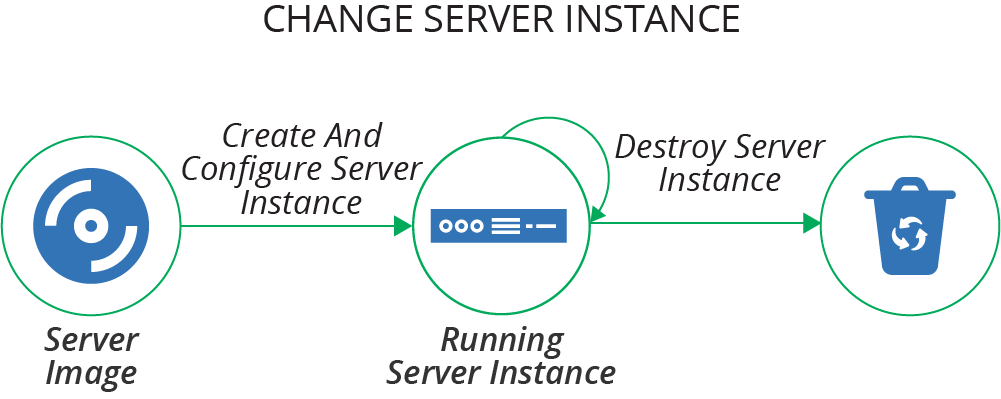
Figure 11-1. The basic server life cycle
The basic life cycle shown here has three transition phases:
-
Create and configure a server instance
-
Change an existing server instance
-
Destroy a server instance
This chapter describes creating and configuring servers. Chapter 12 explains how to make changes to servers, and Chapter 13 discusses creating and updating server images that you can use to create server instances.
What’s on a Server
It’s useful to think about the various things on a server and where they all come from.
One way of thinking of the stuff on a server is to divide it into software, configuration, and data. These categories, as described in Table 11-1, are useful for understanding how configuration management tools should treat a particular file or set of files.
The difference between configuration and data is whether automation tools automatically manage what’s inside the file. So even though a system log is essential for infrastructure, an automated configuration tool treats it as data. Similarly, if an application stores things like its accounts and preferences for its users in files on the server, the server configuration tool treats that file as data.
| Type of thing | Description | How configuration management treats it |
|---|---|---|
Software |
Applications, libraries, and other code. This doesn’t need to be executable files; it could be pretty much any files that are static and don’t tend to vary from one system to another. An example of this is time zone data files on a Linux system. |
Makes sure it’s the same on every relevant server; doesn’t care what’s inside. |
Configuration |
Files used to control how the system and/or applications work. The contents may vary between servers, based on their roles, environments, instances, and so on. These files are managed as part of the infrastructure, rather than configuration managed by applications themselves. For example, if an application has a UI for managing user profiles, the data files that store the user profiles wouldn’t be considered configuration from the infrastructure’s point of view; instead, this would be data. But an application configuration file that is stored on the filesystem and managed by the infrastructure would be considered configuration in this sense. |
Builds the file contents on the server; ensures it is consistent. |
Data |
Files generated and updated by the system and applications. The infrastructure may have some responsibility for this data, such as distributing it, backing it up, or replicating it. But the infrastructure treats the contents of the files as a black box, not caring about their contents. Database data files and logfiles are examples of data in this sense. |
Naturally occurring and changing; may need to preserve it, but won’t try to manage what’s inside. |
Where Things Come From
The software, configuration, and data that comprise a server instance may be added when the server is created and configured, or when the server is changed. There are several possible sources for these elements (see Figure 11-2):
- Base operating system
-
The operating system installation image could be a physical disk, an ISO file, or a stock server image. The OS installation process may select optional components.
- OS package repositories
-
The OS installation, or a post-installation configuration step, can run a tool that downloads and installs packages from one or more repositories (see Table 10-1 for more on OS package formats). OS vendors usually provide a repository with packages they support. You can use third-party repositories for open source or commercial packages. You may also run an internal repository for packages developed or curated in-house.
- Language, framework, and other platform repositories
-
In addition to OS-specific packages, you may install packages for languages or frameworks like Java libraries or Ruby gems. As with OS packages, you may pull packages from repositories managed by language vendors, third parties, or internal groups.
- Nonstandard packages
-
Some vendors and in-house groups provide software with their own installers, or which involve multiple steps other than running a standard package management tool.
- Separate material
-
You may add or modify files outside of an application or component; for example, adding user accounts or setting local firewall rules.
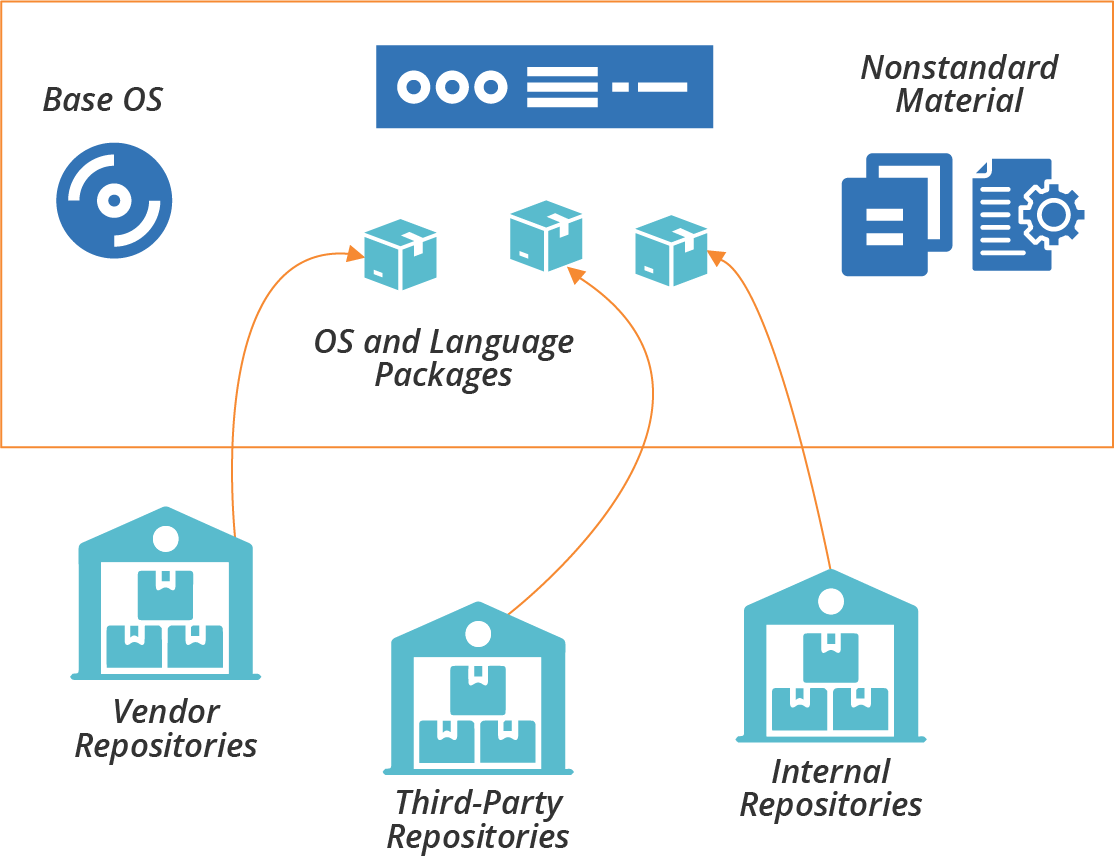
Figure 11-2. Packages and other elements of a server instance
The next question is how to add things to server instances when you create or change them.
Server Configuration Code
The first generation of Infrastructure as Code tools focused on automated server configuration. Some of the tools in this space are:
Many of these tools use an agent installed on each server following the pull configuration pattern (see “Pattern: Pull Server Configuration”). They provide an agent that you can either install as a service or run periodically from a cron job. Other tools are designed to run from a central server and connect to each managed server, following the push pattern (“Pattern: Push Server Configuration”).
You can implement either the push or pull pattern with most of these tools. If you use a tool like Ansible, which is designed for the push model, you can preinstall it on servers and run it from cron. If, on the other hand, you use a tool like Chef or Puppet, which provides an agent to run with the pull model, you can instead run a command from a central server that logs in and executes the client on each machine. So the tool is not a constraint on which pattern you use.
Many server configuration tool makers offer repository servers to host configuration code. Examples of these include Ansible Tower, Chef Server, and Puppetmaster. These may have additional functionality, such as a configuration registry (see “Configuration Registry”), dashboards, logging, or centralized execution.
Arguably, choosing a vendor that provides an all-in-one ecosystem of tools simplifies things for an infrastructure team. However, it’s useful if elements of the ecosystem can be swapped out for different tools so the team can choose the best pieces that fit their needs. For instance, if you use multiple tools that integrate with a configuration registry, you may prefer to use a standalone, general-purpose configuration registry rather than one tied to your server configuration tool.
The codebase is a significant part of a modern infrastructure team’s life. The principles and guidelines from Chapter 4 apply to server code, stack code, etc.
Server Configuration Code Modules
Server configuration code, as with any code, seems to enjoy growing into a sprawling mess over time. It takes discipline and good habits to avoid this. Fortunately, these tools give you ways to organize and structure code into different units.
Most server configuration tools let you organize code into modules. For example, Ansible has playbooks, Chef groups recipes into cookbooks, and Puppet has modules containing manifests. You can organize, version, and release these modules individually.
Roles are a way to mark a group of modules to apply to a server, defining its purpose. Unlike other concepts, most of the tool vendors seem to agree on using the term role for this, rather than making up their own words.1
Many of these tools also support extensions to their core resource model. A tool’s language provides a model of server resource entities, like users, packages, and files. For example, you could write a Chef Lightweight Resource Provider (LWRP) to add a Java application resource that installs and configures applications written by your development teams. These extensions are similar to stack modules (see Chapter 16).
See Chapter 15 for a more general discussion on modularizing infrastructure, including guidance on good design.
Designing Server Configuration Code Modules
You should design and write each server configuration code module (for example, each cookbook or playbook) around a single, cohesive concern. This advice follows the software design principle of separation of concerns. A common approach is to have a separate module for each application.
As an example, you might create a module for managing an application server like Tomcat. The code in the module would install the Tomcat software, user accounts and groups for it to run under, and folders with the correct permissions for logs and other files. It would build the Tomcat configuration files, including configuring ports and settings. The module code would also integrate Tomcat into various services such as log aggregation, monitoring, and process management.
Many teams find it useful to design server configuration modules differently based on their use. For example, you can divide your modules into library modules and application modules (with Chef, this would be library cookbooks and application cookbooks).
A library module manages a core concept that can be reused by application modules. Taking the example of a Tomcat module, you could write the module to take parameters, so the module can be used to configure an instance of Tomcat optimized for different purposes.
An application module, also called a wrapper module, imports one or more library modules and sets their parameters for a more specific purpose. The ShopSpinner team could have one Servermaker module that installs Tomcat to run its product catalog application and a second one that installs Tomcat for its customer management application.2 Both of those modules use a shared library that installs Tomcat.
Versioning and Promoting Server Code
As with any code, you should be able to test and progress server configuration code between environments before applying it to your production systems. Some teams version and promote all of their server code modules together, as a single unit, either building them together (see “Pattern: Build-Time Project Integration”), or building and testing them separately before combining them for use in production environments (see “Pattern: Delivery-Time Project Integration”). Others version and deliver each module independently (see “Pattern: Apply-Time Project Integration”).
If you manage each module as a separate unit, you need to handle any dependencies between them all. Many server configuration tools allow you to specify the dependencies for a module in a descriptor. In a Chef cookbook, for example, you list dependencies in the depends field of the cookbook’s metadata file. The server configuration tool uses this specification to download and apply dependent modules to a server instance. Dependency management for server configuration modules works the same way as software package management systems like RPMs and Python pip packages.
You also need to store and manage different versions of your server configuration code. Often, you have one version of the code currently applied to production environments, and other versions being developed and tested.
See Chapters 18 and 19 for a deeper discussion of organizing, packaging, and delivering your infrastructure code.
Server Roles
As mentioned earlier, a server role is a way to define a group of server configuration modules to apply to a server. A role may also set some default parameters. For example, you may create an application-server role:
role:application-serverserver_modules:-tomcat-monitoring_agent-logging_agent-network_hardeningparameters:-inbound_port:8443
Assigning this role to a server applies the configuration for Tomcat, monitoring and logging agents, and network hardening. It also sets a parameter for an inbound port, presumably something that the network_hardening module uses to open that port in the local firewall while locking everything else down.
Roles can become messy, so you should be deliberate and consistent in how you use them. You may prefer to create fine-grained roles that you combine to compose
specific servers. You assign multiple roles to a given server, such as ApplicationServer, MonitoredServer, and PublicFacingServer. Each of these roles includes a small number of server modules for a narrow purpose.
Alternatively, you may have higher-level roles, which include more modules. Each server probably has only one role, which may be quite specific; for example, ShoppingServiceServer or JiraServer.
A common approach is to use role inheritance. You define a base role that includes software and configuration common to all servers. This role might have networking hardening, administrative user accounts, and agents for monitoring and logging. More specific roles, such as for application servers or container hosts, include the base role and then add a few additional server configuration modules and parameters:
role:base-roleserver_modules:-monitoring_agent-logging_agent-network_hardeningrole:application-serverinclude_roles:-base_roleserver_modules:-tomcatparameters:-inbound_port:8443role:shopping-service-serverinclude_roles:-application-serverserver_modules:-shopping-service-application
This code example defines three roles in a hierarchy. The shopping-service-server role inherits everything from the application-server role, and adds a module to install the specific application to deploy. The application-server role inherits from the base-role, adding the Tomcat server and network port configuration. The base-role defines a core set of general-purpose configuration modules.
Testing Server Code
Chapter 8 explained how automated testing and CD theory applies to infrastructure, and Chapter 9 described approaches for implementing this with infrastructure stacks. Many of the concepts in both of those chapters apply to testing server code.
Progressively Testing Server Code
There is a self-reinforcing dynamic between code design and testing. It’s easier to write and maintain tests for a cleanly structured codebase. Writing tests, and keeping them all passing, forces you to maintain that clean structure. Pushing every change into a pipeline that runs your tests helps your team keep the discipline of continuously refactoring to minimize technical debt and design debt.
The structure described earlier, of server roles composed of server configuration modules, which may themselves be organized into library modules and application modules, aligns nicely to a progressive testing strategy (see “Progressive Testing”). A series of pipeline stages can test each of these in increasing stages of integration, as shown in Figure 11-3.
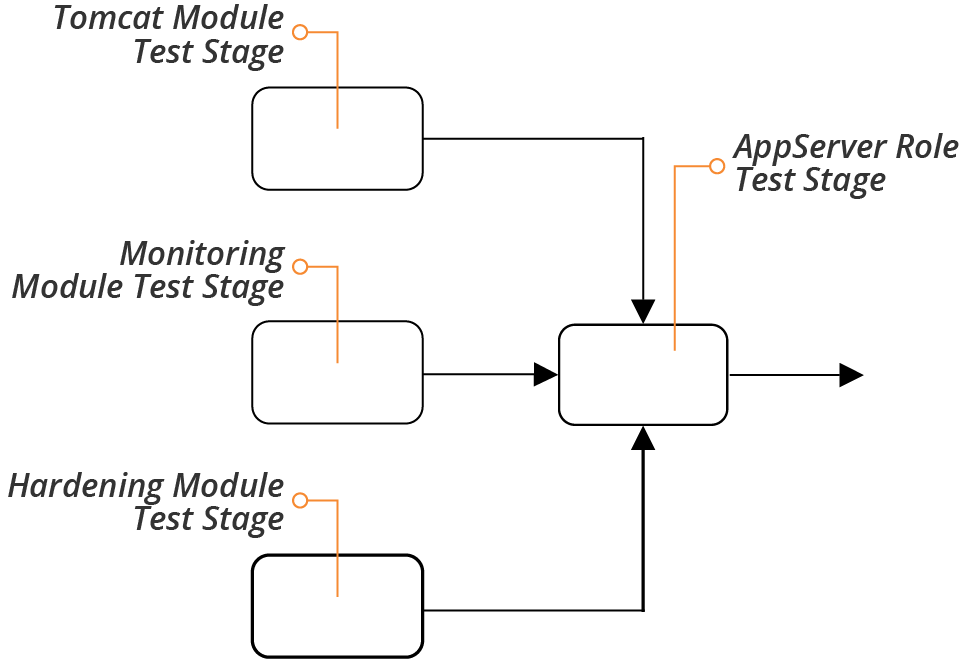
Figure 11-3. Progressively testing server code modules
A separate stage tests each code module whenever someone commits a change to that module. The server role also has a test stage. This stage runs the tests whenever one of the modules used by the role changes and passes its own stage. The role-testing stage also runs when someone commits a change to the role code, for example adding or removing a module, or changing a parameter.
What to Test with Server Code
It’s tricky to decide what to test with server code. This goes back to the question of whether there’s any value in testing declarative code (see “Challenge: Tests for Declarative Code Often Have Low Value”). Server code modules, especially in a well-designed codebase, tend to be small, simple, and focused. A module that installs a Java JVM, for example, may be a single statement, with a few parameters:
package:name:java-${JAVA_DISTRIBUTION}version:${JAVA_VERSION}
In practice, even simple-seeming package installation modules may have more code than this, customizing file paths, configuration files, and perhaps adding a user account. But there’s often not much to test that doesn’t simply restate the code itself.
Tests should focus on common issues, variable outcomes, and combinations of code.
Consider common issues, things that tend to go wrong in practice, and how to sanity check. For a simple package installation, you might want to check that the command is available in the default user path. So a test would invoke the command, and make sure it was executed:
givencommand'java -version'{its(exit_status){should_be0}}
If the package may have radically different outcomes depending on the parameters passed to it, you should write tests to assure you that it behaves correctly in different cases. For the JVM installation package, you could run the test with different values for the Java distribution, for example making sure that the java command is available no matter which distribution someone chooses.
In practice, the value of testing is higher as you integrate more elements. So you may write and run more tests for the application server role than for the modules the role includes.
This is especially true when those modules integrate and interact with one another. A module that installs Tomcat isn’t likely to clash with one that installs a monitoring agent, but a security hardening module might cause an issue. In this case, you may want to have tests that run on the application server role, to confirm that the application server is up and accepting requests even after ports have been locked down.
How to Test Server Code
Most automated server code tests work by running commands on a server or container instance, and checking the results. These tests may assert the existence and status of resources, such as packages, files, user accounts, and running processes. Tests may also look at outcomes; for example, connecting to a network port to prove whether a service returns the expected results.
Popular tools for testing conditions on a server include Inspec, Serverspec, and Terratest.
The strategies for testing full infrastructure stacks include running tests offline and online (see “Offline Testing Stages for Stacks” and “Online Testing Stages for Stacks”). Online testing involves spinning things up on the infrastructure platform. You can normally test server code offline using containers or local virtual machines.
An infrastructure developer working locally can create a container instance or local VM with a minimal operating system installation, apply the server configuration code, and then run the tests.
Pipeline stages that test server code can do the same, running the container instance or VM on the agent (for example, the Jenkins node running the job). Alternatively, the stage could spin up a standalone container instance on a container cluster. This works well when the pipeline orchestration is itself containerized.
You can follow the guidance for stacks to orchestrate server code testing (see “Test Orchestration”). This includes writing scripts that set up the testing prerequisites, such as container instances, before running the tests and reporting results. You should run the same scripts to test locally that you use to test from your pipeline service, so the results are consistent.
Creating a New Server Instance
The basic server life cycle described earlier starts with creating a new server instance. A more extended life cycle includes steps for creating and updating server images that you can create server instances from, but we’ll leave that topic for another chapter (Chapter 13). For now, our life cycle starts with creating an instance, as shown in Figure 11-4.
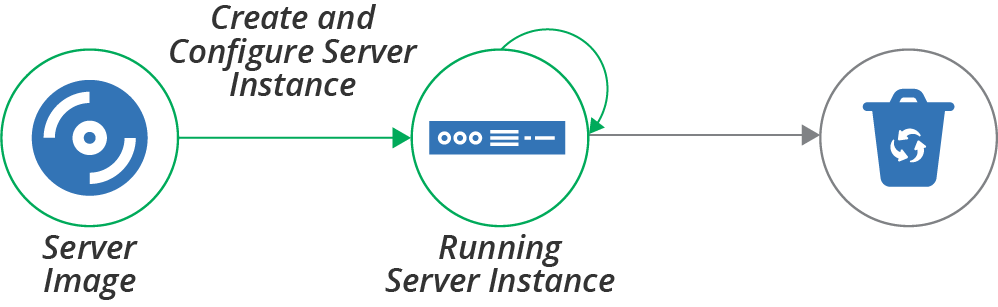
Figure 11-4. Creating a server instance
The full server creation process includes provisioning the server instance so that it is fully ready for use. Some of the activities involved in creating and provisioning a server instance are:
-
Allocate infrastructure resources to instantiate the server instance. To do this, a physical server is selected from a pool or a host server is selected to run it as a virtual machine. For a virtual machine, the hypervisor software on the host allocates memory and other resources. The process may also allocate storage for disk volumes for the server instance.
-
Install the operating system and initial software. The OS may be copied onto a disk volume, as when booting from a server image like an AMI. Or the new instance may execute an installation process that selects and copies files to the new instance, maybe using a scriptable installer. Examples of scripted OS installers include Red Hat Kickstart, Solaris JumpStart, Debian Preseed, and the Windows installation answer file.
-
Additional configuration is applied to the server instance. In this step, the process runs the server configuration tool, following a pattern described in “How to Apply Server Configuration Code”.
-
Configure and attach networking resources and policies. This process can include assigning the server to a network address block, creating routes, and adding firewall rules.
-
Register the server instance with services. For example, add the new server to a monitoring system.
These aren’t mutually exclusive—your server creation process may use one or more methods for running these different activities.
There are several mechanisms that you might use to trigger the creation of a server instance. Let’s go over each of these mechanisms.
Hand-Building a New Server Instance
Infrastructure platforms provide tools to create new servers, usually a web UI, command-line tool, and sometimes a GUI application. Each time you create a new server, you select the options you want, including the source image, resources to allocate, and networking details:
$mycloud server new\--source-image=stock-linux-1.23\--memory=2GB\--vnet=appservers
While it’s useful to play with UIs and command-line tools to experiment with a platform, it’s not a good way to create servers that people need. The same principles for creating and configuring stacks discussed previously (see “Patterns for Configuring Stacks”) apply for servers. Setting options manually (as described in “Antipattern: Manual Stack Parameters”) encourages mistakes, and leads to inconsistently configured servers, unpredictable systems, and too much maintenance work.
Using a Script to Create a Server
You can write scripts that create servers consistently. The script wraps a command-line tool or uses the infrastructure platform’s API to create a server instance, setting the configuration options in the script code or configuration files. A script that creates servers is reusable, consistent, and transparent. This is the same concept as the scripted parameters pattern for stacks (see “Pattern: Scripted Parameters”):
mycloud server new\--source-image=stock-linux-1.23\--memory=2GB\--vnet=appservers
This script is the same as the previous command line example. But because it’s in a script, other people on my team can see how I created the server. They can create more servers and be confident that they will behave the same as the one I created.
Before Terraform and other stack management tools emerged, most teams I worked with wrote scripts for creating servers. We usually made the scripts configurable with configuration files, as with the stack configuration pattern (see “Pattern: Stack Configuration Files”). But we spent too much time improving and fixing these scripts.
Using a Stack Management Tool to Create a Server
With a stack management tool, as discussed in Chapter 5, you can define a server in the context of other infrastructure resources, as shown in Example 11-1. The tool uses the platform API to create or update the server instance.
Example 11-1. Stack code that defines a server
server:source_image:stock-linux-1.23memory:2GBvnet:${APPSERVER_VNET}
There are several reasons why using a stack tool to create servers is so handy. One is that the tool takes care of logic that you would have to implement in your own script, like error checking. Another advantage of a stack is that it handles integration with other infrastructure elements; for example, attaching the server to network structures and storage defined in the stack. The code in Example 11-1 sets the vnet parameter using a variable, ${APPSERVER_VNET}, that presumably refers to a network structure defined in another part of the stack code.
Configuring the Platform to Automatically Create Servers
Most infrastructure platforms can automatically create new server instances in specific circumstances. Two common cases are auto-scaling, adding servers to handle load increases, and auto-recovery, replacing a server instance when it fails. You can usually define this with stack code, as in Example 11-2.
Example 11-2. Stack code for automated scaling
server_cluster:server_instance:source_image:stock-linux-1.23memory:2GBvnet:${APPSERVER_VNET}scaling_rules:min_instances:2max_instances:5scaling_metric:cpu_utilizationscaling_value_target:40%health_check:type:httpport:8443path:/healthexpected_code:200wait:90s
This example tells the platform to keep at least 2 and at most 5 instances of the server running. The platform adds or removes instances as needed to keep the CPU utilization across them close to 40%.
The definition also includes a health check. This check makes an HTTP request to /health on port 8443, and considers the server to be healthy if the request returns a 200 HTTP response code. If the server doesn’t return the expected code after 90 seconds, the platform assumes the server has failed, and so destroys it and creates a new instance.
Using a Networked Provisioning Tool to Build a Server
In Chapter 3, I mentioned bare-metal clouds, which dynamically provision hardware servers. The process for doing this usually includes these steps:
-
Select an unused physical server and trigger it to boot in a “network install” mode supported by the server firmware (e.g., PXE boot).3
-
The network installer boots the server from a simple bootstrap OS image to initiate the OS installation.
-
Download an OS installation image and copy it to the primary hard drive.
-
Reboot the server to boot the OS in setup mode, running an unattended scripted OS installer.
There are a number of tools to manage this process, including:
Instead of booting an OS installation image, you could instead boot a prepared server image. Doing this creates the opportunity to implement some of the other methods for preparing servers, as described in the next section.
FaaS Events Can Help Provision a Server
FaaS serverless code can play a part in provisioning a new server. Your platform can run code at different points in the process, before, during, and after a new instance is created. Examples include assigning security policies to a new server, registering it with a monitoring service, or running a server configuration tool.
Prebuilding Servers
As discussed earlier (see “Where Things Come From”), there are several sources of content for a new server, including the operating system installation, packages downloaded from repositories, and custom configuration files and application files copied to the server.
While you can assemble all of these when you create the server, there are also several ways to prepare server content ahead of time. These approaches can optimize the process of building a server, making it faster and simpler to do, and making it easier to create multiple, consistent servers. What follows are a few approaches to doing this. The section after this then explains options for applying configuration before, during, and after the provisioning process.
Hot-Cloning a Server
Most infrastructure platforms make it simple to duplicate a running server. Hot-cloning a server in this way is quick and easy, and gives you servers that are consistent at the point of cloning.
Cloning a running server can be useful when you want to explore or troubleshoot a server without interfering with its operation. But it carries some risks. One is that a copy of a production server that you make for experimentation might affect production. For example, if a cloned application server is configured to use the production database, you might accidentally pollute or damage production data.
Cloned servers running in production usually contain historical data from the original server, such as logfile entries. This data pollution can make troubleshooting confusing. I’ve seen people spend time puzzling over error messages that turned out not to have come from the server they were debugging.
And cloned servers are not genuinely reproducible. Two servers cloned from the same parent at different points in time will be different, and you can’t go back and build a third server and be entirely sure whether and how it is different from any of the others. Cloned servers are a source of configuration drift (see “Configuration Drift”).
Using a Server Snapshot
Rather than building new servers by directly cloning a running server, you can take a snapshot of a running server and build your servers from that. Again, most infrastructure platforms provide commands and API calls to snapshot servers easily, creating a static image. This way, you can create as many servers as you like, confident that each one is identical to the starting image.
Creating a server from a snapshot taken from a live server has many of the other disadvantages of hot-cloning, however. The snapshot may be polluted with logs, configuration, and other data from the original server. It’s more effective to create a clean server image from scratch.
Creating a Clean Server Image
A server image is a snapshot that you create from clean, known sources so that you can create multiple, consistent server instances. You may do this using the same infrastructure platform features that you would for snapshotting a live server, but the original server instance is never used as a part of your overall systems. Doing this ensures that every new server is clean.
A typical process for building a server image is:
-
Create a new server instance from a known source, such as an operating system vendor’s installation image, or an image provided by your infrastructure platform for this purpose.
-
Apply server configuration code or run other scripts on the server. These may install standard packages and agents that you want on all of your servers, harden configuration for security purposes, and apply all of the latest patches.
-
Snapshot the server, creating an image that you can use as a source for creating multiple server instances. Doing this may involve steps to mark the snapshot as an image for creating new servers. It may also involve tagging and versioning to help manage a library of multiple server images.
People sometimes call server images golden images. Although some teams build these images by hand, perhaps following a written checklist of steps, readers of this book immediately see the benefits of automating this process, managing server images as code. Building and delivering server images is the topic of Chapter 13.
Configuring a New Server Instance
This chapter has described what the elements of a server are, where they come from, ways to create a new server instance, and the value of prebuilding server images. The last piece of the server creation and provisioning process is applying automated server configuration code to new servers. There are several points in the process where you can do this, as illustrated in Figure 11-5.
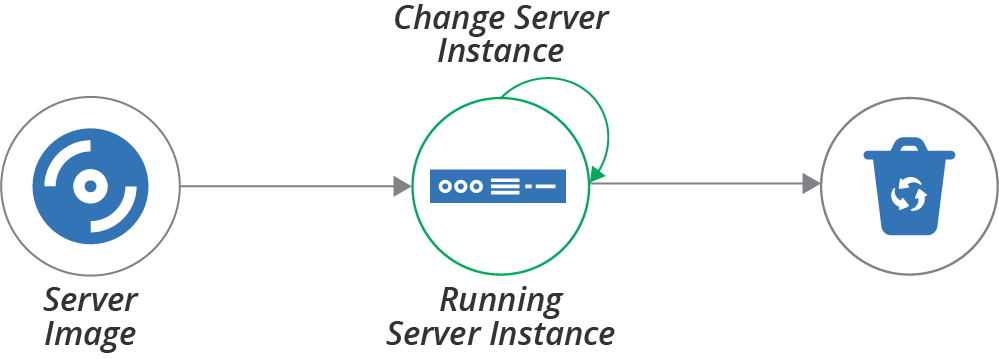
Figure 11-5. Where configuration can be applied in the server life cycle
Configuration can be applied when creating the server image, when creating the server instance from the image, and when the server is running:
- Configuring a server image
-
You apply configuration when building a server image that will be used to create multiple server instances. Think of this as configuring one time, and using it many times. This is often called baking a server image.
- Configuring a new server instance
-
You apply configuration when creating a new server instance. Think of this as configuring many times. This is sometimes called frying a server instance.
- Configuring a running server instance
-
You apply configuration to a server that is already in use. One common reason to do this is to make a change, like applying security patches. Another reason is to revert any changes made outside the automated configuration to enforce consistency. Some teams also apply configuration to transform an existing server; for example, turning a web server into an application server.
The last of these, configuring a running server instance, is usually done to change a server, which is the topic of Chapter 12. The first two are options for applying configuration when creating a new server, so are firmly in the scope of this chapter. The main question is determining the right time to apply configuration for a new server—frying it into each new server instance, or baking it into the server image?
Frying a Server Instance
As explained, frying a server involves applying configuration when you create the new server instance. You can take this to an extreme, keeping each server image to a bare minimum, and building everything specific to a given server into the live image. Doing this means new servers always have the latest changes, including system patches, the most recent software package versions, and up-to-date configuration options. Frying a server is an example of delivery-time integration (see “Pattern: Delivery-Time Project Integration”).
This approach simplifies image management. There are not many images, probably only one for each combination of hardware and OS version used in the infrastructure—for example, one for 64-bit Windows 2019 and one each for 32-bit and 64-bit Ubuntu 18.x. The images don’t need to be updated very often, as there isn’t much on them that changes. And in any case, you can apply the latest patches when you provision each server.
Some teams I’ve been with have focused on frying early in our adoption of infrastructure automation. Setting up the tooling and processes for managing server images is a lot of effort. We put that work on our backlog to do after building our core infrastructure management.
In other cases, frying makes sense because servers are highly variable. A hosting company I know lets customers choose from a large number of customizations for servers. The company maintains minimalist base server images and puts more effort into the automation that configures each new server.
There are several potential issues with installing and configuring elements of a server when creating each instance. These include:
- Speed
-
Activities that occur when building a server add to the creation time. This added time is a particular issue for spinning up servers to handle spikes in load or to recover from failures.
- Efficiency
-
Configuring a server often involves downloading packages over the network from repositories. This can be wasteful and slow. For example, if you need to spin up 20 servers in a short time, having each one of them download the same patches and application installers is wasteful.
- Dependencies
-
Configuring a server usually depends on artifact repositories and other systems. If any of these are offline or unreachable, you can’t create a new server. This can be especially painful in an emergency scenario where you need to rebuild a large number of servers quickly. In these situations, network devices or repositories may also be down, creating a complex ordered graph of which systems to restart or rebuild first to enable the next set of systems to come up.
Baking Server Images
At the other end of the server creation spectrum is configuring nearly everything into the server image. Building new servers is then very quick and straightforward since you only need to apply instance-specific configuration. Baking a server image is an example of build-time integration (see “Pattern: Build-Time Project Integration”).
You can see the advantages of baking from the disadvantages of frying. Baking configuration into server images is especially appropriate for systems that use a large number of similar server instances, and when you need to be able to create servers frequently and quickly.
One challenge with baking server images is that you need to set up the tooling and automated processes to make it easy to update and roll out new versions. For example, if an important security patch is released for your operating system or for key packages that are baked into your server images, you want to be able to build new images and roll them out to your existing servers quickly and with minimal disruption. Doing this is covered in Chapter 13.
Another issue with baking server images is speed. Even with a mature automated process for updating images, it can take many minutes—10 to 60 minutes is common—to build and release a new image. You can mitigate this by rolling changes out to running servers (the topic of Chapter 12), or by having a process that combines baking and frying.
Combining Baking and Frying
In practice, most teams use a combination of baking and frying to configure new servers. You can balance which activities to configure into server images, and which to apply when creating a server instance. You may apply some configuration elements at both parts of the process.
The main considerations for deciding when is the right time to apply a particular configuration are the time it takes and the frequency of change. Things that take longer to apply, and which change less often, are clear candidates for baking into the server image. For example, you can install application server software on a server image, making it much quicker to spin up multiple server instances and saving network bandwidth in the process.
On the flip side of this trade-off, something that is quicker to install, or changes more often, is better to fry. An example of this is applications developed in-house. One of the most common use cases for spinning up new servers on demand is testing as part of a software release process.
Highly productive development teams may push a dozen or more new builds of their application every day, relying on a CI process to automatically deploy and test each build. Baking a new server image for each new application build is too slow for this kind of working pace, so it’s more efficient to deploy the application when creating the test server.
Another way that teams combine baking and frying is to bake as much as possible onto server images, but to fry updated versions. A team may bake updated server images at a slower pace; for example, weekly or monthly. When they need to update something that they usually bake onto the image, such as a security patch or configuration improvement, they can put this into the server creation process to fry it on top of the baked image.
When the time comes to bake an updated image, they fold the updates into it and remove it from the creation process. This method lets the team incorporate new changes quickly, with less overhead. Teams often use this in combination with continuously applying code (see “Pattern: Continuous Configuration Synchronization”) to update existing servers without rebuilding them.
Applying Server Configuration When Creating a Server
Most of the tooling used to create servers in the ways discussed earlier (see “Creating a New Server Instance”), whether a command-line tool, platform API call, or a stack management tool, provides a way to apply server configuration code. For example, a stack management tool should have syntax to support popular tools, or to run arbitrary commands on a new server instance, as with Example 11-3.
Example 11-3. Stack code that runs my fictional server configuration tool
server:source_image:stock-linux-1.23memory:2GBvnet:${APPSERVER_VNET}configure:tool:servermakercode_repo:servermaker.shopspinner.xyzserver_role:appserverparameters:app_name:catalog_serviceapp_version:1.2.3
This code runs the Servermaker tool, passing it the hostname of the server that hosts server configuration code, the role to apply to the server (appserver), and some parameters to pass to the server configuration code (app_name and app_version).
Some tools also allow you to embed server configuration code directly into the code for the stack, or shell commands to execute. It can be tempting to use this to implement the server configuration logic, and for simple needs, this may be fine. But in most cases, this code grows in size and complexity. So it’s better to extract the code to keep your codebase clean and maintainable.
Conclusion
This chapter has covered various aspects of creating and provisioning new servers. The types of things on a server include software, configuration, and data. These are typically drawn from the base operating system installation and packages from various repositories, including those managed by the OS and language vendors, third parties, and internal teams. You typically build a server by combining content from a server image and using a server configuration tool to apply additional packages and configuration.
To create a server, you can run a command-line tool or use a UI, but it’s preferable to use a code-driven process. These days you’re less likely to write a custom script to do this and more likely to use your stack management tool. Although I describe some different approaches for building servers, I usually recommend building server images.
1 It would have been entirely in character for the folks at Chef to call a role a hat, so they could talk about servers wearing a chef hat. I’m grateful they didn’t.
2 You may recall from Chapter 4 that Servermaker is a fictional server configuration tool similar to Ansible, Chef, and Puppet.
3 Often, triggering a server to use PXE to boot a network image requires pressing a function key while the server starts. This can be tricky to do unattended. However, many hardware vendors have lights-out management (LOM) functionality that makes it possible to do this remotely.