Chapter 18. Organizing Infrastructure Code
An infrastructure codebase may include various types of code, including stack definitions, server configurations, modules, libraries, tests, configuration, and utilities.
How should you organize this code across and within projects? How should you organize projects across repositories? Do infrastructure and application code belong together, or should they be separated? How should you organize code for an estate with multiple parts?
Organizing Projects and Repositories
In this context, a project is a collection of code used to build a discrete component of the system. There is no hard rule on how much a single project or its component can include. “Patterns and Antipatterns for Structuring Stacks” describes different levels of scope for an infrastructure stack, for instance.
A project may depend on other projects in the codebase. Ideally, these dependencies and the boundaries between projects are well-defined, and clearly reflected in the way project code is organized.
Conway’s Law (see “Align Boundaries with Organizational Structures”) says that there is a direct relationship between the structure of the organization and the systems that it builds. Poor alignment of team structures and ownership of systems, and the code that defines those systems, creates friction and inefficiency.
The flip side of drawing boundaries between projects is integrating projects when there are dependencies between them, as described for stacks in Chapter 17.
See “Integrating Projects” for a discussion of how and when different dependencies may be integrated with a project.
There are two dimensions to the problem of how to organize code. One is where to put different types of code—code for stacks, server configuration, server images, configuration, tests, delivery tooling, and applications. The other is how to arrange projects across source code repositories. This last question is a bit simpler, so let’s start there.
One Repository, or Many?
Given that you have multiple code projects, should you put them all in a single repository in your source control system, or spread them among more than one? If you use more than one repository, should every project have its own repository, or should you group some projects together into shared repositories? If you arrange multiple projects into repositories, how should you decide which ones to group and which ones to separate?
There are some trade-off factors to consider:
-
Separating projects into different repositories makes it easier to maintain boundaries at the code level.
-
Having multiple teams working on code in a single repository can add overhead and create conflicts.
-
Spreading code across multiple repositories can complicate working on changes that cross them.
-
Code kept in the same repository is versioned and can be branched together, which simplifies some project integration and delivery strategies.
-
Different source code management systems (such as Git, Perforce, and Mercurial) have different performance and scalability characteristics and features to support complex scenarios.
Let’s look at the main options for organizing projects across repositories in the light of these factors.
One Repository for Everything
Some teams, and even some larger organizations, maintain a single repository with all of their code. This requires source control system software that can scale to your usage level. Some software struggles to handle a codebase as it grows in size, history, number of users, and activity level.1 So splitting repositories becomes a matter of managing performance.
A single repository can be easier to use. People can check out all of the projects they need to work on, guaranteeing they have a consistent version of everything. Some version control software offers features, like sparse-checkout, which let a user work with a subset of the repository.
One repository, multiple builds
Most organizations that keep all of their projects in a single repository don’t necessarily run a single build across them all. They often have a few different builds to build different subsets of their system (see Figure 18-2).
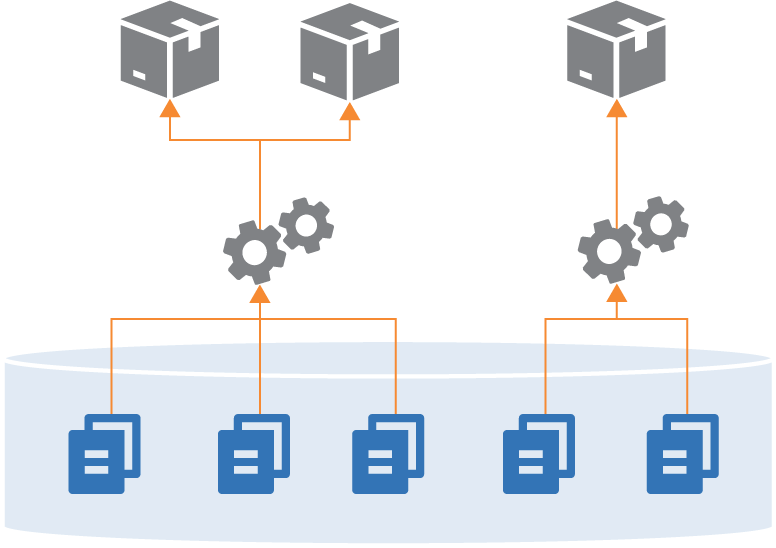
Figure 18-2. Building different combinations of projects from one repository
Often, these builds will share some projects. For instance, two different builds may use the same shared library (see Figure 18-3).
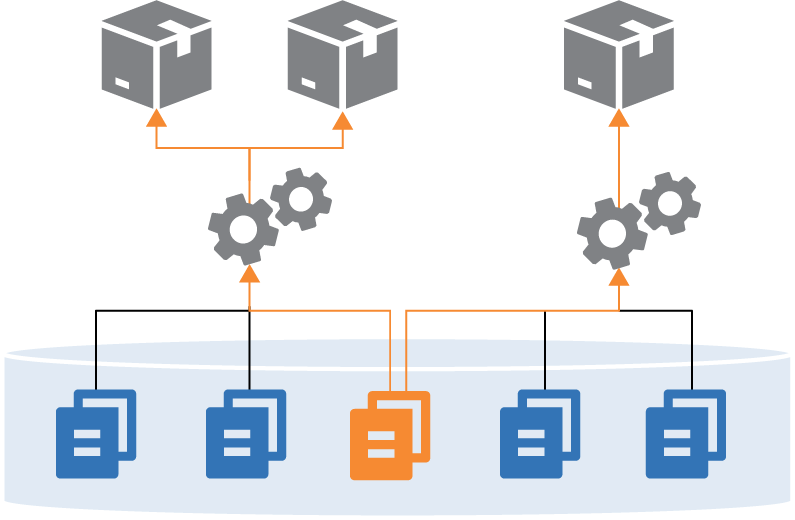
Figure 18-3. Sharing a component across builds in a single repository
One pitfall of managing multiple projects is that it can blur the boundaries between projects. People may write code for one project that refers directly to files in another project in the repository. Doing this leads to tighter coupling and less visibility of dependencies. Over time, projects become tangled and hard to maintain, because a change to a file in one project can have unexpected conflicts with other projects.
A Separate Repository for Each Project (Microrepo)
Having a separate repository for each project is the other extreme (Figure 18-4).
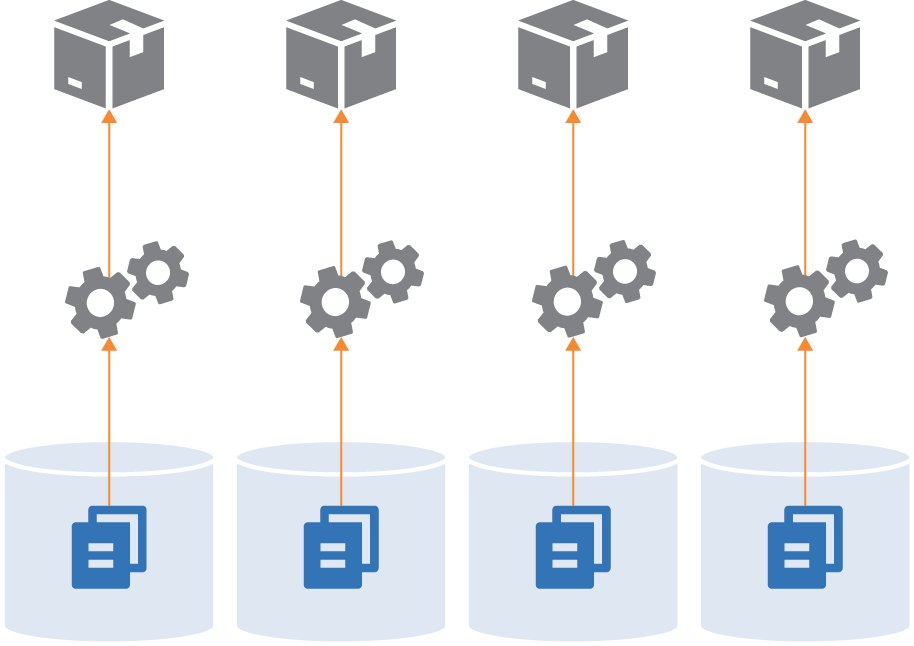
Figure 18-4. Each project in a separate repository
This strategy ensures a clean separation between projects, especially when you have a pipeline that builds and tests each project separately before integrating them. If someone checks out two projects and makes a change to files across projects, the pipeline will fail, exposing the problem.
Technically, you could use build-time integration across projects managed in separate repositories, by first checking out all of the builds (see Figure 18-5).
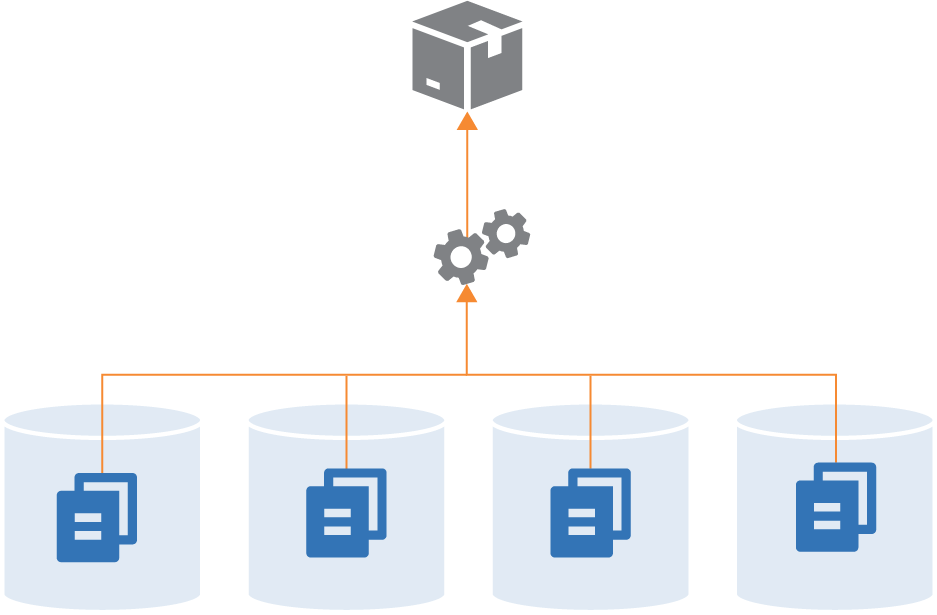
Figure 18-5. A single build across multiple repositories
In practice, it’s more practical to build across multiple projects in a single repository, because their code is versioned together. Pushing changes for a single build to multiple repositories complicates the delivery process. The delivery stage would need some way to know which versions of all of the involved repositories to check out to create a consistent build.
Single-project repositories work best when supporting delivery-time and apply-time integration. A change to any one repository triggers the delivery process for its project, bringing it together with other projects later in the flow.
Multiple Repositories with Multiple Projects
While some organizations push toward one extreme or the other—single repository for everything, or a separate repository for each project—most maintain multiple repositories with more than one project (see Figure 18-6).
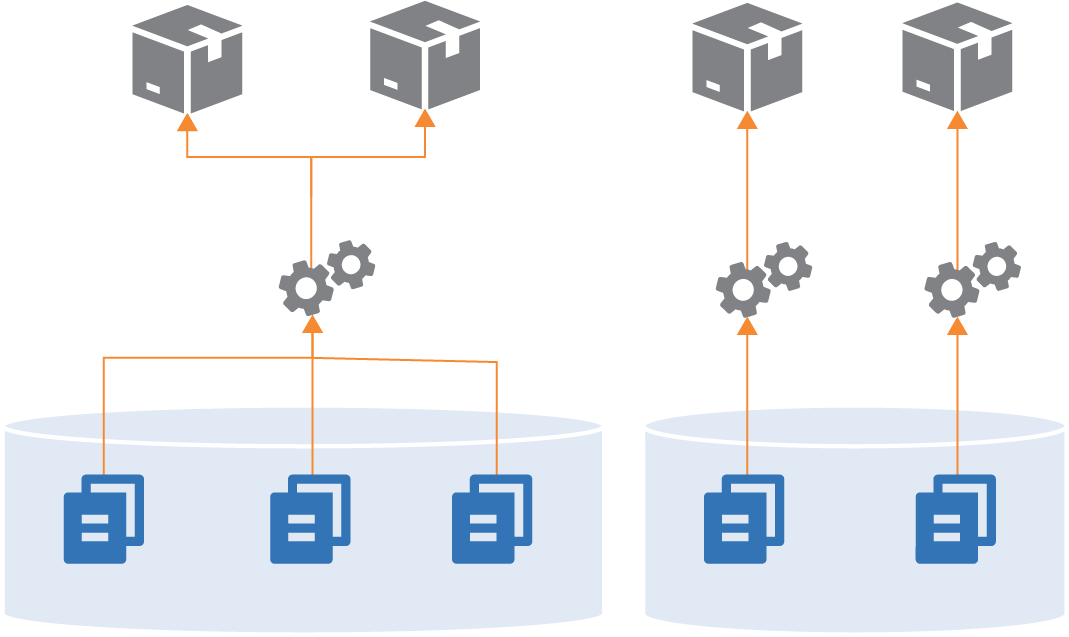
Figure 18-6. Multiple repositories with multiple projects
Often, the grouping of projects into repositories happens organically, rather than being driven by a strategy like monorepo or microrepo. However, there are a few factors that influence how smoothly things work.
One factor, as seen in the discussions of the other repository strategies, is the alignment of a project grouping with its build and delivery strategy. Keep projects in a single repository when they are closely related, and especially when you integrate the projects at build time. Consider separating projects into separate repositories when their delivery paths aren’t tightly integrated.
Another factor is team ownership. Although multiple people and teams can work on different projects in the same repository, it can be distracting. Changelogs intermingle commit history from different teams with unrelated workstreams. Some organizations restrict access to code. Access control for source control systems is often managed by repository, which is another driver for deciding which projects go where.
As mentioned for single repositories, projects within a repository more easily become tangled together with file dependencies. So teams might divide projects between repositories based on where they need stronger boundaries from an architectural and design perspective.
Organizing Different Types of Code
Different projects in an infrastructure codebase define different types of elements of your system, such as applications, infrastructure stacks, server configuration modules, and libraries. And these projects may include different types of code, including declarations, imperative code, configuration values, tests, and utility scripts. Having a strategy for organizing these things helps to keep your codebase maintainable.
Project Support Files
Generally speaking, any supporting code for a specific project should live with that project’s code. A typical project layout for a stack might look like Example 18-1.
Example 18-1. Example folder layout for a project
├── build.sh├── src/├── test/├── environments/└── pipeline/
This project’s folder structure includes:
src/-
The infrastructure stack code, which is the heart of the project.
test/-
Test code. This folder can be divided into subfolders for tests that run at different phases, such as offline and online tests. Tests that use different tools, like static analysis, performance tests, and functional tests, probably have dedicated subfolders as well.
environments/-
Configuration. This folder includes a separate file with configuration values for each stack instance.
pipeline/-
Delivery configuration. The folder contains configuration files to create delivery stages in a delivery pipeline tool (see “Delivery Pipeline Software and Services”).
build.sh/-
Script to implement build activities. See “Using Scripts to Wrap Infrastructure Tools” for a discussion of scripts like this one.
Of course, this is only an example. People organize their projects differently and include many other things than what’s shown here.
The key takeaway is the recommendation that files specific to a project live with the project. This ensures that when someone checks out a version of the project, they know that the infrastructure code, tests, and delivery are all the same version, and so should work together. If the tests are stored in a separate project it would be easy to mismatch them, running the wrong version of the tests for the code you’re testing.
However, some tests, configuration, or other files might not be specific to a single project. How should you handle these?
Cross-Project Tests
Progressive testing (see “Progressive Testing”) involves testing each project separately before testing it integrated with other projects, as shown in Figure 18-7.
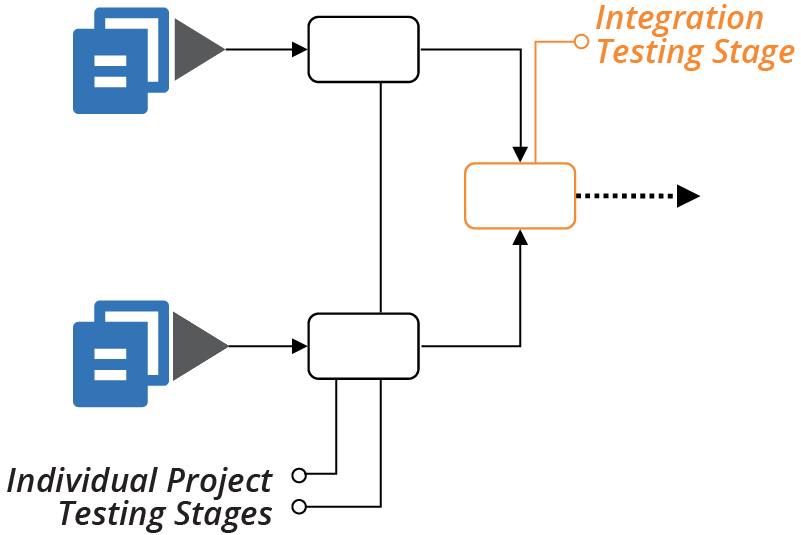
Figure 18-7. Testing projects separately, then together
You can comfortably put the test code to run in the individual stages for each project with that project. But what about the test code for the integration stage? You can put these tests in one of the projects, or create a separate project for the integration tests.
Keeping integration tests within a project
In many cases where you integrate multiple projects, one project is an obvious entry point for certain types of tests. For example, many functional tests connect to a front-end service to prove that the entire system works. If a backend component, such as a database, isn’t configured correctly, the frontend service can’t connect to it, so the test fails.
In these cases, the integration test code lives comfortably with the project that provisions the frontend service. Most likely, the test code is coupled to that service. For example, it needs to know the hostname and port for that service.
Separate these tests from tests that run in earlier delivery stages—for example, when testing with test doubles. You can keep each set of tests in a separate subfolder in the project.
Integration tests also fit well in projects that consume other projects (see “Using Test Fixtures to Handle Dependencies”), rather than in the provider project. The ShopSpinner example includes one stack project that defines application infrastructure instances, sharing network structures defined in a different stack.
Putting integration tests into the shared network stack project goes against the direction of the dependency. The network project needs to know specific details of the application stack, and any other stacks that use it, to test that integration works correctly. The application infrastructure stack already knows about the shared network stack, so keeping the integration tests with the application stack code avoids dependency loops between the projects.
Dedicated Integration Test Projects
An alternative approach is to create a separate project for integration tests, perhaps one for each integration stage. This approach is common when a different team owns the integration tests, as predicted by Conway’s Law. Other teams do this when it’s not clear which project aligns with the integration tests.
Versioning can be challenging when managing integration test suites separately from the code they test. People may confuse which version of the integration tests to run for a given version of the system code. To mitigate this, be sure to write and change tests along with the code, rather than separating those activities. And implement a way to correlate project versions; for example, using the fan-in approach described in the delivery-time integration pattern (see “Pattern: Delivery-Time Project Integration”).
Organize Code by Domain Concept
Code within a single project can include multiple pieces. The application infrastructure project in the ShopSpinner example defines a server cluster and a database instance, and networking structures and security policies for each. Many teams define networking structures and security policies in their own files, as shown in Example 18-2.
Example 18-2. Source files organized by technology
└── src/├── cluster.infra├── database.infra├── load_balancer.infra├── routing.infra├── firewall_rules.infra└── policies.infra
The firewall_rules.infra file includes firewall rules for the virtual machines created in cluster.infra as well as rules for the database instance defined in database.infra.
Organizing code this way focuses on the functional elements over how they’re used. It’s often easier to understand, write, change, and maintain the code for related elements when they’re in the same file. Imagine a file with thirty different firewall rules for access to eight different services, versus a file that defines one service, and the three firewall rules related to it.
This concept follows the design principle of designing around domain concepts rather than technical ones (see “Design components around domain concepts, not technical ones”).
Organizing Configuration Value Files
Chapter 7 described the configuration files pattern for managing parameter values for different instances of a stack project (see “Pattern: Stack Configuration Files”). The description suggested two different ways to organize per-environment configuration files across multiple projects. One is to store them within the relevant project:
├── application_infra_stack/│ ├── src/│ └── environments/│ ├── test.properties│ ├── staging.properties│ └── production.properties│└── shared_network_stack/├── src/└── environments/├── test.properties├── staging.properties└── production.properties
The other is to have a separate project with the configuration for all of the stacks, organized by environment:
├── application_infra_stack/│ └── src/│├── shared_network_stack/│ └── src/│└── configuration/├── test/│ ├── application_infra.properties│ └── shared_network.properties├── staging/│ ├── application_infra.properties│ └── shared_network.properties└── production/├── application_infra.properties└── shared_network.properties
Storing configuration values with the code for a project mixes generalized, reusable code (assuming it’s a reusable stack, per “Pattern: Reusable Stack”) with details of specific instances. Ideally, changing the configuration for an environment shouldn’t require modifying the stack project.
On the other hand, it’s arguably easier to trace and understand configuration values when they’re close to the projects they relate to, rather than mingled in a monolithic configuration project. Team ownership and alignment is a factor, as usual. Separating infrastructure code and its configuration can discourage taking ownership and responsibility across both.
Managing Infrastructure and Application Code
Should application and infrastructure code be kept in separate repositories, or together? Each answer seems obviously correct to different people. The right answer depends on your organization’s structure and division of ownership.
Managing infrastructure and application code in separate repositories supports an operating model where separate teams build and manage infrastructure and applications. But it creates challenges if your application teams have responsibility for infrastructure, particularly infrastructure specific to their applications.
Separating code creates a cognitive barrier, even when application team members are given responsibility for elements of the infrastructure that relate to their application. If that code is in a different repository than the one they most often work in, they won’t have the same level of comfort digging into it. This is especially true when it’s code that they’re less familiar with, and when it’s mixed with code for infrastructure for other parts of the system.
Infrastructure code located in the team’s own area of the codebase is less intimidating. There’s less feeling that a change might break someone else’s applications or even fundamental parts of the infrastructure.
DevOps and Team Structures
The DevOps movement encourages organizations to experiment with alternatives to the traditional divide between development and operations. See Matthew Skelton and Manuel Pais’s writings on Team Topologies for more in-depth thoughts on structuring application and infrastructure teams.
Delivering Infrastructure and Applications
Regardless of whether you manage application and infrastructure code together, you ultimately deploy them into the same system.2 Changes to infrastructure code should be integrated and tested with applications throughout the application delivery flow (Figure 18-8).
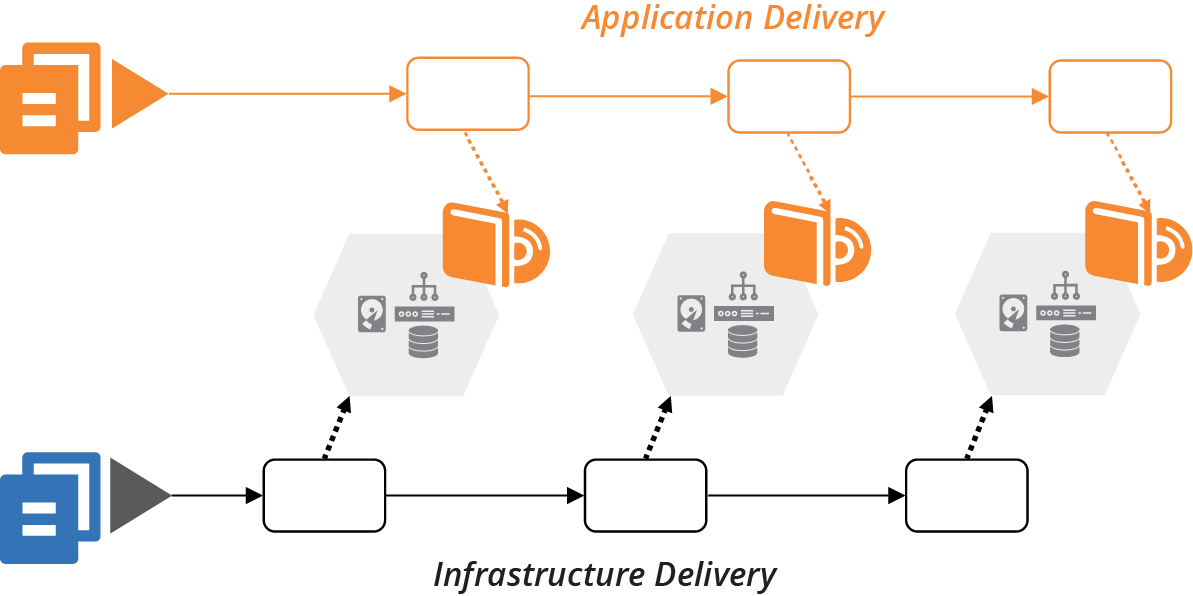
Figure 18-8. Application delivery to environments managed by infrastructure code
As a counter-example, many organizations have a legacy view of production infrastructure as a separate silo. Quite often, one team owns the production infrastructure, including a staging or preproduction environment, but doesn’t have responsibility for development and testing environments (Figure 18-9).
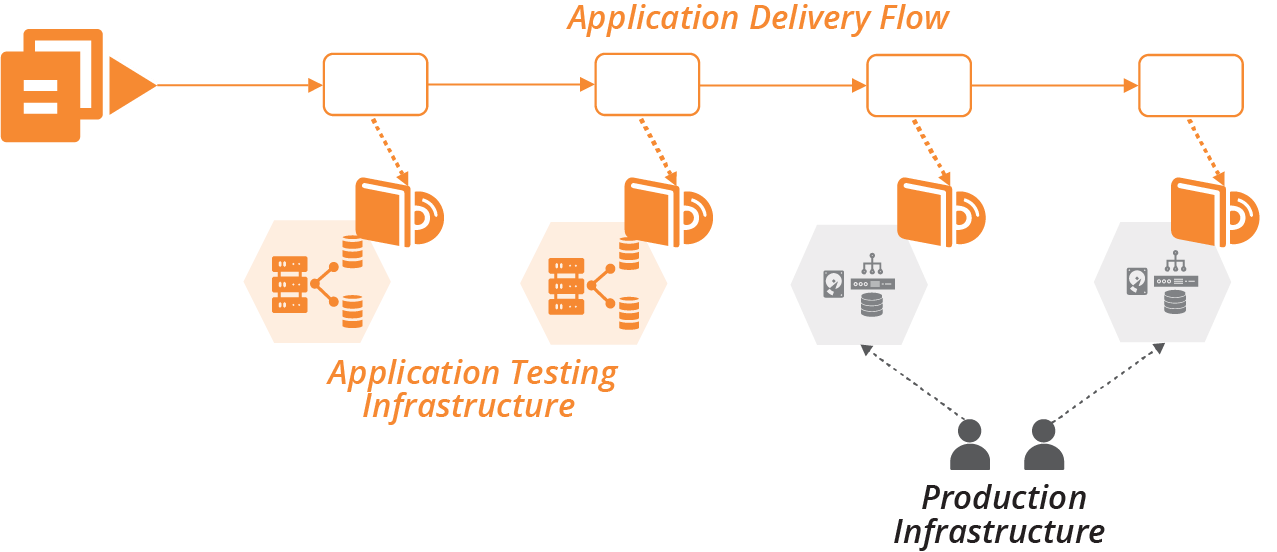
Figure 18-9. Separate ownership of production infrastructure
This separation creates friction for application delivery, and also for infrastructure changes. Teams don’t discover conflicts or gaps between the two parts of the system until late in the delivery process. As explained in Chapter 8, continuously integrating and testing all parts of the system as people work on changes is the most effective way to ensure high quality and reliable delivery.
So your delivery strategy should deliver changes to infrastructure code across all environments. There are a few options for the flow of infrastructure changes.
Testing Applications with Infrastructure
If you deliver infrastructure changes along the application delivery path, you can leverage automated application tests. At each stage, after applying the infrastructure change, trigger the application test stage (see Figure 18-10).
The progressive testing approach (“Progressive Testing”) uses application tests for integration testing. The application and infrastructure versions can be tied together and progressed through the rest of the delivery flow following the delivery-time integration pattern (see “Pattern: Delivery-Time Project Integration”). Or the infrastructure change can be pushed on to downstream environments without integrating with any application changes in progress, using apply-time integration (see “Pattern: Apply-Time Project Integration”).
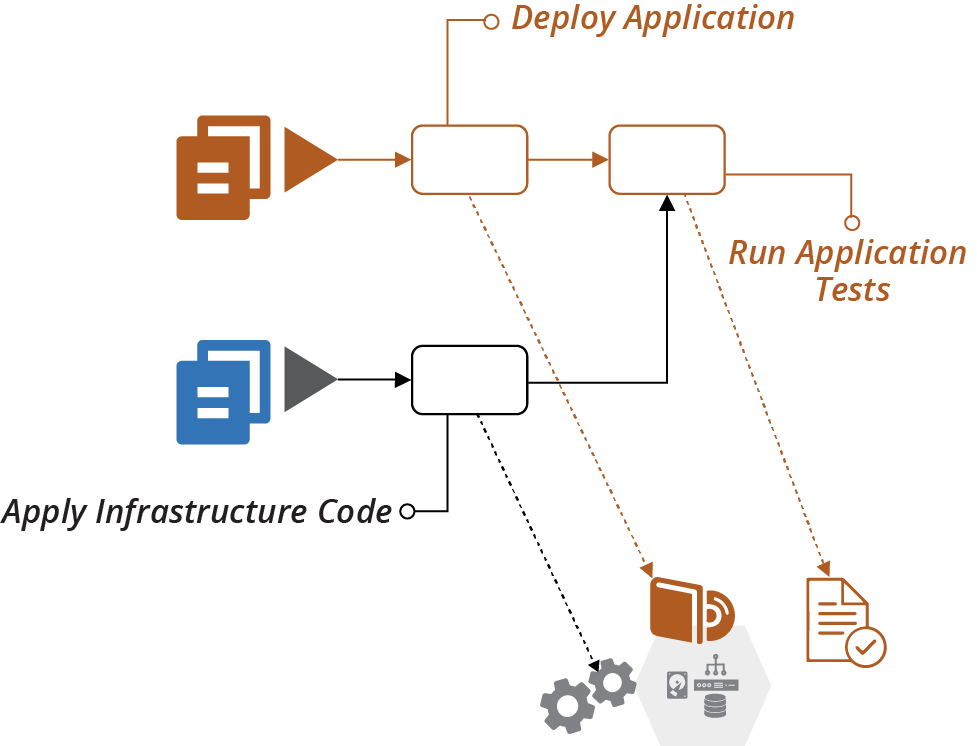
Figure 18-10. Running application tests when infrastructure changes
Pushing changes to applications and infrastructure through as quickly as possible is ideal. But in practice, it’s not always possible to remove the friction from all types of changes in an organization. For example, if stakeholders require a deeper review of user-facing application changes, you may need to push routine infrastructure changes faster. Otherwise, your application release process may tie up urgent changes like security patches and minor changes like configuration updates.
Testing Infrastructure Before Integrating
A risk of applying infrastructure code to shared application development and test environments is that breaking those environments impacts other teams. So it’s a good idea to have delivery stages and environments for testing infrastructure code on their own, before promoting them to shared environments (see Figure 18-11).
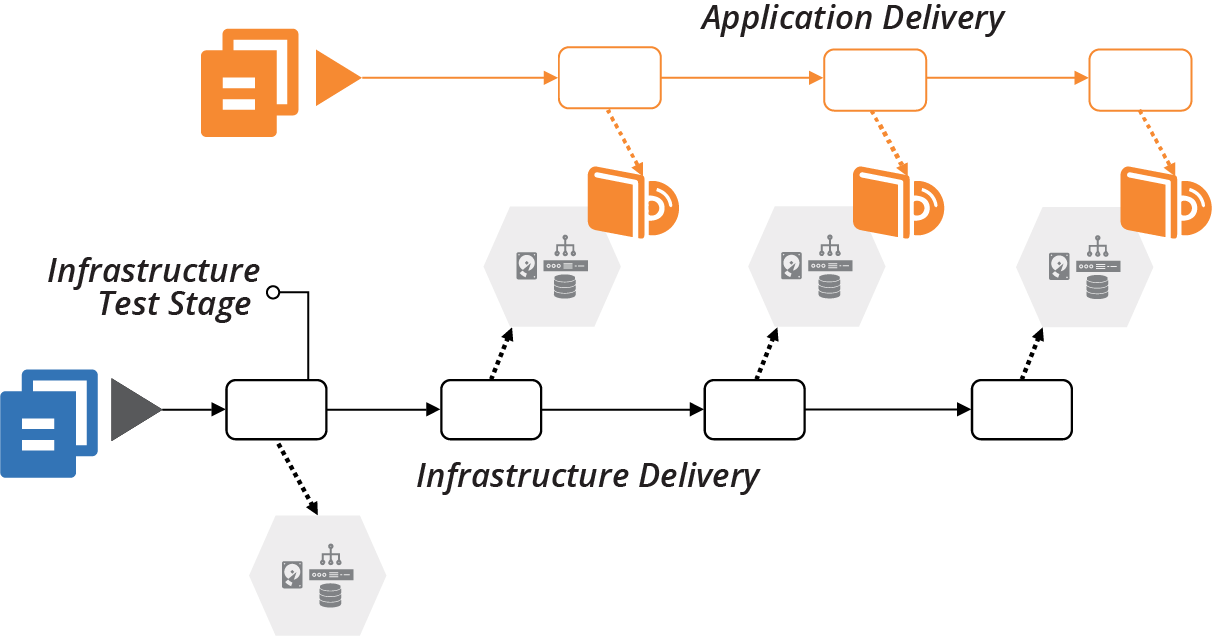
Figure 18-11. Infrastructure testing stage
This idea is a specific implementation of progressive testing (“Progressive Testing”) and delivery-time project integration (“Pattern: Delivery-Time Project Integration”).
Using Infrastructure Code to Deploy Applications
Infrastructure code defines what goes onto servers. Deploying an application involves putting things onto servers. So it may seem sensible to write infrastructure code to automate an application’s deployment process. In practice, mixing the concerns of application deployment and infrastructure configuration becomes messy. The interface between application and infrastructure should be simple and clear.
Operating system packaging systems like RPMs, .deb files, and .msi files are a well-defined interface for packaging and deploying applications. Infrastructure code can specify the package file to deploy, then let the deployment tool take over.
Trouble comes when deploying an application involves multiple activities, and especially when it involves multiple moving parts. For example, I once wrote a Chef cookbook to deploy my team’s Dropwizard Java applications onto Linux virtual machines. The cookbook needed to:
-
Download and unpack the new application version to a new folder
-
Stop the process for the previous version of the application if it was running
-
Update configuration files if required
-
Update the symlink that points to the current version of the application to the new folder
-
Run database schema migration scripts3
-
Start the process for the new application version
-
Check that the new process is working correctly
This cookbook was troublesome for our team, sometimes failing to detect when the previous process hadn’t terminated, or that the new process crashed a minute or so after starting.
Fundamentally, this was a procedural script within a declarative infrastructure codebase. We had more success after deciding to package our applications as RPMs, which meant we could use tools and scripts specifically intended for deploying and upgrading applications. We wrote tests for our RPM packaging process, which didn’t rely on the rest of our Chef codebase, so we could drill in on the specific issues that made our deployment unreliable.
Another challenge with using infrastructure code to deploy applications is when the deployment process requires orchestrating multiple pieces. My team’s process worked fine when deploying our Dropwizard applications to a single server. It wasn’t suitable when we moved to load balancing an application across multiple servers.
Even after moving to RPM packages, the cookbooks didn’t manage the deployment order across multiple servers. So the cluster would run mixed application versions during the deployment operation. And the database schema migration script should only run once, so we needed to implement locking to ensure that only the first server’s deployment process would run it.
Our solution was to move the deployment operation out of the server configuration code, and into a script that pushed applications onto servers from a central deployment location—our build server. This script managed the order of deployment to servers and database schema migrations, implementing zero-downtime deployment by modifying the load balancer’s configuration for a rolling upgrade.4
Distributed, cloud native applications increase the challenge of orchestrating application deployments. Orchestrating changes to dozens, hundreds, or thousands of application instances can become messy indeed. Teams use deployment tools like Helm or Octopus Deploy to define the deployment of groups of applications. These tools enforce separation of concerns by focusing on deploying the set of applications, leaving the provisioning of the underlying cluster to other parts of the codebase.
However, the most robust application deployment strategy is to keep each element loosely coupled. The easier and safer it is to deploy a change independently of other changes, the more reliable the entire system is.
Conclusion
Infrastructure as Code, as the name suggests, drives the architecture, quality, and manageability of a system’s infrastructure from the codebase. So the codebase needs to be structured and managed according to the business requirements and system architecture. It needs to support the engineering principles and practices that make your team effective.
1 Facebook, Google, and Microsoft all use very large repositories. All three have either made custom changes to their version control software or built their own. See “Scaling version control software” for more. Also see “Scaled trunk-based development” by Paul Hammant for insight on this history of Google’s approach.
2 The questions—and patterns—around when to integrate projects are relevant to integrating applications with infrastructure. See “Integrating Projects” for more on this.
3 See “Using Migration Scripts in Database Deployments” from Red Gate.
4 We used the expand and contract pattern to make database schema changes without downtime.