Chapter 19. Delivering Infrastructure Code
The software delivery life cycle is a prominent concept in our industry. Infrastructure delivery often follows a different type process in an Iron Age context, where it can arguably be less rigorous. It’s common for a change to be made to production infrastructure without being tested first; for example, hardware changes.
But using code to define infrastructure creates the opportunity to manage changes with a more comprehensive process. A change to a manually built system might seem silly to replicate in a development environment, such as changing the amount of RAM in a server. But when the change is implemented in code you can easily roll it across a path to production using a pipeline (see “Infrastructure Delivery Pipelines”). Doing this would not only catch a problem with the change itself, which might seem trivial (adding more RAM has a pretty small risk of breaking something), but would also catch any issues with the process of applying the change. It also guarantees that all environments across the path to production are consistently configured.
Delivering Infrastructure Code
The pipeline metaphor describes how a change to infrastructure code progresses from the person making the change to production instances. The activities required for this delivery process influence how you organize your codebase.
A pipeline for delivering versions of code has multiple types of activities, including build, promote, apply, and validate. Any given stage in the pipeline may involve multiple activities, as shown in Figure 19-1.
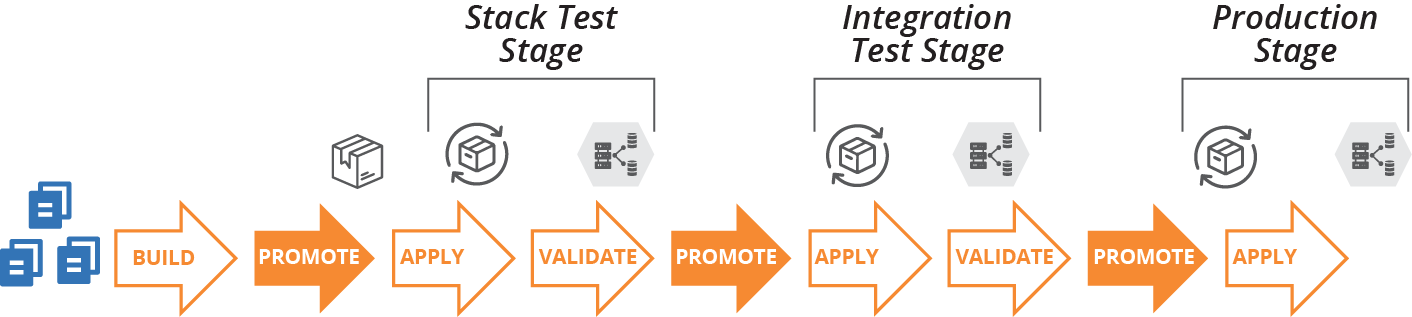
Figure 19-1. Infrastructure code project delivery phases
- Building
-
Prepares a version of the code for use and makes it available for other phases. Building is usually done once in a pipeline, each time the source code changes.
- Promoting
-
Moves a version of the code between delivery stages, as described in “Progressive Testing”. For example, once a stack project version has passed its stack test stage, it might be promoted to show it’s ready for the system integration test stage.
- Applying
-
Runs the relevant tooling to apply the code to the relevant infrastructure instance. The instance could be a delivery environment used for testing activities or a production instance.
“Infrastructure Delivery Pipelines” has more detail on pipeline design. Here, we’re focusing on building and promoting code.
Building an Infrastructure Project
Building an infrastructure project prepares the code for use. Activities can include:
-
Retrieving build-time dependencies, such as libraries, including those from other projects in the codebase and external libraries
-
Resolving build-time configuration, for example pulling in configuration values that are shared across multiple projects
-
Compiling or transforming code, such as generating configuration files from templates
-
Running tests, which include offline and online tests (“Offline Testing Stages for Stacks” and “Online Testing Stages for Stacks”)
-
Preparing the code for use, putting it into the format that the relevant infrastructure tool uses to apply it
-
Making the code available for use
There are a few different ways to prepare infrastructure code and make it available for use. Some tools directly support specific ways to do this, such as a standard artifact package format or repository. Others leave it to the teams that use the tool to implement their own way to deliver code.
Packaging Infrastructure Code as an Artifact
With some tools, “preparing the code for use” involves assembling the files into a package file with a specific format, an artifact. This process is typical with general-purpose programming languages like Ruby (gems), JavaScript (NPM), and Python (Python packages used with the pip installer). Other package formats for installing files and applications for specific operating systems include .rpm, .deb, .msi, and NuGet (Windows).
Not many infrastructure tools have a package format for their code projects. However, some teams build their own artifacts for these, bundling stack code or server code into ZIP files or “tarballs” (tar archives compressed with gzip). Some teams use OS packaging formats, creating RPM files that unpack Chef Cookbook files onto a server, for example. Other teams create Docker images that include stack project code along with the stack tool executable.
Other teams don’t package their infrastructure code into artifacts, especially for tools that don’t have a native package format. Whether they do this depends on how they publish, share, and use their code, which depends on what kind of repository they use.
Using a Repository to Deliver Infrastructure Code
Teams use a source code repository for storing and managing changes to their infrastructure source code. They often use a separate repository for storing code that is ready for delivery to environments and instances. Some teams, as we’ll see, use the same repository for both purposes.
Conceptually, the build stage separates these two repository types, taking code from the source code repository, assembling it, and then publishing it to the delivery repository (see Figure 19-2).
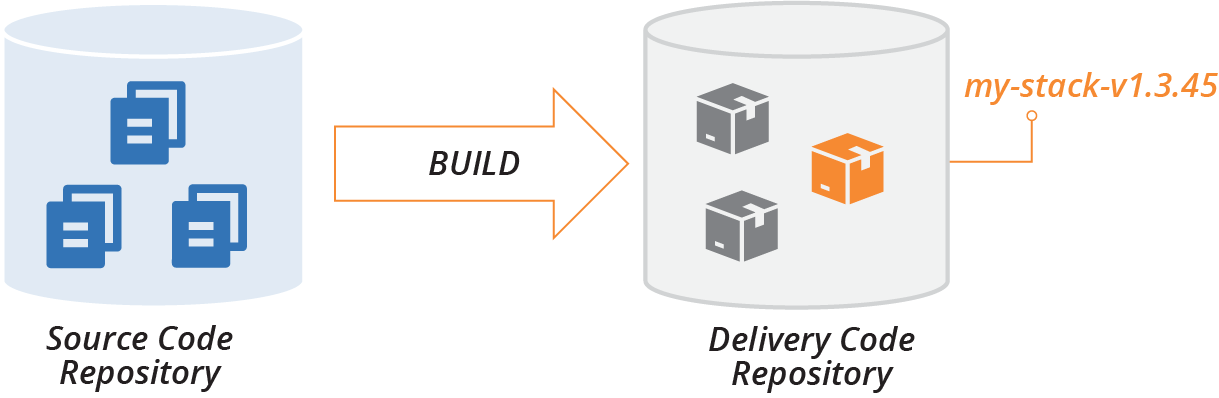
Figure 19-2. Build stage publishes code to the delivery repository
The delivery repository usually stores multiple versions of a given project’s code. Promotion phases, as described shortly, mark versions of the project code to show which stage they have progressed to; for example, whether it’s ready for integration testing or production.
An apply activity pulls a version of the project code from the delivery repository and applies it to a particular instance, such as the SIT environment or the PROD environment.
There are a few different ways to implement a delivery repository. A given system may use different repository implementations for different types of projects. For example, they may use a tool-specific repository, like Chef Server, for projects that use that tool. The same system might use a general file storage service, such as an S3 bucket, for a project using a tool like Packer that doesn’t have a package format or specialized repository.
There are several types of delivery code repository implementations.
Specialized artifact repository
Most of the package formats discussed in the previous section have a package repository product, service, or standard that multiple products and services may implement. There are multiple repository products and hosted services for .rpm, .deb, .gem, and .npm files.
Some repository products, like Artifactory and Nexus, support multiple package formats. Teams in an organization that runs one of these sometimes use them to store their artifacts, such as ZIP files and tarballs. Many cloud platforms include specialized artifact repositories, such as server image storage.
The ORAS (OCI Registry As Storage) project offers a way to use artifact repositories originally designed for Docker images as a repository for arbitrary types of artifacts.
If an artifact repository supports tags or labels, you can use these for promotion. For example, to promote a stack project artifact to the system integration test stage, you might tag it with SIT_STAGE=true, or Stage=SIT.
Alternatively, you might create multiple repositories within a repository server, with one repository for each delivery stage. To promote an artifact, you copy or move the artifact to the relevant repository.
Tool-specific repository
Many infrastructure tools have a specialized repository that doesn’t involve packaged artifacts. Instead, you run a tool that uploads your project’s code to the server, assigning it a version. This works nearly the same way as a specialized artifact repository, but without a package file.
Examples of these include Chef Server (self-hosted), Chef Community Cookbooks (public), and Terraform Registry (public modules).
General file storage repository
Many teams, especially those who use their own formats to store infrastructure code projects for delivery, store them in a general-purpose file storage service or product. This might be a file server, web server, or object storage service.
These repositories don’t provide specific functionality for handling artifacts, such as release version numbering. So you assign version numbers yourself, perhaps by including it in the filename (for example, my-stack-v1.3.45.tgz). To promote an artifact, you might copy or link it to a folder for the relevant delivery stage.
Delivering code from a source code repository
Given that source code is already stored in a source repository, and that many infrastructure code tools don’t have a package format and toolchain for treating their code as a release, many teams simply apply code to environments from their source code repository.
Applying code from the main branch (trunk) to all of the environments would make it difficult to manage different versions of the code. So most teams doing this use branches, often maintaining a separate branch for each environment. They promote a version of the code to an environment by merging it to the relevant branch. GitOps combines this practice with continuous synchronization (see “Apply Code Continuously” and “GitOps” for more detail).
Using branches for promoting code can blur the distinction between editing code and delivering it. A core principle of CD is never changing code after the build stage.1 While your team may commit to never editing code in branches, it’s often difficult to maintain this discipline.
Integrating Projects
As mentioned in “Organizing Projects and Repositories”, projects within a codebase usually have dependencies between them. The next question is when and how to combine different versions of projects that depend on each other.
As an example, consider several of the projects in the ShopSpinner team’s codebase. They have two stack projects. One of these, application_infrastructure-stack, defines the infrastructure specific to an application, including a pool of virtual machines and load balancer rules for the application’s traffic. The other stack project, shared_network_stack, defines common networking shared by multiple instances of application_infrastructure-stack, including address blocks (VPC and subnets) and firewall rules that allow traffic to application servers.
The team also has two server configuration projects, tomcat-server, which configures and installs the application server software, and monitor-server, which does the same for a monitoring agent.
The fifth infrastructure project, application-server-image, builds a server image using the tomcat-server and monitor-server configuration modules (see Figure 19-3).
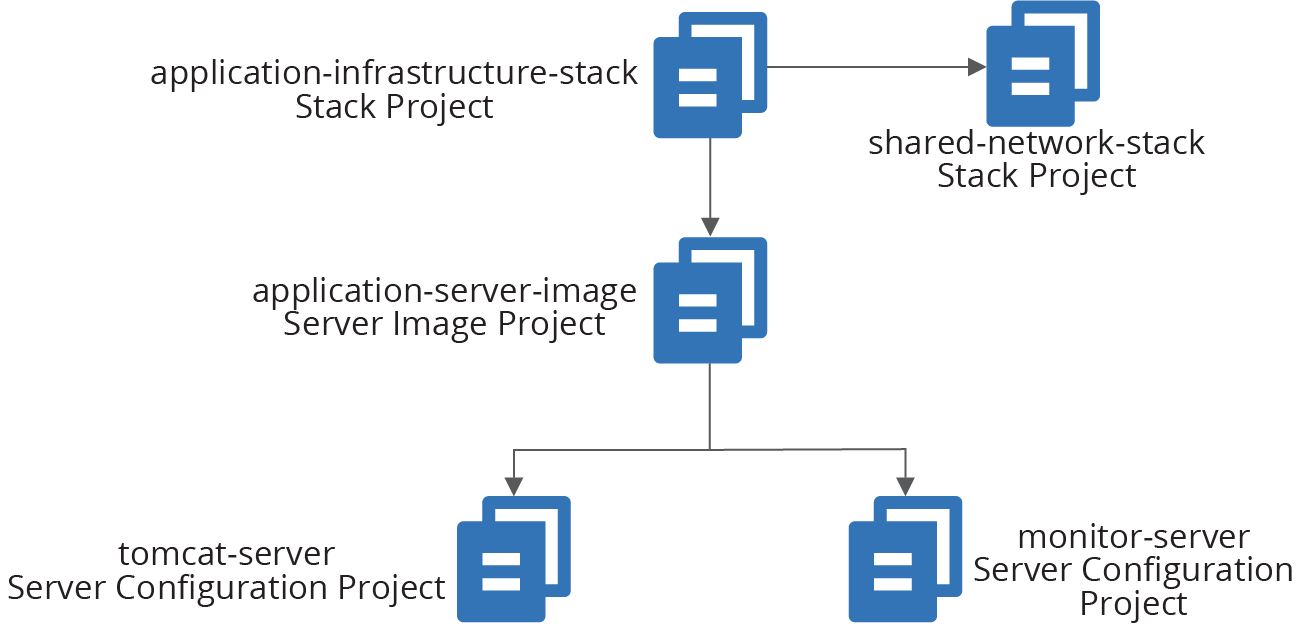
Figure 19-3. Example of dependencies across infrastructure projects
The application_infrastructure-stack project creates its infrastructure within networking structures created by shared_network_stack. It also uses server images built by the application-server-image project to create servers in its application server cluster. And application-server-image builds server images by applying the server configuration definitions in tomcat-server and monitor-server.
When someone makes a change to one of these infrastructure code projects, it creates a new version of the project code. That project version must be integrated with a version of each of the other projects. The project versions can be integrated at build time, delivery time, or apply time.
Different projects of a given system can be integrated at different points, as illustrated by the ShopSpinner example in the following pattern descriptions.
Linking and Integrating
Combining the elements of a computer program is referred to as linking. There are parallels between linking and integrating infrastructure projects as described in this chapter. Libraries are statically linked when building an executable file, similarly to build-time project integration.
Libraries installed on a machine are dynamically linked whenever a call is made from an executable, which is somewhat like apply-time project integration. In both cases, either the provider or the consumer can be changed to a different version in the runtime environment.
The analogy is imperfect, as changing a program affects an executable’s behavior, while changing infrastructure (generally speaking) affects the state of resources.
Pattern: Build-Time Project Integration
The build-time project integration pattern carries out build activities across multiple projects. Doing this involves integrating the dependencies between them and setting the code versions across the projects.
The build process often involves building and testing each of the constituent projects before building and testing them together (see Figure 19-4). What distinguishes this pattern from alternatives is that it produces either a single artifact for all of the projects, or a set of artifacts that are versioned, promoted, and applied as a group.
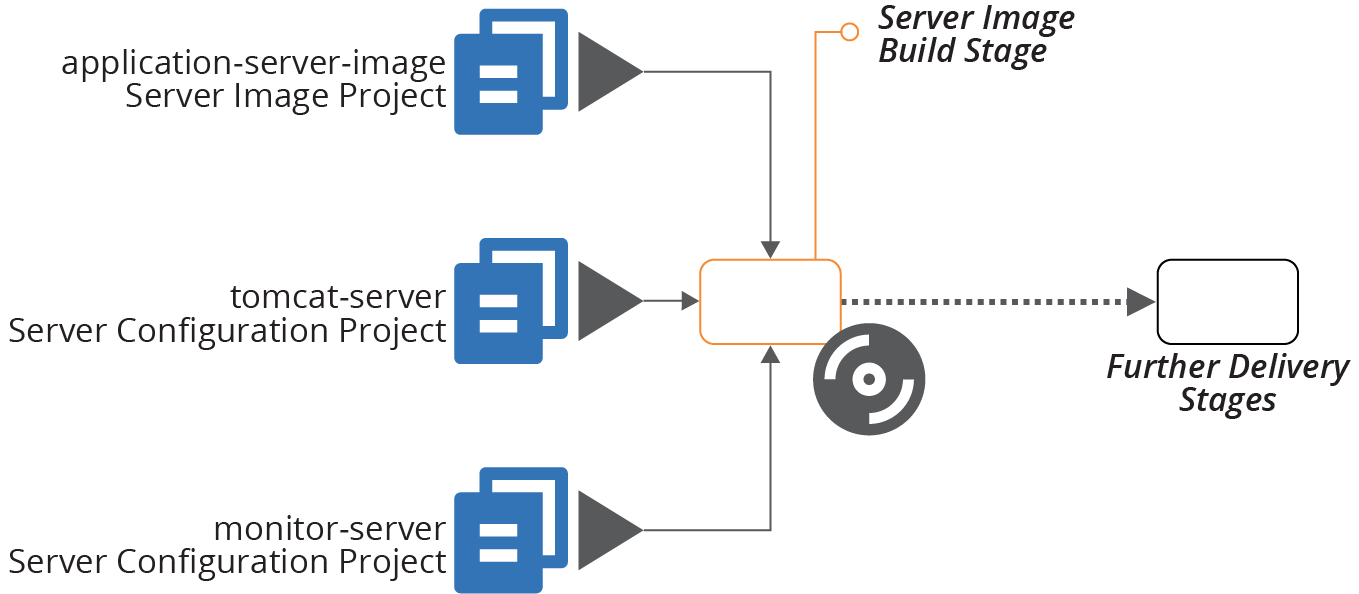
Figure 19-4. Example of integrating projects at build time
In this example, a single build stage produces a server image using multiple server configuration projects.
The build stage may include multiple steps, such as building and testing the individual server configuration modules. But the output—the server image—is composed of code from all of its constituent projects.
Motivation
Building the projects together resolves any issues with dependencies early. Doing this gives fast feedback on conflicts, and creates a high level of consistency across the codebase through the delivery process into production. Project code integrated at build time is consistent throughout the entire delivery cycle. The same version of code is applied at every stage of the process through to production.
Applicability
The use of this pattern versus one of the alternatives is mostly a matter of preference. It depends on which set of trade-offs you prefer, and on your team’s ability to manage the complexity of cross-project builds.
Consequences
Building and integrating multiple projects at runtime is complex, especially for very large numbers of projects. Depending on how you implement the build, it may lead to slower feedback times.
Using build-time project integration at scale requires sophisticated tooling to orchestrate builds. Larger organizations that use this pattern across large codebases, such as Google and Facebook, have teams dedicated to maintaining in-house tooling.
Some build tools are available to build very large numbers of software projects, as discussed under implementation. But this approach is not used as widely in the industry as building projects separately, so there are not as many tools and reference materials to help.
Because projects are built together, boundaries between them are less visible than with other patterns. This may lead to tighter coupling across projects. When this happens, it can be hard to make a small change without affecting many other parts of the codebase, increasing the time and risk of changes.
Implementation
Storing all of the projects for the build in a single repository, often called a monorepo, simplifies building them together by integrating code versioning across them (see “Monorepo—One Repository, One Build”).
Most software build tools, like Gradle, Make, Maven, MSBuild, and Rake, are used to orchestrate builds across a modest number of projects. Running builds and tests across a very large number of projects can take a long time.
Parallelization can speed up this process by building and testing multiple projects in different threads, processes, or even across a compute grid. But this requires more compute resources.
A better way to optimize large-scale builds is using a directed graph to limit building and testing to the parts of the codebase that have changed. Done well, this should reduce the time needed to build and test after a commit so that it only takes a little longer than running a build for separate projects.
There are several specialized build tools designed to handle very large-scale, multi-project builds. Most of these were inspired by internal tools created at Google and Facebook. Some of these tools include Bazel, Buck, Pants, and Please.
Related patterns
The alternatives to integrating project versions at build time are to do so at delivery time (see “Pattern: Delivery-Time Project Integration”) or apply time (see “Pattern: Apply-Time Project Integration”).
The strategy of managing multiple projects in a single repository (“Monorepo—One Repository, One Build”), although not a pattern, supports this pattern. The example I’ve used for this pattern, Figure 19-4, applies server configuration code when creating a server image (see “Baking Server Images”). The immutable server pattern (“Pattern: Immutable Server”) is another example of build-time integration over delivery-time integration.
Although not documented as a pattern in this book, many project builds resolve dependencies on third-party libraries at build time, downloading them and bundling them with the deliverable. The difference is that those dependencies are not built and tested with the project that uses them. When those dependencies come from other projects within the same organization, it’s an example of delivery-time project integration (see “Pattern: Delivery-Time Project Integration”).
Is It Monorepo or Build-Time Project Integration?
Most descriptions of the monorepo strategy for organizing a codebase include building all of the projects in the repository together—what I’ve called build-time project integration. I chose not to name this pattern monorepo because that name hinges on the use of a single code repository, which is an implementation option.
I’ve known teams to manage multiple projects in a single repository without building them together. Although these teams often call their codebase a monorepo, they aren’t using the pattern described here.
On the other side, it’s technically possible to check out projects from separate repositories and build them together. This fits the pattern described here since it integrates project versions at build time. However, doing this complicates correlating and tracing source code versions to builds, for example, when debugging production issues.
Pattern: Delivery-Time Project Integration
Given multiple projects with dependencies between them, delivery-time project integration builds and tests each project individually before combining them. This approach integrates versions of code later than with build-time integration.
Once the projects have been combined and tested, their code progresses together through the rest of the delivery cycle.
As an example, the ShopSpinner application-infrastructure-stack project defines a cluster of virtual machines using the server image defined in the application-server-image project (see Figure 19-5).
When someone makes a change to the infrastructure stack code, the delivery pipeline builds and tests the stack project on its own, as described in Chapter 9.
If the new version of the stack project passes those tests, it proceeds to the integration test phase, which tests the stack integrated with the last server image that passed its own tests. This stage is the integration point for the two projects. The versions of the projects then progress to later stages in the pipeline together.
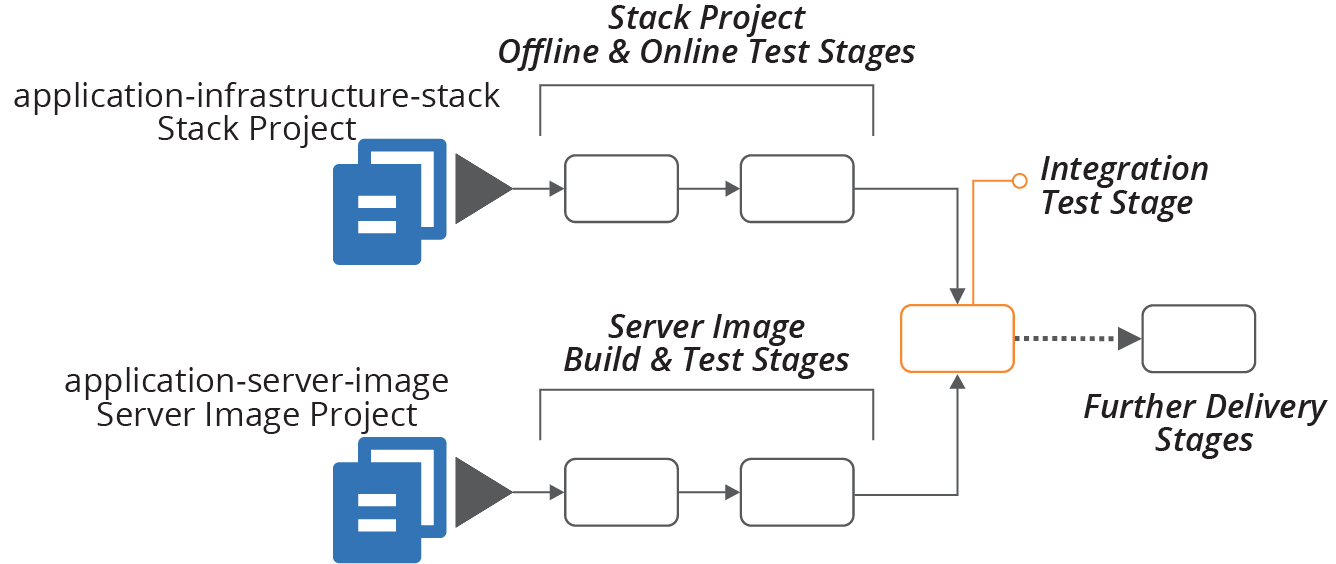
Figure 19-5. Example of integrating projects during delivery
Motivation
Building and testing projects individually before integrating them is one way to enforce clear boundaries and loose coupling between them.
For example, a member of the ShopSpinner team implements a firewall rule in application-infrastructure-stack, which opens a TCP port defined in a configuration file in application-server-image. They write code that reads the port number directly from that configuration file. But when they push their code, the test stage for the stack fails, because the configuration file from the other project is not available on the build agent.
This failure is a good thing. It exposes coupling between the two projects. The team member can change their code to use a parameter value for the port number to open, setting the value later (using one of the patterns described in Chapter 7). The code will be more maintainable than a codebase with direct references to files across projects.
Applicability
Delivery-time integration is useful when you need clear boundaries between projects in a codebase, but still want to test and deliver versions of each project together. The pattern is difficult to scale to a large number of projects.
Consequences
Delivery-time integration puts the complexity of resolving and coordinating different versions of different projects into the delivery process. This requires a sophisticated delivery implementation, such as a pipeline (see “Delivery Pipeline Software and Services”).
Implementation
Delivery pipelines integrate different projects using the “fan-in” pipeline design. The stage that brings different projects together is called a fan-in stage, or project integration stage.2
How the stage integrates different projects depends on what types of projects it combines. In the example of a stack project that uses a server image, the stack code would be applied and passed a reference to the relevant version of the image. Infrastructure dependencies are retrieved from the code delivery repository (see “Using a Repository to Deliver Infrastructure Code”).
The same set of combined project versions need to be applied in later stages of the delivery process. There are two common approaches to handling this.
One approach is to bundle all of the project code into a single artifact to use in later stages. For example, when two different stack projects are integrated and tested, the integration stage could zip the code for both projects into a single archive, promoting that to downstream pipeline stages. A GitOps flow would merge the projects to the integration stage branch, and then merge them from that branch to downstream branches.
Another approach is to create a descriptor file with the version numbers of each project. For example:
descriptor-version:1.9.1stack-project:name:application-infrastructure-stackversion:1.2.34server-image-project:name:application-server-imageversion:1.1.1
The delivery process treats the descriptor file as an artifact. Each stage that applies the infrastructure code pulls the individual project artifact from the delivery repository.
A third approach would be to tag relevant resources with an aggregated version number.
Related patterns
The build-time project integration pattern (see “Pattern: Build-Time Project Integration”) integrates the projects at the beginning, rather than after some delivery activities have already taken place on the separate projects. The apply-time project integration pattern integrates the projects at each delivery stage that uses them together but doesn’t “lock” the versions.
Pattern: Apply-Time Project Integration
Also known as: decoupled delivery or decoupled pipelines.
Apply-time project integration involves pushing multiple projects through delivery stages separately. When someone changes a project’s code, the pipeline applies the updated code to each environment in the delivery path for that project. This version of the project code may integrate with different versions of upstream or downstream projects in each of these environments.
In the ShopSpinner example, the application-infrastructure-stack project depends on networking structures created by the shared-network-stack project. Each project has its own delivery stages, as illustrated in Figure 19-6.
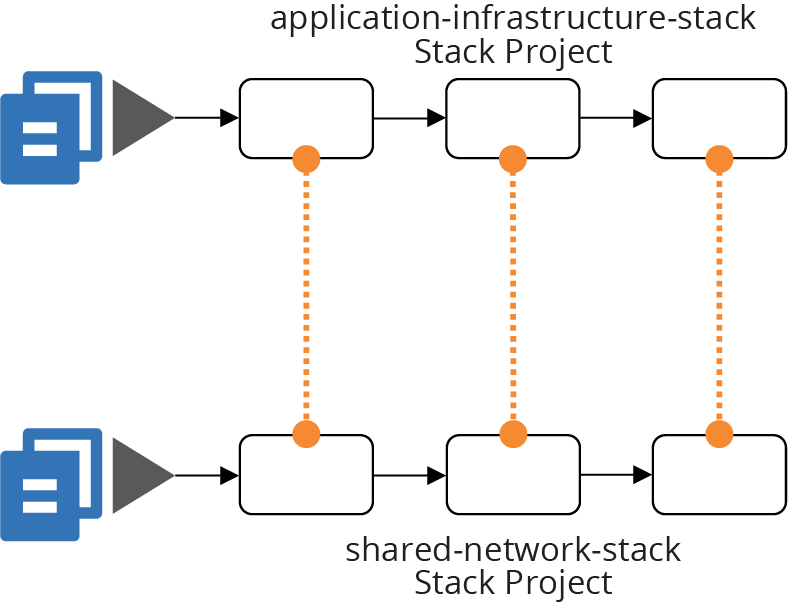
Figure 19-6. Example of integrating projects when applying them
Integration between the projects takes place by applying the application-infrastructure-stack code to an environment. This operation creates or changes a server cluster that uses network structures (for example, subnets) from the shared networking.
This integration happens regardless of which version of the shared networking stack is in place in a given environment. So the integration of versions happens separately each time the code is applied.
Motivation
Integrating projects at apply time minimizes coupling between projects. Different teams can push changes to their systems to production without needing to coordinate, and without being blocked by problems with a change to another team’s projects.
Applicability
This level of decoupling suits organizations with an autonomous team structure. It also helps with larger-scale systems, where coordinating releases and delivering them in lock-step across hundreds or thousands of engineers is impractical.
Consequences
This pattern moves the risk of breaking dependencies across projects to the apply-time operation. It doesn’t ensure consistency through the pipeline. If someone pushes a change to one project through the pipeline faster than changes to other projects, they will integrate with a different version in production than they did in test environments.
Interfaces between projects need to be carefully managed to maximize compatibility across different versions on each side of any given dependency. So this pattern requires more complexity in designing, maintaining, and testing dependencies and interfaces.
Implementation
In some respects, designing and implementing decoupled builds and pipelines using apply-time integration is simpler than alternative patterns. Each pipeline builds, tests, and delivers a single project.
Chapter 17 discusses strategies for integrating different infrastructure stacks. For example, when a stage applies the application-infrastructure-stack, it needs to reference networking structures created by the shared-network-stack. That chapter explains some techniques for sharing identifiers across infrastructure stacks.
There is no guarantee of which version of another project’s code was used in any given environment. So teams need to identify dependencies between projects clearly and treat them as contracts. The shared-network-stack exposes identifiers for the networking structures that other projects may use. It needs to expose these in a standardized way, using one of the patterns described in Chapter 17.
As explained in “Using Test Fixtures to Handle Dependencies”, you can use test fixtures to test each stack in isolation. With the ShopSpinner example, the team would like to test the application-infrastructure-stack project without using an instance of shared-network-stack. The network stack defines redundant and complex infrastructure that isn’t needed to support test cases. So the team’s test setup can create a stripped-down set of networking. Doing this also reduces the risk that the application stack evolves to assume details of the network stack’s
implementation.
A team that owns a project that other projects depend on can implement contract tests that prove its code meets expectations. The shared-network-stack can verify that the networking structures—subnets—are created and that their identifiers are exposed using the mechanism that other projects use to consume them.
Make sure that contract tests are clearly labeled. If someone makes a code change that causes the test to fail, they should understand that they may be breaking other projects, rather than thinking they only need to update the test to match their change.
Many organizations find consumer-driven contract (CDC) testing useful. With this model, teams working on a consumer project that depends on resources created in a provider project write tests that run in the provider project’s pipeline. This helps the provider team to understand the expectations of consumer teams.
Related patterns
The build-time project integration pattern (“Pattern: Build-Time Project Integration”) is at the opposite end of the spectrum from this pattern. That pattern integrates projects once, at the beginning of the delivery cycle, rather than each time. Delivery-time project integration (“Pattern: Delivery-Time Project Integration”) also integrates projects once, but at a point during the delivery cycle rather than at the beginning.
“Frying a Server Instance” illustrates apply-time integration used for server provisioning. Dependencies like server configuration modules are applied each time a new server instance is created, usually taking the latest version of the server module that was promoted to the relevant stage.
Using Scripts to Wrap Infrastructure Tools
Most teams managing infrastructure code create custom scripts to orchestrate and run their infrastructure tools. Some use software build tools like Make, Rake, or Gradle. Others write scripts in Bash, Python, or PowerShell. In many cases, this supporting code becomes at least as complicated as the code that defines the infrastructure, leading teams to spend much of their time debugging and maintaining it.
Teams may run these scripts at build time, delivery time, or apply time. Often, the scripts handle more than one of these project phases. The scripts handle a variety of tasks, which can include:
- Configuration
-
Assemble configuration parameter values, potentially resolving a hierarchy of values. More on this shortly.
- Dependencies
-
Resolve and retrieve libraries, providers, and other code.
- Packaging
-
Prepare code for delivery, whether packaging it into an artifact or creating or merging a branch.
- Promotion
-
Move code from one stage to the next, whether by tagging or moving an artifact or creating or merging a branch.
- Orchestration
-
Apply different stacks and other infrastructure elements in the correct order, based on their dependencies.
- Execution
-
Run the relevant infrastructure tools, assembling command-line arguments and configuration files according to the instance the code is applied to.
- Testing
-
Set up and run tests, including provisioning test fixtures and data, and gathering and publishing results.
Assembling Configuration Values
Marshaling and resolving configuration values can be one of the more complex wrapper script tasks. Consider a system like the ShopSpinner example that involves multiple delivery environments, multiple production customer instances, and multiple infrastructure components.
A simple, one-level set of configuration values, with one file per combination of component, environment, and customer, requires quite a few files. And many of the values are duplicated.
Imagine a value of store_name for each customer, which must be set for every instance of each component. The team quickly decides to set that value in one location with shared values and add code to its wrapper script to read values from the shared configuration and the per-component configuration.
They soon discover they need some shared values across all of the instances in a given environment, creating a third set of configuration. When a configuration item has different values in multiple configuration files, the script must resolve it following a precedence hierarchy.
This type of parameter hierarchy is a bit messy to code. It’s harder for people to understand when introducing new parameters, configuring the right values, and tracing and debugging the values used in any given instance.
Using a configuration registry puts a different flavor onto the complexity. Rather than chasing parameter values across an array of files, you chase them through various subtrees of the registry. Your wrapper script might handle resolving values from different parts of the registry, as with the configuration files. Or you might use a script to set registry values beforehand, so it owns the logic for resolving a hierarchy of default values to set the final value for each instance. Either approach creates headaches for setting and tracing the origin of any given parameter value.
Simplifying Wrapper Scripts
I’ve seen teams spend more time dealing with bugs in their wrapper scripts than on improving their infrastructure code. This situation arises from mixing and coupling concerns that can and should be split apart. Some areas to consider:
- Split the project life cycle
-
A single script shouldn’t handle tasks during the build, promotion, and apply phases of a project’s life cycle. Write and use different scripts for each of these activities. Make sure you have a clear understanding of where information needs to be passed from one of these phases to the next. Implement clear boundaries between these phases, as with any API or contract.
- Separate tasks
-
Break out the various tasks involved in managing your infrastructure, such as assembling configuration values, packaging code, and executing infrastructure tools. Again, define the integration points between these tasks and keep them loosely coupled.
- Decouple projects
-
A script that orchestrates actions across multiple projects should be separate from scripts that execute tasks within the projects. And it should be possible to execute tasks for any project on its own.
- Keep wrapper code ignorant
-
Your scripts should not know anything about the projects they support. Avoid hardcoding actions that depend on what the infrastructure code does into your wrapper scripts. Ideal wrapper scripts are generic, usable for any infrastructure project of a particular shape (e.g., any project that uses a particular stack tool).
Treating wrapper scripts like “real” code helps with all of this. Test and validate scripts with tools like shellcheck. Apply the rules of good software design to your scripts, such as the rule of composition, single responsibility principle, and designing around domain concepts. See Chapter 15 and the references to other sources of information on good software design.
Conclusion
Creating a solid, reliable process for delivering infrastructure code is a key to achieving good performance against the four key metrics (see “The Four Key Metrics”). Your delivery system is the literal implementation of fast and reliable delivery of changes to your system.
1 “Only build packages once.” See Jez Humble’s CD patterns.
2 The fan-in pattern is similar to (or perhaps a different name for) the Aggregate Artifact pipeline pattern.