Chapter 20. Team Workflows
Using code to build and change infrastructure is a radically different way of working from traditional approaches. We make changes to virtual servers and network configuration indirectly, rather than by typing commands at prompts or directly editing live configuration. Writing code and then pushing it out to be applied by automated systems is a bigger shift than learning a new tool or skill.
Infrastructure as Code changes how everyone involved in designing, building, and governing infrastructure works as individuals and as a group. This chapter aims to explain how different people work on infrastructure code. Processes for working on infrastructure involve designing, defining, and applying code.
Some characteristics of effective processes for teams who manage Infrastructure as Code include:
-
The automated process is the easiest, most natural way for team members to make changes.
-
People have a clear way to ensure quality, operability, and alignment to policies.
-
The team keeps its systems up-to-date with little effort. Things are consistent where appropriate, and where variations are required, they are clear and well-managed.
-
The team’s knowledge of the system is embedded in code, and its ways of working are articulated in the automation.
-
Errors are quickly visible and easily corrected.
-
It’s easy and safe to change the code that defines the system and the automation that tests and delivers that code.
Overall, a good automated workflow is fast enough to get a fix through to systems in an emergency, so that people aren’t tempted to jump in and make a manual change to fix it. And it’s reliable enough that people trust it more than they trust themselves to twiddle configuration on a live system by hand.
This chapter and the next one both discuss elements of how a team works on infrastructure code. This chapter focuses on what people do in their workflows, while the following one looks at ways of organizing and managing infrastructure codebases.
Measuring the Effectiveness of Your Workflow
The four key metrics from the Accelerate research, as mentioned in “The Four Key Metrics”, are a good basis for deciding how to measure your team’s effectiveness. The evidence is that organizations that perform well on these metrics tend to perform well against their core organizational goals, such as profitability and share price.
Your team might use these metrics to create SLIs (Service Level Indicators), which are things to measure, SLOs (Service Level Objectives), which are targets your team uses for itself, and SLAs (Service Level Agreements), which are commitments to other people.1 The specific things you measure depend on your team’s context and specific ways you’re trying to improve higher-level outcomes.
The People
A reliable automated IT system is like Soylent Green—its secret ingredient is people.2 While human hands shouldn’t be needed to get a code change through to production systems, other than perhaps reviewing test results and clicking a few buttons, people are needed to continuously build, fix, adapt, and improve the system.
There are a handful of roles involved with most infrastructure systems, automated or otherwise. These roles don’t often map one to one to individuals—some people play more than one role, and some people share roles with others:
- Users
-
Who directly uses the infrastructure? In many organizations, application teams do. These teams may develop the applications, or they may configure and manage third-party applications.
- Governance specialists
-
Many people set policies for the environment across various domains, including security, legal compliance, architecture, performance, cost control, and correctness.
- Designers
-
People who design the infrastructure. In some organizations, these people are architects, perhaps divided into different domains, like networking or storage.
- Toolmakers
-
People who provide services, tools, and components that other teams use to build or run environments. Examples include a monitoring team or developers who create reusable infrastructure code libraries.
- Builders
-
People who build and change infrastructure. They could do this manually through consoles or other interfaces, by running scripts, or by running tools that apply infrastructure code.
- Testers
-
People who validate infrastructure. This role isn’t limited to QAs (quality analysts). It includes people who test or review systems for a governance domain like security or performance.
- Support
-
People who make sure the system continues to run correctly and fix it when it doesn’t.
Figure 20-1 shows a classic structure, with a dedicated team for each part of the workflow for changing a system.
Many roles may be divided across different infrastructure domains, such as networking, storage, or servers. They are also potentially split across governance domains like security, compliance, architecture, and performance. Many larger organizations create baroque organizational structures of micro-specialties.3
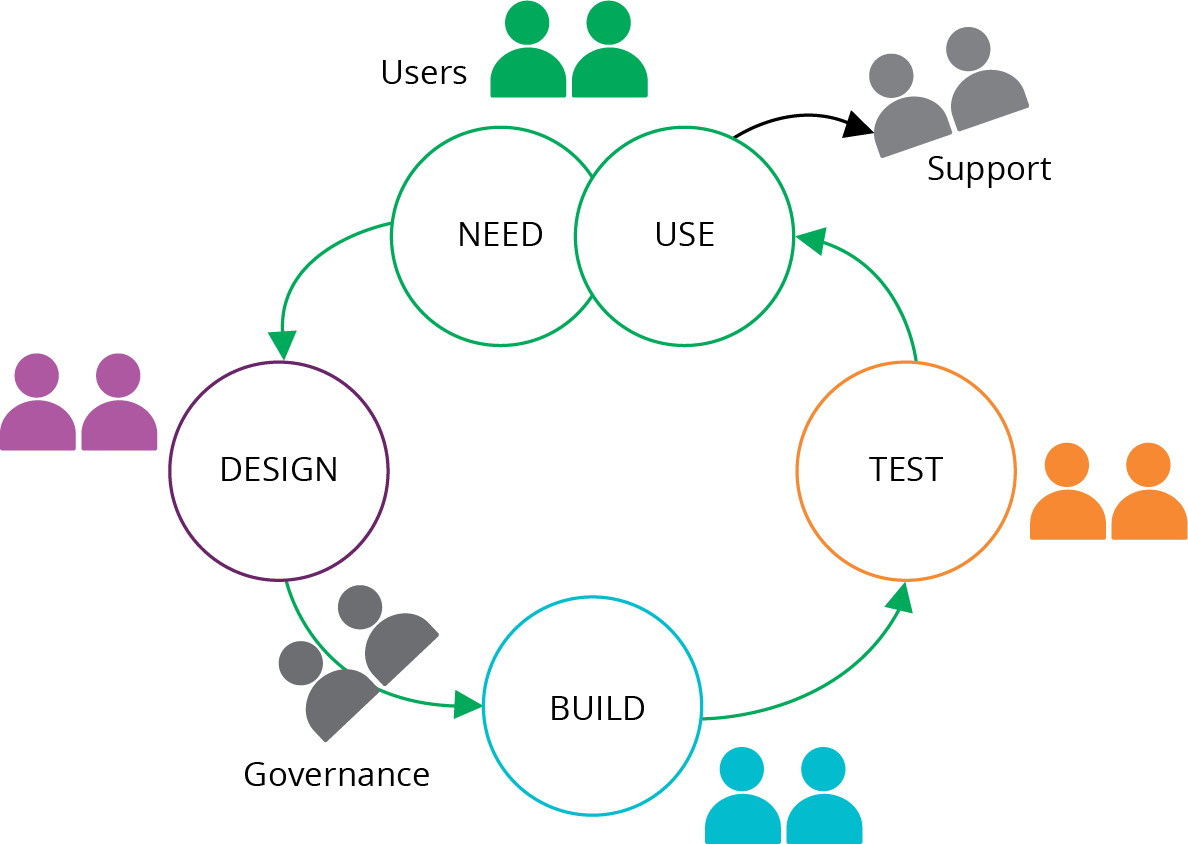
Figure 20-1. A classic mapping of a dedicated team to each part of a workflow
However, it’s also common for a person or team to work across these roles. For example, an infosec (information security) team might set standards, provide scanning tools, and conduct security audits. A bit later in this chapter we’ll look at ways to reshuffle responsibilities (see “Reshuffling Responsibilities”).
Who Writes Infrastructure Code?
Here are a few different ways organizations answer the question of who writes and edits infrastructure code:
- Builders write code
-
Some organizations try to keep traditional processes and team structures. So the team that builds (and perhaps supports) infrastructure uses Infrastructure as Code tools to optimize its work. Users request an environment, and the build team uses its tools and scripts to build it for them. See “Using Value Stream Mapping to Improve Workflows” for an example of how optimizing a build team’s process tends not to improve the end-to-end process, either for speed or quality.
- Users write code
-
Many organizations enable application teams to define the infrastructure that their applications use. This aligns user needs to the solution. However, it either requires every team to include people with strong infrastructure expertise or tooling that simplifies defining infrastructure. The challenge with tooling is ensuring that it meets the needs of application teams, rather than constraining them.
- Toolmakers write code
-
Specialist teams can create platforms, libraries, and tools that enable users to define the infrastructure they need. In these cases, the users tend to write more configuration than code. The difference between toolmakers and builders writing code is self-service. A builder team writes and uses code in response to requests from users to create or change an environment. A toolmaker team writes code that users can use to create or change their own environments. See “Building an Abstraction Layer” as an example of what toolmakers might build.
- Governance and testers write code
-
People who set policies and standards, and those who need to assure changes, can create tools that help other people to verify their own code. These people may become toolmakers or work closely with toolmakers.
Applying Code to Infrastructure
A typical workflow for making a change to infrastructure starts with code in a shared source repository. A member of the team pulls the latest version of the code to their working environment and edits it there. When they’re ready, they push the code into the source repository, and apply the new version of the code to various environments.
Many people run their tools from the command line in their working environment when they are starting with infrastructure automation. However, doing that has pitfalls.
Applying Code from Your Local Workstation
Applying infrastructure code from the command line can be useful for a test instance of the infrastructure that nobody else uses. But running the tool from your local work environments creates problems with shared instances of infrastructure, whether it’s a production environment or a delivery environment (see “Delivery Environments”).
The person might make changes to their local version of the code before applying it. If they apply the code before pushing the changes to the shared repository, then nobody else has access to that version of the code. This can cause problems if someone else needs to debug the infrastructure.
If the person who applied their local version of the code does not immediately push their changes, someone else might pull and edit an older version of the code. When they apply that code, they’ll revert the first person’s changes. This situation quickly becomes confusing and hard to untangle (see Figure 20-2).
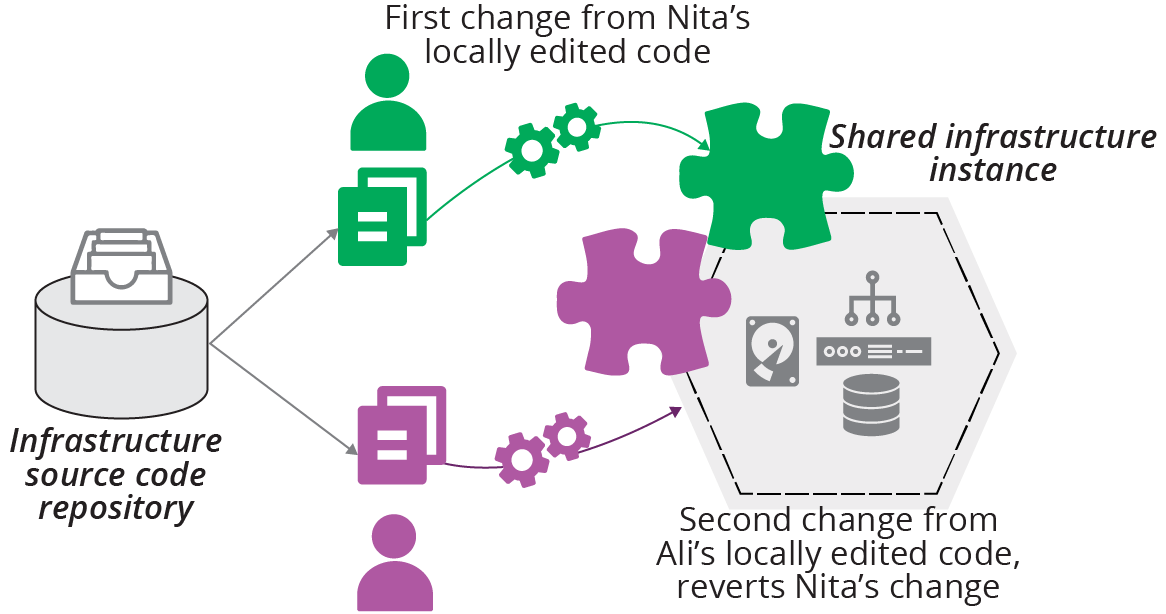
Figure 20-2. Locally editing and applying code leads to conflicts
Note that locking solutions, such as Terraform’s state locking, don’t prevent this situation. Locking stops two people from applying their code to the same instance simultaneously. But, as of this writing, locking solutions don’t stop people from applying divergent versions of code, as long as they each wait their turn.
So the lesson is that, for any instance of infrastructure, code should always be applied from the same location. You could designate an individual to be responsible for each instance. But this has many pitfalls, including a risky dependency on one person and their workstation. A better solution is to have a central system that handles shared infrastructure instances.
Applying Code from a Centralized Service
You can use a centralized service to apply infrastructure code to instances, whether it’s an application that you host yourself or a third-party service. The service pulls code from a source code repository or an artifact repository (see “Packaging Infrastructure Code as an Artifact”) and applies it to the infrastructure, imposing a clear, controlled process for managing which version of code is applied.
If two people pull and edit code, they must resolve any differences in their code when they integrate their code with the branch that the tool uses. When there is a problem, it’s easy to see which version of the code was applied and correct it (see Figure 20-3).
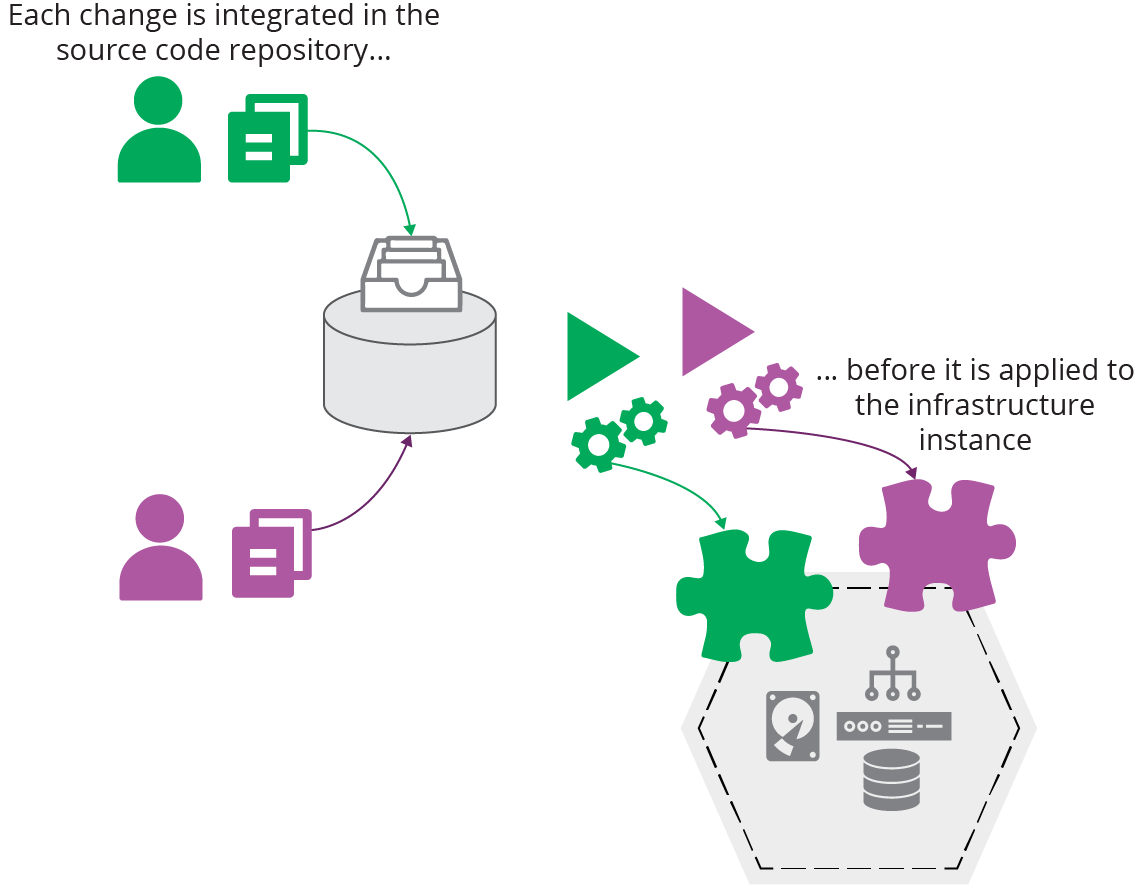
Figure 20-3. Centrally integrating and applying code
A central service also ensures that the infrastructure tool is run consistently, rather than assuming that a person doesn’t make a mistake or “improve” (deviate from) the workflow. It uses the same versions of the tool, scripts, and supporting utilities every time.
Using a central service aligns well with the pipeline model for delivering infrastructure code across environments (see “Infrastructure Delivery Pipelines”). Whatever tool or service you use to orchestrate changes through your pipeline takes on the responsibility for running your infrastructure tool to apply the latest version of code to each environment.
Another benefit of having a central service execute your infrastructure code is that it forces you and your team to automate the entire process. If you run the tool from your workstation, it’s easy to leave a few loose ends, steps that you need to do manually before or after running the tool. A central service gives you no choice other than making sure the task is entirely automated.
Tools and Services That Run Your Infrastructure Tool for You
There are several options for a centralized service to apply infrastructure code. If you use a build server like Jenkins or a CD tool like GoCD or ConcourseCI, you can implement jobs or stages to execute your infrastructure tool. These tools support managing different versions of code from a source repository and can promote code between stages. These multipurpose tools also make it easy to integrate workflows across applications, infrastructure, and other parts of your system. You can use self-hosted instances of these services, or use a hosted offering. See “Delivery Pipeline Software and Services” for more on pipeline servers and software.
Several vendors offer products or services specialized for running infrastructure tools. Examples include Terraform Cloud, Atlantis, and Pulumi for Teams. WeaveWorks provides Weave Cloud, which applies infrastructure code to Kubernetes clusters.
Personal Infrastructure Instances
In most of the workflows discussed in this book, you pull code, edit it, and then push it into a shared code repository.5 Then a pipeline delivery process applies it to relevant environments.
Ideally, you can test your code changes before you push them into the shared repository. Doing this gives you a way to make sure your change does what you expect and is faster than waiting for a pipeline to run your code through to an online test stage (see “Online Testing Stages for Stacks”). It also helps avoid breaking the build when one of your changes fails a pipeline stage, disrupting everyone working on the codebase.
Your team can do a few things to make it easier to test code changes before pushing.
First, make sure each person working on the infrastructure code can create their own instance of the infrastructure. There’s a limit to what people can test locally, without your cloud platform, as discussed in “Offline Testing Stages for Stacks”. You might be tempted to run shared “dev” instances of the infrastructure. But as explained earlier, having multiple people apply locally edited code to a shared instance becomes messy. So create a way for people to spin up their own infrastructure instances, and destroy them when they’re not actively using them.
Second, keep the pieces of your infrastructure small. This is, of course, one of the three core practices in this book (see Chapter 15). You should be able to spin up an instance of any component of your system on its own, perhaps using test fixtures to handle dependencies (see “Using Test Fixtures to Handle Dependencies”). It’s hard for people to work on personal instances if they need to spin up the entire system, unless the system is exceptionally small.
Third, people should use the same tools and scripts to apply and test their instances of infrastructure that are used with shared instances, for example, in the pipeline. It helps to create packages for the tooling and scripts that you can use across these different locations.6
Centrally Managed Personal Instances
It’s safer for people to apply code to personal instances from their workstations than it is for shared instances. But there may be advantages to using a centralized service for personal instances. I’ve seen a team struggle to tear down a personal instance that someone left running when they went on vacation. They created the instance using a local version of the infrastructure code that they didn’t push to the repository, making it hard to destroy.
So some teams establish a practice where each person pushes changes to a personal branch, which the central service applies to their personal infrastructure instance that they can test. In this arrangement, the personal branch emulates local code, so people don’t consider a change committed until they’ve merged it to the shared branch or trunk. But the code is centrally available for other people to view and use in their absence.
Source Code Branches in Workflows
Branches are a powerful feature of shared source repositories that make it easier for people to make changes to different copies of a codebase—branches—and then integrate their work when they’re ready. There are many strategies and patterns for using branches as part of a team’s workflow. Rather than elaborating on them here, I refer you to Martin Fowler’s article, “Patterns for Managing Source Code Branches”.
It’s worth highlighting a few distinctions of branching strategy in the context of Infrastructure as Code. One is the difference between path to production patterns and integration patterns for branching. The other is the importance of integration frequency.
Teams use path to production branching patterns to manage which versions of code to apply to environments.7 Typical path to production patterns include release branches and environment branches (environment branches are discussed in “Delivering code from a source code repository”).
Integration patterns for branching describes ways for people working on a codebase to manage when and how they integrate their work.8 Most teams use the mainline integration pattern, either with feature branching or continuous integration.
The specific pattern or strategy is less important than how you use it. The most important factor in the effectiveness of a team’s use of branches is integration frequency, how often everyone merges all of their code into the same (main) branch of the central repository.9 The DORA Accelerate research finds that more frequent integration of all of the code within a team correlates to higher commercial performance. Their results suggest that everyone in the team should integrate all of their code together—for example, to main or trunk—at least once a day.
Merging Is Not Integration
People sometimes confuse a build server automatically running tests on branches with continuous integration. The practice of continuous integration, and the correlation with higher team performance, is based on fully integrating all of the changes that everyone is working on in the codebase.
Although someone using the feature branch pattern may frequently merge the current main branch to their own branch, they don’t normally integrate their own work back into main until they’ve finished working on their feature. And if other people are working the same way on their own feature branches, then the code is not fully integrated until everyone finishes their feature and merges their changes to the main branch.
Integration involves merging in both directions—individuals merging their own changes to the main branch as well as merging main back to their own branch or local copy of the code. Continuous integration, therefore, means everyone doing this as they work, at least once a day.
Preventing Configuration Drift
Chapter 2 described the perils of configuration drift (see “Configuration Drift”), where similar infrastructure elements become inconsistent over time. Configuration drift often results when teams use infrastructure coding tools to automate parts of older ways of working, rather than fully adapting their ways of working.
There are several things you can do in your workflows to avoid configuration drift.
Minimize Automation Lag
Automation lag is the time that passes between instances of running an automated process, such as applying infrastructure code. The longer it’s been since the last time the process ran, the more likely it will fail.10 Things change over time, even when nobody has consciously made a change.
Even if code hasn’t changed, applying it after a long gap in time can still fail, for various reasons:
-
Someone has changed another part of the system, such as a dependency, in a way that only breaks when your code is reapplied.
-
An upgrade or configuration change to a tool or service used to apply your code might be incompatible with your code.
-
Applying unchanged code might nevertheless bring in updates to transitive dependencies, such as operating system packages.
-
Someone may have made an manual fix or improvement that they neglected to fold back into the code. Reapplying your code reverts the fix.
The corollary to automation lag is, the more frequently you apply infrastructure code, the less likely it is to fail. When failures do occur, you can discover the cause more quickly, because less has changed since the last successful run.
Avoid Ad Hoc Apply
One habit that some teams carry over from Iron Age ways of working is only applying code to make a specific change. They might only use their infrastructure code to provision new infrastructure, but not for making changes to existing systems. Or they may write and apply infrastructure code to make ad hoc changes to specific parts of their systems. For example, they code a one-off configuration change for one of their application servers. Even when teams use code to make changes, and apply code to all instances, sometimes they may only apply code when they make a change to the code.
These habits can create configuration drift or automation lag.
Apply Code Continuously
A core strategy for eliminating configuration drift is to continuously apply infrastructure code to instances, even when the code hasn’t changed. Many server configuration tools, including Chef and Puppet, are designed to reapply configuration on a schedule, usually hourly.11
The GitOps methodology (see “GitOps”) involves continuously applying code from a source code branch to each environment. You should be able to use a central service to apply code (as described in “Applying Code from a Centralized Service”) to continuously reapply code to each instance.
Immutable Infrastructure
Immutable infrastructure solves the problem of configuration drift in a different way. Rather than applying configuration code frequently to an infrastructure instance, you only apply it once, when you create the instance. When the code changes, you make a new instance and swap it out for the old one.
Making changes by creating a new instance requires sophisticated techniques to avoid downtime (“Zero Downtime Changes”), and may not be applicable to all use cases. Automation lag is still potentially an issue, so teams that use immutable infrastructure tend to rebuild instances frequently, as with phoenix servers.12
Governance in a Pipeline-based Workflow
Governance is a concern for most organizations, especially larger ones and those that work in regulated industries like finance and health care. Some people see governance as a dirty word that means adding unneeded friction to getting useful work done. But governance just means making sure things are done responsibly, according to the organization’s policies.
Chapter 1 explained that quality—governance being an aspect of quality—can enable delivery speed and that the ability to deliver changes quickly can improve quality (see “Use Infrastructure as Code to Optimize for Change”.) Compliance as Code13 leverages automation and more collaborative working practices to make this positive loop work.
Reshuffling Responsibilities
Defining systems as code creates opportunities to reshuffle the responsibilities of the people involved in working on infrastructure (the people listed in “The People”) and the way those people engage with their work. Some factors that create these opportunities are:
- Reuse
-
Infrastructure code can be designed, reviewed, and reused across multiple environments and systems. You don’t need a lengthy design, review, and signoff exercise for each new server or environment if you use code that has already been through that process.
- Working code
-
Because code is quick to write, people can review and make decisions based on working code and example infrastructure. This makes for faster and more accurate feedback loops than haggling over diagrams and specifications.
- Consistency
-
Your code creates environments far more consistently than humans following checklists. So testing and reviewing infrastructure in earlier environments gives faster and better feedback than doing these later in the process.
- Automated testing
-
Automated testing, including for governance concerns like security and compliance, gives people working on infrastructure code fast feedback. They can correct many problems as they work, without needing to involve specialists for routine issues.
- Democratize quality
-
People who aren’t specialists can make changes to the code for potentially sensitive areas of infrastructure, such as networking and security policies. They can use tools and tests created by specialists to sanity check their changes. And specialists can still review and approve changes before they’re applied to production systems. Reviewing this way is more efficient because the specialist can directly view code, test reports, and working test instances.
- Governance channels
-
The infrastructure codebase, and pipelines used to deliver changes to production instances, can be organized based on their governance requirements. So a change to security policies goes through a review and signoff step not necessarily required for changes to less sensitive areas.
Many of the ways we can change how people manage systems involve shifting responsibilities left in the process.
Shift Left
Chapter 8 explains principles and practices for implementing automated testing and pipelines to deliver code changes to environments. The term shift left describes how this impacts workflows and delivery practices.
Code is rigorously tested during implementation, at the “left” end of the flow shown in most process diagrams. So organizations can spend less time on heavyweight processes at the “right” end, just before applying code to production.
People involved in governance and testing focus on what happens during implementation, working with teams, providing tools, and enabling practices to test early and often.
An Example Process for Infrastructure as Code with Governance
ShopSpinner has a reusable stack (“Pattern: Reusable Stack”) that it can use to create the infrastructure for an application server to host an instance of its service for a customer. When someone changes the code for this stack, it can affect all of its customers.
Its technical leadership group, which is responsible for architectural decisions, defines CFRs (as described in “What Should We Test with Infrastructure?”) that the application server infrastructure must support. These CFRs include the number and frequency of orders that users can place on a customer instance, the response times for the interface, and recovery times for server failures.
The infrastructure team and the application team join with a pair of Site Reliability Engineers (SREs) and a QA to implement some automated tests that check the performance of the application server stack against the CFRs. They build these tests into the several stages of the pipeline, progressively testing different components of the stack (as per “Progressive Testing”).
Once the group has these tests in place, people don’t need to submit infrastructure changes for review by the technical leadership group, SREs, or anyone else. When an engineer changes the networking configuration, for example, the pipeline automatically checks whether the resulting infrastructure still meets the CFRs before they can apply it to production customer instances. If the engineer makes a mistake that breaks a CFR, they find out within minutes when a pipeline stage goes red and can immediately correct it.
In some cases, a change may cause a problem with a customer instance that isn’t caught by the automated tests. The group can conduct a blameless postmortem to review what happened. Perhaps the problem was that none of the CFRs covered the situation, so they need to change or add a CFR to their list. Or their testing may have a gap that missed the issue, in which case they improve the test suite.
Normalize Your Emergency Fix Process
Many teams have a separate process for emergency changes so that they can deliver fixes quickly. Needing a separate process for faster fixes is a sign that the normal change process could be improved.
An emergency change process speeds things up in one of two ways. One is to leave out unnecessary steps. The other is to leave out necessary steps. If you can safely leave a step out in an emergency, when the pressure is on and the stakes are high, you can probably leave it out of your normal process. If skipping a step is unacceptably risky, then find a way to handle it more efficiently and do it every time.14
Conclusion
When an organization defines its Infrastructure as Code, its people should find themselves spending less time carrying out routine activities and playing gatekeeper. They should instead spend more time continuously improving their ability to improve the system itself. Their efforts will be reflected in the four metrics for software delivery and operational performance.
1 See Google’s “SRE Fundamentals” for more on SLOs, SLAs, and SLIs.
2 Soylent Green is a food product in the classic dystopian science fiction movie of the same name. Spoiler: “Soylent Green is people!” Although, my lawyers advise me to point out that, for a reliable automated IT system, the secret ingredient is living people.
3 I worked with a group at an international bank that had four different release testing environments, one for each stage in their release process. For each of these environments, one team configured the infrastructure, another team deployed and configured the application, and then a third team tested it. Some of these twelve teams were unaware that their counterparts existed. The result was little knowledge sharing and no consistency across the release process.
4 The book Value Stream Mapping by Karen Martin and Mike Osterling (McGraw-Hill Education) is a good reference.
5 Particularly in Chapters 8 and 9.
6 batect and Dojo are examples of tools that build a repeatable, shareable container for developing applications and infrastructure.
7 See the path to production section of Fowler’s article, “Patterns for Managing Source Code Branches”.
8 Fowler also describes integration patterns in the article.
9 See the section on integration frequency for a detailed examination.
10 Automation lag applies to other types of automation as well. For example, if you only run your automated application test suite at the end of a long release cycle, you will spend days or weeks updating the test suite to match the code changes. If you run the tests every time you commit a code change, you only need to make a few changes to match the code, so the full test suite is always ready to run.
11 See ConfigurationSynchronization for an early articulation of this concept.
12 A phoenix server is frequently rebuilt, in order to ensure that the provisioning process is repeatable. This can be done with other infrastructure constructs, including infrastructure stacks.
13 See the O’Reilly website for articles on compliance as code.
14 Steve Smith defines this as the dual value streams antipattern.