Chapter 21. Safely Changing Infrastructure
The theme of making changes frequently and quickly runs throughout this book. As mentioned at the very start (“Objection: “We must choose between speed and quality””), far from making systems unstable, speed is an enabler for stability, and vice versa. The mantra is not “move fast and break things,” but rather, “move fast and improve things.”
However, stability and quality don’t result from optimizing purely from speed. The research cited in the first chapter shows that trying to optimize for either speed or quality achieves neither. The key is to optimize for both. Focus on being able to make changes frequently, quickly, and safely, and on detecting and recovering from errors quickly.
Everything this book recommends—from using code to build infrastructure consistently, to making testing a continuous part of working, to breaking systems into smaller pieces—enables fast, frequent, and safe changes.
But making frequent changes to infrastructure imposes challenges for delivering uninterrupted services. This chapter explores these challenges and techniques for addressing them. The mindset that underpins these techniques is not to see changes as a threat to stability and continuity, but to exploit the dynamic nature of modern infrastructure. Exploit the principles, practices, and techniques described throughout this book to minimize disruptions from changes.
Reduce the Scope of Change
Agile, XP, Lean, and similar approaches optimize the speed and reliability of delivery by making changes in small increments. It’s easier to plan, implement, test, and debug a small change than a large one, so we aim to reduce batch sizes.1 Of course, we often need to make significant changes to our systems, but we can do this by breaking things up into a small set of changes that we can deliver one at a time.
As an example, the ShopSpinner team initially built its infrastructure with a single infrastructure stack. The stack included its web server cluster and an application server. Over time, the team members added more application servers and turned some into clusters. They realized that running the web server cluster and all of the application servers in a single VLAN was a poor design, so they improved their network design and shifted these elements into different VLANs. They also decided to take the advice of this book and split their infrastructure into multiple stacks to make it easier to change them individually.
ShopSpinner’s original implementation was a single stack with a single VLAN (see Figure 21-1).
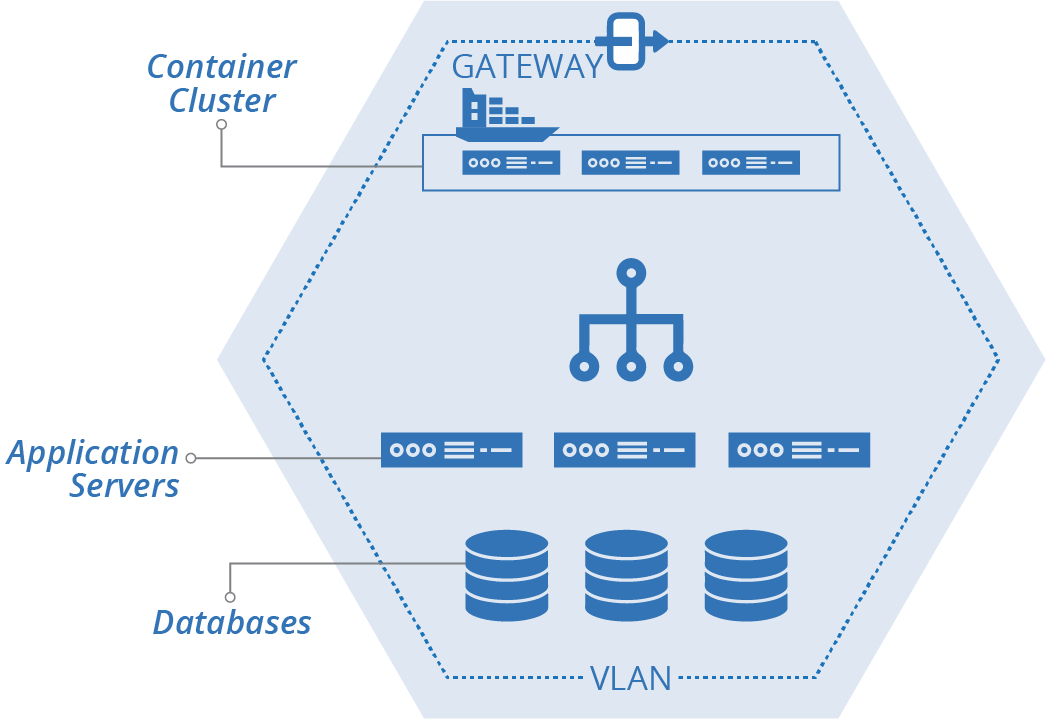
Figure 21-1. Example starting implementation, single stack, single VLAN
The team plans to split its stack out into multiple stacks. These include the shared-networking-stack and application-infrastructure-stack seen in examples from previous chapters of this book. The plan also includes a web-cluster-stack to manage the container cluster for the frontend web servers, and an application-database-stack to manage a database instance for each application (Figure 21-2).
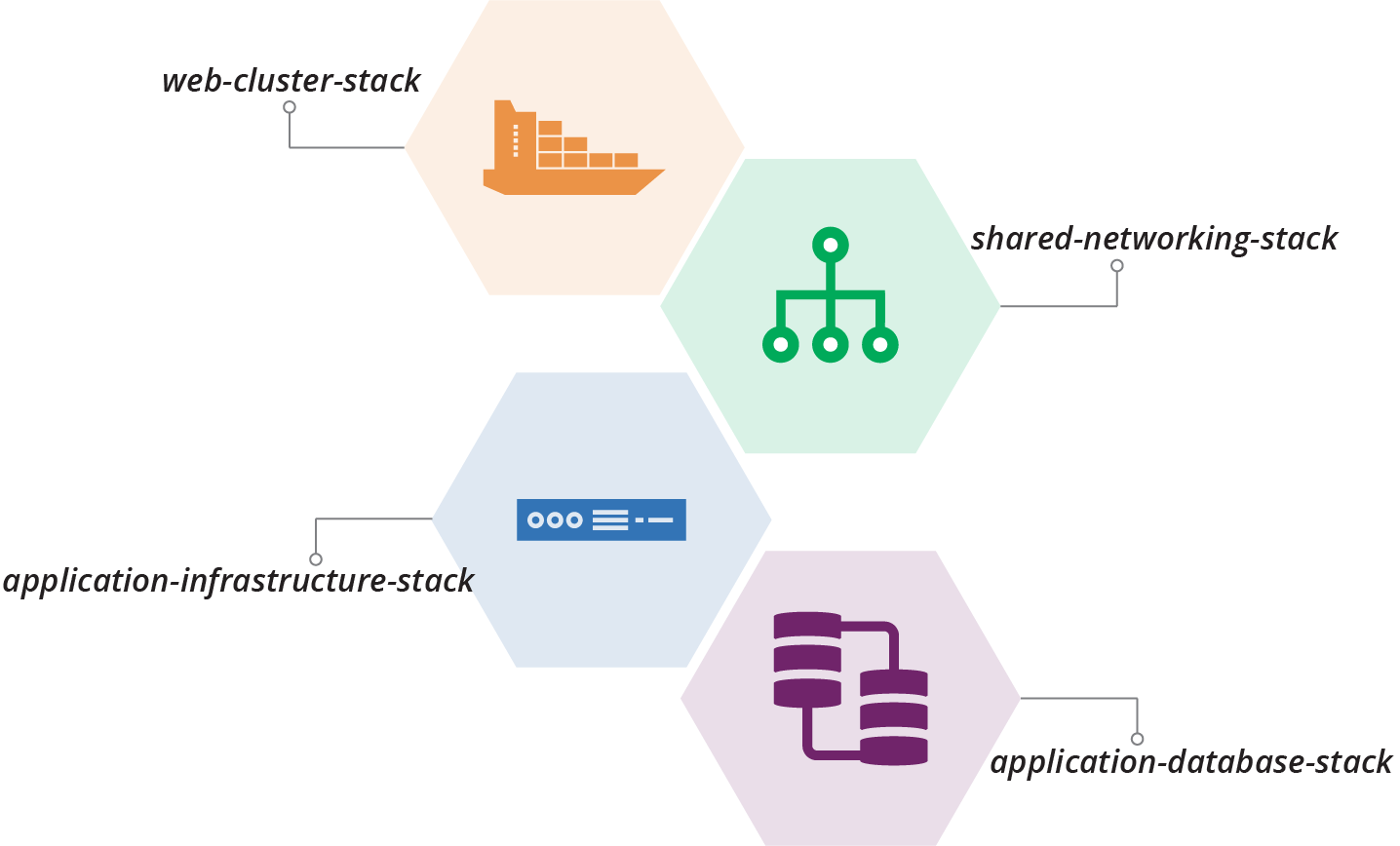
Figure 21-2. Plan to split out multiple stacks
The team will also split its single VLAN into multiple VLANs. The application servers will be spread out across these VLANs for redundancy (see Figure 21-3).
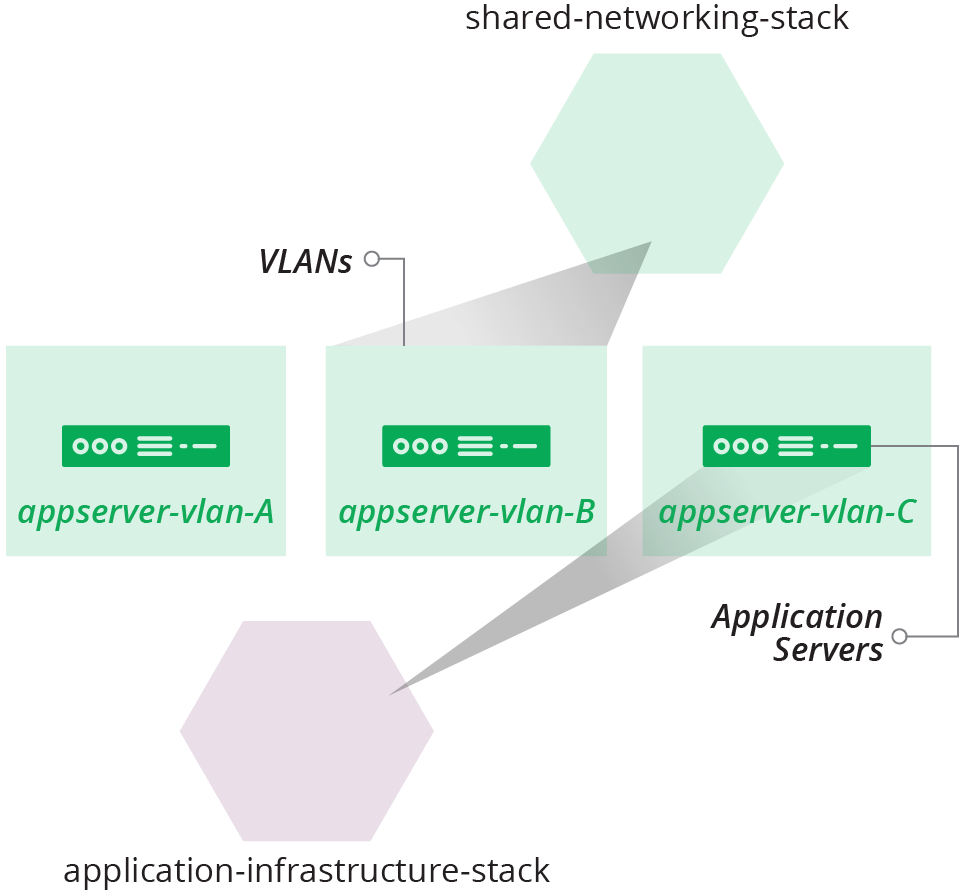
Figure 21-3. Plan to create multiple VLANs
Chapter 17 described the design choices and some implementation patterns for dividing these example stacks. Now we can explore ways to move from one implementation to another in a production system.
Small Changes
The biggest messes I’ve made in code were when I built up too much work locally before pushing. It’s tempting to focus on completing the full piece of work that you have in mind. It’s harder to make a small change that only takes you a little further toward that full thing. Implementing large changes as a series of small changes requires a new mindset and new habits.
Fortunately, the software development world has shown the path. I’ve included many of the techniques that support building systems a piece at a time throughout this book, including TDD, CI, and CD. Progressively testing and delivering code changes using a pipeline, as described in Chapter 8 and referenced throughout the book, is an enabler. You should be able to make a small change to your code, push it, get feedback on whether it works, and put it into production.
Teams that use these techniques effectively push changes very frequently. A single engineer may push changes every hour or so, and each change is integrated into the main codebase and tested for production readiness in a fully integrated system.
People knock around various terms and techniques for making a significant change as a series of small changes:
- Incremental
-
An incremental change is one that adds one piece of the planned implementation. You could build the example ShopSpinner system incrementally by implementing one stack at a time. First, create the shared networking stack. Then, add the web cluster stack. Finally, build the application infrastructure stack.
- Iterative
-
An iterative change makes a progressive improvement to the system. Start building the ShopSpinner system by creating a basic version of all three stacks. Then make a series of changes, each one expanding what the stacks can do.
- Walking skeleton
-
A walking skeleton is a basic implementation of the main parts of a new system that you implement to help validate its general design and structure.2 People often create a walking skeleton for an infrastructure project along with similar initial implementations of applications that will run on it, so teams can see how delivery, deployment, and operations might work. The initial implementation and selection of tools and services for the skeleton are often not the ones that are planned for the long term. For example, you might plan to use a full-featured monitoring solution, but build your walking skeleton using more basic services provided out of the box by your cloud provider.
- Refactoring
-
Refactoring involves changing the design of a system, or a component of the system, without changing its behavior. Refactoring is often done to pave the way for changes that do change behavior.3 A refactoring might improve the clarity of the code so that it’s easier to change, or it might reorganize the code so that it aligns with planned changes.
Example of Refactoring
The ShopSpinner team decides to decompose its current stack into multiple stacks and stack instances. Its planned implementation includes one stack instance for the container cluster that hosts its web servers and another for shared networking structures. The team will also have a pair of stacks for each service, one for the application server and its associated networking, and one for the database instance for that service (see Figure 21-4).
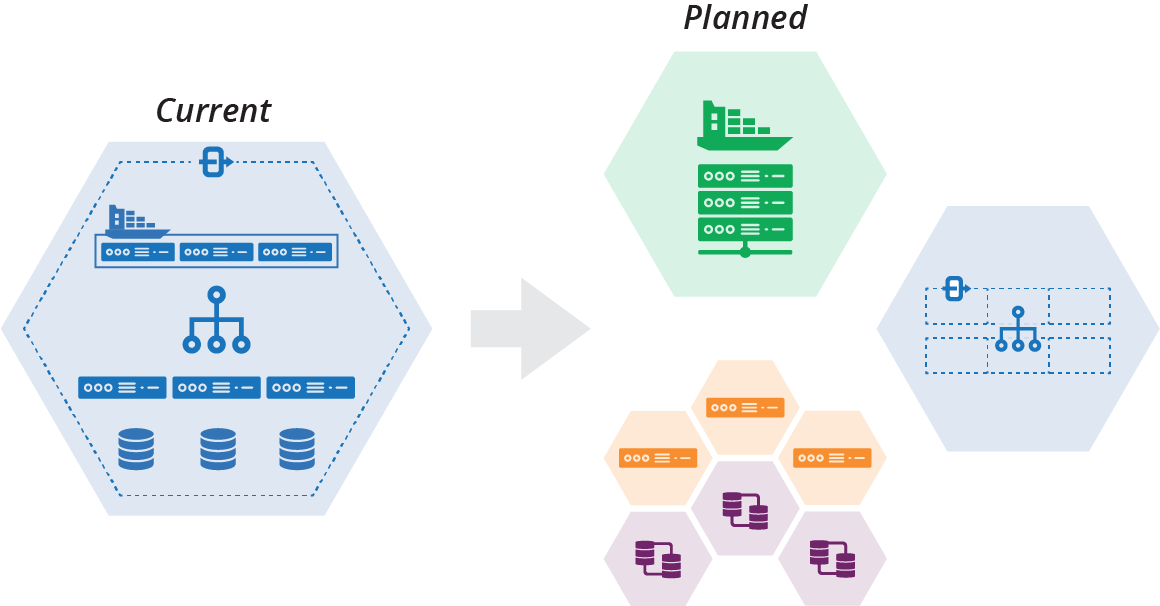
Figure 21-4. Plan to decompose a stack
The team members also want to replace their container cluster product, moving from a Kubernetes cluster that they deploy themselves onto virtual machines to use Containers as a Service provided by their cloud vendor (see “Application Cluster Solutions”).
The team decides to incrementally implement its decomposed architecture. The first step is to extract the container cluster into its own stack, and then replace the container product within the stack (Figure 21-5).
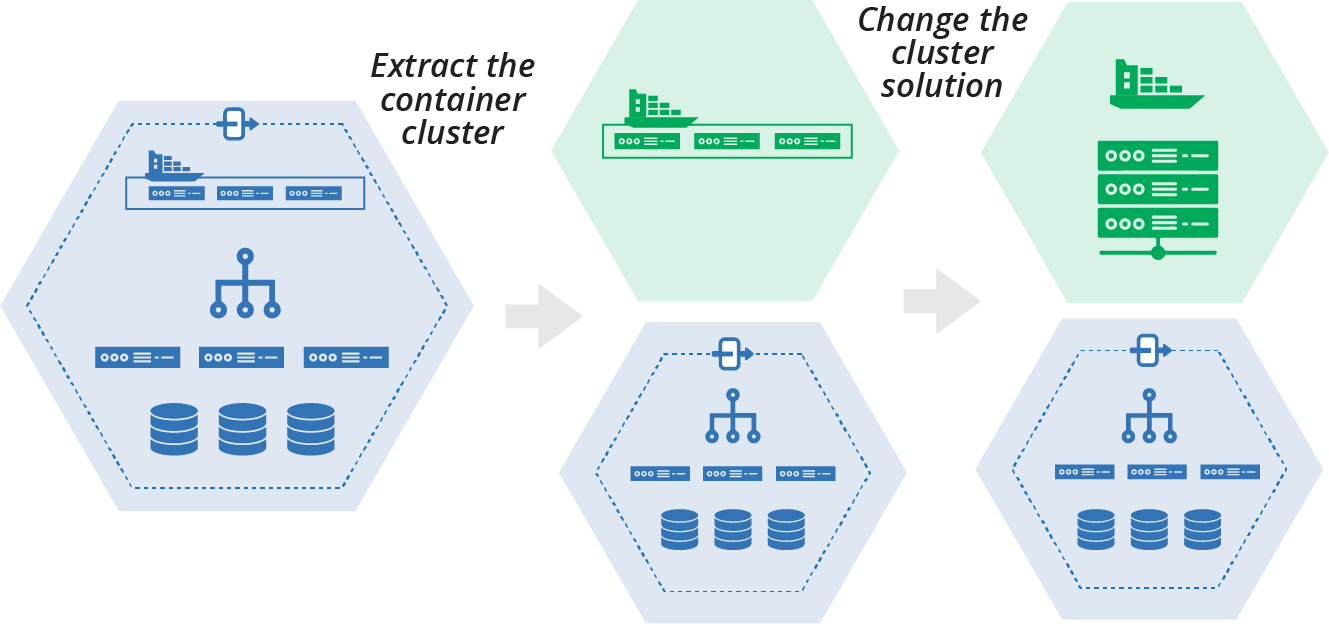
Figure 21-5. Plan to extract and replace the container cluster
This plan is an example of using refactoring to enable a change. Changing the container cluster solution will be easier when it is isolated into its own stack than when it’s a part of a larger stack with other infrastructure. When the team members extract the cluster into its own stack, they can define its integration points for the rest of the system. They can write tests and other validations that keep the separation and integration clean. Doing this gives the team confidence that they can safely change the contents of the cluster stack.
Building New
Rather than incrementally changing your existing production system, you could build the new version of your system separately and swap users over when you’re finished. Building the new version may be easier if you’re drastically changing your system design and implementation. Even so, it’s useful to get your work into production as quickly as possible. Extracting and rebuilding one part of your system at a time is less risky than rebuilding everything at once. It also tests and delivers the value of improvements more quickly. So even a substantial rebuild can be done incrementally.
Pushing Incomplete Changes to Production
How can you deliver a significant change to your production system as a series of small, incremental changes while keeping the service working? Some of those small changes may not be useful on their own. It may not be practical to remove existing functionality until the entire set of changes is complete.
“Example of Refactoring” showed two incremental steps, extracting a container cluster from one stack into its own stack, and then replacing the cluster solution within the new stack. Each of these steps is large, so would probably be implemented as a series of smaller code pushes.
However, many of the smaller changes would make the cluster unusable on its own. So you need to find ways to make those smaller changes while keeping the existing code and functionality in place. There are different techniques you can use, depending on the situation.
Parallel Instances
The second step of the cluster replacement example starts with the original container solution in its own stack, and ends with the new container solution (see Figure 21-6).
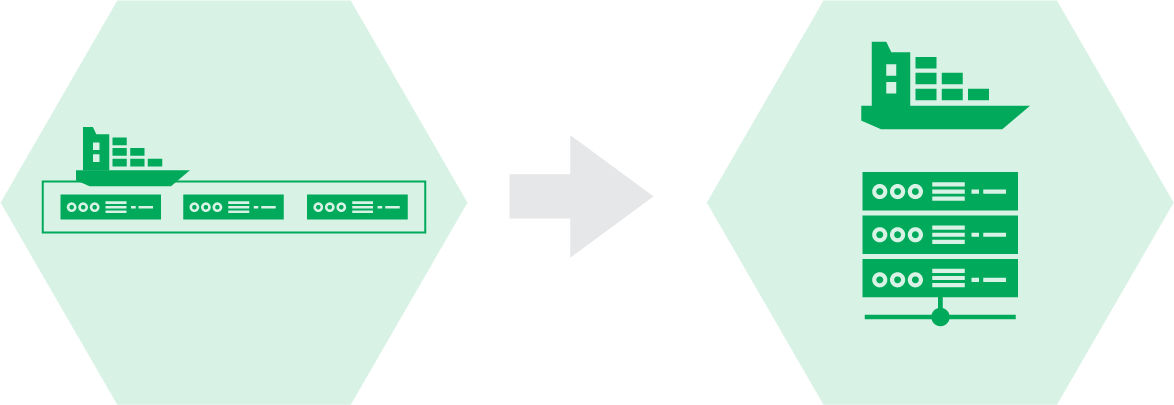
Figure 21-6. Replacing the cluster solution
The existing solution is a packaged Kubernetes distribution called KubeCan.4 The team is switching to FKS, a managed cluster service provided by its cloud platform.5 See “Application Cluster Solutions” for more on clusters as a service and packaged cluster distributions.
It isn’t practical to turn the KubeCan cluster into an FKS cluster in small steps. But the team can run the two clusters in parallel. There are a few different ways to run the two different container stacks in parallel with a single instance of the original stack.
One option is to have a parameter for the main stack to choose which cluster stack to integrate with (see Figure 21-7).
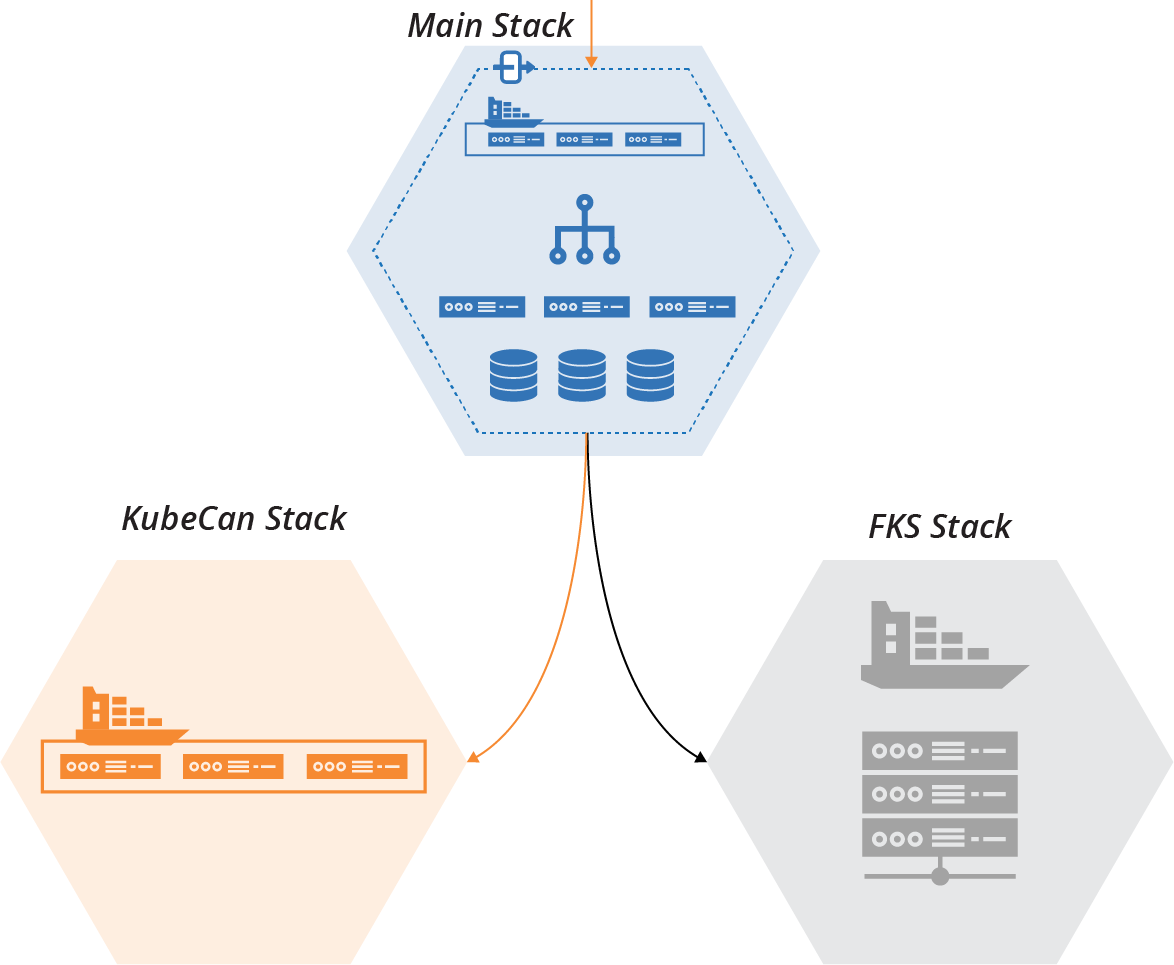
Figure 21-7. One stack is enabled, and one is disabled
With this option, one of the stacks is enabled and will handle live workloads. The second stack is disabled but still present. The team can test the second stack in a fully operational environment, exercise and develop its delivery pipeline and test suite, and integrate it with other parts of the infrastructure in each environment.
Why Extract the Old Container Solution at All?
Considering that we’ve ended up creating a standalone stack with the new container solution, we arguably could have skipped the step of extracting the old solution into its own stack. We could have just created the new stack with the new solution from scratch.
By extracting the old solution, it’s easier to make sure our new solution matches the old solution’s behavior. The extracted stack clearly defines how the cluster integrates with other infrastructure. By using the extracted stack in production, we guarantee the integration points are correct.
Adding automated tests and a new pipeline for the extracted stack ensures that we find out immediately when one of our changes breaks something.
If we leave the old cluster solution in the original stack and build the new one separately, swapping it out will be disruptive. We won’t know until the end if we’ve made an incompatible design or implementation decision. It would take time to integrate the new stack with other parts of the infrastructure, and to test, debug, and fix problems.
Another option is to integrate both stacks with the main stack (see Figure 21-8).
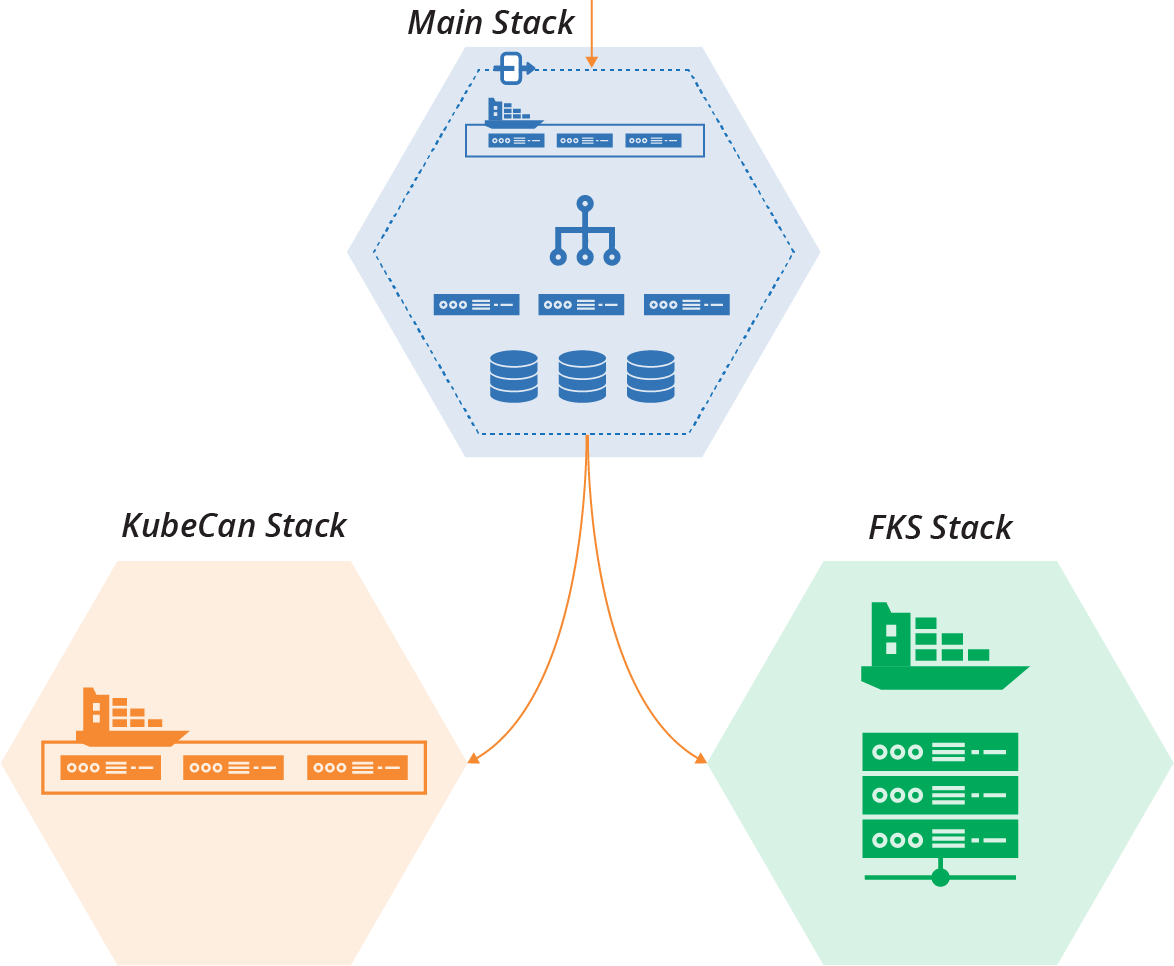
Figure 21-8. Each cluster implementation runs in its own stack instance
With this arrangement, you can direct part of your workload to each of the cluster stacks. You can divide the workload in different ways:
- Workload percentage
-
Direct part of the workload to each stack. Usually, the old stack handles most of the load at first, with the new stack taking a small percentage to evaluate how well it works. As the new stack beds in, you can dial the load up over time. After the new stack successfully manages 100% of the load and everyone is ready, you can decommission the old stack. This option assumes the new stack has all of the capabilities of the old stack, and that there aren’t any issues with data or messaging being split across the stacks.
- Service migration
-
Migrate services one by one to the new cluster. Workloads in the main stack, such as network connections or messages, are directed to whichever stack instance the relevant service is running on. This option is especially useful when you need to modify service applications to move them to the new stack. It often requires more complex integration, perhaps even between the old and new cluster stacks. This complexity may be justified for migrating a complex service portfolio.6
- User partitioning
-
In some cases, different sets of users are directed to different stack implementations. Testers and internal users are often the first group. They can conduct exploratory tests and exercise the new system before risking “real” customers. In some cases, you might follow this by giving access to customers who opt-in to alpha testing or preview services. These cases make more sense when the service running on the new stack has changes that users will notice.
Running new and old parts of the system conditionally, or in parallel, is a type of branch by abstraction. Progressively shifting portions of a workload onto new parts of a system is a canary release. Dark launching describes putting a new system capability into production, but not exposing it to production workloads, so your team can test it.
Backward Compatible Transformations
While some changes might require building and running a new component in parallel with the old one until it’s complete, you can make many changes within a component without affecting users or consumers.
Even when you add or change what you provide to consumer components, you can often add new integration points while maintaining existing integration points unchanged. Consumers can switch to using the new integration points on their own schedule.
For example, the ShopSpinner team plans to change its shared-networking-stack to move from a single VLAN to three VLANs (Figure 21-9).
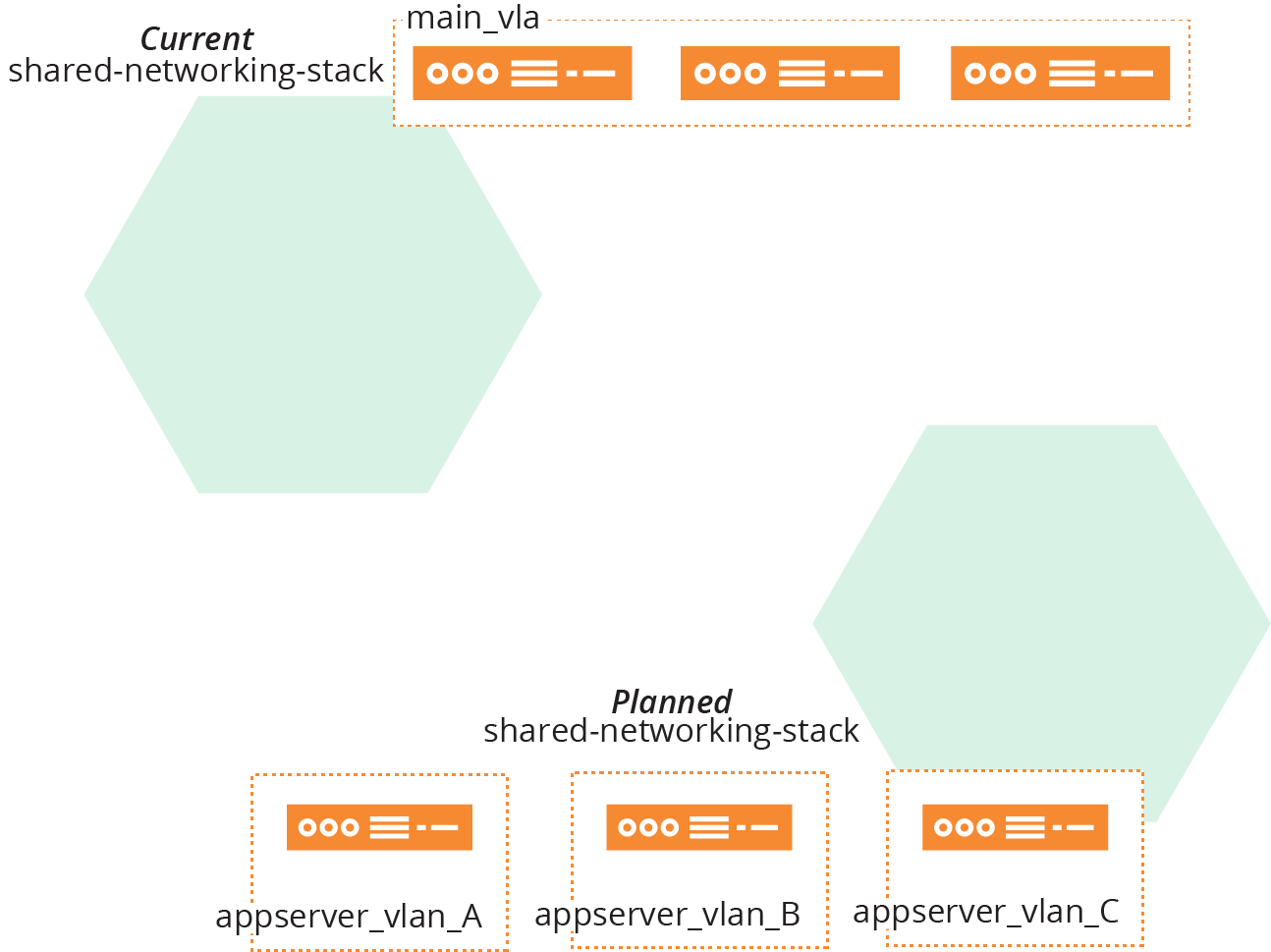
Figure 21-9. Change from single VLAN to three VLANs
Consumer stacks, including application-infrastructure-stack, integrate with the single VLAN managed by the networking stack using one of the discovery methods described in “Discovering Dependencies Across Stacks”. The shared-networking-stack code exports the VLAN identifier for its consumer stacks to
discover:
vlans:-main_vlanaddress_range:10.2.0.0/8export:-main_vlan:main_vlan.id
The new version of shared-networking-stack creates three VLANs and exports their identifiers under new names. It also exports one of the VLAN identifiers using the old identifier:
vlans:-appserver_vlan_Aaddress_range:10.1.0.0/16-appserver_vlan_Baddress_range:10.2.0.0/16-appserver_vlan_Caddress_range:10.3.0.0/16export:-appserver_vlan_A:appserver_vlan_A.id-appserver_vlan_B:appserver_vlan_B.id-appserver_vlan_C:appserver_vlan_C.id# Deprecated-main_vlan:appserver_vlan_A.id
By keeping the old identifier, the modified networking stack still works for consumer infrastructure code. The consumer code should be modified to use the new identifiers, and once all of the dependencies on the old identifier are gone, it can be removed from the networking stack code.
Feature Toggles
When making a change to a component, you often need to keep using the existing implementation until you finish the change. Some people branch the code in source control, working on the new change in one branch and using the old branch in production. The issues with this approach include:
-
It takes extra work to ensure changes to other areas of the component, like bugfixes, are merged to both branches.
-
It takes effort and resources to ensure both branches are continuously tested and deployed. Alternatively, the work in one branch goes with less rigorous testing, increasing the chances of errors and rework later on.
-
Once the change is ready, changing production instances over is more of a “big bang” operation, with a higher risk of failure.
It’s more effective to work on changes to the main codebase without branching. You can use feature toggles to switch the code implementation for different environments. Switch to the new code in some environments to test your work, and switch to the existing code for production-line environments. Use a stack configuration parameter (as described in Chapter 7) to specify which part of the code to apply to a given instance.
Once the ShopSpinner team finishes adding VLANs to its shared-networking-stack, as described previously, the team needs to change the application-infrastructure-stack to use the new VLANs. The team members discover that this isn’t as simple a change as they first thought.
The application stack defines application-specific network routes, load balancer VIPs, and firewall rules. These are more complex when application servers are hosted across VLANs rather than in a single VLAN.
It will take the team members a few days to implement the code and tests for this change. This isn’t long enough that they feel the need to set up a separate stack, as described in “Parallel Instances”. But they are keen to push incremental changes to the repository as they work, so they can get continuous feedback from tests, including system integration tests.
The team decides to add a configuration parameter to the application-infrastructure-stack that selects different parts of the stack code depending on whether it should use a single VLAN or multiple VLANs.
This snippet of the source code for the stack uses three variables—appserver_A_vlan, appserver_B_vlan, and appserver_C_vlan—to specify which VLAN to assign to each application server. The value for each of these is set differently depending on the value of the feature toggle parameter, toggle_use_multiple_vlans:
input_parameters:name:toggle_use_multiple_vlansdefault:falsevariables:-name:appserver_A_vlanvalue:$IF(${toggle_use_multiple_vlans} appserver_vlan_A ELSE main_vlan)-name:appserver_B_vlanvalue:$IF(${toggle_use_multiple_vlans} appserver_vlan_B ELSE main_vlan)-name:appserver_C_vlanvalue:$IF(${toggle_use_multiple_vlans} appserver_vlan_C ELSE main_vlan)virtual_machine:name:appserver-${SERVICE}-Amemory:4GBaddress_block:${appserver_A_vlan}virtual_machine:name:appserver-${SERVICE}-Bmemory:4GBaddress_block:${appserver_B_vlan}virtual_machine:name:appserver-${SERVICE}-Cmemory:4GBaddress_block:${appserver_C_vlan}
If the toggle_use_multiple_vlans toggle is set to false, the appserver_X_vlan parameters are all set to use the old VLAN identifier, main_vlan. If the toggle is true, then each of the variables is set to one of the new VLAN identifiers.
The same toggle parameter is used in other parts of the stack code, where the team works on configuring the routing and other tricky elements.
Advice on Feature Toggles
See “Feature Toggles (aka Feature Flags)” by Pete Hodgson for advice on using feature toggles, and examples from software code. I have a few recommendations to add.
Firstly, minimize the number of feature toggles you use. Feature toggles and conditionals clutter code, making it hard to understand, maintain, and debug. Keep them short-lived. Remove dependencies on the old implementation as soon as possible, and remove the toggles and conditional code. Any feature toggle that remains past a few weeks is probably a configuration parameter.
Name feature toggles according to what they do. Avoid ambiguous names like new_networking_code. The earlier example toggle,
toggle_use_multiple_vlans, tells the reader that it is a feature toggle, to distinguish it from a configuration parameter. It tells the reader that it enables multiple VLANs, so they know what it does.
And the name makes it clear which way the toggle works. Reading a name like toggle_multiple_vlans, or worse, toggle_vlans, leaves you uncertain whether it enables or disables the multiple VLAN code. This leads to errors, where someone uses the conditional the wrong way around in their code.
Changing Live Infrastructure
These techniques and examples explain how to change infrastructure code. Changing running instances of infrastructure can be trickier, especially when changing resources that are being consumed by other infrastructure.
For example, when the ShopSpinner team applies the change to the shared-networking-stack code that replaces the single VLAN with three VLANs, as explained in “Backward Compatible Transformations”, what happens to resources from other stacks that are assigned to the first VLAN (see Figure 21-10)?
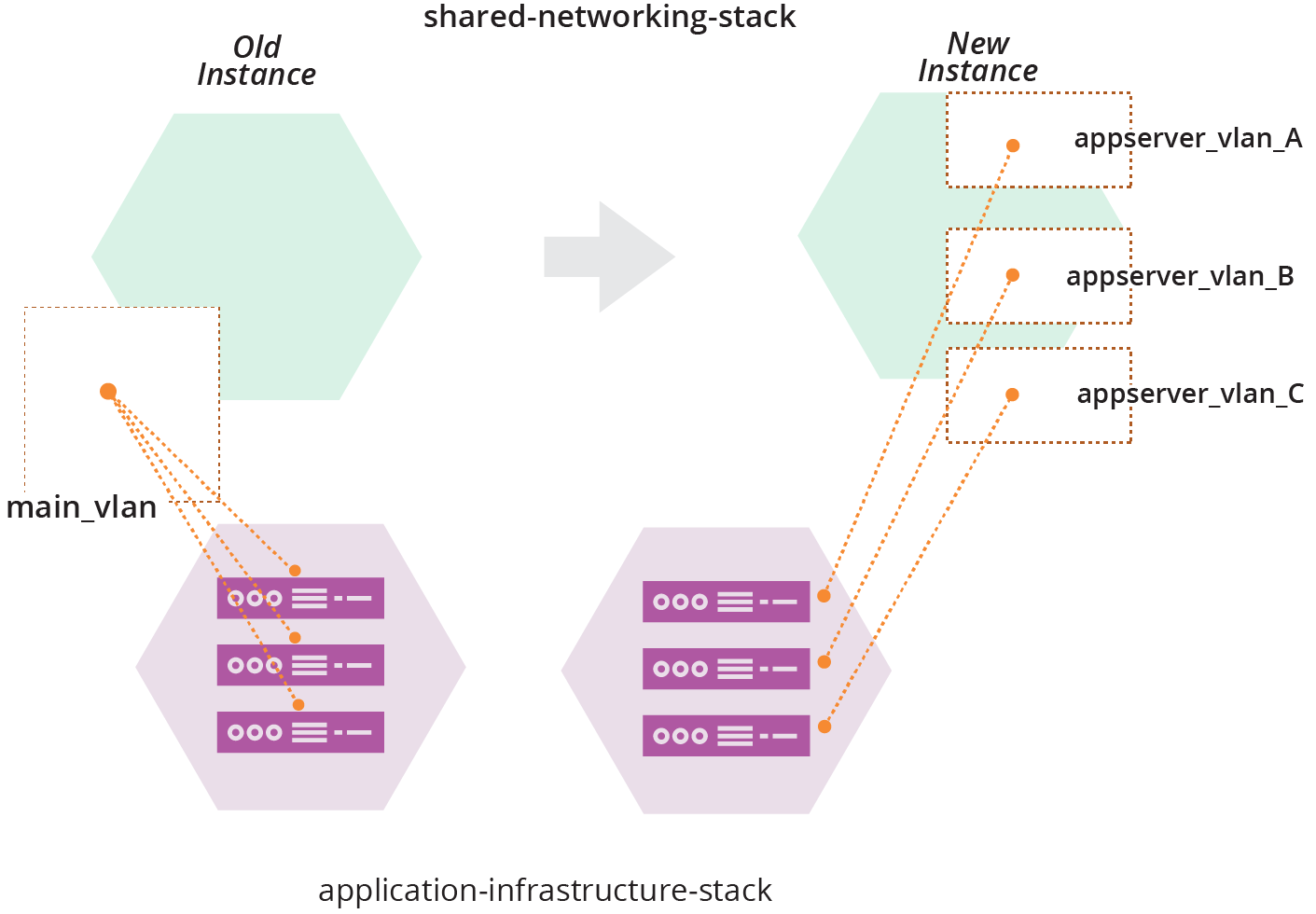
Figure 21-10. Changing networking structures that are in use
Applying the networking code destroys main_vlan, which contains three server instances. In a live environment, destroying those servers, or detaching them from the network, will disrupt whatever services they provide.
Most infrastructure platforms will refuse to destroy a networking structure with server instances attached, so the operation would fail. If the code change you apply removes or changes other resources, the operation might implement those changes to the instance, leaving the environment in a halfway state between the old and new versions of your stack code. This will almost always be a bad thing.
There are a few ways to handle this kind of live infrastructure change. One would be to keep the old VLAN, main_vlan, and add the two new VLANs, appserver_vlan_B, and appserver_vlan_C.
Doing this leaves you with three VLANs, as intended, but one of them is named differently from the others. Keeping the existing VLAN probably prevents you from changing other aspects of it, such as its IP address range. Again, you might decide to compromise by keeping the original VLAN smaller than the new ones.
These kinds of compromises are a bad habit, leading to inconsistent systems and code that is confusing to maintain and debug.
You can use other techniques to change live systems and leave them in a clean, consistent state. One is to edit infrastructure resources using infrastructure surgery. The other is to expand and contract infrastructure resources.
Infrastructure Surgery
Some stack management tools, like Terraform, give you access to the data structures that map infrastructure resources to code. These are the same data structures used in the stack data lookup pattern for dependency discovery (see “Pattern: Stack Data Lookup”).
Some (but not all) stack tools have options to edit their data structures. You can leverage this capability to make changes to live infrastructure.
The ShopSpinner team can use its fictional stack tool to edit its stack data structures. Members of the team will use this to change their production environment to use the three new VLANs. They first create a second instance of their shared-networking-stack with the new version of their code (see Figure 21-11).
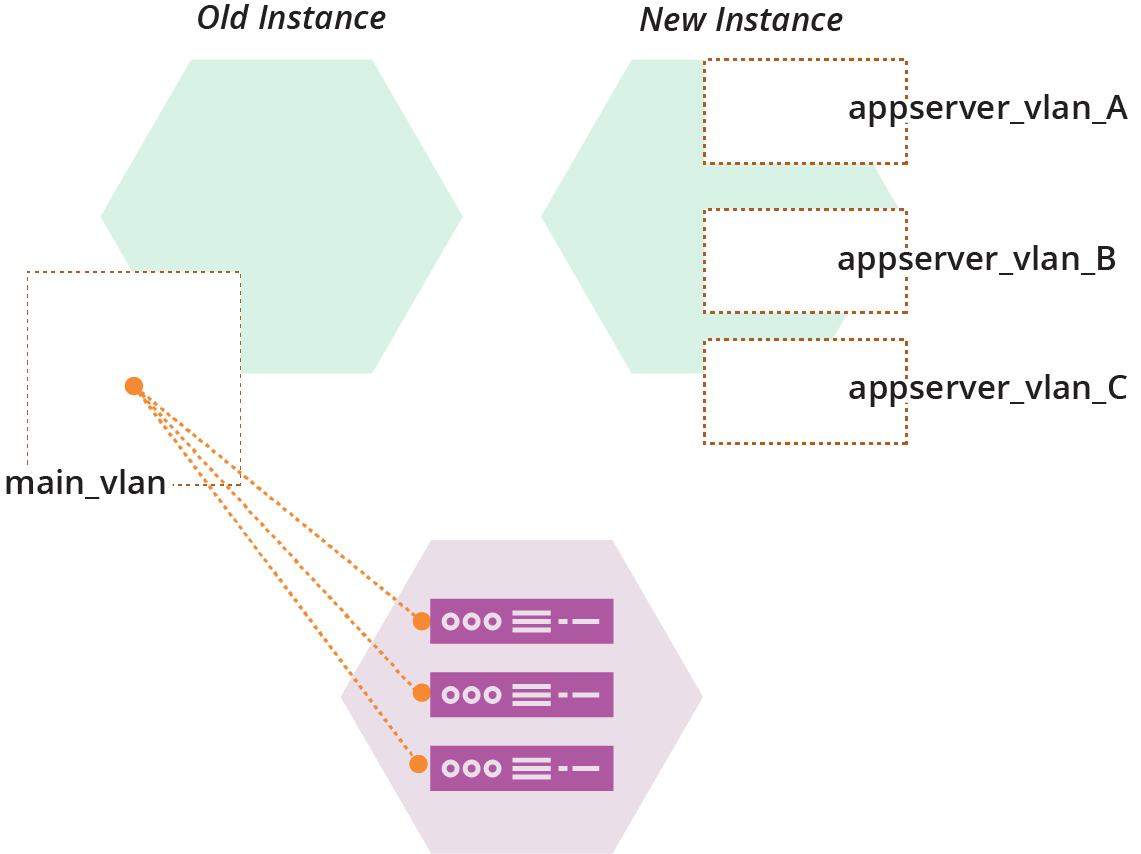
Figure 21-11. Parallel instances of the production networking stack
Each of these three stacks’ instances—the application-infrastructure-stack instance, and the old and new instances of the shared-networking-stack—has a data structure that indicates which resources in the infrastructure platform belong to that stack (see Figure 21-12).
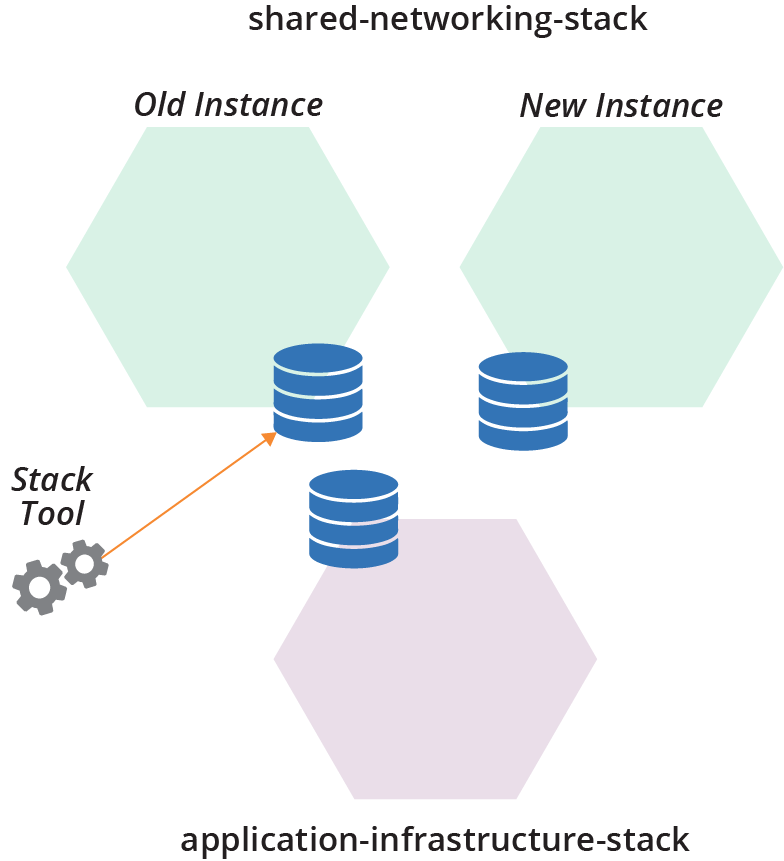
Figure 21-12. Each stack instance has its own stack data structure
The ShopSpinner team will move main_vlan from the old stack instance’s data structures into the data structure for the new stack instance. The team will then use it to replace appserver_vlan_A.
The VLAN in the infrastructure platform won’t change in any way, and the server instances will be completely untouched. These changes are entirely a bookkeeping exercise in the stack tool’s data structures.
The team runs the stack tool command to move main_vlan from the old stack into the new stack instance:
$stack datafile move-resource\source-instance=shared-networking-stack-production-old \source-resource=main_vlan \destination-instance=shared-networking-stack-production-newSuccess: Resource moved
The next step is to remove appserver_vlan_A. How to do this varies depending on the actual stack management tool. The fictional stack command happens to make this operation incredibly simple. Running the following command destroys the VLAN in the infrastructure platform and removes it from the data structure file:
$stack datafile destroy-resource\instance=shared-networking-stack-production-new \resource=appserver_vlan_ASuccess: Resource destroyed and removed from the datafile
Note that the team members have not removed appserver_vlan_A from the stack source code, so if they apply the code to the instance now, it will re-create it. But they won’t do that. Instead, they’ll run a command to rename the main_vlan resource that they moved from the old stack instance:
$stack datafile rename-resource\instance=shared-networking-stack-production-new \from=main_vlan \to=appserver_vlan_ASuccess: Resource renamed in the datafile
When the team applies the shared-networking-stack code to the new instance, it shouldn’t change anything. As far as it’s concerned, everything in the code exists in the instance.
Note that the ability to edit and move resources between stacks depends entirely on the stack management tool. Most of the tools provided by cloud vendors, at least as of this writing, don’t expose the ability to edit stack data structures.7
It’s easy to make a mistake when editing stack data structures by hand, so the risk of causing an outage is high. You could write a script to implement the commands and test it in upstream environments. But these edits are not idempotent. They assume a particular starting state and running the script can be unpredictable if something differs.
Viewing stack data structures can be useful for debugging, but you should avoid editing them. Arguably, it could be necessary to edit structures to resolve an outage. But the pressure of these situations often makes mistakes even likelier. You should not edit stack data routinely. Any time you resort to editing the structures, your team should follow up with a blameless postmortem to understand how to avoid repeating it.
A safer way to make changes to live infrastructure is to expand and contract.
Expand and Contract
Infrastructure teams use the expand and contract pattern (also called Parallel Change) for changing interfaces without breaking consumers. The idea is that changing a provider’s interface involves two steps: change the provider, then change the consumers. The expand and contract pattern decouples these steps.
The essence of the pattern is to first add the new resource while keeping the existing one, then change the consumers over to the new resource, and finally, remove the old unused resource. Each of these changes is delivered using a pipeline (see “Infrastructure Delivery Pipelines”), so it’s thoroughly tested.
Making a change by expanding and contracting is similar to a backward compatible transformation (see “Backward Compatible Transformations”). That technique replaced the old resource and re-pointed the old interface to one of the new resources. However, applying the new code to a running instance would attempt to destroy the old resource, which could either disrupt any consumers attached to it or fail to complete. So a few extra steps are required.
The first step for the ShopSpinner team to use expand and contract for its VLAN change is to add the new VLANs to the shared-networking-stack, while leaving the old main_vlan in place:
vlans:-main_vlanaddress_range:10.2.0.0/8-appserver_vlan_Aaddress_range:10.1.0.0/16-appserver_vlan_Baddress_range:10.2.0.0/16-appserver_vlan_Caddress_range:10.3.0.0/16export:-main_vlan:main_vlan.id-appserver_vlan_A:appserver_vlan_A.id-appserver_vlan_B:appserver_vlan_B.id-appserver_vlan_C:appserver_vlan_C.id
Unlike the parallel instances technique (“Parallel Instances”) and infrastructure surgery (“Infrastructure Surgery”), the ShopSpinner team doesn’t add a second instance of the stack, but only changes the existing instance.
After applying this code, the existing consumer instances are unaffected—they are still attached to the main_vlan. The team can add new resources to the new VLANs, and can make changes to the consumers to switch them over as well.
How to switch consumer resources to use new ones depends on the specific infrastructure and the platform. In some cases, you can update the definition for the resource to attach it to the new provider interface. In others, you may need to destroy and rebuild the resource.
The ShopSpinner team can’t reassign existing virtual server instances to the new VLANs. However, the team can use the expand and contract pattern to replace the servers. The application-infrastructure-stack code defines each server with a static IP address that routes traffic to the server:
virtual_machine:name:appserver-${SERVICE}-Amemory:4GBvlan:external_stack.shared_network_stack.main_vlanstatic_ip:name:address-${SERVICE}-Aattach:virtual_machine.appserver-${SERVICE}-A
The team’s first step is to add a new server instance attached to the new VLAN:
virtual_machine:name:appserver-${SERVICE}-A2memory:4GBvlan:external_stack.shared_network_stack.appserver_vlan_Avirtual_machine:name:appserver-${SERVICE}-Amemory:4GBvlan:external_stack.shared_network_stack.main_vlanstatic_ip:name:address-${SERVICE}-Aattach:virtual_machine.appserver-${SERVICE}-A
The first virtual_machine statement in this code creates a new server instance named appserver-${SERVICE}-A2. The team’s pipeline delivers this change to each environment. The new server instance isn’t used at this point, although the team can add some automated tests to prove that it’s running OK.
The team’s next step is to switch user traffic to the new server instance. The team makes another change to the code, modifying the static_ip statement:
virtual_machine:name:appserver-${SERVICE}-A2memory:4GBvlan:external_stack.shared_network_stack.appserver_vlan_Avirtual_machine:name:appserver-${SERVICE}-Amemory:4GBvlan:external_stack.shared_network_stack.main_vlanstatic_ip:name:address-${SERVICE}-Aattach:virtual_machine.appserver-${SERVICE}-A2
Pushing this change through the pipeline makes the new server active, and stops traffic to the old server. The team can make sure everything is working, and easily roll the change back to restore the old server if something goes wrong.
Once the team has the new server working OK, it can remove the old server from the stack code:
virtual_machine:name:appserver-${SERVICE}-A2memory:4GBvlan:external_stack.shared_network_stack.appserver_vlan_Astatic_ip:name:address-${SERVICE}-Aattach:virtual_machine.appserver-${SERVICE}-A2
Once this change has been pushed through the pipeline and applied to all environments, application-infrastructure-stack no longer has a dependency on main_vlan in shared-networking-stack. After all consumer infrastructure has changed over, the ShopSpinner team can remove main_vlan from the provider stack code:
vlans:-appserver_vlan_Aaddress_range:10.1.0.0/16-appserver_vlan_Baddress_range:10.2.0.0/16-appserver_vlan_Caddress_range:10.3.0.0/16export:-appserver_vlan_A:appserver_vlan_A.id-appserver_vlan_B:appserver_vlan_B.id-appserver_vlan_C:appserver_vlan_C.id
The VLAN change is complete, and the last remnants of main_vlan have been swept away.8
Zero Downtime Changes
Many of the techniques described in this chapter explain how to implement a change incrementally. Ideally, you’d like to apply the change to existing infrastructure without disrupting the services it provides. Some changes will inevitably involve destroying resources, or at least changing them in a way that might interrupt service. There are a few common techniques for handling these situations.
Blue-green changes
A blue-green change involves creating a new instance, switching usage to the new instance, and then removing the old instance. This is conceptually similar to expand and contract (“Expand and Contract”), which adds and removes resources within an instance of a component such as a stack. It’s a key technique for implementing immutable infrastructure (see “Immutable Infrastructure”).
Blue-green changes require a mechanism to handle the switchover of a workload from one instance to another, such as a load balancer for network traffic. Sophisticated implementations allow the workload to “drain,” allocating new work to the new instance, and waiting for all work on the old instance to complete before destroying it. Some automated server clustering and application clustering solutions provide this as a feature, for example, enabling “rolling upgrades” to instances in a cluster.
Blue-green is implemented with static infrastructure by maintaining two environments. One environment is live at any point in time, the other being ready to take the next version. The names blue and green emphasize that these are equal environments that take turns at being live, rather than a primary and secondary environment.
I worked with one organization that implemented blue-green data centers. A release involved switching workloads for its entire system from one data center to the other. This scale became unwieldy, so we helped the organization to implement deployment at a smaller scale, so it would do a blue-green deployment only for the specific service that was being upgraded.
Continuity
Chapter 1 discussed the contrast between traditional, “Iron Age” approaches to managing infrastructure and modern, “Cloud Age” approaches (see “From the Iron Age to the Cloud Age”). When we worked more with physical devices and managed them manually, the cost of making changes was high.
The cost of making a mistake was also high. When I provisioned a new server without enough memory, it took me a week or more to order more RAM, take it to the data center, power the server down and pull it from the rack, open it up and add the extra RAM, then rerack and boot the server again.
The cost of making a change with Cloud Age practices is much lower, as are the cost and time needed to correct a mistake. If I provision a server without enough memory, it only takes a few minutes to correct it by editing a file and applying it to my virtual server.
Iron Age approaches to continuity emphasize prevention. They optimize for MTBF, Mean Time Between Failure, by sacrificing speed and frequency of change. Cloud Age approaches optimize for MTTR, Mean Time to Recover. Although even some enthusiasts for modern methods fall into the trap of thinking that focusing on MTTR means sacrificing MTBF, this is untrue, as explained in “Objection: “We must choose between speed and quality””. Teams who focus on the four key metrics (speed and frequency of changes, MTTR, and change failure rate, as described in “The Four Key Metrics”) achieve strong MTBF as a side effect. The point is not to “move fast and break things,” but rather, to “move fast and fix things.”
There are several elements to achieving continuity with modern infrastructure. Prevention, the focus of Cloud Age change management practices, is essential, but cloud infrastructure and automation enable the use of more effective Agile engineering practices for reducing errors. Additionally, we can exploit new technologies and practices to recover and rebuild systems to achieve higher levels of continuity than imaginable before. And by continuously exercising the mechanisms that deliver changes and recover systems, we can ensure reliability and readiness for a wide variety of disasters.
Continuity by Preventing Errors
As mentioned, Iron Age approaches to governing changes were mainly preventative. Because the cost of fixing a mistake was high, organizations invested heavily in preventing mistakes. Because changes were mainly manual, prevention involved restricting who could make changes. People needed to plan and design changes in detail, and other people exhaustively reviewed and discussed each change. The idea was that having more people take more time to consider a change ahead of time would catch mistakes.
One problem with this approach is the gap between design documents and implementation. Something that looks simple in a diagram can be complicated in reality. People make mistakes, especially when carrying out substantial, infrequent upgrades. The result is that traditional low-frequency, highly planned large batch change operations have a high failure rate, and often lengthy recovery times.
The practices and patterns described throughout this book aim to prevent errors without sacrificing the frequency and speed of change. Changes defined as code represent their implementation better than any diagram or design document possibly can. Continuously integrating, applying, and testing changes as you work proves their readiness for production. Using a pipeline to test and deliver changes ensures steps aren’t skipped, and enforces consistency across environments. This reduces the likelihood of failures in production.
The core insight of Agile software development and Infrastructure as Code is to flip the attitude toward change. Rather than fearing change and doing it as little as possible, you can prevent errors by making changes frequently. The only way to get better at making changes is to make changes frequently, continuously improving your systems and processes.
Another key insight is that as systems become more complex, our ability to replicate and accurately test how code will behave in production shrinks. We need to stay aware of what we can and cannot test before production, and how to mitigate risks by improving our visibility of production systems (see “Testing in Production”).
Continuity by Fast Recovery
The practices described so far in this chapter can reduce downtime. Limiting the size of changes, making them incrementally, and testing changes before production can lower your change failure rate. But it’s unwise to assume that errors can be prevented entirely, so we also need to be able to recover quickly and easily.
The practices advocated throughout this book make it easy to rebuild any part of your system. Your system is composed of loosely coupled components, each defined as idempotent code. You can easily repair, or else destroy and rebuild, any component instance by reapplying its code. You’ll need to ensure the continuity of data hosted on a component if you rebuild it, which is discussed in “Data Continuity in a Changing System”.
In some cases, your platform or services can automatically rebuild failed infrastructure. Your infrastructure platform or application runtime destroys and rebuilds individual components when they fail a health check. Continuously applying code to instances (“Apply Code Continuously”) automatically reverts any deviation from the code. You can manually trigger a pipeline stage (“Infrastructure Delivery Pipelines”) to reapply code to a broken component.
In other failure scenarios, these systems might not automatically fix a problem. A compute instance might malfunction in such a way that it still passes its health check. An infrastructure element might stop working correctly while still matching the code definition, so reapplying the code doesn’t help.
These scenarios need some kind of additional action to replace failed components. You might flag a component so that the automated system considers it to be failed, and destroys and replaces it. Or, if recovery uses a system that reapplies code, you might need to destroy the component yourself and allow the system to build a new instance.
For any failure scenario that needs someone to take an action, you should make sure to have tools, scripts, or other mechanisms that are simple to execute. People shouldn’t need to follow a sequence of steps; for example, backing up data before destroying an instance. Instead, they should invoke an action that carries out all of the required steps. The goal is that, in an emergency, you don’t need to think about how to correctly recover your system.
Continuous Disaster Recovery
Iron Age infrastructure management approaches view disaster recovery as an unusual event. Recovering from the failure of static hardware often requires shifting workloads to a separate set of hardware kept on standby.
Many organizations test their recovery operation infrequently—every few months at best, in some cases once a year. I’ve seen plenty of organizations that rarely test their failover process. The assumption is that the team will work out how to get its backup system running if it ever needs to, even if it takes a few days.
Continuous disaster recovery leverages the same processes and tools used to provision and change infrastructure. As described earlier, you can apply your infrastructure code to rebuild failed infrastructure, perhaps with some added automation to avoid data loss.
One of the principles of Cloud Age infrastructure is to assume systems are unreliable (“Principle: Assume Systems Are Unreliable”). You can’t install software onto a virtual machine and expect it will run there as long as you like. Your cloud vendor might move, destroy, or replace the machine or its host system for maintenance, security patches, or upgrades. So you need to be ready to replace the server if needed.9
Treating disaster recovery as an extension of normal operations makes it far more reliable than treating it as an exception. Your team exercises your recovery process and tools many times a day as it works on infrastructure code changes and system updates. If someone makes a change to a script or other code that breaks provisioning or causes data loss on an update, it usually fails in a pipeline test stage, so you can quickly fix it.
Chaos Engineering
Netflix was a pioneer of continuous disaster recovery and Cloud Age infrastructure management.10 Its Chaos Monkey and Simian Army took the concept of continuous disaster recovery a step further, proving the effectiveness of its system’s continuity mechanisms by injection error into production systems. This evolved into the field of Chaos Engineering, “The discipline of experimenting on a system to build confidence in the system’s capability.”11
To be clear, chaos engineering is not about irresponsibly causing production service outages. Practitioners experiment with specific failure scenarios that their system is expected to handle. These are essential production tests that prove that detection and recovery mechanisms work correctly. The intention is to gain fast feedback when some change to the system has a side effect that interferes with these mechanisms.
Planning for Failure
Failures are inevitable. While you can and should take steps to make them less likely, you also need to put measures in place to make them less harmful and easier to handle.
A team holds a failure scenario mapping workshop to brainstorm types of failures that may occur, and then plan mitigations.12 You can create a map of likelihood and impact of each scenario, build a list of actions to address the scenarios, and then prioritize these into your team’s backlog of work appropriately.
For any given failure scenario, there are several conditions to explore:
- Causes and prevention
-
What situations could lead to this failure, and what can you do to make them less likely? For example, a server might run out of disk space when usage spikes. You could address this by analyzing disk usage patterns and expanding the disk size, so there is enough for the higher usage levels. You might also implement automated mechanisms to continuously analyze usage levels and make predictions, so disk space can be added preemptively if patterns change. A further step would be to automatically adjust disk capacity as usage increases.
- Failure mode
-
What happens when the failure occurs? What can you do to reduce the consequence without human intervention? For example, if a given server runs out of disk space, the application running on it might accept transactions but fail to record them. This could be very harmful, so you might modify the application to stop accepting transactions if it can’t record them to disk. In many cases, teams don’t actually know what will happen when a given error occurs. Ideally, your failure mode keeps the system fully operational. For example, when an application stops responding, your load balancer may stop directing traffic to it.
- Detection
-
How will you detect when the failure occurs? What can you do to detect it faster, maybe even beforehand? You might detect that the disk has run out of space when the application crashes and a customer calls your CEO to complain. Better to receive a notification when the application crashes. Better still to be notified when disk space runs low, before it actually fills up.
- Correction
-
What steps do you need to take to recover from the failure? In some scenarios, as described earlier, your systems may automatically correct the situation, perhaps by destroying and rebuilding an unresponsive application instance. Others require several steps to repair and restart a service.
If your system automatically handles a failure scenario, such as restarting an unresponsive compute instance, you should consider the deeper failure scenario. Why did the instance become unresponsive in the first place? How will you detect and correct an underlying issue? It shouldn’t take you several days to realize that application instances are being recycled every few minutes.
Failure planning is a continuous process. Whenever you have an incident with your system, including in a development or test environment, your team should consider whether there is a new failure scenario to define and plan for.
You should implement checks to prove your failure scenarios. For example, if you believe that when your server runs out of disk space the application will stop accepting transactions, automatically add new server instances, and alert your team, you should have an automated test that exercises this scenario. You could test this in a pipeline stage (availability testing as described in “What Should We Test with Infrastructure?”) or using a chaos experiment.
Incrementally Improving Continuity
It’s easy to define ambitious recovery measures, where your system gracefully handles every conceivable failure without interrupting service. I’ve never known a team that had the time and resources to build even half of what it would like.
When mapping failure scenarios and mitigations, you can define an incremental set of measures you could implement. Break them into separate implementation stories and prioritize them on your backlog, based on the likelihood of the scenario, potential damage, and cost to implement. For example, although it would be nice to automatically expand the disk space for your application when it runs low, getting an alert before it runs out is a valuable first step.
Data Continuity in a Changing System
Many Cloud Age practices and techniques for deploying software and managing infrastructure cheerfully recommend the casual destruction and expansion of resources, with only a hand wave to the problem of data. You can be forgiven for thinking that DevOps hipsters consider the whole idea of data to be a throwback to the Iron Age—a proper twelve-factor application is stateless, after all. Most systems out in the real world involve data, and people can be touchingly attached to it.
Data can present a challenge when incrementally changing a system, as described in “Pushing Incomplete Changes to Production”. Running parallel instances of storage infrastructure may create inconsistencies or even corrupt your data. Many approaches to incrementally deploying changes rely on being able to roll them back, which might not be possible with data schema changes.
Dynamically adding, removing, and rebuilding infrastructure resources that host data is particularly challenging. However, there are ways to manage it, depending on the situation. Some approaches include lock, segregate, replicate, and reload.
Lock
Some infrastructure platforms and stack management tools allow you to lock specific resources so they won’t be deleted by commands that would otherwise destroy them. If you specify this setting for a storage element, then the tool will refuse to apply changes to this element, allowing team members to make the change manually.
There are a few issues with this, however. In some cases, if you apply a change to a protected resource, the tool may leave the stack in a partially modified state, which can cause downtime for services.
But the fundamental problem is that protecting some resources from automated changes encourages manual involvement in changes. Manual work invites manual mistakes. It’s much better to find a way to automate a process that changes your infrastructure safely.
Segregate
You can segregate data by splitting the resources that host them from other parts of the system; for example, by making a separate stack (an example of this is given in “Pattern: Micro Stack”). You can destroy and rebuild a compute instance with impunity by detaching and reattaching its disk volume.
Keeping data in a database gives even more flexibility, potentially allowing you to add multiple compute instances. You still need a data continuity strategy for the stack that hosts the data, but it narrows the problem’s scope. You may be able to offload data continuity completely using a hosted DBaaS service.
Replicate
Depending on the data and how it’s managed, you may be able to replicate it across multiple instances of infrastructure. A classic example is a distributed database cluster that replicates data across nodes.
With the right replication strategy, data is reloaded to a newly rebuilt node from other nodes in the cluster. This strategy fails if too many nodes are lost, which can happen with a major hosting outage. So this approach works as the first line of defense, with another mechanism needed for harder failure scenarios.
Reload
The best-known data continuity solution is backing up and restoring data from more reliable storage infrastructure. When you rebuild the infrastructure that hosts data, you first back the data up. You reload the data to the new instance after creating it. You may also take periodic backups, which you can reload in recovery scenarios, although you will lose any data changes that occurred between the backup and the recovery. This can be minimized and possibly eliminated by streaming data changes to the backup, such as writing a database transaction log.
Cloud platforms provide different storage services, as described in “Storage Resources”, with different levels of reliability. For example, object storage services like AWS S3 usually have stronger guarantees for the durability of data than block storage services like AWS EBS. So you could implement backups by copying or streaming data to an object storage volume.
You should automate the process for not only backing up data but also for recovering it. Your infrastructure platform may provide ways to easily do this. For example, you can automatically take a snapshot of a disk storage volume before applying a change to it.
You may be able to use disk volume snapshots to optimize the process of adding nodes to a system like a database cluster. Rather than creating a new database node with an empty storage volume, attaching it to a clone of another node’s disk might make it faster to synchronize and bring the node online.
“Untested backups are the same as no backups” is a common adage in our industry. You’re already using automated testing for various aspects of your system, given that you’re following Infrastructure as Code practices. So you can do the same thing with your backups. Exercise your backup restore process in your pipeline or as a chaos experiment, whether in production or not.
Mixing Data Continuity Approaches
The best solution is often a combination of segregate, replicate, and reload. Segregating data creates room to manage other parts of the system more flexibly. Replication keeps data available most of the time. And reloading data is a backstop for more extreme situations.
Conclusion
Continuity is often given short shrift by advocates of modern Cloud Age infrastructure management practices. The most familiar approaches to keeping systems running reliably are based on the Iron Age premise that making changes is expensive and risky. These approaches tend to undermine the benefits of cloud, Agile, and other approaches that focus on a fast pace of change.
I hope this chapter has explained how to leverage Cloud Age thinking to make systems more reliable, not despite a fast pace of change, but because of it. You can leverage the dynamic nature of modern infrastructure platforms, and implement the rigorous focus on testing and consistency that comes from Agile engineering practices. The result is a high level of confidence that you can continuously deliver improvements to your system and exploit failures as an opportunity to learn and improve.
1 Donald G. Reinertsen describes the concept of reducing batch size in his book, The Principles of Product Development Flow (Celeritas Publishing).
2 Growing Object-Oriented Software, Guided by Tests by Steve Freeman and Nat Pryce (Addison-Wesley) devotes a chapter to walking skeletons.
3 Kent Beck describes workflows for making “large changes in small, safe steps” in his article “SB Changes”. This involves making a series of changes, some that tidy the code to prepare for a behavioral change, others that make behavioral changes. The key point is that each change does one or the other, never both.
4 KubeCan is yet another of the fictitious products the fictitious ShopSpinner team prefers.
5 FKS stands for Fictional Kubernetes Service.
6 This type of complex migration scenario with applications integrated across two hosting clusters is common when migrating a large estate of server-based applications hosted in a data center to a cloud-based hosting platform.
7 See the terraform mv command and pulumi state command for two examples of tools that do support editing stack data structures.
8 Don’t worry, fear will keep the local systems in line.
9 Compute instances have become more reliable since the early days of cloud computing. Originally, you couldn’t shut an AWS EC2 instance down and boot it later—when the instance stopped, it was gone forever. The ephemeral nature of compute forced cloud users to adopt new practices to run reliable services on unreliable infrastructure. This was the origin of Infrastructure as Code, chaos engineering, and other Cloud Age infrastructure practices.
10 See “5 Lessons We’ve Learned Using AWS”, written in 2010, for insight into early lessons of building highly reliable services on public cloud at scale.
11 This definition is from the principles of chaos engineering web site.
12 See also “Failure mode and effects analysis”.