Chapter 3. Infrastructure Platforms
There is a vast landscape of tools relating in some way to modern cloud infrastructure. The question of which technologies to select and how to fit them together can be overwhelming. This chapter presents a model for thinking about the higher-level concerns of your platform, the capabilities it provides, and the infrastructure resources you may assemble to provide those capabilities.
This is not an authoritative model or architecture. You will find your own way to describe the parts of your system. Agreeing on the right place in the diagram for each tool or technology you use is less important than having the conversation.
The purpose of this model is to create a context for discussing the concepts, practices, and approaches in this book. A particular concern is to make sure these discussions are relevant to you regardless of which technology stack, tools, or platforms you use. So the model defines groupings and terminology that later chapters use to describe how, for instance, to provision servers on a virtualization platform like VMware, or an IaaS cloud like AWS.
The Parts of an Infrastructure System
There are many different parts, and many different types of parts, in a modern cloud infrastructure. I find it helpful to group these parts into three platform layers (Figure 3-1):
- Applications
-
Applications and services provide capabilities to your organization and its users. Everything else in this model exists to enable this layer.
- Application runtimes
-
Application runtimes provide services and capabilities to the application layer. Examples of services and constructs in an application runtime platform include container clusters, serverless environments, application servers, operating systems, and databases. This layer can also be called Platform as a Service (PaaS).
- Infrastructure platform
-
The infrastructure platform is the set of infrastructure resources and the tools and services that manage them. Cloud and virtualization platforms provide infrastructure resources, including compute, storage, and networking primitives. This is also known as Infrastructure as a Service (IaaS). I’ll elaborate on the resources provided in this layer in “Infrastructure Resources”.
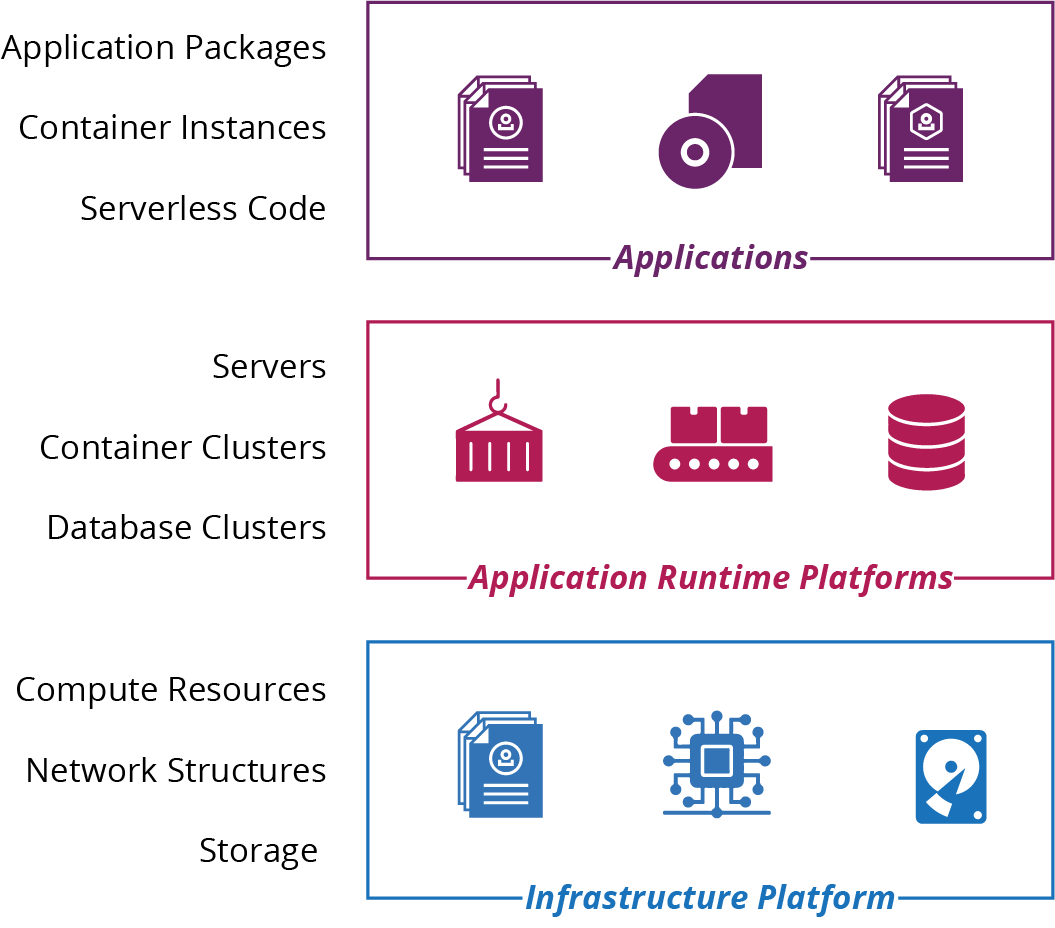
Figure 3-1. Layers of system elements
The premise of this book is using the infrastructure platform layer to assemble infrastructure resources to create the application runtime layer.
Chapter 5 and the other chapters in Part II describe how to use code to build infrastructure stacks. An infrastructure stack is a collection of resources that is defined and managed together using a tool like Ansible, CloudFormation, Pulumi, or Terraform.
Chapter 10 and the other chapters in Part III describe how to use code to define and manage application runtimes. These include servers, clusters, and serverless execution environments.
Infrastructure Platforms
Infrastructure as Code requires a dynamic infrastructure platform, something that you can use to provision and change resources on demand with an API. Figure 3-2 highlights the infrastructure platform layer in the platform model. This is the essential definition of a cloud.1 When I talk about an “infrastructure platform” in this book, you can assume I mean a dynamic, IaaS type of platform.2
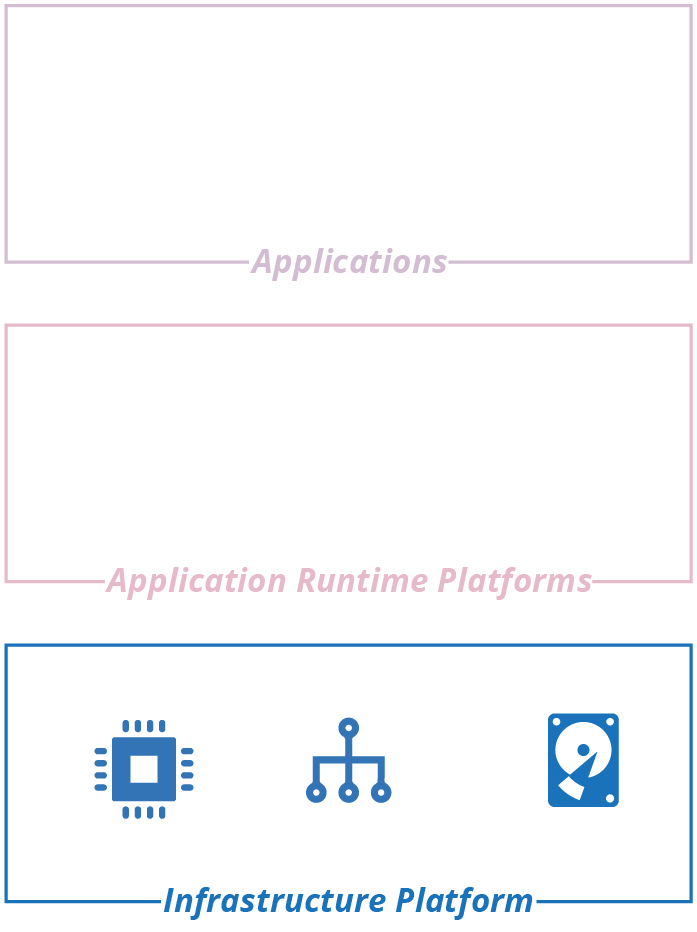
Figure 3-2. The infrastructure platform is the foundation layer of the platform model
In the old days—the Iron Age of computing—infrastructure was hardware. Virtualization decoupled systems from the hardware they ran on, and cloud added APIs to manage those virtualized resources.3 Thus began the Cloud Age.
There are different types of infrastructure platforms, from full-blown public clouds to private clouds; from commercial vendors to open source platforms. In this chapter, I outline these variations and then describe the different types of infrastructure resources they provide. Table 3-1 lists examples of vendors, products, and tools for each type of cloud infrastructure platform.
| Type of platform | Providers or products |
|---|---|
Public IaaS cloud services |
AWS, Azure, Digital Ocean, GCE, Linode, Oracle Cloud, OVH, Scaleway, and Vultr |
Private IaaS cloud products |
CloudStack, OpenStack, and VMware vCloud |
Bare-metal cloud tools |
Cobbler, FAI, and Foreman |
At the basic level, infrastructure platforms provide compute, storage, and networking resources. The platforms provide these resources in various formats. For instance, you may run compute as virtual servers, container runtimes, and serverless code execution.
PaaS
Most public cloud vendors provide resources, or bundles of resources, which combine to provide higher-level services for deploying and managing applications. Examples of hosted PaaS services include Heroku, AWS Elastic BeanStalk, and Azure Devops.4
Different vendors may package and offer the same resources in different ways, or at least with different names. For example, AWS object storage, Azure blob storage, and GCP cloud storage are all pretty much the same thing. This book tends to use generic names that apply to different platforms. Rather than VPC and Subnet, I use network address block and VLAN.
Infrastructure Resources
There are three essential resources provided by an infrastructure platform: compute, storage, and networking. Different platforms combine and package these resources in different ways. For example, you may be able to provision virtual machines and container instances on your platform. You may also be able to provision a database instance, which combines compute, storage, and networking.
I call the more elemental infrastructure resources primitives. Each of the compute, networking, and storage resources described in the sections later in this chapter is a primitive. Cloud platforms combine infrastructure primitives into composite resources, such as:
-
Database as a Service (DBaaS)
-
Load balancing
-
DNS
-
Identity management
-
Secrets management
The line between a primitive and a composite resource is arbitrary, as is the line between a composite infrastructure resource and an application runtime service. Even a basic storage service like object storage (think AWS S3 buckets) involves compute and networking resources to read and write data. But it’s a useful distinction, which I’ll use now to list common forms of infrastructure primitives. These fall under three basic resource types: compute, storage, and networking.
Compute Resources
Compute resources execute code. At its most elemental, compute is execution time on a physical server CPU core. But platforms provide compute in more useful ways. Common compute resource resources include:
- Virtual machines (VMs)
-
The infrastructure platform manages a pool of physical host servers, and runs virtual machine instances on hypervisors across these hosts. Chapter 11 goes into much more detail about how to provision, configure, and manage servers.
- Physical servers
-
Also called bare metal, the platform dynamically provisions physical servers on demand. “Using a Networked Provisioning Tool to Build a Server” describes a mechanism for automatically provisioning physical servers as a bare-metal cloud.
- Server clusters
-
A server cluster is a pool of server instances—either virtual machines or physical servers—that the infrastructure platform provisions and manages as a group. Examples include AWS Auto Scaling Group (ASG), Azure virtual machine scale set, and Google Managed Instance Groups (MIGs).
- Containers
-
Most cloud platforms offer Containers as a Service (CaaS) to deploy and run container instances. Often, you build a container image in a standard format (e.g., Docker), and the platform uses this to run instances. Many application runtime platforms are built around containerization. Chapter 10 discusses this in more detail. Containers require host servers to run on. Some platforms provide these hosts transparently, but many require you to define a cluster and its hosts yourself.
- Application hosting clusters
-
An application hosting cluster is a pool of servers onto which the platform deploys and manages multiple applications.5 Examples include Amazon Elastic Container Services (ECS), Amazon Elastic Container Service for Kubernetes (EKS), Azure Kubernetes Service (AKS), and Google Kubernetes Engine (GKE). You can also deploy and manage an application hosting package on an infrastructure platform. See “Application Cluster Solutions” for more details.
- FaaS serverless code runtimes
-
An infrastructure platform executes serverless Function as a Service (FaaS) code on demand, in response to an event or schedule, and then terminates it after it has completed its action. See “Infrastructure for FaaS Serverless” for more. Infrastructure platform serverless offerings include AWS Lambda, Azure Functions, and Google Cloud Functions.
Serverless Beyond Code
The serverless concept goes beyond running code. Amazon DynamoDB and Azure Cosmos DB are serverless databases: the servers involved in hosting the database are transparent to you, unlike more traditional DBaaS offerings like AWS RDS.
Some cloud platforms offer specialized on-demand application execution environments. For example, you can use AWS SageMaker, Azure ML Services, or Google ML Engine to deploy and run machine learning models.
Storage Resources
Many dynamic systems need storage, such as disk volumes, databases, or central repositories for files. Even if your application doesn’t use storage directly, many of the services it does use will need it, if only for storing compute images (e.g., virtual machine snapshots and container images).
A genuinely dynamic platform manages and provides storage to applications transparently. This feature differs from classic virtualization systems, where you need to explicitly specify which physical storage to allocate and attach to each instance of compute.
Typical storage resources found on infrastructure platforms are:
- Block storage (virtual disk volumes)
-
You can attach a block storage volume to a single server or container instance as if it was a local disk. Examples of block storage services provided by cloud platforms include AWS EBS, Azure Page Blobs, OpenStack Cinder, and GCE Persistent Disk.
- Object storage
-
You can use object storage to store and access files from multiple locations. Amazon’s S3, Azure Block Blobs, Google Cloud Storage, and OpenStack Swift are all examples. Object storage is usually cheaper and more reliable than block storage, but with higher latency.
- Networked filesystems (shared network volumes)
-
Many cloud platforms provide shared storage volumes that can be mounted on multiple compute instances using standard protocols, such as NFS, AFS, and SMB/CIFS.6
- Structured data storage
-
Most infrastructure platforms provide a managed Database as a Service (DBaaS) that you can define and manage as code. These may be a standard commercial or open source database application, such as MySQL, Postgres, or SQL Server. Or it could be a custom structured data storage service; for example, a key-value store or formatted document stores for JSON or XML content. The major cloud vendors also offer data storage and processing services for managing, transforming, and analyzing large amounts of data. These include services for batch data processing, map-reduce, streaming, indexing and searching, and more.
- Secrets management
-
Any storage resource can be encrypted so you can store passwords, keys, and other information that attackers might exploit to gain privileged access to systems and resources. A secrets management service adds functionality specifically designed to help manage these kinds of resources. See “Handling Secrets as Parameters” for techniques for managing secrets and infrastructure code.
Network Resources
As with the other types of infrastructure resources, the capability of dynamic platforms to provision and change networking on demand, from code, creates great opportunities. These opportunities go beyond changing networking more quickly; they also include much safer use of networking.
Part of the safety comes from the ability to quickly and accurately test a networking configuration change before applying it to a critical environment. Beyond this, Software Defined Networking (SDN) makes it possible to create finer-grained network security constructs than you can do manually. This is especially true with systems where you create and destroy elements dynamically.
Typical of networking constructs and services an infrastructure platform provides include:
- Network address blocks
-
Network address blocks are a fundamental structure for grouping resources to control routing of traffic between them. The top-level block in AWS is a VPC (Virtual Private Cloud). In Azure, GCP, and others, it’s a Virtual Network. The top-level block is often divided into smaller blocks, such as subnets or VLANs. A certain networking structure, such as AWS subnets, may be associated with physical locations, such as a data center, which you can use to manage availability.
- Names, such as DNS entries
-
Names are mapped to lower-level network addresses, usually IP addresses.
- Routes
-
Configure what traffic is allowed between and within address blocks.
- Gateways
-
May be needed to direct traffic in and out of blocks.
- Load balancing rules
-
Forward connections coming into a single address to a pool of resources.
- Proxies
-
Accept connections and use rules to transform or route them.
- API gateways
-
A proxy, usually for HTTP/S connections, which can carry out activities to handle noncore aspects of APIs, such as authentication and rate throttling. See also “Service Mesh”.
- VPNs (virtual private networks)
-
Connect different address blocks across locations so that they appear to be part of a single network.
- Direct connection
-
A dedicated connection set up between a cloud network and another location, typically a data center or office network.
- Network access rules (firewall rules)
-
Rules that restrict or allow traffic between network locations.
- Asynchronous messaging
-
Queues for processes to send and receive messages.
- Cache
-
A cache distributes data across network locations to improve latency. A CDN (Content Distribute Network) is a service that can distribute static content (and in some cases executable code) to multiple locations geographically, usually for content delivered using HTTP/S.
- Service mesh
-
A decentralized network of services that dynamically manages connectivity between parts of a distributed system. It moves networking capabilities from the infrastructure layer to the application runtime layer of the model I described in “The Parts of an Infrastructure System”.
The details of networking are outside the scope of this book, so check the documentation for your platform provider, and perhaps a reference such as Craig Hunt’s TCP/IP Network Adminstration (O’Reilly).
1 The US National Institute of Standards and Technology (NIST) has an excellent definition of cloud computing.
2 Here’s how NIST defines IaaS: “The capability provided to the consumer is to provision processing, storage, networks, and other fundamental computing resources where the consumer is able to deploy and run arbitrary software, which can include operating systems and applications. The consumer does not manage or control the underlying cloud infrastructure but has control over operating systems, storage, and deployed applications; and possibly limited control of select networking components (e.g., host firewalls).”
3 Virtualization technology has been around since the 1960s, but emerged into the mainstream world of x86 servers in the 2000s.
4 I can’t mention Azure DevOps without pointing out the terribleness of that name for a service. DevOps is about culture first, not tools and technology first. Read Matt Skelton’s review of John Willis’s talk on DevOps culture.
5 An application hosting cluster should not be confused with a PaaS. This type of cluster manages the provision of compute resources for applications, which is one of the core functions of a PaaS. But a full PaaS provides a variety of services beyond compute.
6 Network File System, Andrew File System, and Server Message Block, respectively.
7 Google documents its approach to zero-trust (also known as perimeterless) with the BeyondCorp security model.