Chapter 10. Application Runtimes
I introduced application runtimes in “The Parts of an Infrastructure System”, as part of a model that organizes the parts of a system into three layers. In this model, you combine resources from the infrastructure layer to provide runtime platforms that people can deploy applications onto.
Application runtimes are composed of infrastructure stacks that you define and create using infrastructure management tools, as described in Chapter 5, and depicted in Figure 10-1.
The starting point for designing and implementing application runtime infrastructure is understanding the applications that will use it. What language and execution stacks do they run? Will they be packaged and deployed onto servers, in containers, or as FaaS serverless code? Are they single applications deployed to a single location, or multiple services distributed across a cluster? What are their connectivity and data requirements?
The answers to these questions lead to an understanding of the infrastructure resources that the application runtime layer needs to provision and manage to run the applications. The parts of the application runtime layer map to the parts of the infrastructure platform I describe in “Infrastructure Resources”. These will include an execution environment based around compute resources, data management built on storage resources, and connectivity composed of networking resources.
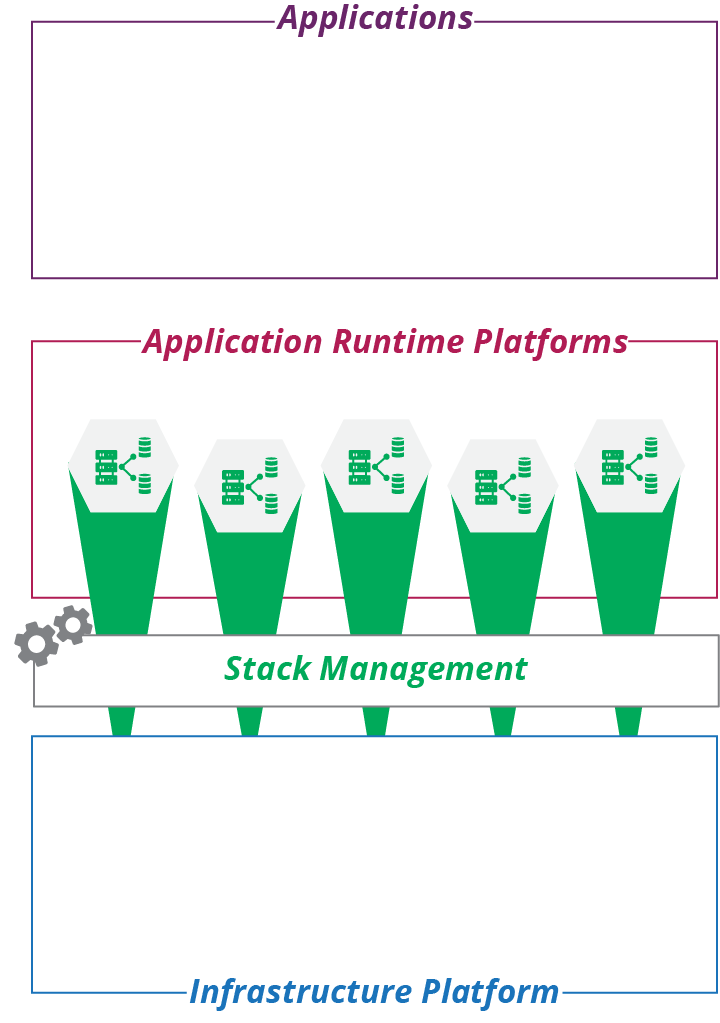
Figure 10-1. The application layer composed of infrastructure stacks
This chapter summarizes each of these relationships, focusing on ways to organize infrastructure resources into runtime platforms for applications. It sets the stage for later chapters, which go into more detail on how to define and manage those resources as code—servers as code (Chapter 11) and clusters as code (Chapter 14).
Cloud Native and Application-Driven Infrastructure
Cloud native software is designed and implemented to exploit the dynamic nature of modern infrastructure. Unlike older-generation software, instances of a cloud native application can be transparently added, removed, and shifted across underlying infrastructure. The underlying platform dynamically allocates compute and storage resources and routes traffic to and from the application. The application integrates seamlessly with services like monitoring, logging, authentication, and encryption.
The folks at Heroku articulated the twelve-factor methodology for building applications to run on cloud infrastructure. Cloud native, as a phrase, is often associated with the Kubernetes ecosystem.1
Many organizations have existing software portfolios that aren’t cloud native. While they may convert or rewrite some of their software to become cloud native, in many cases the cost of doing so isn’t justified by the benefits. An application-driven infrastructure strategy involves building application runtime environments for applications using modern, dynamic infrastructure.
Teams provide application runtimes for new applications that run as serverless code or in containers. They also provide infrastructure to support existing applications. All of the infrastructure is defined, provisioned, and managed as code. Application-driven infrastructure may be provided dynamically using an abstraction layer (see “Building an Abstraction Layer”).
Application Runtime Targets
Implementing an application-driven strategy starts with analyzing the runtime requirements of your application portfolio. You then design application runtime solutions to meet those requirements, implementing reusable stacks, stack components, and other elements teams can use to assemble environments for specific applications.
Deployable Parts of an Application
A deployable release for an application may involve different elements. Leaving aside documentation and other metadata, examples of what may be part of an application deployment include:
- Executables
-
The core of a release is the executable file or files, whether they are binaries or interpreted scripts. You can consider libraries and other files used by the executables as members of this category.
- Server configuration
-
Many application deployment packages make changes to server configuration. These can include user accounts that processes will run as, folder structures, and changes to system configuration files.
- Data structures
-
When an application uses a database, its deployment may create or update schemas. A given version of the schema usually corresponds to a version of the executable, so it is best to bundle and deploy these together.
- Reference data
-
An application deployment may populate a database or other storage with an initial set of data. This could be reference data that changes with new versions or example data that helps users get started with the application the first time they install it.
- Connectivity
-
An application deployment may specify network configuration, such as network ports. It may also include elements used to support connectivity, like certificates or keys used to encrypt or authenticate connections.
- Configuration parameters
-
An application deployment package may set configuration parameters, whether by copying configuration files onto a server, or pushing settings into a registry.
You can draw the line between application and infrastructure in different places. You might bundle a required library into the application deployment package, or provision it as part of the infrastructure.
For example, a container image usually includes most of the operating system, as well as the application that will run on it. An immutable server or immutable stack takes this even further, combining application and infrastructure into a single entity. On the other end of the spectrum, I’ve seen infrastructure code provision libraries and configuration files for a specific application, leaving very little in the application package itself.
This question also plays into how you organize your codebase. Do you keep your application code together with the infrastructure code, or keep it separate? The question of code boundaries is explored later in this book (see Chapter 18), but one principle is that it’s usually a good idea to align the structure of your codebase to your deployable pieces.
Deployment Packages
Applications are often organized into deployment packages, with the package format depending on the type of the runtime environment. Examples of deployment package formats and associated runtimes are listed in Table 10-1.
| Target runtime | Example packages |
|---|---|
Server operating system |
Red Hat RPM files, Debian .deb files, Windows MSI installer packages |
Language runtime engine |
Ruby gems, Python pip packages, Java .jar, .war, and .ear files. |
Container runtime |
Docker images |
Application clusters |
Kubernetes Deployment Descriptors, Helm charts |
FaaS serverless |
Lambda deployment package |
A deployment package format is a standard that enables deployment tools or runtimes to extract the parts of the application and put them in the right places.
Deploying Applications to Servers
Servers, whether physical or virtual, are the traditional runtime platform. An application is packaged using an operating system packaging format such as an RPM, a .deb file, or a Windows MSI. Or it is packaged in a language runtime format, such as a Ruby gem or Java .war file. More recently, container images, such as Docker images, have gained popularity as a format for packaging and deploying applications to servers.
Defining and provisioning servers as code is the topic of Chapter 11. This topic overlaps with application deployment, given the need to decide when and how to run deployment commands (see “Configuring a New Server Instance”).
Packaging Applications in Containers
Containers pull dependencies from the operating system into an application package, the container image, as shown in Figure 10-2.2
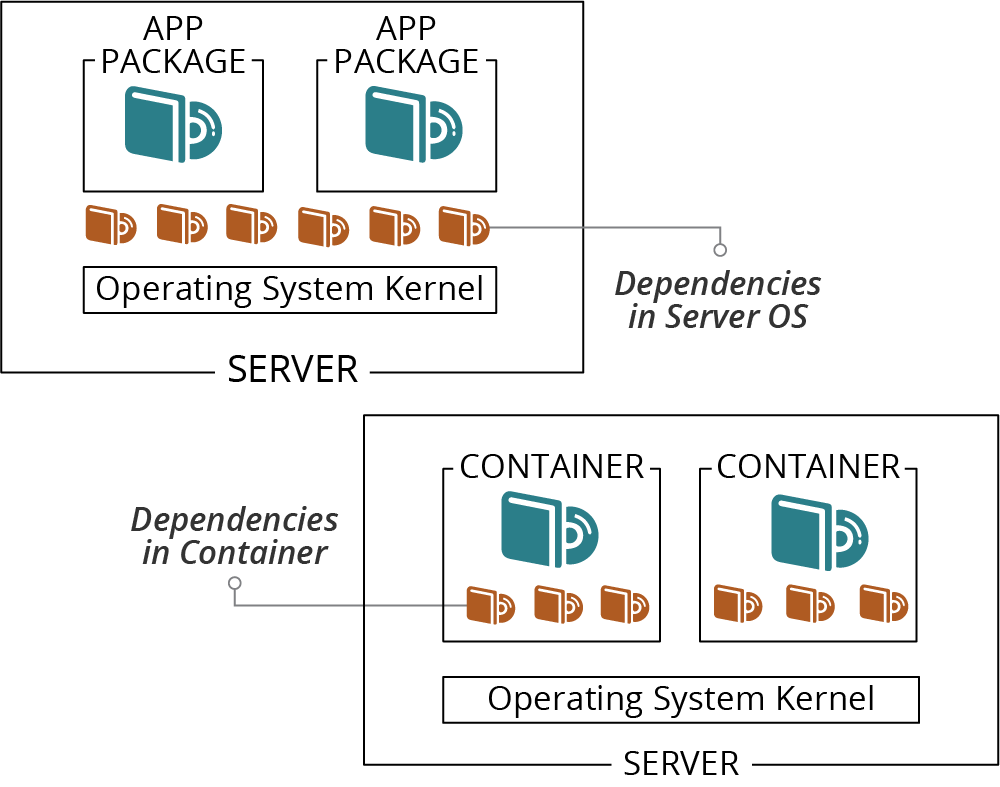
Figure 10-2. Dependencies may be installed on the host OS or bundled in containers
Including dependencies in the container makes it larger than typical operating system or language packages, but has several advantages:
-
A container creates a more consistent environment for running an application. Without a container, the application relies on libraries, configuration, user accounts, and other elements that may be different on different servers. A container bundles the runtime environment along with the application and its dependencies.
-
A containerized application is mostly isolated from the server it runs on, which gives you flexibility for where you can run it.
-
By packaging the application’s operating system context in the container image, you simplify and standardize the requirements for the host server. The server needs to have the container execution tooling installed, but little else.
-
Reducing the variability of runtime environments for an application improves quality assurance. When you test a container instance in one environment, you can be reasonably confident it will behave the same in other environments.
Deploying Applications to Server Clusters
People have been deploying applications to groups of servers since before container-based application clusters were a thing. The usual model is to have a server cluster (as described in “Compute Resources”), and run an identical set of applications on each server. You package your applications the same way you would for a single server, repeating the deployment process for each server in the pool, perhaps using a remote command scripting tool like Capistrano or Fabric. See Figure 10-3.
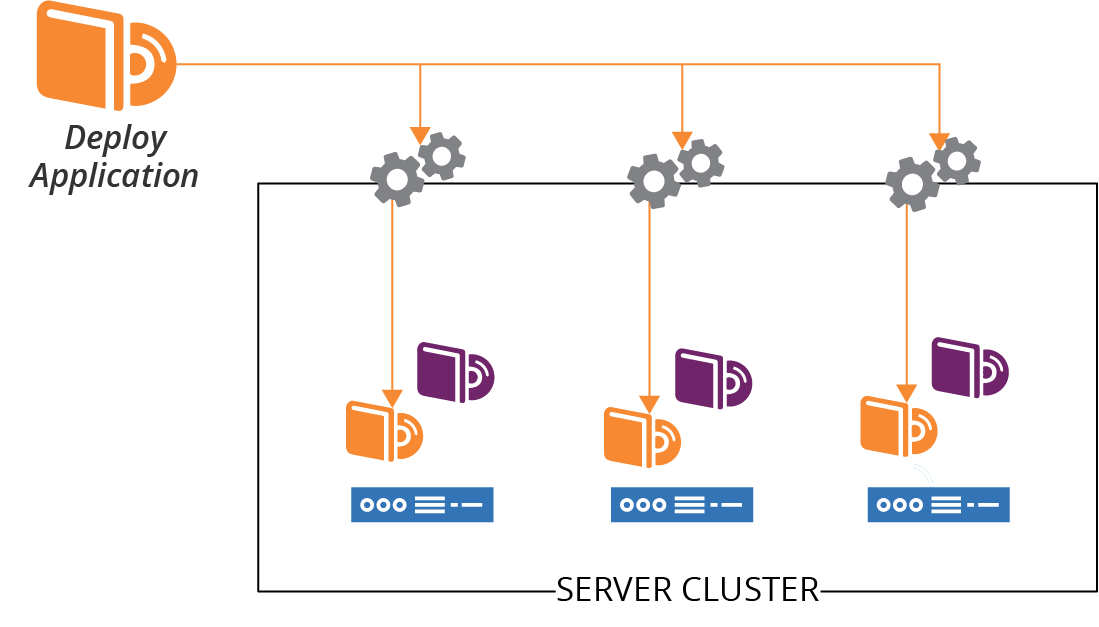
Figure 10-3. Applications are deployed to each server in a cluster
If you deploy an application to multiple servers, you need to decide how to orchestrate the deployment. Do you deploy the application to all of the servers at once? Do you need to take the entire service offline while you do this? Or do you upgrade one server at a time? You can leverage incremental deployment to servers for progressive deployment strategies like the blue-green and canary deployment patterns (see “Changing Live Infrastructure” for more on these strategies).
In addition to deploying application code onto servers, you may need to deploy other elements like changes to data structures or connectivity.
Deploying Applications to Application Clusters
As discussed in “Compute Resources”, an application hosting cluster is a pool of servers that runs one or more applications. Unlike a server cluster, where each server runs the same set of applications, different servers in an application cluster may run different groups of application instances (see Figure 10-4).
When you deploy an application to the cluster, a scheduler decides which host servers to run instances of the application on. The schedule may change this distribution, adding and removing application instances across host servers according to different algorithms and settings.
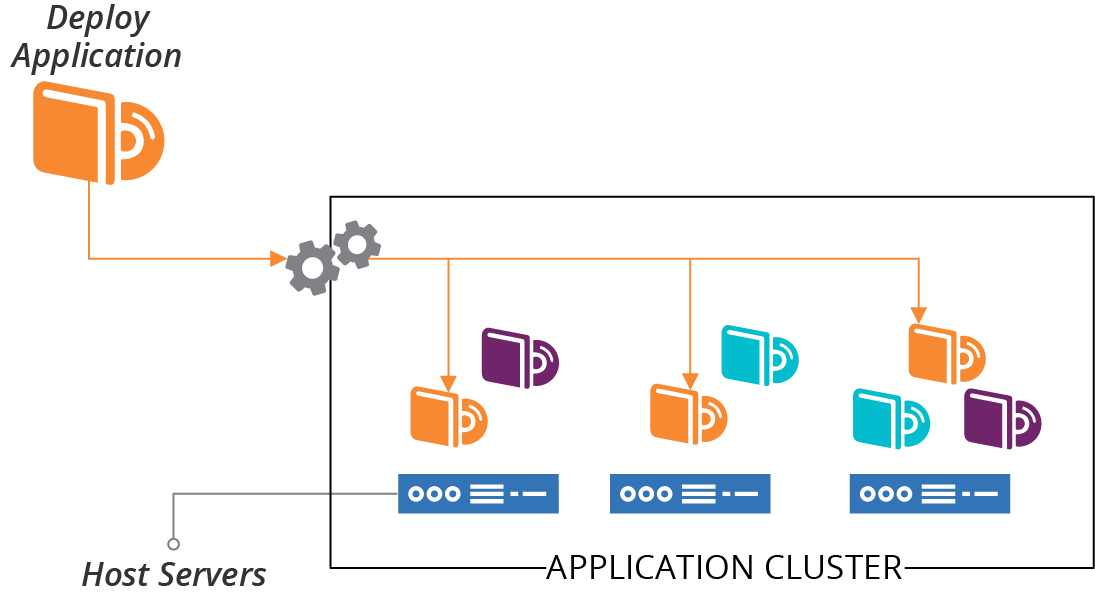
Figure 10-4. Applications are deployed to the cluster and distributed across host nodes
In the old days,3 the most popular application clusters were Java-based (Tomcat, Websphere, Weblogic, JBoss, and others). A wave of cluster management systems emerged a few years ago, including Apache Mesos and DC/OS, many inspired by Google’s Borg.4 Systems focused on orchestrating container instances have overwhelmed application servers and cluster orchestrators in more recent years.
Defining and provisioning clusters as code is the topic of Chapter 14. Once you have your cluster, it may be simple to deploy a single application onto it. Package the application with Docker and push it to the cluster. But more complex applications, with more moving parts, have more complex requirements.
Packages for Deploying Applications to Clusters
Modern applications often involve multiple processes and components deployed across complex infrastructure. A runtime environment needs to know how to run these various pieces:
-
What are the minimum and maximum number of instances to run?
-
How should the runtime know when to add or remove instances?
-
How does the runtime know whether an instance is healthy or needs to be restarted?
-
What storage needs to be provisioned and attached to each instance?
-
What are the connectivity and security requirements?
Different runtime platforms provide different functionality, and many have their own packaging and configuration format. Often, these platforms use a deployment manifest that refers to the actual deployment artifacts (for example, a container image), rather than an archive file that includes all of the deployable pieces. Examples of cluster application deployment manifests include:
-
Helm charts for Kubernetes clusters
-
Weave Cloud Kubernetes deployment manifests
-
AWS ECS Services, which you can define as code using your favorite stack management tool
-
Azure App Service Plans
Different deployment manifests and packages work at different levels. Some are focused on a single deployable unit, so you need a manifest for each application. Some define a collection of deployable services. Depending on the tool, each of the services within the collection may have a separate manifest, with a higher-level manifest defining common elements and integration parameters.
A manifest for the ShopSpinner web server deployment might look like the pseudocode shown in Example 10-1.
Example 10-1. Example of an application cluster deployment manifest
service:name:webserversorganization:ShopSpinnerversion:1.0.3application:name:nginxcontainer_image:repository:containers.shopspinner.xyzpath:/images/nginxtag:1.0.3instance:count_min:3count_max:10health_port:443health_url:/aliveconnectivity:inbound:id:https_inboundport:443allow_from:$PUBLIC_INTERNETssl_cert:$SHOPSPINNER_PUBLIC_SSL_CERToutbound:port:443allow_to:[$APPSERVER_APPLICATIONS.https_inbound]
This example specifies where and how to find the container image (the container_image block), how many instances to run, and how to check their health. It also defines inbound and outbound connection rules.
Deploying FaaS Serverless Applications
In Chapter 3, I listed some FaaS serverless application runtime platforms as a type of compute resource (see “Compute Resources”). Most of these have their own format for defining application runtime requirements, and packaging these with code and related pieces for deploying to an instance of the runtime.
When writing a FaaS application, the details of whatever servers or containers your code runs in are hidden from you. But your code probably needs infrastructure to work. For example, you may need network routing for inbound or outbound connections, storage, or message queues. Your FaaS framework may integrate with the underlying infrastructure platform, automatically provisioning the necessary infrastructure. Or you may need to define the infrastructure elements in a separate stack definition tool. Many stack tools like Terraform and CloudFormation let you declare your FaaS code provisioning as a part of an infrastructure stack.
Chapter 14 is relevant for defining and provisioning FaaS runtimes to run your code.
Application Data
Data is often an afterthought for deploying and running applications. We provision databases and storage volumes but, as with many parts of infrastructure, it’s making changes to them that turns out to be hard. Changing data and structures is time consuming, messy, and risky.
Application deployment often involves creating or changing data structures, including converting existing data when structures change. Updating data structures should be a concern of the application and application deployment process, rather than the infrastructure platform and runtime. However, the infrastructure and application runtime services need to support maintaining data when infrastructure and other underlying resources change or fail. See “Data Continuity in a Changing System” for ways to approach this challenge.
Data Schemas and Structures
Some data storage is strictly structured, such as SQL databases, while others are unstructured or schema-less. A strictly structured, schema-driven database enforces structures on data, refusing to store incorrectly formatted data. Applications that use a schema-less database are responsible for managing the data format.
A new application release may include a change to data structures. For a schema-driven database, this involves changing the definition of the data structures in the database. For example, the release may add a new field to data records, a classic example being splitting a single “name” field into separate fields for first, middle, and last name.
When data structures change, any existing data needs to be converted to the new structure with either type of database. If you are splitting a “name” field, you will need a process that divides the names in the database into their separate fields.
Changing data structures and converting data is called schema migration. There are several tools and libraries that applications and deployment tools can use to manage this process, including Flyway, DBDeploy, Liquibase, and db-migrate.5 Developers can use these tools to define incremental database changes as code. The changes can be checked into version control, and packaged as part of a release. Doing this helps to ensure that database schemas stay in sync with the application version deployed to an instance.
Teams can use database evolution strategies to safely and flexibly manage frequent changes to data and schemas. These strategies align with Agile software engineering approaches, including CI and CD, as well as Infrastructure as Code.6
Cloud Native Application Storage Infrastructure
Cloud native infrastructure is dynamically allocated to applications and services on demand. Some platforms provide cloud native storage as well as compute and networking. When the system adds an application instance, it can automatically provision and attach a storage device. You specify the storage requirements, including any formatting or data to be loaded when it is provisioned, in the application deployment manifest (see Example 10-2).
Example 10-2. Example of an application deployment manifest with data storage
application:name:db_clustercompute_instance:memory:2 GBcontainer_image:db_cluster_node_applicationstorage_volume:size:50 GBvolume_image:db_cluster_node_volume
This simple example defines how to create nodes for a dynamically scaled database cluster. For each node instance, the platform will create an instance of the container with the database software, and attach a disk volume cloned from an image initialized with an empty database segment. When the instance boots, it will connect to the cluster and synchronize data to its local volume.
Application Connectivity
In addition to compute resources to execute code and storage resources to hold data, applications need networking for inbound and outbound connectivity. A server-oriented application package, such as for a web server, might configure network ports and add encryption keys for incoming connections. But traditionally, they have relied on someone to configure infrastructure outside the server separately.
You can define and manage addressing, routing, naming, firewall rules, and similar concerns as part of an infrastructure stack project, and then deploy the application into the resulting infrastructure. A more cloud native approach to networking is to define the networking requirements as part of the application deployment manifest and have the application runtime allocate the resources dynamically.
You can see this in part of Example 10-1, shown here:
application:name:nginxconnectivity:inbound:id:https_inboundport:443allow_from:$PUBLIC_INTERNETssl_cert:$SHOPSPINNER_PUBLIC_SSL_CERToutbound:port:443allow_to:[$APPSERVER_APPLICATIONS.https_inbound]
This example defines inbound and outbound connections, referencing other parts of the system. These are the public internet, presumably a gateway, and inbound HTTPS ports for application servers, defined and deployed to the same cluster using their own deployment manifests.
Application runtimes provide many common services to applications. Many of these services are types of service discovery.
Service Discovery
Applications and services running in an infrastructure often need to know how to find other applications and services. For example, a frontend web application may send requests to a backend service to process transactions for users.
Doing this isn’t difficult in a static environment. Applications may use a known hostname for other services, perhaps kept in a configuration file that you update as needed.
But with a dynamic infrastructure where the locations of services and servers are fluid, a more responsive way of finding services is needed.
A few popular discovery mechanisms are:
- Hardcoded IP addresses
-
Allocate IP addresses for each service. For example, the monitoring server always runs on
192.168.1.5. If you need to change the address or run multiple instances of a service (for example, for a controlled rollout of a major upgrade), you need to rebuild and redeploy applications. - Hostfile entries
-
Use server configuration to generate the /etc/hosts file (or equivalent) on each server, mapping service names to the current IP address. This method is a messier alternative to DNS, but I’ve seen it used to work around legacy DNS implementations.7
- DNS (Domain Name System)
-
Use DNS entries to map service names to their current IP address, either using DNS entries managed by code, or DDNS (Dynamic DNS). DNS is a mature, well-supported solution to the problem.
- Resource tags
-
Infrastructure resources are tagged to indicate what services they provide, and the context such as environments. Discovery involves using the platform API to look up resources with relevant tags. Care should be taken to avoid coupling application code to the infrastructure platform.
- Configuration registry
-
Application instances can maintain the current connectivity details in a centralized registry (see “Configuration Registry”), so other applications can look it up. This may be helpful when you need more information than the address; for example, health or other status indications.
- Sidecar
-
A separate process runs alongside each application instance. The application may use the sidecar as a proxy for outbound connections, a gateway for inbound connections, or as a lookup service. The sidecars will need some method to do network discovery itself. This method could be one of the other discovery mechanisms, or it might use a different communication protocol.8 Sidecars are usually part of a service mesh ( I discuss service meshes in “Service Mesh”), and often provide more than service discovery. For example, a sidecar may handle authentication, encryption, logging, and monitoring.
- API gateway
-
An API gateway is a centralized HTTP service that defines routes and endpoints. It usually provides more services than this; for example, authentication, encryption, logging, and monitoring. In other words, an API gateway is not unlike a sidecar, but is centralized rather than distributed.9
Avoid Hard Boundaries Between Infrastructure, Runtime, and Applications
In theory, it could be useful to provide application runtimes as a complete set of services to developers, shielding them from the details of the underlying infrastructure. In practice, the lines are much fuzzier than presented in this model. Different people and teams need access to resources at different levels of abstraction, with different levels of control. So you should not design and implement systems with absolute boundaries, but instead define pieces that can be composed and presented in different ways to different users.
Conclusion
The purpose of infrastructure is to run useful applications and services. The guidance and ideas in this book should help you in providing collections of infrastructure resources in the shapes needed to do this. An application-driven approach to infrastructure focuses on the runtime requirements of applications, helping you to design stacks, servers, clusters, and other middle-tier constructs for running applications.
1 The Cloud Native Computing Foundation aims to set standards for the genre.
2 Docker is the dominant container format. Alternatives include CoreOS rkt and Windows Containers.
3 “The old days” were less than ten years ago.
4 Borg is Google’s internal, proprietary cluster management system, documented in the paper “Large-Scale Cluster Management at Google with Borg”.
5 DBDeploy popularized this style of database schema migration, along with Ruby on Rails. But the project isn’t currently maintained.
6 For more on strategies and techniques you can use to evolve your databases, see “Evolutionary Database Design” by Pramod Sadalage, Refactoring Databases by Scott Ambler and Pramod Sadalage (Addison-Wesley Professional), and Database Reliability Engineering, by Laine Campbell and Charity Majors (O’Reilly).
7 A typical example of an “unsophisticated DNS implementation” is organizations that don’t give teams access to change DNS entries. This is usually because the organization doesn’t have modern automation and governance processes that make it safe to do so.
8 The documentation for HashiCorp Consul explains how its sidecars communicate.
9 My colleagues have expressed concerns about the tendency to centralize business logic in API gateways. See Overambitious API gateways in the ThoughtWorks Technology Radar for more detail.