Chapter 6. Building Environments with Stacks
Chapter 5 described an infrastructure stack as a collection of infrastructure resources that you manage as a single unit. An environment is also a collection of infrastructure resources. So is a stack the same thing as an environment? This chapter explains that maybe it is, but maybe it isn’t.
An environment is a collection of software and infrastructure resources organized around a particular purpose, such as to support a testing phase, or to provide service in a geographical region. A stack, or set of stacks, is a means of defining and managing a collection of infrastructure resources. So you use a stack, or multiple stacks, to implement an environment. You might implement an environment as a single stack, or you might compose an environment from multiple stacks. You could even create several environments in one stack, although you shouldn’t.
What Environments Are All About
The concept of an environment is one of those things that we take for granted in IT. But we often mean slightly different things when we use the term in different contexts. In this book, an environment is a collection of operationally related infrastructure resources. That is, the resources in an environment support a particular activity, such as testing or running a system. Most often, multiple environments exist, each running an instance of the same system.
There are two typical use cases for having multiple environments running instances of the same system. One is to support a delivery process, and the other is to run multiple production instances of the system.
Delivery Environments
The most familiar use case for multiple environments is to support a progressive software release process—sometimes called the path to production. A given build of an application is deployed to each environment in turn to support different development and testing activities until it is finally deployed to the production environment (Figure 6-1).
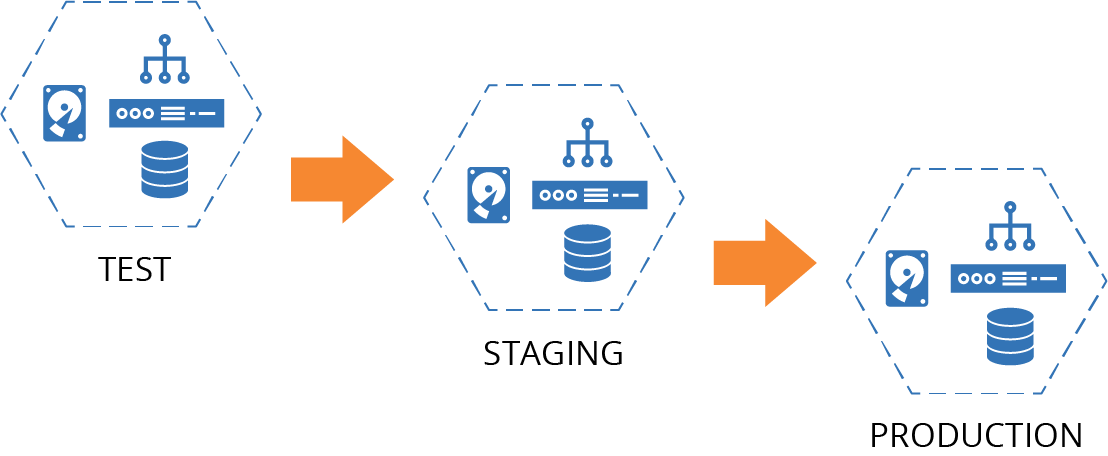
Figure 6-1. ShopSpinner delivery environments
I’ll use this set of environments throughout this chapter to illustrate patterns for defining environments as code.
Multiple Production Environments
You might also use multiple environments for complete, independent copies of a system in production. Reasons to do this include:
- Fault tolerance
-
If one environment fails, others can continue to provide service. Doing this could involve a failover process to shift load from the failed environment. You can also have fault tolerance within an environment, by having multiple instances of some infrastructure, as with a server cluster. Running an additional environment duplicates all of the infrastructure, creating a higher degree of fault tolerance, although at a higher cost. See “Continuity” for continuity strategies that leverage Infrastructure as Code.
- Scalability
-
You can spread a workload across multiple environments. People often do this geographically, with a separate environment for each region. Multiple environments may be used to achieve both scalability and fault tolerance. If there is a failure in one region, the load is shifted to another region’s environment until the failure is corrected.
- Segregation
-
You may run multiple instances of an application or service for different user bases, such as different clients. Running these instances in different environments can strengthen segregation. Stronger segregation may help meet legal or compliance requirements and give greater confidence to customers.
ShopSpinner runs a separate application server for each of its ecommerce customers. As it expands to support customers in North America, Europe, and South Asia, it decides to create a separate environment for each of these regions (see Figure 6-2).
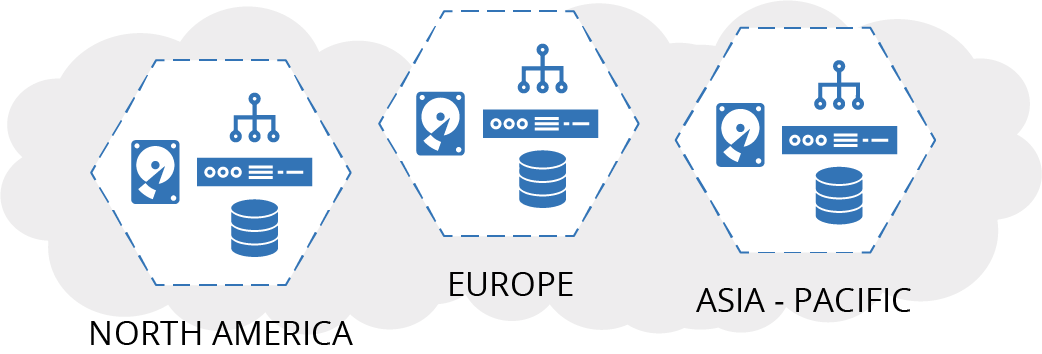
Figure 6-2. ShopSpinner regional environments
Using fully separated environments, rather than having a single environment spread across the regions, helps ShopSpinner to ensure that it is complying with different regulations about storing customer data in different regions. Also, if it needs to make changes that involve downtime, it can do so in each region at a different time. This makes it easier to align downtime to different time zones.
Later, ShopSpinner lands a contract with a pharmaceutical store chain named The Medicine Barn. The Medicine Barn needs to host its customer data separately from other companies for regulatory reasons. So ShopSpinner’s team offers to run a completely separate environment dedicated to The Medicine Barn at a higher cost than running in a shared environment.
Environments, Consistency, and Configuration
Since multiple environments are meant to run instances of the same system, the infrastructure in each environment should be consistent. Consistency across environments is one of the main drivers of Infrastructure as Code.
Differences between environments create the risk of inconsistent behavior. Testing software in one environment might not uncover problems that occur in another. It’s even possible that software deploys successfully in some environments but not others.
On the other hand, you typically need some specific differences between environments. Test environments may be smaller than production environments. Different people may have different privileges in different environments. Environments for different customers may have different features and characteristics. At the very least, names and IDs may be different (appserver-test, appserver-stage, appserver-prod). So you need to configure at least some aspects of your environments.
A key consideration for environments is your testing and delivery strategy. When the same infrastructure code is applied to every environment, testing it in one environment tends to give confidence that it will work correctly in other environments. You don’t get this confidence if the infrastructure varies much across instances, however.
You may be able to improve confidence by testing infrastructure code using different configuration values. However, it may not be practical to test many different values. In these situations, you may need additional validation, such as post-provisioning tests or monitoring production environments. I’ll go more in-depth on testing and delivery in Chapter 8.
Patterns for Building Environments
As I mentioned earlier, an environment is a conceptual collection of infrastructure elements, and a stack is a concrete collection of infrastructure elements. A stack project is the source code you use to create one or more stack instances. So how should you use stack projects and instances to implement environments?
I’ll describe two antipatterns and one pattern for implementing environments using infrastructure stacks. Each of these patterns describes a way to define multiple environments using infrastructure stacks. Some systems are composed of multiple stacks, as I described in “Patterns and Antipatterns for Structuring Stacks”. I’ll explain what this looks like for multiple environments in “Building Environments with Multiple Stacks”.
Antipattern: Multiple-Environment Stack
A multiple-environment stack defines and manages the infrastructure for multiple environments as a single stack instance.
For example, if there are three environments for testing and running an application, a single stack project includes the code for all three of the environments (Figure 6-3).
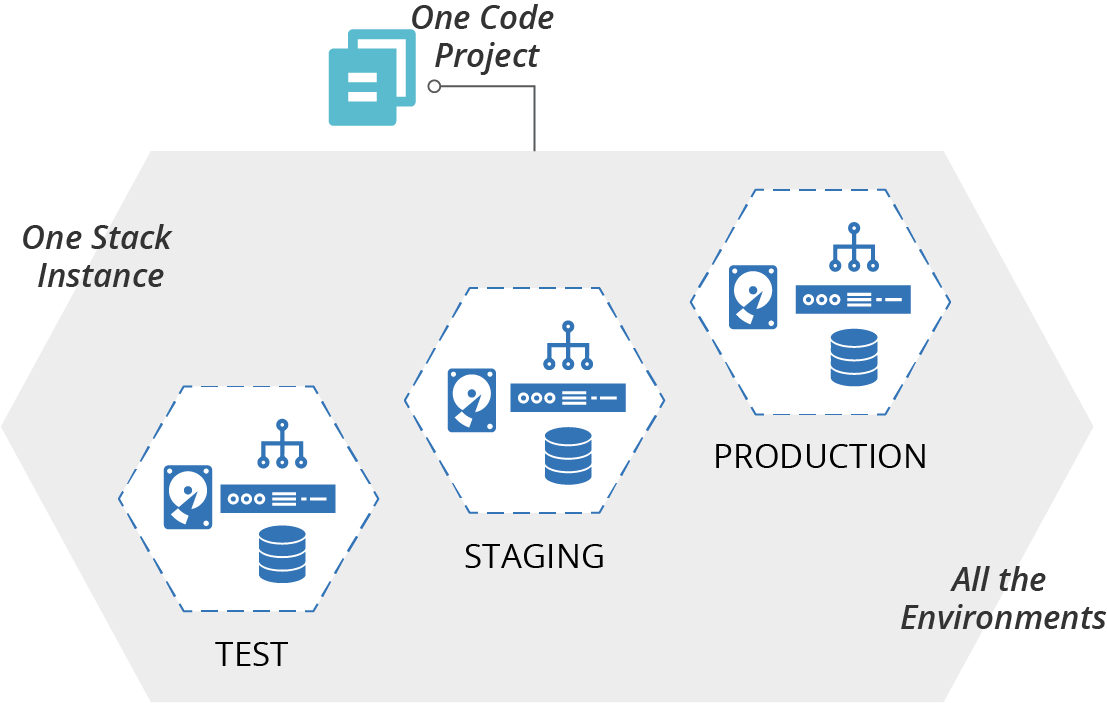
Figure 6-3. A multiple-environment stack manages the infrastructure for multiple environments as a single stack instance
Motivations
Many people create this type of structure when they’re learning a new stack tool because it seems natural to add new environments into an existing project.
Consequences
When running a tool to update a stack instance, the scope of a potential change is everything in the stack. If you have a mistake or conflict in your code, everything in the instance is vulnerable.1
When your production environment is in the same stack instance as another environment, changing the other environment risks causing a production issue. A coding error, unexpected dependency, or even a bug in your tool can break production when you only meant to change a test environment.
Related patterns
You can limit the blast radius of changes by dividing environments into separate stacks. One obvious way to do this is the copy-paste environment (see “Antipattern: Copy-Paste Environments”), where each environment is a separate stack project, although this is considered an antipattern.
A better approach is the reusable stack pattern (see “Pattern: Reusable Stack”). A single project is used to define the generic structure for an environment and is then used to manage a separate stack instance for each environment. Although this involves using a single project, the project is only applied to one environment instance at a time. So the blast radius for changes is limited to that one environment.
Antipattern: Copy-Paste Environments
The copy-paste environments antipattern uses a separate stack source code project for each infrastructure stack instance.
In our example of three environments named test, staging, and production, there is a separate infrastructure project for each of these environments (Figure 6-4). Changes are made by editing the code in one environment and then copying the changes into each of the other environments in turn.
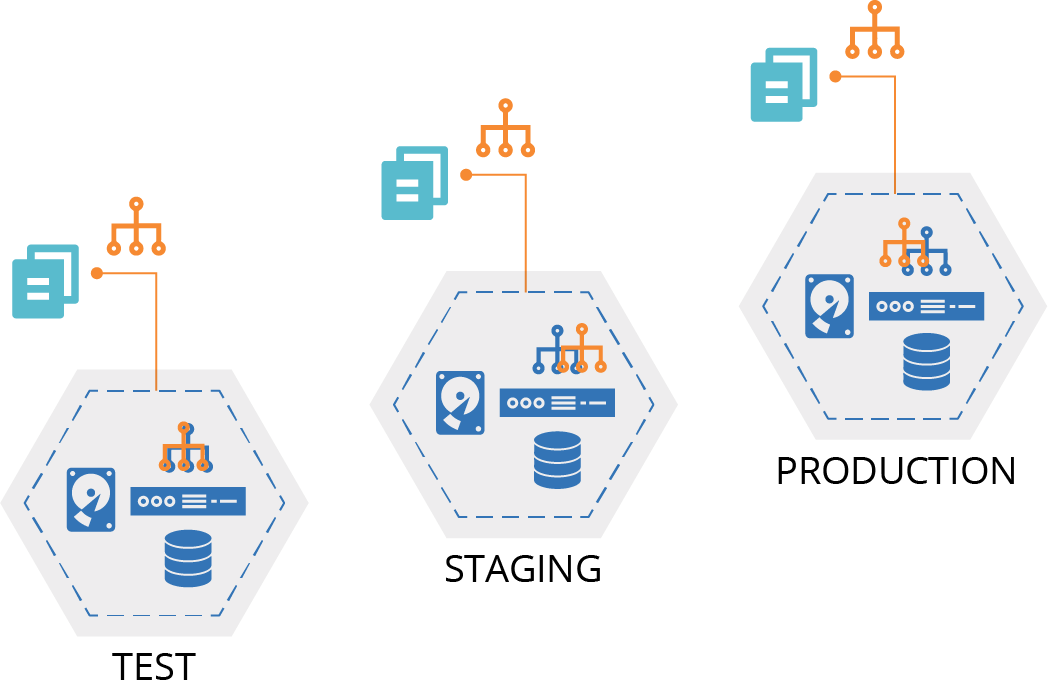
Figure 6-4. A copy-paste environment has a separate copy of the source code project for each instance
Motivation
Copy-paste environments are an intuitive way to maintain multiple environments. They avoid the blast radius problem of the multiheaded stack antipattern. You can also easily customize each stack instance.
Applicability
Copy-paste environments might be appropriate if you want to maintain and change different instances and aren’t worried about code duplication or consistency.
Consequences
It can be challenging to maintain multiple copy-paste environments. When you want to make a code change, you need to copy it to every project. You probably need to test each instance separately, as a change may work in one but not another.
Copy-paste environments often suffer from configuration drift (see “Configuration Drift”). Using copy-paste environments for delivery environments reduces the reliability of the deployment process and the validity of testing, due to inconsistencies from one environment to the next.
A copy-paste environment might be consistent when it’s first set up, but variations creep in over time.
Implementation
You create a copy-paste environment by copying the project code from one stack instance into a new project. You then edit the code to customize it for the new instance. When you make a change to one stack, you need to copy and paste it across all of the other stack projects, while keeping the customizations in each one.
Related patterns
Environment branches (see “Delivering code from a source code repository”) may be considered a form of copy-paste environments. Each branch has a copy of the code, and people copy code between branches by merging. Continuously applying code (see “Apply Code Continuously”) may avoid the pitfalls of copy-paste, because it guarantees the code isn’t modified from one environment to the next. Editing the code as a part of merging it to an environment branch creates the hazards of the copy-paste antipattern.
The wrapper stack pattern (see “Pattern: Wrapper Stack”) is also similar to copy-paste environments. A wrapper stack uses a separate stack project for each environment in order to set configuration parameters. But the code for the stack is implemented in stack components, such as reusable module code. That code itself is not copied and pasted for each environment, but promoted much like a reusable stack. However, if people add more than basic stack instance parameters to the wrapper stack projects, it can devolve into the copy-paste environment antipattern.
In cases where stack instances are meant to represent the same stack, the reusable stack pattern is usually more appropriate.
Pattern: Reusable Stack
A reusable stack is an infrastructure source code project that is used to create multiple instances of a stack (Figure 6-5).
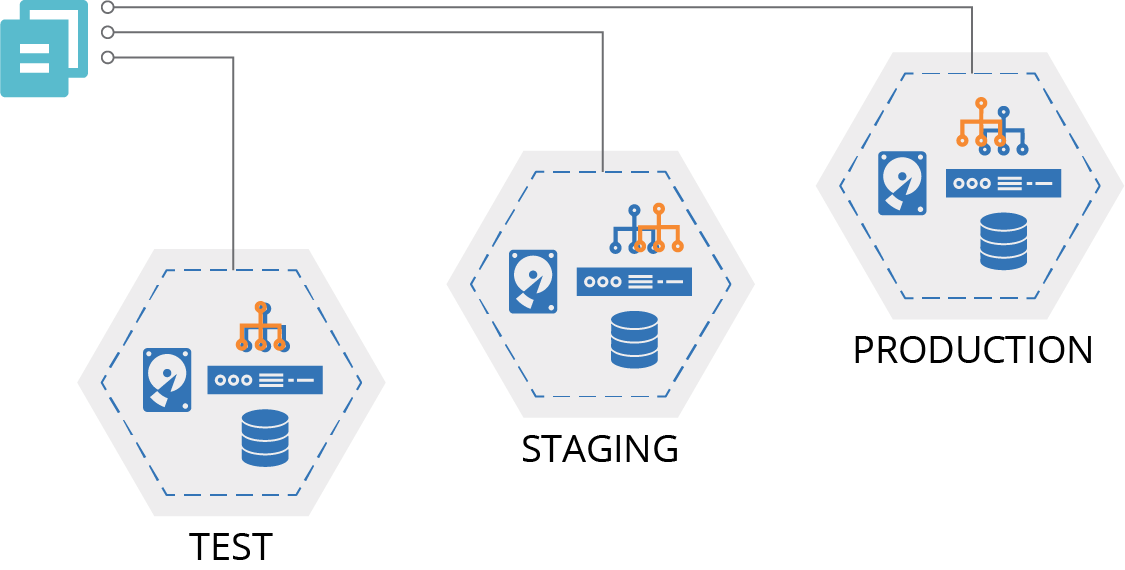
Figure 6-5. Multiple stack instances created from a single reusable stack project
Motivation
You create a reusable stack to maintain multiple consistent instances of infrastructure. When you make changes to the stack code, you can apply and test it in one instance, and then use the same code version to create or update multiple additional instances. You want to provision new instances of the stack with minimal ceremony, maybe even automatically.
As an example, the ShopSpinner team extracted common code from different stack projects that each use an application server. Team members put the common code into a module used by each of the stack projects. Later, they realized that the stack projects for their customer applications still looked very similar. In addition to using the module to create an application server, each stack had code to create databases and dedicated logging and reporting services for each customer.
Changing and testing changes to this code across multiple customers was becoming a hassle, and ShopSpinner was signing up new customers every month. So the team decided to create a single stack project that defines a customer application stack. This project still uses the shared Java application server module, as do a few other applications (Jira and GoCD). But the project also has the code for setting up the rest of the per-customer infrastructure as well.
Now, when they sign on a new customer, the team members use the common customer stack project to create a new instance. When they fix or improve something in the project codebase, they apply it to test instances to make sure it’s OK, and then they roll it out one by one to the customer instances.
Applicability
You can use a reusable stack for delivery environments or for multiple production environments. This pattern is useful when you don’t need much variation between the environments. It is less applicable when environments need to be heavily customized.
Consequences
The ability to provision and update multiple stacks from the same project enhances scalability, reliability, and throughput. You can manage more instances with less effort, make changes with a lower risk of failure, and roll changes out to more systems more rapidly.
You typically need to configure some aspects of the stack differently for different instances, even if it’s just what you name things. I’ll spend a whole chapter talking about this (Chapter 7).
You should test your stack project code before you apply changes to business-critical infrastructure. I’ll spend multiple chapters on this, including Chapters 8 and 9.
Implementation
You create a reusable stack as an infrastructure stack project, and then run the stack management tool each time you want to create or update an instance of the stack. Use the syntax of the stack tool command to tell it which instance you want to create or update. With Terraform, for example, you would specify a different state file or workspace for each instance. With CloudFormation, you pass a unique stack ID for each instance.
The following example command provisions two stack instances from a single project using a fictional command called stack. The command takes an argument env that identifies unique instances:
>stack upenv=test--source mystack/srcSUCCESS: stack 'test' created>stack upenv=staging --source mystack/srcSUCCESS: stack 'staging' created
As a rule, you should use simple parameters to define differences between stack instances—strings, numbers, or in some cases, lists. Additionally, the infrastructure created by a reusable stack should not vary much across instances.
Related patterns
The reusable stack is an improvement on the copy-paste environment antipattern (see “Antipattern: Copy-Paste Environments”), making it easier to keep multiple instances consistent.
The wrapper stack pattern (see “Pattern: Wrapper Stack”) uses stack components to define a reusable stack, but uses a different stack project to set parameter values for each instance.
Building Environments with Multiple Stacks
The reusable stack pattern describes an approach for implementing multiple environments. In Chapter 5 I described different ways of structuring a system’s infrastructure across multiple stacks (see “Patterns and Antipatterns for Structuring Stacks”). There are several ways you can implement your stacks to combine these two dimensions of environments and system structure.
The simple case is implementing the complete system as a single stack. When you provision an instance of the stack, you have a complete environment. I depicted this in the diagram for the reusable stack pattern (Figure 6-5).
But you should split larger systems into multiple stacks. For example, if you follow the service stack pattern (“Pattern: Service Stack”) you have a separate stack for each service, as shown in Figure 6-6.
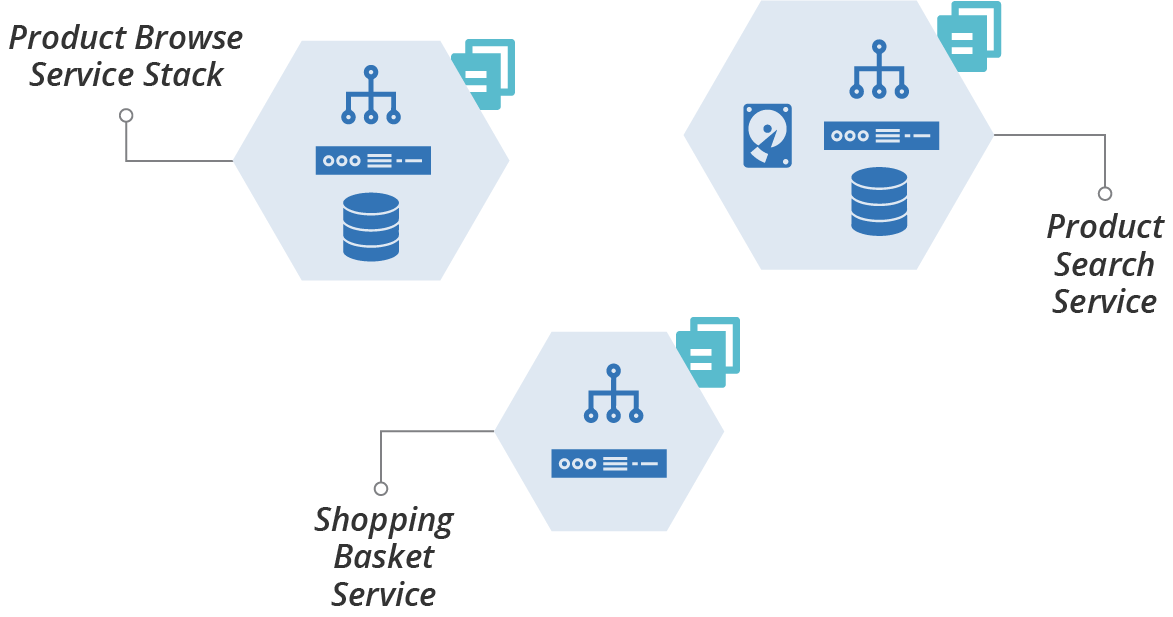
Figure 6-6. Example using a separate infrastructure stack for each service
To create multiple environments, you provision an instance of each service stack for each environment, as shown in Figure 6-7.
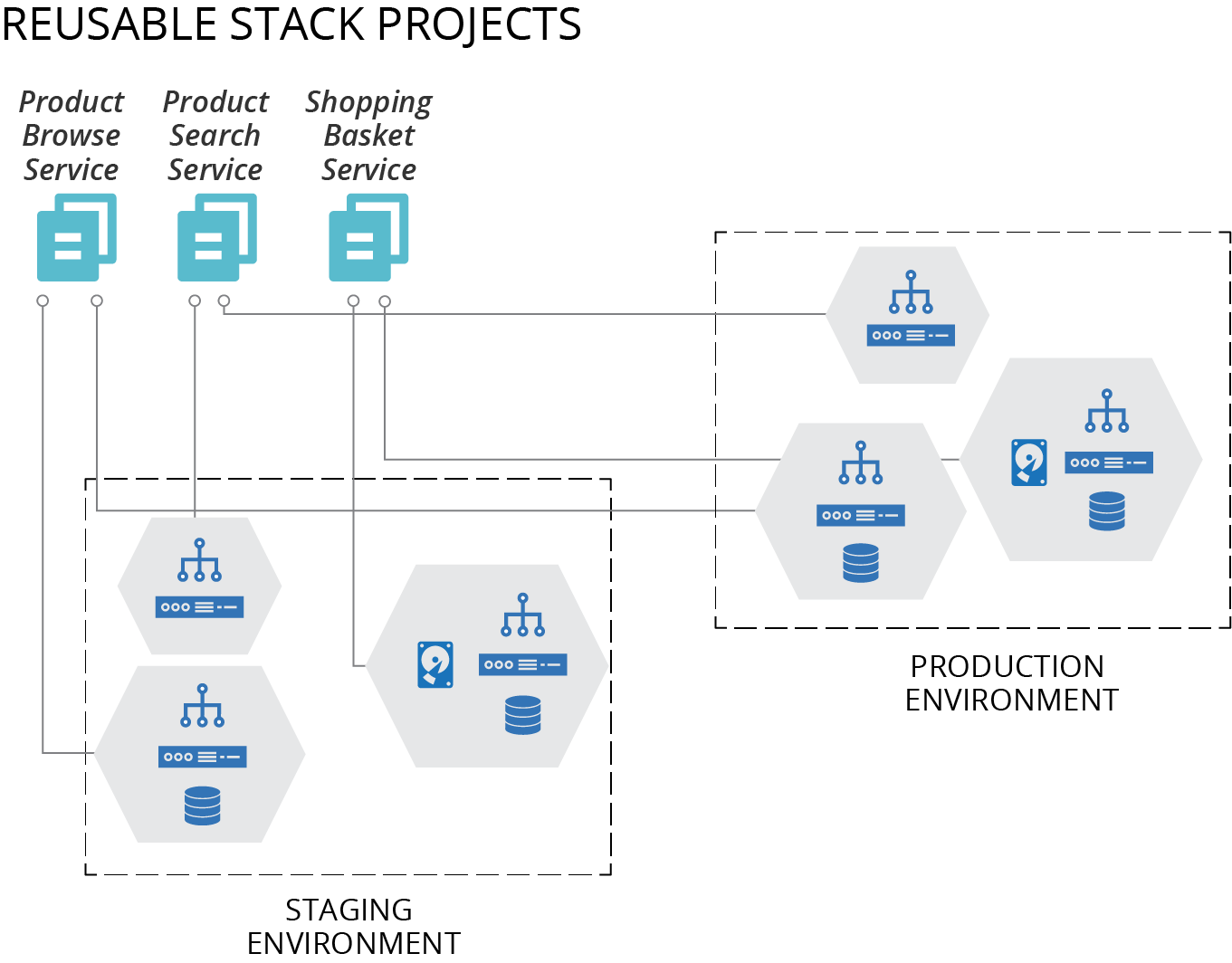
Figure 6-7. Using multiple stacks to build each environment
You would use commands like the following to build a full environment with multiple stacks:
>stack upenv=staging --source product_browse_stack/srcSUCCESS: stack 'product_browse-staging' created>stack upenv=staging --source product_search_stack/srcSUCCESS: stack 'product_search-staging' created>stack upenv=staging --source shopping_basket_stack/srcSUCCESS: stack 'shopping_basket-staging' created
Chapter 15 describes strategies for splitting systems into multiple stacks, and Chapter 17 discusses how to integrate infrastructure across stacks.
Conclusion
Reusable stacks should be the workhorse pattern for most teams who need to manage large infrastructures. A stack is a useful unit for testing and delivering changes. It provides assurance that each instance of an environment is defined and built consistently. The comprehensiveness of a stack, rather than modules, as a unit of change enhances the ability to easily deliver changes quickly and frequently.
1 Charity Majors shared her painful experiences of working with a multiple-environment stack in a blog post.