Chapter 12. Managing Changes to Servers
Many organizations and teams focus on processes and tools to build servers and other infrastructure, but neglect changes. When a change is needed—to fix a problem, apply security patches, or upgrade software—they treat it as an unusual event. If every change is an exception, then you can’t automate it. This mindset is why so many organizations have inconsistent, flaky systems. It’s why many of us spend our time switching between picking up dull tickets and fighting fires.
The only constant thing about our systems is that they change. If we define our systems as code, run them on dynamic infrastructure platforms, and deliver that code across our systems with a change pipeline, then we can make changes routine and easy. If our systems are only ever created and changed through code and pipelines, then we can ensure their consistency and be sure they align with whatever policies we need.
“What’s on a Server” and “Where Things Come From” describe what’s on a server and where it all comes from. Everything on a given server comes from a defined source, whether it’s an OS installation, system package repository, or server configuration code. Any change you need to make to a server is a change to one of these things.
This chapter is about how to change things on servers by changing the code that defines where the thing comes from and applying it one way or another. By implementing a reliable, automated change process for your servers, you ensure that you can roll changes out across your estate rapidly and reliably. You can keep all of your servers up-to-date with the latest approved packages and configuration, with minimal effort.
There are several patterns for applying configuration code to servers, including applying each change as it happens, continuously synchronizing it, and rebuilding servers to change them. Another dimension of making changes is how to run your tool to apply changes to a server, whether to push or pull configuration. Finally, there are several other events in a server’s life cycle, from pausing to rebuilding to deleting a server.
Change Management Patterns: When to Apply Changes
There is one antipattern and two patterns for deciding when to apply changes to a server instance.
Antipattern: Apply On Change
Also known as: ad hoc automation.
With the apply on change antipattern, configuration code is only applied to a server when there is a specific change to apply.
For example, consider a team that runs multiple Tomcat application servers. The team members run an Ansible playbook to install and configure Tomcat when they create a new server instance, but once the server is running, they don’t run Ansible until they need to. When a new version of Tomcat is released, they update their playbook and apply it to their servers.
In the most extreme version of this antipattern, you only apply code to the server that you specifically intend to change.
The team in our example notices that one of its application servers is seeing much higher traffic, and the load is making Tomcat unstable. The team members make some changes to their playbook to optimize their Tomcat configuration for higher load and then apply it to the server that has the issue. But they don’t apply the playbook to the other application servers, because those don’t need the change.
Motivation
Systems and network administrators have traditionally managed servers by hand. When you need to make a change, you log in to the relevant server and make the change. Why would you do it differently? Even people who use scripts tend to write and run the scripts to make a specific change. The apply on change antipattern is an extension of this way of working that happens to use an Infrastructure as Code tool instead of a manual command or on-off script.
Applicability
Applying code only as needed for a specific change may be fine for a single temporary server. But it’s not a suitable method for sustainably managing a group of servers.
Consequences
If you only apply configuration code to make a specific change, you may have long gaps where the code is never applied to a particular server instance. When you finally do apply the code, it might fail because of other differences on the server than the one you meant to change.
Things have a habit of changing on a server when you aren’t paying attention. Someone may make a change manually—for example, as a quick fix for an outage. Someone else may have patched the system with newer versions of OS or application packages. These fall into the category of quick changes that we’re sure won’t break anything. And into the category of changes that, a week later, we don’t remember making (because it was only a small change) until we’ve spent several hours debugging something it broke.
The problem becomes worse when we only apply changes to some servers and not others. Consider the previous example where the team applies code to optimize performance to one server. Later on, someone on the team will need to make a different change to the application servers.
When they do, they also apply the previous performance optimization change to the servers that don’t already have it, as a side effect of applying the code for the new change. The earlier change might have unexpected effects on other servers. Worse, the person applying the code may have forgotten about the performance optimization, so they take much longer to discover the cause of any problems it creates.
Implementation
People who are used to making changes by hand, or using one-off scripts, tend to use server configuration code the same way. They see the tool—Ansible, Chef, Puppet—as a scripting tool with awkward syntax. Most often, people who do this run the tool by hand from their local computer, rather than having a pipeline or other orchestration service apply code.
Related patterns
People tend to use the apply on change antipattern with the push configuration pattern (“Pattern: Push Server Configuration”) rather than using pull (“Pattern: Pull Server Configuration”). The alternatives to this antipattern are continuous synchronization or immutable servers (see “Pattern: Immutable Server”).
Pattern: Continuous Configuration Synchronization
Also known as: scheduled server configuration update.
Continuous configuration synchronization involves repeatedly and frequently applying configuration code to a server, regardless of whether the code has changed. Doing this reverts or surfaces any unexpected differences that might creep in, whether to the server, or other resources used by the configuration code.
Motivation
We would like to believe that server configuration is predictable. Once I apply code to a server, nothing should change until the next time I apply the code. And if I haven’t changed the code, there’s no need to apply it. However, servers, and server code, are sneaky.
Sometimes a server changes for obvious reasons, such as someone logging in and making a change by hand. People often make minor changes this way because they don’t think it will cause any problems. They are often mistaken about this. In other cases, teams manage some aspects of a server with a different tool or process. For example, some teams use a specialized tool to update and patch servers, especially for security patches.
Even if a server hasn’t changed, applying the same server configuration code multiple times can introduce differences. For example, the code may use parameters from a central configuration registry. If one of those parameters changes, the code may do something different the next time it runs on a server.
Packages are another external source of change. If your configuration code installs a package from a repository, it may update the package to a newer version when it becomes available. You can try to specify package versions, but this leads down one of two terrible roads. Down one road, your system eventually includes many out-of-date packages, including ones with security vulnerabilities well known to attackers. Down the other road, you and your team spend enormous amounts of energy manually updating package version numbers in your server code.
By reapplying your server configuration code regularly, on an automated schedule, you ensure that you keep all of your servers configured consistently. You also ensure that any differences, from whatever sources, are applied sooner rather than later.
Applicability
It is easier to implement continuous synchronization than the main alternative, immutable servers. Most Infrastructure as Code tools—Ansible, Chef, and Puppet, for example—are designed with this pattern in mind. It is quicker and less disruptive to apply changes by updating an existing server instance than by building a new instance.
Consequences
When an automated process applies server configuration across your estate, there is a risk that something will break. All of the things that might change unexpectedly, as described earlier in the “Motivation” section, are things that could break a server. To counter this, you should have an effective monitoring system to alert you to problems, and a good process for testing and delivering code before applying changes to production systems.
Implementation
As mentioned before, most server configuration as code tools are designed to run continuously. The specific mechanisms they use are described in “Pattern: Push Server Configuration” and in “Pattern: Pull Server Configuration”.
Most continuous synchronization implementations run on a schedule. These tend to have some way of varying the runtime on different servers so that all of your servers don’t wake up and run their configuration at the same time.1 However, sometimes you want to apply code more quickly, maybe to apply a fix, or to support a software deployment. Different tools have different solutions for doing this.
Related patterns
Continuous synchronization is implemented using either the push (“Pattern: Push Server Configuration”) or pull (“Pattern: Pull Server Configuration”) configuration pattern. The alternative to this pattern is immutable servers (“Pattern: Immutable Server”).
Pattern: Immutable Server
An immutable server is a server instance whose configuration is never changed. You deliver changes by creating a new server instance with the changed configuration and using it to replace the existing server.2
Motivation
Immutable servers reduce the risk of making changes. Rather than applying a change to a running server instance, you create a new server instance. You have the opportunity to test the new instance, and then swap it out for the previous instance. You can then check that the new instance is working correctly before destroying the original, or swap it back into place if something goes wrong.
Applicability
Organizations that need tight control and consistency of server configuration may find immutable servers useful. For example, a telecommunications company that runs thousands of server images may decide not to apply changes to running servers, preferring to guarantee the stability of their configuration.
Consequences
Implementing immutable servers requires a robust automated process for building, testing, and updating server images (as described in Chapter 13). Your system and application design must support swapping server instances without interrupting service (see “Changing Live Infrastructure” for ideas).
Despite the name, immutable servers do change.3
Configuration drift may creep in, especially if people can log in to servers and make changes manually rather than using the configuration change process to build new server instances. So teams using immutable servers should be careful to ensure the freshness of running instances. It’s entirely possible to combine immutable servers with the apply on change antipattern (see “Antipattern: Apply On Change”), which can result in servers that run, unchanged, for a long time, without including patches and improvements made to servers built later. Teams should also consider disabling access to servers, or make the ability to make accessing and manually changing services require a “break glass” procedure.4
Implementation
Most teams who use immutable servers handle the bulk of their configuration in server images, favoring baking images (see “Baking Server Images”) over frying instances. So a pipeline, or set of pipelines, to automatically build and update server images is a foundation for immutable servers.
You can fry configuration onto immutable server instances (as described in “Frying a Server Instance”), as long as you don’t make changes to the instance after you create it. However, a stricter form of immutable servers avoids adding any differences to server instances. With this approach, you create and test a server image, and then promote it from one environment to the next. Because little or nothing changes with each server instance, you lower the risk of issues creeping in from one environment to the next.
Related patterns
People tend to bake servers (see “Baking Server Images”) to support immutable servers. Continuous synchronization (see “Pattern: Continuous Configuration Synchronization”) is the opposite approach, routinely applying changes to running server instances. Immutable servers are a subset of immutable infrastructure (see “Immutable Infrastructure”).
Patching Servers
Many teams are used to patching servers as a special, separate process. However, if you have an automated pipeline that delivers changes to servers, and continuously synchronize server code to existing servers, you can use this same process to keep your servers patched.
Teams I’ve worked with pull, test, and deliver the latest security patches for their operating systems and other core packages on a weekly basis, and sometimes daily.
This rapid, frequent patching process impressed the CIO at one of my clients when the business press trumpeted a high-profile security vulnerability in a core OS package. The CIO demanded that we drop everything and create a plan to address the vulnerability, with estimates for how long it would take and the cost impact of diverting resources to the effort. They were pleasantly surprised when we told them that the patch fixing the issue had already been rolled out as part of that morning’s routine update.
How to Apply Server Configuration Code
Having described patterns to manage when to apply configuration code to servers, this section now discusses patterns for deciding how to apply the code to a server instance.
These patterns are relevant to changing servers, particularly as a part of a continuous synchronization process (see “Pattern: Continuous Configuration Synchronization”). But they’re also used when building new server instances, to fry configuration onto an instance (see “Frying a Server Instance”). And you also need to choose a pattern to apply configuration when building server images (Chapter 13).
Given a server instance, whether it’s a new one you are building, a temporary instance you use to build an image, or an existing instance, there are two patterns for running a server configuration tool to apply code. One is push, and the other is pull.
Pattern: Push Server Configuration
With the push server configuration pattern, a process running outside the new server instance connects to the server and executes, downloading and applying code.
Motivation
Teams use push to avoid the need to preinstall server configuration tooling onto server images.
Applicability
The push pattern is useful when you need a higher degree of control over the timing of configuration updates to existing servers. For example, if you have events, such as software deployments, with a sequence of activities across multiple servers, you can implement this with a central process that orchestrates the process.
Consequences
The push configuration pattern requires the ability to connect to server instances and execute the configuration process over the network. This requirement can create a security vulnerability since it opens a vector that attackers might use to connect and make unauthorized changes to your servers.
It can be awkward to run push configuration for server instances that are created automatically by the platform (see “Configuring the Platform to Automatically Create Servers”); for example, for autoscaling or automated recovery. However, it can be done.
Implementation
One way to push server configuration is for someone to run the server configuration tool from their local computer. As discussed in “Applying Code from a Centralized Service”, however, it’s better to run tools from a central server or service, to ensure consistency and control over the process.
Some server configuration tools include a server application that manages connections to machine instances, such as Ansible Tower. Some companies offer SaaS services to remotely configure server instances for you, although many organizations prefer not to give third parties this level of control over their infrastructure.
In other cases, you implement a central service yourself to run server configuration tools. I’ve most often seen teams build this using CI or CD server products. They implement CI jobs or pipeline stages that run the configuration tool against a particular set of servers. The job triggers based on events, such as changes to server configuration code, or creation of new environments.
The server configuration tool needs to be able to connect to server instances. Although some tools use a custom network protocol for this, most use SSH. Each server instance must accept SSH connections from the server tool, allowing the tool to run with enough privileges to apply its configuration changes.
It’s essential to have strong authentication and secrets management for these connections. Otherwise, your server configuration system is a huge security hole for your estate.
When creating and configuring a new server instance, you can dynamically generate a new authentication secret, such as an SSH key. Most infrastructure platforms provide a way to set a key when creating a new instance. Your server configuration tool can then use this secret and potentially disable and discard the key once it’s no longer needed.
If you need to apply configuration changes to existing server instances, as with continuous synchronization, then you need a longer-term method to authenticate connections from the configuration tool. The simplest method is to install a single key on all of your server instances. But this single key is a vulnerability. If it is exposed, then an attacker may be able to access every server in your estate.
An alternative is to set a unique key for each server instance. It’s essential to manage access to these keys in a way that allows the server configuration tool to access them while reducing the risk of an attacker gaining the same access—for example, by compromising the server that runs the tool. The advice in “Handling Secrets as Parameters” is relevant here.
One approach many organizations use is to have multiple servers or services that manage server configuration. The estate is divided into different security realms, and each server configuration service instance only has access to one of these. This division can reduce the scope of a compromise.
Related patterns
The alternative to the push pattern is the pull server configuration pattern.
Pattern: Pull Server Configuration
The pull server configuration pattern involves a process running on the server instance itself to download and apply configuration code. This process triggers when a new server instance is created. For existing instances under the continuous synchronization pattern, the process typically runs on a schedule, periodically waking up and applying the current configuration.
Motivation
Pull-based server configuration avoids the need for server instances to accept incoming connections from a central server, so it helps to reduce the attack surface. The pattern simplifies configuring instances created automatically by the infrastructure platform, such as autoscaling and automated recovery (see “Configuring the Platform to Automatically Create Servers”).
Applicability
You can implement pull-based server configuration when you can build or use server images that have your server configuration tool preinstalled.
Implementation
Pull configuration works by using a server image that has the server configuration tool preinstalled. If you are pulling configuration for new server instances, configure the image to run the tool when it first boots.
Cloud-init is a widely used tool for automatically running this kind of process. You can pass parameters to the new server instance using your infrastructure platform’s API, even including commands to execute, and parameters to pass to the server configuration tool (see Example 12-1).
Example 12-1. Example stack code that runs a setup script
server:source_image:stock-linux-1.23memory:2GBvnet:${APPSERVER_VNET}instance_data:-server_tool:servermaker-parameter:server_role=appserver-parameter:code_repo=servermaker.shopspinner.xyz
Configure the script to download configuration code from a central repository and apply it on startup. If you use continuous synchronization to update running servers, the setup process should configure this, whether it’s running a background process for the server configuration tool, or a cron job to execute the tool on a schedule.
Even if you don’t build your own server images, most of the images provided by public cloud vendors have cloud-init and popular server configuration tools pre-installed.
A few other tools, notably Saltstack, use a messaging and event-based approach to trigger server configuration. Each server instance runs an agent that connects to a shared service bus from which it receives commands to apply configuration code.
Related patterns
The alternative to the pull pattern is the push server configuration pattern (see “Pattern: Push Server Configuration”).
Other Server Life Cycle Events
Creating, changing, and destroying server instances makes up the basic life cycle for a server. But there are other interesting phases in the extended life cycle, including stopping and restarting a server (Figure 12-1), replacing a server, and recovering a failed server.
Stopping and Restarting a Server Instance
When most of our servers were physical devices plugged into an electrical supply, we would commonly shut them down to upgrade hardware, or reboot them when upgrading certain operating system components.
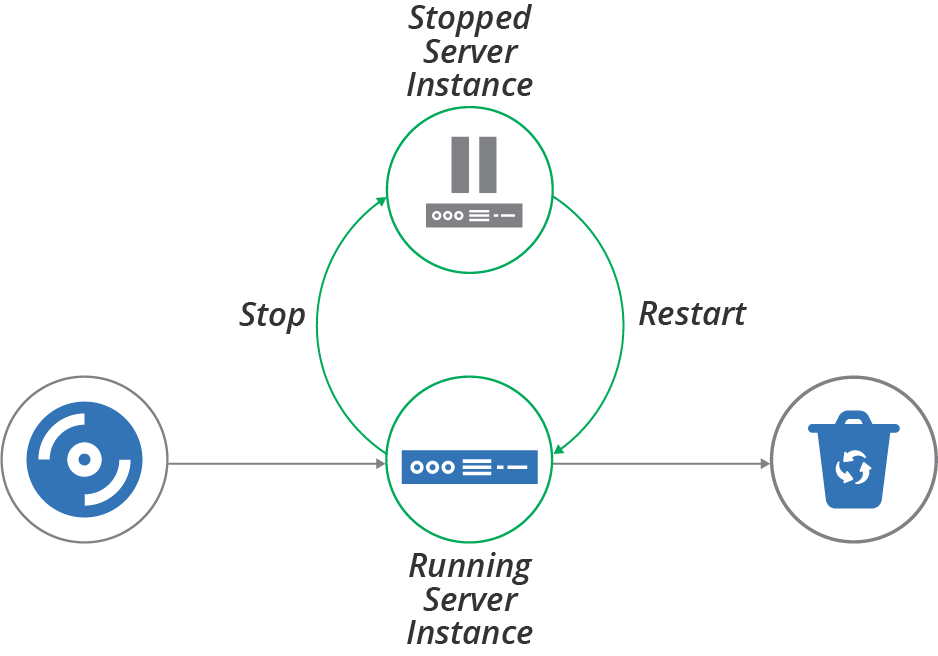
Figure 12-1. Server life cycle—stopping and restarting
People still stop and reboot virtual servers, sometimes for the same reasons—to reconfigure virtual hardware or upgrade an OS kernel. We sometimes shut servers down to save hosting costs. For example, some teams shut down development and test servers during evenings or weekends if nobody uses them.
If servers are easy to rebuild, however, many teams simply destroy servers when they aren’t in use, and create new servers when they’re needed again. They do this partly because it’s easy and may save a bit more money than simply shutting them down.
But destroying and rebuilding servers rather than stopping and keeping them around also plays to the philosophy of treating servers like “cattle” rather than “pets” (as mentioned in Cattle, Not Pets). Teams may stop and restart rather than rebuilding because they aren’t able to rebuild their servers with confidence. Often the challenge is retaining and restoring application data. See “Data Continuity in a Changing System” for ways to handle this challenge.
So having a policy not to stop and restart servers forces your team to implement reliable processes and tools to rebuild servers and to keep them working.
Having servers stopped can also complicate maintenance activities. Configuration updates and system patches won’t be applied to stopped servers. Depending on how you manage those types of updates, servers may receive them when starting again, or they may miss out.
Replacing a Server Instance
One of the many benefits of moving from physical to virtual servers is how easy it is to build and replace server instances. Many of the patterns and practices described in this book, including immutable servers (see “Pattern: Immutable Server”) and frequently updating server images, rely on the ability to replace a running server by building a new one (Figure 12-2).
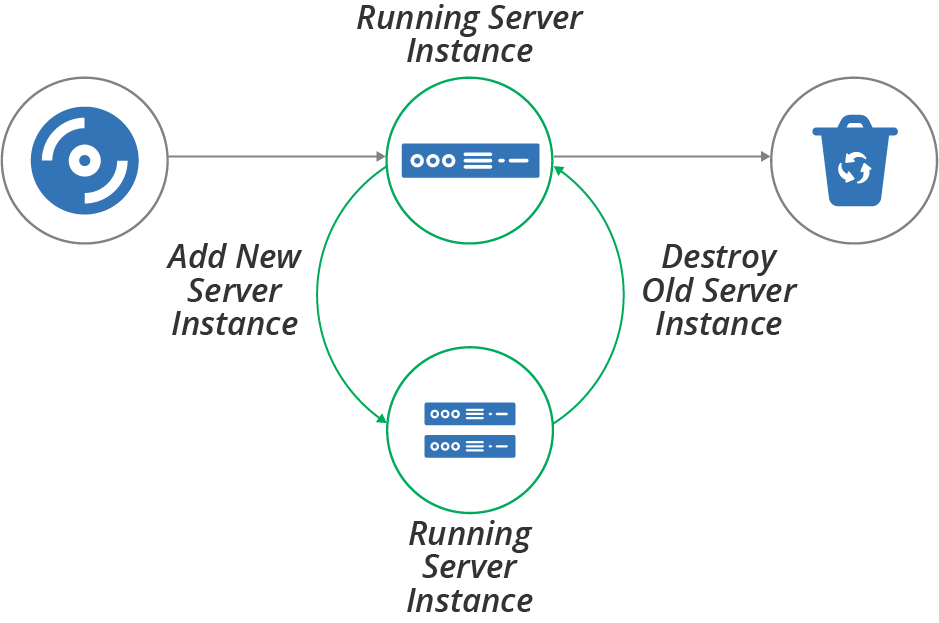
Figure 12-2. Server life cycle—replacing a server instance
The essential process for replacing a server instance is to create a new instance, validate its readiness, reconfigure other infrastructure and systems to use the new instance, test that it’s working correctly, and then destroy the old instance.
Depending on the applications and systems that use the server instance, it may be possible to carry out the replacement without downtime, or at least with minimal downtime. You can find advice on this in “Changing Live Infrastructure”.
Some infrastructure platforms have functionality to automate the server replacement process. For example, you might apply a configuration change to the definition of servers in an autoscaling server cluster, specifying that it should use a new server image that includes security patches. The platform automatically adds new instances, checks their health, and removes old ones.
In other cases, you may need to do the work to replace servers yourself. One way to do this within a pipeline-based change delivery system is to expand and contract. You first push a change that adds the new server, then push a change that removes the old server afterward. See “Expand and Contract” for more details on this approach.
Recovering a Failed Server
Cloud infrastructure is not necessarily reliable. Some providers, including AWS, explicitly warn that they may terminate server instances without warning—for example, when they decide to replace the underlying hardware.5 Even providers with stronger availability guarantees have hardware failures that affect hosted systems.
The process for recovering a failed server is similar to the process for replacing a server. One difference is the order of activities—you create the new server after destroying the old one rather than before (see Figure 12-3). The other difference is that you typically replace a server on purpose, while failure is less intentional.6
As with replacing a server instance, recovery may need a manual action, or you may be able to configure your platform and other services to detect and recover failures automatically.
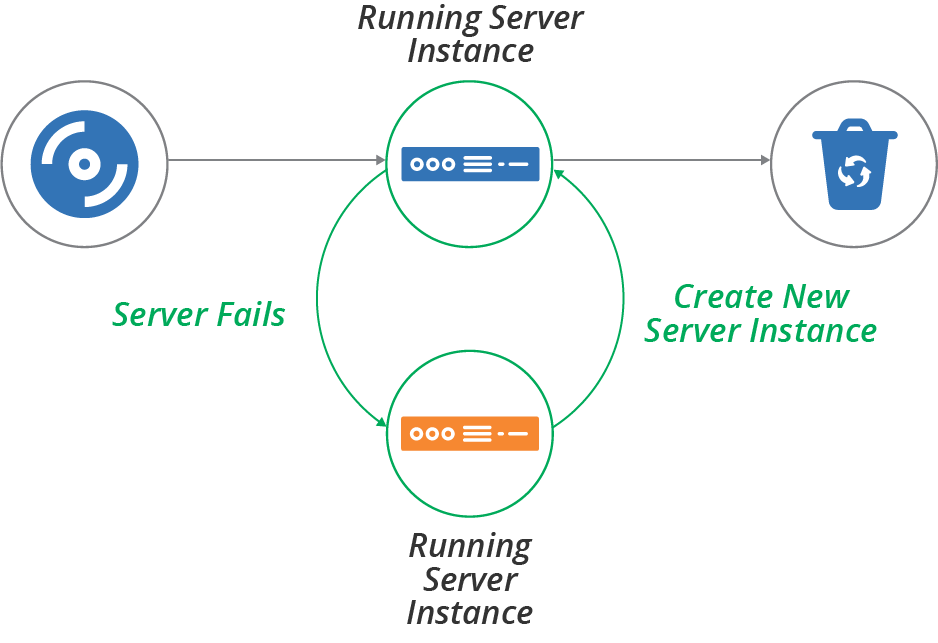
Figure 12-3. Server life cycle—recover a failed server instance
Conclusion
We’ve considered some patterns for when to apply configuration changes to servers—when making a change, by applying code continuously to running servers, or by creating new instances. We’ve also looked at patterns for how to apply changes—push and pull. Finally, we touched on some of the other server life cycle events, including stopping, replacing, and recovering servers.
This chapter, combined with the previous chapter on creating servers, covers the core events in a server’s life. However, many of the approaches to creating and changing servers that we’ve discussed work by customizing server images, which you then use to create or update multiple server instances. So the next chapter explores approaches to defining, building, and updating server images.
1 For an example, see the chef-client --splay option.
2 My colleague Peter Gillard-Moss and former colleague Ben Butler-Cole used immutable servers when they worked on the ThoughtWorks’ Mingle SaaS platform.
3 Some people have protested that immutable infrastructure is an invalid approach because aspects of servers, including logs, memory, and process space, are changeable. This argument is similar to dismissing “serverless computing” because it uses servers behind the scenes. The terminology is a metaphor. Despite the imperfection of the metaphor, the approach it describes is useful for many people.
4 A “break glass” process can be used to gain elevated access temporarily, in an emergency. The process is usually highly visible, to discourage it being used routinely. If people begin relying on a break glass process, the team should assess what tasks are forcing its use, and look for ways to support those tasks without it. See Derek A. Smith’s webinar, “Break Glass Theory” for more.
5 Amazon provides documentation for its instance retirement policy.
6 An exception to this is chaos engineering, which is the practice of deliberately creating failure to prove recoverability. See “Chaos Engineering”.