Chapter 19. Deploying Infrastructure
Throughout this book, I’ve discussed the step of deploying infrastructure code to provision, change, or remove infrastructure resources. In Chapter 4, I explained that, unlike software code, infrastructure code is executed during deployment. The ultimate purpose of infrastructure code is the set of infrastructure resources that result from executing the code, but deployment is where the action is.
This chapter focuses on the details of deploying infrastructure code. Deploying infrastructure code may require multiple steps. The first step is defining which version of the infrastructure code to deploy (the build). As described in Chapter 15, the build may be found as a package in an artifact repository, or it may be pulled directly from a source code repository as a branch or tag.
That chapter also explained that some activities, like resolving dependencies, may have been run during a build stage to prepare the build, or they could be repeated each time the build is deployed. Some activities need to execute as part of the process of deploying to a specific instance of the infrastructure. These can include:
-
Assembling configuration parameter values and secrets (discussed in Chapter 8)
-
Managing authentication to the IaaS platform and any other services involved in the deployment
-
Orchestrating the deployment and integration of multiple deployment stacks, as explained in Chapter 9
-
Recording output values and other data that may be needed by configuration databases, registries, and management services
-
Running tests, policy checks, health checks, and other validations before and/or after the infrastructure code is applied
The basic unit of deployment is the infrastructure stack. Some deployment processes deploy multiple stacks, which this book describes as a composition although, as mentioned in Chapter 6, different toolchains use different terms.
I’ll start this chapter by describing a few strategies for software deployment and then several infrastructure deployment strategies. The application strategies are a basis for some of the infrastructure deployment approaches, so it’s useful to have them for context.
Once I’ve described these strategies, I’ll describe ways to implement infrastructure deployment, including where to run infrastructure apply commands from, and then ways to trigger deployments.
Understanding Software Deployment Strategies
Understanding strategies for deploying software is an important starting point for considering infrastructure deployment. Many teams implement infrastructure deployments by using the same processes and even the same systems and tools that they use for deploying software, such as pipeline tools. Even when they use different tools, many infrastructure deployments follow similar patterns as application deployments. Finally, some interesting approaches combine deploying software and infrastructure.
Push Deployment for Software
The most common way to deploy software is to run a deployment tool when a change is made to the deployable code. This technique, called push deployment, is shown in Figure 19-1.
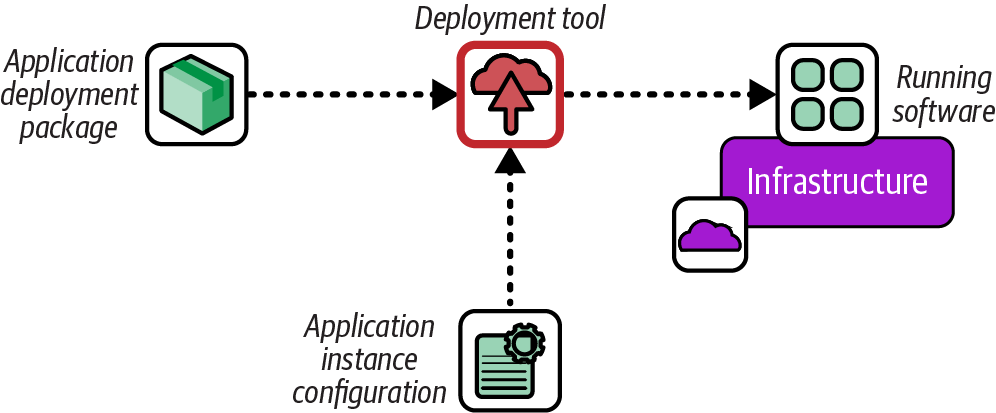
Figure 19-1. Push software deployment process
The deployment process is often managed by a pipeline stage that either responds to an event, polls a repository for new versions of the software, or runs when a human triggers it.
Pull Deployment for Software
A pull deployment defines software to be installed in infrastructure code, such as a server configuration that specifies an RPM package, illustrated in Figure 19-2.
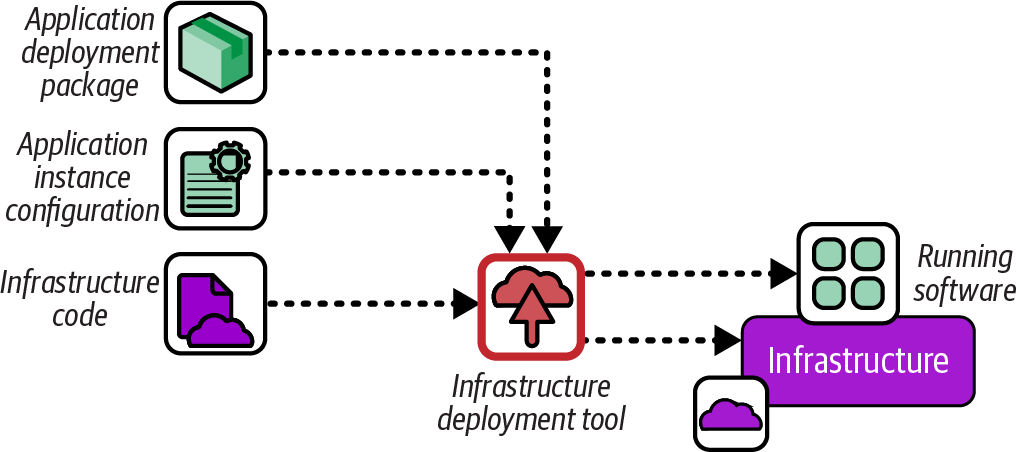
Figure 19-2. Pull software deployment process
Using infrastructure code to deploy software works well when the installation process is simple, as with many OS packages. When teams find themselves implementing deployment sequencing logic, failure detection and rollback steps, or orchestrating database schema definitions with deploying executables, I recommend stopping and looking into a proper application deployment tool like Capistrano or Fabric, assuming the application deployment process can’t be simplified.
GitOps Deployment for Software
GitOps is an approach most commonly used for deploying applications to Kubernetes clusters. The GitOps principles are as follows:
- Declarative
-
A system managed by GitOps must have its desired state expressed declaratively.
- Versioned and immutable
-
Desired state is stored in a way that enforces immutability and retains a complete version history.
- Pulled automatically
-
Software agents automatically pull the desired state declarations from the source.
- Continuously reconciled
-
Software agents continuously observe actual system state and attempt to apply the desired state.
Figure 19-3 shows a deployment service pulling application configuration and binaries and deploying them to a runtime platform.
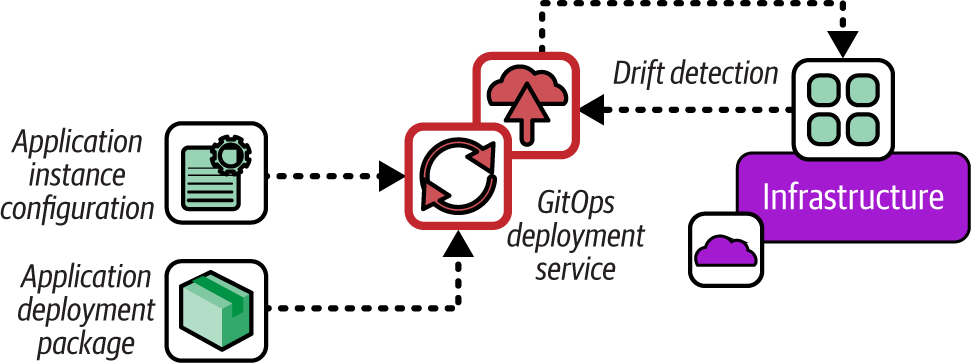
Figure 19-3. GitOps software deployment process
Unlike a push or pull deploy, the GitOps service continuously checks the version of code and configuration currently deployed against their definitions in the configuration file, and redeploys if the code is found to be different. This means that a deployment doesn’t run only when there is a new version of code, but even if the code is unchanged but, for some reason, the deployed code is no longer the same. This process is called drift detection (see the following sidebar).
GitOps is typically implemented using the Kubernetes Controller pattern (see the Kubernetes documentation).
Using Infrastructure Deployment Strategies
Infrastructure deployment builds on approaches for deploying software. The more interesting aspects are in how the deployment of software and infrastructure are orchestrated together. The pull deployment pattern I described previously is the first example of this, where software is deployed as a part of deploying infrastructure. Several approaches for infrastructure deployment invert this, managing infrastructure deployment in the context of software deployment.
Siloed Infrastructure Deployment
Possibly the most common approach to managing infrastructure is to provision it in a separate operation from deploying its workloads. Figure 19-4 shows the infrastructure deployment and software deployment as separate processes.
Siloed infrastructure may be deployed using any of the deployment processes described in this chapter, such as manually or from a centralized service. This approach is often used by instance management teams, which, as explained in “Infrastructure Instance Management Teams”, can lead to lower effectiveness in the quality, reliability, and flow of delivery for both software and infrastructure. It’s usually more effective to separate the definition and deployment of infrastructure tied to specific applications from shared infrastructure.
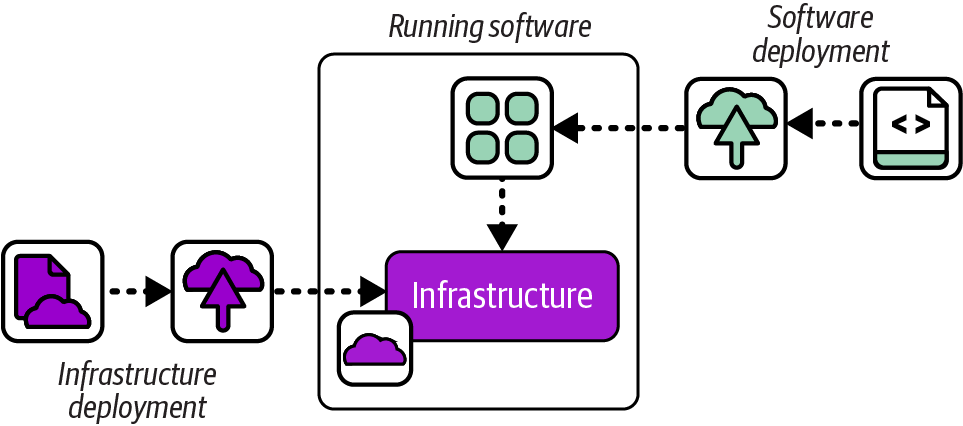
Figure 19-4. Siloed infrastructure deployment
Application Infrastructure Descriptor
An increasingly common way to enable people who are responsible for software to deploy the infrastructure they rely on is to use infrastructure deployment descriptors. Figure 19-5 shows how these work.
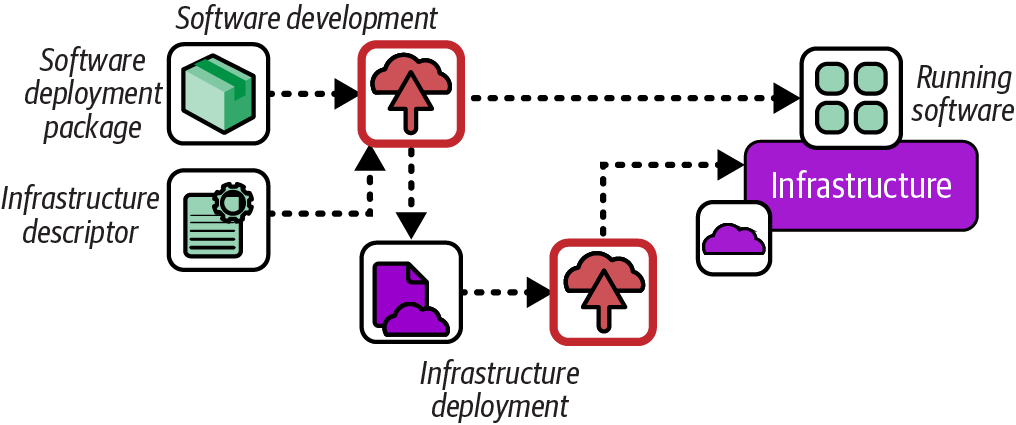
Figure 19-5. Application infrastructure descriptor
An application deployment includes a descriptor file specifying the infrastructure that the software needs. For infrastructure specific to that application, like a database instance, the deployment service can trigger the deployment of the relevant infrastructure. The descriptor can also specify a shared service, like a container cluster or monitoring service, which the deployment service can use to integrate the application.
Many teams define in-house deployment specifications, but movements to standardize this concept have arisen, such as the Score specification.
Infrastructure from Code
Some leading-edge, experimental tools take the infrastructure descriptor concept a step further by embedding code that defines the infrastructure needed by an application into the application code. In some cases, the infrastructure is deployed when the application is deployed or when it runs for the first time. In other cases, the application code might deploy its infrastructure the first time it needs to use it. Figure 19-6 show infrastructure deployed from application code.
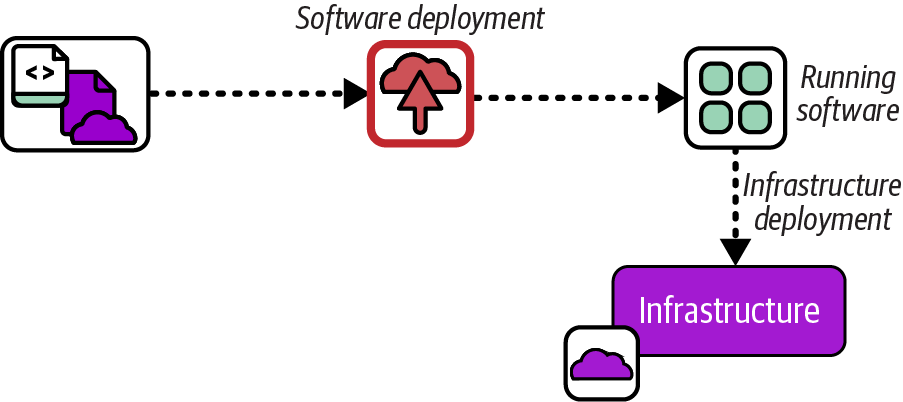
Figure 19-6. Infrastructure deployed from application code
I’ve mentioned examples of tools built around the IfC concept, including Ampt, Darklang, Winglang, and Nitric (see “Infrastructure from Code”). The approach is also advocated by some serverless developers, leveraging the ability of infrastructure tools like AWS CDK to write infrastructure code in the same language used to write the application code to have projects that provision their own IaaS resources.2 In my pre-cloud days, I deployed applications that automatically connected to their database and provisioned their schemas the first time they started, an early example of infrastructure from data.
Although application infrastructure code could embed low-level infrastructure code, other options include importing code libraries, or including annotations in application code that indicate the infrastructure required. Code from the application might directly interface with the IaaS platform API, or it might interact with an infrastructure deployment service API. These depend on the implementation of the infrastructure from data framework or platform.
Running Infrastructure Deployments
Many people start out with Infrastructure as Code by running deployment tools from their personal workstation or laptop. However, this doesn’t work well when working in a team and managing infrastructure for environments used by other people. In these situations, individual infrastructure developers may still run tools locally while editing and testing code, but most of the delivery workflow involves running the tools to apply code from a centralized service. I’ll discuss the circumstances for running code locally first and then options for running it centrally.
Deploying Infrastructure Code from Your Computer
The simplest way to deploy infrastructure code is to run the tool on your laptop or workstation by using a local copy of the code you have checked out. Doing this is useful when you are testing changes that you’re working on, and for small, personal projects where you’re not too worried about breaking something.
On the other hand, having multiple people share an instance of infrastructure to test changes they each work on locally can lead to conflicts and wasted time. Figure 19-7 shows two people deploying local code changes to the same instance and overwriting each other’s work.
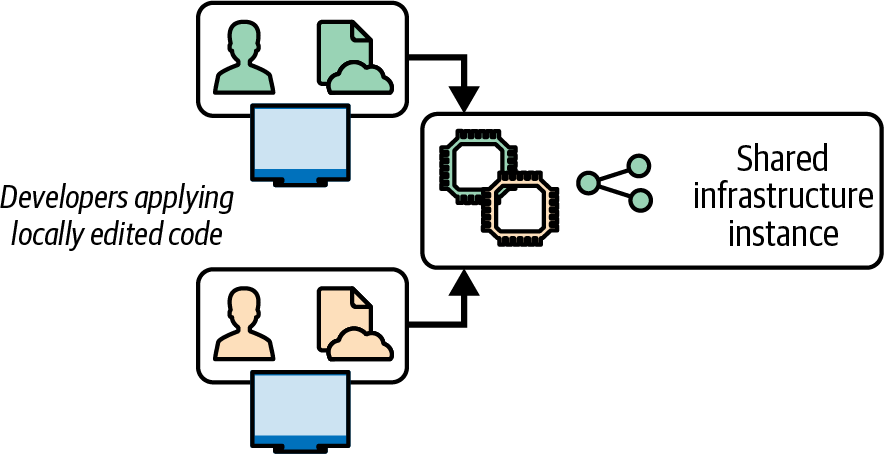
Figure 19-7. Locally editing and applying code leads to conflicts
It often takes a while for the people involved to recognize what’s going on in this situation. They waste time and energy trying to work out what’s wrong with the system, or their code, not realizing that someone else is reverting their change without noticing.
Note that a locking solution, such as Terraform’s state locking, won’t prevent this situation. Locking stops two people from applying their code to the same instance simultaneously. But, as of this writing, locking solutions don’t stop people from applying their own, conflicting versions of code one after the other.
As I’ve suggested in “Personal IaaS Environments”, it’s best if infrastructure developers have their own instances of infrastructure to test their changes, making sure the resources are destroyed when not in use to avoid running up costs. However, when multiple people need to work on an infrastructure instance, infrastructure code should be deployed from a centralized service.
Deploying from a Central Service
A centralized infrastructure deployment service carries out the deployment activities described earlier in this chapter. The service pulls an infrastructure code build from a source code repository or an artifact repository and then runs the tools to apply the code to the infrastructure instance. This technique imposes a clear, controlled process for managing which version of code is applied and how it’s applied.
As shown in Figure 19-8, infrastructure developers can push their changes to the repository, and the deployment service pulls each build to deploy it.
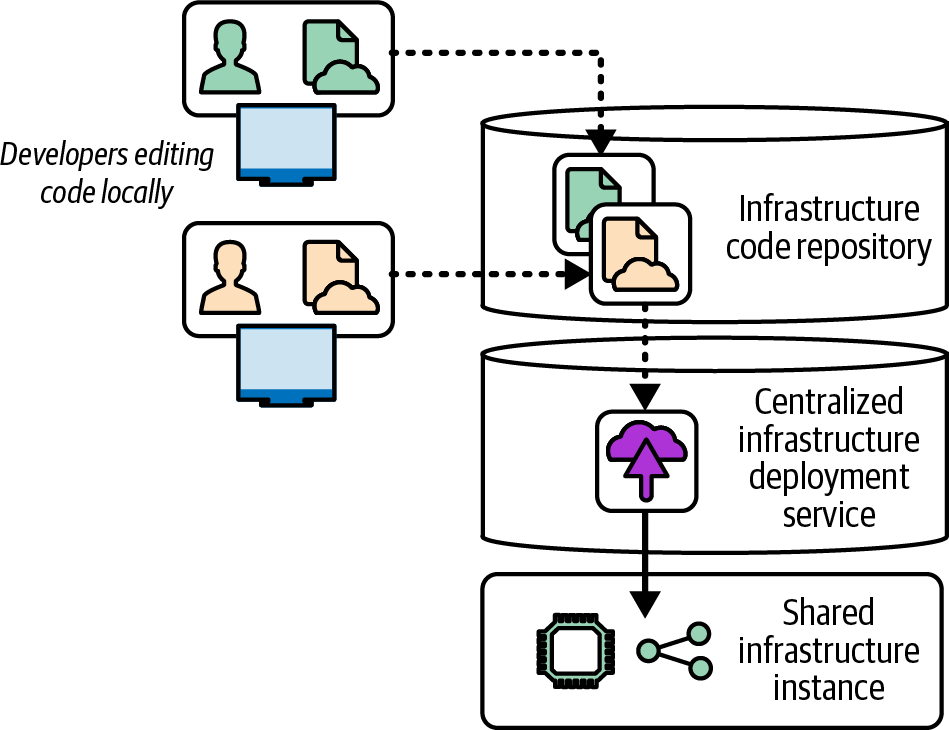
Figure 19-8. A centralized infrastructure code deployment service
Using a central deployment service doesn’t guarantee people won’t overwrite one another’s work. But because the developers need to push their code into the source repository before it is applied, they will see when someone else has pushed a newer change. They can then merge the other developer’s change with their local copy before pushing again, so they are fully aware of any conflicts.
The central service should also track the history of deployments, which makes it easier to understand what’s been done to the environments and troubleshoot issues. The code that has been applied is available in the repository for anyone to review and use in troubleshooting and correcting problems. This is handy if the person who made the code change isn’t available. Otherwise, it can be hard to work out which copy of the code was applied, and it may even be impossible to get access to that copy if it’s on the personal machine of a developer who has left for a vacation, for example.
Another benefit of a central deployment service is that it can ensure that all the right steps are run when applying a change to an environment, including governance and reporting. People in the habit of deploying from their personal machine may be tempted to skip parts of the process, especially when rushed, which is a common way to cause or worsen a production outage.
Deploying from a Delivery Pipeline
A centralized service has many options for deploying infrastructure code. A common choice is to implement deployment in a build or deployment stage by using the delivery pipeline (see “Delivery Pipeline Software and Services”). Figure 19-9 shows a pipeline stage that deploys infrastructure to an environment.
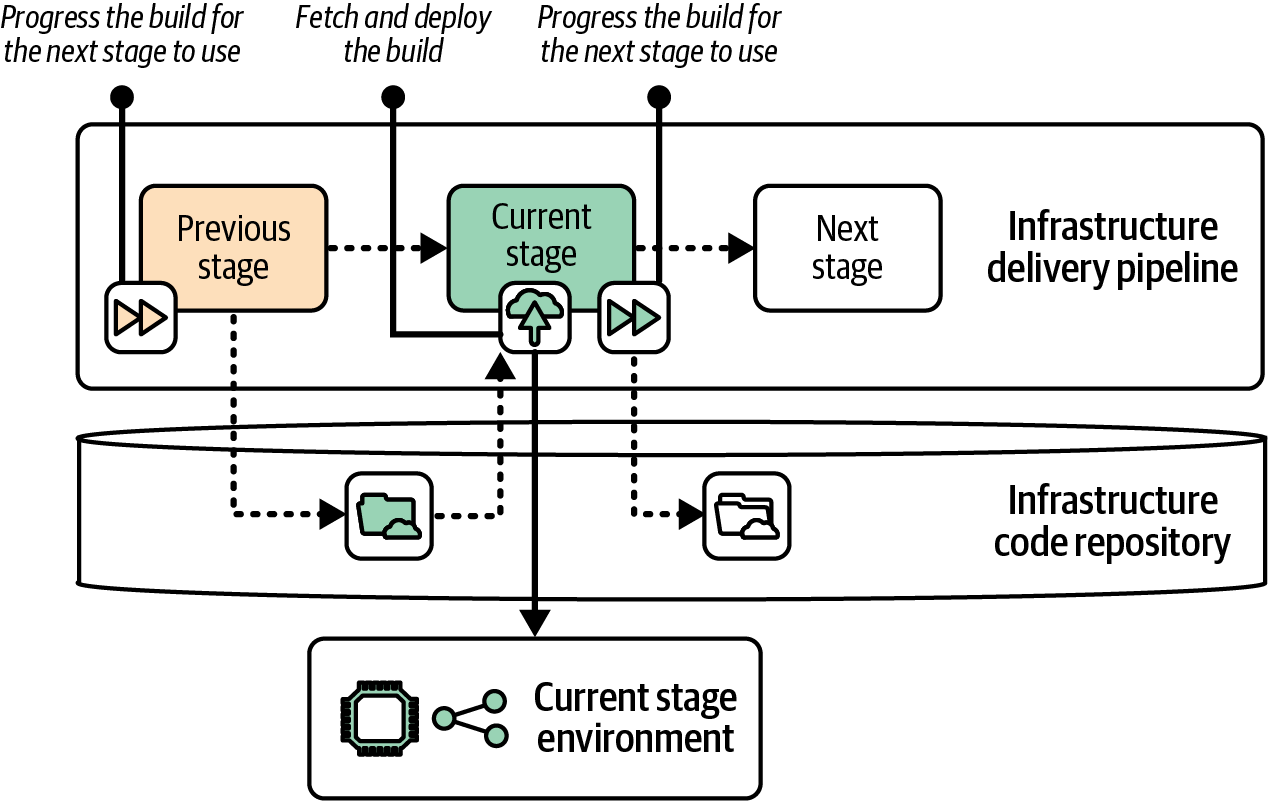
Figure 19-9. Deployment implemented in the delivery pipeline
The example shows the previous stage promoting the infrastructure code artifact and triggering the current stage. The pipeline executes the current stage, which runs the infrastructure tool to apply the code to the relevant environment. The pipeline service normally runs the infrastructure tool on an agent, such as a server or container instance. If the current stage completes successfully, it promotes the build to the next stage of the pipeline.
Many teams prefer running infrastructure deployments from the pipeline to keep the visibility and troubleshooting of the process in one place. This particularly makes sense when a single team is responsible for both the workflow and deployment of infrastructure. When the ownership is split, such as when one team provides infrastructure that another team configures and deploys, it can make sense to separate the workflow from the deployment by using a separate deployment service.
Using an Infrastructure Code Deployment Service
Some vendors and open source projects provide specialized software or services for deploying infrastructure code. Some of these also implement a pipeline service that progresses builds across stages. Other solutions handle only the infrastructure code deployment and can be combined with a deployment pipeline, as shown in Figure 19-10.
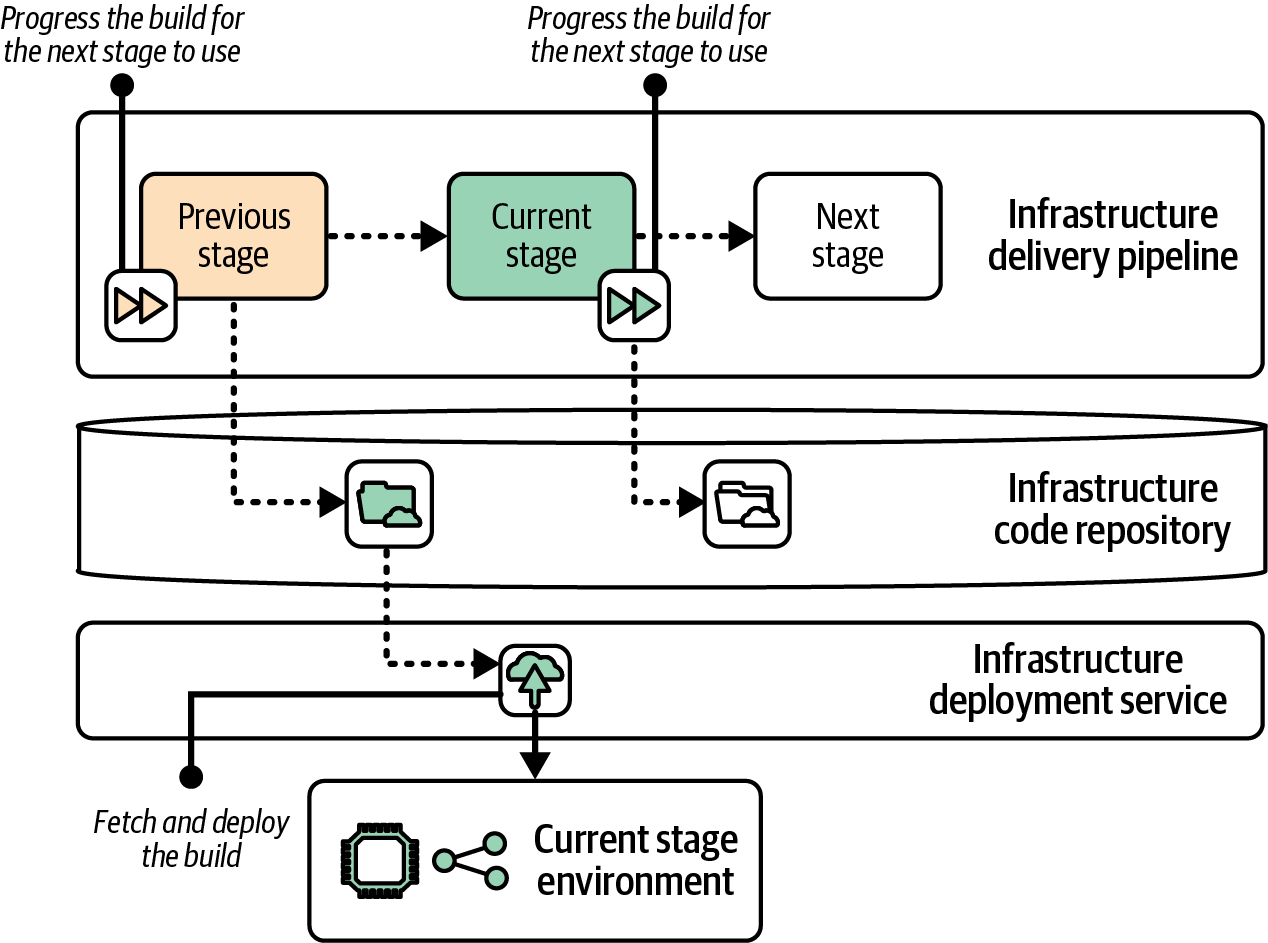
Figure 19-10. Separating the build lifecycle progression from deployment
This example shows the same pipeline stages and environments from the previous example, where the pipeline deploys the infrastructure code. However, in this case the delivery pipeline only manages the progression of the code from one stage to the next. Again, progression may be implemented as a version number, repository tag, or source code branch.
A deployment service normally has a server or pool of nodes that runs the infrastructure tool, downloading or checking out the relevant build the same way I described for running deployments from a pipeline.
Many Infrastructure as Code tool vendors offer hosted deployment services, including Pulumi Cloud and HCP Terraform, usually as part of a suite of services.
Some IaaS cloud vendors also have services to run infrastructure code. The AWS Service Catalog supports both CloudFormation and Terraform. Google Cloud Infrastructure Manager and Oracle Cloud Infrastructure Resource Manager both support Terraform.
Some third-party vendors provide solutions that work with multiple Infrastructure as Code tools, such as env0, Garden, and Spacelift.
Terraform Automation and Collaboration Software (TACOS) products are specifically for use with Terraform and OpenTofu. TACOS products and services include the following:
Some of these services are hosted SaaS offerings, some are products you can deploy and run yourself, and some are tools that you run from another service or system like a delivery pipeline. Terrakube and some of the other offerings apply infrastructure code from a Kubernetes operator, so they leverage your Kubernetes cluster as an infrastructure deployment service.
Infrastructure as Data
Infrastructure as data is the practice of deploying infrastructure code by using the same Controller pattern used with GitOps.3 It’s a variation of Infrastructure as Code that treats drift detection and resolution as a core feature. Infrastructure definitions are stored in a central service, usually a Kubernetes cluster, which uses a control loop to continually synchronize the definitions with the running infrastructure, as shown in Figure 19-11.
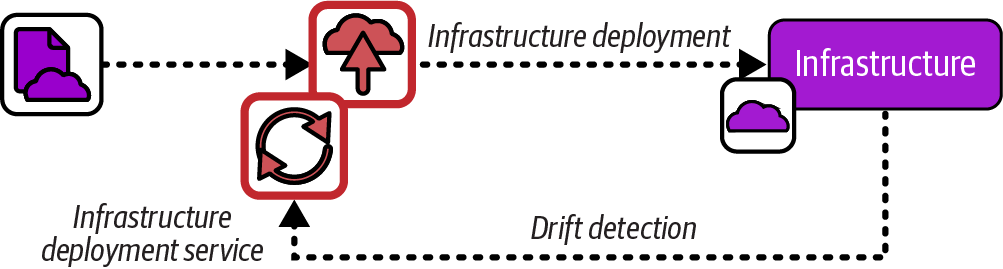
Figure 19-11. Infrastructure as data
Some Infrastructure as Code tools are designed to natively use the Controller pattern (see “Infrastructure as Code Tools”). The following are some of these tools:
-
ACK, which works with AWS
-
Crossplane, which supports multiple clouds
-
Config Connector, which works with GCP
Each of these supports its own YAML-based language for defining infrastructure. Other custom controllers are available that work with other infrastructure tools. The controller is installed in a Kubernetes cluster and either triggers deployment from a hosted service like HCP or Pulumi Cloud, or else runs the infrastructure tool itself. Here are some examples:
-
Tofu Controller (which works with Terraform as well)
Although most infrastructure as data systems are based on Kubernetes, IaSQL is an intriguing alternative that uses the PostgreSQL database instead. Infrastructure code is written in SQL, and a connector synchronizes the definitions in the database with infrastructure hosted on AWS.4
Infrastructure Deployment Scripts
At the beginning of this chapter, I listed various activities that are often needed to prepare for executing infrastructure code and to finish up afterward. These included retrieving the code and its dependencies, assembling configuration parameters, orchestrating the deployment and integration of multiple stacks, recording values and other information about the resulting infrastructure, and running any tests and checks before and after the deployment.
Most teams I’ve encountered write custom scripts to orchestrate the process of deploying infrastructure code. They write these orchestration scripts in languages like Python or Ruby, as shell scripts or batch files, or use build definition languages like Make or Rake. Their scripts start simple but evolve to handle a multitude of tasks. I’ve worked on projects with infrastructure deployment scripts that had more lines of code than the infrastructure codebase we managed with them and that took up more of our time to maintain and troubleshoot.
Tools and services have been developed over the past few years to standardize and productize various aspects of infrastructure code delivery and deployment workflows. These include Terragrunt, which is essentially a build and deployment tool for Terraform, as well as Atmos, InfraBlocks, and Terraspace, which I would describe as deployment frameworks. Some of the deployment services I mentioned earlier in this chapter also provide some levels of standardization and support for managing infrastructure code projects.
Triggering Infrastructure Deployments
Now that we’ve discussed where we can run infrastructure deployments, we can move on to when and how to make those deployments happen. Some of the drivers for running an infrastructure deployment include changes to input materials such as source code or dependencies, rollbacks to a previous version of code, and changes to target infrastructure resulting in it no longer matching the code.
Using Input Materials for Deployment
You may use multiple types of input materials to deploy an infrastructure stack instance, as shown in Figure 19-12. The main input material is the infrastructure code and anything included in the build, as discussed in Chapter 15.
Infrastructure deployments usually also use instance-specific configuration values. Chapter 8 described options for storing configuration values, including configuration files kept with the code build, in a central file location, or in a configuration registry.
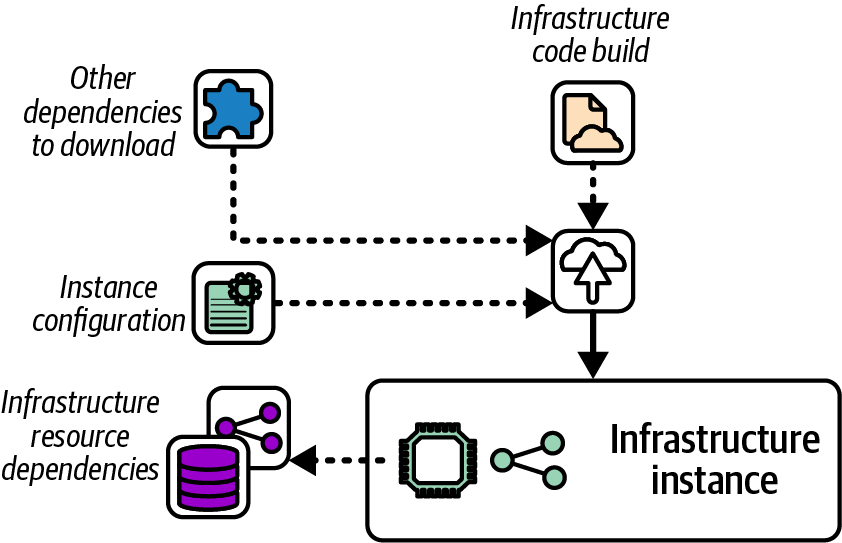
Figure 19-12. Deployment input materials
A deployment may also involve other dependencies, such as infrastructure resources created outside the stack being deployed, static files, or templates. A common example is a server build image, like an AWS AMI, referenced by infrastructure code that deploys a cluster. Dependencies that are referenced indirectly, perhaps even from libraries imported by the code, can be difficult to track and manage.
As discussed in “Build Stage”, it’s a good idea to set up your delivery process so that as many of the dependencies and inputs as possible are assembled and bundled with the versioned build, rather than reassembling them each time the build is deployed to a different instance. Including materials in the build improves the consistency of deployments and environments, and gives you better awareness of your software (and system) supply chain.
When the input materials for a given environment change, you need to deploy those changes. I recommend deploying as soon as you safely can after any input materials change, to avoid accumulating outdated system elements. The purpose of pipelines that run testing and validation is to make it as safe as possible to pull in updates when they’re available. Ideally, you automatically trigger deployments for routine updates and changes.
Manually Triggering Deployment
Humans often need to trigger the deployment of infrastructure builds. A tester provisions a specific version of infrastructure for exploratory testing. A system operator rolls back a change that has an issue by deploying the previous version of infrastructure. A reviewer approves the deployment of an infrastructure change to a regulated system. A software developer troubleshoots a production issue by deploying the same version of infrastructure to a test instance.
We can implement a manual deployment trigger in various ways. Here are some options:
- Pipeline or deployment service UI
-
Although the default workflow for these tools often triggers deployments automatically, most also have a UI where someone can select an infrastructure build to run a particular stage. This option is useful when you want to deploy an older build version for rollbacks and troubleshooting, or when you want to give testers control over which versions of code they’re testing.
- Developer portal
-
A developer portal can be configured to present users with the option to select an infrastructure build to deploy to an existing or new environment. The portal handles the interface, authorization, and potentially other concerns like billing, and then calls a deployment service on the backend. You may want to implement tags in addition to version numbers, so people can choose to deploy the current production version, latest development version, or perhaps an alpha or beta version.
- Ticketing system
-
Ticketing systems can implement a governance workflow for managing approvals and recording auditing information for the lifecycle of an infrastructure build and environments. You can integrate ticketing workflows with your delivery pipelines to separate the implementation of governance and deployment.
- Deployment source code branches
-
Some teams use branches to manage the workflow of code and configuration across environments. A person promotes a build to an environment by merging the build code into the environment’s branch. The deployment mechanism may be triggered by a hook in the source control service, or by the deployment service polling the branch for changes. Many of the infrastructure deployment tools listed earlier are specifically designed for this type of workflow, often using pull requests for reviewing and authorizing deployments.
Although having an option for people to trigger deployments is useful, especially for human-managed workflow steps, in many cases workflows should automatically run deploy infrastructure builds.
Automatically Triggering Deployment
Many delivery workflows include steps to automatically validate that each build meets certain criteria. In Chapter 16, I described using multiple stages to progressively test builds with a broader scope of integrations and dependencies.
An infrastructure developer usually triggers the pipeline by pushing a commit to the infrastructure code. The first stage creates the build and runs offline tests, and then triggers a stage to deploy a test instance of the build on the IaaS and run automated tests. That stage might, in turn, trigger a following stage that deploys the build into an integrated environment to run more-comprehensive automated tests.
Each of these stages will automatically trigger the deployment of the infrastructure build. The mechanism for triggering the deployment is usually the same used for manual deployments, as I’ll discuss next.
Implementing Triggers
The mechanism to implement a deployment trigger depends on the tools and services you use. Many deployment services have an API. The pipeline service, developer portal, ticketing system, or source code repository service calls the deployment service API, passing the information it needs such as the version of the infrastructure code build to deploy. The API call might pass details like instance parameter values. The details of the deployment might be implemented in the configuration for the deployment job, or the deployment job could call an orchestration script, as I’ll describe later.
Calling an API or other mechanism to start the deployment is an active deployment trigger. Some deployment services use passive deployment triggers, particularly with infrastructure as data. Passive triggers could monitor code in a source repository, packages in an artifact repository, values in a configuration registry, or changes to dependent resources.
One concern with indirect deployments is that troubleshooting deployments that happen in the background can be more difficult. Implement information radiators and alerts to make sure the team is notified when deployments are running out of control or failing. Ensure that there is a way to temporarily pause synchronization and comprehensive logging and observability of the deployment process to support troubleshooting.
Conclusion
Current approaches and tooling for deploying infrastructure code are an area that is likely to evolve in the years after this book is published. My intention has been to examine aspects of deployment, particularly how they are triggered, which will most likely still be relevant as time goes on. I expect the main areas of change to be a movement from some techniques that are common now, like deploying code from someone’s laptop, to the use of services that separate code promotion from deployment, and more use of passive triggers over active triggers.
The approaches I described in this chapter are used not only to provision new infrastructure but also to apply changes to existing infrastructure resources. Making changes to production infrastructure can be challenging, as it has the potential to disrupt running workloads. I’ll discuss the challenges this presents and techniques for dealing with them in the next chapter.
1 In Chapter 2, I mentioned that configuration drift has two definitions. The older definition is drift between the configuration of infrastructure instances that are meant to be consistent, like environments in a delivery path (see “Minimize Variation”). In the second, more recent definition, drift detection describes differences between code and the instance it’s deployed to, as in this chapter.
2 This serverless Hello World application tutorial is a typical example of infrastructure from code.
3 See “I Do Declare! Infrastructure Automation with Configuration as Data” by Kelsey Hightower and Mark Balch.
4 As of this writing, not much activity is occurring on the IaSQL project. Whether it’s active or not, it’s an interesting example of an alternative way of approaching Infrastructure as Code.