Chapter 8. Configuring Infrastructure Stack Instances
The previous chapter introduced the Reusable Stack pattern as a way to use infrastructure code to create multiple instances of the same infrastructure. The Reusable Stack is a core pattern for keeping infrastructure consistent across an estate. However, people often find it easier to create new infrastructure by copying or branching code to create a new project, the Snowflakes as Code antipattern. The most common reason people copy a stack project is that it’s the easiest way to customize instances of a stack.
Stack instances inevitably need to be customized. A simple example is a container cluster that needs fewer worker nodes in a development environment and more in a production environment. Copying and customizing a stack’s code is temptingly easy, especially if you need more-complex differences than setting the size of a container cluster. But this customization quickly leads to an unmaintainable mess of code and infrastructure, falling afoul of pretty much everything mentioned in Chapter 2.
Ensuring that stacks are configurable helps reduce the size and complexity of an infrastructure codebase. This chapter focuses on ways to specify configuration parameters when provisioning a stack instance. The bulk of the chapter defines patterns for implementing stack configuration. I’ll also dip into the topic of configuration registries, which are needed for one of these patterns, and handling secrets as a type of configuration that needs more care.
Setting configuration parameters for a stack instance is closely related to integrating stacks, which is usually implemented by providing the output values from one stack as configuration parameters to another. Chapter 9 describes approaches specific to integrating stacks, many of which build on patterns from this chapter.
Chapter 6 described a higher-level component, the infrastructure composition, that defines a collection of stacks. Compositions define stacks to provision and set their configuration values. Compositions are an option for implementing many of the patterns in this chapter and the next, especially when deployments involve multiple stacks.
Before launching into the patterns for configuring stacks, I’ll set the scene with key concepts as well as examples that can be used to illustrate the patterns.
Key Concepts
Here is an example of stack code that defines a container cluster with configurable minimum and maximum numbers of worker nodes:
container_cluster:id:web_cluster-${environment}min_workers:${min_workers}max_workers:${max_workers}
You pass different parameter values to this code for each environment, as depicted in Figure 8-1.
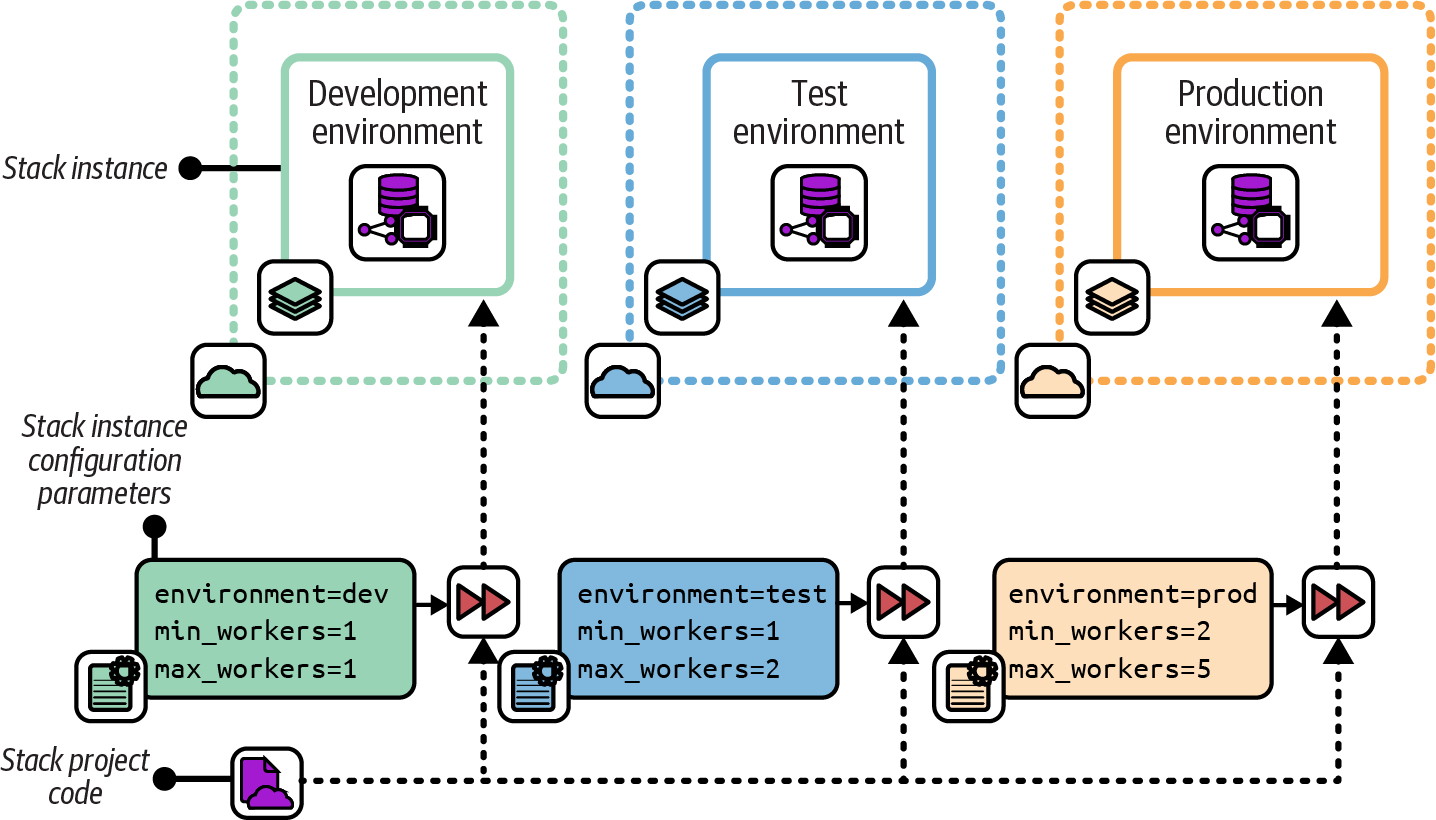
Figure 8-1. Using the same code with different parameter values for each environment
Stack tools such as Terraform, OpenTofu, Pulumi, and AWS CDK support multiple ways of setting configuration parameter values. These typically include passing values on the command line, reading them from a file, and having the infrastructure code retrieve them from a key-value store. The patterns later in this chapter make use of these options for setting parameter values.
Use Stack Parameters to Create Unique Identifiers
Even when stack instances don’t vary much, setting unique names or identifiers is often necessary for certain resources in an IaaS platform. For example, the following code defines an application server:
server:id:appserversubnet_id:appserver-subnet
This IaaS platform requires a server’s id value to be unique, so running the stack command to create the second stack fails:1
#Createaninstanceinthedevelopmentenvironment:> stack up --stack-name=app-dev --source mystack/srcSUCCESS: stack 'app-dev' created#Nowcreateaninstanceinthetestenvironment:> stack up --stack-name=app-test --source mystack/srcFAILURE: server 'appserver' already exists in another stack
Using a parameter can avoid this clash. The code is modified to take a parameter called environment and use it to assign a unique server ID. The server is also now deployed into a different subnet in each environment:
server:id:appserver-${environment}subnet_id:appserver-subnet-${environment}"
Now, the stack command creates multiple stack instances without an error:
#Createaninstanceinthedevelopmentenvironment:> stack up --stack-name=app-dev --source mystack/src --environment=devSUCCESS: stack 'app-dev' created#Nowcreateaninstanceinthetestenvironment:> stack up --stack-name=app-test --source mystack/src --environment=testSUCCESS: stack 'app-test' created
In a few cases, unique identifiers may be the only detail that varies among instances of a stack. But further customization is more common. Taking configurability too far can make systems inconsistent and difficult to maintain even when using a single stack project.
Keep Parameters Simple
The more configurable a stack project is, the more each instance may vary from others, and the more difficult it can be to test and maintain the code. So it’s best to keep stack parameters simple and to use them in simple ways:
-
Prefer simple parameter types, like strings, numbers, and perhaps lists and key-value maps.
-
Minimize the number of parameters that you can set for a stack. Avoid defining parameters that you “might” need later. Add a parameter only when you have an immediate need for it. You can always add a parameter later if you discover you need it. This is the principle of “you ain’t gonna need it” (YAGNI).2
-
Avoid using parameters as conditionals that create significant differences in the resulting infrastructure. For example, a Boolean (yes/no) parameter to indicate whether to provision a service as part of a stack instance creates a significant difference between instances of the same stack.
When following this advice becomes difficult, it’s probably a sign that you should refactor your stack code, perhaps splitting it into multiple stack projects.
Example Stack
I’ll use an example stack to compare and contrast the stack configuration patterns in this chapter. The example stack defines a container cluster composed of a dynamic pool of worker nodes and some networking constructs. The folder structure for the project is as follows:
├── src/│ ├── cluster.infra│ └── networking.infra└── test/
The cluster stack uses the parameters listed in Table 8-1 for three stack instances, dev, test, and prod.
| Stack instance | environment |
min_workers |
max_workers |
|---|---|---|---|
|
dev |
1 |
1 |
|
test |
1 |
2 |
|
prod |
2 |
5 |
The environment instance is a unique ID for each environment, which can be used to uniquely identify elements within the environment so they don’t clash with the same elements in other environments. The min_workers and max_workers instances define the range of sizes for the cluster. The infrastructure code in the file cluster.infra defines the cluster on the cloud platform, which scales the number of host nodes depending on load. Each of the three environments, dev, test, and prod, uses a different set of values.
I’ll refer to this example in the patterns and antipatterns described in the next section.
Patterns for Configuring Stacks
We’ve looked at why you need to parameterize stacks. This section describes patterns and antipatterns for providing parameters to your stack tool when creating or updating an instance:
- Configuration in Code
- Manual Stack Parameters
-
Run the stack tool and type the parameter values on the command line.
- Stack Environment Variables
-
The stack tool picks up parameter values from the environment it executes in.
- Scripted Parameters
-
Hardcode parameter values for each instance in a script that runs the stack tool.
- Stack Configuration Files
-
Declare parameter values for each instance in configuration files kept in the stack code project.
- Deployment Wrapper Stack
-
Create a separate infrastructure stack project for each instance, and import a shared library with the stack code.
- Pipeline Stack Parameters
-
Define parameter values in the configuration of a pipeline stage for each instance.
- Stack Parameter Registry
Each of these patterns and antipatterns is defined in detail in the following sections.
Configuration in Code
Variations between stack instances can be implemented within the stack’s code. A single parameter, such as environment, is used to specify which instance the code is applied to. The stack code is written to implement the variations needed for each potential instance:
container_cluster:web_cluster-${environment}min_workers:#{if ${environment} == "dev" || ${environment} == "test"1elsif ${environment} == "prod"2end}max_workers:#{if ${environment} == "dev"1elsif ${environment} == "test"2elsif ${environment} == "prod"5end}
The Configuration in Code antipattern differs from simply having options in the code in that it’s tied to the specific instances. The antipattern violates the law of Demeter, also known as the principle of least knowledge. The stack code knows too much about where it may be deployed.
Motivation
Implementing instance Configuration in Code is easier than externally managing parameter values, as per the other patterns in this chapter, if you don’t have the necessary tools and support mechanisms. It can also be appealing to have the configuration with the code, where it is all visible in one place.
Consequences
Combining instance-specific configuration with code that is reused across the instances couples the code tightly to the environments it’s used in. A configuration change requires changing stack code, which needs more comprehensive testing than a change to an input value.
Creating a new environment involves making changes to all the stack code that includes configuration. The overhead of changing and testing stack code increases the cost of creating environments, which can lead to constraints on the capacity for delivery and testing software and infrastructure.
Infrastructure code (or any code) that includes instance-specific variations can be difficult to read, understand, and maintain as it grows. The preceding example code shows one part of a stack with conditional code based on the instance. The rest of the stack may have multiple other settings and options that also depend on which instance it’s applied to.
Implementation
Instance-specific code may be cleaned up by separating code that sets the values from the code where they are used. Here’s an example, changed from the preceding one:
if ${environment} == "dev"${min_workers} = 1${max_workers} = 1elsif ${environment} == "test"${min_workers} = 1${max_workers} = 2elsif ${environment} == "prod"${min_workers} = 2${max_workers} = 5endcontainer_cluster:web_cluster-${environment}min_workers:${min_workers}max_workers:${max_workers}
Configuration and implementation are separated, which makes the code easier to read and maintain. But configuration changes still require changing the stack code. You need to either fully test the stack code for every configuration change or rely on humans to decide when a change needs testing. “I didn’t change anything important” is a phrase often heard during postmortems after production incidents.
This cleaned-up code example is only a step away from the Stack Configuration Files pattern described later in this chapter, which avoids most of the problems with the Configuration in Code antipattern.
Rather than specifying variations in infrastructure code based on the instance, specify the variations based on the specific outcome for each variation. You can then select the variation by using a parameter value that makes its purpose explicit.
For example, the following code configures our container cluster based on a parameter called cluster_size_, which can be set to S, M, or L:
if ${cluster_size} == "S"${min_workers} = 1${max_workers} = 1elsif ${cluster_size} == "M"${min_workers} = 1${max_workers} = 2elsif ${cluster_size} == "L"${min_workers} = 2${max_workers} = 5endcontainer_cluster:web_cluster-${environment}min_workers:${min_workers}max_workers:${max_workers}
Changes to the stack code can be run through tests for all these size settings. The size of an instance can be changed without needing to change or test the stack code since the behavior is known.
Manual Stack Parameters
Manually typing parameter values for an instance on the command line is a natural approach, as shown in Example 8-1.
Example 8-1. Manually typing command-line parameters
> stack up environment=prod min_workers=2 max_workers=5 --source mystack/srcSUCCESS: new stack 'prod' created> stack up environment=prod min_workers=3 --source mystack/srcSUCCESS: existing stack 'prod' modified. Diff:- min_workers=2+ min_workers=3- max_workers=5+ max_workers=1WARNING: "Cluster: min_workers must be less than or equal to min_workers, settingvalue to '1'"
The example commands create a new stack called prod. With the second command, I wanted to increase the minimum size of the worker pool to 3. However, I forgot to specify the value for the max_workers parameter, so the tool set it to the default value of 1. The cluster automatically “fixed” the sizing to set the minimum to equal the maximum, so I’ve accidentally reduced my cluster size to one worker node. Oops!
Motivation
It’s dirt-simple to type values on the command line, which is helpful when you’re learning how to use a tool. Typing parameters on the command line is also useful for experimenting. Some teams write documents with the commands to run so that people can copy and paste them into a command prompt as needed.
Consequences
Making a mistake is easy when typing a value on the command line. Remembering which values to type can also be hard. For infrastructure that people care about, you probably don’t want to risk accidentally breaking something important by mistyping a command when making an improvement or fix. When multiple people work on an infrastructure stack, as in a team, you can’t expect everyone to remember the correct values to type for each instance. Even copying and pasting commands from a runbook can lead to errors.3
Implementation
For the example stack parameters, pass the values on the command line according to the syntax expected by the particular tool. With my fictional stack tool, the command looks like this:
stack up \environment=test \min_workers=1 \max_workers=1 \ssl_cert_passphrase="correct horse battery staple"
Anyone who runs the command needs to know the secrets, like passwords and keys, to use for a given environment and pass them on the command line. Your team should use a team password management tool to securely store and share these secrets among team members, and rotate secrets when people leave the team.4
Related patterns
The Scripted Parameters pattern takes the command that you would type and puts it into a script. The Pipeline Stack Parameters pattern does the same thing but puts the command and the parameter values into the pipeline configuration instead of a script.
Stack Environment Variables
Many infrastructure tools can read parameter values from environment variables. In a given system context, such as a developer workstation, CI node, or container instance, the variables can be set to the values for a specific instance of the stack.
This example stack code references environment variables:
container_cluster:web_cluster-${ENV("STACK_ENVIRONMENT")}min_workers:${ENV("STACK_MIN_WORKERS")}max_workers:${ENV("STACK_MAX_WORKERS")}
Motivation
Environment variables can be useful when a relationship exists between where the infrastructure tool is executed and a particular environment instance. A common use case is for infrastructure developers to preset environment variables for their personal IaaS environment (see “Personal IaaS Environments”). Setting these values in a login script or shell configuration allows the developer to run infrastructure tool commands without having to think about which parameter values to use.
Consequences
Using environment variables directly in stack code arguably couples stack code too tightly to the runtime environment. Often, environment variables are appropriate for some environments, like developer workstations, but not in others, like pipeline stages, so you may need to implement multiple configuration patterns for the same stack. Setting secrets in environment variables may expose them to other processes that run on the same system.
Implementation
With many infrastructure coding languages, you can directly reference environment variables, as in the preceding example. However, it’s more common to use a wrapper script that runs the infrastructure tool, and have that script import environment variables. A wrapper script might implement alternative patterns for setting parameter values, using environment variables if they are set, but using a different approach if not.
Because infrastructure developers often work with multiple projects, they may find it useful to set different environment variables for different projects. Local development solutions like those described in “Working on Code Locally” can create separate environments for each project, also including different tools and versions. Lighter solutions focus on setting environment variables, such as direnv, which loads directory-specific environment settings.
Scripted Parameters
The Scripted Parameters pattern hardcodes the parameter values into a script that runs the stack tool. You can write a separate script for each environment or a single script that includes the values for all your environments:
if${ENV}=="dev"stackupmin_workers=1max_workers=1environment=develsif${ENV}=="test"stackupmin_workers=1max_workers=2environment="test"elsif${ENV}=="prod"stackupmin_workers=2max_workers=5environment="prod"end
Motivation
Scripts are a simple way to capture the values for each instance, avoiding the problems with the Manual Stack Parameters antipattern. You can be confident that values are used consistently for each environment. By checking the script into version control, you ensure that you are tracking any changes to the configuration values.
Applicability
A stack provisioning script is a useful way to set parameters when you have a fixed set of environments that don’t change very often. The script doesn’t require the additional moving parts of some of the other patterns in this chapter.
Because hardcoding secrets in scripts is dangerous, this pattern is not suitable for secrets. That doesn’t mean you shouldn’t use this pattern, only that you’ll need to implement a separate pattern for dealing with secrets (see “Handling Secrets” for suggestions).
Consequences
Commands used to run the stack tool become complicated over time. Infrastructure deployment orchestration scripts can grow into messy beasts. “Infrastructure Deployment Scripts” discusses scripts for running deployments, and “Using Delivery Orchestration Scripts” describes scripting the overall infrastructure delivery process.
Implementation
This pattern has two common implementations. One is a single script that takes the environment as a command-line argument, with hardcoded parameter values for each environment:
#!/bin/shcase$1indev)MIN_WORKERS=1MAX_WORKERS=1;;test)MIN_WORKERS=2MAX_WORKERS=3;;prod)MIN_WORKERS=2MAX_WORKERS=6;;*)echo"Unknown environment$1"exit1;;esacstackup\environment=$1\min_workers=${MIN_WORKERS}\max_workers=${MAX_WORKERS}
Another implementation is a separate script for each stack instance:
our-infra-stack/├── bin/│ ├── dev.sh│ ├── test.sh│ └── prod.sh├── src/└── test/
Each of these scripts is identical but has different parameter values hardcoded in it. The scripts are smaller because they don’t need logic to select parameter values. However, the scripts need more maintenance. If you need to change the command, you need to change it across all the scripts. Having a script for each environment also tempts people to overly customize environments, creating inconsistency.
Commit your provisioning script or scripts to source control. Putting your script in the same project as the stack it provisions ensures that it stays in sync with the stack code. For example, if you add a new parameter, you add it to the infrastructure source code as well as to your provisioning script. You always know which version of the script to run for a given version of the stack code.
As mentioned earlier, you shouldn’t hardcode secrets into scripts, so you’ll need to use a different pattern for those. You can use the script to support that pattern. In this example, a command-line tool fetches the secret from a secrets manager, following the Stack Parameter Registry pattern:
...# (Set environment specific values as in other examples)...SSL_CERT_PASSPHRASE=$(secrets-toolget-secretid="/ssl_cert_passphrase/${ENV}")stackup\environment=${ENV}\min_workers=${MIN_WORKERS}\max_workers=${MAX_WORKERS}\ssl_cert_passphrase="${SSL_CERT_PASSPHRASE}"
The secrets-tool command connects to the secrets manager and retrieves the secret for the relevant environment by using the ID /ssl_cert_passphrase/${ENV}. This example assumes that the session is authorized to use the secrets manager. An infrastructure developer may use the tool to start a session before running this script. Or the compute instance that runs the script may have secrets injected into its environment, as discussed later.
Stack Configuration Files
Stack configuration files contain parameter values to use for an instance. Typically, the values for each instance are defined in a separate file, as shown in Figure 8-2.
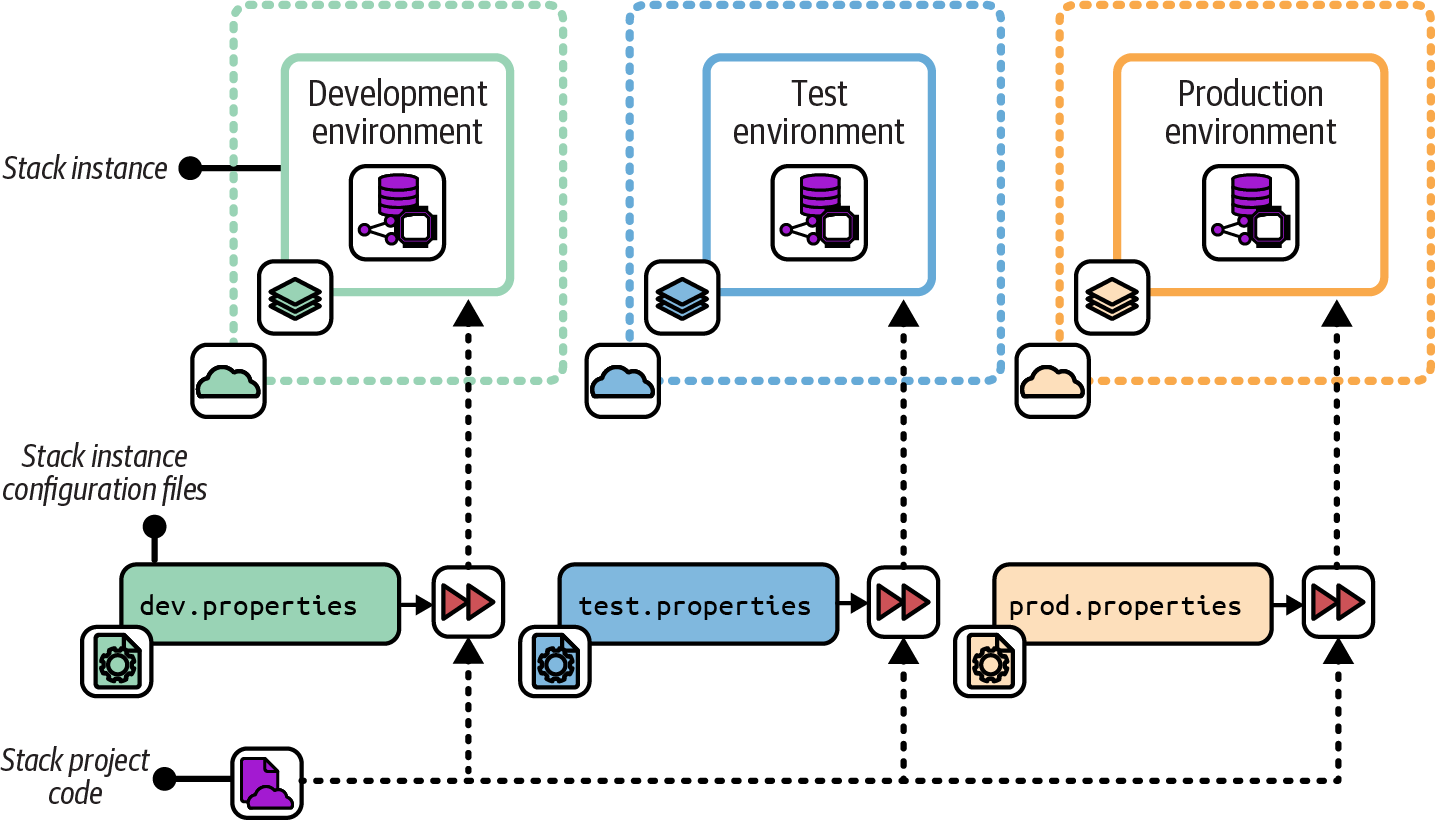
Figure 8-2. A separate configuration file provides parameter values for each instance
The configuration files for each instance are stored in version control:
├── src/│ ├── cluster.infra│ ├── host_servers.infra│ └── networking.infra├── environments/│ ├── dev.properties│ ├── test.properties│ └── prod.properties└── test/
Motivation
Creating configuration files for a stack’s instances is straightforward. Because the file is committed to the source code repository, it is easy to do the following:
-
See which values are used for any given environment (“What is the maximum cluster size for production?”)
-
Trace the history for debugging (“When did the maximum cluster size change?”)
-
Audit changes (“Who changed the maximum cluster size?”)
The Stack Configuration Files pattern enforces the separation of configuration from the stack code with few moving parts.
Applicability
Stack configuration files are appropriate when the number of environments doesn’t change often. You must add a file to your project in order to add a new stack instance. The files also require (and help enforce) consistent logic in the way different instances are created, since, unlike scripts, the configuration files can’t include logic.
Consequences
When you want to create a new stack instance, you need to add a new configuration file to the stack project. Doing this means you can’t create new environments on the fly, programmatically. In “Ephemeral Test Stack”, I describe an approach for managing test environments that relies on creating environments automatically. You could work around this by automatically generating a configuration file.
Parameter files can add friction when changing the configuration of downstream environments in a change delivery pipeline of the kind described in “Designing Infrastructure Delivery Pipelines”. Every change to the stack project code must progress through each stage of the pipeline before being applied to production. Completion can take a while, and this process doesn’t add any value when the configuration change is applied only to production.
Defining parameter values can be a source of considerable complexity in deployment scripts, and I’ll talk about this more in “Using Delivery Orchestration Scripts”. As a teaser, consider that teams often want to define default values for stack projects and for environments, and then need logic to combine these into values for a given instance of a given stack in a different environment. Inheritance models for parameter values can get messy and confusing.
Configuration files in source control should not include secrets. So to handle secrets, you either need to select an additional pattern from this chapter or implement a separate secrets configuration file outside of source control.
Implementation
You can define stack parameter values in a separate file for each environment, as shown in Figure 8-2.
The contents of a parameter file could look like this:
environment=testmin_workers=1max_workers=3
Pass the path to the relevant parameter file when running the stack command:
stack up --source ./src --config ./environments/test.propertiesIf the system is composed of multiple stacks, managing configuration across all the environments can get messy. There are two common ways of arranging parameter files in these cases. One is to put configuration files for all the environments with the code for each stack:
├── cluster_stack/│ ├── src/│ │ ├── cluster.infra│ │ ├── host_servers.infra│ │ └── networking.infra│ └── environments/│ ├── dev.properties│ ├── test.properties│ └── prod.properties│└── appserver_stack/├── src/│ ├── server.infra│ └── networking.infra└── environments/├── dev.properties├── test.properties└── prod.properties
The other is to centralize the configuration for all the stacks in one place:
├── cluster_stack/│ ├── cluster.infra│ ├── host_servers.infra│ └── networking.infra│├── appserver_stack/│ ├── server.infra│ └── networking.infra│└── environments/├── dev/│ ├── cluster.properties│ └── appserver.properties├── test/│ ├── cluster.properties│ └── appserver.properties└── production/├── .properties└── appserver.properties
Each approach can become messy and confusing in different ways. When you need to make a change to all the elements in an environment, making changes to configuration files across dozens of stack projects is painful. When you need to change the configuration for a single stack across the various environments it’s in, trawling through a tree full of configurations for dozens of other stacks is also not fun.
Most infrastructure orchestration tools, like Terragrunt, define folder and file structures for configuration files. If you use configuration files to provide secrets, rather than using a separate pattern for secrets, you should manage those files outside of the project code checked into source control.
For local development environments, you can require users to manually create the file in a set location. Pass the file location to the stack command like this:
stack up --source ./src \--config ./environments/test.properties \--config ../.secrets/test.properties
In this example, you provide two --config arguments to the stack tool, and it reads parameter values from both. You have a directory named .secrets outside the project folder, so it is not in source control.
Doing this can be trickier when running the stack tool automatically from a compute instance such as a CD pipeline agent. You could provision similar secrets property files onto these compute instances, but that can expose secrets to other processes that run on the same agent. You also need to provide the secrets to the process that builds the compute instance for the agent, so you still have a bootstrapping problem.
Related patterns
Putting configuration values into files simplifies the approach of provisioning scripts or wrapper scripts. You can avoid some of the limitations of environment configuration files by using the Stack Parameter Registry pattern instead. A simple implementation of the parameter registry pattern moves the parameter files for stacks out of each stack project and into a central location, such as an infrastructure-configuration Git repository.
Deployment Wrapper Stack
The Deployment Wrapper Stack pattern uses a separate infrastructure stack project for each deployed stack instance as a wrapper to import and configure an infrastructure code library (Figure 8-3). A common example is creating separate Terraform projects for each instance, with each project importing a module that defines the infrastructure for the instance. The wrapper project defines the parameter values to use for the stack instance.
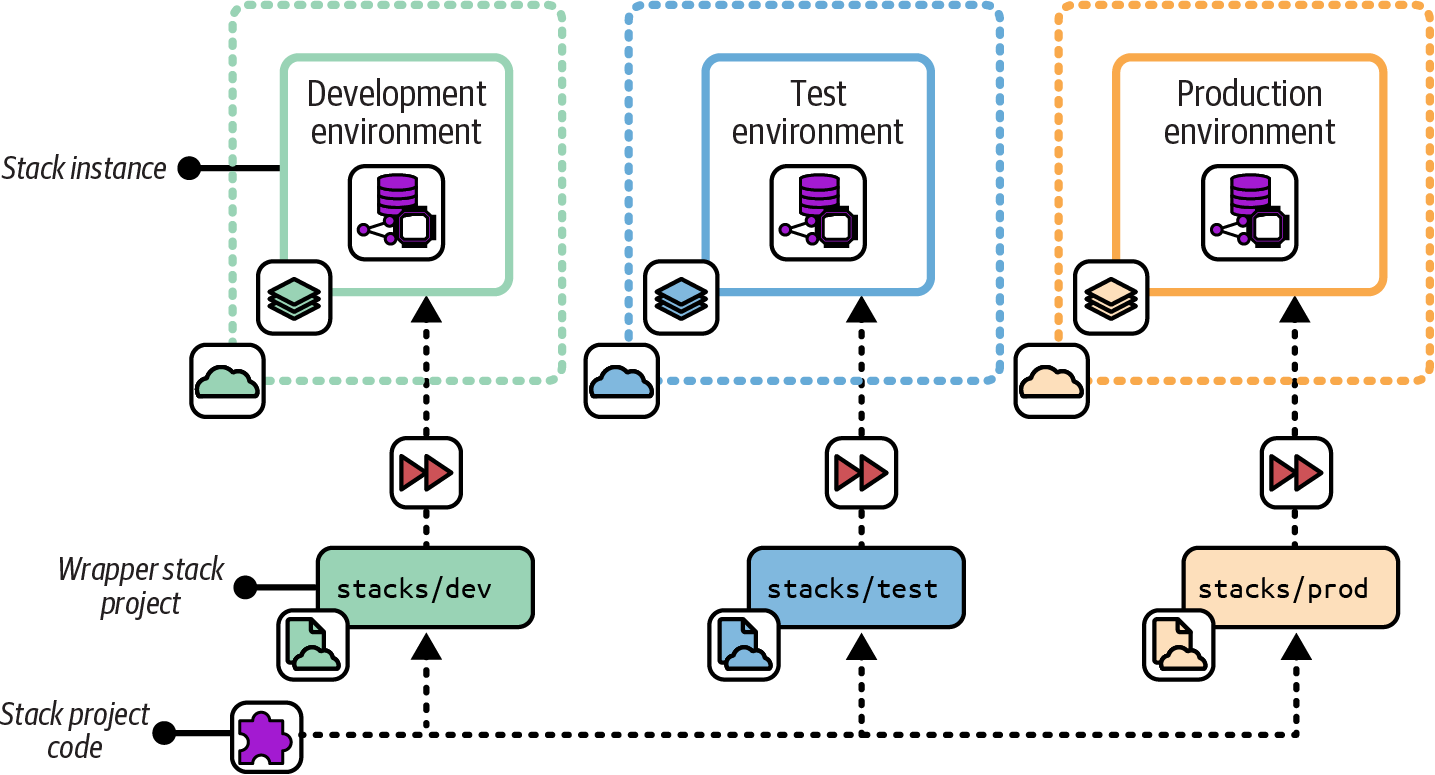
Figure 8-3. A deployment wrapper stack uses an infrastructure stack project for each deployed stack instance to import and configure a library
Also known as
Wrapper Stack, Configuration Stack.
Motivation
A deployment wrapper stack leverages the stack tool’s library functionality or library support to reuse shared code across stack instances. You can use the tool’s library versioning, dependency management, and artifact repository functionality to implement a change delivery pipeline. Many infrastructure stack tools don’t have a project packaging format that you can use to implement pipelines for stack code. So you need to create a custom stack packaging process yourself. You can work around this by versioning and promoting your shared stack code as a library and using deployment wrapper stacks to configure instances.
With wrapper stacks, you write the logic for provisioning and configuring stacks in the same language that you use to define your infrastructure, rather than using a separate language as you would with a provisioning script.
Consequences
Components add an extra layer of complexity between your stack and the code contained in the component. You now have two levels: the stack project, which contains the wrapper projects, and the component that contains the code for the stack.
Because you have a separate code project for each stack instance, people may be tempted to add custom logic for each instance. Custom instance code makes your codebase inconsistent and hard to maintain.
Because you define parameter values in wrapper projects managed in source control, you can’t use this pattern to manage secrets. So you need to add another pattern from this chapter to provide secrets to stacks.
Implementation
Each deployed stack instance has a separate infrastructure stack project. For example, you would have a separate Terraform project for each environment. You can implement this similarly to a snowflake stack project (see “Snowflakes as Code”), with each environment in a separate repository. A wrapper stack avoids becoming a snowflake by limiting its contents to configuration values, rather than defining or customizing infrastructure resources unique to the instance.
Alternatively, each environment project could be a folder in a single repository:
my_stack/├── dev/│ └── stack.infra├── test/│ └── stack.infra└── production/└── stack.infra
Define the infrastructure code for the stack as a library, according to your tool’s implementation. You could put the library code in the same repository with your wrapper stacks. However, this would prevent you from leveraging library versioning functionality. You wouldn’t be able to use different versions of the infrastructure code in different environments, which is crucial for progressively testing your code.
The following example is a deployment wrapper stack that imports a library called container_cluster_library, specifying the version of the library, and the configuration parameters to pass to it:
library:name:container_cluster_libraryversion:1.23parameters:env:devmin_workers:1max_workers:1
The wrapper stack code for the test and production environments is similar, other than the parameter values, and perhaps the library version they use.
The project structure for the library could look like this:
├── container_cluster_library/│ ├── cluster.infra│ └── networking.infra└── tests/
When you make a change to the library code, you test and upload it to a library repository. How the repository works depends on your particular infrastructure stack tool. You can then update your test stack instance to import the new library version and apply it to the test environment.
Terragrunt is a stack orchestration tool that implements the Deployment Wrapper Stack pattern.
Related patterns
The Deployment Wrapper Stack pattern is similar to the Scripted Parameters pattern (“Scripted Parameters”). The main differences are that it uses your stack tool’s language rather than a separate scripting language and that the infrastructure code is in a separate component. The Stack Configuration Files pattern (“Stack Configuration Files”) is an alternative that simplifies the implementation by removing a layer of infrastructure code. For example, a set of wrapper stacks and library code is replaced with a single stack project and set of properties files.
Pipeline Stack Parameters
With the Pipeline Stack Parameters pattern, you set configuration values for each stack deployment in the configuration of a delivery pipeline; see Figure 8-4.
I explain how to use a change delivery pipeline to apply infrastructure stack code to environments in “Designing Infrastructure Delivery Pipelines”.
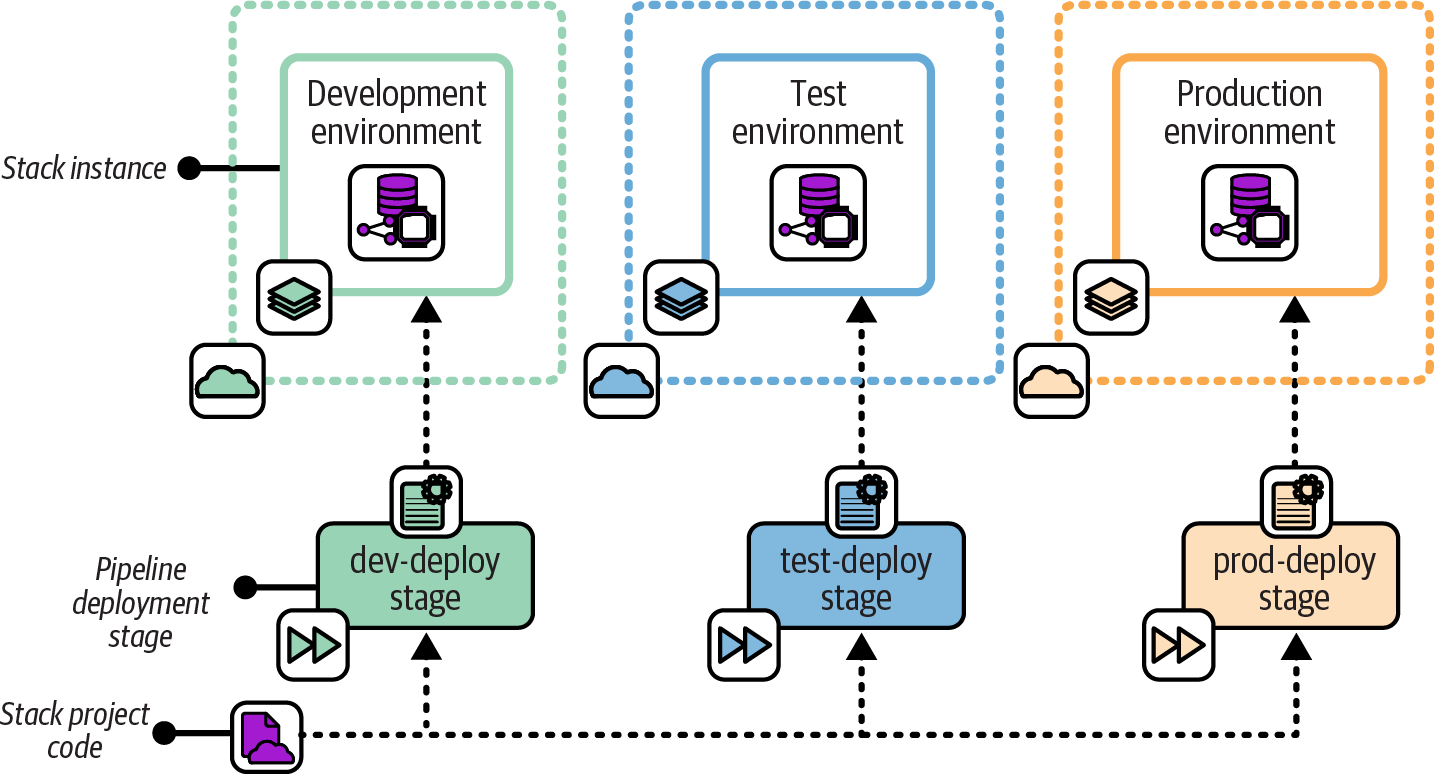
Figure 8-4. Each stage that applies the stack code passes the relevant configuration values for the environment
Motivation
If you’re using a pipeline tool to run your infrastructure deployment tool, the pipeline tool provides the mechanism for storing and passing parameter values to the deployment tool out of the box. Assuming your pipeline tool is itself configured by code, the values are defined as code and stored in version control.
Configuration values are kept separate from the infrastructure code. You can change configuration values for downstream environments and apply them immediately, without needing to push through a new version of the infrastructure code from the start of the pipeline.
Applicability
Teams that are already using a pipeline to apply infrastructure code to environments can easily leverage this pattern to set stack parameters for each instance. However, if stacks require more than a few parameter values, setting these in the pipeline configuration has serious drawbacks, so you should avoid this.
Consequences
Setting stack instance variables in the pipeline configuration couples configuration values to your delivery implementation. The more configuration values you define in your pipeline, the harder it is to run the stack tool outside the pipeline. Your pipeline can become a single point of failure—you may not be able to fix, recover, or rebuild an environment in an emergency until you have recovered your pipeline. And it can be hard for your team to develop and test stack code outside the pipeline.
In general, it’s best to keep the pipeline configuration for applying a stack project as small and simple as possible. Most of the logic should live in a script called by the pipeline, rather than in the pipeline configuration.
Implementation
Parameters should be implemented using “as code” configuration of the pipeline tool. The following example shows a pseudocode pipeline stage configuration that passes the values on the command line:
stage:apply-test-stackinput_artifacts:container_cluster_stackcommands:unpack ${input_artifacts}stack up --source ./src environment=test min_workers=1 max_workers=1stack test environment=test
You can also set parameters as environment variables that the stack code uses:
stage:apply-test-stackinput_artifacts:container_cluster_stackenvironment_vars:STACK_ENVIRONMENT=testSTACK_MIN_WORKERS=1STACK_MAX_WORKERS=1commands:unpack ${input_artifacts}stack up --source ./srcstack test environment=test
In this example, the pipeline tool sets those environment variables before running the commands.
Many pipeline tools provide management features that you can use to pass secrets to your stack command. Set the secret values in the pipeline tool’s configuration and then refer to them in your pipeline job:
stage:apply-test-stackinput_artifacts:container_cluster_stackcommands:unpack ${input_artifacts}stack up --source ./src environment=test \min_workers=1 \max_workers=1 \ssl_cert_passphrase=${STACK_SSL_CERT_PASSPHRASE}
Note that pipeline tools tend to log output from their jobs, and this output may include secrets set this way. See “Handling Secrets” for better approaches.
Stack Parameter Registry
The Stack Parameter Registry pattern manages the parameter values for stack instances in a central location rather than with your stack code; see Figure 8-5. The stack tool retrieves the relevant values when it applies the stack code to an instance of the stack.
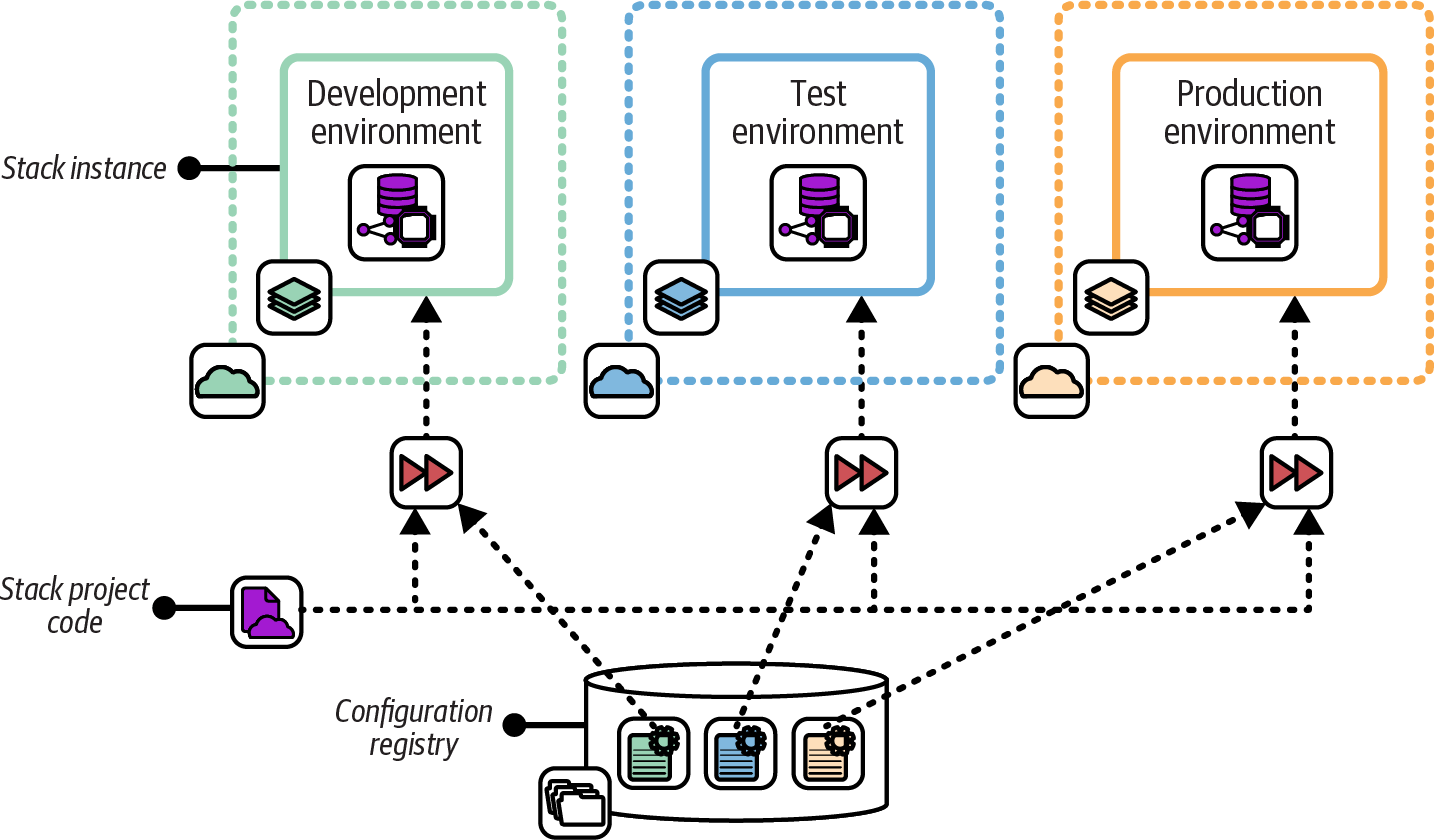
Figure 8-5. Stack instance parameter values stored in a central registry
Motivation
Storing parameter values in a registry separates configuration from implementation. Parameters in a registry can be set, used, and viewed by multiple tools, using various languages and technologies. This flexibility reduces coupling between parts of the system. You can replace any tool that uses the registry without affecting any other tool that uses it.
Because they are tool-agnostic, stack parameter registries can act as a source of truth for infrastructure and even system configuration, acting as a configuration management database (CMDB). This configuration data can be useful in regulated contexts, making it easy to generate reports for auditing.
Applicability
If you are using a configuration registry for other purposes, using it for stack parameters as well may make sense. For example, a configuration registry can be used to integrate multiple stacks (see “Integration Registry Lookup”).
Consequences
A stack parameter registry requires a configuration registry service, which is an extra moving part for your overall system. The registry is a dependency for your stack and a potential point of failure. If the registry becomes unavailable, reprovisioning or updating your infrastructure may be impossible until you can restore it. This dependency can be painful in disaster-recovery scenarios, putting the registry service on the critical path.
Managing parameter values separately from the stack code that uses it has trade-offs. You can change the configuration of a stack instance without making a change to the stack project. If one team maintains a reusable stack project, other teams can use it to create their own stack instances without needing to add or change configuration files in the stack project itself, as they may with other patterns like Stack Configuration Files. On the other hand, making changes across more than one place—stack project and parameter registry—adds complexity and opportunity for mistakes.
Implementation
I’ll discuss ways to implement a parameter registry in “Implementing a Configuration Registry”. In short, it may be a service that stores key-value pairs, or it could be a file or directory structure that contains key-value pairs. Either way, parameter values can usually be stored in a hierarchical structure, so you can store and find them based on the environment and the stack, and perhaps other factors like the application, service, team, geography, or customer.
The values for this chapter’s example container cluster could look like Example 8-2.
Example 8-2. Configuration registration entries
└── env/├── dev/│ └── cluster/│ ├── min = 1│ └── max = 1├── test/│ └── cluster/│ ├── min = 2│ └── max = 3└── prod/└── cluster/├── min = 2└── max = 6
When you apply the infrastructure stack code to an instance, the stack tool uses the key to retrieve the relevant value. You pass the environment parameter to the stack tool, and the code uses this to refer to the relevant location in the registry:
cluster:id:container_cluster-${environment}minimum:${get_value("/env/${environment}/cluster/min")}maximum:${get_value("/env/${environment}/cluster/max")}
The get_registry_item() function in the stack code looks up the value.
This implementation ties your stack code to the configuration registry. You need the registry to run and test your code, which can be too heavy. You could work around this by fetching the values from the registry in a script, which then passes them to the stack code as normal parameters. Doing this gives you the flexibility to set parameter values in other ways. This is particularly useful for reusable stack code, giving users of your code more options for configuring their stack instances.
Secrets management services (see “Storage resources”) are a special type of parameter registry. Used correctly, they ensure that secrets are available only to people and services that require them, without exposing them more widely. Some configuration registry products and services can be used to store both secret and nonsecret values. But it’s important to avoid storing secrets in registries that don’t protect them. Doing so makes the registry an easy target for attackers.
Implementing a Configuration Registry
Larger organizations with many teams working across complex systems often find configuration registries useful. They can be used to configure stack instances, as described earlier. A configuration registry can also be useful for managing integration dependencies across stack instances, applications, and other services, as discussed in Chapter 9.
A registry can provide a useful source of information about the composition and state of your infrastructure. You can use this to create tools, dashboards, and reports, as well as for monitoring and auditing your systems.
You can implement a configuration registry in various ways. You can use an integrated configuration registry provided with an infrastructure automation solution, you can use a standalone packaged configuration registry product, you can use an IaaS platform-provided registry service, or you can build your own registry solution.
Integrated Infrastructure Automation Tool Registries
Many infrastructure automation toolchains include a configuration registry service. Many of these are part of a centralized automation server providing multiple services to manage the automation. Here are some examples:
You may be able to use these services with tools outside the toolchain that provides them. Most have APIs to share information about the infrastructure they manage, so you can integrate them with other tools and scripts. Some of these registries are extensible, so you can use them to store the data from other tools.
However, this creates a dependency on whatever product set provides the registry service. The service may not fully support integration with third-party tools. It might not offer a contract or API that guarantees future compatibility.
So if you’re considering using an infrastructure tool’s data store as a general-purpose configuration registry, consider how well it supports this use case, and what kind of lock-in it creates.
Standalone Packaged Configuration Registries
Many dedicated configuration registry and key-value database products are available as standalone packages. Here are some examples:
Because these are generally compatible with various tools, languages, and systems, they avoid locking you into any particular toolchain.
However, defining how data should be stored can take a fair bit of work. Should keys be structured like environment/service/application, service/application/environment, or something else entirely? You may need to write and maintain custom code to integrate systems with your registry. And a configuration registry gives your team yet another thing to deploy and run.
IaaS Platform Registry Services
Most cloud platforms provide a key-value store service, such as the AWS Systems Manager (SSM) Parameter Store. These give you most of the advantages of a general-purpose configuration registry product, without forcing you to install and support it yourself. However, it does tie you to that cloud provider. In some cases, you may be using a registry service on one cloud to manage infrastructure running on another!
Your Own Configuration Registry
Rather than running a configuration registry server, some teams build a lightweight custom configuration registry by storing configuration files in a central location or by using distributed storage. They typically use an existing file storage service like an object store (e.g., an S3 bucket on AWS), a version control system, networked filesystem, or even a web server.
One variation is packaging configuration settings into system packages, such as a .deb or .rpm file (for Debian-based or Red Hat–based Linux distributions, respectively), and pushing them to an internal APT or YUM repository. You can then download configuration files to local servers by using the standard package management tool. Another variation is using a standard relational or document store database server.
All these approaches leverage existing services, so they can be quick to implement for a simple project rather than needing to install and run a new server. But when you get beyond trivial situations, you may find yourself building and maintaining the functionality that you could get off the shelf.
Single or Multiple Configuration Registries
Combining all configuration values from across all your systems, services, and tools is an appealing idea. You could keep everything in one place rather than sprawling across many systems. “One registry to rule them all.” However, this isn’t always practical in larger, more heterogeneous environments.
Many tools, such as monitoring services and server configuration systems, have their own registry. You’ll often find registry and directory products that are very good at specific tasks, such as license management, service discovery, and user directories. Bending all these tools to use a single system creates an ongoing flow of work. Every update to every tool needs evaluation, testing, and potentially more work to maintain the integration.
Pulling relevant data from across the services where they are stored may be a better choice. Make sure you know which system is the source of truth for any particular data or configuration item. Design your systems and tools with this understanding.
Some teams use messaging systems to share configuration data as events. Whenever a system changes a configuration value, that system sends an event. Other systems can monitor the event queue for changes to configuration items in which they are interested.
Handling Secrets
Systems need various secrets. Your stack tool needs to authenticate to your IaaS platform’s API. Many of the infrastructure resources your code defines, and services that run on them, need authentication to each other and to externally hosted services. For example, an application running on a container cluster may need to connect to a database. Another application may need to connect to a GenAI SaaS.
Handling these types of secrets securely from the very beginning is essential. Whether you are using a public cloud or a private cloud, a leaked password can have terrible consequences. So even when you are writing code only to learn how to use a new tool or platform, you should never put secrets into code.
There are many stories of people who checked a secret into a source repository they thought was private, only to find it had been discovered by hackers who exploited it and quickly ran up huge hosting bills. In other incidents, attackers used credentials to lock the company out of the management of its own infrastructure and demanded ransom payments.
We have a few approaches for handling secrets needed by infrastructure code without actually putting them into code. A typical use case is the FoodSpin team implementing a way for applications running on virtual servers or in a container cluster to authenticate to database instances. The compute resources that host an application might be defined in the same deployment stack that defines the database instance it uses, or they could be defined in separate stacks.
Managing secrets has two aspects. One is generating secrets. Another is handling them, including storage and retrieval.
Generating Secrets
Secrets are commonly generated at three points in the lifecycle of infrastructure. Each of these descriptions glosses over the fact that these secrets need to be stored and accessed, which will be explored a bit later:
- Pregenerated secrets
-
A team can generate a secret ahead of deploying the infrastructure and applications that use it. For example, the FoodSpin team may have a process or tool that generates a database password for a new environment before creating the environment. The infrastructure deployment process retrieves the secrets and sets them for the application and database instance. Pregenerating secrets is sometimes used with centralized security tools and teams, especially those that were designed and implemented without dynamic cloud services in mind. Secrets managed this way are longer-lived and handled in more parts of a workflow, so are more vulnerable to being discovered by attackers, and leave a longer window of opportunity for them to exploit.
- Deployment-generated secrets
-
Secrets can be generated and stored as a part of deploying the relevant infrastructure stack. If the server and database are defined in the same stack, the secret can be generated, applied to the database instance, and then passed to the server to make it available to the application. If the server and database are deployed in different stacks, one of the stacks can generate the secret and make it available to the other stack. The relationship could go either way: the database generates the password and passes it to the compute instance to use, or the compute instance generates it and passes it to the database stack to set. Alternatively, the deployment orchestration script or infrastructure composition component could generate the secret and pass it to both stacks. Generating and storing these secrets during deployment means that humans don’t need to be directly involved in handling them. The secrets may even be stored in a way that doesn’t allow any human access. Keeping passwords out of human hands reduces the opportunity for someone to either deliberately or accidentally expose or misuse them.
- Runtime-generated secrets
-
Some services can provide a short-lived password or token on demand, such as a session token. For example, the database instance may create a password that can be used by the application to open a connection to the database, but the password expires after a short period, such as 15 minutes. Each time the application needs to open a new connection to the database, it retrieves a new password. The short lifespan of the secret means that, even if it is leaked, the window of opportunity to exploit it is reduced. However, an attacker who gains access to the resources allowed to request a current token, such as the virtual server where the application runs, can still exploit the secrets. And whatever mechanism is used to acquire the token requires its own authentication mechanism, so attention turns to keeping that mechanism secure.
Each of these methods can be implemented in multiple ways, often with support from features in the IaaS platform, the Infrastructure as Code tool, infrastructure deployment service, or other services such as secret management services. Some of the common mechanisms for storing and providing secrets include storing them in an encrypted file, using a secrets storage service, injecting them in the runtime environment, or a combination.
Storing Secrets in Encrypted Files
In its earlier days, the FoodSpin team used database passwords that didn’t change often and that were typically used by team members to connect to the live database to troubleshoot issues or even to pull data for analysis. When building or updating a database, or applications that used it, team members would reuse the same password. They knew better than to put the database into their infrastructure code projects in source control, but needed a better solution than having someone type in the password when running the command to deploy or update infrastructure. The solution they chose was to store the database password in an encrypted file, which they did check into source control.
Numerous tools are designed to safely manage secrets in encrypted files, suitable for storing in a source code repository. Examples include agebox, BlackBox, git-crypt, SOPS, and transcrypt.
The key used to decrypt the secrets file should never be in the repository itself; otherwise, it would be available to attackers who gain access to the code. The key could be typed in when running an infrastructure deployment, but that prevents infrastructure deployments from running unattended. One of the other methods described in this chapter can be used to store and provide the encrypted file key.
Using a Secrets Storage Service
Secrets storage services, as the name suggests, store secrets in a central location and control access to those secrets. Most provide more sophisticated functionality, including generating secrets, keys, and certificates; rotating secrets; handling revocation when a secret has been compromised; creating short-lived secrets and tokens; and providing audit logging.
Services provided by IaaS vendors have strong integration with their platform’s authentication, policy, and logging services. They are also designed to integrate with resources such as compute and database instances. Some examples include AWS Secrets Manager, Google Cloud Secret Manager, Azure Key Vault, and Alibaba Cloud Key Management Service. The AWS secure parameter store is a simple method for storing secrets and using them with infrastructure resources, but it doesn’t have the sophisticated management capabilities of Secrets Manager.
Third-party secrets management services have the obvious advantage that they can be used across multiple cloud platforms and in data centers. Although they don’t integrate as deeply into the IaaS platform as a platform-native service, they often have more sophisticated feature sets. A few examples include CyberArk Conjur, HashiCorp Vault, and StrongDM.
Some secrets management services are specifically designed to manage secrets across infrastructure and environments, with features and structures that help organize secrets around environments and their workloads, and in some cases integrating well with Infrastructure as Code tools. Pulumi ESC, Doppler, and Infisical are three examples to consider.
Injecting Secrets at Runtime
Once a secret has been generated and stored, it needs to be made available to processes that need to use it. These include processes on the client side, such as the FoodSpin application, and on the side of the resource being accessed, such as the application’s database.
In some cases, the application or service may integrate directly with the service that stores the secret. For example, the FoodSpin application could connect to a Vault service to retrieve the database password. The database could also integrate with the secrets service—for example, to enable short-lived passwords. The database either has passwords injected into it, or may call to the secrets service when the client connects to validate the password.
Most infrastructure services, including IaaS platforms and container clusters, support injecting secrets into compute environments. For example, a virtual server or container can have secrets exposed as environment variables or metadata values available to processes running on them. Short-term passwords and tokens can be continually updated in the runtime environment so applications always have access to the current value.
Making secrets available in runtime environments simplifies client implementation and leaves the implementation of securely transmitting and storing secrets to the platform. However, this approach grants trust to any process running in that context, so the system is vulnerable to attackers who can gain access to the server, container instance, or other relevant process. Keeping runtime contexts small and short-lived reduces risk, which favors containers over VMs, and serverless processes over containers. Using short-lived passwords and tokens wherever possible reduces the time to exploit secrets that are leaked outside of their environments.
Beware of Logs!
One of the most common ways for secrets to leak out, even when using the most sophisticated services and tools, is in logs. A script, application, or tool that happens to handle a secret may print it to a log or echo it to a console, where it is made available to people who shouldn’t have access. For example, CI server jobs often log all the console output of commands they run, which passwords love to slip into. Although logs may not be readily available outside of a core support team, people sometimes paste parts of logs into bug reports, forum posts, or other locations, especially when they’re under pressure to fix a production incident.
Many tools are available for scanning logs and source code repositories for secrets. These can at the least alert you when a secret may have been leaked, so you can quickly change or revoke it and take corrective action on systems that might have been compromised.
Conclusion
Chapter 7 recommended the Reusable Stack pattern, using a single deployable infrastructure stack project to deploy multiple instances of the infrastructure. A stack project is reused when most of the resources in it should be kept consistent across instances, but some variation is always needed, which is where configuration parameters come in. The goal of this chapter is to provide you with some good ideas for managing configuration across instances of a stack.
Another practice Chapter 7 recommended was organizing your infrastructure into multiple, separately deployable stacks, to keep them more manageable and composable. A big challenge created by splitting infrastructure stacks is managing dependencies among those stacks, such as the example in this chapter where a FoodSpin application hosted on a server defined in one stack connects to a database defined in a different stack. The next chapter delves into patterns and antipatterns for integrating multiple stacks. Many of these patterns pass references across stacks as configuration parameters, so you should find the content you’ve just read useful in the next chapter.
1 A reminder that the stack command, the code syntax, and the IaaS platform that I use in most of my examples are all fictional.
2 YAGNI is the principle of waiting to add something to your system until you actually need it, rather than adding it because you think you’ll need later. People often add things before they’re needed because they believe adding them later will be harder. Practices and techniques that make changes easy, quick, and safe increase peoples’ confidence that it’s OK to wait, another reason this is such a core theme for this book.
3 I know of a major financial institution where a team testing its deployment rollback process in a staging environment accidentally copied and pasted the commands for the production environment. The bank’s national ATM network was down for two days.
4 Some examples of tools that teams can use to securely share passwords include GnuPG, KeePass, 1Password, Keeper, and LastPass.
5 Consul is a product of HashiCorp, which also makes Terraform, and of course, these products work well together. But Consul was created and is maintained as an independent tool and is not required for Terraform to function. This is why I count it as a general-purpose registry product.