Chapter 18. Infrastructure Code Testing Implementation
Chapter 16 explained the use of automated pipelines to deliver infrastructure code changes. Chapter 17 then described how to apply progressive testing strategies to infrastructure code. Now we can bring these together to look at how to implement automated infrastructure tests in the context of a pipeline.
Figure 18-1 gives an example of a pipeline that progressively tests and delivers the code for an infrastructure stack that defines a compute cluster.
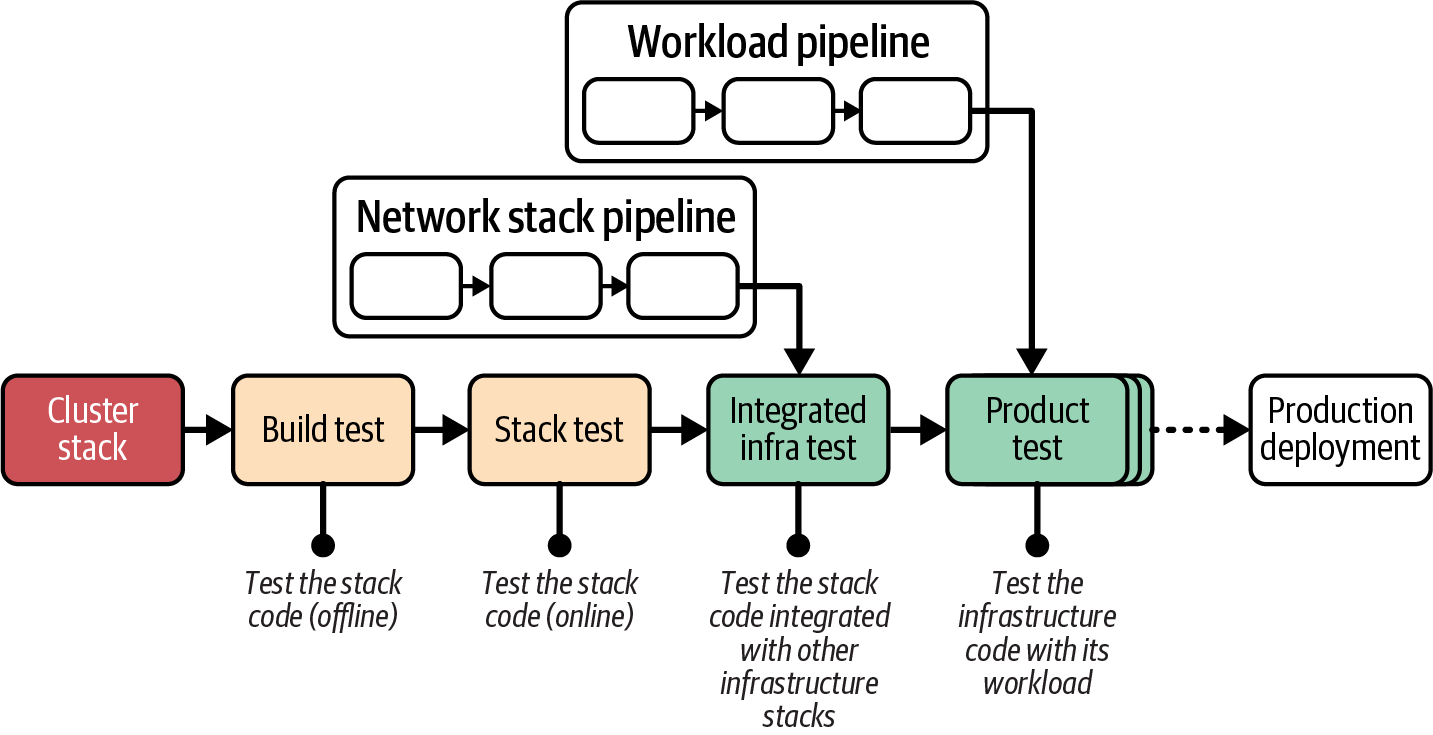
Figure 18-1. Overview of example pipeline stages
The compute stack pipeline includes various types of testing stages, each of which I describe in more detail in this chapter. The idea of a pipeline is to optimize for fast feedback, so the earlier stages run more quickly by having a smaller scope. The later stages test across a broader scope and take more time. The stages in this example pipeline are listed here:
- Build and test
-
Previous chapters have discussed the build stage in detail but skimmed over tests that can be run in the same stage. The build stage is an offline test stage, meaning the code isn’t deployed to the IaaS platform.
- Stack test
-
The next stage is an online test stage, so it deploys the stack code on the IaaS platform. However, its scope is limited to the stack itself, so it doesn’t deploy other infrastructure components.
- Integrated infrastructure test
-
Once the stack has been validated on its own, the next stage deploys the code with other infrastructure components and tests how the stack works when integrated.
- Product test
-
The final stages of the example pipeline use the stack code to deploy and test workload code. This part of the pipeline may have multiple stages for different types of application testing and review.
The following sections describe approaches for implementing offline and online stages, as well as techniques for handling dependencies, managing the lifecycle of test environments, and running tests.
Offline Testing Stages for Stacks
An offline stage runs locally, either on an engineer’s workstation or on an agent node of the pipeline service, rather than needing to provision infrastructure on an IaaS platform. Strict offline testing runs entirely within the local server or container instance, or on the developer’s workstation, without connecting to any external services such as a database. The types of activities in an offline stage are similar to those for local development (as discussed in “Working on Code Locally”).
An offline stage should do the following:
-
Run quickly, giving fast feedback if something is incorrect
-
Validate the correctness of components in isolation, to give confidence in each component, and to simplify debugging failures
-
Not have dependencies on code outside of the stack
-
Prove that the component is cleanly decoupled
Some of the stack tests that can run offline include syntax checking, static code analysis, supply-chain checks, static code analysis with the platform API, and testing with a mock API.
Some validation tools work in a connected mode that depends on connectivity to a hosted service. For example, some tools check libraries against online databases of the latest known security vulnerabilities.
Syntax Checking
With most stack tools, you can run a dry run command that parses your code without applying it to infrastructure. The command exits with an error if a syntax error exists. The check quickly tells you when you’ve made a typo in your code change but misses many other errors. Examples of scriptable syntax-checking tools include terraform validate and aws cloudformation validate-template.
The output of a failing syntax check might look like this:
$stackvalidateError: Invalid resource typeon appserver_vm.infra line 1, in resource "virtual_mahcine":stack does not support resource type "virtual_mahcine".
Offline Static Code Analysis
Some tools can parse and analyze stack source code for a wider class of issues than just syntax, but still without deploying resources to an IaaS platform. This analysis is often called linting.1 This kind of tool may look for coding errors, confusing or poor coding style, adherence to code style policy, or security issues. Some tools may modify code to match a certain style, such as the terraform fmt command.
If your infrastructure code is written in a general-purpose programming language via a tool like CDK or Pulumi, you should be able to find a linter that supports that language. A growing number of linters are available for popular infrastructure DSLs like Terraform’s HCL and CloudFormation templates, such as TFLint, CloudFormation Linter, cfn_nag, and Trivy.
Most linters come with a comprehensive set of rules for deciding whether a given bit of code is “clean.” You can usually add custom rules to enforce your team’s preferred coding style.
A growing category of policy-as-code tools validates whether code complies with governance requirements. The difference between linters and policy-as-code tools is mostly down to intent. Linters focus more on maintainability, while policy tools focus on compliance. Because security policies vary widely across organizations, policy tools are usually more extensible and can be used for complex checks.
Some examples of policy-as-code tools include Checkov, Conftest, Open Policy Agent (OPA), and Snyk.
Connected Static Code Analysis
Depending on the tool, some static code analysis checks may connect to the cloud platform API to check for conflicts with what the platform supports. For example, TFLint can check Terraform project code to make sure that any instance types (VM sizes) or AMIs (server images) defined in the code actually exist. Unlike previewing changes (see “Preview: Seeing What Changes Will Be Made”), this type of validation tests the code in general rather than checking it against resources already provisioned on the IaaS platform.
The following example output fails because the code declaring the virtual server specifies a server image that doesn’t exist on the platform:
$stacklint1 issue(s) found:Notice: base_image 'SERVER_IMAGE.shopspinner_java_server_image' doesn'texist (validate_server_images)on appserver_vm.infra line 5, in resource "virtual_machine":
Supply-Chain Checks
Many systems include components from third parties, such as code libraries or base container images. These components and other materials may come from open source repositories or be provided by a vendor. In either case, it is increasingly important to validate the safety of these materials. Some components may have security vulnerabilities that have been reported to central registries. Others may have software-licensing terms that aren’t compatible with your organization’s policies.
Supply-chain validation tools can check the various components that are imported when building or provisioning your systems. Additionally, they can record the contents of a package, such as a container, in an SBOM. An SBOM is important because vulnerabilities may be reported in a version of a component after you have packaged and provisioned it. An automated process could regularly check the versions of materials currently deployed in your system against the latest vulnerability reports.
IaaS-level infrastructure code typically has fewer components pulled in from third parties than application-level packages such as containers. However, the use of third-party infrastructure code components such as Terraform modules and GPL libraries used with CDK and Pulumi increases the importance of ensuring that you have relevant supply-chain validation in place.
Local Infrastructure Emulators
Part of the process of working on code in your personal development environment involves trying out the code, applying it to create and update infrastructure. You should also be writing, updating, and running tests, many of which need to be run against the infrastructure that results from applying your code.
One option for a personal instance of the infrastructure you’re working on is a local emulator for your IaaS platform’s API. A handful of tools can mock these APIs. LocalStack is a well-established tool with API compatibility for AWS. You can configure your infrastructure tool to treat a LocalStack instance running in a local container as if it were AWS. Moto is a Python library for mocking AWS that can be used to test infrastructure code written in Python. Some tools can mock parts of a platform. Here are a few examples:
-
Azurite, to emulate Azure blob and queue storage
-
Winglang Simulator, for use with the Winglang development environment
These emulators don’t replicate the full functionality of the IaaS platform. In some cases, their implementations are shallow mocks of the IaaS platform’s API calls. As a developer, you need to be conscious of their limitations, and whether and how they may be helpful. As with all testing, it’s important to limit the tests you create and maintain to those that identify and validate a meaningful risk. Local emulators can be useful for specific use cases, but it’s easy to get carried away and create suites of unit tests that don’t prove anything useful.
Use Test Fixtures to Handle Dependencies
Chapter 5 explained dependencies between stacks in terms of providers and consumers (“Providers, Consumers, and Interfaces”). A stack that you are testing may have providers, consumers, or both, which can affect how you need to test the stack. Figure 18-2 shows an example of a stack that has both a consumer and a provider.
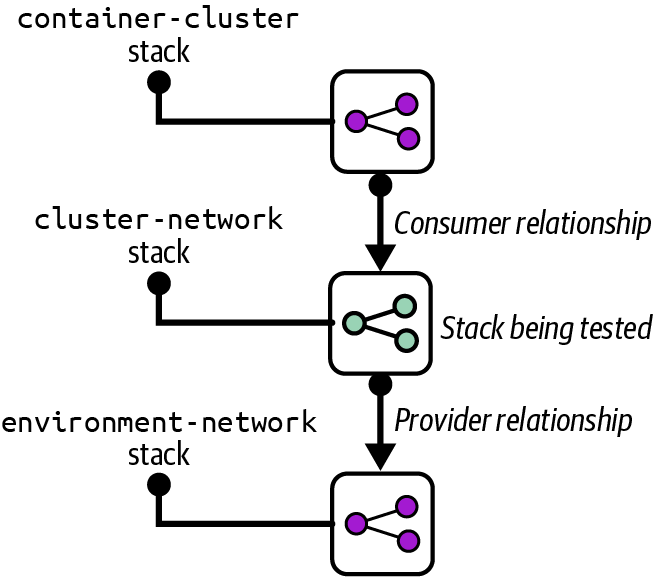
Figure 18-2. Example of a stack with a provider and consumer
The cluster-network stack defines networking resources for a container cluster, such as gateways and routes. The container-cluster stack is a consumer of the cluster-network stack, provisioning a control plane and worker nodes into the cluster network. The network stack, in turn, depends on the environment-network stack to create base infrastructure shared across the environment, such as a VPC and subnets. I’ll use this example to discuss how to use test fixtures.
Use Test Fixtures to Replace Providers
The aim of a component test, such as a stack test, is to limit the scope of testing to that specific component. There are two reasons for this. One is to keep the test runtime as short as possible, so people get fast feedback when they make a change that causes an error. The other is to ensure that the tests fail only because of a change to the component itself, rather than problems with providers or consumers, which simplifies writing and debugging tests.
Without test fixtures, running online tests for the cluster-network stack requires provisioning all provider and consumer stacks to be provisioned in addition to the tested stack. The other stacks could be large and take a long time to provision.
A test fixture is a lightweight implementation of just enough system elements to support provisioning and testing the subject component, as shown in Figure 18-3.
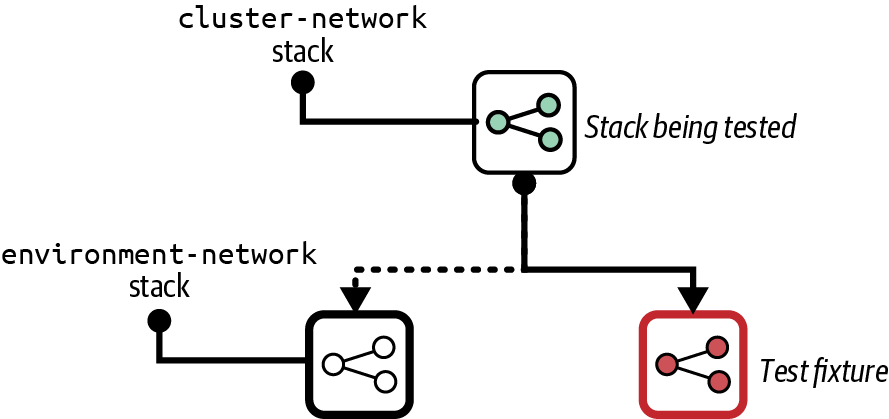
Figure 18-3. A test fixture
The full environment-network stack in our example may provision complex infrastructure needed for production systems, such as security controls, connections to other networks, and traffic logging. Tests for the cluster-network stack may need only a simple VPC and a few subnets, which will be much quicker to provision.
Using the simple network test fixture also avoids the risk that a change to the environment network stack will cause tests for the cluster-network stack to fail. A change to the provider that breaks the subject stack should be caught in a later stage specifically designed to test the integration between stacks. Integration testing is simpler when separated from stack testing. Integration tests can assume that each stack being integrated works correctly as a separate component because stack-level tests have already passed. Integration tests can focus on the interaction between the stacks, as can troubleshooting efforts when one of the tests fails.
Use Test Fixtures to Replace Consumers
You can also use test fixtures for the reverse situation, to test that the resources provisioned by the subject stack work as consumer stacks need them to. Figure 18-4 shows a test fixture for the cluster-network stack.
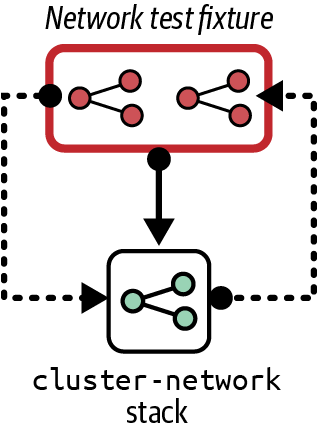
Figure 18-4. Test instance of the FoodSpin network stack, with test fixtures
It would be difficult to test the cluster-network stack provisioned alone. It creates a gateway for public traffic to reach applications running on a cluster, with supporting network routes. Without those applications running, tests can assert only that the gateway and routes exist, not whether they are configured correctly.
So the network test fixture provisions a piece of serverless code to stand in for an application deployed on a container cluster. The test fixture may also provision a network client located outside the environment network. A test can demonstrate whether the network client can connect to the serverless code through the cluster network’s gateway and routes:
givenstack_instance(stack:"cluster_network",instance:"online_test"){can_connect(from:get_fixture("client_fixture"),to:get_fixture("server_fixture").address,port:8443)}
This example assumes that the test framework provides a method called get_fixture() to find the details of the relevant test fixture, and that a test method called can_connect() succeeds if the connection is successfully opened and fails otherwise.
Refactor Components So They Can Be Isolated
Sometimes a particular component can’t be easily isolated and provisioned with only a few lightweight test fixtures. Dependencies on other components may be hardcoded or simply too messy to pull apart. One of the benefits of writing tests while developing a system, rather than after development is complete, is that it helps you improve your designs. A component that is difficult to test in isolation is a symptom of design issues. A well-designed system should have loosely coupled components.
When you run across a component that is difficult to isolate, you should fix the design to make it easy to do so. You may need to completely rewrite the component or replace libraries, tools, or applications. As the saying goes, this is a feature, not a bug. Clean design and loosely coupled code is a by-product of making a system testable. Anything that complicates fast and clean testing should be treated as a design issue.
Several strategies exist for restructuring systems. Martin Fowler has written about refactoring and other techniques for improving system architecture. For example, the strangler application prioritizes keeping the system fully working while restructuring it over time.
Online Testing Stages for Stacks
An online stage provisions an instance of the stack on the IaaS platform and runs tests against the resources it creates. This type of stage is slower and more expensive because of the time that provisioning takes and use of IaaS resources. However, online tests are often more meaningful than offline tests.
Although an online test stage depends on the IaaS platform, you should design tests to use a minimum of dependencies outside the stack itself. In particular, you should design your infrastructure, stacks, and tests so that you can create and test an instance of a stack without needing to integrate with instances of other stacks. I cover techniques for splitting infrastructure and keeping components loosely coupled in Chapter 5.
Online validations can include various types of tests and checks. An online test stage may preview changes, verify that changes are applied correctly, or prove outcomes. It may also test the operational characteristics of the stack, such as performance, policy compliance, or recoverability.
Mixing Online and Offline Tests
Many tools can be used for both online and offline tests, so people tend to write and run them in a single stage of their change delivery pipeline. A single stage is simpler to implement for a very small codebase. However, offline tests are typically much faster than online tests, on the order of seconds rather than minutes. Splitting the tests apart and running the offline tests first can shorten the feedback loop for basic errors.
Preview: Seeing What Changes Will Be Made
Some stack tools can compare stack code against a stack instance to list changes it would make without actually changing anything. Terraform’s plan command and Pulumi’s preview command are well-known examples.
Most often, people preview changes against production instances as a safety measure, so someone can review the list of changes to reassure themselves that nothing unexpected will happen. Applying changes to a stack can be done with a two-step process in a pipeline stage. The first step runs the preview, and a person triggers the second step to apply the changes after reviewing the results of the preview.
Having humans review changes isn’t very reliable. People might misunderstand or not notice a problematic change. You can write automated tests that check the output of a preview command. This kind of test might check changes against policies, failing if the code creates a deprecated resource type, for example. Or it might check for disruptive changes—failing if the code will rebuild or destroy a database instance.
Another issue is that stack tool previews are usually not deep. A preview tells you that this code will create a new server:
virtual_machine:name:myappserverbase_image:"java_server_image"
But the preview may not tell you that java_server_image doesn’t exist, something you won’t discover until the apply command fails to create the server.
Previewing stack changes is useful for immediately checking a limited set of risks before applying a code change to an instance. However, it is less useful for testing code that you intend to reuse across multiple instances, such as across delivery environments. Teams using copy-paste environments (see “Snowflakes as Code”) often use a preview stage as a minimal test for each environment. But deploying and testing instances of reusable stacks is a safer and more effective way to validate code.
Verification: Making Assertions About Infrastructure Resources
Given a stack instance, you can have tests in an online stage that make assertions about the infrastructure in the stack. The following are examples of frameworks for testing infrastructure resources:
A test for a VM could look like this:
givenvirtual_machine(name:"myappserver"){it{exists}it{is_running}it{passes_healthcheck}it{has_attachedstorage_volume(name:"appserver-storage")}}
Most infrastructure testing tools provide libraries to help write assertions about IaaS resources and other common infrastructure elements. This example test uses a virtual_machine resource to identify the VM in the stack instance for the staging environment. The test makes several assertions about the resource, including whether it has been created (exists), whether it’s running rather than having terminated (is_running), and whether the infrastructure platform considers it healthy (passes_healthcheck).
Simple assertions are rarely valuable since they only restate the infrastructure code they are testing. A few basic assertions (such as exists) help sanity check that the code was applied successfully. These quickly identify basic problems with pipeline stage configuration or test setup scripts. Tests such as is_running and passes_healthcheck would tell you whether the stack tool successfully created the VM. Simple assertions like these save you time in troubleshooting.
Although you can create assertions that reflect each of the VM’s configuration items in the stack code, like the amount of RAM or the network address assigned to it, these have little value and add maintenance overhead.
The fourth assertion in the example, has_attached storage_volume(), is more interesting. The assertion checks that the storage volume defined in the same stack is attached to the VM. Doing this validates that the combination of multiple declarations works correctly. Depending on your platform and tooling, the stack code might run successfully but leave the storage volume unattached to the server. Or you might make an error in your stack code that breaks the attachment.
Another case where assertions can be useful is with dynamic stack code. When passing different parameters to a stack can create different results, you may want to make assertions about those results. As an example, this code creates the infrastructure for an application server that is either public facing or internally facing:
virtual_machine:name:appserver-${customer}-${environment}address_block:if(${network_access} == "public")ADDRESS_BLOCK.public-${customer}-${environment}elseADDRESS_BLOCK.internal-${customer}-${environment}end
You could have a testing stage that creates each type of instance and asserts that the networking configuration is correct in each case. You should move more-complex variations into modules or libraries and test those modules separately from the stack code. Doing this simplifies testing the stack code.
Asserting that infrastructure resources are created as expected is useful up to a point. But the most valuable testing is proving that they do what they should.
Outcomes: Proving Infrastructure Works Correctly
Functional testing is an essential part of testing application software. The analogy with infrastructure is proving that you can use the infrastructure as intended. These are examples of outcomes you could test with infrastructure stack code:
-
Can you make a network connection from the web-server networking segment to an application-hosting network segment on the relevant port?
-
Can you deploy and run an application on an instance of your container cluster stack?
-
Can you safely reattach a storage volume when you rebuild a server instance?
-
Does your load balancer correctly handle node instances as they are added and removed?
Testing outcomes is more complicated than verifying that things exist. Not only do your tests need to create or update the stack instance, but you may also need to use test fixtures.
This test makes a connection to the server to check that the port is reachable and then returns the expected HTTP response:
givenstack_instance(stack:"shopspinner_networking",instance:"online_test"){can_connect(ip_address:stack_instance.appserver_ip_address,port:443)http_request(ip_address:stack_instance.appserver_ip_address,port:443,url:'/').response.codeis('200')}
The testing framework and libraries implement the details of validations like can_connect() and http_request(). You’ll need to read the documentation for your test tool to see how to write actual tests.
Test Instance Lifecycles
Before we had virtualization and clouds, we had to maintain static, long-lived test environments. Many teams still use static environments, but creating and destroying environments on demand has advantages. The following patterns describe the trade-offs of keeping a persistent stack deployment, creating an ephemeral deployment for each test run, and ways of combining both approaches. You can also apply these patterns to application and full system test environments as well as to testing infrastructure stack code.
Persistent Test Stack
A testing stage can use a Persistent Test Stack deployment that is always running. The stage applies each code change as an update to the existing deployed stack, runs the tests, and leaves the resulting modified stack in place for the next run, as shown in Figure 18-5.
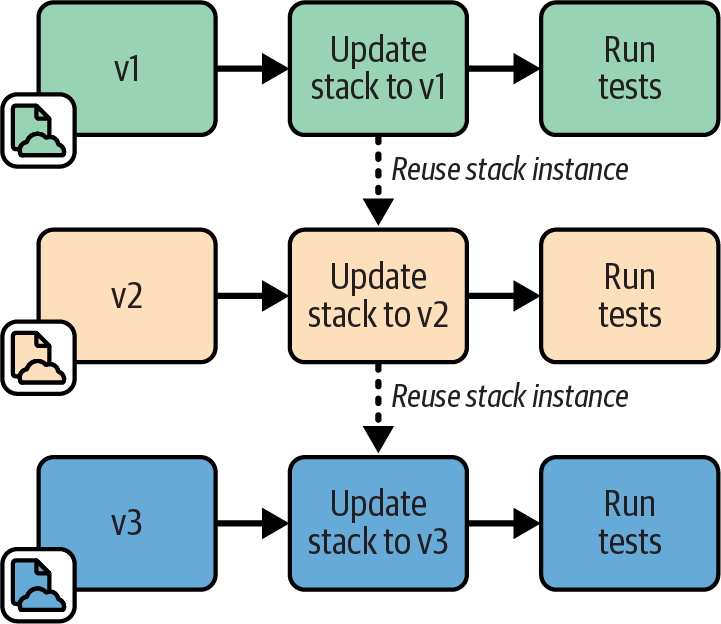
Figure 18-5. Persistent Test Stack instance
Motivation
Applying changes to an existing stack deployment is faster than creating a new deployment. Therefore, the persistent test stack can give faster feedback. For larger stacks, using a Persistent Test Stack can noticeably cut the lead time for delivering changes.
Additionally, leaving a test system running for longer periods rather than frequently rebuilding it can expose some issues such as resource leaks that will otherwise appear only in production.
Applicability
A Persistent Test Stack is useful when you can reliably apply your stack code to the instance with a low rate of failures or errors. If you find yourself spending time fixing broken deployments to get the pipeline running again, you should consider one of the other patterns in this chapter.
Consequences
It’s not uncommon for stack deployments to become “wedged” when a change fails and leaves it in a state where any new attempt to apply stack code also fails. Often a deployment gets wedged so severely that the stack tool can’t even destroy it so you can start over. Your team then spends too much time manually unwedging broken test deployments.
You can often reduce the frequency of wedged stacks through better stack design. Breaking stacks into smaller and simpler stacks, and simplifying dependencies between stacks, can lower your wedge rate. See Chapter 5 for more on this.
Implementation
Implementing a Persistent Test Stack is easy. Your pipeline stage runs the stack tool command to update the deployment with the relevant version of the stack code, runs the tests, and then leaves the stack deployment in place when finished.
You may rebuild the stack completely as an ad hoc process, such as someone running the tool from their local computer, or using an extra stage or job outside the routine pipeline flow.
Ephemeral Test Stack
With the Ephemeral Test Stack pattern, the test stage creates and destroys a new deployment of the stack every time it runs, as in Figure 18-6.
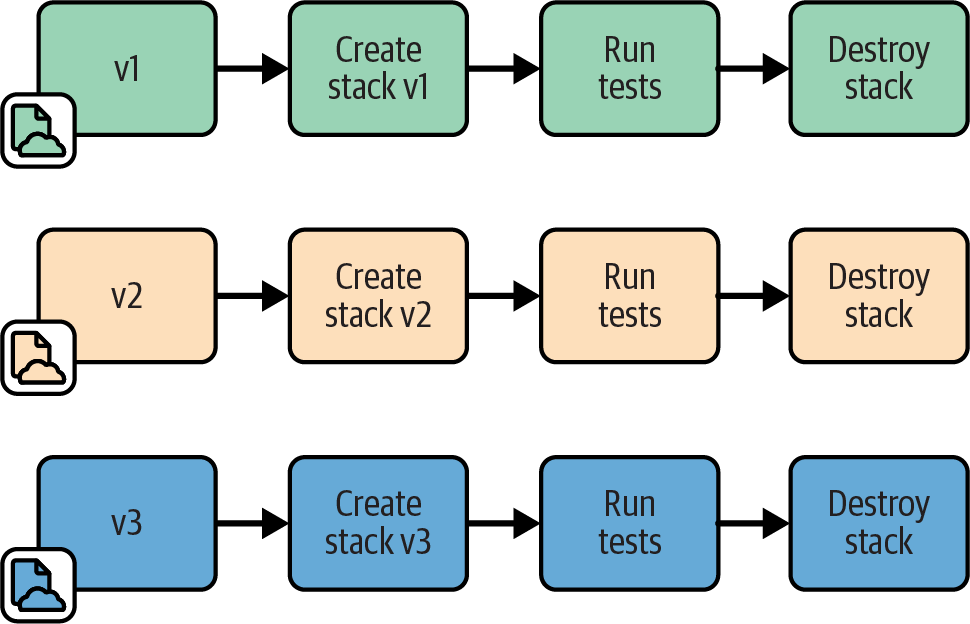
Figure 18-6. Ephemeral Test Stack instance
Motivation
An Ephemeral Test Stack provides a clean environment for each run of the tests. There is no risk from data, fixtures, or other “cruft” left over from a previous run.
Applicability
You may want to use ephemeral deployments for stacks that are quick to provision from scratch. “Quick” is relative to the feedback loop you and your teams need. For more frequent changes, like commits to application code during rapid development phases, the time to build a new environment is probably longer than people can tolerate. However, less frequent changes, such as weekly OS patch updates, may be acceptable to test with a complete rebuild.
Consequences
Stacks generally take a long time to provision from scratch. So stages using ephemeral stack deployments make feedback loops and delivery cycles slower.
Implementation
To implement an Ephemeral Test Stack, your test stage should run the stack tool to destroy the stack deployment when testing and reporting have finished. You may want to configure the stage to stop without destroying the deployment if the tests fail to let people debug the failure.
A common challenge is that destroying an infrastructure deployment often fails, especially when things go wrong as they’re prone to do in a test stage. You may need to implement additional measures to clean up—for example, using the cloud-nuke tool.
Dual Persistent and Ephemeral Stack Stages
With Persistent and Ephemeral Stack Stages, the pipeline sends each change to a stack to two different stages, one that creates a new ephemeral stack deployment and one that updates a persistent stack deployment. This combines the Persistent Test Stack pattern and the Ephemeral Test Stack pattern.
Motivation
Teams usually implement this approach to work around the disadvantages of each of the two patterns it combines. If all works well, the “quick and dirty” stage (the one updating the persistent deployment) provides fast feedback. If that stage fails because the environment becomes wedged, you will get feedback eventually from the “slow and clean” stage (the one creating a new ephemeral deployment).
Applicability
This pattern is useful with long-running systems where resource leaks are a potential issue. It may also be worth implementing both types of stages as an interim solution while improving the reliability of the infrastructure and testing process.
Consequences
In practice, using both types of stack lifecycles often combines the disadvantages of both. If updating an existing stack is unreliable, your team will still spend time manually fixing that stage when it goes wrong. And you probably wait until the slower stage passes before being confident that a change is good.
Implementation
You implement dual stages by creating two pipeline stages, both triggered by the previous stage in the pipeline for the stack project, as shown in Figure 18-7. You may require both stages to pass before promoting the stack version to the following stage, or you may promote it when either of the stages passes.
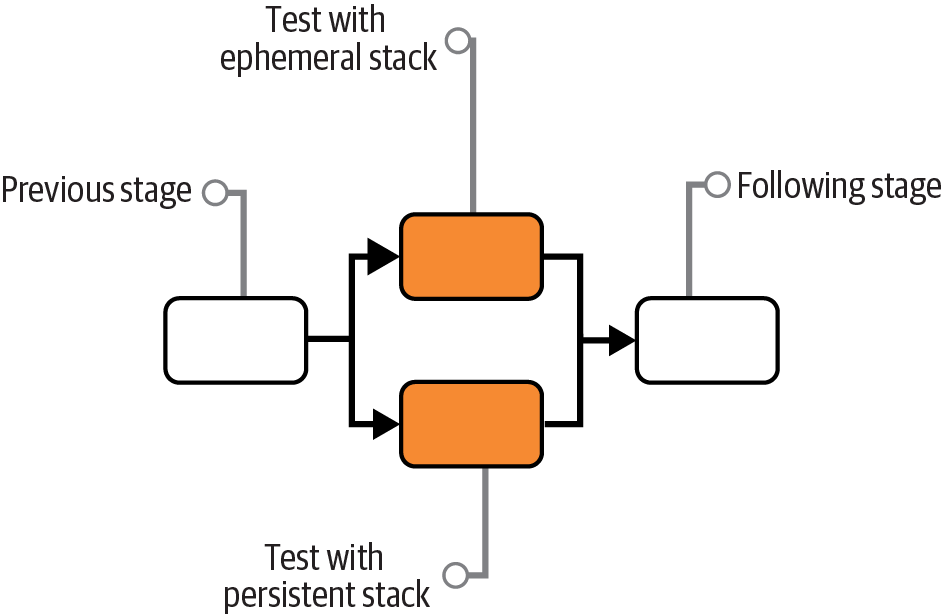
Figure 18-7. Dual Persistent and Ephemeral Stack Stages
Periodic Stack Rebuild
Periodic Stack Rebuild uses a Persistent Test Stack deployment for the stack test stage, and then has a process that runs out of band to destroy and rebuild the stack instance on a schedule, such as nightly.
Motivation
People often use periodic rebuilds to reduce costs. They destroy the stack at the end of the working day and provision a new one at the start of the next day.
Periodic rebuilds might help with unreliable stack updates, depending on why the updates are unreliable. In some cases, the resource usage of instances builds up over time, such as memory or storage that accumulates across test runs. Regular resets can clear these out.
Applicability
Destroying a stack deployment when it isn’t in use to save costs is sensible, especially when using metered resources such as with public cloud platforms.
Consequences
Rebuilding a stack deployment to work around resource usage usually masks underlying problems or design issues. In this case, this pattern is, at best, a temporary hack, and at worst, a way to allow problems to build up until they cause a production outage.
Implementation
Most pipeline services support jobs that run on a schedule, which you can use to destroy the deployed stack at the end of the day and build a new one in the morning. A more sophisticated solution would run based on activity levels. For example, you could have a job that destroys a deployment if the test stage hasn’t run in the past hour.
We have three options for triggering the build of a fresh stack after destroying the previous instance. One is to rebuild it right away after destroying it. This approach clears resources but doesn’t save costs.
A second option is to build the new stack deployment at a scheduled point in time out of hours, assuming the team isn’t distributed across time zones and so has an “out of hours.”
The third option is for the test stage to deploy a new stack instance if it doesn’t currently exist. Create a separate job that destroys the instance, either on a schedule or after a period of inactivity. Each time the testing stage runs, it first checks whether the instance is already running. If not, it provisions a new instance first. With this approach, people occasionally need to wait longer than usual to get test results. The first person to push a change in the morning needs to wait for the system to provision the stack.
Continuous Stack Reset
With the Continuous Stack Reset pattern, as shown in Figure 18-8, every time the stack testing stage completes, a job destroys and rebuilds the stack instance. However, the results of the test stage are reported, and any following pipeline stages are triggered before the rebuild job runs. So the stack rebuild job is effectively out of band from the main test stage.
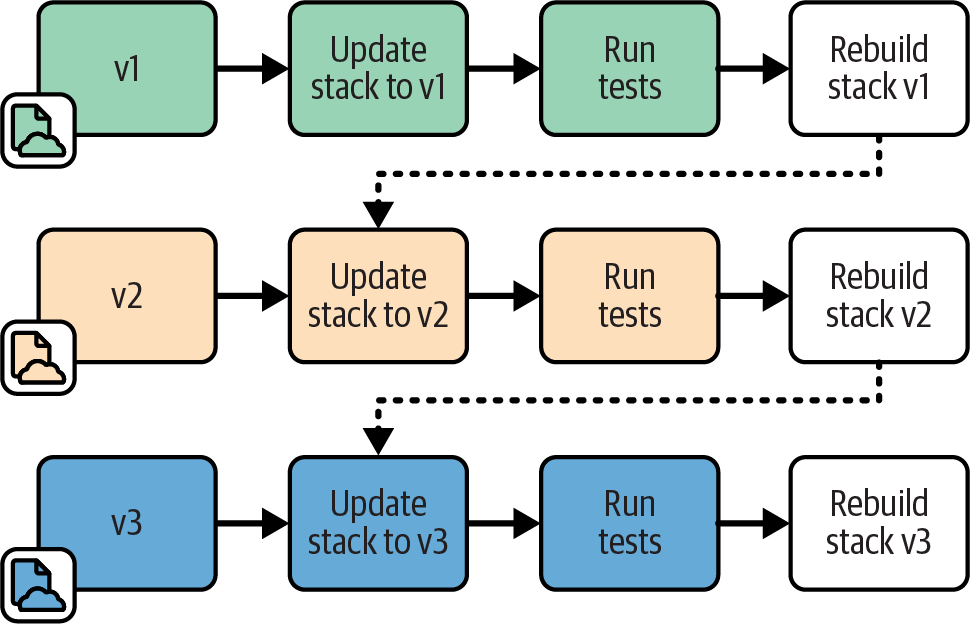
Figure 18-8. Pipeline flow for Continuous Stack Reset
Motivation
Destroying and rebuilding the stack instance every time provides a clean slate for each testing run. This approach should automatically reset the instance to a clean state if the stack build breaks it. This technique also removes the time it takes to create and destroy the stack instance from the feedback loop.
Another benefit of this pattern is that it can reliably test the update process that would happen for the given stack code version in production.
Applicability
Destroying the stack instance in the background can work well if the stack project doesn’t tend to break and need manual intervention to fix.
Consequences
Since the stack is destroyed and provisioned outside the delivery flow of the pipeline, problems may not be visible. The pipeline can be green, but the test instance may break behind the scenes. When the next change reaches the test stage, it may take time to realize it failed because of the background job rather than because of the change itself.
Implementation
When the test stage passes, the stack project code is promoted to the next stage. This approach also triggers a job to destroy and rebuild the stack instance. When someone pushes a new change to the code, the test stage applies it to the instance as an update.
You need to decide which version of the stack code to use when rebuilding the instance. You could use the same version that has just passed the stage. An alternative is to pull the last version of the stack code applied to the production instance. This way, each new version of the stack code is tested as an update to the current production version. Depending on how your infrastructure code typically flows to production, this may be a more accurate representation of the production upgrade process.
Test Orchestration
I’ve described each of the moving parts involved in testing stacks: the types of tests and validations you can apply, using test fixtures to handle dependencies, and lifecycles for test stack instances. But how should you put these together to set up and run tests?
Most teams use scripts to orchestrate their tests. Often these are the same scripts they use to orchestrate running their stack tools, as discussed in “Using Delivery Orchestration Scripts”.
Test orchestration may involve the following:
-
Creating test fixtures
-
Loading test data (more commonly needed for application testing than for infrastructure testing)
-
Managing the lifecycle of test stack instances
-
Providing parameters to the test tool
-
Running the test tool
-
Consolidating test results
-
Cleaning up test instances, fixtures, and data
Most of these topics, such as test fixtures and stack instance lifecycles, are covered earlier in this chapter. Others, including running the tests and consolidating the results, depend on the particular tool.
Two guidelines to consider for orchestrating tests are supporting local testing and avoiding tight coupling to pipeline tools.
Consider Test Orchestration Tools
Many teams write custom scripts to orchestrate tests. These scripts are similar to, or may even be the same, scripts used to orchestrate stack management (as described in “Using Delivery Orchestration Scripts”). People use Bash scripts, batch files, Ruby, Python, Make, Rake, and others I’ve never heard of.
A few tools available are specifically designed to orchestrate infrastructure tests. Two I know of are Test Kitchen and Ansible Molecule. Test Kitchen is an open source product from Chef that was originally aimed at testing Chef cookbooks. Molecule is an open source tool designed for testing Ansible playbooks. You can use either tool to test infrastructure stacks—for example, using Kitchen-Terraform.
The challenge with these tools is that they are designed with a particular workflow in mind and can be difficult to configure to suit the workflow you need. Some people tweak and massage them, while others find it simpler to write their own scripts.
Support Local Testing
People working on infrastructure stack code should be able to run the tests themselves before pushing code into the shared pipeline and environments. Doing this allows you to code and run online tests before pushing changes.
In addition to being able to work with personal test instances of stacks, people need to have the testing tools and other elements involved in running tests on their local working environment. Many teams use code-driven development environments, which automate installing and configuring tools. You can use containers or VMs for packaging development environments that can run on various types of desktop systems. Alternatively, your team could use virtual desktop infrastructure (VDI), cloud-hosted desktops (hopefully configured as code), although these may suffer from latency, especially for distributed teams.
A key to making it easy for people to run tests themselves is using the same test orchestration scripts across local work and pipeline stages. Doing this ensures that tests are set up and run consistently everywhere, and makes it easier to troubleshoot pipeline test failures.
Avoid Tight Coupling with Pipeline Tools
Many CI and pipeline orchestration tools have features or plug-ins for test orchestration, even configuring and running the tests for you. While these features may seem convenient, they make it difficult to set up and run your tests consistently outside the pipeline. Mixing test and pipeline configuration can also make it painful to make changes.
Instead, you should implement your test orchestration in a separate script or tool. The test stage should call this tool, passing a minimum of configuration parameters. This approach keeps the concerns of pipeline orchestration and test orchestration loosely coupled.
Conclusion
The core of a delivery pipeline is stages that test the code, progressively broadening the scope of the system under test by bringing together more dependencies. Test fixtures are particularly useful to implement earlier stages with fewer dependencies in place, allowing them to run more quickly. In later stages, strategies for managing the lifecycle of instances helps manage cost and delivery speed.
A missing piece for the conversation about pipelines so far is actually deploying infrastructure code to create and update instances, whether in delivery environments used for testing or in production environments. That’s the topic of the next chapter.