Chapter 16. Implementing Infrastructure Delivery with Pipelines
An infrastructure delivery pipeline is an automated implementation of your delivery workflow. Many infrastructure teams implement their workflows by having people run commands from their laptops. However, automating the process of building, delivering, and deploying infrastructure is essential for ensuring that processes are repeatable and that systems are built and configured consistently.
The automated delivery pipeline is the core concept of this chapter. However, I’ll start by discussing approaches for organizing an infrastructure codebase, and then how to work on infrastructure code locally before pushing it into the pipeline. Once these topics are covered, I’ll get into the elements of pipeline design, with a particular focus on pipeline stages.
Organizing Projects in a Codebase
As with so many terms, “codebase” and “project” are widely and inconsistently used. For the purpose of this discussion, I’m defining a build project as a collection of code used to build a discrete component, which could be a code library, a deployable stack, or a deployable application. A codebase is a collection of one or more build projects, usually interrelated. A repository is a collection of one or more build projects defined within the source control system.
A developer typically checks out a version of the code locally at the repository level, although some source control systems support partial checkouts. Versioning within the source control system also works at the repository level; a branch, tag, or commit version applies to all the files in the repository.
All the build projects in a codebase may be contained in a single repository, or they may be distributed across multiple repositories. I’ll describe a few patterns for organizing projects and repositories first.
Finally, I’ll describe some alternatives for how to organize code within an infrastructure project.
Organizing Build Projects and Repositories
If you have multiple build projects, should you manage them all in a single repository or spread them across more than one? If you use more than one repository, should every project have its own repository, or should you group some projects into shared repositories? If so, how should you decide which projects to group together?
Consider the following design forces:
-
Separating projects into their own repositories makes it easier to maintain boundaries at the code level.
-
Having too many people working on code in a single repository can create friction and conflicts.
-
Most source control systems manage permissions at the repository level, which may suggest organizing projects into repositories based on team ownership.
-
Spreading code across multiple repositories can complicate working on changes that cross them.
-
Code kept in the same repository is versioned and can be branched together, which simplifies some project integration and delivery strategies.
-
Source code management systems (such as Git, Perforce, and Mercurial) have differing performance and scalability characteristics and features to support complex scenarios.
Let’s look at the main options for organizing projects across repositories in light of these factors.
Full codebase in one repository
Many teams manage an entire codebase in a single repository. A repository that contains a large codebase built together in a single process is a monorepo, as defined in the previous chapter. However, teams more commonly have multiple separate builds for different projects in their codebase managed in a single repository, as shown in Figure 16-1.
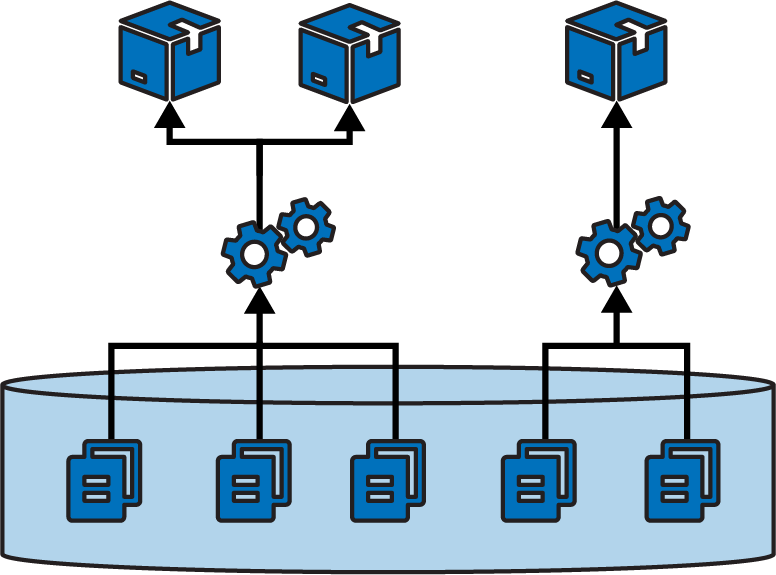
Figure 16-1. Building multiple projects in one repository
A pitfall of projects sharing a repository is that their boundaries can blur. It’s easy to have a component import code or other files from a different component’s folder structure, which then requires those components to be checked out and built together. Over time, code becomes tangled across projects and hard to maintain, because a change to a file in one project can have unexpected conflicts with others.
A separate repository for each build project
The other extreme is a microrepo, where each project is in a separate repository, as in Figure 16-2.
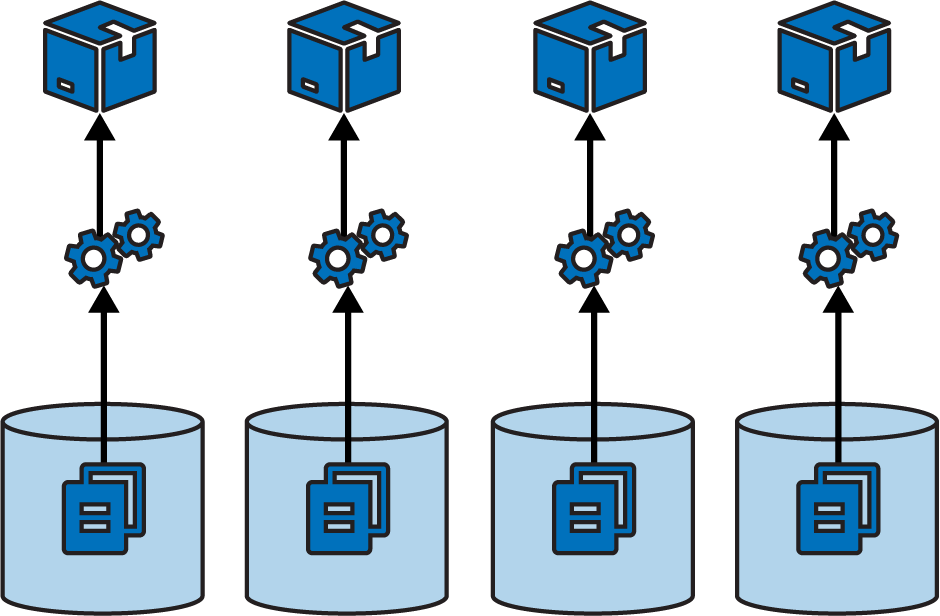
Figure 16-2. Each project in a separate repository
This strategy ensures a clean separation between projects, especially when you have a pipeline that builds and tests each project separately before integrating them. In theory, you could use build-time integration across projects managed in separate repositories, by first checking out all the builds (see Figure 16-3).
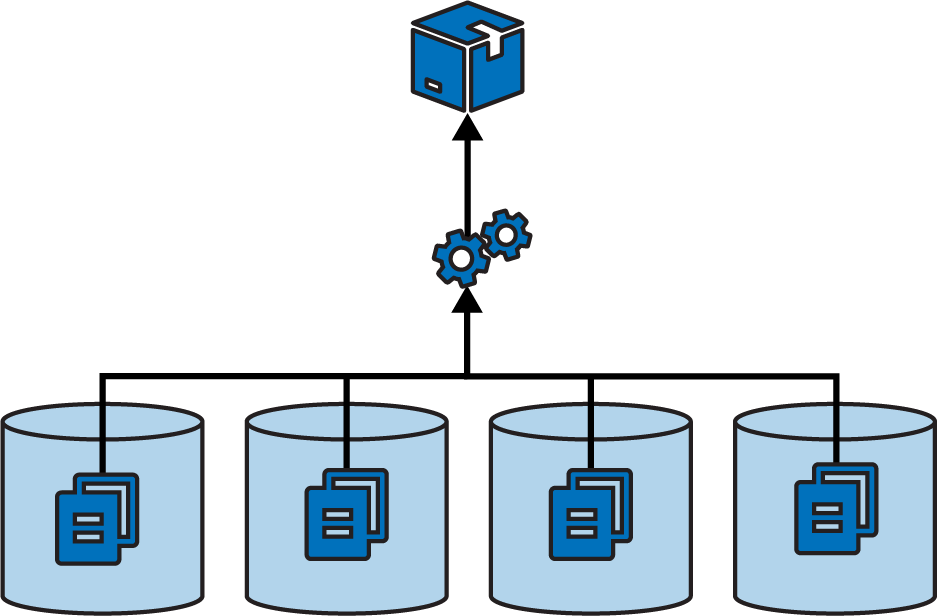
Figure 16-3. A single build across multiple repositories
However, building across multiple projects in a single repository is more practical, because their code is versioned together. Pushing changes for a single build to multiple repositories complicates the delivery process. The delivery stage would need some way to know which versions of all the involved repositories to check out to create a consistent build.
Single-project repositories work best when supporting delivery-time and apply-time integration. A change to any one repository triggers the delivery process for its project, bringing it together with other projects later in the flow.
Multiple repositories with multiple projects
While some organizations push toward one extreme or the other—single repository for everything, or a separate repository for each project—most maintain multiple repositories that each contain more than one build project (see Figure 16-4).
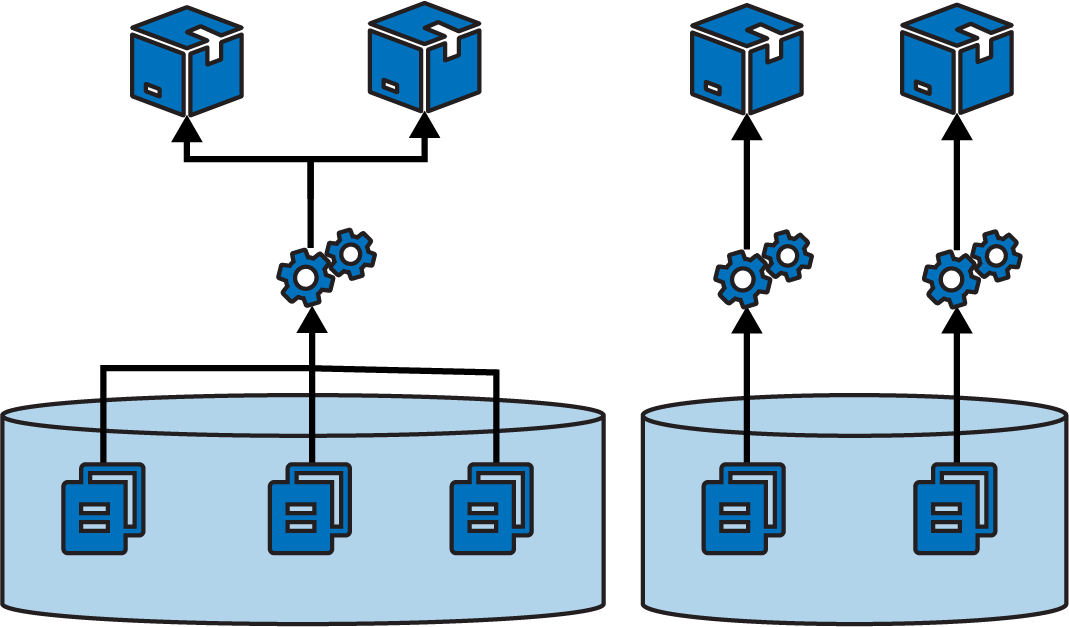
Figure 16-4. Multiple repositories with multiple projects
Often the grouping of projects into repositories happens organically rather than being driven by a strategy like monorepo or microrepo. However, a few factors influence how easy the projects are to work with.
One factor, as seen in the discussions of the other repository strategies, is the alignment of projects with their build and delivery strategy. Keep projects in a single repository when they are closely related, and especially when you integrate the projects at build time. Consider separating projects into separate repositories when their delivery paths aren’t tightly integrated.
Another factor is team ownership. Although multiple people and teams can work on different projects in the same repository, it can be distracting. Changelogs intermingle commit history from different teams with unrelated workstreams. Some organizations restrict access to code. Access control for source control systems is often managed by repository, which is another driver for deciding which projects go where.
As mentioned for single repositories, projects within a repository more easily become tangled with file dependencies. So teams might divide projects into repositories based on where they need stronger boundaries from an architectural and design perspective.
Organizing Types of Code
Different projects in an infrastructure codebase usually define different types of elements of your system, such as applications, infrastructure stacks, server configuration modules, and libraries. Any of these projects could include multiple types of code, including infrastructure code, configuration values, tests, and utility scripts. Having a strategy for organizing these types helps keep your codebase maintainable.
Several design forces should be considered when deciding how to organize code in a repository. I mentioned a few of these design forces in Chapter 5. One is to organize projects around team ownership, which helps reduce friction that comes when you fall afoul of Conway’s law. Another is considering the working sets, making it easy for people to work on the code for the groups of projects they tend to change together. A third is delivery scope, aligning project code and pipeline design.
Design forces also affect how to organize source code within a project. Using domains to drive design is usually good, but for infrastructure code there are different domains you might consider.
Organize code by domain concept
Domain-driven design starts with the business domain, suggesting it’s a good idea to organize projects and code within them around business concepts like, in the case of FoodSpin, product management, checkout, and logistics. I find it useful to treat platform domains in a similar way, grouping components and code around areas such as availability and monitoring, analytics, and identity.
Many infrastructure teams organize their code around functionality and technology, such as networking, databases, and servers. As an example, a FoodSpin development team has an application infrastructure stack project that defines a server cluster, database instance, networking structures, and security policies, each in its own file:
└── src/├── cluster.infra├── database.infra├── load_balancer.infra├── routing.infra├── firewall_rules.infra└── policies.infra
The firewall_rules.infra file includes firewall rules for the VMs created in cluster.infra as well as rules for the database instance defined in database.infra.
Organizing code this way emphasizes implementation over use. To make a change for one workload’s infrastructure, an infrastructure developer needs to sift through multiple files, each of which has resource definitions for dozens of other workloads. Applying this strategy of organizing code by implementation at the component level tends to support siloed team structure. Chapter 14 describes how this leads to workflow bottlenecks.
An alternative is to organize the code by domain or workload:
└── src/├── customer_service.infra├── search_service.infra├── menu_service.infra├── shared_compute.infra└── shared_network.infra
Each of the *_service.infra files in this stack folder contains the database, networking, and policies specific to that workload. The shared_* files each contain infrastructure shared across workloads. Even the shared infrastructure code files are organized according to domain, rather than thrown into a miscellaneous “shared stuff” file.
Project support files
Generally speaking, any supporting code for a specific project should live with that project’s code. A typical project layout for a stack might look like this:
├── build.sh├── deploy.sh├── src/├── tests/├── environments/└── pipeline/
This project’s folder structure includes the following:
- src/
-
The infrastructure stack code, which is the heart of the project.
- tests/
-
Test code. This folder can be divided into subfolders for tests that run at different phases, such as offline and online tests. Tests that use different tools, like static analysis, performance tests, and functional tests, probably have dedicated subfolders as well.
- environments/
-
Configuration. This folder includes a separate file with configuration values for each stack instance.
- pipeline/
-
Delivery configuration. The folder contains configuration files to create delivery stages in a delivery pipeline tool.
- build.sh
-
Script that runs the stack build process.
- deploy.sh
-
Script that runs the stack deployment process.
Of course, this is only an example. People organize their projects differently and include content other than what’s shown here.
The key takeaway is the recommendation that files specific to a project live with the project. This ensures that when someone checks out a version of the project, they know that the infrastructure code, tests, and delivery are all the same version, and so should work together. If the tests are stored in a separate project, it would be easy to mismatch them, running the wrong version of the tests for the code you’re testing.
However, some test, configuration, or other files might not be specific to a single project.
Cross-project tests
Progressive testing involves testing each project separately before testing it integrated with other projects, following a fan-in workflow as described in Chapter 15. You can comfortably put the test code that runs for each component in the project for that component. But what about the test code for the integration stage? You can put these tests in one of the projects or create a separate project for the integration tests.
When you integrate multiple components in a pipeline stage, one project is often an obvious entry point for certain types of tests. For example, many functional tests connect to a frontend service to prove that the entire system works. If a backend component, such as a database, isn’t configured correctly, the frontend service can’t connect to it, so the test fails.
In these cases, the integration test code lives comfortably with the project that provisions the frontend service. Most likely, the test code is coupled to that service. For example, it needs to know the hostname and port for that service.
Separate these tests from tests that run in earlier delivery stages—for example, when testing with test doubles. You can keep each set of tests in a separate subfolder in the project.
Integration tests also fit well in the project for a consumer component, rather than keeping them in the provider project. This avoids the provider component project needing to include knowledge of its consumers.
Dedicated integration test projects
An alternative approach is to create a separate project for integration tests, perhaps one for each integration stage. This approach is common when a different team owns the integration tests, as predicted by Conway’s law. Other teams do this when it’s not clear which project aligns with the integration tests.
Versioning can be challenging when managing integration test suites separately from the code they test. People may confuse which version of the integration tests to run for a given version of the system code. To mitigate this, be sure to write and change tests when you change the code. And implement a way to correlate project versions (for example, using the fan-in pipeline pattern).
Working on Code Locally
Infrastructure engineers need to edit and test changes to the code before pushing the change to the shared code and starting the build and delivery pipeline. The workflow starts with an infrastructure developer, or pair of developers, checking out a copy of the codebase locally. They edit the code and its tests and make sure they work. Once the developers are satisfied with the change, they push it to the code repository to trigger a run of the delivery pipeline.
I use the word “locally” to describe when someone edits and tests a copy of the code that they have checked out from source control. It might be literally local, on a laptop or desktop. However, it could be checked out in hosted environment, such as a cloud editor or virtual desktop hosted somewhere else.
Details of managing development environments as well as tools like IDEs for editing and working with code are beyond the scope of this book, as these topics aren’t specific to infrastructure development. However, I do need to discuss how infrastructure developers can try out and test their local copy of infrastructure code.
The Advantage of Consistent Development Environments
Although every developer could configure their local development environment themselves, it helps if developers in a team set up the environment consistently. People should use the same tools, versions of those tools, and configuration settings to cut down on time wasted by inconsistent behavior across local setups. Putting measures in place to standardize development setups also helps with onboarding new team members, and can be used to create consistency between local environments and delivery and production environments.
You can use server configuration tools like Ansible, Chef, or Puppet to configure parts of developer environments. Another option is leveraging containers. Batect and Dojo support creating repeatable, shareable containers for developing applications and infrastructure, or local VMs, perhaps using a tool like Vagrant.
The first challenge is how to run local infrastructure code. Developers need to see the results of deploying their code so they can make sure it does what they expect and can troubleshoot it when it doesn’t. And they need to be able to run automated tests, both as part of developing the tests and to make sure their changes pass these tests before pushing them into the pipeline.
Local IaaS Emulators
Developers can use various tools to emulate their IaaS platform, or parts of it, so they can apply code. Chapter 18 discusses some of these tools in detail. For local work, emulators may be handy for running some automated tests. However, most emulators don’t fully replicate the IaaS platform, because they don’t replicate fully usable infrastructure resources. Instead, they emulate the API endpoints of the IaaS platform. The infrastructure stack tool interacts with these endpoints when it deploys the code to the emulator, but the emulator doesn’t provision real infrastructure resources.
The emulator might maintain some stateful data structures that later calls to the API can query. Most emulators don’t have a particularly useful UI for developers to interact with, so they’re more useful for automated tests and validations rather than for interactive exploration of what your code does. That said, IaaS emulators can give you fast feedback, so running tests against them as you work is useful to catch basic errors.
Personal IaaS Environments
Given the limitations of local IaaS emulators, infrastructure developers will almost certainly find it useful to be able to apply their local code to infrastructure hosted on the real IaaS platform.
Some teams have multiple developers share an environment to test their infrastructure changes. However, sharing environments invites clashes and confusion. I’ve seen people spend hours debugging what they assumed was an error in their code or a flaky system, which turned out to be another developer testing their own changes to the same infrastructure. This leads to situations like a developer wondering, “Why do my changes to the load balancer keep disappearing?”
Each person working on infrastructure code should be able to provision their own instance of the infrastructure on the IaaS platform. Some useful metrics for the effectiveness of your infrastructure development process include measuring how quickly someone can provision a personal environment to work on, and utilization levels for these environments. High-performing infrastructure teams provision environments on demand and tear them down when they’re not in use.
Developers might provision personal environments by using a script or tool. Using the same tools and process that are used to deploy infrastructure in other environments in the pipeline through to production helps keep results consistent. Some teams manage personal environments by using the same hosted tools or services used in the pipeline. Each developer creates a branch of the code they’re working on, and the service deploys code from the branch. The developer commits their changes to the pipeline by merging their branch to the main codebase branch.
An advantage of deploying personal environments from the repository rather than from code checked out to a local workstation is that the code is available to others. I’ve seen a team struggle to tear down a personal instance that someone left running when they went on vacation, because they didn’t have access to the person’s local code.
Just Enough Environment
A common reason for having developers share an environment to test their local code changes is that it’s too expensive to provide every developer with their own environment. Ensuring that environments are provisioned on demand and destroyed when not in use helps to some extent. But sometimes an environment is so large that creating a new one takes too long.
Teams should aim to be able to provision a partial environment with just enough infrastructure to work on the change at hand. Throughout this book I’ve advocated for breaking the infrastructure for an environment into separately deployable stacks and infrastructure compositions. One of the many benefits of a composable infrastructure architecture is that it simplifies provisioning partial environments for development and testing.
A challenge with spinning up only some parts of an environment is that those parts may depend on infrastructure provided by parts of the environment that you don’t particularly need. You might need to test an infrastructure stack that can be spun up in under 2 minutes but find that its chain of dependencies takes nearly 30 minutes to provision.
You can create and use test fixtures to loosen the coupling between parts of your environment (see “Use Test Fixtures to Handle Dependencies”). For example, your networking stack may be fully featured with comprehensive hardening and audit logging. But the infrastructure component you’re testing may need only a subnet from that stack. You can create a lightweight networking stack that includes the bare minimum to test dependent components.
Designing Infrastructure Delivery Pipelines
As I mentioned earlier, a CD pipeline is an automated implementation of a delivery workflow.1 Figure 16-5 is an example of a simple pipeline.
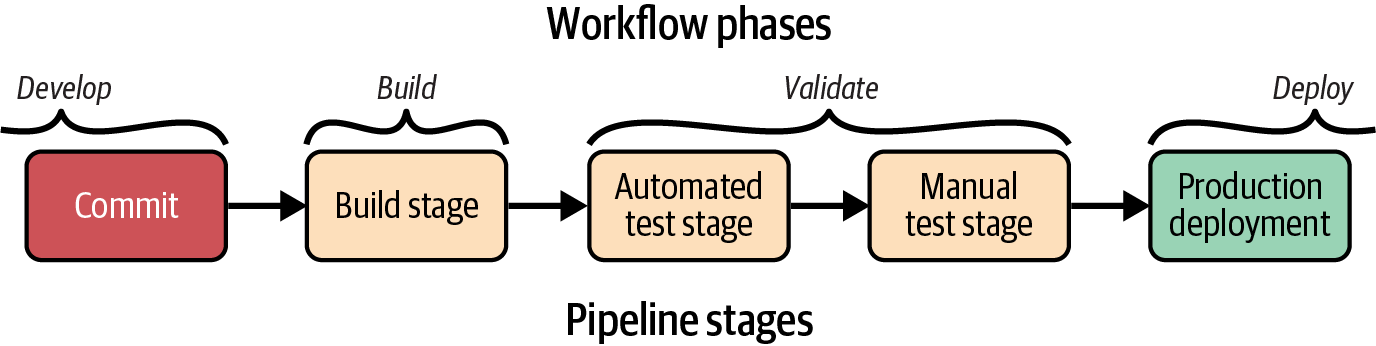
Figure 16-5. Basic delivery pipeline stages
A developer commits code to push it into the build stage of the pipeline, after which it progresses to validation stages. Different pipelines will have different validation stages. This example has two validation stages: one that runs automated tests and the other for manual, exploratory testing. The final stage of a pipeline is typically the production deployment stage. Delivery pipelines build on this basic structure to deliver multiple components and more-complex workflows.
The infrastructure component architecture of a system drives the need to test and deliver components independently. More-complex pipeline design patterns are needed to keep components decoupled. The overall design of the flow of a pipeline, or multiple pipelines, will reflect the workflows described in the past few chapters, including patterns such as fan-in and federated pipelines.
Each stage in an automated pipeline progresses a change within the workflow. Figure 16-6 diagrams the elements of a pipeline stage so you can consider the design and implementation of a pipeline.
The elements of a pipeline stage can be roughly grouped into content, actions, and context. I’ll describe each of these separately.
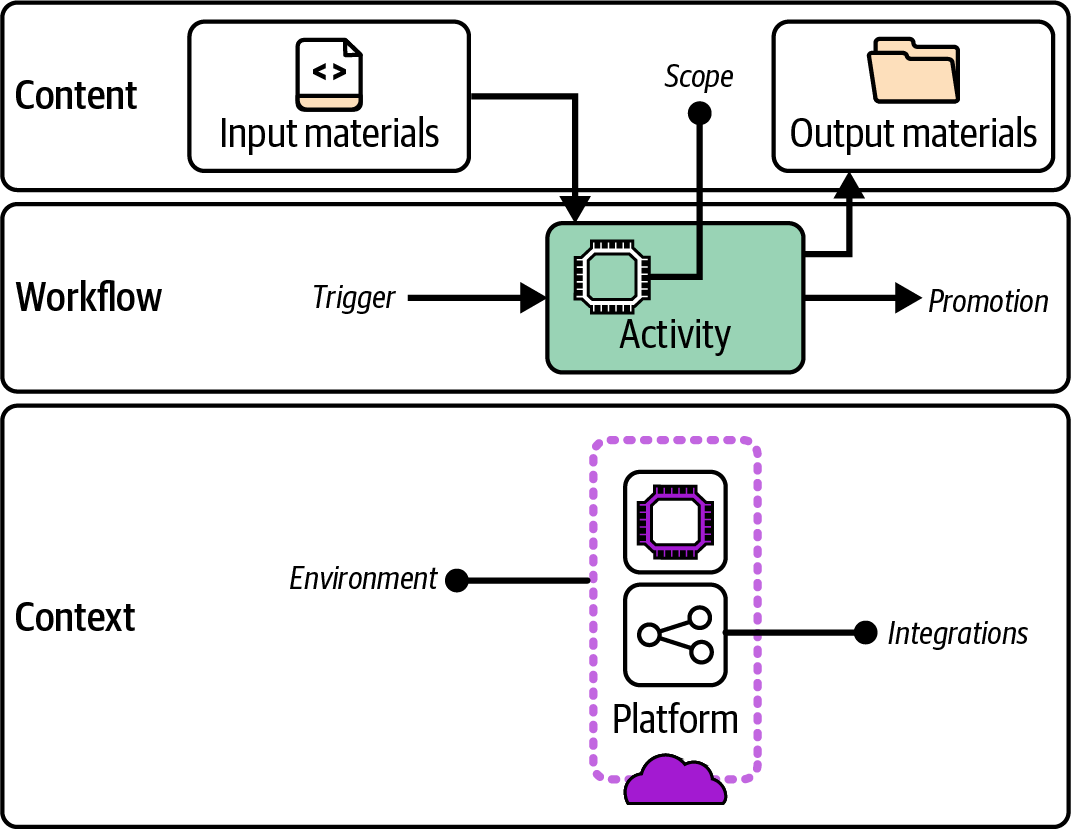
Figure 16-6. Anatomy of a pipeline stage
Pipeline Stage Content
A pipeline stage takes input material. A build stage’s input is usually source code for the component. Later stages will take the build as a package or repository branch or tag. Materials can also include code libraries to assemble into a build package, tests to execute, or configuration values.
Clearly defining the scope of the stage is useful, in terms of which parts of the system are being tested or reviewed. The stage may have dependencies on other parts of the system, such as an IaaS platform or APIs of a hosted service. The pipeline stage for a component should not be responsible for ensuring that its dependencies have been built correctly, instead proving whether they work as needed in combination with the component being tested.
When the pipeline stage completes, whether it succeeds or fails, it usually produces output material. The output for a build stage is the code or package to be distributed in later stages. These may be altered in some ways, such as added files, a version number, or a tag indicating the results of the stage. Most stages produce additional output materials like test reports or logs.
Pipeline Stage Actions
Each stage of the pipeline runs within a broader flow. The stage has a trigger that causes it to execute. A pipeline stage trigger might be an event, like a previous stage completing successfully. The stage implementation could poll the source of the event—for example, checking a source code repository to see whether a new commit has occurred.
The actions of the stage fulfill its purpose. This may be to assemble the build, test an aspect of the code, or allow human review or testing.
Because an automated stage runs every time the trigger activates, that stage will normally run for every change to its inputs. Every commit to the component source code should trigger the first stage of the pipeline, and every success of a stage within the pipeline should trigger the following stage, if it’s automated.
A manually triggered pipeline stage, on the other hand, runs only when a person decides to carry out the activity for the stage. This means a manual stage doesn’t necessarily run for every change to the previous stage. For example, a human tester may run the stage to deploy a build to the QA environment once or twice a day. When they do run the stage, the previous stage may have run multiple times, as multiple developer commits have passed through the earlier parts of the pipeline. A manual pipeline stage should normally use the last passing build from the previous pipeline stage unless the person decides to choose a specific, different build.
Avoid Mixing Automated and Manual Modes in a Pipeline Stage
Mixing automated and manual triggers and activities is not a good idea. A stage with manual activities should be triggered manually, and a stage with automated activities should be triggered automatically.
Having a stage that automatically triggers the deployment of builds to an environment used by a human for testing will be disruptive, as it may deploy a new build unexpectedly while the person is in the middle of testing. In the reverse situation, waiting for a human to trigger automated tests means those tests won’t run as soon or frequently as they would if they’re automatically triggered for every new build.
A corollary to this guidance is that the overall pipeline design should run automated stages first, leaving manual stages for the later part of the pipeline. This structure ensures that all possible automated validation has been carried out before a person looks at it. Human time is valuable and shouldn’t be wasted on a build that a machine could indicate isn’t ready.
When the pipeline stage completes, it promotes the build for use in later stages in the pipeline. It could do this by putting output material into a location for use by later stages, such as an artifact repository or a source code branch. The stage might tag or label the build, perhaps setting a version number or marking it as having passed the validation.
A manual pipeline stage might be split into separate tasks. One task would trigger the start of the stage—for example, deploying the build to a test environment. The person would test the system, and then run a second pipeline task to approve the build. The approval step triggers closing activities such as assembling and storing test reports, and then promotes the build for the next stage in the pipeline.
A pipeline stage might actively trigger the next stage in the pipeline, calling an API or running a command. If the output of a pipeline stage may be used as inputs to multiple downstream stages or pipelines, such as building a library component, using a passive promotion method is often better.
With a passive trigger, the consumer pipelines and stages detect when a new build of their input has been released by the provider pipeline. Passive triggers make self-service models easier. Consumer teams don’t need to ask the provider team to add a trigger for them, and provider teams don’t need to spend time maintaining the triggers each time a downstream team changes its own pipeline configuration.
Pipeline Stage Context
In Chapter 17, I describe progressive testing strategies, where tests with smaller scope are run in earlier stages for faster feedback, with the scope of components under test increasing further along the pipeline.
In addition to progressively increasing the scope of the components tested in each stage of the pipeline, each stage may expand the environment and integrations the component is tested with. Earlier stages of the pipeline will run faster in a more minimal environment, and will run more reliably by integrating with test fixtures rather than live API services. Figure 16-7 illustrates progressive context for multiple pipeline stages.
The first stage in the pipeline is an offline stage; the infrastructure component is validated without deploying the code to the IaaS platform. The code executes entirely in a pipeline service agent, perhaps using an IaaS emulator. Any dependencies the infrastructure requires from other infrastructure are replaced with test fixtures such as a mock service.
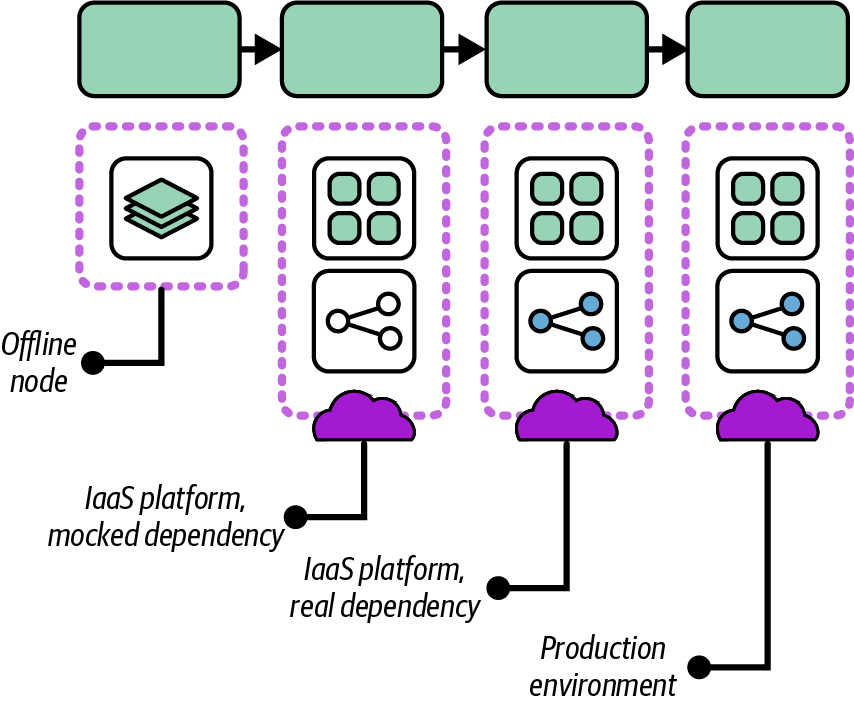
Figure 16-7. Progressive pipeline stages
The second stage deploys the code on the IaaS platform but still uses test fixtures in place of dependencies. The test fixtures should be faster to deploy than the real infrastructure, which makes the tests run faster. The use of fixtures also keeps the tests in this stage focused on the component under test. The tests won’t fail because of issues in its dependencies, but only because of problems with the component itself.
The third stage closely replicates the production environment, deploying the infrastructure code on the IaaS platform and integrating with infrastructure and services it depends on. The testing in this stage should cover only issues that will emerge in this situation, rather than checking for issues that could be caught in the earlier stages.
“Use Test Fixtures to Handle Dependencies” discusses mocks and other text fixtures in more detail.
Delivery Pipeline Software and Services
Infrastructure pipelines need capabilities to implement, including a source code repository, (potentially) an artifact repository, pipeline orchestration, and a deployment service.
A pipeline orchestration system manages the flow of code and artifacts through the stages of a pipeline. Some systems model the end-to-end flow of a pipeline—for example, Buildkite, Concourse, GoCD, and Spinnaker. These services are designed to build and deliver software but can deliver any type of code including infrastructure.
You can also build pipelines by using a build server such as Jenkins, TeamCity, Bamboo Data Center, or GitHub Actions. These tools are often job oriented rather than flow oriented. The core design doesn’t inherently correlate versions of code, artifacts, and runs across multiple jobs. Most of these products have added support for pipelines as an overlay in their UI and configuration.
Some services and tools are designed specifically for deploying Infrastructure as Code. Most of these are focused on deploying to a single instance of infrastructure as opposed to delivering code across multiple environments, so I cover them in Chapter 19.
Using Delivery Orchestration Scripts
Most infrastructure teams write custom scripts to orchestrate and run their various infrastructure tools. Some use software build tools like Make, Rake, or Gradle. Others write scripts in Bash, Python, Ruby, or PowerShell.
An orchestration script manages the process of one or more activities in the delivery process, such as the following:
- Building a project
-
Resolving dependencies, assembling files, generating code, and any other activities needed to prepare an infrastructure component’s code for delivery, as described in “Build Stage”.
- Deployment
-
Assembling instance configuration parameters, generating code, and other actions needed to apply code to a deployable infrastructure stack (see Chapter 19). An orchestration script may orchestrate the deployment and integration of multiple stacks in an environment.
- Delivery
-
Uploading, downloading, and promoting builds of infrastructure component packages, as discussed in this chapter.
- Testing
-
Preparing test fixtures, local emulators, and other prerequisites, then executing automated tests and assembling the results (Chapter 17).
The following are examples of tasks an orchestration script may need to handle:
- Dependencies
-
Resolving and retrieving libraries, providers, and other code, whether at compile time or deploy time
- Tool and platform setup
-
Resolving configuration options for the execution of the Infrastructure as Code tool and for the IaaS platform, managing state files
- Authentication
-
Managing secrets or other methods to authenticate to the IaaS platform and other services
- Configuration
-
Assembling configuration parameter values for the infrastructure stacks
- Packaging
-
Preparing code for delivery, whether packaging it into an artifact or creating or merging a branch
- Promotion
-
Moving code from one stage to the next, whether by tagging or moving an artifact or creating or merging a branch
- Execution
-
Running the relevant infrastructure tools, assembling command-line arguments and configuration files according to the instance the code is applied to
Infrastructure developers often run orchestration scripts locally while editing and testing infrastructure code. Scripts are also called from delivery pipeline tools. Wrapping the logic for tasks in a script helps avoid tight coupling that comes from embedding the details of build and deployment into the configuration of pipeline stages and tasks.
A common pitfall is for orchestration scripts to become as complicated as the code that defines the infrastructure, leading teams to spend much of their time debugging and maintaining it. Rather than having scripts that handle multiple activities and multiple parts of the delivery process, you should split scripts to keep them small and focused on a single activity. Avoid having a single script managing the build, testing, and deployment. Separate the script that orchestrates deployment of multiple stacks from the script that handles the details of a stack’s deployment. And write and maintain tests for your scripts, possibly using a shell script testing tool like Bats.
Conclusion
While the previous chapters described workflows for delivering infrastructure, this chapter has focused on implementing those workflows with automated processes. Logically, implementation starts with organizing the code into one or more repositories. Many teams structure a code repository based on habits and how they’ve worked with previous teams, which can lead to complex workarounds to implement builds and delivery workflows.
A better approach is to organize code with a consideration of design forces such as team ownership, the desired workflow across software and infrastructure, and the way people will develop and test infrastructure code. The workflow for delivering infrastructure also drives the design of automated pipelines to build, validate, and deliver infrastructure changes across environments.
This chapter laid the groundwork for implementing automated infrastructure delivery. The next two chapters build on this groundwork by discussing testing strategies and how to automate infrastructure testing in pipelines. Those are followed by chapters on deploying infrastructure code to environments and managing changes to live infrastructure safely.
1 Sam Newman described the concept of build pipelines in several blog posts starting in 2005, which he recaps in a 2009 blog post, “A Brief and Incomplete History of Build Pipelines”. Jez Humble and David Farley’s book Continuous Delivery popularized the use of delivery pipelines in the industry, particularly for software code. See the deployment pipeline pattern at the Continuous Delivery website.