Chapter 15. Building and Distributing Infrastructure as Code
The workflows and team topologies in Chapter 14 provide the core concepts for delivering and managing infrastructure by using code. This chapter digs deeper into how to build and distribute infrastructure code across environments, and how to integrate separately built infrastructure components and software.
Many teams approach building and delivering infrastructure code differently from the way they deliver software. Infrastructure does have some inherent differences from software that affect delivery, as I’ve pointed out with the code processing model in Chapter 4. However, there are benefits from drawing more deeply from the experience and learning gained in the software delivery field over the past few decades. This chapter draws on patterns and practices from software delivery for building and distributing infrastructure, as well as practices specific to infrastructure.
The preceding chapter also described basic topologies for teams that manage infrastructure for software development teams. This chapter explores patterns aimed at improving the flow of delivery of software and infrastructure changes.
Build Stage: Preparing for Distribution
Chapter 14 includes a build stage as part of an infrastructure delivery workflow. The purpose of a build stage is to prepare the code for a component so that it can be deployed to multiple environments in later stages of the workflow. In the workflow for a Reusable Stack, the build stage takes a commit of the stack project code and produces a release candidate as an output, illustrated in Figure 15-1.
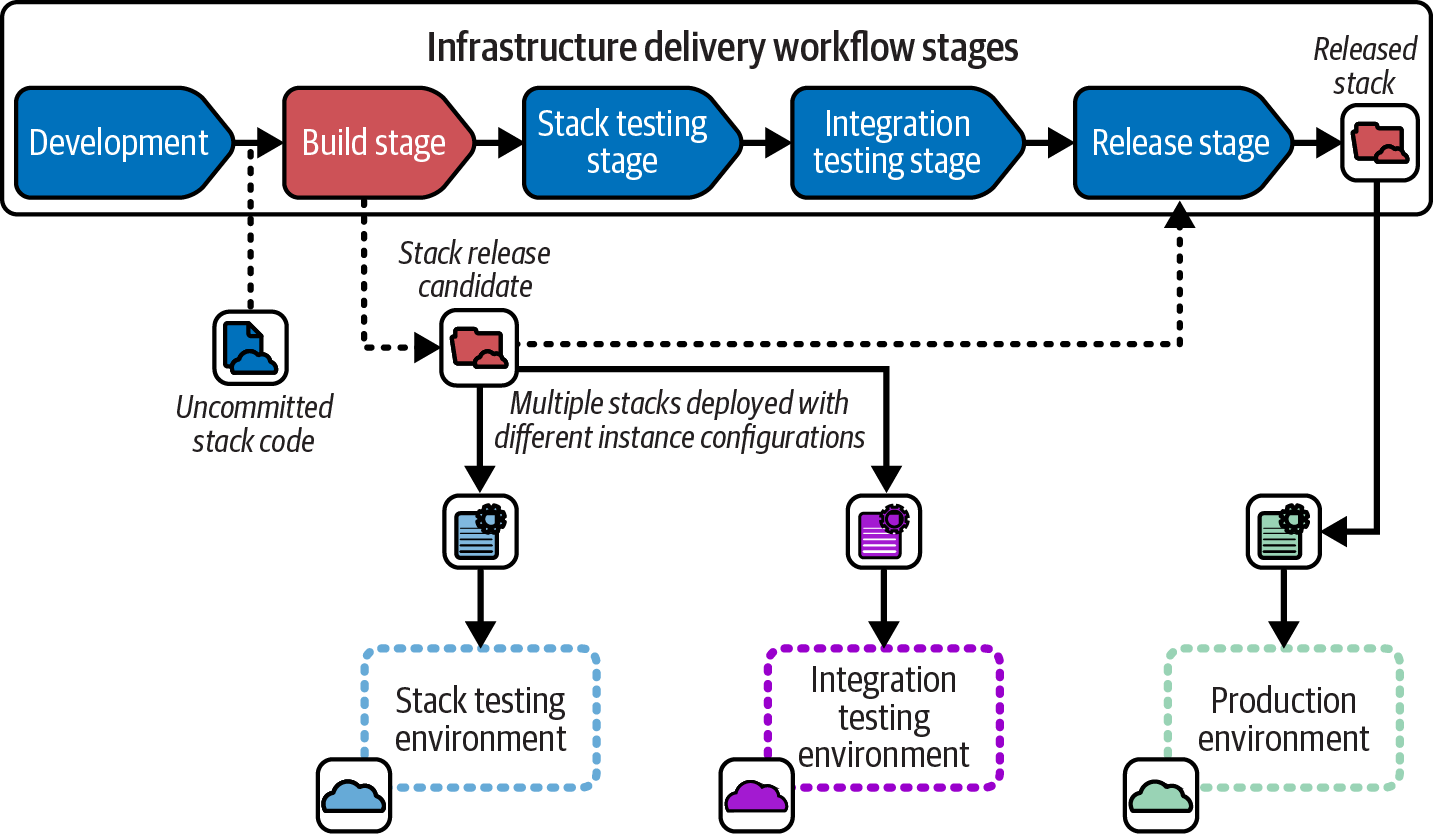
Figure 15-1. The stack build stage turns a code commit into a release candidate
A release candidate has all the elements needed to deploy it to any environment. The diagram shows that the release candidate is deployed with instance configuration to two environments, one for the stack testing stage and another for the integration testing stage. Assuming all the tests pass, the release candidate is released. The released stack is approved for use in production environments or in software delivery workflows, but its contents aren’t changed from when it was tested as a release candidate.
Software delivery build stages are well understood. The code is compiled, libraries are resolved and downloaded, and everything is packaged into an artifact such as a JAR file, container image, or executable installer. An artifact is given a version number (like 2.4.321) and uploaded to a repository that a deployment tool will download it from.
Infrastructure build stages are not as commonly understood. Most infrastructure code isn’t compiled, or if it is, it’s used to generate intermediary code separately for each environment. Libraries and modules are resolved and downloaded, but this is often done each time the code is deployed to an environment rather than once for each build and reused across environments. Most infrastructure code workflows don’t turn stack code into an artifact or assign a version number, and the deployment tool or script pulls the code directly from the source code repository.
Code Processing Steps for Building and Deploying
“Infrastructure Code Processing” is useful for considering when various activities are carried out across the build stage and deployment stages. You may recall the model includes three steps for processing infrastructure code for deployment: assemble, compile, and execute. Figure 15-2 elaborates on how code is prepared in each of these steps.
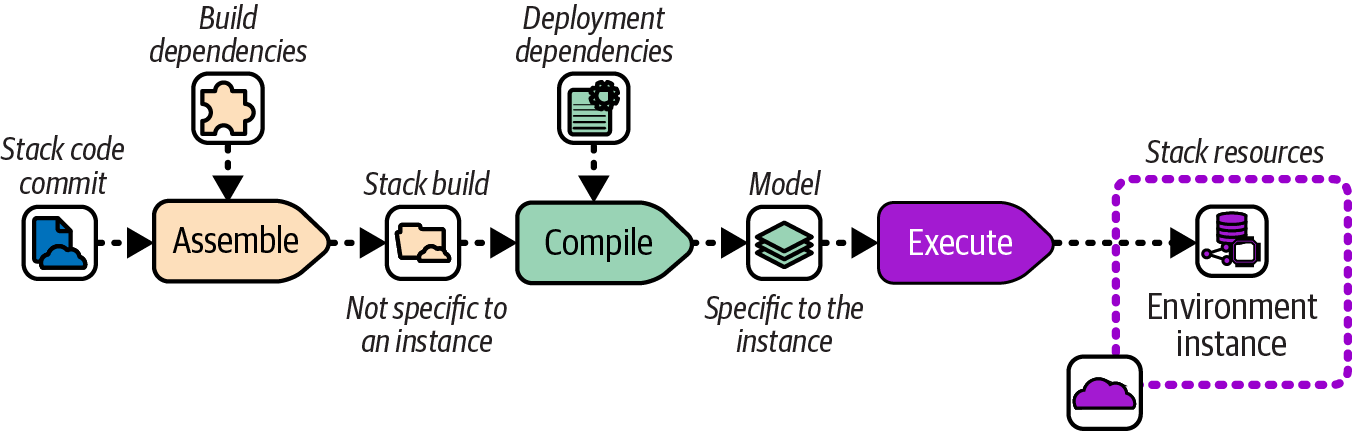
Figure 15-2. Code-processing steps
The Assemble step takes code and build-time dependencies and turns them into a build. The build could be the distributable release candidate, or it could be files in a temporary working folder. The key attribute of the build for the purposes of this discussion is that it is not specific to any instance where the infrastructure code will be deployed.
Examples of actions that happen in the Assemble step include resolving and integrating build-time code dependencies such as libraries or modules, and resolving and integrating build-time tool dependencies such as plug-ins or providers.
Deployment dependencies are added in the Compile step that creates the desired state model. Unlike the build, the model is specific to an instance where the code will be deployed.
Deployment dependencies may include configuration values, references to external infrastructure resources, and configuration the tool needs for the instance, such as an IaaS authentication token or state file configuration. The Execute step then uses the IaaS API to compare the desired state model to the actual resources in the environment instance and modify them as needed.
Many infrastructure tools don’t implement a clean distinction between build dependencies and deployment dependencies, or between assembling a build that is not instance specific and compiling a model that is. I’ll explain how it can be useful to implement this distinction in a build once, deploy many workflow shortly, but first I’ll describe the default build on deploy workflow that many tools assume.
Build on Deploy Workflow
Many infrastructure code tools were originally designed around the needs of deploying infrastructure code to a single environment. The natural workflow for these tools is to run all code-processing activities in a single deployment step. When using these tools to deploy a reusable stack to multiple environments, this workflow means all the processing steps are repeated for every deployment, including things like resolving code and tool dependencies. Figure 15-3 shows this workflow.
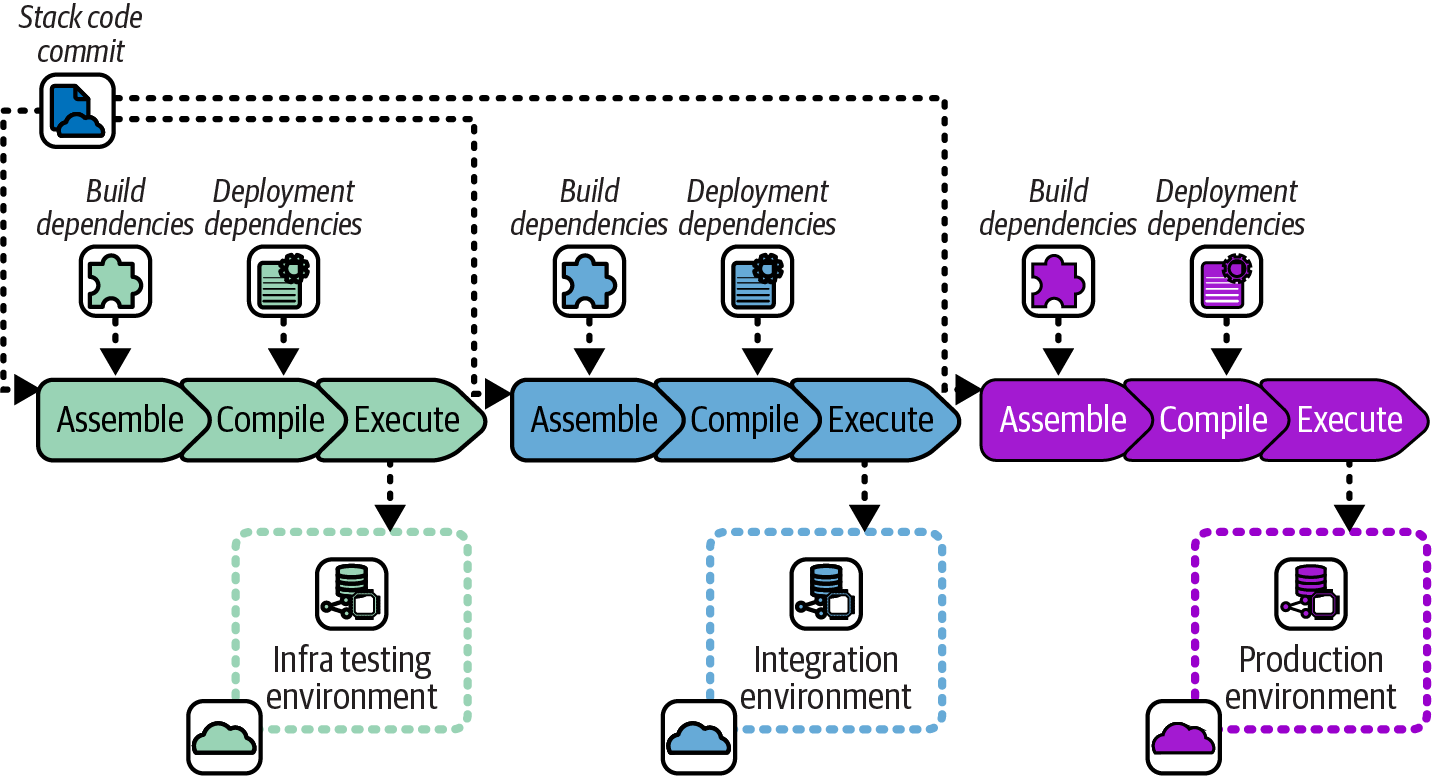
Figure 15-3. Include build dependencies when deploying
The same infrastructure stack project code commit is deployed to each environment, following the Reusable Stack pattern. However, each time the code is deployed, code libraries and tool plug-ins are resolved and downloaded again.
Resolving dependencies every time doesn’t usually cause problems. However, it does create the possibility that in the time between deploying to one environment and the next, a new version of a dependency becomes available. When this happens, a risk arises that the updated dependency causes a change to the infrastructure resources that are provisioned.
Although the risk from dependencies drifting between deployments is usually small, it’s not zero, and troubleshooting inconsistent behavior and failures caused by it can be fiendishly difficult. Good change management practice encourages us to find ways to reduce variation among environments built with the same infrastructure code, as do many compliance and auditing regimes.
Build Once, Deploy Many Workflow
A more rigorous approach to ensuring consistency across environments is to separate the Assemble step and run it once for each commit, in the build stage. Then run the Compile step, with deployment-specific activities, each time the build is deployed. Figure 15-4 illustrates this.
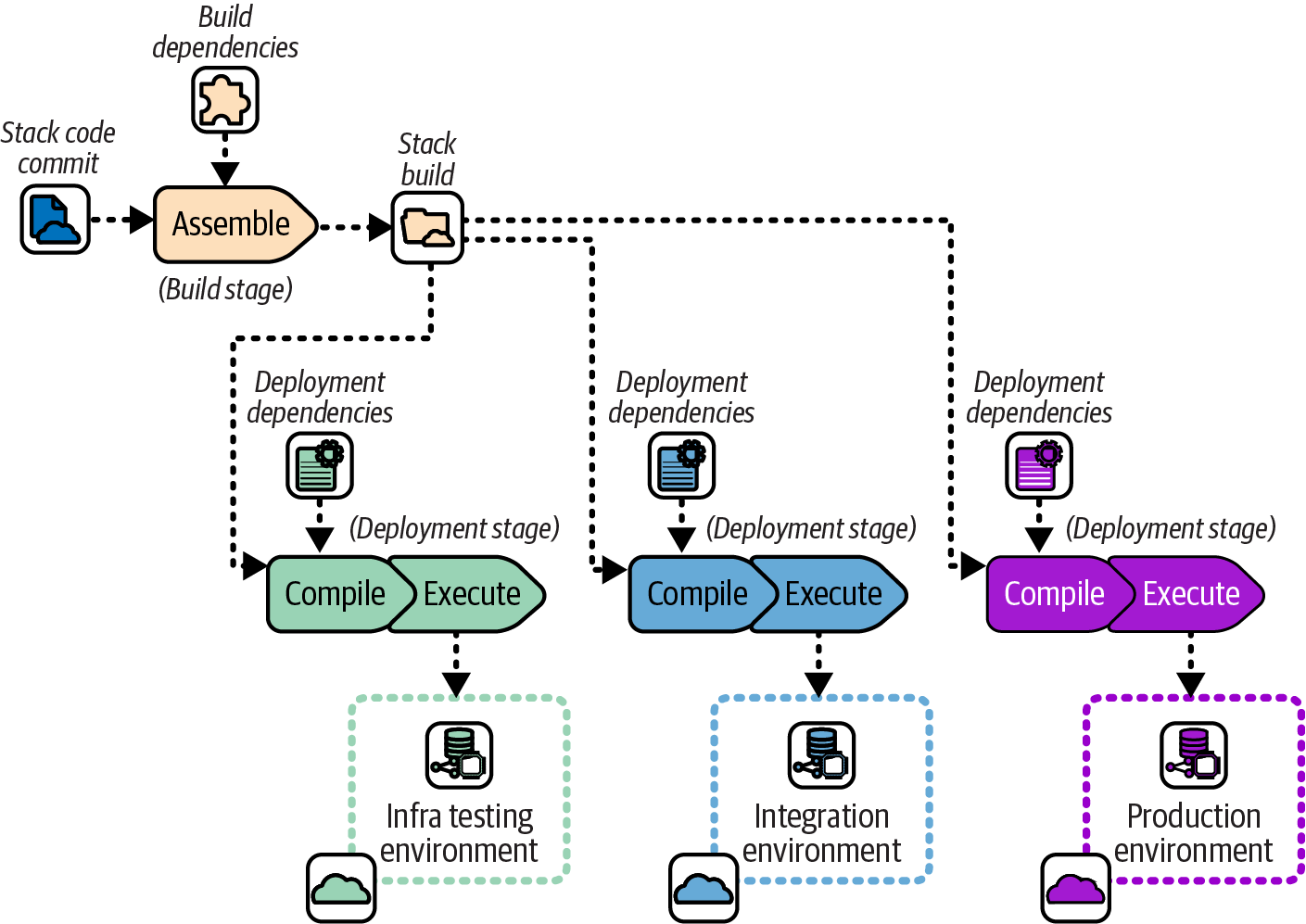
Figure 15-4. Build once and then deploy to each environment
The Assemble step runs once when a code change is committed, resolving build-time dependencies and including them in the stack build. The build is then used across multiple environment deployments, where the Compile step adds dependencies specific to the instance.
Building each version of an infrastructure project’s code once and then deploying the resulting artifact to multiple environments makes those environments more consistent. This improves the reliability of tests by avoiding situations where deployments or tests fail because of inconsistencies between environments.
Dependency Versioning and Regulated Environments
Ensuring consistency of dependency versions across the delivery process has added benefits for systems that are subjected to strict regulations, such as those used in finance, government, and health care. Compliance usually includes proving that dependencies are managed well, including testing changes and creating an audit trail. The approach described here fulfills these needs almost as an incidental side effect.
Bundling or Locking Dependencies
A build once, deploy many workflow involves resolving versions of build-time dependencies once and ensuring that the same versions are used every time the build is deployed. A simple way to ensure this is to download the dependency files and bundle them with the code build. This approach works well when distributing builds as artifacts, as described later. If you are distributing builds in the code repository, such as using environment branches, you could commit the downloaded dependencies to the repository.
Another approach is to use a version lock-file. The build stage resolves the dependencies, including transitive dependencies that may not be explicitly specified in the build configuration. These versions are written to a lock-file, such as a Terraform dependency lock-file. The version lock-file can be committed with the build in the source repository or bundled into the artifact.
Pull Requests and Trunk-Based Development
Two major alternative workflows are most often used by development teams to take code changes to the build stage. These are pull requests and trunk-based development:
- Pull requests (PRs)
-
Developers work on each feature in a separate branch. When they believe the feature is ready, they submit the branch (creating a pull request) to be reviewed and merged with the main branch.1
- Trunk-based development (TBD)
-
Developers commit incremental changes that are functionally correct but not necessarily completed features to the main branch (sometimes called the trunk).
The PR workflow is used by teams believing that human reviews are more effective than their automated test suites for preventing developers from breaking the main code branch. This approach is also popular because it makes it easier to enforce code reviews, with good support in modern source code management systems.
TBD is preferred by teams believing that their automated test suites are fast and effective enough to stop changes from breaking the main code branch. These teams typically work at a fast pace, committing multiple incremental changes and prioritizing fast feedback from tests.
Note that a PR workflow may involve building the code on the PR before it’s merged to main. However, the build that results from merging the code to main is the true release candidate. It’s the version that will be promoted and potentially deployed to production.
The key trade-off between the PRs and TBD is feedback loops versus how manual code reviews are implemented. Figure 15-5 compares the two workflows.
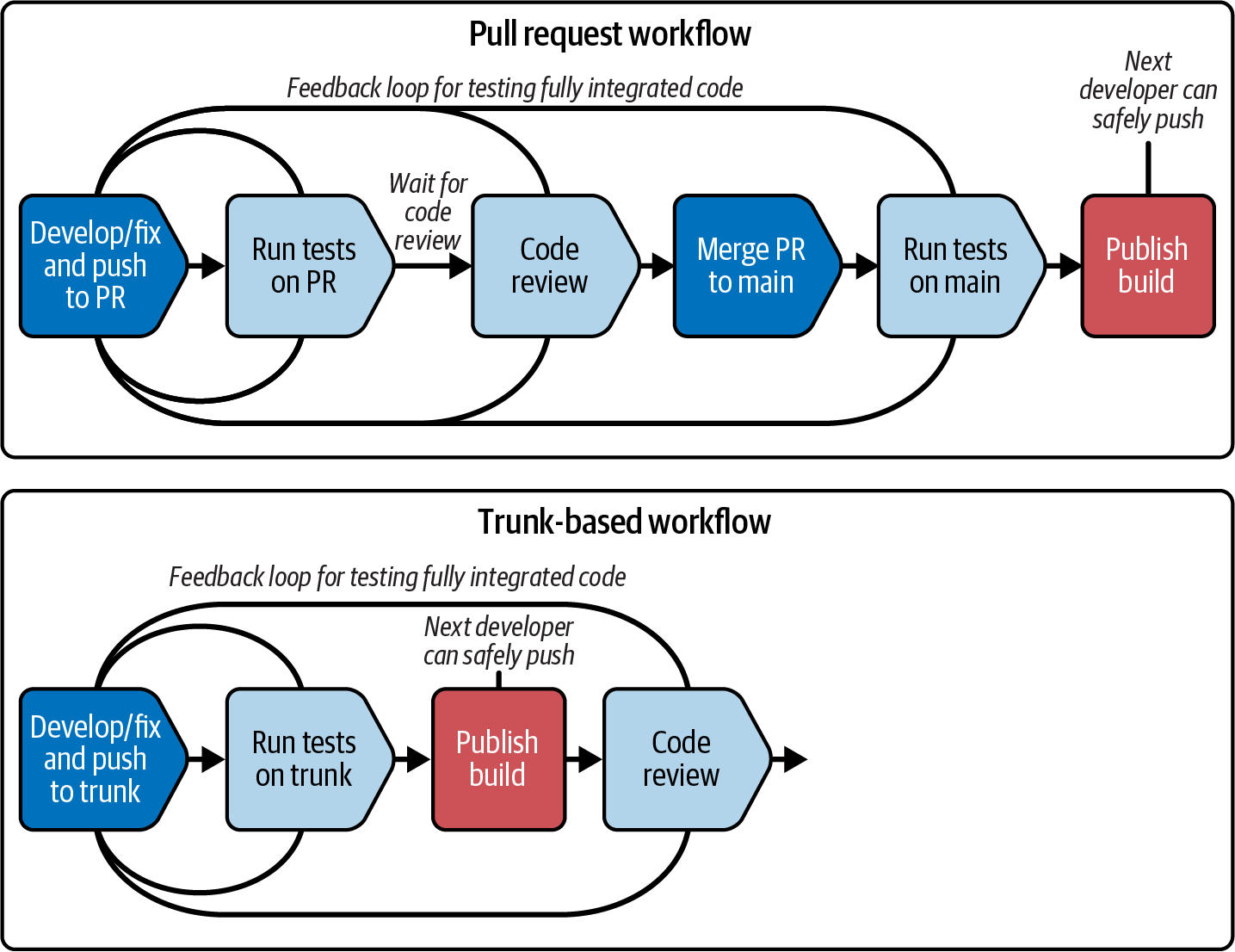
Figure 15-5. Comparing PR and TBD workflows
The two workflows differ in where code review sits in relation to publishing a build that includes the code change merged into the main branch. Pull requests put manual code reviews inside this loop. Because it may take a while for someone to review a PR, and to resolve and rerun the loop for any changes the reviewer requires, the feedback loop for merging the code and publishing the build from it can be fairly long.
With TBD, changes are merged and, assuming automated tests pass, a build is immediately published as a release candidate and promoted to the rest of the delivery workflow. Teams using TBD tend to keep their automated test suites fast, so the feedback loop for the build takes ideally less than 10 minutes.
Many teams using TBD do human code reviews, using alternatives to PRs. Pair programming is code reviewing done continually, in real time.2 Other teams use pipelines to enforce code reviews in later stages, moving them outside the inner loop of the build stage. Either of these approaches can be used to satisfy certain regulatory requirements around reviewing changes, but they tend to need custom tooling to enforce them and create audit trails.
TBD requires mature engineering practices for managing small, incremental changes in a potentially production codebase. See “Changing a System Incrementally” for advice.
Distribution of Infrastructure Code
When I work on trivial, solo code projects like the infrastructure for my personal website, I usually edit and deploy my code directly from the current version of the code in my repository. I apply the code to a test environment, run tests and assure myself it’s good, then deploy the code to my production instance. I can get away with this because nobody else is working on the codebase, and I work on only one change at a time.
For a nontrivial workflow, we usually need a way to deploy different versions of the code to different environments. While I’m testing a change in the user acceptance testing (UAT) environment, another developer may work on another change and deploy to a QA instance.
With software, we package builds into a versioned artifact like a container image. The build I deploy to UAT may be version 2.8.123, and the version someone else is deploying to QA is 2.8.124. As we’ll see, infrastructure builds can be handled the same way, but many teams use other approaches, such as code branches and libraries as artifacts.
Figure 15-6 shows how the build progresses through an infrastructure delivery workflow regardless of how the build is physically managed.
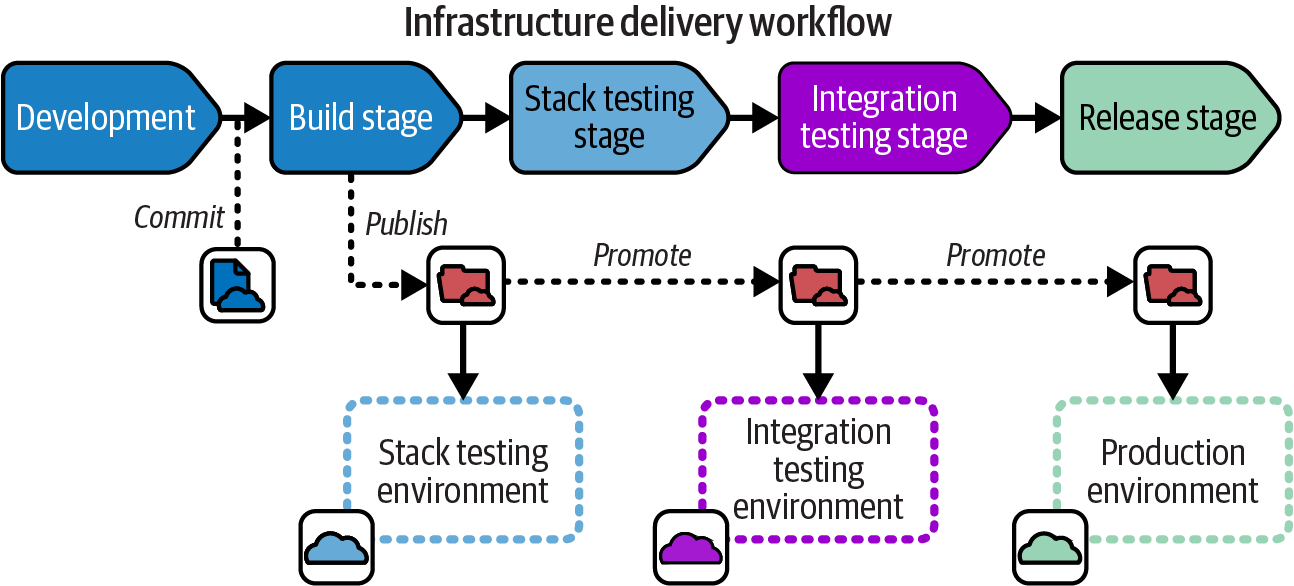
Figure 15-6. How a build progresses through an infrastructure delivery workflow
A developer creates an infrastructure build by committing or merging code in the repository. Creating the build triggers the build stage to prepare the build for distribution. The build stage publishes the build, which means making it available for the next stage in the workflow. At each stage in the workflow, the build may, if tests and other requirements for the stage pass, be promoted to the following stage.
Treat Builds as Immutable
Whether infrastructure code builds are distributed in a code repository or as artifacts, each build should be treated as immutable, meaning no changes are made to the code as it progresses across environments. Some teams make a habit of editing stack code to customize it for each environment, which results in the Snowflakes as Code antipattern (see “Snowflakes as Code”). Variations should be managed as configuration parameters, following the Reusable Stack pattern (see “Reusable Stack”).
Distributing Code Branches as Artifacts
Infrastructure code is already stored in a central source code repository, so the simplest approach for delivering the code to multiple environments is to pull it directly from the repository. Given that we want to manage each change as a discrete, identifiable build, we have two ways to manage builds in a source repository. One way is by reference; the other is with environment branches.
Managing an infrastructure build by reference requires using a unique identifier for the build in the source repository. The identifier could be one that the repository assigns to the changeset, such as the Git commit ID. Or you could tag the code commit with an ID, such as a sequential version number. Either way, the workflow implementation needs to pass the build ID from one stage to the next, so that the correct version of the code can be pulled from the repository and deployed.
An alternative approach is to maintain a branch for each environment and promote the build by merging its code to that branch. Environment branches are commonly used with the deployment technique described in “Infrastructure as Data”: a controller continually synchronizes the code in the branch with the resources deployed in the environment.
Distributing Stack Packages as Artifacts
Most software development languages have packaging formats for bundling libraries and deployables into artifacts for distribution. Java has JAR, WAR, and EAR files, Ruby has gems, JavsScript has npm, and Python has pip, to name a few. Other packaging formats are designed to bundle, distribute, and install applications developed in any language, typically focusing on how to deploy and configure the application for particular runtime systems. Examples of these include RPM (RedHat-based Linux systems), DEB (Debian-based Linux systems), MSI, and NuGet (Windows). Container images are a way to package software written in any language in a highly portable, executable format.
Few infrastructure tools have a package format for their code projects. However, some teams build their own artifacts for these, bundling stack or server infrastructure code into ZIP files or TGZ tarballs (TAR archives compressed with gzip). Some teams use OS packaging formats, creating RPM files that unpack Chef cookbook files onto a server, for example. Other teams create container images with the infrastructure code build, often bundling the stack tool executable with it.
A system has three parts for distributing infrastructure code as artifacts: the packager, the repository, and the deployer.
You can leverage an ecosystem of tools and services by packaging your infrastructure code with an off-the-shelf packaging system. Alternatively, you can script your own tools by using an archiving tool like tar or zip. You can store home-built artifacts by using a general-purpose file storage service like S3 buckets or a file server. Or you could use an artifact repository like JFrog Artifactory or Sonatype Nexus Repository. The OCI Registry As Storage (ORAS) project offers a way to use a container registry as a repository for arbitrary types of artifacts, which can be used for infrastructure. GitHub supports publishing a package as a release.
Some infrastructure code tools, particularly those used for server configuration, have repositories for infrastructure code components. Examples of these include Ansible Galaxy, Chef Infra Server, and Puppet control repository. Some infrastructure deployment services (like those described in “Using an Infrastructure Code Deployment Service”) include repositories for storing infrastructure code.
Distributing Libraries as Artifacts
A wrapper stack implements a reusable deployment stack as a code library.3 Each deployment of the stack is defined as a separate stack project. Using Terraform, for example, the stack is implemented as a Terraform module, with a separate Terraform project for each environment where the stack is deployed. Figure 15-7 shows the delivery flow for a code library deployed using wrapper stacks.
Separate stack projects define the environment-specific configuration to deploy the infrastructure defined in the library. The advantage of this approach is that it makes use of services for managing libraries as versioned artifacts (like a Terraform module registry) with toolchains that don’t support doing so for deployment-level components.
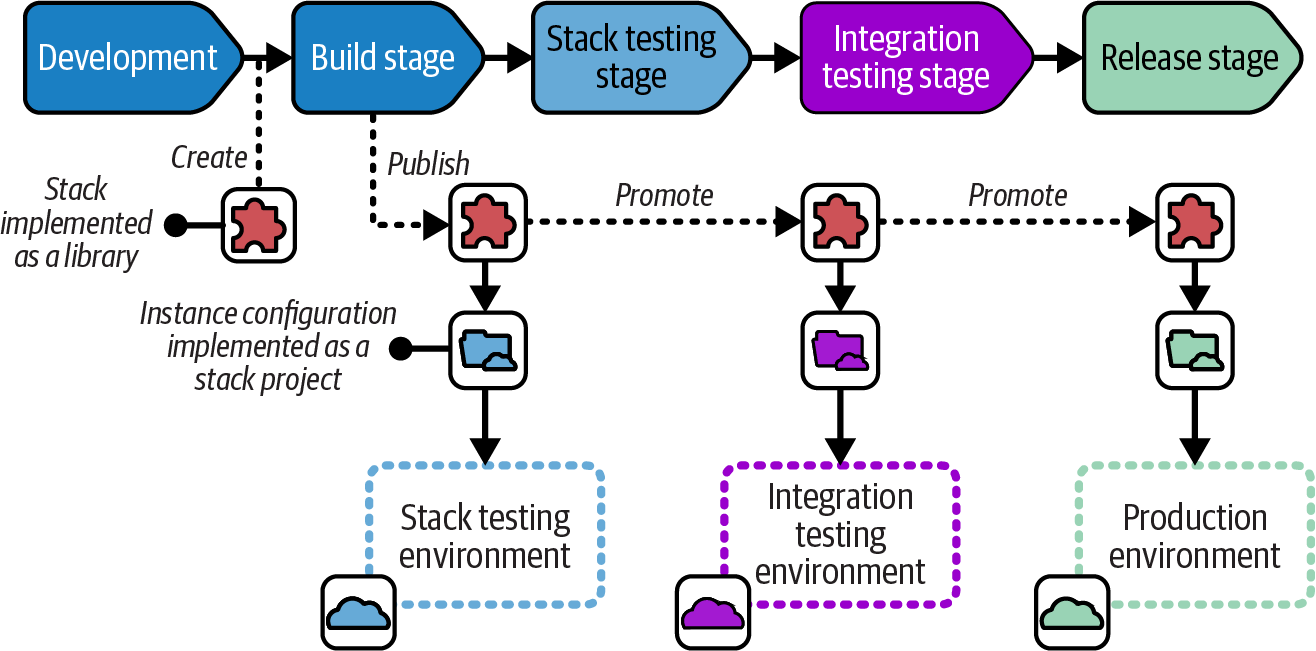
Figure 15-7. Distributing an infrastructure code library as a deployment artifact
Integration Workflows
Much of the design advice in this book leads to multiple, separately deployable infrastructure stack projects that may be integrated to form an environment. Figure 15-8 shows three stacks that build the infrastructure hosting the FoodSpin menu service software. The compute stack creates a pool of virtual servers, the storage stack creates a database instance, and the network stack defines the networking used to manage inbound traffic to the service.
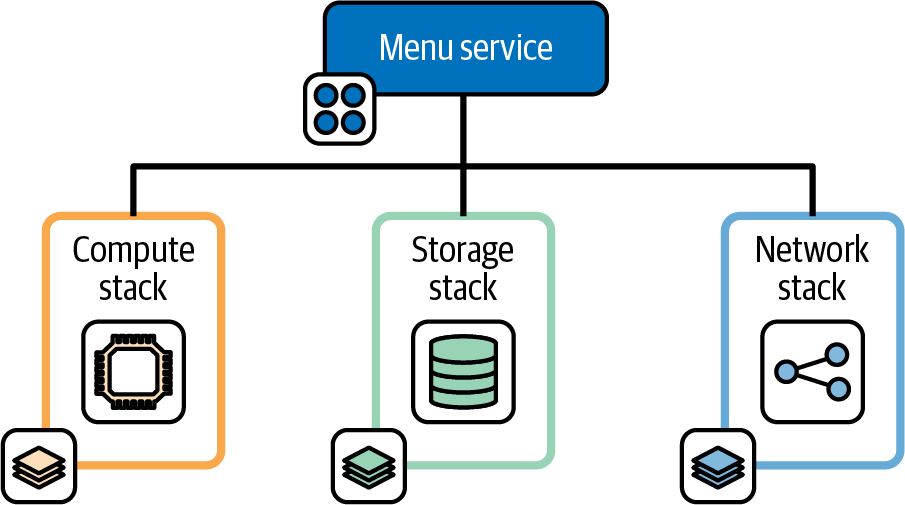
Figure 15-8. Decoupled infrastructure deployment stacks
The FoodSpin team has separated the service’s infrastructure into these stacks to reduce the time needed to test and deploy the infrastructure code, and because the team often makes changes to the infrastructure in each stack separately. Changing the storage stack involves steps to retain the data, so deploying that stack separately from the others is useful. The compute stack isn’t as risky to change, and in fact can be completely destroyed and rebuilt without losing data. The network stack is also safe to rebuild, but changes to load-balancer rules are quite slow. Although changes to any of these stacks often results in downtime for the service, the three-stack design helps minimize downtime for any one change.
However, managing the service’s infrastructure in three stacks means the team’s workflow needs to support integrating and testing changes to the stacks. Three workflow patterns that may be considered involve integrating and testing the stacks together at three points in the workflow. One is integrating during delivery, using the fan-in pattern. The next is integrating each time the stacks are deployed with a federated workflow. The third is integrating in the build, using a monorepo. A fourth option is to use compositions to treat stack components like libraries.
Fan-in: Integrating Components During Delivery
A fan-in integration workflow builds and tests each deployable component separately, to ensure it is independently deployable and to check that it works correctly.4 Figure 15-9 shows a fan-in workflow for the menu service infrastructure stacks.
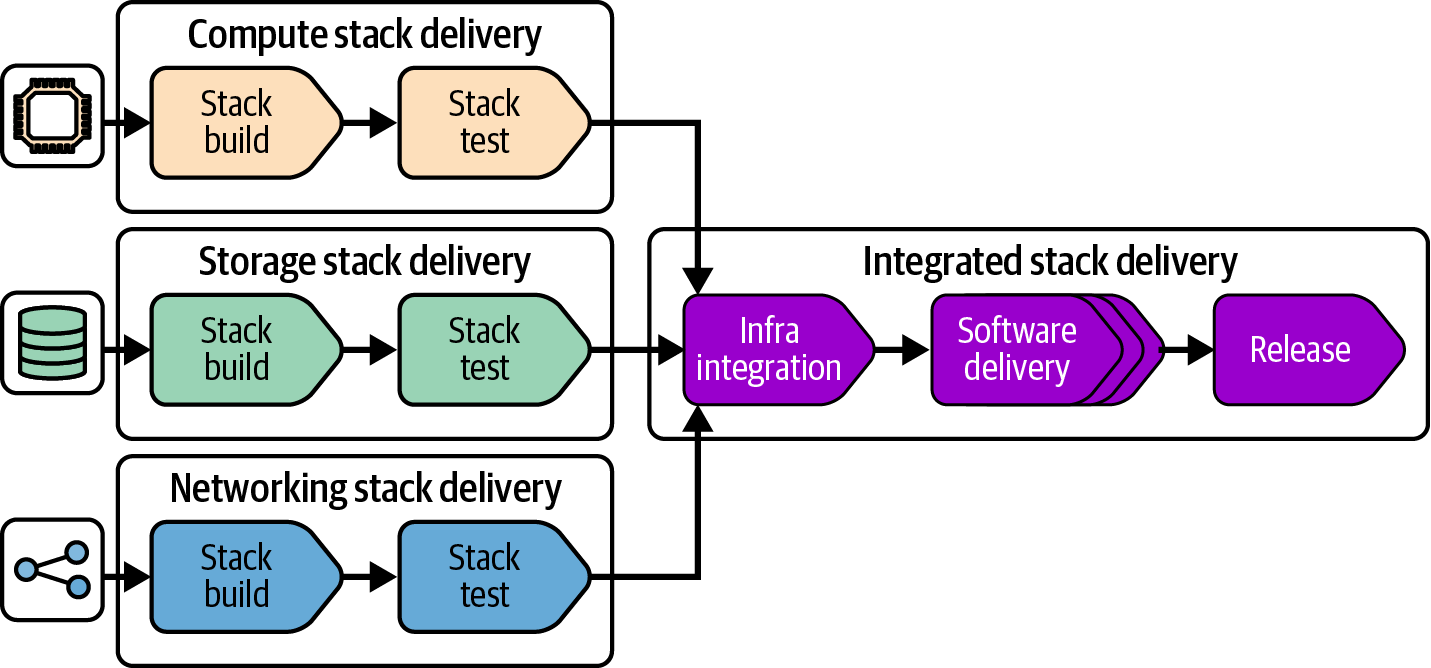
Figure 15-9. Fan-in delivery workflow
When any one of the stacks has changed, this workflow integrates it, deploying and testing all together. It then progresses all three stacks together through the rest of the workflow, deploying to software delivery environments and production. At each integrated workflow stage, only the stacks that have changed are deployed. Often when multiple stacks have been changed, they can be deployed in parallel. This not only can reduce downtime needed, but also improves the cycle time for the overall delivery workflow, especially automated segments.
The advantage of the fan-in approach is ensuring that changes to any of the components can be reliably deployed without needing to redeploy everything, while also ensuring that the collection of components works properly before deploying it to production environments. A drawback is that this approach tends to become unwieldy when scaled to larger numbers of components owned by different teams. So it’s recommended to ensure that all the components of a fan-in workflow are owned by the same stream-aligned team.
Federation: Integrating Components at Runtime
A federated integration workflow decouples the delivery of each deployable across environments. For larger systems, decoupling this way removes the overhead and friction involved in coordinating releases across components, but requires mature approaches to managing their dependencies. Figure 15-10 shows a federated workflow.
An infrastructure developer can change one of the infrastructure stacks and push it through to release without needing to coordinate with people working on changes to other components. Federated delivery of separately deployable software components is a key practice of microservices architectures.5
The challenge with federated delivery is that a stack build may be tested in an earlier stage with its dependencies and consumers, but then released into production with different versions of those components. The variation in integrated versions across the delivery workflow creates an obvious risk of inconsistent behavior and incompatibility.
Teams that adopt federated delivery use various practices to manage these risks. One practice is applying API design principles and concepts to dependencies between infrastructure components, such as backward compatibility and contract testing. A robust approach to testing and monitoring also help, as do progressive deployment practices like dark launching. These topics are covered in Chapter 20.
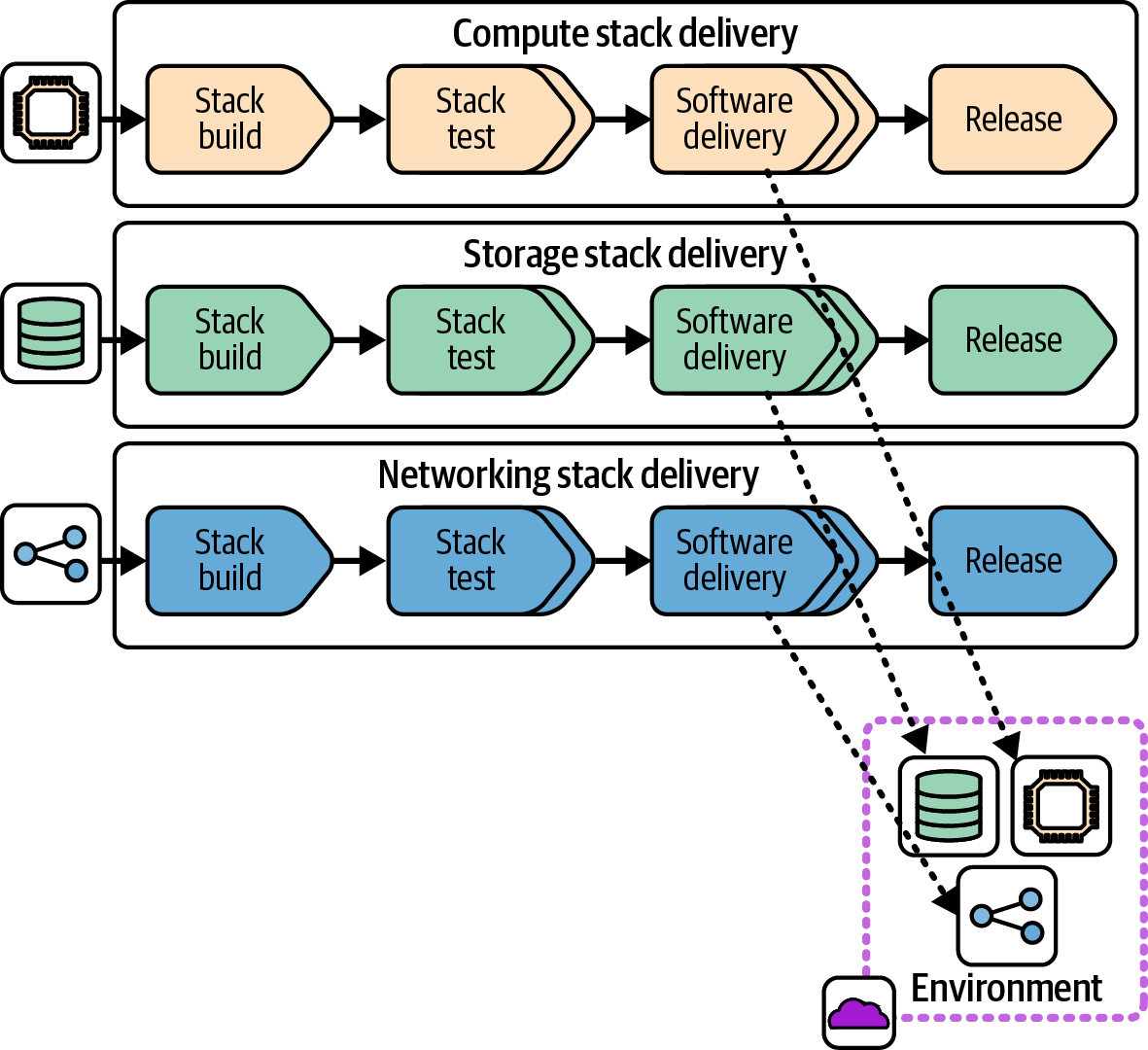
Figure 15-10. Federated delivery workflow
Organizations adopt microservices and federated infrastructure delivery when coordinating delivery across dozens of teams becomes unworkable. However, many use a hybrid approach, using fan-in delivery for subsets of components, and federation between those subsets. As a rule of thumb, fanning can be appropriate for components owned by a single stream-aligned team or group, while federation is more appropriate across teams.
One benefit of federating delivery of components even within teams is that it makes code ownership more portable. Reassigning ownership of components is easier with decoupled delivery workflows.
Monorepo: Integrating Components in the Build
Some larger organizations with particularly complex systems take integration in the opposite direction of a federated workflow and integrate all their deployable components at build time. This approach is called a monorepo because the components and their build-time dependencies are all maintained in a single repository.
It’s important to understand that a monorepo involves more than managing all the code for a system in a single repository. The fact that the code is all in one repository led to the name, but if elements of the repository are built and delivered separately, it’s not a monorepo; it’s just a mess.
A monorepo also isn’t the same as having a single, monolithic deployable artifact. The key concept of a monorepo is that multiple deployable artifacts, and their shared code, are built together, as shown in Figure 15-11.
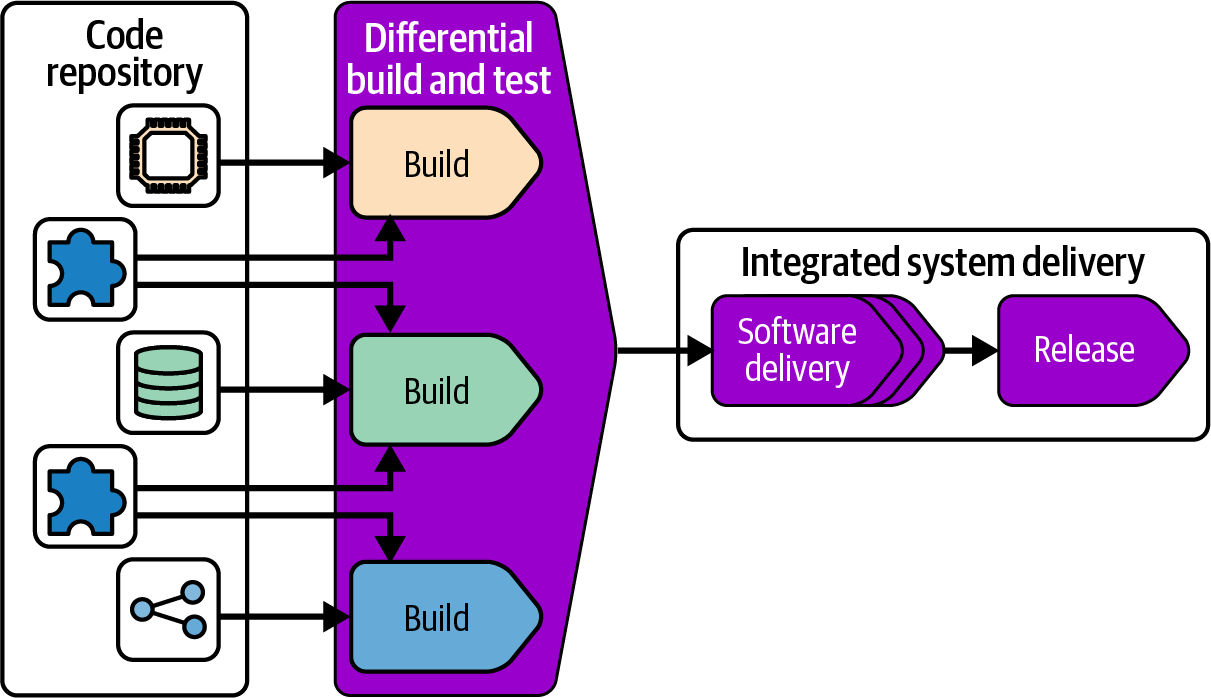
Figure 15-11. Building all projects in a repository together
A monorepo build avoids having different versions of the same shared code used in production. Whenever someone changes shared code, the build and tests make sure that everything that uses that code still works correctly.
The challenge with a monorepo is that rebuilding and retesting everything in the repository takes a long time, which isn’t feasible to do every time someone changes some code. A build tool like Make can conditionally build and test only those files that have changed, but most build tools aren’t designed to scale across a very large number of projects. Parallelization can speed up this process by building and testing multiple projects in different threads, processes, or even across a compute grid.
A better way to optimize large-scale builds is using a directed graph to limit building and testing to the parts of the codebase that have changed. Done well, this should reduce the time needed to build and test after a commit so that it takes only a little longer than running a build for separate projects.
Facebook, Google, and Microsoft pioneered the monorepo approach, and each developed custom, in-house build tools to manage them.6 These have evolved into and inspired other monorepo build tools, including Bazel, Buck, Pants, and Please.
Pretesting Infrastructure
It’s essential to keep in mind that development and testing environments are business critical. Pushing an untested infrastructure change to a development environment risks disrupting software development, which could delay a bug fix or the release of a new feature, and waste the time of developers, testers, and others who need reliable systems to do their jobs.
Figure 15-12 shows a workflow that tests infrastructure code in isolation before deploying it to software delivery environments.
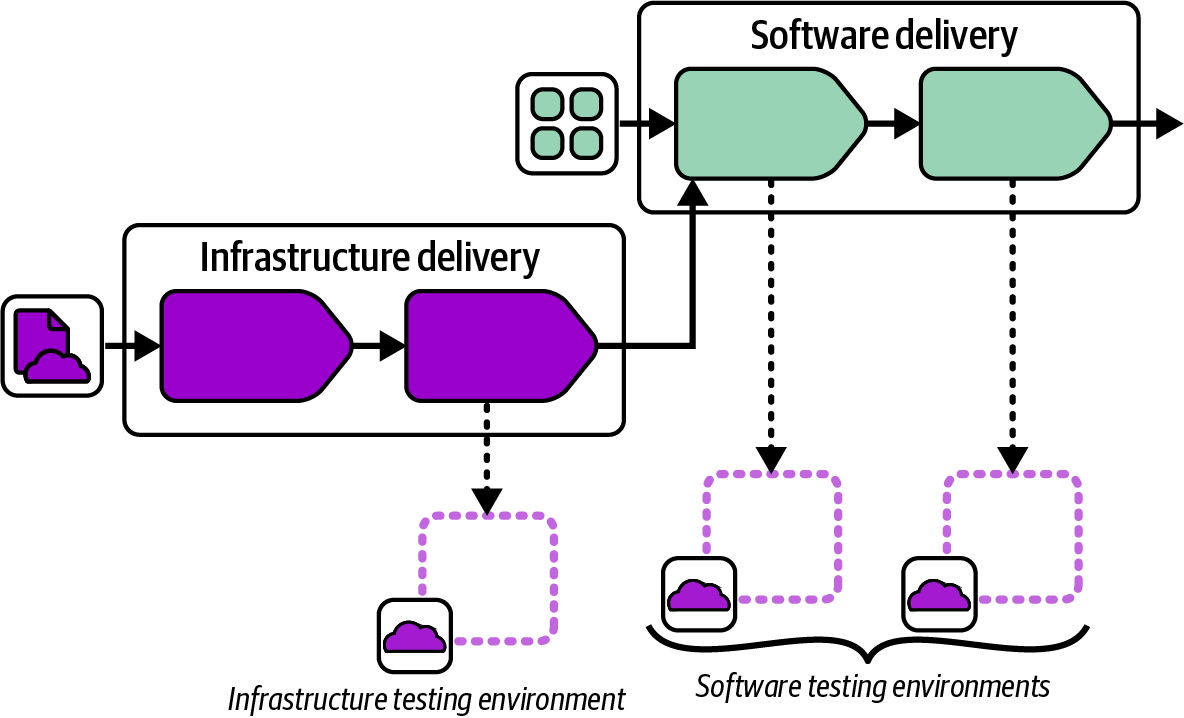
Figure 15-12. Integrated infrastructure and software pipeline
Once the infrastructure code build passes its tests, its workflow joins with the software delivery workflow, which is another example of the fan-in pattern. The infrastructure is applied to the first software delivery environment, and the software tests run to prove that the previous software build still works correctly after the infrastructure change. The infrastructure change can then proceed to the rest of the software delivery environments.
Infrastructure Service Teams
In “Infrastructure Instance Management Teams”, I described the infrastructure instance management team that configures and manages the use of infrastructure that software delivery teams use to run their workloads. Infrastructure instance management teams are typically responsible for even minor changes to the infrastructure instance and its configuration needed by software teams. This model leads to the infrastructure team becoming a bottleneck for routine software delivery, and to the team becoming overwhelmed by routine work (toil).
Toil
In the DevOps and SRE world, toil refers to manual, repetitive, and often mundane tasks that are needed to keep a system or service running but don’t contribute to its improvement or innovation. Toil is time-consuming, error-prone, and generally low-value work.
The infrastructure service team is an alternative model: the team provides services and tools that other teams can use to manage their use of infrastructure. A service team makes sure that its consumer teams can carry out normal delivery work without the service team being directly involved. The service team may need to help out when the consumer team runs into a problem it doesn’t know how to solve, or to add a new capability to the infrastructure it provides. But these situations are the exception to normal workflows.
Figure 15-13 shows that the FoodSpin compute team provides services to three software teams.
The topology shows that the FoodSpin shared compute team makes its compute cluster available for software teams to add, deploy, and configure their applications via a self-service model rather than a handover model (like raising a request in a ticketing system). A service team has two main options for providing self-service infrastructure. One is self-service use of a shared instance; the other is self-service provisioning of dedicated instances.
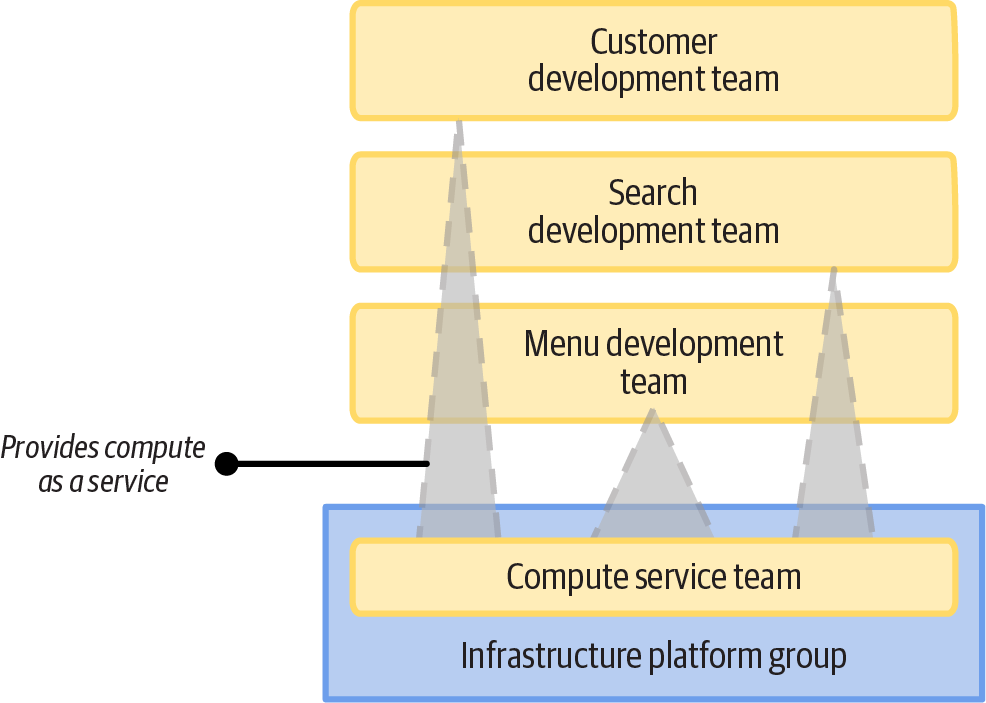
Figure 15-13. The shared compute team manages infrastructure that workload teams can use as a service
Shared Infrastructure as a Service
Several software teams may deploy and run workloads on a shared infrastructure instance in a multitenancy arrangement, as shown in Figure 15-14.
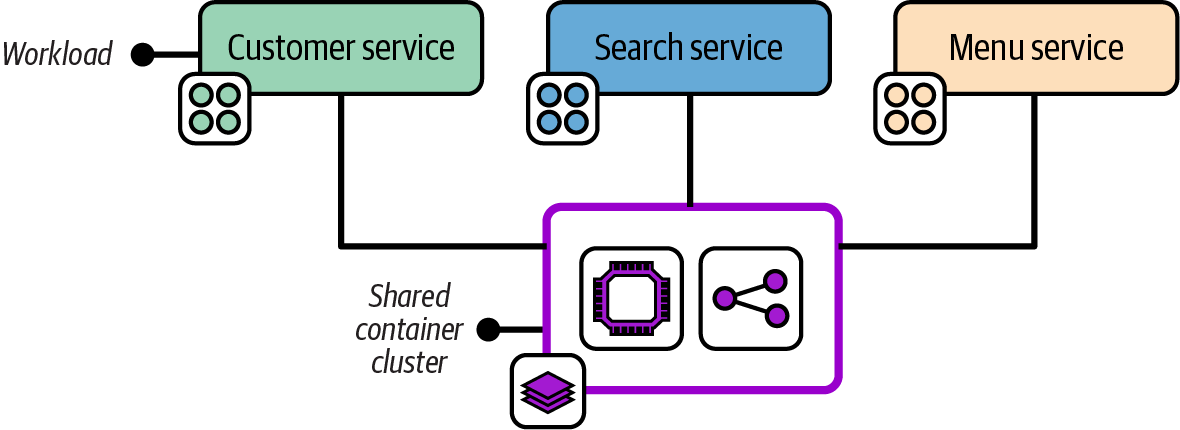
Figure 15-14. A shared compute infrastructure deployment
The FoodSpin development teams in this example each deploy their applications onto a shared container cluster. This cluster could be provided by an infrastructure instance management team, or by an infrastructure service team. The difference is in the amount of involvement the team needs to have to support consumer teams. It’s useful to consider various journeys involved in using the shared infrastructure:
- Onboarding a new workload
-
When a consuming team develops new software to deploy onto the cluster, can the team add and deploy it on its own? An instance management team needs to make changes either to the infrastructure code or the instance configuration before the software team can deploy the new workload. A service team provides a way for the software team to add and configure its new workload on the cluster without the service team doing anything.
- Configuring infrastructure for a workload
-
If a consumer needs to change the infrastructure (for example, to optimize performance or support a new software feature), can they make this change themselves, or do they need the infrastructure team to do it for them?
- Troubleshooting for a workload
-
When something goes wrong with the workload, how easy is it for the consumer team to get visibility into what is happening with the infrastructure, and to make the necessary changes to resolve the issue? An infrastructure instance management team often needs to respond to incidents, perhaps even before the application team gets involved. An infrastructure service team makes it possible for the application team to respond first, handling escalations only when necessary.7
- Deploying a workload
-
When a new version of workload software needs to be deployed to an instance, an infrastructure service team makes it possible for the consumer team (or its automation) to deploy that version without being involved. Many instance management teams are able to provide at least this level of self-service, but in extreme cases the infrastructure team owns application deployment.
Some journeys can be self-service, while other journeys on the same infrastructure are managed. For example, a development team may be able to deploy and configure its software on a container cluster, but may need the infrastructure team to troubleshoot issues and make changes for adding new application instances. Whether the team is seen as a service team or an instance management team will depend on how often those journeys are needed.
If new applications are added once or twice a year, there is less need to make the journey self-service. If a new application instance is deployed multiple times a week (every time a new customer signs up, for instance), it’s probably time to make that process self-service or even fully automated.
Multitenancy infrastructure deployments are most appropriate when the workloads are integrated—for example, when they need to communicate with one another by using the infrastructure capability, like some networking constructs. Unrelated workloads may share an infrastructure instance, such as a container cluster or database server, in order to optimize resource utilization. However, a given workload’s requirements should not impact other workloads sharing the infrastructure.
If workloads sharing an infrastructure instance may impact other workloads, consider running them on separate, dedicated instances. An infrastructure team can provide dedicated instances as a service by providing on-demand instance provisioning.
Provisioning an Infrastructure Instance on Demand
Infrastructure that is used by only a single workload, or a set of workloads for a single team, can take the “as a service” model a step further. The teams that use the infrastructure can provision dedicated instances of the infrastructure on demand. Figure 15-15 shows each FoodSpin application using a dedicated database instance.
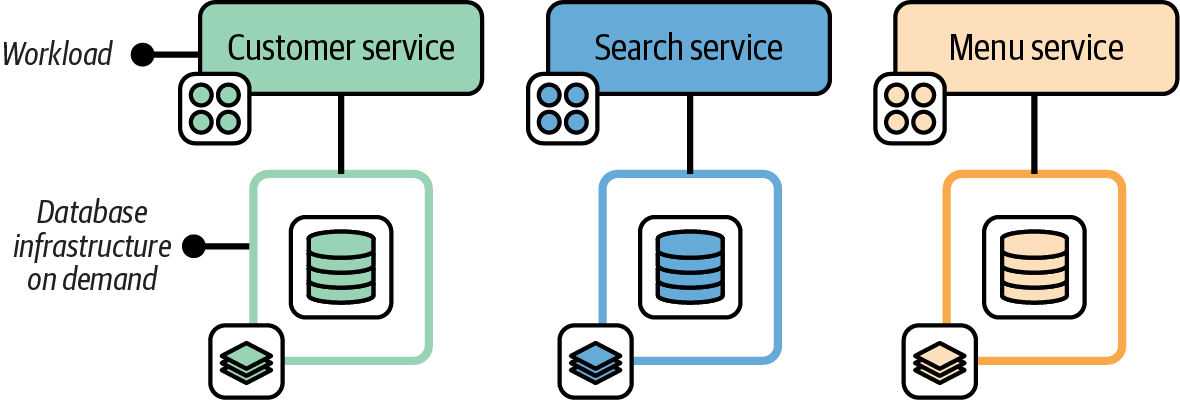
Figure 15-15. Single-tenancy infrastructure can be provisioned on demand
The FoodSpin database service team provides database infrastructure to development teams as a service. The database team develops and maintains an infrastructure stack project ensuring that databases follow the company’s policies for authentication, encryption, monitoring, and backups. Those teams also provide an API that application teams’ deployment tools can call to trigger provisioning and updating database instances via their stack code, running policy checks to verify and record that the database instance meets compliance requirements.
Providing Deployable Infrastructure as a Component
In practice, when a team deploys infrastructure provided by another team, it uses a common deployment platform, such as a developer portal, infrastructure deployment service, or platform orchestration service, rather than a deployment service managed by the provider team. See Chapter 19 for a deeper exploration of services for deploying and updating infrastructure components.
The provider team publishes a versioned infrastructure stack component, or even a composition that bundles multiple stacks. The consuming team selects the components, sets configuration values, and deploys it without needing to edit the infrastructure code.
For example, the FoodSpin network team provides an application networking stack that is used by several public-facing services. The stack defines networking constructs specific to an application, including DNS entries, SSL certificates, load balancing, and routing. The stack is easy to integrate with shared networking provided separately by the same team, which defines VPCs, subnets, and other constructs that aren’t specific to any one application.
Figure 15-16 shows the workflow for the application networking stack, from the infrastructure team to the customer service software team.
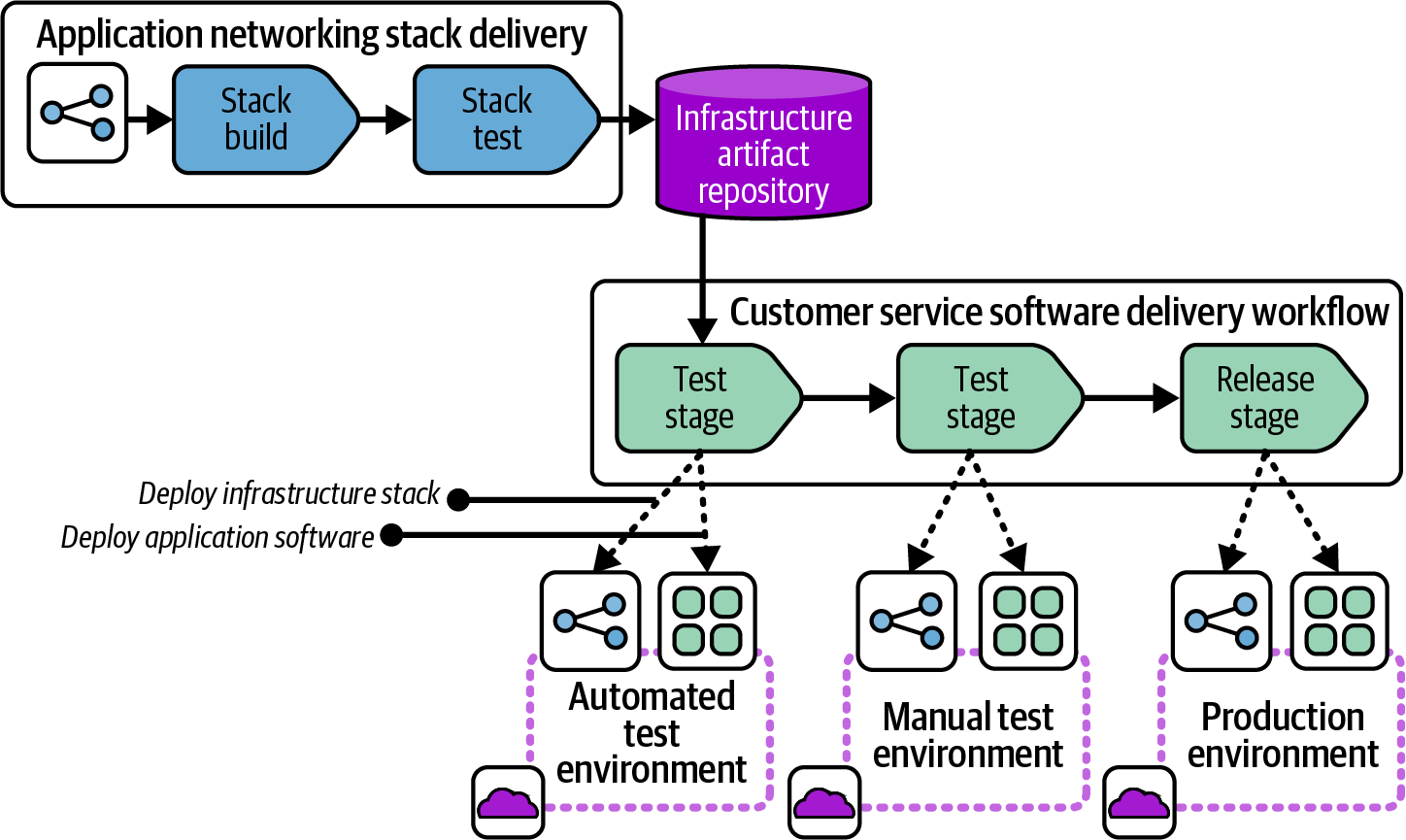
Figure 15-16. Workflow for a deployable infrastructure component
The network team has a pipeline to build and test its infrastructure code and publish it to a repository. The repository could be a source code repository, following the “branch as artifact” approach. However, a packaged artifact often works better as a distributable component. The FoodSpin teams share their infrastructure components as compressed TAR files (TGZ, or tarballs).
Multiple Infrastructure Platform Teams
Most of the examples so far have shown one or more software delivery teams using infrastructure provided by a single infrastructure team. A key theme throughout this book is breaking infrastructure into more-manageable components as it grows in scope and complexity. The teams that provide the infrastructure, whichever models they use to provide it, will also need to be split to keep their work manageable.
Figure 15-17 shows three FoodSpin teams that provide infrastructure capabilities to other teams, including compute capabilities, databases, and network capabilities.
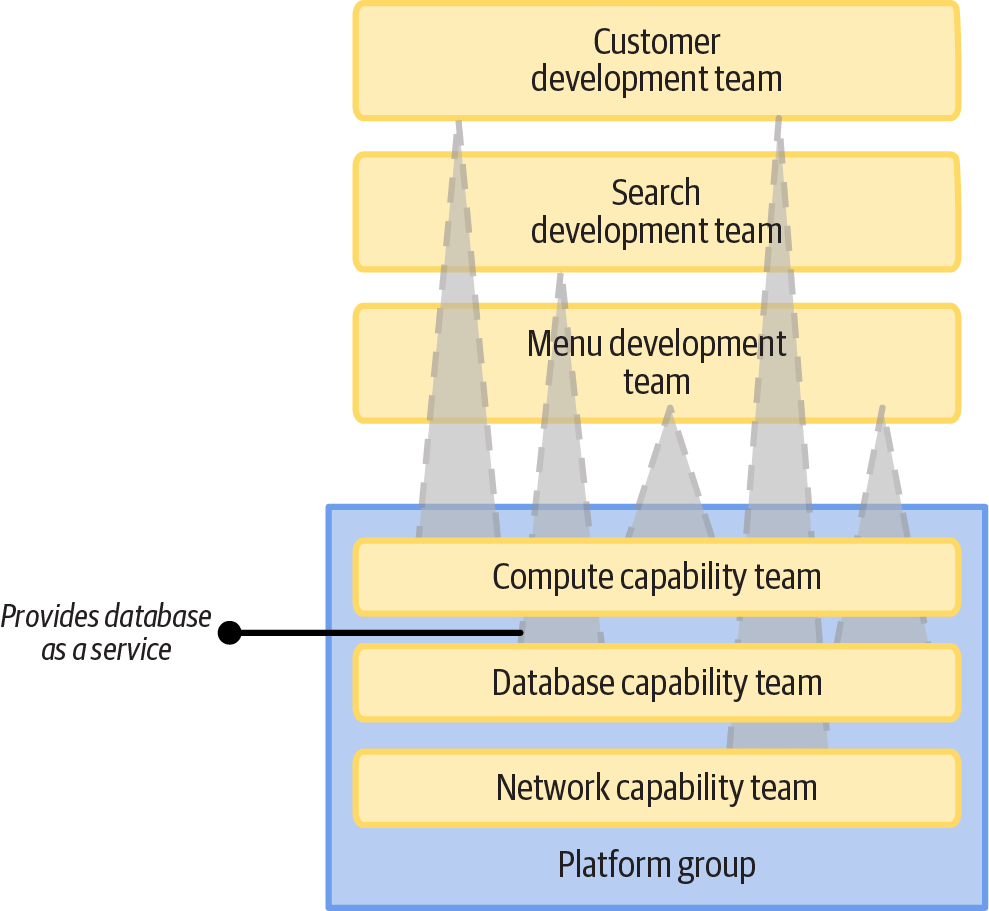
Figure 15-17. Multiple infrastructure service teams
Each of these infrastructure capability teams works as a stream-aligned team in the language of Team Topologies. They develop infrastructure code and provide it as a managed instance, library, deployable component, or on-demand service. A team may provide different implementations of their capabilities in different formats.
Conclusion
This chapter has described ways of dividing infrastructure code processing steps across a “once per build” build stage of a workflow, and multiple “once for each deploy” deployment stages. The way code is built is tied to the way code is physically distributed for deployment across multiple instances, which can be done using code repository branches, stack packages, or code libraries.
The story becomes more complicated when considering ways of integrating multiple infrastructure components: whether to build and test components separately first and then “fan in” to integrate and distribute them together, or deliver each component to every instance independently of the other components, or build them all together with a monorepo.
Ultimately, workflows for building, distributing, and integrating infrastructure components can come together in different ways to provide infrastructure to the teams and workloads that use it. I’ve recommended aiming for a service-based approach that empowers teams to deliver and run their software, relying on infrastructure teams only when needed for unusual requirements and troubleshooting situations.
The next chapter gets into more-concrete details of how to implement building and delivering software by using delivery pipelines.
1 Some teams use feature branches, which are similar to PRs but don’t involve a separate person reviewing and merging the branch when it’s ready.
2 Pairing is a core practice of Extreme Programming, which gets its name from the idea that practices that are known to be effective, like code reviews and testing, should be turned up to the maximum.
3 See “Deployment Wrapper Stack” and “Reusable Stack”.
4 See “Progressive Testing” for more on the value of testing components in isolation and progressively integrating them. Also see “Use Test Fixtures to Handle Dependencies” for techniques for testing a component without other components it depends on.
5 For more on microservices see Building Microservices by Sam Newman, and the article “Microservices, a Definition of This New Architectural Term”, by James Lewis and Martin Fowler (published in 2014, when it was a new term).
6 See “Scaling version control software” on Wikipedia for more. Also see “Scaled Trunk-Based Development” for insight on the history of Google’s approach and "microsoft/git and the Scalar CLI” on GitHub for work done by Microsoft to modify Git to support large, monorepo-style repositories.
7 I encountered an extreme example of poor developer observability with an early internal PaaS system at a major bank. The development team’s deployments frequently failed with a generic error message. The development team asked the PaaS team for help, but the PaaS team did not have access to the error logs. The PaaS team needed to raise a ticket with the team that managed the server nodes to ask it to investigate the issue. This siloed troubleshooting process took over a week to resolve the issue via a simple server configuration change.