Chapter 20. Changing Existing Infrastructure
A core theme of this book is optimizing the design and delivery of infrastructure to make changes easier and safer. Far from making a system unstable, being able to quickly, reliably, and frequently make changes is the key to continually improving it. The mantra should not be “move fast and break things” but rather “move fast and improve things.”
The challenge is that applying a change to infrastructure risks disrupting services that run on it. A change that goes wrong can lead to losing data, transactions, reputation, or revenue, and can even violate contracts or legal regulations. Even when a change succeeds, doing it too often may be unacceptable if downtime is required. But systems that are changed less often accumulate unfixed issues, security vulnerabilities, outdated components, and technical debt.
The answer is to make the process of changing a system less disruptive. Delivering changes frequently helps do this, because it forces us to optimize our tools, processes, and skills. Having experience and confidence in the ability to make a change means we don’t hesitate to fix and improve our system, and this equips us to handle outages and incidents effectively.
On the one hand, defining infrastructure as code and automating its testing and deployment removes many opportunities for human error. On the other hand, running an automated change across a large system can quickly do a lot of damage. As the saying goes, “To err is human; to really mess things up, you need a computer.” We try to avoid major damage by using preview features to see what changes will be made, but these features are fallible.1
In Chapter 19, I discussed how to deploy infrastructure code, including changing existing infrastructure. This chapter goes deeper into techniques for making it safer to deploy those changes. These techniques, which form the structure of this chapter, include the following:
-
Deliver changes in smaller increments.
-
Change live infrastructure progressively.
-
Minimize or eliminate downtime during deployments.
-
Retain data when changing infrastructure that hosts it.
Changing a System Incrementally
The Agile, XP, Lean, and similar approaches I advocate in this book optimize the speed and reliability of delivery by making changes in small increments. It’s easier and safer to plan, implement, test, and debug a small change than a large one, but we often need to build a large system and make significant changes to that existing system. The key to making changes with larger scope and complexity is to break down the work and deliver it as a series of smaller, incremental changes.
This leads to two questions. First, what’s the best way to divide the work needed to implement a larger change into smaller increments? Second, what happens when an incremental change leaves the overall change incomplete and unusable?
Break a Change into Increments
The most obvious way to break up work is by component. After all, we break a system’s design into smaller pieces to make it easier to build and maintain. And I’ve recommended separating delivery pipelines for each component, again to make it easier to deliver changes. So why shouldn’t we implement a system, or a change to the system, one component at a time?
The FoodSpin team is building new application-hosting infrastructure as three stacks: one for networking, one for data storage, and the third for a compute cluster. The team could develop and deploy the networking stack first, then the storage stack, and finally the compute cluster. The order makes sense because each stack depends on resources created by the previous stacks.
The drawback of building components one at a time is that you don’t have anything you can meaningfully test, either in terms of functionality or usefulness, until everything is complete. So you might discover after deploying the compute cluster that the way you built the networking doesn’t work very well for the system as a whole. Hopefully, you’ll need only some minor tweaks to make it right, but you might need significant rework or even a serious redesign once you see how it all works together.
The alternative is to build the system incrementally. An incremental approach starts with a simple implementation that may not be very useful but lets you start testing and getting feedback. Each additional increment adds something that is valuable, even if the value is simply letting you test and get feedback. An early iteration of a system is sometimes called a walking skeleton.2 A walking skeleton is useful because it helps you work out how to build, test, configure, and deploy multiple components early on. Once the scaffolding for this is in place, you can focus on fleshing out the skeleton, adding and evolving capabilities.
Defining an Increment
I use increment to mean a small change that is part of a larger intended change in the functionality or outcome of a system. I sometimes use iterative to describe the way multiple increments gradually build up that functionality. Multiple increments may be made to the code and the system it defines in order to achieve an iteration of the system. For example, a team may deploy a series of code changes that together progress a system from an initial iteration that hosts only stateless workloads to an iteration that provides a database storage capability.
It should be possible to deploy each incremental code change to the production system while keeping it in a workable state, passing all tests, and meeting all operability requirements that apply to the current iteration of the system.3
A side effect of building a new system incrementally is that you can put the same systems, tools, and processes in place that you will use throughout development and once the system is live. A tracer bullet, or trail marker, pipeline is a starting iteration of a delivery pipeline that is evolved along with the system.4
Handle Incomplete Changes
Ideally, when delivering a large change in increments, you’d like to put each increment into use in production as it’s delivered. For example, you may have plans to create a sophisticated set of networking structures, but start with a simple structure and add to it over time. You get much better feedback on the correctness and usefulness of a change when it’s in use than you can get from testing. However, some changes can’t be put into active use until after many incremental changes. Several strategies are available for handling incomplete changes:
- Feature branches
-
Many teams work on changes in a branch in their source code repository, not releasing it to production systems until it’s complete. However, feature branches limit feedback, leaving risk and additional work to be done after the feature is complete. The strategies in this chapter support trunk-based development. See “Pull Requests and Trunk-Based Development” for more.
- Feature toggles
-
A feature toggle is a configuration setting that can switch a system between two implementations. The new implementation can be delivered as part of the same infrastructure code build to multiple environments, but is activated only for environments where you need to test the new feature. Feature toggles, also called feature flags, are a useful way to avoid the need to maintain code branches.
- Feature hiding
-
Some changes can be deployed into production but not actively used—for example, with the Expand and Contract technique described in “Use Expand and Contract to Incrementally Change Live Infrastructure”. The difference between feature hiding and feature toggles is that feature toggles disable the feature, while a feature released as hidden could be used, such as for testing. You might use dark launching, making the new elements of the system available for controlled testing. Dark launching makes it possible to see how new versions of system components work with production data and integrations, without putting them in the critical path for production workloads.
Safely Changing Live Infrastructure
Once people are using your infrastructure, making changes to it becomes trickier. How can you deliver a significant change to your production system as a series of small, incremental changes while keeping the service working?
The FoodSpin team has delivered the first production version of its infrastructure for hosting applications and gone live with production workloads. As the workloads evolve, the team realizes it needs to make major changes to the infrastructure. A security review has recommended splitting the compute cluster into two clusters, one for running public-facing workloads and a second for running internally facing workloads. Each of these clusters needs a separate set of network resources.
The infrastructure developers could make all these changes at once. They would create a new internal-facing network stack, change the existing shared networking stack to manage traffic between the two network segments, and reconfigure the compute cluster to deploy two pools of nodes, one in each network. However, if they deploy all these changes to production at once the internally facing workloads will be destroyed and re-created on their new cluster, possibly losing transactions and certainly disrupting workloads. Data volumes may also need to be reattached to the new cluster, potentially destroying them and their data in the process.
For example, the FoodSpin team needs to improve the security of its public-facing networking infrastructure. The code for this infrastructure is defined in a stack called shared_network, which also defines networking used for communication between internal applications. The team decides that working on the public-facing networking would be easier if the code were split into two stacks.
The team members first make sure they have automated tests that validate how public and private network connectivity works. Then they create the new stack project and move the public networking code into it. They deploy both stacks to a test environment and run the tests to make sure their changes haven’t broken anything. Figure 20-1 shows the code and deployed resources before and after the change.
The resources deployed on the IaaS platform are the same before and after. But the new stacks are smaller than the one stack before the change, so the team can deploy and test changes to the public stack more quickly and with fewer disruptions to workloads.
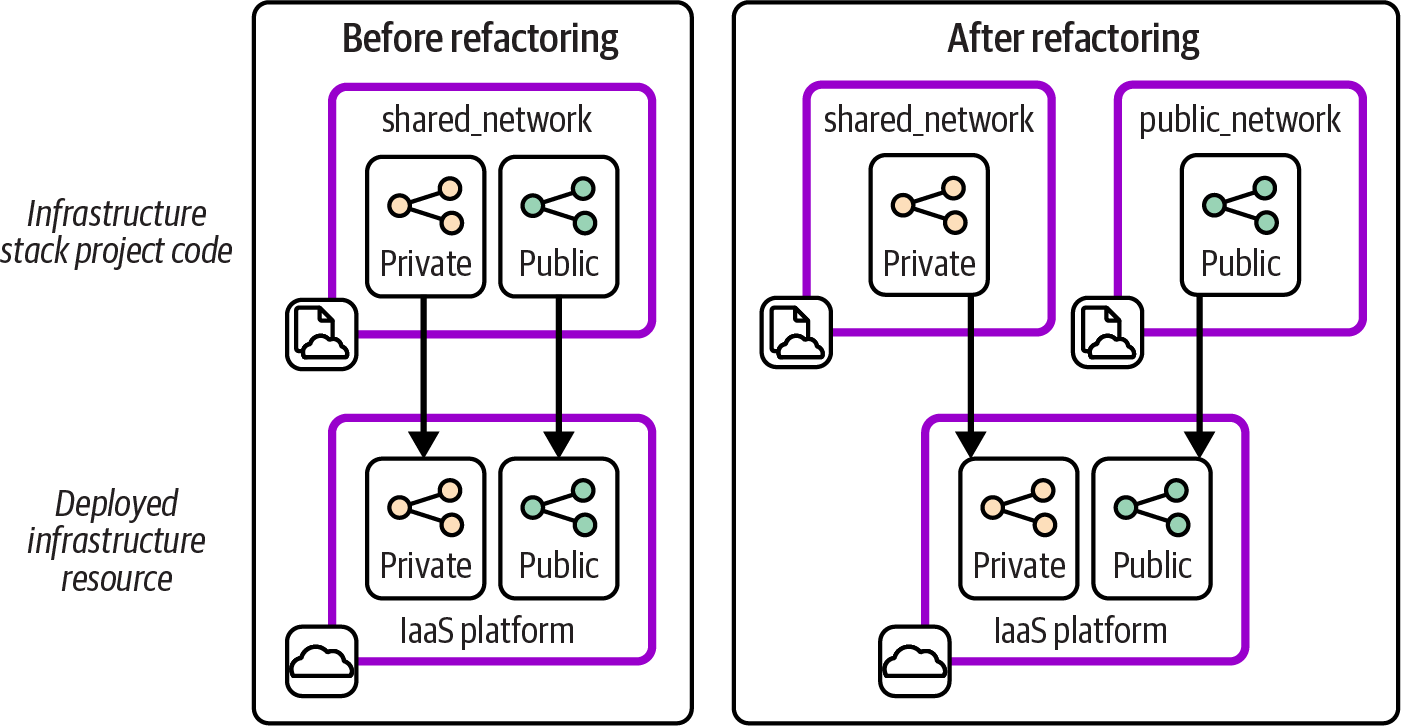
Figure 20-1. Planned changes to the FoodSpin application-hosting infrastructure
If you’ve worked on these kinds of infrastructure changes, you probably have a complaint about the example I just described. The diagram shows a very tidy world where the infrastructure is exactly the same after the refactored stack code was deployed, but skips over what happens in between. Figure 20-2 shows the missing step.
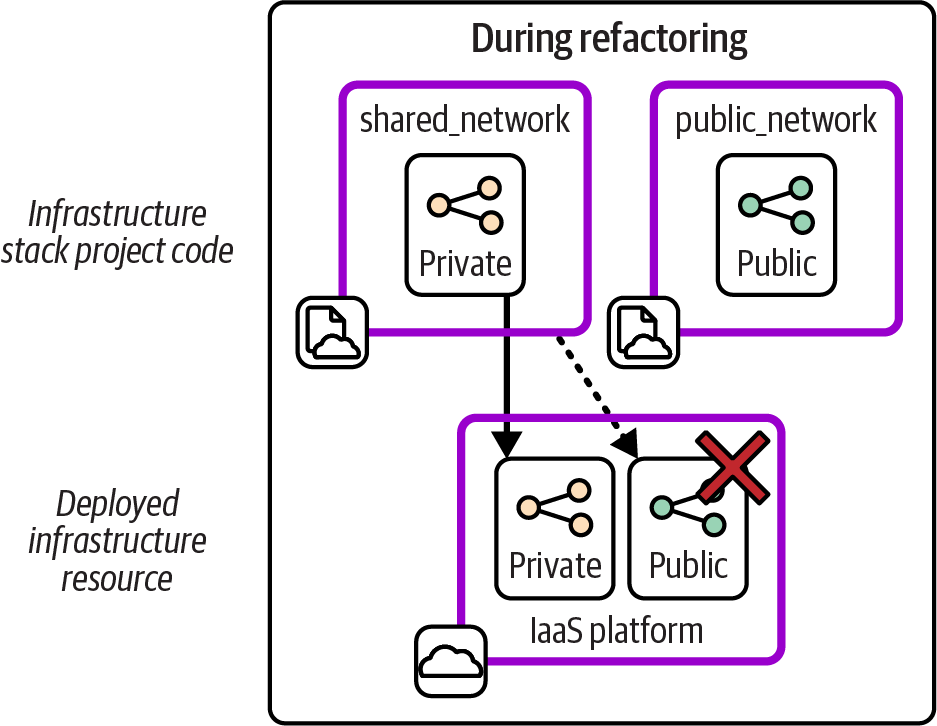
Figure 20-2. Interim steps may be destructive
Deploying the new version of the shared_network stack destroys the public network structures. Although these structures are restored when the team deploys the new public_network stack, service is interrupted for at least a few moments, maybe longer. Worse, it may not even be possible to deploy the updated shared_network stack without errors if other infrastructure depends on the network resources that are deleted from it. Deploying this change to a live system might need other components and software to be stopped and even temporarily removed.
Therefore, changing infrastructure code, unlike changing software code, may require planning downtime. Certain techniques can change live infrastructure faster and more simply and safely. With some infrastructure tools, specifically, those that use external state files, you can remap running infrastructure resources without destroying them, manually or in scripts. Expand and Contract is an alternative technique you can use with any infrastructure tool. I’ll describe each of these.
Manually Remap Live Infrastructure
Infrastructure tools like Terraform and Pulumi maintain mappings of resources deployed in a stack instance to their definitions in stack code by using an external state file. With other tools like CloudFormation and CDK, these mappings are managed internally by the IaaS platform (see “Managing Infrastructure State”). You can take advantage of external state files to make some live infrastructure changes nondestructively, including the previous example.6
Figure 20-3 shows the starting point with the example stack, including the state file.
Each of the resources defined in the project code is represented in the state file with a mapping to the identifier for the resource in the IaaS platform. The networking structure named public in the infrastructure code is mapped to the IaaS platform resource with the identifier fe9876.
Figure 20-4 shows the first step in the change, creating a new stack project and its state file.
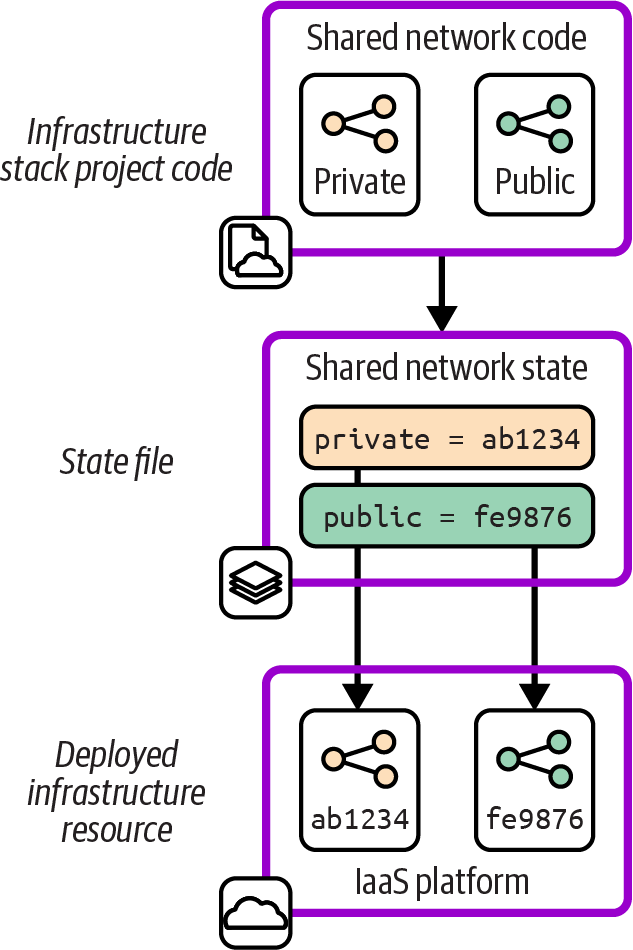
Figure 20-3. State file for the stack before refactoring
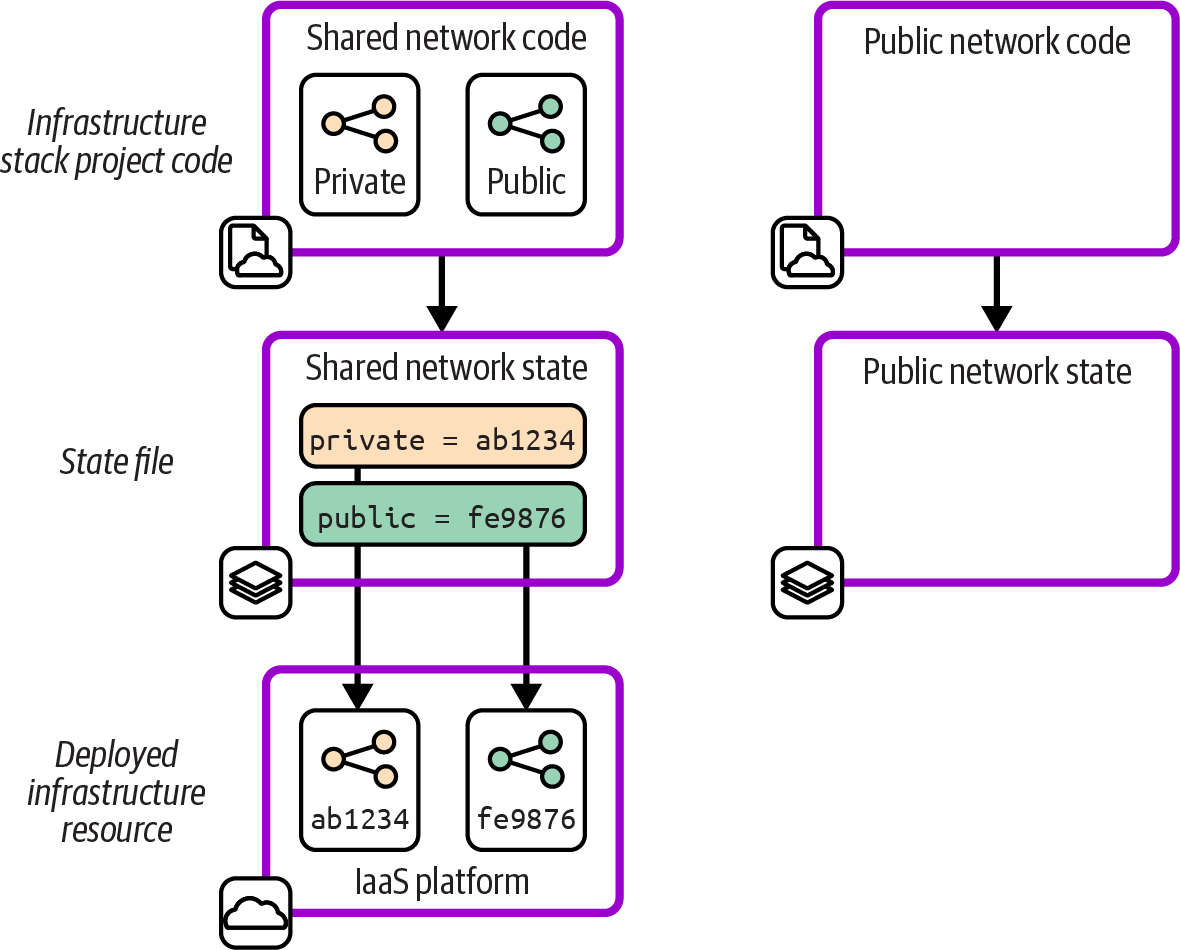
Figure 20-4. Empty state file for the new stack
The new stack doesn’t include the resource that will be moved from the first stack. Including that resource now could cause a clash with the resource still defined by the first stack. The resource could also end up orphaned after being moved to the new stack, still existing on the IaaS platform but no longer managed by any of the team’s infrastructure code. The final stage of the change, shown in Figure 20-5, is trickier.
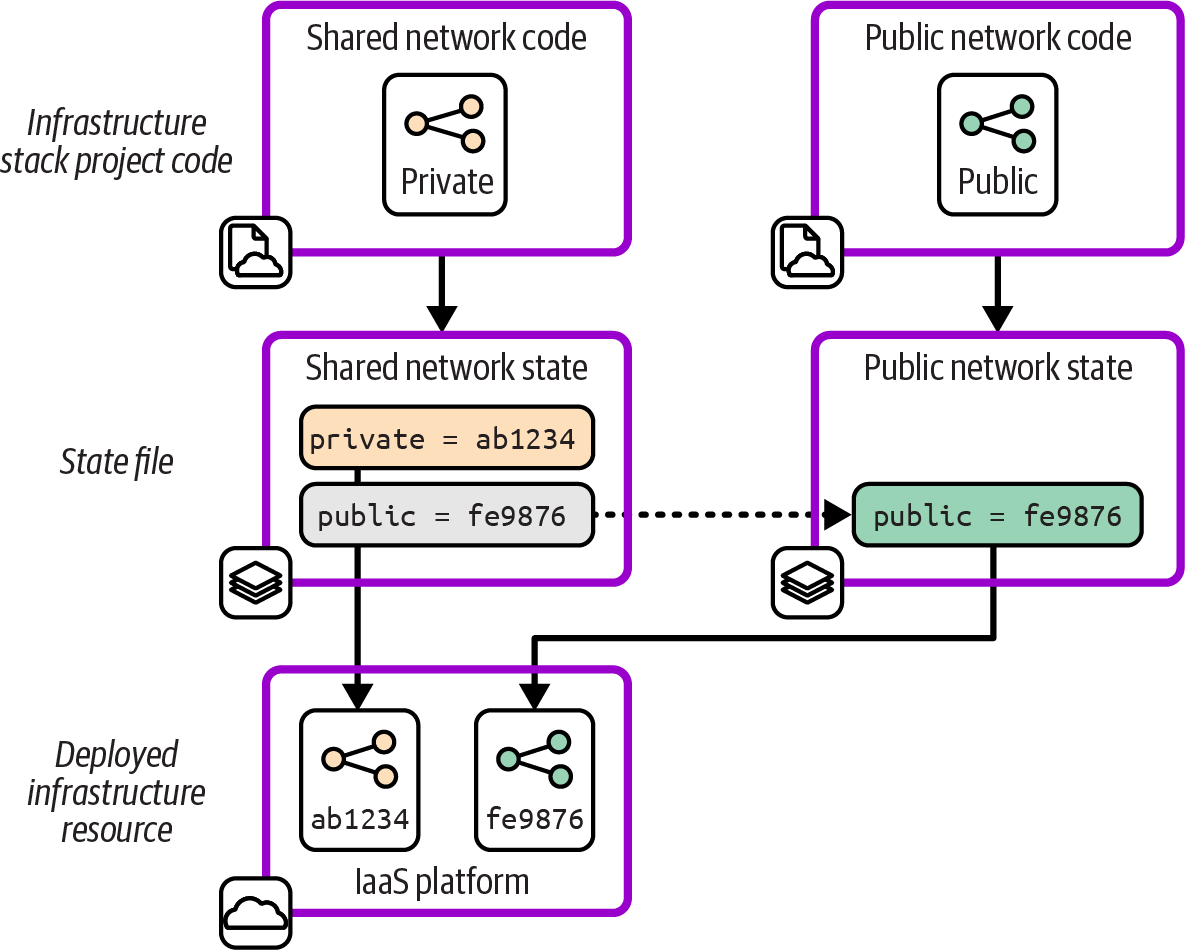
Figure 20-5. Move the resource to the new state file
The team edits the two state files, removing the mapping for the resource from the first stack and adding it to the new stack. The team members might do this by editing the state file, which for many tools is stored in a readable format like JSON. Or they may use features of their infrastructure code tool (like terraform state mv, terraform move blocks, or pulumi state) or a third-party state-editing tool.
Once the state files are updated, the team members need to ensure that the stack code for both projects is correct and that they can deploy the stacks without causing any changes. If the code is updated and applied at the wrong point, they could end up breaking their infrastructure or state files. In the worst cases, they may find the mess is impossible to repair without manually destroying the broken infrastructure and redeploying the stacks and workloads.
I call manually editing state files, whether for this kind of change or to fix problems, infrastructure surgery. It’s a risky, error-prone operation. Teams should avoid infrastructure surgery except in extreme situations, when the only other option is destroying and rebuilding swathes of infrastructure. Be sure to back up data and be prepared in case things go wrong and you need to destroy and rebuild after all.
Remap Live Infrastructure in Pipelines
A key tenet of Infrastructure as Code is to find ways to implement changes that don’t require steps by a human, other than writing code and perhaps approving a change to proceed. Changing live infrastructure by running a series of commands, as described previously, violates this tenet.
The rest of the options in this section on changing live infrastructure involve defining a change in code and delivering it to multiple environments via the same delivery pipeline and workflows that you would use for any infrastructure code change. This gives you confidence that the process you’re using is well proven and that your tests will flag most issues before they hit a production system.
A live change implemented as code needs to be idempotent and should be safe to apply to existing infrastructure, regardless of the code version was last applied to it. Figure 20-6 shows how the environments in the path to production may have different versions of the infrastructure code when a change is applied.
Version 1 of the stack code has been applied to all the environments through to production. However, version 2 made it only to the manual test environment, where an issue was found that the infrastructure team tried to fix in version 3. Version 3 was deployed to the automated test environment, but the tests failed, so it didn’t progress to later environments. The team then decided a change was needed to avoid the issue, which was implemented as version 4. If the change passes its tests, it will be applied to each environment in turn and will need to work correctly regardless of which version of infrastructure it starts from.
Three requirements to deliver an infrastructure change as code are that it can be deployed automatically through a pipeline, it can be applied to different starting versions of the infrastructure and state files (if applicable), and it is idempotent, so it can be applied to the same environment multiple times without harm. Each of the following methods can be used to meet these requirements.
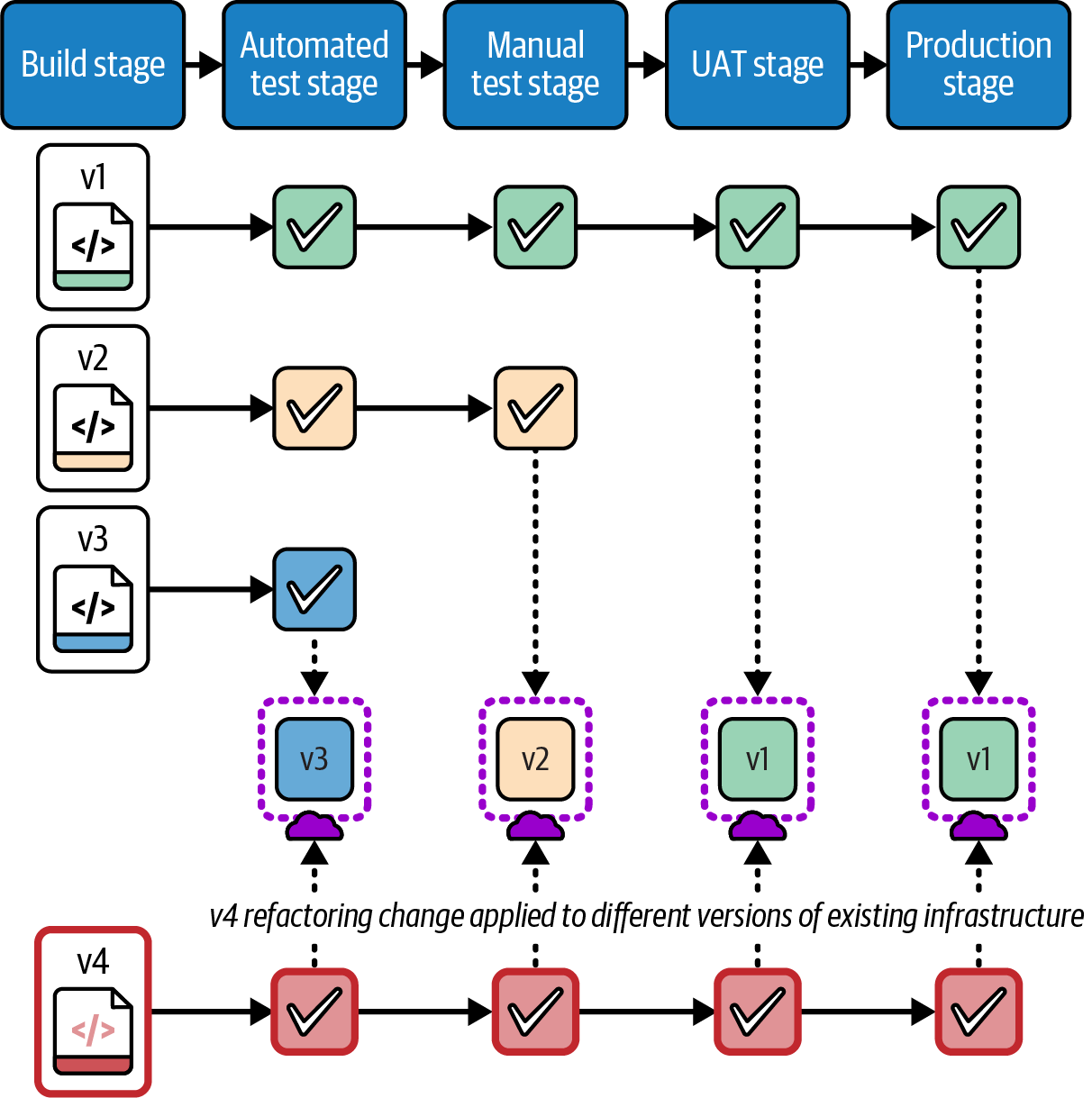
Figure 20-6. Applying a change to instances with different starting versions
Define Changes to Live Infrastructure in Code
Terraform and OpenTofu support safely renaming infrastructure resources within a stack with the moved block feature,7 while Pulumi has aliases.
By default, a tool has no way to know when you have changed the name of an infrastructure resource in your code rather than removed one resource and added a new one. So when you apply the code, the tool will destroy the existing instance of the resource and create a new one. In some cases, this may be fine, but in others, you may want to avoid interrupting service or losing data stored in the resource.
The moved block tells the tool to update the state file to map the existing resource to its new identity. The implementation of this feature is idempotent and can be applied to infrastructure regardless of which version of the code was applied before. However, you should avoid accumulating moved blocks in your stack code since it can become messy and confusing. You can remove the block from the code after the change has been applied to all instances.
The moved block works only for renaming resources within a stack and doesn’t help with moving them between stacks.
Pulumi aliases are arguably cleaner and appear more naturally in code than moved blocks, so you may have less need to remove them as diligently as Terraform moved blocks.
Script Live Infrastructure Changes
Tfmigrate is an example of a tool that supports scripting changes to state files. You can create a file that specifies the old and new identifiers in the infrastructure code, much like the moved block in Terraform in OpenTofu. You then run the tfmigrate tool, which updates the state file and then applies the updated code. Tfmigrate, unlike the moved block (as of this writing), can migrate resources between state files to support changes such as breaking a large stack into smaller stacks.
Using a tool like tfmigrate needs more orchestration when deploying infrastructure code through a pipeline, because the deployment process needs to know whether to run the tfmigrate command or not. You may also need to make the effort to implement the change in a way that is idempotent and version safe.
Use Expand and Contract to Incrementally Change Live Infrastructure
Making changes that involve editing state files can be tricky because you need to coordinate the code and state file edits. If your tool doesn’t use state files, like those provided by cloud vendors, you don’t even have the option of moving existing resources to keep them from being destroyed or to move them from one stack to another. The Expand and Contract pattern is an alternative that is arguably safer than moving resources, although it requires delivering multiple changes to complete the change.
The Expand and Contract technique, also called Parallel Change, makes a change in three steps. The first step adds the new resource, the second step changes usage from the old resource to the new one, and the third step removes the old resource. Each step is implemented as a separate change pushed through the pipeline and tested. The normal set of tests should prove that none of the steps breaks anything, loses data, or interrupts service. Figure 20-7 shows how the FoodSpin team uses the Expand and Contract technique to split out its public networking resources into a new stack.
As in the previous examples, the team members start with public and private networking resources in a single stack. They make a new stack project with a copy of the public networking resources, creating a new pipeline and tests. Then the team pushes the new code through the pipeline, creating an instance of the new stack in each environment. The resources in the new stack aren’t used yet, so this change has little risk of breaking anything.
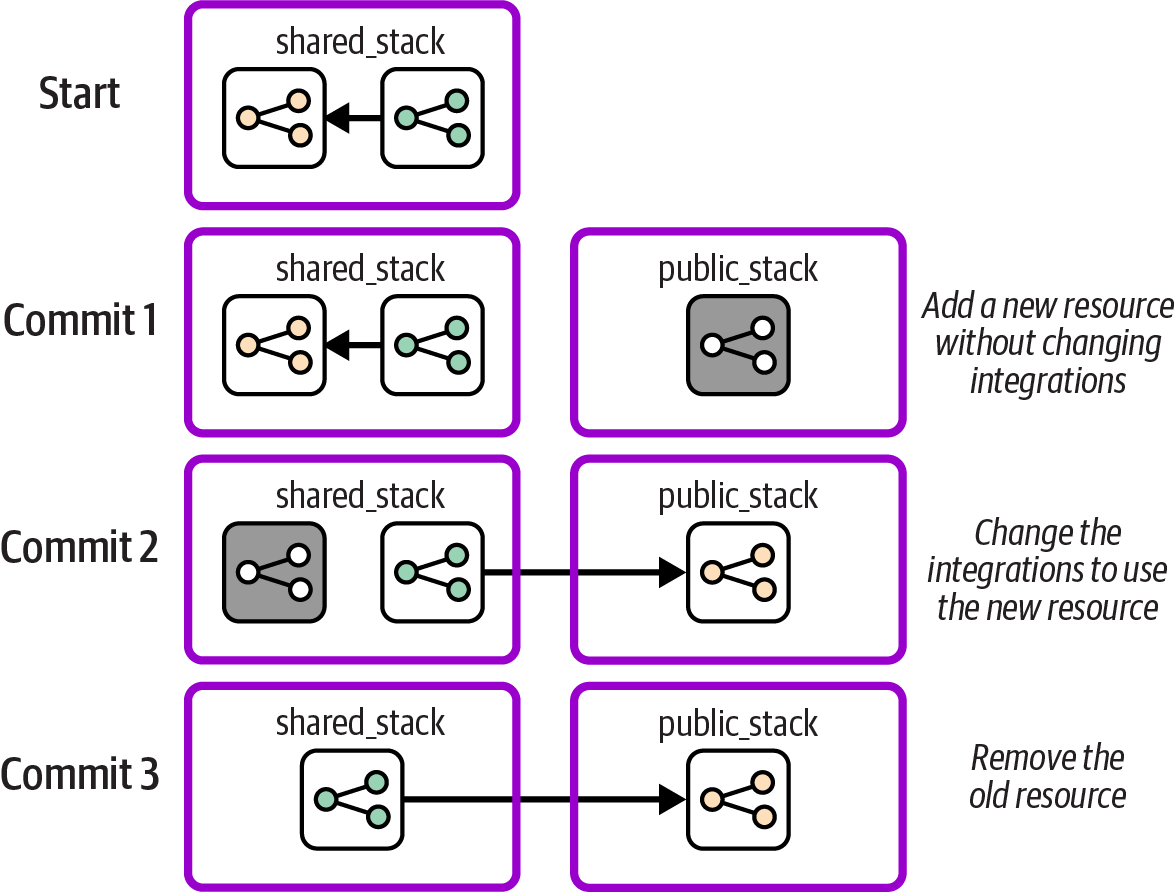
Figure 20-7. Example of a change using Expand and Contract
The second commit changes the private stack to integrate with the resources in the new public stack. This change is pushed through the pipeline for the existing stack, being tested in each environment in the path to production. The automated tests make the change relatively safe, and because the previous resources are still in place, the change can be rolled back quickly if something goes wrong in production.
Once the new stack is being actively used in the production environment, and the team members are confident the change is successful, they can remove the old networking resources from the shared stack by pushing a third code change through the pipeline.
Expand and Contract can be used with any infrastructure code tool, even those that don’t have state files that can be edited. This approach also takes advantage of pipelines and automated tests so that the change follows a standard workflow with less chance for error, rather than needing risky infrastructure surgery.
Minimizing Disruption When Deploying Changes
Ideally, you would like to deploy changes to running infrastructure without disrupting the services running on it. Many teams schedule downtime for their deployments, taking services offline and giving themselves a time window for dealing with any unexpected issues. Critical systems, such as those that provide services to paying customers or taxpayers, have less leeway for outages, planned or not.
As I mentioned in Chapter 1, teams that deploy to production more often have higher levels of reliability and service continuity. Although this seems counter-intuitive, what we see in practice is that teams that deploy frequently use techniques to make their deployments easier, faster, and more reliable. Teams that deploy less often tend to use release and deployment processes with more manual steps, and their releases are larger and more complex, so they need more time and are more likely to run into problems.
One of the keys to deploying frequently and safely, in addition to keeping changes small and incremental, is using techniques to deploy changes without taking services offline. These techniques are often used for deploying software changes but can also be used for infrastructure changes or even for deployments that involve changing both software and its infrastructure.
Blue-Green Deployments
A blue-green deployment involves creating a new instance, switching usage to the new instance, and then removing the old instance. The process has several steps, very much like the Expand and Contract technique I described earlier, with user traffic as the consumer.
Blue-green changes require a mechanism to handle the switchover of a workload from one instance to another, such as a load balancer for network traffic. Sophisticated implementations allow the workload to “drain,” allocating new work to the new instance, and waiting for all work on the old instance to complete before destroying it. One concern with blue-green deployments is managing changes to live data and data structures, which I’ll discuss later in this chapter.
Many descriptions of blue-green deployments define its use with servers, since the technique originated with physical environments with two sets of servers, one “blue” and one “green.”
Years ago I worked with an organization that implemented blue-green at the level of data centers, repurposing “live” and “disaster recovery” data centers into “blue” and “green.” Each release involved switching workloads for its entire system from one data center to the other. This scale became unwieldy as we released more and more often, so we worked to make it possible to deploy individual services using blue-green. This meant different services would be live in different data centers, with service integration between the locations.
Blue-green deployment to virtualized or cloud infrastructure often involves more infrastructure than one server, usually at the level of a deployment stack. A new stack instance is created for the deployment, and the old one destroyed afterward. However, modern application runtime technologies make it possible to take blue-green deployments to a new level, with rolling upgrades.
Rolling Upgrades and Canary Releases
A rolling upgrade incrementally deploys new versions to a pool of applications or infrastructure. For example, when the FoodSpin team members need to update the OS of worker nodes in its container clusters, they create a new server image with the updated OS and then use a feature of their cluster orchestration system to add new nodes to the cluster via the new image, removing old nodes as it goes. Rolling upgrades can be used with a pool of deployed instances.
For some changes, a team can spread the upgrades to allow time for each new server to take on traffic and ensure that it’s stable before moving on to the next. This technique is called canary deployment. Monitoring and health checks assess the upgraded nodes, and if issues are detected, the change can be rolled back either manually or automatically.
Immutable Infrastructure
Many of the techniques for zero-downtime deployments use immutable infrastructure. This technique makes a change to an instance, usually a server or a infrastructure deployment stack, by building a new instance and destroying the old instance. Rather than applying a new version of code to update the existing set of resources, the new code build is used to create an entirely new instance. The new instance can be tested offline before being put into service by switching usage to it. If something goes wrong shortly after switching to the new instance, it’s easy to roll back by swapping the old instance back into service.8
Automation lag is still a concern, so teams that use immutable infrastructure tend to rebuild instances frequently, a practice sometimes called phoenix servers.
Managing Data When Changing Live Infrastructure
So far I’ve discussed the challenges of minimizing disruption to service when using code to change live infrastructure, but I haven’t mentioned how to avoid disruption of data hosted on the infrastructure. Data can make it difficult to implement many of the delivery and deployment techniques I’ve described that involve destroying existing resources. Challenges include retaining data hosted on resources that are destroyed, ensuring continuity of service when data is migrated from old to new resources, having the time needed to transfer large data sets, and dealing with data version changes with application upgrades.
Store and Load
When using a destructive deployment process, you will need to back up data before the infrastructure hosting it is destroyed, and you’ll need to load it to the new resources after they are created. Most IaaS platforms offer features that you can leverage to back up and restore storage resources, such as snapshots. If not, you can implement data snapshots by using the same techniques you would use for backups of the particular type of data.
Storing and loading data across infrastructure changes requires extra orchestration. Your infrastructure deployment scripts may need to run the backups and restores for infrastructure where it’s relevant. So data continuity complicates orchestration scripts, maybe even requiring the scripts to have highly customized knowledge of the infrastructure, which makes the scripts and infrastructure code more work to maintain.
Keep orchestration scripts simple by separating the concerns of orchestrating and implementing the backups and restore. Avoid encoding details of a system’s storage, such as database table structures, in the deployment process.
An event-based store-and-load process may help separate these concerns. Your infrastructure code tool or IaaS platform may offer lifecycle hooks that you can use to trigger a snapshot before infrastructure is destroyed, and trigger a load when new infrastructure is created, perhaps using FaaS serverless code like AWS Lambda. Otherwise, you might implement this type of hook as a feature of your orchestration scripts, using tags or configuration to indicate which infrastructure needs data to be saved and loaded. Although this still involves more work on your in-house scripting, at the least you can keep your scripts loosely coupled from the infrastructure code implementations.
Use Continuous Data Transfer
Storing and loading data gives you a way to ensure that data is retained when you replace infrastructure resources. However, there is a gap in time after completing the backup, loading it to the new infrastructure, and then switching workloads to use the new copy of the storage. If software writes data to the old storage infrastructure before the workload is switched, those data changes will be lost since they are not included in the new storage instance.
Depending on the nature of the workload, it might be possible to pause service during this gap, especially if it’s brief. For example, with a message-based system, it might be fine to allow messages to back up in the queue for a short while. With other applications, pausing service might not be acceptable.
Streaming data from one data instance to the next may be possible during the deployment process. Some databases have transaction logs that can be fed from the old instance (the active node) to the new instance (passive node). A brief pause may occur when the software is switched over and the new instance is switched from passive to active, but often this is fast enough that no noticeable service interruption happens. Depending on the size of data and the duration of changes, this approach can rack up data storage costs.
Some data services support active-active data synchronization, so data can be written to either node without loss. This capability will be needed to make rolling deployments to infrastructure that hosts data, because in these situations multiple instances may have different versions of infrastructure in use for a longer period of time.
Segregate Data Infrastructure
All these techniques mean you need to handle changing or replacing infrastructure that hosts data differently from infrastructure that doesn’t. A good way to make infrastructure deployment easier is to define data-hosting infrastructure in separate deployment stacks. Doing this means you won’t need to run the extra steps to manage data consistency when changing other parts of your infrastructure. This approach can also keep the size of the infrastructure involved in the change smaller, which means deploying the changes should be faster, and easier to roll back or correct if necessary.
Separate Software and Data Changes
Some software updates make backward-incompatible changes to data formats that complicate deployments. For example, version 2 of the software might change the structure of data records in a way that version 1 of the software can’t read or write. If so, you won’t be able to use rolling or canary deployments for your software code, because you would have two incompatible versions of your software accessing the same data.
As with other difficult changes, you can simplify the process by making changes in incremental steps. One rule of thumb is to separate changes of software and infrastructure, especially infrastructure that hosts data. Try to make one change first, such as upgrading the database or other data resources, and then deploy and release the other change. This can require you to coordinate the software code changes with the infrastructure changes.
With applications that may need to run different versions during deployment, you can again separate the change to the software from the change to the data format. The new version of the software should be written to be backward compatible with the older version’s data record format. Deploy the new software version first, using rolling deployments as needed. After all versions of the software have been upgraded, you can then deploy the changes to the data record formats as a separate change.
Use Continuous Disaster Recovery
Many organizations treat disaster recovery as a special activity, following processes and even using tools that are used only in these crisis scenarios. Having regular rehearsals and game days can help work out any issues with the process and make sure people know what to do if they need to.
However, if you consider the approaches to deploying and updating infrastructure described in the preceding chapters, you might find that many of the techniques and processes can be applied in disaster scenarios. Rebuilding a failed system using infrastructure code is not very different from building a new environment using infrastructure code. Restoring part of your infrastructure that has failed can often be done as simply as rerunning the deployment of the latest version of your infrastructure code builds.
It’s worth mapping out various disaster scenarios and understanding how your routine infrastructure deployment systems and processes can be used to handle them. Instead of disaster recovery as a special situation, it becomes just another deployment. Every routine deployment exercises your disaster-recovery process. When disaster strikes, your team will be familiar and comfortable with the process, most of which is already automated.
For example, you should aim to use the same mechanisms for backing up data to longer-term storage and recovering from major failures that you use to deploy routine changes to infrastructure.
Conclusion
I’ve called out before that while Infrastructure as Code has many similarities with software development, the fact that infrastructure code executes when it’s deployed rather than at runtime creates fundamental differences. Changing existing infrastructure is a major example. We can make changes to our infrastructure code and know what the outcome will be for our live infrastructure, but we have less control over how the changes are executed to that infrastructure.
My goal for this chapter was to shed light on the issues involved, and provide various techniques available to give you control over the way changes are executed to your infrastructure.
1 I explained some of the pitfalls of relying too much on “plan” features in “Preview: Seeing What Changes Will Be Made”.
2 Growing Object-Oriented Software, Guided by Tests by Steve Freeman and Nat Pryce (Addison-Wesley) devotes a chapter to walking skeletons.
3 An alternative definition of incremental delivery is to build a system in the way I described earlier, one component at a time, without achieving a useful system until the end. This definition is often compared to paint-by-numbers, and contrasted with iterative delivery as building up layers of useful functionality, much like creating a painting by layering. While distinguishing between these approaches is useful, most people use increment in the way I’ve defined it.
4 See my blog post about tracer bullet pipelines for guidance.
5 Kent Beck describes workflows for making “large changes in small, safe steps” in Tidy First? (O’Reilly) and in his accompanying email newsletter.
6 In theory, cloud providers probably could expose an API with the ability to edit resource mappings or to migrate them between stacks. But I haven’t heard of any that do.
7 See the Refactoring Modules section of the Terraform and OpenTofu documentation.
8 The term was coined by Ben Butler-Cole and adopted more widely since.