Chapter 11. Building Servers as Code
Infrastructure as Code originally emerged as a way to configure servers. Systems administrators wrote shell, batch, and Perl scripts. CFEngine pioneered the use of declarative, idempotent DSLs for installing packages and managing configuration files on servers, and Puppet and Chef followed.
The popularity of containerized (cloud native) and serverless application runtimes has shifted attention away from servers to the level of stacks. But most organizations that have been in business for a while still have at least some workloads running on servers, whether physical, virtualized, or cloud-hosted.1 Even a newer organization starting from scratch typically provisions servers as part of its application-hosting clusters.
Within the component model I described in Chapter 6, a server can be viewed either as an IaaS resource or a special type of infrastructure component. IaaS platforms expose VMs as a primitive resource that can be created and destroyed through their APIs. However, a running server usually involves a collection of other primitives such as storage volumes, networking, and permissions. So it makes sense to treat servers as a component.
This chapter explains approaches to building and managing server configuration as code. I’ll start by outlining the composition of servers, techniques for creating and then configuring new servers, and approaches to changing existing servers. I’ll then discuss how to manage and use server images, and finally how to deliver servers by using pipelines and automated testing.
It can be helpful to think about the lifecycle of a server as having several transition phases, as illustrated in Figure 11-1.

Figure 11-1. The basic server lifecycle
The basic lifecycle shown here has four stages:
-
Build a server image (optional).
-
Create a new server instance.
-
Change an existing server instance.
-
Destroy a server instance.
I’ll start by discussing the composition of a server and how it’s defined.
Defining Servers
In theory, a team could specify everything about a server by using reproducible code. In practice, servers are built from a combination of an OS image, application installation packages, and infrastructure server code.
What’s on a Server
It’s useful to think about the various things on a server and where they all come from. One way of thinking of the stuff on a server is to divide it into software, configuration, and data. These categories, elaborated in Table 11-1, are useful for understanding the server’s configuration code and lifecycle.
| Type of thing | Description | How infrastructure code treats it |
|---|---|---|
Software |
Applications, libraries, and other code. These don’t need to be executable files; they could be any files that are static and don’t tend to vary from one system to another. An example is time-zone data files on a Linux system. |
Makes sure it’s the same on every relevant server; doesn’t care what’s inside. Typically managed by application installation packages like RPM files. |
Configuration |
Files used to control how the system and/or an application works. The contents may vary among servers, based on their roles, environments, instances, and so on. These files are managed by infrastructure code rather than by application processes themselves. For example, if an application has a UI for managing user profiles, the data files that store the user profiles aren’t considered configuration to be managed by code. Instead, they are application data. But an application configuration file that is stored on the filesystem and managed by infrastructure code is considered configuration in this sense. |
Builds the file content on the server; ensures it is consistent. |
Data |
Files generated and updated by the system and applications. Infrastructure code may have some responsibility for this data, such as distributing it, backing it up, or replicating it. But code treats the contents of the files as an opaque box, not caring about their contents. Database data files and logfiles are examples of data in this sense. |
Naturally occurring and changing; may need to preserve it, but won’t try to manage what’s inside. |
The difference between configuration and data is whether automation tools automatically manage what’s inside the file. So even though a system log is essential for infrastructure, infrastructure code treats it as externally managed data. Similarly, if an application stores information like its accounts and preferences for its users in files on the server, the server configuration tool treats that file as data.
Where Things Come From
The software, configuration, and data that make up a server instance may be added when the server is created and configured, or when the server is changed. These elements have several possible sources, as shown in Figure 11-2.
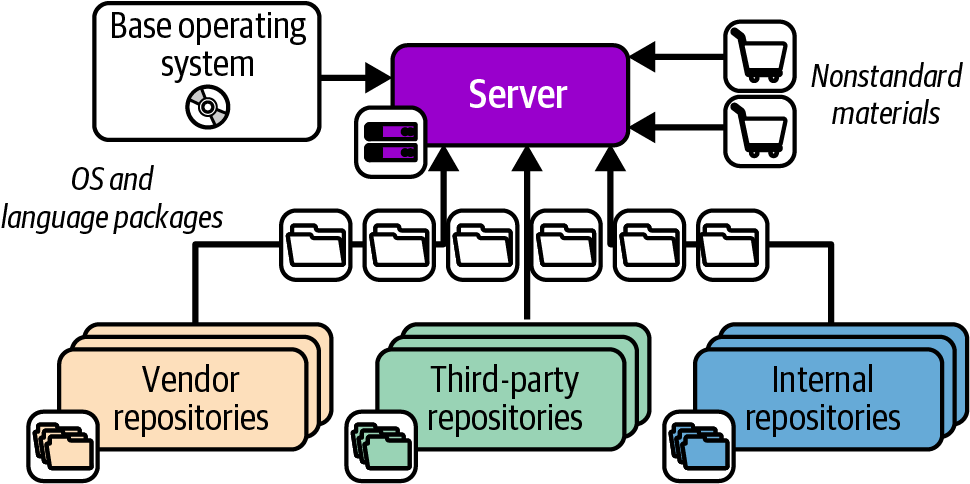
Figure 11-2. Packages and other elements of a server instance
The elements shown in the diagram include the following:
- Base operating system
-
The OS installation image could be a physical disk, an ISO file, or a stock server image provided by an IaaS platform. In some cases, an installer process is run to customize the installed server.
- OS package repositories
-
The OS installation, or a post-installation configuration step, can run a tool that downloads and installs packages from one or more repositories. OS vendors usually provide a repository with packages they support. You can also use third-party repositories for open source or commercial packages. You can additionally host an internal repository for packages developed or curated in-house.
- Language, framework, and other platform repositories
-
In addition to OS-specific packages, you may install packages for languages or frameworks like Ruby or Python. As with OS packages, you may pull packages from repositories managed by language vendors, third parties, or internal groups.
- Nonstandard packages
-
Some vendors and in-house groups provide software with their own installers rather than using a standard package management tool, or else give instructions for installing their software manually.
- Separate material
-
You may add or modify files outside of an application or component—for example, adding user accounts or setting local firewall rules.
Server Configuration Code
The first generation of Infrastructure as Code tools focused on automated server configuration. The following are some of the tools in this space:
Server configuration code can be applied to a server instance as part of the provisioning process when it is created, as I’ll describe in “Creating and Provisioning a New Server Instance”. It can also be applied to prebuilt server images that are later used to create instances, as I’ll describe in “Configuring a New Server Instance”.
Server configuration tools organize code in modules, such as Ansible playbooks, Chef cookbooks, and Puppet modules. Teams can then define server roles to specify which code modules to apply to each server.
Server Roles
A team may run many types of servers for multiple purposes, including container cluster nodes, DNS servers, or database server nodes. Server infrastructure code tools support the concept of a server role to specify which code modules to apply to a given server. Server roles are the entry point for managing servers, whether creating a new server, specifying a server to provision as part of an infrastructure stack, or configuring automated server cluster management like an AWS Auto Scaling group.
In addition to specifying which server code modules to apply to a server, a role may set default parameter values for the modules to use. For example, you may create an application-server role:
role:application-serverserver_modules:-jboss-monitoring_agent-logging_agent-network_hardeningparameters:-inbound_port:8443
Assigning this role to a server applies the configuration for JBoss, monitoring and logging agents, and network hardening. It also sets a parameter for an inbound port, presumably so that the network_hardening module will open that port in the local firewall while locking down everything else. An email server may use the same module, but open port 25 for inbound SMTP connections.
Roles can become messy, so you should be deliberate and consistent in the way you use them. You may prefer to create fine-grained roles that you combine to compose specific servers. You assign multiple roles to a given server, such as ApplicationServer, MonitoredServer, and PublicFacingServer. Each of these roles includes a small number of server modules for a narrow purpose.
Alternatively, you may have higher-level roles, which include more modules. Each server probably has only one role, which may be quite specific (for example, ShoppingServiceApplicationServer or JenkinsServer).
A common approach is to use role inheritance. You define a base role that includes software and configuration common to all servers. This role might have networking hardening, administrative user accounts, and agents for monitoring and logging. More specific roles, such as for application servers or container hosts, include the base role and then add additional server configuration modules and parameters.
Creating and Provisioning a New Server Instance
The following are the steps to create a server instance:
-
Selecting a physical server or virtualization host server
-
Optionally starting a VM on the host server and allocating resources such as storage, memory, and networking
-
Installing a base image
-
Configuring the instance, installing applications, and registering with supporting services
An IaaS platform handles the first two steps behind its API and orchestrates the third step as specified by API parameters. Even without an IaaS platform, a team can automate these steps by using a network provisioning tool, as I’ll describe shortly. Either way, a team then has the option to manually create new servers, specifying the details of the instance to create each time. Better yet, the team can use code to define the process to create and provision a server instance as part of an infrastructure stack or as a response to events. I’ll describe each of these in more detail.
In each case, the server creation and provisioning process combines two main elements: the server image from which the server is initially created, and server configuration code that is applied to the instance after it is created but before it is made available for use. I’ll touch on how these come into play with each of the options for creating servers, and I’ll go into more detail of the options for when and how to run server configuration tools in the following sections.
Creating a Server by Using Network Provisioning
In Chapter 3, I mentioned bare-metal provisioning tools for dynamically provisioning hardware servers. This process usually includes these steps:
-
Select an available physical server and trigger it to boot in a network install mode supported by the server firmware. This is typically a hardware-vendor-provided lights-out management (LOM) hardware function combined with the PXE boot standard for initiating the network booting process.
-
Boot the server from a minimal OS image to initiate the image installation.
-
Download a server image and copy it to the primary hard drive.
-
Reboot the server and apply server configuration or automated OS setup.
Tools to orchestrate the process include the following:
In some cases, the server image may be an OS installation image. If so, the instance is booted from the image in step 4 in a mode that runs a scripted OS installer. Examples of scripted OS installers include Red Hat Kickstart, Solaris JumpStart, Debian Preseed, and the Windows installation answer file.
Creating an IaaS Server by Hand
IaaS platforms provide tools to create new servers via their APIs, which are usually web interfaces or command-line tools. Each time you create a new server, you select the options you want, including the source image, resources to allocate, and networking details:
$mycloudservernew\--source-image=stock-linux-1.23\--memory=2GB\--vnet=appservers
The API may include a way to execute a provisioning script when booting it for the first time, which can be used to run server configuration code. Otherwise, the team will need to run the server configuration process after the server is created.
While it’s useful to play with UIs and command-line tools to experiment with a platform, it’s not a good way to create servers that people rely on. The same principles for creating and configuring stacks discussed previously apply to servers.2 Setting options manually encourages mistakes and leads to inconsistently configured servers, unpredictable systems, and too much maintenance work.
Creating a Server as Part of a Stack
An infrastructure stack may include server instances, such as a pool of nodes for a container cluster, or an application server and database server in an application-hosting stack. The stack code specifies the details of the server instance so the IaaS platform API can create it.
As with hand-building IaaS server instances, you normally have the option to configure a server configuration script or tool to run after booting the server but before making it available for use. Two ways this can be implemented include using the IaaS API to orchestrate a pull configuration process, or configuring the stack tool to execute a push configuration command after the server is started. See “Pull Configuration with Initialization Scripts” for more on how these work.
Example 11-1 shows a stack definition to provision an application server to run the menu-service application.
Example 11-1. A stack defining a server instance
virtual_machine:name:menu-service-appserversource_image:ubuntu-24.04memory:4GBprovision:method:cloud-inittool:servermakerparameters:role:appserverapplication:menu-service
This stack defines an application server instance created from a base server image that has Ubuntu Linux preinstalled. It uses the cloud-init tool preinstalled on the server image to run the fictional servermaker tool to configure the server. The configuration parameters tell servermaker to apply the appserver role, specifying the menu-service application to be installed.
Creating a Server from an Event
Most IaaS platforms will automatically create new server instances in specific circumstances. Two common cases are auto-scaling, adding servers to handle load increases, and auto-recovery, replacing a server instance when it fails. You normally define this by using stack code, as shown in Example 11-2.
Example 11-2. Stack code for automated scaling
server_cluster:server_instance:source_image:stock-linux-1.23memory:2GBvnet:${APPSERVER_VNET}scaling_rules:min_instances:2max_instances:5scaling_metric:cpu_utilizationscaling_value_target:40%health_check:type:httpport:8443path:/healthexpected_code:200wait:90s
This example tells the platform to keep at least two and at most five instances of the server running. The platform adds or removes instances as needed to keep the CPU utilization across them close to 40%.
The definition also includes a health check. This check makes an HTTP request to /health on port 8443, and considers the server to be healthy if the request returns a 200 HTTP response code. If the server doesn’t return the expected code after 90 seconds, the platform assumes the server has failed, and so destroys it and creates a new instance.
Configuring a New Server Instance
My descriptions of how to create a new server instance glossed over how to configure what’s on the server. In each case, the creation starts with a base image of some sort. It could be an OS installation image, a preconfigured image provided by the IaaS platform or a third party, or an image that you prepare yourself. You have several options for applying server configuration code to a new server instance:
-
Preconfigure the server image so no additional configuration is needed when using it to create a new server.
-
Use the IaaS API to execute commands to configure the server while it is being created.
-
Use the IaaS API to run a script or configuration tool on the server while it is being created.
-
Run a tool that connects to the new server over the network and configures it after it starts.
People sometimes talk about “baking” server images and “frying” server instances.
Baking Images and Frying Instances
Building configuration into server images (baking) optimizes for speed and ease of creating server instances. This process is especially useful for event-driven server creation like auto-scaling and recovery, when it’s important to get new servers into service quickly. Another advantage is that the image can be thoroughly tested offline with the confidence that servers created from it will behave consistently. Container cluster nodes are good candidates for using baked images. However, the lead time to get a change into production can be relatively slow when the change needs to be baked into an image and put through a testing pipeline.
Applying configuration when creating each server instance (frying) optimizes for variability among servers and for speed of delivering changes. When each server instance is configured or used differently, the information needed may be available only when the server is created. Servers created and customized on demand, such as to run customer-developed workloads, may be candidates for applying customized configuration parameters each time.
Often the most practical approach is to combine baking and frying. Create server images with as much as possible baked into them, especially larger items like language runtimes (the Java Development Kit, or JDK, comes to mind), application servers, database servers, and container cluster system software. Server infrastructure code can be applied with configuration supplied when creating servers to customize the configuration for particular uses and environments.
I’ve worked with teams that built images with their in-house software baked in but that used creation-time configuration scripts to fry in development builds of software for fast development and test feedback loops.
Pull Configuration with Initialization Scripts
Most IaaS platforms’ APIs for creating new server instances include a way to specify commands that will be executed the first time the server starts. AWS calls this user data, Azure calls it custom data, and Google Cloud uses startup scripts. You can configure this by using the API, command-line tool, infrastructure code, or the IaaS platform’s web interface. Options include directly passing a command to execute, files to upload, scripts to execute, parameters to pass, or a combination of these. The cloud-init standard tool is preinstalled on most Linux server images and offers advanced capabilities to configure new servers in combination with the data passed by the IaaS API.
Initialization scripts are often used to run server configuration tools like Ansible, Chef, or Puppet to configure the new server. The IaaS API passes a role name and a few parameters, such as the name of the environment the server is deployed into, and the tool downloads and applies the relevant infrastructure code. The server image usually has the server configuration tool agent preinstalled, although in some cases the initialization script might need to download and install the tool over the network before running it.
Teams that use more fully configured server images may not need to run a server configuration tool on new servers, but may instead run a script with a few simple commands to customize the specific server instance. This is especially common when using the immutable server approach.
Initialization scripts follow the pull configuration approach, so are also natural for teams that use continual synchronization to manage changes to servers and keep them consistent.
The advantage of configuring a new server by using an initialization script is that it isn’t necessary to open the server for external services or tools to connect over the network and run commands with root access. Server images can be more secure, possibly not even needing to run services like Secure Shell (SSH) at all.
Push Configuration with External Commands
An alternative to having the IaaS API execute commands on the server is to run a tool from an external agent that connects to the newly created server to run configuration commands over the network, usually using SSH. As I’ll discuss shortly, some server configuration tools, like Ansible, are designed to be run from a central service and connect into servers to configure them.
Teams may prefer using external tools and services to configure new servers because it avoids the need to preinstall server configuration agents, tools, or scripts. However, this approach requires ensuring that the configuration service is able to connect to the new server and execute commands as root, which potentially creates avenues for attackers to exploit.
Updating and Changing Servers
So far I’ve explained how to create and configure new servers. Once a server is in use, it’s important to keep it updated—for example, by applying patches and minor updates to the OS and installed software. Additionally, teams should roll out configuration changes like fixes, optimizations, and configuration changes to existing servers. As with infrastructure more generally, failing to keep running servers updated creates configuration drift and technical debt.
You can use several strategies to manage updates and changes to servers. The ones I’ll describe here are push on change, continual synchronization, and immutable servers.
Push on Change
The naive approach to using infrastructure code is to apply the code when you have a specific change you need to make. Many systems administration teams new to Infrastructure as Code follow the same pattern as when making changes manually, applying infrastructure code to only those systems they are aware need to be changed.
The drawback of this approach is that it leads to configuration drift among servers, with different versions of configuration and even system software across servers that should be broadly the same. For instance, newly created application servers may have the latest patches of the OS and application server software, while other application servers may be months or even years behind. In the worst case, this approach leads to snowflake servers, as described in Chapter 2. Pushing a change to only those servers that you know need it contributes to inconsistency and legacy systems.
Continuous Configuration Synchronization
Continuous configuration synchronization repeatedly and frequently applies configuration code to a server, whether or not the code has changed.
There are several reasons for doing this. One is to revert any changes that might have been made on a server outside of the configuration code. When code is applied only occasionally, some people might edit files on a server by hand to quickly fix an issue or because they aren’t aware of the automation. These conflicts are difficult to detect. The manual change will be reverted the next time the configuration is applied, but if it’s been a while, people may not notice or realize why something that had been working for a few weeks has broken.
Synchronizing configuration to servers on a short, automated cycle forces the discipline of including every change in the server code, breaking habits of making ad hoc tweaks. The rigor of this approach can help meet governance and compliance requirements such as those faced in financial services, government, and health care.
Malicious changes, such as those made by attackers gaining access to a server, may also be reverted. However, relying on continuous synchronization to stop attackers is not a good idea, since they might make changes to parts of the system not directly managed by code, or may even disable or subvert the automated updates on servers they’ve compromised.
Continuous synchronization could be run using push configuration, as described previously as an option for configuring new servers. A central service schedules commands that connect to each server and apply updates. As with configuring new servers, this approach requires enabling network access for the configuration service. It also requires ensuring that all servers are correctly registered with the service, to avoid any being left out of updates.
A more popular approach is pull configuration: an agent either runs as a service or is started by a scheduler like cron. The agent schedules a run, checking a central service or repository for the latest version of code and then applying it.
It’s a good idea to avoid running server configuration on the same schedule across a large estate of servers. The time to synchronize each should vary, perhaps with randomization, to avoid swamping the code repositories by running all the updates at the same time.3
Changing Servers by Replacement
Continuous synchronization leaves gaps in a system, in particular those parts of a server’s content that are not directly managed by infrastructure code. In theory, two servers built using the same starting image and with the same system and software package versions installed should be identical.
In practice, a server built fresh from the latest OS and packages often has differences from one built weeks or months earlier and brought to the same patch levels by updates. These differences might be subtle, but it’s not unusual for them to become the source of frustrating, inconsistent behavior.
And as I’ve mentioned earlier, people might make changes to areas of the system not directly managed by infrastructure code. Someone might decide to install a new package onto one server to try out some software, and leave it in place when they’re done or are interrupted by another task.
So the best way to ensure that a server is consistent and as deterministically managed as possible is to rebuild it. Many teams have processes to ensure that no server runs for very long before being rebuilt. “Very long” might be defined as a week or a few weeks.
The essential process for replacing a server instance is as follows:
-
Create a new instance without putting it into service.
-
Run checks to validate that the server is correct and ready.
-
Switch services to use the new server in place of the old one.
-
Allow monitoring to verify that the new server is handling its workload correctly.
-
Destroy the old server.
Depending on the applications and systems that use the server instance, it may be possible to carry out the replacement without downtime or at least with minimal downtime. You can find advice on this in Chapter 20, along with pointers for handling data that needs to be persistent.
Some IaaS platforms have functionality to automate the server replacement process. You can update the server image version used by a server cluster in a stack instance, and the platform automatically adds new instances and removes old ones on a rolling basis.
Immutable Server
The Immutable Server pattern is a strategy that uses replacement as the only way to make changes to a server.4 The entire server configuration is defined in the image used to create instances. A change is made by building a new version of the image and replacing all the server instances that use it.
Immutable servers reduce the risk of applying configuration changes to running servers. Every change is tested in an image delivery pipeline before being put into production.
Despite the name, content on immutable servers does change. Application data, logs, and running processes obviously do change while a server is running. The term immutable refers to the policy of not changing configuration or installed software or packages on a running server instance.
Building Server Images
IaaS and virtualization platforms have a format for server images that can be used as a template. Amazon has Amazon Machine Images (AMIs), Azure has managed images, and VMware has VM templates. Hosted platforms provide prepackaged stock images with common OSs and distributions so that you can create servers without needing to build images yourself. Many vendors and organizations also offer prebuilt server images. These images are perfectly useful for many cases, and quite a few teams have no need to build their own images.
However, a team might decide to build its own custom server images for various reasons, including these:
- Providing a standard base image
-
Many organizations use a standard collection of services, agents, tools, and default configurations for servers. Examples include monitoring agents, administrative user accounts, and security policies. Providing images with these preinstalled makes it easy for teams to create their own servers while keeping the estate consistent and well managed.
- Optimizing server creation
-
Installing and updating in-house and third-party packages can take minutes or even tens of minutes, which makes creating new servers slow. Baking these all into an image and refreshing it frequently often makes it possible to start new servers very quickly, which is particularly important for automated scaling and recovery scenarios. Images can also be stripped down, with unnecessary packages removed, to make them even quicker to boot and leaner to run.
- Hardening for security
-
Server images can have security policies preconfigured to meet the governance and compliance requirements of your organization. It’s common to strip out user accounts, software packages, and other elements that aren’t needed, since each adds to the surface areas that attackers can potentially exploit.5
- Building images for server roles
-
Many of the examples in this chapter go further than building a standard, general-purpose image. You can build server images tailored for a particular purpose, such as a container cluster node, application server, or CI server agent.
Teams have a few options for creating their own server images, depending on their IaaS or virtualization platform. Most of these options involve booting a server and running scripts or server configuration tools to customize it, and then saving the running image into the platform’s server image format.
An alternative is to use a source image that is mountable as a disk volume—for example, an EBS-backed AMI in AWS. You can mount a copy of this image as a disk volume and then configure the files on that disk image. Once you have finished configuring the disk image, you can unmount it and convert it to the platform’s server image format. This offline image-building process can be faster than booting a live server and configuring it, but requires more sophisticated tools and techniques.
Building server images from a running server image is more straightforward, and there are several options for doing it.
Hot-Cloning an Existing Server
Most infrastructure platforms make it simple to duplicate a running server, so some teams create new servers by selecting a server that is already in use and cloning it. This quick-and-easy approach gives you servers that are consistent at the point of cloning. However, it doesn’t create clean, consistently configured servers.
Cloned servers contain historical data from the original server, such as logs. This data pollution can make troubleshooting confusing. I’ve seen people spend time puzzling over error messages that turned out not to have come from the server they were debugging, but instead from the server it was cloned from.
Cloned servers aren’t consistent or reproducible, because even when you use the same server to make new ones, the source server is likely to have changed in subtle ways. The capability to build new servers that are each exactly the same, even when created later, is useful for troubleshooting and can also be important for compliance and auditing.
Cloning a production server can be useful for troubleshooting issues or experimenting, but clones should never be used for business-critical activities, including development and testing software.
Booting an OS Installer
Some IaaS platforms and most virtualization systems allow you to boot a new server directly from a standard bootable disk image such as an ISO file, which is effectively a snapshot of a CD or DVD. This feature makes it possible to boot a new server directly from an OS setup image, passing parameters or console commands to customize the OS installation and configuration process.
Installing a new OS and then customizing it gives team members more control over the images they create. They obviously still rely on the OS vendor or project team, but don’t need to worry about other third parties who may have interfered with prebuilt stock images.
Modifying a Stock Image
The most common approach for building server images is to boot a new server instance from an existing stock image for your IaaS platform, modify it, and save it as a new image. An existing image can save a lot of work over building a new image from a base OS installation, although it may have more packages and services than you need.
Orchestrating Image Building
You can use an orchestration tool to manage the process of building server images. The tool should let you specify the starting image, boot disk image, or other source, as well as the configuration tool and any scripts you want to run to configure your new image. You should define this process as code, for all the usual reasons.
Netflix pioneered the extensive use of in-house server images and released as open source the Aminator tool it created for that purpose.6
The most popular tool for building images is HashiCorp Packer. Packer supports every OS and IaaS or virtualization platform I’ve ever used or considered using. Some of the infrastructure platforms offer services for building their server images, including AWS EC2 Image Builder and Azure VM Image Builder.
Conclusion
Although there are those who consider servers obsolete, many of us still deal with servers, whether because we’re supporting more-mature technology estates or because we’re building the infrastructure that underpins containerized, cloud native, and even supposedly serverless software stacks.
In this chapter I’ve described the elements of a server, how servers are created and updated, and approaches for building server images as a reusable component. Later chapters discuss infrastructure more generally, often focusing on infrastructure stacks. However, it’s important to keep in mind that servers are quite often a part of these stacks. Chapter 16 in particular discusses how server images and server infrastructure code are tested and delivered as a part of infrastructure delivery pipelines.
1 I’ve observed that new technologies rarely completely replace old ones. Instead, each generation of technology adds a new layer to the organization’s IT archaeology.
2 See “Patterns for Configuring Stacks”.
3 For an example, see the Chef Infra Client --splay option.
4 My former colleague Ben Butler-Cole describes how he and Peter Gillard-Moss used immutable servers in their post “Rethinking Building on the Cloud”.
5 For more information on security hardening, see “Proactively Hardening Systems Against Intrusion: Configuration Hardening” by Megan Freshley, “25 Hardening Security Tips for Linux Servers” by Ravi Saive, and “40 Linux Server Hardening Security Tips” by Vivek Gite.
6 Aminator doesn’t appear to be actively developed anymore. Netflix described its approach for building and using AMIs in its post “AMI Creation with Aminator”.