Chapter 13. Providing Application Runtime Infrastructure
Where does software fit into infrastructure design? In Chapter 3, I described a system in terms of platform layers, which are summarized in Figure 13-1.
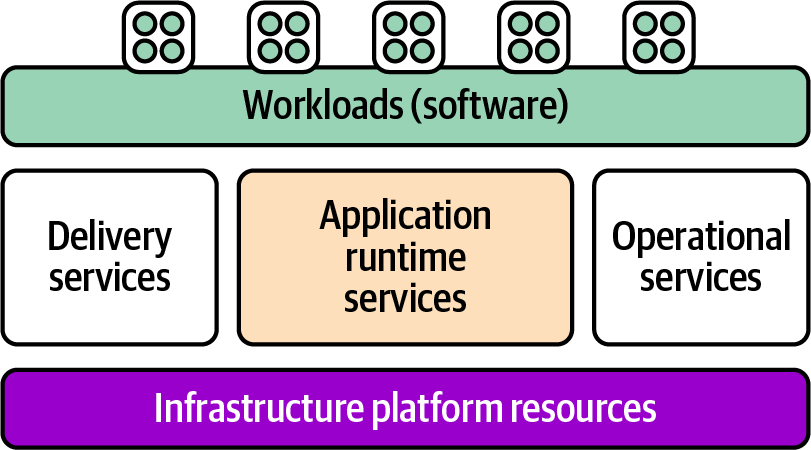
Figure 13-1. Overview of the platform layers
The topic of this chapter is application runtime services, which are those services that are directly involved in hosting running workloads. The other services in the platform layer include delivery services and operational services, which are necessary but not directly involved in running the applications. Delivery services are used to create, validate, and deploy changes to software; examples include source code repositories, pipeline services, and deployment services. Operational services are used to manage running applications, including things like monitoring and reporting.
Runtime services must be provisioned before an application can be deployed; examples include servers, compute clusters, database instances, and network structures. Figure 13-2 shows several runtime services that are used by an example application.
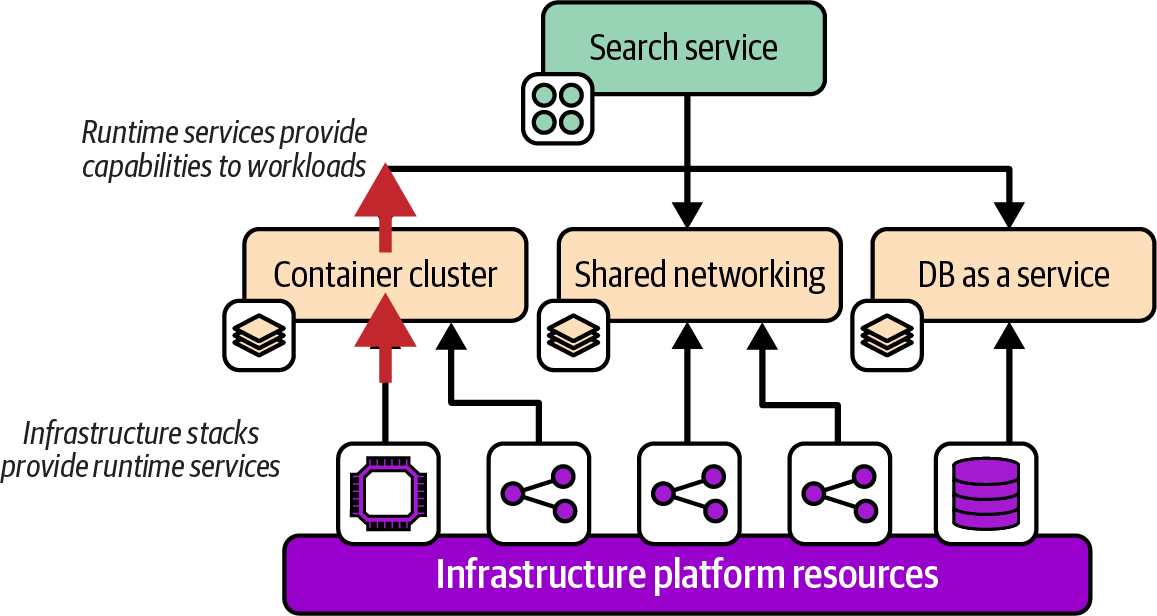
Figure 13-2. Application runtime services
The diagram shows that runtime services are provided by provisioning infrastructure resources. In Chapter 3, I explained that a platform service functionality may be provided to workloads using one of three models, which I’ve shown again in Figure 13-3.
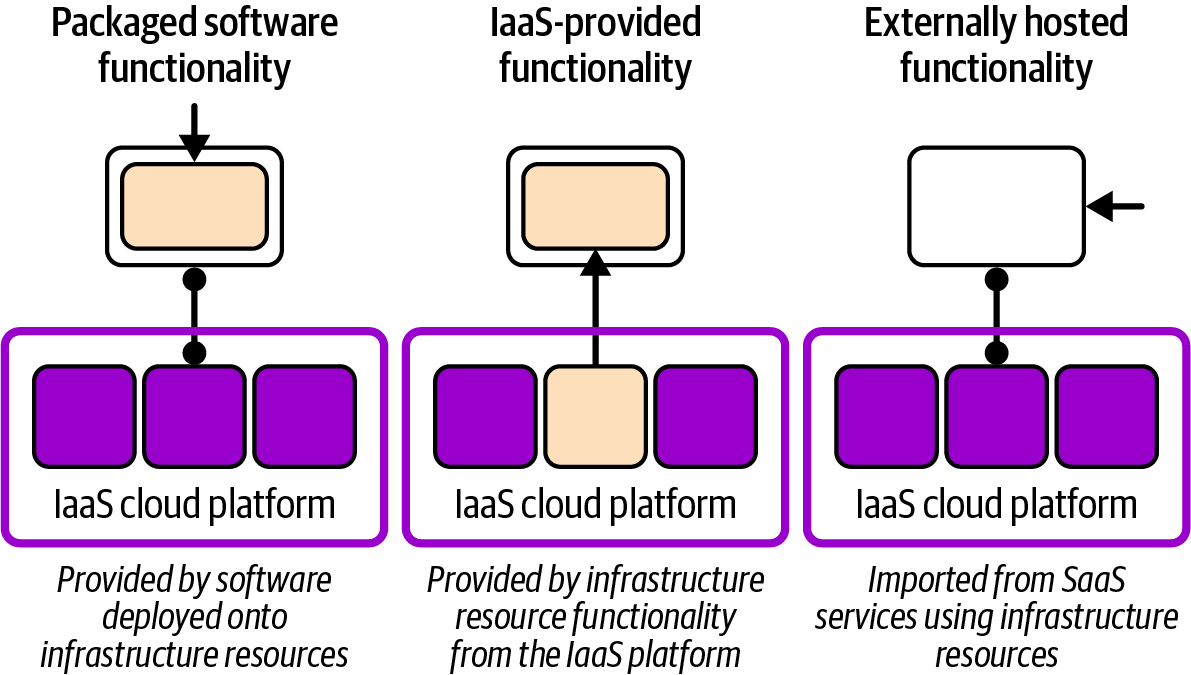
Figure 13-3. How different models for providing a runtime service use infrastructure
Some platform services might be provided by deploying packaged software onto infrastructure, such as a specialized AI database deployed onto VMs. Many services can be provided directly from the IaaS platform, such as a container cluster or database as a service. Other services may be externally hosted, such as a SaaS monitoring service, imported into the system by configuring network resources in the IaaS platform.
When reviewing or designing infrastructure, I find it useful to start by examining the workloads that run on the system, identifying the runtime capabilities that they need, and then the platform services that provide those capabilities. I’ll start with an example of this application-driven infrastructure design approach.
I’ll then discuss several typical types of application runtime services, particularly compute services. I’ll finish the chapter with a discussion of several topologies for organizing clusters and environments.
Application-Driven Infrastructure Design
Application-driven infrastructure design is an approach that starts by looking at the workloads to understand their requirements. Requirements can best be understood by defining capabilities. A capability is described without being specific about the technology used to implement it. Figure 13-4 shows a capability map for a retrieval-augmented generation (RAG) application the FoodSpin team is building to create an interactive GenAI chat service for its customers.
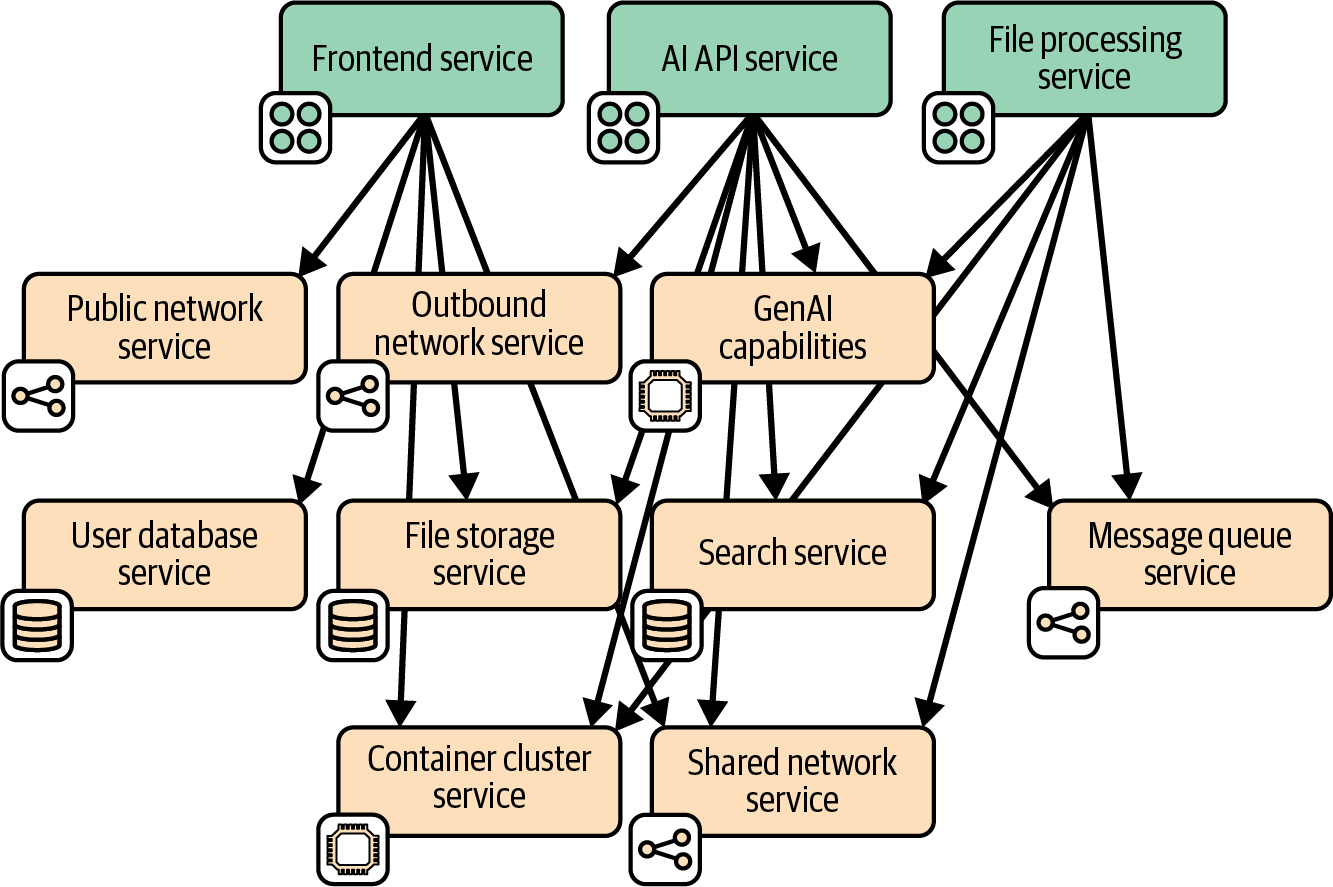
Figure 13-4. Runtime capabilities for an LLM RAG application
The application consists of three main services, each built and deployed as separately deployable containers:
- Frontend service
-
Provides the UI for the chat, including user profile management. It stores user profile information and chat history in a database. The service also allows admin users to upload and store data files for processing.
- File processing service
-
Ingests files that contain product information and specialist data specific to the FoodSpin chat. It accesses these files from storage and exchanges messages with the API service.
- AI API service
-
Connects to an external SaaS GenAI API on behalf of the other services. It sends and receives messages with the file processing service.
I won’t detail all the capabilities involved in this application, but several of them illustrate the concept of capabilities and how they relate to workloads.
All these services use a single shared networking capability for communication with other parts of the system. The frontend and API services each also have specific networking requirements. The frontend service needs to accept connections from the public internet, and the API service needs to connect to the external AI SaaS provider.
The AI and file processing service will communicate with each other using an asynchronous messaging capability. And all three of the services, and potentially implementations of some of their supporting capabilities, run on a container cluster.
Figure 13-5 shows the capabilities used by the AI API service, indicating how each capability is provided.
Four of the capabilities are provided by provisioning resources from the IaaS platform, including all the networking as well as the container cluster and file storage. The GenAI service is provided by an external vendor as a SaaS API. And the search service is provided by deploying an open source search indexing tool.
The next level of detail is defining which specific services and software are used for these services.
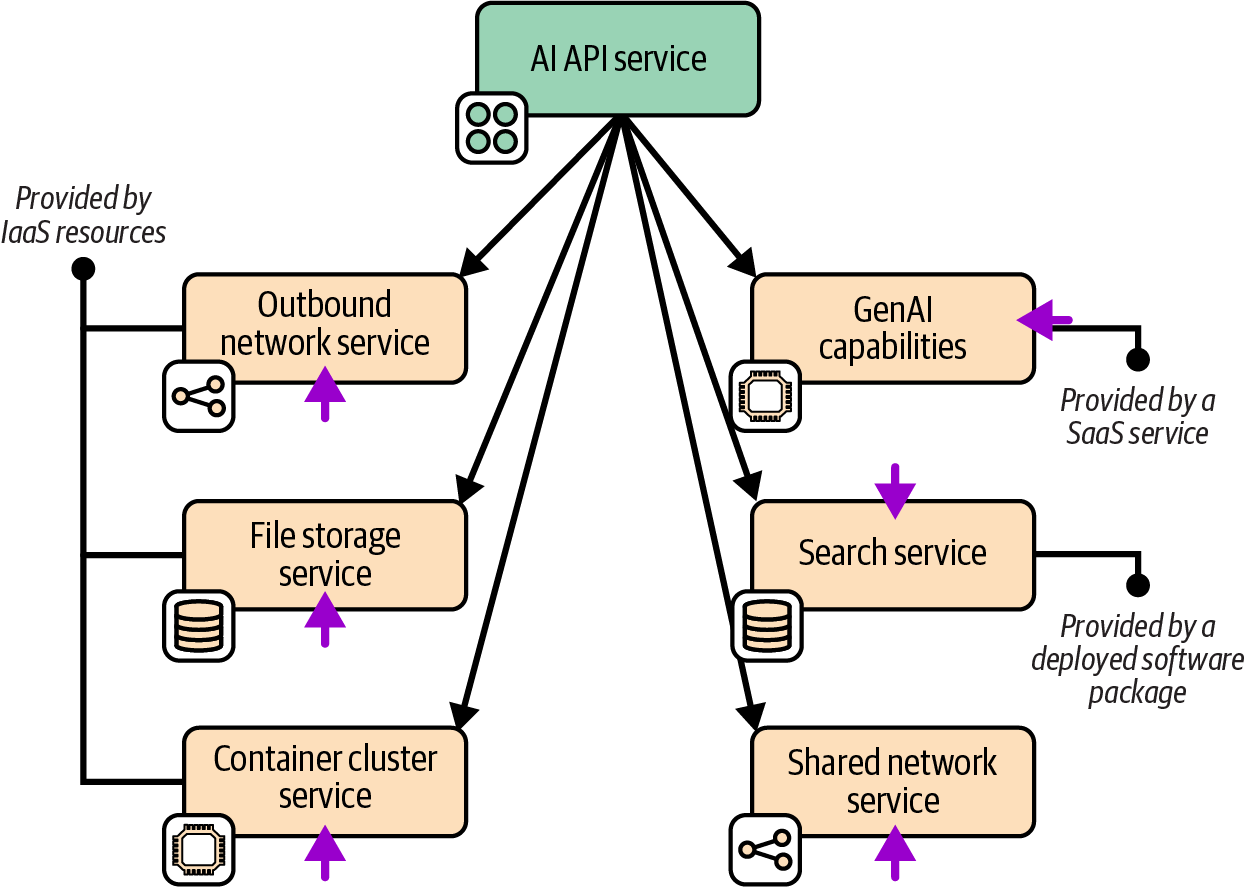
Figure 13-5. Capability implementations for the LLM RAG application
Application Runtime Platforms
Application runtime services include a wide array of compute, storage, and networking constructs that are far outside the scope of this book. However, Infrastructure as Code emerged from the need to configure servers, and newer compute stacks such as containers and serverless code are still at the core of most runtime platforms. I’ve had to resist the urge to devote multiple chapters to these topics, which are covered in detail in many other sources, but I will give a summary focusing on the intersection of these platforms and infrastructure code.
Servers as Code
Servers, whether physical or virtual, are the traditional runtime platform, and still underpin even containerized and serverless platforms. Chapter 11 describes defining and provisioning servers as code in detail.
Server Clusters as Code
Before Docker and Kubernetes ruled the world, there were server clusters.1 Each server in a cluster is identically configured and runs an identical workload. Applications are much more tightly coupled to servers than they are to container clusters.
Traditionally, teams provisioned servers in a cluster using push deployments, often using a remote command-scripting tool like Capistrano or Fabric, and server configuration tools like Ansible. These clusters tended to be fairly static, as adding and removing servers were manually initiated and often involved multiple manual steps.
IaaS platforms enable us to specify servers and their workloads in code, as well as to define the nature of the cluster. The IaaS platform automatically adds servers to and removes servers from the cluster, whether in response to events, metrics like load, or conditions like failed health checks. These capabilities mean we can use a server cluster not only to scale capacity to match demand, but also to automatically recover from certain types of failures.
You can configure servers in an automated cluster using pull deployments, where a script or agent running on the server downloads and installs software, or else to bake the software into the server image used to create servers in a cluster.2 Using a push configuration or deployment process is complicated because you need to trigger a separate process after a new server becomes available, and then indicate when configuration is complete so the server can be put into service.
Application Clusters as Code
An application cluster is a pool of servers that runs one or more applications. Unlike a server cluster, where each server runs the same set of applications, with an application cluster, application instances are dynamically added to and removed from nodes of the cluster on demand. At any point in time, any given node may run a different set of application instances than other nodes are running.
Early application clusters were based on application servers such as J2EE servers (JBoss, IBM WebSphere, Orion, and WebLogic Server, among many others) that were deployed to a server cluster and provided an application-hosting layer for a particular application stack such as Java or .NET applications.
Another generation of cluster systems was designed to orchestrate multiple types of application processes across a server cluster. Examples include Apache Mesos, DC/OS, and Nomad, all of which are still in use.
Container clusters, particularly Kubernetes, have come to dominate the market. A container cluster is an application cluster that orchestrates containerized workloads. Some people use the phrase “cloud native” to mean software and systems based on Kubernetes.
As with other platform services, application cluster functionality can be provided by the IaaS platform, or by deploying a packaged solution onto infrastructure that has been provided for it. I’ll discuss options for each of these.
Cluster as a service (IaaS provisioned)
Most IaaS cloud providers offer hosted container orchestration, and most of these are Kubernetes implementations. Amazon has EKS, as well as the non-Kubernetes ECS service. Azure has AKS, and Google has GKE. The smaller clouds also have offerings, including Alibaba Cloud (AKS), DigitalOcean (DOKS), IBM (IKS), Linode (LKE), Oracle (OKE), and VMWare Tanzu (TKG).3
Infrastructure code that defines IaaS-provided container clusters is easily integrated with broader infrastructure estates, including traffic management, storage, and other types of compute.
Packaged cluster distribution
Many teams prefer to install and manage application clusters themselves rather than using managed clusters. The motivation is usually to provide a single consistent solution across multiple cloud providers.
Kubernetes is, again, the most popular core cluster solution, although Mesos, DC/OS, and Nomad also fall into this category. You can use an installer such as kOps, Kubeadm, or Kubespray to deploy Kubernetes onto infrastructure you’ve provisioned for it.
There are also packaged Kubernetes distributions that bundle other services and features with them. Dozens of these exist, including the following:4
-
Mirantis Kubernetes Engine (formerly Docker Enterprise)
-
OpenShift (Red Hat)
-
Tanzu Platform (VMware)
Some of these products started out with their own container formats and application scheduling and orchestration services. Many decided to rebuild their core products around the overwhelmingly popular Docker and Kubernetes rather than to continue developing their own solutions.
Serverless Application Infrastructure
Serverless applications, sometimes called FaaS (function as a service),5 are code that is executed on demand. The execution process is usually started from an event, which could be a message, inbound network connection, scheduler event, or a change in the lifecycle of an IaaS resource, such as creating a new instance of a resource. Once the execution completes, the process is either terminated or frozen. Most often, multiple instances of the serverless function can be triggered and run in parallel, although there may be a configurable limit on the number of processes that run concurrently.
A key advantage of serverless code is that it can be simpler than code that runs continually on a server or in a container. Non-serverless code tends to need logic to manage whatever events it needs to respond to, such as opening ports to listen on, looping over multiple requests, and managing the use of resources like memory over time and multiple requests. With serverless code, these activities are generally handled by the platform, so the code can focus on business logic. Note that some serverless platforms, including AWS Lambda, may reuse an instance to serve multiple requests, so engineers need to be aware of how resources may be used across requests.
Serverless Beyond Compute
The serverless concept goes beyond running code. Amazon DynamoDB and Azure Cosmos DB are serverless databases: the servers involved in hosting the database are transparent to you, unlike more traditional DBaaS offerings like Amazon RDS. AWS Step Functions is a serverless implementation of state machines, blurring the line between compute and storage.
Some cloud platforms offer specialized on-demand application execution environments. For example, you can use Amazon SageMaker, Azure Machine Learning, or Vertex AI to deploy and run machine learning models.
One concern with serverless code is that a request may involve starting a new process, which can affect latency. Serverless code is useful for well-defined, short-lived actions where the code starts quickly. It’s also appropriate when latency is less of a concern—for example, with asynchronous message processing. Serverless can be very efficient for workloads where the demand varies greatly, scaling up when there are peaks and not running at all when not needed.
Serverless and infrastructure
Serverless isn’t the most accurate term because, of course, the code does run on a server. It’s just that the server is effectively invisible to the developer. The level of abstraction from servers goes a step further than containers, which bundle OS configuration with the application.
Some early enthusiasts declared that serverless makes Infrastructure as Code irrelevant. However, serverless code usually depends on infrastructure resources, such as storage and networking, which are still best defined as code. IfC offers a way to declare infrastructure within serverless code and have it provisioned by the platform on demand (see “Infrastructure from Code”). In many cases, even systems that make heavy use of serverless code may need shared infrastructure that is best defined outside of application code.
Serverless platforms
IaaS platforms usually provide their own serverless implementations, such as AWS Lambda, Azure Functions, and Cloud Run functions. Unlike with containers and Kubernetes, there is little standardization of serverless runtimes, so code developed for IaaS serverless platforms are tied to those platforms. In addition, options for packaged serverless runtime solutions can be deployed on multiple IaaS platforms and in data centers. Examples of these include the following:
Cluster Topologies
When designing a clustered platform capability like a container cluster or serverless platform solution, an important decision is how to organize clusters, workloads, and environments. The forces to consider when deciding on a cluster topology are similar to other component design forces (like those I shared in Chapter 5). Here are the ones I’ve found most applicable:
- Governance
-
With some regulatory regimes, it’s easier to demonstrate compliance by segregating workloads with stricter requirements into separate clusters. The most obvious example is with restrictions on where data is stored and processed, as required by many national financial services regulators. It may be possible to configure a multiregional cluster and its workloads to comply with these requirements, but it’s often simpler to demonstrate compliance to regulators with fully separate clusters.
- Optimization
-
Tuning a cluster for a special purpose, such as low-latency transactions or high-volume data processing, may create performance or other issues for different types of workloads.
- Ownership
-
Larger organizations sharing clusters across multiple teams or groups can create various conflicts around configuration, upgrade schedules, and resource contention. Although imagining technical solutions to these conflicts is easy, in practice it’s often simpler to allocate separate clusters to separate groups.
- Continuity
-
Upgrading core software for some cluster solutions can be disruptive for workloads running on them. The challenges with scheduling maintenance and upgrades increases exponentially with the number of workloads and teams involved. Running multiple clusters reduces the impact of each upgrade and simplifies scheduling.
I’ll describe four broad types of topologies in relation to environments. These topologies leverage different environment implementation layers (as I defined in “Environment Implementation Layers”). Note that although the examples I give show multiple delivery environments in the path to production, the same topologies apply with multiple region-specific environments.
Multiple Environments in One Cluster
Figure 13-6 shows a single cluster that hosts multiple environments. These are configuration environments in the environment abstraction layers model I described.
Many smaller organizations prefer to run a single cluster, especially those with newer systems that are entirely containerized. Scaling to very large organizations across geographies may require adopting advanced tooling and techniques, especially to manage upgrades and maintenance work.
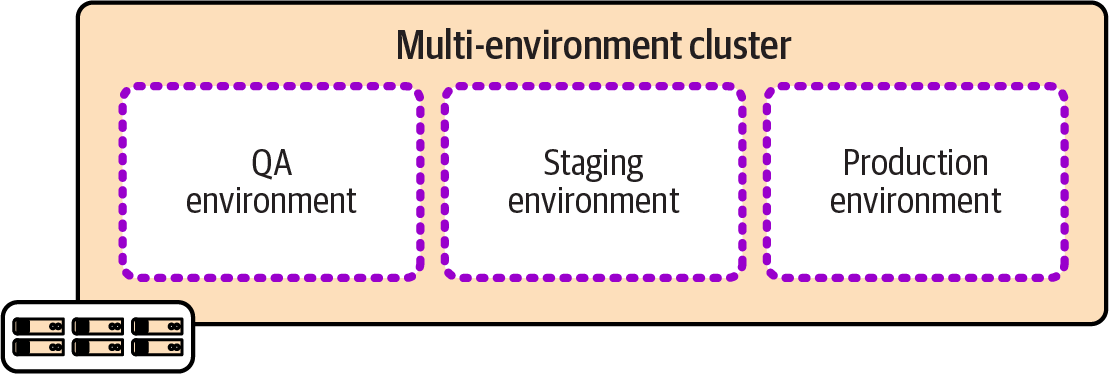
Figure 13-6. Multiple environments per cluster
One Cluster per Environment
Running a separate cluster for each environment, as shown in Figure 13-7, can simplify issues including governance and testing changes and upgrades to the clustering system.
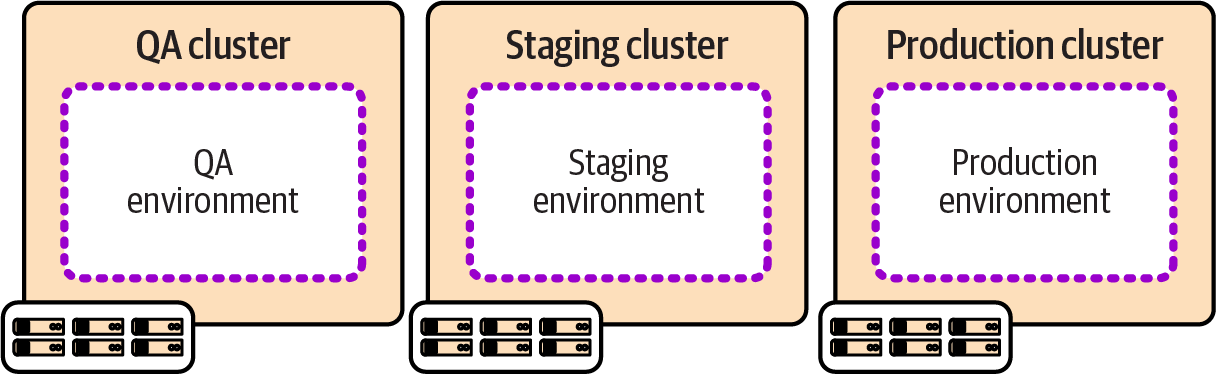
Figure 13-7. One cluster per environment
The challenge with running multiple clusters is ensuring that they are easily updated, upgraded, and kept consistent. Teams that manage clusters through manual configuration, or per environment snowflake configuration, often struggle as they add more environments, leading to growing technical debt. Automating the delivery of clusters as deployable, reusable stacks makes this more manageable.
Multiple Clusters per Environment
Organizations with larger suites of workloads developed and managed by multiple teams and groups often find that a single cluster isn’t appropriate for a single environment. Figure 13-8 shows three clusters in each of the example environments.
Here, the forces I described earlier lead to giving each application team a dedicated cluster in each environment. Clearly, the challenges with managing multiple clusters are intensified, not only because there are so many more clusters, but because the clusters for each application team are likely to be configured and managed separately. Organizations using this approach could have each application team develop and maintain its own infrastructure code for its clusters. Alternatively, the organization can ensure that infrastructure code is not only reusable across delivery environments, but also configurable for the different use cases of each application team.
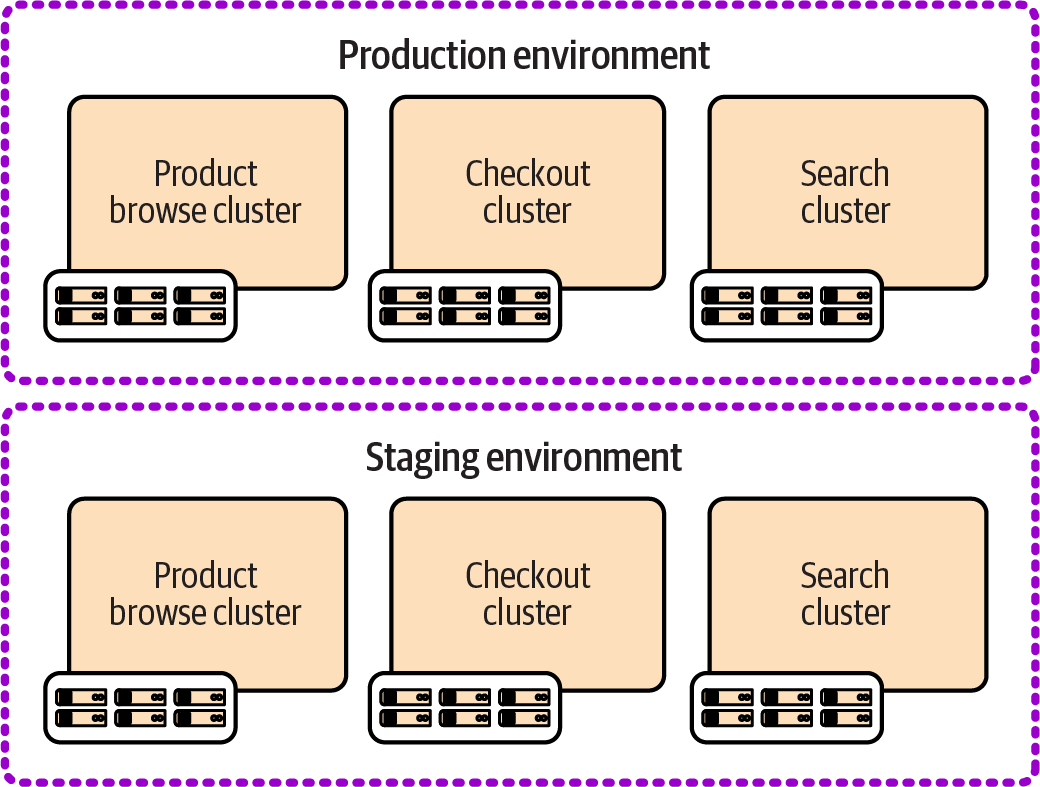
Figure 13-8. Multiple clusters per environment
Mature systems for managing multiple clusters can reduce the overhead of time and effort and avoid inconsistency across clusters. However, clusters that are too small may be inefficient because of the overhead resources used for each cluster. Clusters with small workloads also lead to lower utilization than running workloads in a shared cluster. Modern cluster management systems have many options for handling differing requirements of tenants in a shared cluster.
Cross-Environment Clusters
Figure 13-9 shows three clusters, each of which hosts multiple environments with a subset of workloads.
The clusters in this example are divided according to governance and optimization concerns rather than team boundaries as in the previous examples. One cluster handles externally visible public services, the second handles internal services, and the third is optimized for data processing. These are considered shared environments because services running on different clusters are integrated within each environment.
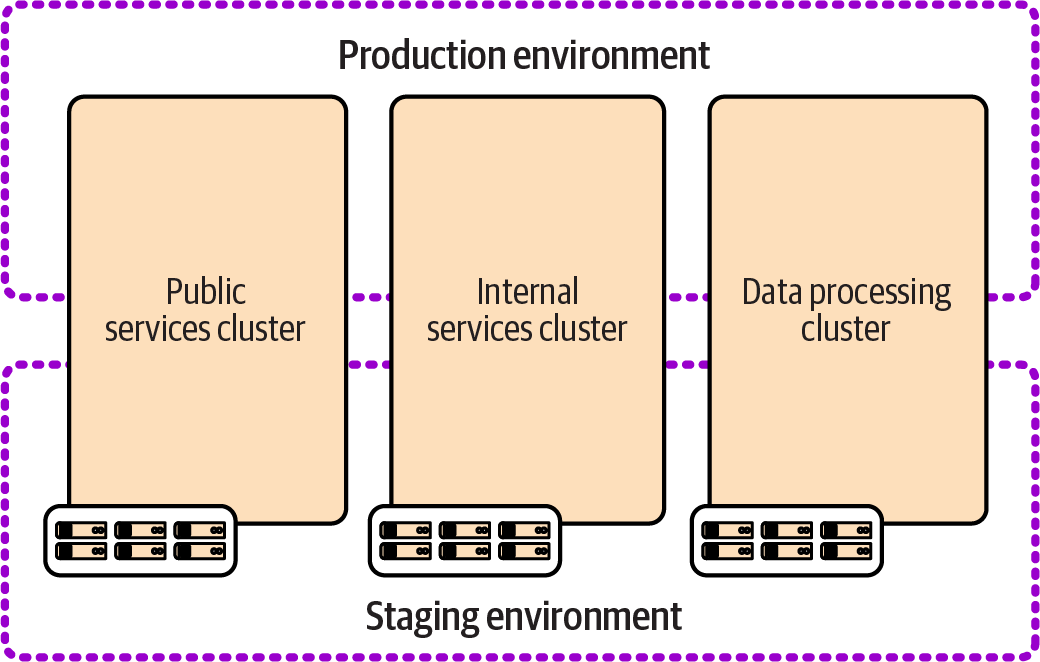
Figure 13-9. Multiple cross-environment clusters
Conclusion
Many organizations divide the responsibilities for infrastructure from developing and managing workloads that run on it. The reasoning is typically that these involve different skill sets, and a desire to enforce clean design boundaries. However, boundaries that cross horizontal layers like applications and infrastructure often cut across dependencies in a way that doesn’t reduce coupling but instead makes that coupling impossible to manage well.
I’ve found that the best way to design infrastructure is to start by understanding the workloads that run on it and then implementing infrastructure around their needs. In Chapter 14, I’ll discuss ways to arrange team topologies and workflows across infrastructure and software to align with this approach. However, to get there, I’ll first cover various aspects of developing and delivering infrastructure code, including testing, pipelines, deployment, and managing changes.
1 In truth, server clusters still exist, even if they are hidden behind cloud native curtains. Kubernetes nodes are typically implemented as server clusters.
2 “Configuring a New Server Instance” describes these options for configuring new servers.
3 Smaller providers are largely focused on container clusters, in some cases better described as PaaS services than IaaS, such as Platform9 (PMK) and Civo.
4 You can find a current list of certified Kubernetes distributions on the Kubernetes website.
5 The term FaaS is usually used to distinguish the concept from other uses of the term serverless, such as backend as a service (BaaS), which is an externally hosted service. See Mike Roberts’s definitive article “Serverless Architectures” for more. I’ve found that most people have come to use serverless to mean FaaS without distinguishing it, so I’m doing the same here.
6 In the 2016 edition of this book I defined cloud native as “software that has been designed and implemented to function seamlessly when elements of the infrastructure it runs on are routinely added and removed.” Looking back, I find this a bit narrow, although it reflected a common issue I saw at the time when teams ported workloads directly from data centers to cloud servers that they expected to treat as static.