Chapter 2. Basic Types
Now that you are all set up, it’s time to write some TypeScript! Starting out should be easy, but you will very soon run into situations where you’re unsure if you’re doing the right thing. Should you use interfaces or type aliases? Should you annotate or let type inference do its magic? What about any and unknown, are they safe to use? Some people on the internet said you should never use them, so why are they part of TypeScript anyways?
All these questions will be answered in this chapter. We look at the basic types that make TypeScript and learn how an experienced TypeScript developer will make use of them. Use this as a foundation for the upcoming chapters, so you get a feeling of how the TypeScript compiler gets to its types, and how it interprets your annotations.
This is a lot about the interaction between your code, the editor, and the compiler. And about going up and down the type hierarchy, which we will see in Recipe 2.3. If you are an experienced TypeScript developer, this chapter will give you the missing foundation. If you’re just starting out, you will learn the most important techniques to go really far!
2.1 Annotating Effectively
Problem
Annotating types is cumbersome and boring.
Solution
Only annotate when you want to have your types checked.
Discussion
A type annotation is a way to explicitly tell which types to expect. You know, the stuff that was very prominent in other programming languages, where the verbosity of StringBuilder stringBuilder = new StringBuilder() makes sure that you’re really, really dealing with a StringBuilder. The opposite is type inference, where TypeScript tries to figure out the type for you.
// Type inferenceletaNumber=2;// aNumber: number// Type annotationletanotherNumber:number=3;// anotherNumber: number
Type annotations are also the most obvious and visible syntax difference between TypeScript and JavaScript.
When you start learning TypeScript, you might want to annotate everything to express the types you’d expect. This might feel like the obvious choice but you can also use annotations sparingly and let TypeScript figure out types for you.
A type annotation is a way for you to express where contracts have to be checked. If you add a type annotation to a variable declaration, you tell the compiler to check if types match during the assignment.
typePerson={name:string;age:number;};constme:Person=createPerson();
If createPerson returns something that isn’t compatible with Person, TypeScript will throw an error. Do this is if you really want to be sure that you’re dealing with the right type here.
Also, from that moment on, me is of type Person, and TypeScript will treat it as a Person. If there are more properties in me, e.g. a profession, TypeScript won’t allow you to access them. It’s not defined in Person.
If you add a type annotation to a function signature’s return value, you tell the compiler to check if types match the moment you return that value.
functioncreatePerson():Person{return{name:"Stefan",age:39};}
If I return something that doesn’t match Person, TypeScript will throw an error. Do this if you want to be completely sure that you return the correct type. This especially comes in handy if you are working with functions that construct big objects from various sources.
If you add a type annotation to a function signature’s parameters, you tell the compiler to check if types match the moment you pass along arguments.
functionprintPerson(person:Person){console.log(person.name,person.age);}printPerson(me);
This is in my opinion the most important, and unavoidable type annotation. Everything else can be inferred.
typePerson={name:string;age:number;};// Inferred!// return type is { name: string, age: number }functioncreatePerson(){return{name:"Stefan",age:39};}// Inferred!// me: { name: string, age: number}constme=createPerson();// Annotated! You have to check if types are compatiblefunctionprintPerson(person:Person){console.log(person.name,person.age);}// All worksprintPerson(me);
You can use inferred object types at places where you expect an annotation because TypeScript has a structural type system. In a structural type system, the compiler will only take into account the members (properties) of a type, not the actual name.
Types are compatible if all members of the type to check against are available in the type of the value. We also say that the shape or structure of a type has to match.
typePerson={name:string;age:number;};typeUser={name:string;age:number;id:number;};functionprintPerson(person:Person){console.log(person.name,person.age);}constuser:User={name:"Stefan",age:40,id:815,};printPerson(user);// works!
User has more properties than Person, but all properties that are in Person are also in User, and they have the same type. This is why it’s possible to pass User objects to printPerson, even though the types don’t have any explicit connection.
However, if you pass a literal, TypeScript will complain that there are excess properties that should not be there.
printPerson({name:"Stefan",age:40,id:1000,// ^- Argument of type '{ name: string; age: number; id: number; }'// is not assignable to parameter of type 'Person'.// Object literal may only specify known properties,// and 'id' does not exist in type 'Person'.(2345)});
This is to make sure that you didn’t expect properties to be present in this type, and wonder yourself why changing them has no effect.
With a structural type system, you can create interesting patterns where you have carrier variables with the type inferred, and reuse the same variable in different parts of your software, with no similar connection to each other.
typePerson={name:string;age:number;};typeStudying={semester:number;};typeStudent={id:string;age:number;semester:number;};functioncreatePerson(){return{name:"Stefan",age:39,semester:25,id:"XPA"};}functionprintPerson(person:Person){console.log(person.name,person.age);}functionstudyForAnotherSemester(student:Studying){student.semester++;}functionisLongTimeStudent(student:Student){returnstudent.age-student.semester/2>30&&student.semester>20;}constme=createPerson();// All work!printPerson(me);studyForAnotherSemester(me);isLongTimeStudent(me);
Student, Person, and Studying have some overlap, but are unrelated to each other. createPerson returns something that is compatible with all three types. If you have annotated too much, you would need to create a lot more types and a lot more checks than necessary, without any benefit.
So annotate wherever you want to have your types checked, but at least for function arguments.
2.2 Working with any and unknown
Problem
There are two top types in TypeScript, any and unknown. Which one should you use?
Solution
Use any if you effectively want to deactivate typing, use unknown when you need to be cautious.
Discussion
Both any and unknown are top types, which means that every value is compatible with any or unknown.
constname:any="Stefan";constperson:any={name:"Stefan",age:40};constnotAvailable:any=undefined;
Since any is a type every value is compatible with, you can access any property without restriction.
constname:any="Stefan";// This is ok for TypeScript, but will crash in JavaScriptconsole.log(name.profession.experience[0].level);
any is also compatible with every sub-type, except never. This means you can narrow the set of possible values by assigning a new type.
constme:any="Stefan";// Good!constname:string=me;// Bad, but ok for the type system.constage:number=me;
With any being so permissive, any can be a constant source of potential errors and pitfalls since you effectively deactivate type checking.
While everybody seems to agree that you shouldn’t use any in your codebases, there are some situations where any is really useful:
Migration. When you go from JavaScript to TypeScript, chances are that you already have a large codebase with a lot of implicit information on how your data structures and objects work. It might be a chore to get everything spelled out in one go. any can help you migrate to a safer codebase incrementally.
Untyped Third-party dependencies. You might have one or the other JavaScript dependency that still refuses to use TypeScript (or something similar). Or even worse: There are no up-to-date types for it. Definitely Typed is a great resource, but it’s also maintained by volunteers. It’s a formalization of something that exists in JavaScript but is not directly derived from it. There might be errors (even in such popular type definitions like React’s), or they just might not be up to date!
This is where any can help you greatly. When you know how the library works, if the documentation is good enough to get you going, and if you use it sparingly, any can be a relief instead of fighting types.
JavaScript prototyping. TypeScript works a bit differently from JavaScript and needs to make a lot of trade-offs to make sure that you don’t run into edge cases. This also means that if you write certain things that would work in JavaScript, you’d get errors in TypeScript.
typePerson={name:string;age:number;};functionprintPerson(person:Person){for(letkeyinperson){console.log(`${key}:${person[key]}`);// Element implicitly has an 'any' --^// type because expression of type 'string'// can't be used to index type 'Person'.// No index signature with a parameter of type 'string'// was found on type 'Person'.(7053)}}
Find out why this is an error in Recipe 9.1. In cases like this, any can help you to switch off type checking for a moment because you know what you’re doing. And since you can go from every type to any, but also back to every other type, you have little, explicit unsafe blocks throughout your code where you are in charge of what’s happening.
functionprintPerson(person:any){for(letkeyinperson){console.log(`${key}:${person[key]}`);}}
Once you know that this part of your code works, you can start adding the right types, work around TypeScript’s restrictions, and type assertions.
functionprintPerson(person:Person){for(letkeyinperson){console.log(`${key}:${person[keyaskeyofPerson]}`);}}
Whenever you use any, make sure you activate the noImplicitAny flag in your tsconfig.json; it is activated by default in strict mode. With that, TypeScript needs you to explicitly annotate any when you don’t have a type through inference or annotation. This helps find potentially problematic situations later on.
An alternative to any is unknown. It allows for the same values, but the things you can do with it are very different. Where any allows you to do everything, unknown allows you to do nothing. The only thing you can do is pass values around, the moment you want to call a function or make the type more specific, you need to do type checks first.
constme:unknown="Stefan";constname:string=me;// ^- Type 'unknown' is not assignable to type 'string'.(2322)constage:number=me;// ^- Type 'unknown' is not assignable to type 'number'.(2322)
Type checks and control flow analysis help to do more with unknown:
functiondoSomething(value:unknown){if(typeofvalue==="string"){// value: stringconsole.log("It's a string",value.toUpperCase());}elseif(typeofvalue==="number"){// value: numberconsole.log("it's a number",value*2);}}
If your apps should work with a lot of different types, unknown is great to make sure that you can carry values throughout your code, but don’t run into any safety problems because of any’s permissiveness.
2.3 Choosing the Right Object Type
Problem
You want to allow for values that are JavaScript objects, but there are three different object types, object, Object and {}, which one should you use?
Solution
Use object for compound types like objects, functions, and arrays. {} for everything that has a value.
Discussion
TypeScript divides its types into two branches. The first branch, primitive types, include number, boolean, string, symbol, bigint, and some sub-types. The second branch is called compound types and includes everything that is a sub-type of an object and is ultimately composed of other compound types or primitive types. Figure 2-1 gives an overview.
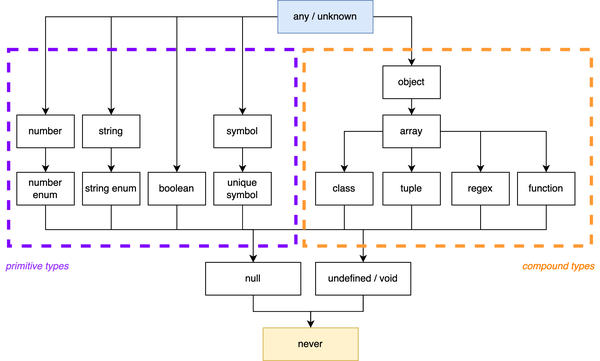
Figure 2-1. The type hierarchy in TypeScript.
There are situations where you want to target values that are compound types. Either because you want to modify certain properties, or just want to be safe that we don’t pass any primitive values. For example Object.create creates a new object and takes its prototype as the first argument. This can only be a compound type, otherwise, your runtime JavaScript code would crash.
Object.create(2);// Uncaught TypeError: Object prototype may only be an Object or null: 2// at Function.create (<anonymous>)
In TypeScript, there are three types that seem to do the same thing: The empty object type {}, the uppercase O Object interface, and the lowercase O object type. Which one do you use for compound types?
{} and Object allow for roughly the same values, which is everything but null or undefined (given that strict mode or strictNullChecks is activated).
letobj:{};// Similar to Objectobj=32;obj="Hello";obj=true;obj=()=>{console.log("Hello")};obj=undefined;// Errorobj=null;// Errorobj={name:"Stefan",age:40};obj=[];obj=/.*/;
The Object interface is compatible with all values that have the Object prototype, which is every value from every primitive and compound type.
However, Object is a defined interface in TypeScript, and has some requirements for certain functions. For example, the toString method which is toString() => string and part of any non-nullish value, is part of the Object prototype. If you assign a value with a different tostring method, TypeScript will error.
letokObj:{}={toString(){returnfalse;}};// OKletobj:Object={toString(){returnfalse;}// ^- Type 'boolean' is not assignable to type 'string'.ts(2322)}
Object can cause some confusion due to this behavior, so in most cases, you’re good with {}.
TypeScript also has a lowercase object type. This is more the type you’re looking for, as it allows for any compound type, but no primitive types.
letobj:object;obj=32;// Errorobj="Hello";// Errorobj=true;// Errorobj=()=>{console.log("Hello")};obj=undefined;// Errorobj=null;// Errorobj={name:"Stefan",age:40};obj=[];obj=/.*/;
If you want a type that excludes functions, regexes, arrays, and the likes, wait for Chapter 5, where we create one on our own.
2.4 Working with Tuple Types
Problem
You are using JavaScript arrays to organize your data. The order is important, and so are the types at each position. But TypeScript’s type inference makes it really cumbersome to work with it.
Solution
Annotate with tuple types.
Discussion
Next to objects, JavaScript arrays are a popular way to organize data in a complex object. Instead of writing a typical Person object as we did in other recipes, you can store entries element by element:
constperson=["Stefan",40];// name and age
The benefit of using arrays over objects is that array elements don’t have property names. When you assign each element to variables using destructuring, it gets really easy to assign custom names:
// objects.js// Using objectsconstperson={name:"Stefan",age:40,};const{name,age}=person;console.log(name);// Stefanconsole.log(age);// 40const{anotherName=name,anotherAge=age}=person;console.log(anotherName);// Stefanconsole.log(anotherAge);// 40// arrays.js// Using arraysconstperson=["Stefan",40];// name and ageconst[name,age]=person;console.log(name);// Stefanconsole.log(age);// 40const[anotherName,anotherAge]=person;console.log(anotherName);// Stefanconsole.log(anotherAge);// 40
For APIs where you need to assign new names constantly, using Arrays is really comfortable, as we see in Chapter 10.
When using TypeScript and relying on type inference, this pattern can cause some issues. By default, TypeScript infers the array type from an assignment like that. Arrays are open-ended collections with the same element in each position.
constperson=["Stefan",40];// person: (string | number)[]
So TypeScript thinks that person is an array, where each element can be either a string or a number, and it allows for plenty of elements after the original two. This means when you’re destructuring, each element is also of type string or number.
const[name,age]=person;// name: string | number// age: string | number
That makes a comfortable pattern in JavaScript really cumbersome in Typescript. You would need to do control flow checks to narrow down the type to the actual one, where it should be clear from the assignment that this is not necessary.
Whenever you think you need to do extra work in JavaScript just to satisfy TypeScript, there’s usually a better way. In that case, you can use tuple types to be more specific on how your array should be interpreted.
Tuple types are a sibling to array types that work on a different semantic. While arrays can be potentially endless in size and each element is of the same type (no matter how broad), tuple types have a fixed size and each element has a distinct type.
The only thing that you need to do to get tuple types is to explicitly annotate.
constperson:[string,number]=["Stefan",40];const[name,age]=person;// name: string// age: number
Fantastic! Tuple types have a fixed length, this means that the length is also encoded in the type. So assignments that go out of bounds are not possible, and TypeScript will throw an error.
person[1]=41;// OK!person[2]=false;// Error//^- Type 'false' is not assignable to type 'undefined'.(2322)
TypeScript also allows you to add labels to tuple types. This is just meta information for editors and compiler feedback but allows you to be clearer about what to expect from each element.
typePerson=[name:string,age:number];
This will help you and your colleagues to easier understand what to expect, just like object types.
Tuple types can also be used to annotate function arguments. This function
functionhello(name:string,msg:string):void{// ...}
Can also be written with tuple types.
functionhello(...args:[name:string,msg:string]):{// ...}
And you can be very flexible in defining it:
functionh(a:string,b:string,c:string):void{//...}// equal tofunctionh(a:string,b:string,...r:[string]):void{//...}// equal tofunctionh(a:string,...r:[string,string]):void{//...}// equal tofunctionh(...r:[string,string,string]):void{//...}
This is also known as rest elements, something that we have in JavaScript and that allows you to define functions with an almost limitless argument list, where the last element, the rest element sucks all excess arguments in.
When you need to collect arguments in your code, you can use a tuple before you apply them to your function.
constperson:[string,number]=["Stefan",40];functionhello(...args:[name:string,msg:string]):{// ...}hello(...person);
Tuple types are really useful for many scenarios. We will see a lot more in Chapter 7 and Chapter 10.
2.5 Understanding Interfaces vs Type Aliases
Problem
There are two different ways in TypeScript to declare object types: Interfaces and type aliases. Which one should you use?
Solution
Use type aliases for types within your project’s boundary, and use interfaces for contracts that are meant to be consumed by others.
Discussion
Both approaches to defining object types have been subject to lots of blog articles over the years. And all of them became outdated as time progressed. Right now, there is little difference between type aliases and interfaces. And everything that was different has been gradually aligned.
Syntactically, the difference between interfaces and type aliases is nuanced.
typePersonAsType={name:string;age:number;address:string[];greet():string;};interfacePersonAsInterface{name:string;age:number;address:string[];greet():string;}
You can use interfaces and type aliases for the same things, in the same scenarios:
-
In an implements declaration for classes
-
As a type annotation for object literals
-
For recursive type structures
There is however one important difference that can have side effects you usually don’t want to deal with: Interfaces allow for declaration merging, but type aliases don’t. Declaration merging allows for adding properties to an interface even after it has been declared.
interfacePerson{name:string;}interfacePerson{age:number;}// Person is now { name: string; age: number; }
TypeScript itself uses this technique a lot in lib.d.ts files, making it possible to just add deltas of new JavaScript APIs based on ECMAScript versions. This is a great feature if you want to extend e.g. Window, but it can fire back in other scenarios. Take this as an example:
// Some data we collect in a web forminterfaceFormData{name:string;age:number;address:string[];}// A function that sends this data to a back-endfunctionsend(data:FormData){console.log(data.entries())// this compiles!// but crashes horrendously in runtime}
So, where does the entries() method come from? It’s a DOM API! FormData is one of the interfaces provided by browser APIs, and there are a lot of them. They are globally available, and nothing keeps you from extending those interfaces. And you get no notification if you do.
You can of course argue about proper naming, but the problem persists for all interfaces that you make available globally, maybe from some dependency where you don’t even know they add an interface like that to the global space.
Changing this interface to a type alias immediately makes you aware of this problem:
typeFormData={// ^-- Duplicate identifier 'FormData'.(2300)name:string;age:number;address:string[];};
Declaration merging is a fantastic feature if you are creating a library that is consumed by other parts in your project, maybe even other projects entirely written by other teams. It allows you to define an interface that describes your application but allows your users to adapt it to reality if needed. Think of a plug-in system, where loading new modules enhances functionality. Here, declaration merging is a feature you don’t want to miss.
Within your module’s boundaries, however, using type aliases prevents you from accidentally re-using or extending already declared types. Use type aliases when you don’t expect others to consume them.
Performance
Using type aliases over interfaces has sparked some discussion in the past, as interfaces have been considered much more performant in their evaluation than type aliases, even resulting in a performance recommendation on the official TypeScript wiki. This recommendation is meant to be taken with a grain of salt, though, and is as everything much more nuanced.
On creation, simple type aliases may perform faster than interfaces because interfaces are never closed and might be merged with other declarations. But interfaces may perform faster in other places because they’re known ahead of time to be object types. Ryan Canavaugh from the TypeScript team expects performance differences to be really measurable with an extraordinary amount of interfaces or type aliases to be declared (around 5000 according to this tweet).
If your TypeScript code base doesn’t perform well, it’s not because you declared too many type aliases instead of interfaces, or vice versa
2.6 Defining Function Overloads
Problem
Your function’s API is very flexible and allows for arguments of various types, where context is important. This is hard to type in just a single function signature.
Solution
Use function overloads.
Discussion
JavaScript is very flexible when it comes to function arguments. You can pass basically any parameters, of any length. As long as the function body treats the input right, you’re good. This allows for very ergonomic APIs, but it’s also very tough to type.
Think of a conceptual task runner. With a task function you define new tasks by name, and either passes a callback or pass a list of other tasks to be executed. Or both: a list of tasks that needs to be executed before the callback runs.
task("default",["scripts","styles"]);task("scripts",["lint"],()=>{// ...});task("styles",()=>{// ...});
If you think “this looks a lot like Gulp 6 years ago”, you’re right. Its flexible API where you couldn’t do much wrong was also one of the reasons Gulp was so popular.
Typing functions like this can be a nightmare. Optional arguments, different types at the same position, this is tough to do even if you use union types1.
typeCallbackFn=()=>void;functiontask(name:string,param2:string[]|CallbackFn,param3?:CallbackFn):void{//...}
This catches all variations from the example above, but it’s also wrong, as it allows for combinations that don’t make any sense.
task("what",()=>{console.log("Two callbacks?");},()=>{console.log("That's not supported, but the types say yes!");});
Thankfully, TypeScript has a way to solve problems like this: Function overloads. Its name hints at similar concepts from other programming languages: Defining the same, but with different behavior. The biggest difference in TypeScript, as opposed to other programming languages, is that function overloads only work on a type system level and have no effect on the actual implementation.
The idea is that you define every possible scenario as its own function signature. The last function signature is the actual implementation.
// Types for the type systemfunctiontask(name:string,dependencies:string[]):void;functiontask(name:string,callback:CallbackFn):voidfunctiontask(name:string,dependencies:string[],callback:CallbackFn):void// The actual implementationfunctiontask(name:string,param2:string[]|CallbackFn,param3?:CallbackFn):void{//...}
There are a couple of things that are important to note:
First, TypeScript only picks up the declarations before the actual implementation as possible types. If the actual implementation signature is also relevant, duplicate it.
Also, the actual implementation function signature can’t be anything. TypeScript checks if the overloads can be implemented with the implementation signature.
If you have different return types, it is your responsibility to make sure that inputs and outputs match.
functionfn(input:number):numberfunctionfn(input:string):stringfunctionfn(input:number|string):number|string{if(typeofinput==="number"){return"this also works";}else{return1337;}}consttypeSaysNumberButItsAString=fn(12);consttypeSaysStringButItsANumber=fn("Hello world");
The implementation signature usually works with a very broad type, which means you have to do a lot of checks that you would need to do in JavaScript anyways. This is good as it urges you to be extra careful.
If you need overloaded functions as their own type, to use them in annotations and assign multiple implementations, you can always create a type alias:
typeTaskFn={(name:string,dependencies:string[]):void;(name:string,callback:CallbackFn):void;(name:string,dependencies:string[],callback:CallbackFn):void;}
As you can see, you only need the type system overloads, not the actual implementation definition.
2.7 Defining this Parameter Types
Problem
You are writing callback functions that make assumptions of this, but don’t know how to define this when writing the function standalone.
Solution
Define a this parameter type at the beginning of a function signature.
Discussion
If there has been one source of confusion for aspiring JavaScript developers it has to be the ever-changing nature of the this object pointer.
Sometimes when writing JavaScript, I want to shout “This is ridiculous!”. But then I never know what this refers to.
Unknown JavaScript developer
Especially if your background is a class-based object-oriented programming language, where this always refers to an instance of a class. this in JavaScript is entirely different, but not necessarily harder to understand. What’s, even more, is that TypeScript can greatly help us get more closure about this in usage.
this lives within the scope of a function, and that points to an object or value that is bound to that function. In regular objects, this is pretty straightforward.
constauthor={name:"Stefan",// function shorthandhi(){console.log(this.name);},};author.hi();// prints 'Stefan'
But functions are values in JavaScript, and can be bound to a different context, effectively changing the value of this.
constauthor={name:"Stefan",};functionhi(){console.log(this.name);}constpet={name:"Finni",kind:"Cat",};hi.apply(pet);// prints "Finni"hi.call(author);// prints "Stefan"constboundHi=hi.bind(author);boundHi();// prints "Stefan"
It doesn’t help that the semantics of this change again if you use arrow functions instead of regular functions.
classPerson{constructor(name){this.name=name;}hi(){console.log(this.name);}hi_timeout(){setTimeout(function(){console.log(this.name);},0);}hi_timeout_arrow(){setTimeout(()=>{console.log(this.name);},0);}}constperson=newPerson("Stefan")person.hi();// prints "Stefan"person.hi_timeout();// prints "undefined"person.hi_timeout_arrow();// prints "Stefan"
With TypeScript, we can get more information on what this is and, more importantly, what it’s supposed to be through this parameter types.
Take a look at the following example. We access a button element via DOM APIs and bind an event listener to it. Within the callback function, this is of type HTMLButtonElement, which means you can access properties like classList.
constbutton=document.querySelector("button");button?.addEventListener("click",function(){this.classList.toggle("clicked");});
The information on this is provided by the addEventListener function. If you extract your function in a refactoring step, you retain the functionality, but TypeScript will error, as it loses context to this.
constbutton=document.querySelector("button");button.addEventListener("click",handleToggle);functionhandleToggle(){this.classList.toggle("clicked");// ^- 'this' implicitly has type 'any'// because it does not have a type annotation}
The trick is to tell TypeScript that this is supposed to be of a specific type. You can do this by adding a parameter at the very first position in your function signature that is named this.
constbutton=document.querySelector("button");button?.addEventListener("click",handleToggle);functionhandleToggle(this:HTMLButtonElement){this.classList.toggle("clicked");}
This argument gets removed once compiled. TypeScript now has all the information it needs to make sure you this needs to be of type HTMLButtonElement, which also means that you get errors once we use handleToggle in a different context.
handleToggle();// ^- The 'this' context of type 'void' is not// assignable to method's 'this' of type 'HTMLButtonElement'.
You can make handleToggle even more useful if you define this to be HTMLElement a super-type of HTMLButtonElement.
constbutton=document.querySelector("button");button?.addEventListener("click",handleToggle);constinput=document.querySelector("input");input?.addEventListener("click",handleToggle);functionhandleToggle(this:HTMLElement){this.classList.toggle("clicked");}
When working with this parameter types, you might want to make use of two helper types that can either extract or remove this parameters from your function type.
functionhandleToggle(this:HTMLElement){this.classList.toggle("clicked");}typeToggleFn=typeofhandleToggle;// (this: HTMLElement) => voidtypeWithoutThis=OmitThisParameter<ToggleFn>// () = > voidtypeToggleFnThis=ThisParameterType<ToggleFn>// HTMLElement
There are more helper types when it comes to this in classes and objects. See more in Recipe 4.8 and Recipe 11.8.
2.8 Working with Symbols
Problem
You see the type symbol popping up in some error messages, but you don’t know what they mean or how you can use them.
Solution
Create symbols for object properties you want to be unique, and not iterable. They’re great for storing and accessing sensitive information.
Discussion
symbol is a primitive data type in JavaScript and TypeScript, which, amongst other things, can be used for object properties. Compared to number and string, `symbol`s have some unique features that make them stand out.
Symbols can be created using the Symbol() factory function:
constTITLE=Symbol('title')
Symbol has no constructor function. The parameter is an optional description. By calling the factory function, TITLE is assigned the unique value of this freshly created symbol. This symbol is now unique, distinguishable from all other symbols, and doesn’t clash with any other symbols that have the same description.
constACADEMIC_TITLE=Symbol('title')constARTICLE_TITLE=Symbol('title')if(ACADEMIC_TITLE===ARTICLE_TITLE){// This is never true}
The description helps you to get info on the Symbol during development time:
console.log(ACADEMIC_TITLE.description)// titleconsole.log(ACADEMIC_TITLE.toString())// Symbol(title)
Symbols are great if you want to have comparable values that are exclusive and unique. For runtime switches or mode comparisons:
// A really bad logging frameworkconstLEVEL_INFO=Symbol('INFO')constLEVEL_DEBUG=Symbol('DEBUG')constLEVEL_WARN=Symbol('WARN')constLEVEL_ERROR=Symbol('ERROR')functionlog(msg,level){switch(level){caseLEVEL_WARN:console.warn(msg);breakcaseLEVEL_ERROR:console.error(msg);break;caseLEVEL_DEBUG:console.log(msg);debugger;break;caseLEVEL_INFO:console.log(msg);}}
Symbols also work as property keys but are not iterable, which is great for serialization
const=Symbol('print')constuser={name:'Stefan',age:40,[]:function(){console.log(`${this.name}is${this.age}years old`)}}JSON.stringify(user)// { name: 'Stefan', age: 40 }user[]()// Stefan is 40 years old
There’s a global symbols registry that allows you to access tokens across your whole application.
Symbol.for('print')// creates a global symbolconstuser={name:'Stefan',age:37,// uses the global symbol[Symbol.for('print')]:function(){console.log(`${this.name}is${this.age}years old`)}}
The first call to Symbol.for creates a symbol, the second call uses the same symbol. If you store the symbol value in a variable and want to know the key, you can use Symbol.keyFor()
constusedSymbolKeys=[]functionextendObject(obj,symbol,value){//Oh, what symbol is this?constkey=Symbol.keyFor(symbol)//Alright, let's better store thisif(!usedSymbolKeys.includes(key)){usedSymbolKeys.push(key)}obj[symbol]=value}// now it's time to retreive them allfunctionprintAllValues(obj){usedSymbolKeys.forEach(key=>{console.log(obj[Symbol.for(key)])})}
Nifty!
TypeScript has full support for symbols, and they are prime citizens in the type system. symbol itself is a data type annotation for all possible symbols. See the extendObject function from earlier on. To allow for all symbols to extend our object, we can use the symbol type:
constsym=Symbol('foo')functionextendObject(obj:any,sym:symbol,value:any){obj[sym]=value}extendObject({},sym,42)// Works with all symbols
There’s also the sub-type unique symbol. A unique symbol is closely tied to the declaration, only allowed in const declarations and references this exact symbol, and nothing else.
You can think of a nominal type in TypeScript for a very nominal value in JavaScript.
To get to the type of `unique symbol`s, you need to use the typeof operator.
constPROD:uniquesymbol=Symbol('Production mode')constDEV:uniquesymbol=Symbol('Development mode')functionshowWarning(msg:string,mode:typeofDEV|typeofPROD){// ...}
At the time of writing, the only possible nominal type is TypeScript’s structural type system.
Symbols stand at the intersection between nominal and opaque types in TypeScript and JavaScript. And are the closest things we get to nominal type checks at runtime.
2.9 Understanding Value and Type Namespaces
Problem
You find it confusing that you can use certain names as type annotations, and not others.
Solution
Learn about type and value namespaces, and which names contribute to what.
Discussion
TypeScript is a superset of JavaScript, which means it adds more things to an already existing and defined language. Over time you learn to spot which parts are JavaScript, and which parts are TypeScript.
It really helps to see TypeScript as this additional layer of types upon regular JavaScript. A thin layer of meta-information, which will be peeled off before your JavaScript code runs in one of the available runtimes. Some people even speak about TypeScript code “erasing to JavaScript” once compiled.
TypeScript being this layer on top of JavaScript also means that different syntax contributes to different layers. While a function or const creates a name in the JavaScript part, a type declaration or an interface contributes a name in the TypeScript layer.
// Collection is in TypeScript land! --> typetypeCollection=Person[]// printCollection is in JavaScript land! --> valuefunctionprintCollection(coll:Collection){console.log(...coll.entries)}
We also say that declarations contribute either a name to the type namespace or to the value namespace. Since the type layer is on top of the value layer, it’s possible to consume values in the type layer, but not vice versa. We also have explicit keywords for that.
// a valueconstperson={name:"Stefan",};// a typetypePerson=typeofperson;
typeof creates a name available in the type layer from the value layer below.
It gets irritating when there are declaration types that create both types and values. Classes for instance can be used in the TypeScript layer as a type, as well as in JavaScript as a value.
// declarationclassPerson{name:string;constructor(n:string){this.name=n;}}// used as a valueconstperson=newPerson("Stefan");// used as a typetypeCollection=Person[];functionprintPersons(coll:Collection){//...}
And naming conventions trick you. Usually, we define classes, types, interfaces, enums, etc. with a capital first letter. And even if they may contribute values, they for sure contribute types. Well, until you write uppercase functions for your React app, as the convention dictates.
If you’re used to using names as types and values, you’re going to scratch your head if you suddenly get a good old TS2749: YourType refers to a value, but is being used as a type error.
typePersonProps={name:string;};functionPerson({name}:PersonProps){// ...}typePrintComponentProps={collection:Person[];// ^- 'Person' refers to a value,// but is being used as a type}
This is where TypeScript can get really confusing. What is a type, what is a value, why do we need to separate this, and why doesn’t this work like in other programming languages? Suddenly, you see yourself confronted with typeof calls or even the InstanceType helper type, because you realize that classes actually contribute two types (see Chapter 11).
Classes contribute a name to the type namespace, and since TypeScript is a structural type system, they allow values that have the same shape as an instance of a certain class. So this is allowed.
classPerson{name:string;constructor(n:string){this.name=n;}}functionprintPerson(person:Person){console.log(person.name);}printPerson(newPerson("Stefan"));// okprintPerson({name:"Stefan"});// also ok
However, instanceof checks, which are working entirely in the value namespace and just have implications on the type namespace, would fail, as objects with the same shape may have the same properties, but are not an actual instance of a class.
functioncheckPerson(person:Person){returnpersoninstanceofPerson;}checkPerson(newPerson("Stefan"));// truecheckPerson({name:"Stefan"});// false
So it’s good to understand what contributes types, and what contributes value. This table, adapted from the TypeScript docs, sums it up nicely:
| Declaration type | Type | Value |
|---|---|---|
Class |
X |
X |
Enum |
X |
X |
Interface |
X |
|
Type Alias |
X |
|
Function |
X |
|
Variable |
X |
If you stick with functions, interfaces (or type aliases, see Recipe 2.5), and variables at the beginning, you will get a feeling of what you can use where. If you work with classes, think about the implications a bit longer.