Chapter 4. Generics
Up until now, our main goal was to take the inherent flexibility of JavaScript and find a way to formalize it through the type system. We added static types for a dynamically typed language, to communicate intent, get tooling, and catch bugs before they happen.
Some parts in JavaScript don’t really care about static types, though. E.g. an isKeyAvailableInObject function should only check if a key is available in an object, it doesn’t need to know about the concrete types. To properly formalize a function like this we can either use TypeScript’s structural type system and describe a very wide type for the price of information, or a very strict type for the price of flexibility.
But we don’t want to pay any price. We want both flexibility and information. Generics in TypeScript are just the silver bullet we need. We can describe complex relationships, formalize structure for data that has not been defined yet.
Generics, along with its gang of mapped types, type maps, type modifiers, and helper types, open us the door to meta typing, where we can create new types based on old ones, keep relationships between types intact while the newly generated types challenge our original code for possible bugs.
This is the entrance to advanced TypeScript concepts. But fear not, there shan’t be dragons, unless we define them.
4.1 Generalizing Function Signatures
Problem
You have two functions which work the same, but on different, and largely incompatible types.
Solution
Generalize their behavior using generics.
Discussion
You are writing an application that stores several language files (for e.g. subtitles) in an object. The keys are the language codes, the values are URLs. You load language files by selecting them via a language code, which comes from some API or user interface as string. To make sure the language code is correct and valid, you add an isLanguageAvailable function, that does an in check and sets the correct type using a type predicate.
typeLanguages={de:URL;en:URL;pt:URL;es:URL;fr:URL;ja:URL;};functionisLanguageAvailable(collection:Languages,lang:string):langiskeyofLanguages{returnlangincollection;}functionloadLanguage(collection:Languages,lang:string){if(isLanguageAvailable(collection,lang)){// lang is keyof Languagescollection[lang];// access ok!}}
Same application, different scenario, entirely different file. You load media data into an HTML element. Either audio, video, or a combination with certain animations in a canvas element. All elements exist in the application already, but you need to select the right one based on some input from an API. Again, the selection comes as string, and you write an isElementAllowed function to ensure that the input is actually a valid key of your AllowedElements collection.
typeAllowedElements={video:HTMLVideoElement;audio:HTMLAudioElement;canvas:HTMLCanvasElement;};functionisElementAllowed(collection:AllowedElements,elem:string):elemiskeyofAllowedElements{returnelemincollection;}functionselectElement(collection:AllowedElements,elem:string){if(isElementAllowed(collection,elem)){// elem is keyof AllowedElementscollection[elem];// access ok}}
You don’t need to look too closely to see that both scenarios are very similar. Especially the type guard functions catch our eye. If we strip away all the type information and align the names, they are identical!
functionisAvailable(obj,key){returnkeyinobj;}
The only thing two of them exist is because of the type information we get. Not because of the input parameters, but because of the type predicates. In both scenarios we can tell more about the input parameters by asserting a specific keyof type.
The problem is that both input types for the collection are entirely different and have no overlap. Except for the empty object, which we don’t get that many valuable information out of if we create a keyof type. keyof {} is actually never.
But there is some type information here that we can generalize. We know that the first input parameter is an object. And the second one is a property key. If this check evaluates to true, we know that the first parameter is a key of the second parameter.
To generalize this function, we can add a generic type parameter to isAvailable called Obj, put in angle brackets. This is a placeholder for an actual type, that will be substituted once isAvailable is used. We can use this generic type parameter like we would use AllowedElements or Languages, and can add a type predicate. Since Obj can be substituted for every type, key needs to include all possible property keys: string, symbol, and number.
functionisAvailable<Obj>(obj:Obj,key:string|number|symbol):keyiskeyofObj{returnkeyinobj;}functionloadLanguage(collection:Languages,lang:string){if(isAvailable(collection,lang)){// lang is keyof Languagescollection[lang];// access ok!}}functionselectElement(collection:AllowedElements,elem:string){if(isAvailable(collection,elem)){// elem is keyof AllowedElementscollection[elem];// access ok}}
And there we have it: One function that works in both scenarios, no matter which types we substitute Obj for. Just like JavaScript works! We still get the same functionality, and we get the right type information. Index access becomes safe, without sacrificing flexibility.
The best part? We can use isAvailable just like we would use an untyped JavaScript equivalent. This is because TypeScript infers types for generic type parameters through usage. And this comes with some neat side effects. You can read more about that in Recipe 4.3.
4.3 Getting Rid of any and unknown
Problem
Generic type parameters, any, and unknown all seem to describe very wide sets of values. When should you use what?
Solution
Use generic type parameters when you get to the actual type eventually, refer to Recipe 2.2 for the decision between any and unknown.
Discussion
When using generics, it might first seem like a substitute for any and unknown. Take an identity function. Its only job is to return the value passed as input parameter.
functionidentity(value:any):any{returnvalue;}leta=identity("Hello!");letb=identity(false);letc=identity(2);
It takes values of every type, and the return type of it can also be anything. We can write the same function using unknown if we want to safely access properties.
functionidentity(value:unknown):unknown{returnvalue;}leta=identity("Hello!");letb=identity(false);letc=identity(2);
We can even mix and match any and unknown, but the result is always the same: Type information is lost. The type of the return value is what we define it to be.
Now let’s write the same function with generics instead of any or unknown. It’s type annotations say that the generic type is also the return type.
functionidentity<T>(t:T):T{returnt;}
We can use this function to pass in any value and see which type TypeScript infers.
leta=identity("Hello!");// a is stringletb=identity(2000);// b is numberletc=identity({a:2});// c is { a: number }
Assigning to a binding with const instead of let, gives slightly different results.
consta=identity("Hello!");// a is "Hello!"constb=identity(2000);// b is 2000constc=identity({a:2});// c is { a: number }
For primitive types, TypeScript substitutes the generic type parameter with the actual type. This is a fact that we can make great use of in more advanced scenarios.
With TypeScript’s generics, there is also the possibility to annotate the generic type parameter.
consta=identity<string>("Hello!");// a is stringconstb=identity<number>(2000);// b is numberconstc=identity<{a:2}>({a:2});// c is { a: 2 }
If this behavior reminds you of annotation and inference described in Recipe 3.4, you are absolutely right. It’s very similar, but with generic type parameters in functions.
When using generics without constraints, we can write functions that work with values of any type. Inside, they behave like unknown, which means we can do type guards to narrow down the type. The biggest difference is that once we use the function, we substitute our generics with real types, not losing any information on typing at all.
This allows us to be a bit more clearer with our types than just allowing everything. This pairs function takes two arguments and creates a tuple.
functionpairs(a:unknown,b:unknown):[unknown,unknown]{return[a,b];}consta=pairs(1,"1");// [unknown, unknown]
With generic type parameters, we get a nice tuple type.
functionpairs<T,U>(a:T,b:U):[T,U]{return[a,b];}constb=pairs(1,"1");// [number, string]
Using the same generic type parameter, we can make sure we only get tuples where each element is of the same type.
functionpairs<T>(a:T,b:T):[T,T]{return[a,b];}constc=pairs(1,"1");// ^// Argument of type 'string' is not assignable to parameter of type 'number'.(2345)
So, should you use generics everywhere? Not necessarily. In this chapter you find many solutions which rely on getting the right type information at the right time. When you are happy enough with a wider set of values and can rely on sub-types being compatible, you don’t need to use any generic at all. If you have any and unknown in your code, think if you need to the actual type at some point in time. Adding a generic type parameter instead might help you greatly.
4.4 Understanding Generic Instantiation
Problem
You understand how generics are substituted for real types, but sometimes errors like _”Foo is assignable to the constraint of type Bar, but could be instantiated with a different subtype of constraint Baz" confuse you.
Solution
Remember that values of a generic type can be — explicitly and implicitly — substituted with a variety of sub-types. Write sub-type friendly code.
Discussion
You create a filter logic for your application. You have different filter rules, that you can combine using "and" | "or" combinators. You can also chain regular filter rules with the outcome of combinatorial filters. You create your types based on this behavior.
typeFilterRule={field:string;operator:string;value:any;};typeCombinatorialFilter={combinator:"and"|"or";rules:FilterRule[];};typeChainedFilter={rules:(CombinatorialFilter|FilterRule)[];};typeFilter=CombinatorialFilter|ChainedFilter;
Now you want to write a reset function that — based on an already provided filter — resets all rules. You use type guards to distinguish between CombinatorialFilter and ChainedFilter.
functionreset(filter:Filter):Filter{if("combinator"infilter){// filter is CombinatorialFilterreturn{combinator:"and",rules:[]};}// filter is ChainedFilterreturn{rules:[]};}constfilter:CombinatorialFilter={rules:[],combinator:"or"};constresetFilter=reset(filter);// resetFilter is Filter
The behavior is what you are after, but the return type of reset is too wide. When we pass a CombinatorialFilter, we already should be sure that the reset filter is also a CombinatorialFilter. Here it’s the union type, just like our function signature indicates. But you want to make sure that if you pass a filter of a certain type, you also get the same return type. So you replace the broad union type with a generic type parameter that is constrained to Filter. The return type works as intended, but the implementation of your function throws errors.
functionreset<FextendsFilter>(filter:F):F{if("combinator"infilter){return{combinator:"and",rules:[]};// ^ '{ combinator: "and"; rules: never[]; }' is assignable to// the constraint of type 'F', but 'F' could be instantiated// with a different subtype of constraint 'Filter'.}return{rules:[]};//^ '{ rules: never[]; }' is assignable to the constraint of type 'F',// but 'F' could be instantiated with a different subtype of// constraint 'Filter'.}constresetFilter=reset(filter);// resetFilter is CombinatorialFilter
While you want to differentiate between two parts of a union, TypeScript thinks broader. It knows that you might pass in an object which is structurally compatible to Filter, but has more properties, and is therefore a sub-type. Which means that you can call reset with F instantiated to a sub-type, and your program would happily override all excess properties. This is wrong, and TypeScript tells you that.
constonDemandFilter=reset({combinator:"and",rules:[],evaluated:true,result:false,});/* filter is {combinator: "and";rules: never[];evaluated: boolean;result: boolean;}; */
Overcome this by writing sub-type friendly code. Clone the input object (still type F), set the properties that need to be changed accordingly, and return something that is still of type F.
functionreset<FextendsFilter>(filter:F):F{constresult={...filter};// result is Fresult.rules=[];if("combinator"inresult){result.combinator="and";}returnresult;}constresetFilter=reset(filter);// resetFilter is CombinatorialFilter
Generic types can be one of many in a union, but they can also be much, much more. TypeScript’s structural type system allows you to work on a variety of sub-types, and your code needs to reflect that.
A different scenario, but with a similar outcome. You want to create a tree data structure, and write a recursive type that stores all tree items. This type can be sub-typed, so you write a createRootItem function with generic type parameter since you want to instantiate it with the correct sub-type.
typeTreeItem={id:string;children:TreeItem[];collapsed?:boolean;};functioncreateRootItem<TextendsTreeItem>():T{return{id:"root",children:[],};// '{ id: string; children: never[]; }' is assignable to the constraint// of type 'T', but 'T' could be instantiated with a different subtype// of constraint 'TreeItem'.(2322)}constroot=createRootItem();// root is TreeItem
We get a similar error as before, as we can’t possibly say that the return value will be compatible with all the sub-types. To solve this problem, get rid of the generic! We know how the return type will look like, it’s a TreeItem!
functioncreateRootItem():TreeItem{return{id:"root",children:[],};}
The simplest solutions are often the better ones. But now you want to extend your software, by being able to attach children of type or sub-type TreeItem to a newly created root. We don’t add any generics yet, and are somewhat dissatisfied.
functionattachToRoot(children:TreeItem[]):TreeItem{return{id:"root",children,};}constroot=attachToRoot([]);// TreeItem
root is of type TreeItem, but we lose any information regarding the sub-typed children. Even if we add a generic type parameter just for the children, constrained to TreeItem, we don’t retain this information on the go.
functionattachToRoot<TextendsTreeItem>(children:T[]):TreeItem{return{id:"root",children,};}constroot=attachToRoot([{id:"child",children:[],collapsed:false,marked:true,},]);// root is TreeItem
When we start adding a generic type as return type, we run into the same problems as before. To solve this issue, we need to split the root item type from the children item type, by opening up TreeItem to be a generic, where we can set Children to be a sub-type of TreeItem.
Since we want to avoid any circular references, we need to set Children to a default BaseTreeItem, so we can use TreeItem both as constraint for Children and for attachToRoot.
typeBaseTreeItem={id:string;children:BaseTreeItem[];};typeTreeItem<ChildrenextendsTreeItem=BaseTreeItem>={id:string;children:Children[];collapsed?:boolean;};functionattachToRoot<TextendsTreeItem>(children:T[]):TreeItem<T>{return{id:"root",children,};}constroot=attachToRoot([{id:"child",children:[],collapsed:false,marked:true,},]);/*root is TreeItem<{id: string;children: never[];collapsed: false;marked: boolean;}>*/
Again, we write sub-type friendly and treat our input parameters as their own, instead of making assumptions.
4.5 Generating New Object Types
Problem
You have a type in your application that is related to your model. Every time the model changes, you need to change your types as well.
Solution
Use generic mapped types to create new object types based on the original type.
Discussion
Let’s go back to the toy shop from Recipe 3.1. Thanks to union types, intersection types, and discriminated union types, we were able to model our data quite nicely.
typeToyBase={name:string;description:string;minimumAge:number;};typeBoardGame=ToyBase&{kind:"boardgame";players:number;};typePuzzle=ToyBase&{kind:"puzzle";pieces:number;};typeDoll=ToyBase&{kind:"doll";material:"plush"|"plastic";};typeToy=Doll|Puzzle|BoardGame;
Somewhere in our code, we need to group all toys from our model in a data structure that can be described by a type called GroupedToys. GroupedToys has a property for each category (or "kind"), and a Toy array as value. A groupToys function takes an unsorted list of toys, and groups them by kind.
typeGroupedToys={boardgame:Toy[];puzzle:Toy[];doll:Toy[];};functiongroupToys(toys:Toy[]):GroupedToys{constgroups:GroupedToys={boardgame:[],puzzle:[],doll:[],};for(lettoyoftoys){groups[toy.kind].push(toy);}returngroups;}
There are already some niceties in this code. First, we use an explicit type annotation when declaring groups. This ensures that we are not forgetting any category. Also, since the keys of GroupedToys are the same as the union of "kind" types in Toy, we can easily index access groups by toy.kind.
Months and sprints pass, and we need to touch our model again. The toy shop is now selling original or maybe alternate vendors of interlocking toy bricks. We wire the new type Bricks up to our Toy model.
typeBricks=ToyBase&{kind:"bricks",pieces:number;brand:string;}typeToy=Doll|Puzzle|BoardGame|Bricks;
And since groupToys needs to deal with Bricks, too. We get a nice error since GroupedToys has no clue about a "bricks" kind.
functiongroupToys(toys:Toy[]):GroupedToys{constgroups:GroupedToys={boardgame:[],puzzle:[],doll:[],};for(lettoyoftoys){groups[toy.kind].push(toy);// ^- Element implicitly has an 'any' type because expression// of type '"boardgame" | "puzzle" | "doll" | "bricks"' can't// be used to index type 'GroupedToys'.// Property 'bricks' does not exist on type 'GroupedToys'.(7053)}returngroups;}
This is desired behavior in TypeScript: Knowing when types don’t match anymore. This should draw our attention. Let’s give GroupedToys and groupToys an update.
typeGroupedToys={boardgame:Toy[];puzzle:Toy[];doll:Toy[];bricks:Toy[];};functiongroupToys(toys:Toy[]):GroupedToys{constgroups:GroupedToys={boardgame:[],puzzle:[],doll:[],bricks:[],};for(lettoyoftoys){groups[toy.kind].push(toy);}returngroups;}
There is one big thing that is bothersome: The task of grouping toys is always the same. No matter how much our model changes, we will always select by kind, and push into an array. We would need to maintain groups with every change, but if we change how we think about groups, we can optimize for change. First, we change the type GroupedToys to feature optional properties. Second, we initialize each group with an empty array if there hasn’t been any initialization, yet.
typeGroupedToys={boardgame?:Toy[];puzzle?:Toy[];doll?:Toy[];bricks?:Toy[];};functiongroupToys(toys:Toy[]):GroupedToys{constgroups:GroupedToys={};for(lettoyoftoys){// Initialize when not availablegroups[toy.kind]=groups[toy.kind]??[];groups[toy.kind]?.push(toy);}returngroups;}
Now we don’t need to maintain groupToys anymore. The only thing that needs maintenance is the type GroupedToys. If we look closely at GroupedToys, we see that there is an implicit relation to Toy. Each property key is part of Toy["kind"]. Let’s make this relation explicit. With a mapped type, we create a new object type based on each type in Toy["kind"].
Toy["kind"] is a union of string literals: "boardgame" | "puzzle" | "doll" | "bricks". Since we have a very reduced set of strings, each element of this union will be used as its own property key. Let that sink in for a moment: We can use a type to be a property key of a newly generated type. Each property has an optional type modifier and points to a Toy[].
typeGroupedToys={[kinToy["kind"]]?:Toy[];};
Fantastic! Every time we change Toy, we immediately change Toy[]. Our code needs no change at all, we can still group by kind as we did before.
This is a pattern that where we have a potential to generalize. Let’s create a Group type, that takes a collection and groups it by a specific selector. We want to create a generic type with two type parameters:
-
The
Collection, can be anything. -
The
Selector, a key ofCollection, so it can create the respective properties.
Our first attempt would be to take what we had in GroupedToys and replace the concrete types with type parameters. This creates what we need, but also causes an error.
// How to use ittypeGroupedToys=Group<Toy,"kind">;typeGroup<Collection,SelectorextendskeyofCollection>={[xinCollection[Selector]]?:Collection[];// ^ Type 'Collection[Selector]' is not assignable// to type 'string | number | symbol'.// Type 'Collection[keyof Collection]' is not// assignable to type 'string | number | symbol'.// Type 'Collection[string] | Collection[number]// | Collection[symbol]' is not assignable to// type 'string | number | symbol'.// Type 'Collection[string]' is not assignable to// type 'string | number | symbol'.(2322)};
TypeScript warns us that Collection[string] | Collection[number] | Collection[symbol] could result in anything, not just things that can be used as a key. That’s true, and we need to prepare for that. We have two options.
First, use a type constraint on Collection that points to Record<string, any>. Record is a utility type that generates a new object where the first parameter gives you all keys, the second parameter gives you the types.
// This type is built-in!typeRecord<Kextendsstring|number|symbol,T>={[PinK]:T;};
This elevates Collection to be a wildcard object, effectively disabling the type check from Groups. This is ok as if something would be a unusable type for a property key, TypeScript will throw it away anyway. So the final Group has two constrained type parameters.
typeGroup<CollectionextendsRecord<string,any>,SelectorextendskeyofCollection>={[xinCollection[Selector]]:Collection[];};
The second option that we have is to do a check for each key to see if it is a valid string key. We can use a conditional type to see if Collection[Selector] is in fact a valid type for a key. Otherwise we would remove this type by choosing never. Conditional types are their own beast, and we tackle this in Recipe 5.4 extensively.
typeGroup<Collection,SelectorextendskeyofCollection>={[kinCollection[Selector]extendsstring?Collection[Selector]:never]?:Collection[];};
Note that we did remove the optional type modifier as well. We do this because making keys optional is not the task of grouping. We have another type for that: Partial<T>. Again a mapped type that makes every property in an object type optional.
// This type is built-in!typePartial<T>={[PinkeyofT]?:T[P]};
No matter which Group helper you create, we can now create a GroupedToys object by telling TypeScript that we want a Partial (changing everything to optional properties) of a Group of Toys by "kind".
typeGroupedToys=Partial<Group<Toy,"kind">>;
Now that reads nicely.
4.6 Modifying Objects with Assertion Signatures
Problem
After a certain function execution in your code, you know that the type of a value has changed.
Solution
Use assertion signatures to change types independently of if and switch statements.
Discussion
JavaScript is a very flexible languages. Its dynamic typing features allow you to change objects at runtime, adding new properties on the fly. And developers use this. There are situations where you e.g. run over a collection of elements and need to assert certain properties. You then store a checked property and set it to true, just so you know that you passed a certain mark.
functioncheck(person:any){person.checked=true;}constperson={name:"Stefan",age:27,};check(person);// person now has the checked propertyperson.checked;// this is true!
You want to mirror this behavior in the type system, otherwise you would need to constantly do extra checks if certain properties are in an object, even though you can be sure that they exist.
One way to assert that certain properties exist are, well, type assertions. We say that at a certain point in time, this property has a different type.
(personastypeofperson&{checked:boolean}).checked=true;
Good, but you would need to do this type assertion over and over again, as they don’t change the original type of person. Another way to assert that certain properties are available is to create type predicates, like shown in Recipe 3.5.
functioncheck<T>(obj:T):objisT&{checked:true}{(objasT&{checked:boolean}).checked=true;returntrue;}constperson={name:"Stefan",age:27,};if(check(person)){person.checked;// checked is true!}
The situation is a bit different though, which makes the check function feel clumsy: You need to do an extra condition, and return true in the predicate function. This doesn’t feel right.
Thankfully, TypeScript has another technique we can leverage in situations like this: assertion signatures. Assertion signatures can change the type of a value in control flow, without the need for conditionals. They have been modelled for the Node.js assert function, which takes a condition, and if throws an error if it isn’t true. Which means that after calling assert, you might have more information than before. For example, if you call assert and check if a value has a type of string, you should know that after this assert function the value should be string.
functionassert(condition:any,msg?:string):assertscondition{if(!condition){thrownewError(msg);}}functionyell(str:any){assert(typeofstr==="string");// str is stringreturnstr.toUpperCase();}
Please note that the function short circuits if the condition is false. It throws an error, the never case. If this function passes, you can really assert the condition.
While assertion signatures have been modelled for the Node.js assert function, you can assert any type you like. For example, you can have a function that takes any value for an addition, but you assert that the values need to be number to continue.
functionassertNumber(val:any):assertsvalisnumber{if(typeofval!=="number"){throwError("value is not a number");}}functionadd(x:unknown,y:unknown):number{assertNumber(x);// x is numberassertNumber(y);// y is numberreturnx+y;}
All the examples you find on assertion signatures are based after assertions and short-circuit with errors. We can take the same technique though to tell TypeScript that more properties are available. We write a function that is very similar to check in the predicate function before, but this time, we don’t need to return true. We set the property, and since objects are passed by value in JavaScript, we can assert that after calling this function whatever we pass has a property checked, which is true.
functioncheck<T>(obj:T):assertsobjisT&{checked:true}{(objasT&{checked:boolean}).checked=true;}constperson={name:"Stefan",age:27,};check(person);
And with that we can modify a value’s type on the fly. A little known technique that can greatly help you.
4.7 Mapping Types with Type Maps
Problem
You write a factory function that creates an object of a specific sub-type based on a string identifier, and there are a lot of possible sub-types.
Solution
Store all sub-types in a type map, widen with index access, and use mapped types like Partial<T>.
Discussion
Factory functions are great if you want to create variants of complex objects based on just some basic information. One scenario that you might know from browser JavaScript is the creation of elements. The document.createElement function accepts an element’s tag name, and you get an object where you can modify all necessary properties.
You want to spice this creation up with a neat factory function you call createElement. Not only does it take the element’s tag name, but it also a list of properties so you don’t need to set each property individually.
// Using create Element// a is HTMLAnchorElementconsta=createElement("a",{href:"https://fettblog.eu"});// b is HTMLVideoElementconstb=createElement("video",{src:"/movie.mp4",autoplay:true});// c is HTMLElementconstc=createElement("my-element");
You want to create good types for this. There are two things you need to to take care of:
-
Making sure you only create valid HTML elements.
-
Providing a type that accepts a sub-set of an HTML element’s properties.
Let’s take care of the valid HTML elements first. There are around 140 possible HTML elements, which is a lot. Each of those elements has a tag name, which can be represented as string, and a respective prototype object in the DOM. Using the dom lib in your tsconfig.json, TypeScript has information on those prototype objects in form of types. And you can figure out all 140 element names.
A good way to provide a mapping between element tag names and prototype objects is to use a type map. A type map is a technique where you take a type alias or interface, and let keys point to the respective type variants. You can then get the correct type variant using index access of a string literal type.
typeAllElements={a:HTMLAnchorElement;div:HTMLDivElement;video:HTMLVideoElement;//... and ~140 more!};// HTMLAnchorElementtypeA=AllElements["a"];
It really looks like accessing a JavaScript object’s properties using index access, but remember that we’re still working on a type level. Which means that index access can be broad if we intend to:
typeAllElements={a:HTMLAnchorElement;div:HTMLDivElement;video:HTMLVideoElement;//... and ~140 more!};// HTMLAnchorElement | HTMLDivELementtypeAandDiv=AllElements["a"|"div"];
Let’s use this map to type the createElement function. We use a generic type parameter constrained to all keys of AllElements, which allows us to only pass valid HTML elements.
functioncreateElement<TextendskeyofAllElements>(tag:T):AllElements[T]{returndocument.createElement(tagasstring)asAllElements[T];}// a is HTMLAnchorElementconsta=createElement("a");
Using generics here is really great to pin a string literal to a literal type, which we can use to index the right HTML element variant from the type map. Also note that using document.createElement requires two type assertions. One to make the set wider (T to string), one to make the set narrower (HTMLElement to AllElements[T]). Both assertions indicate that we have to deal with an API outside our control, as established in Recipe 3.9. We deal with the assertions later on.
Step 2. Now we want to provide the option to pass extra properties for said HTML elements, to set an href to an HTMLAnchorElement, etc. All properties are already in the respective HTMLElement variants, but they’re required, not optional.
We can make all properties optional with the built-in type Partial<T>. It’s a mapped type that takes all properties of a certain type and adds a type modifier.
typePartial<T>={[PinkeyofT]?:T[P]};
We extend our function with an optional argument props that is a Partial of the indexed element from AllElements. This way we know that if we pass an "a", we can only set properties that are available in HTMLAnchorElement.
functioncreateElement<TextendskeyofAllElements>(tag:T,props?:Partial<AllElements[T]>):AllElements[T]{constelem=document.createElement(tagasstring)asAllElements[T];returnObject.assign(elem,props);}consta=createElement("a",{href:"https://fettblog.eu"});constx=createElement("a",{src:"https://fettblog.eu"});// ^--// Argument of type '{ src: string; }' is not assignable to parameter// of type 'Partial<HTMLAnchorElement>'.// Object literal may only specify known properties, and 'src' does not// exist in type 'Partial<HTMLAnchorElement>'.(2345)
Fantastic! Now it’s up to you to figure out all 140 HTML elements. Or not. Somebody already did the work and put HTMLElementTagNameMap into lib.dom.ts. So let’s use this instead.
functioncreateElement<TextendskeyofHTMLElementTagNameMap>(tag:T,props?:Partial<HTMLElementTagNameMap[T]>):HTMLElementTagNameMap[T]{constelem=document.createElement(tag);returnObject.assign(elem,props);}
This is also the interface used by document.createElement, so there is no friction between your factory function and the built-in one. No extra assertions necessary.
There is only one caveat. You are restricted to the 140 elements provided by HTMLElementTagNameMap. What if you want to create SVG elements as well, or web components where you don’t know yet if they exist. Your factory function suddenly is too constrained for its own good.
To allow for more — as document.createElement does — we would need to add all possible strings to the mix again. HTMLElementTagNameMap is an interface. So we can use declaration merging to extend the interface with an indexed signature, where we map all remaining strings to HTMLUnknownElement.
interfaceHTMLElementTagNameMap{[x:string]:HTMLUnknownElement;};functioncreateElement<TextendskeyofHTMLElementTagNameMap>(tag:T,props?:Partial<HTMLElementTagNameMap[T]>):HTMLElementTagNameMap[T]{constelem=document.createElement(tag);returnObject.assign(elem,props);}// a is HTMLAnchorElementconsta=createElement("a",{href:"https://fettblog.eu"});// b is HTMLUnknownElementconstb=createElement("my-element");
Now we have everything we want: 1. A great factory function to create typed HTML elements. 2. The possibility to set an elements properties with just one configuration object. 3. The flexibility to create more elements than defined.
The last is great, but what if you only want to allow for web components? Web components have a convention, they need to have a dash in their tag name. We can model this using an mapped type on a string template literal type. We learn all about string template literal types in Chapter 6. For now, the only thing you need to know is that we create a set of strings where the pattern is any string followed by a dash followed by any string. This is enough to ensure we only pass correct element names.
Mapped types only work with type aliases, not interface declarations, so we need to define an AllElements type again.
typeAllElements=HTMLElementTagNameMap&{[xin`${string}-${string}`]:HTMLElement;};functioncreateElement<TextendskeyofAllElements>(tag:T,props?:Partial<AllElements[T]>):AllElements[T]{constelem=document.createElement(tagasstring)asAllElements[T];returnObject.assign(elem,props);}consta=createElement("a",{href:"https://fettblog.eu"});// OKconstb=createElement("my-element");// OKconstc=createElement("thisWillError");// ^// Argument of type '"thisWillError"' is not// assignable to parameter of type '`${string}-${string}`// | keyof HTMLElementTagNameMap'.(2345)
Fantastic. With the AllElements type we also get type assertions back, which we don’t like that much. In that case, instead of asserting, we can also use a function overload, defining two declarations: One for our users, and one for us to implement the function. You can learn more about this technique in Recipe 2.6 and Recipe 12.7.
functioncreateElement<TextendskeyofAllElements>(tag:T,props?:Partial<AllElements[T]>):AllElements[T];functioncreateElement(tag:string,props?:Partial<HTMLElement>):HTMLElement{constelem=document.createElement(tag);returnObject.assign(elem,props);}
Now we are all set and done. We defined a type map with mapped types and index signatures, using generic type parameters to be very explicit about our intentions. A great combination of multiple tools in our TypeScript tool belt.
4.8 Using ThisType to Define this in Objects
Problem
Your app requires complex configuration objects with methods, where this has a different context depending on usage.
Solution
Use the built-in generic ThisType<T> to define the correct this.
Discussion
Frameworks like VueJS rely a lot on factory functions, where you pass a comprehensive configuration object to define initial data, computed properties, and methods for each instance. You want to create a similar behavior for components of your app. The idea is to provide a configuration object with three properties:
-
A
datafunction. The return value is the initial data for the instance. You should not have access to any other properties from the configuration object in this function. -
A
computedproperty. This is for, well, computed properties; properties, which are based on the initial data. Computed properties are declared using functions. They can access initial data just like normal properties. -
A
methodsproperty. Methods that can be called, and that can access computed properties as well as the initial data. When methods access computed properties, they access it like they would access normal properties, no need to call the function.
Looking at the configuration object in use, there are three different ways how to interpret this. In data, this doesn’t have any properties at all. In computed, each function can access the return value of data via this just like it would be part of their object. In methods, each method can access computed properties and data via this just in the same way.
constinstance=create({data(){return{firstName:"Stefan",lastName:"Baumgartner",};},computed:{fullName(){// has access to the return object of datareturnthis.firstName+" "+this.lastName;},},methods:{hi(){// use computed properties just like normal propertiesalert(this.fullName.toLowerCase());},},});
This behavior is special, but not uncommon. And with a behavior like that, we definitely want to rely on good types.
Note
In this lesson we will only focus on the types, not the actual implementation, as it would outgrow this chapter’s scope.
Let’s create types for each property. We define a type Options, which we are going to refine step by step. First is the data function. data can be user-defined, so we want to specify data using a generic type parameter. The data we are looking for is specified by the return type of the data function.
typeOptions<Data>={data(this:{})?:Data;};
So once we specify an actual return value in the data function, the Data placeholder gets substituted with the real object’s type. Note that we also define this to point to the empty object. Which means that we don’t get access to any other property from the configuration object.
Next, we define computed. computed is an object of functions. We add another generic type parameter called Computed, and let the value of Computed be typed through usage. Here, this changes to all the properties of Data. Since we can’t set this like we do in the data function, we can use the built-in helper type ThisType and set it to the generic type parameter Data.
typeOptions<Data,Computed>={data(this:{})?:Data;computed?:Computed&ThisType<Data>;};
This allows us to access e.g this.firstName like in the example before. Last, but not least we want to specify methods. methods is again special as you are not only getting access to Data via this, but also to all methods, and to all computed properties as properties.
Computed holds all computed properties as functions. We would need their value, though. More specific, their return value. If we access fullName via property access, we expect it to be a string.
For that, we create a little helper type called MapFnToProp. It takes a type that is an object of functions, and maps it to their return values’ types. The built-in ReturnType helper type is perfect for this scenario.
// An object of functions ...typeFnObj=Record<string,()=>any>;// ... to an object of return typestypeMapFnToProp<FunctionObjextendsFnObj>={[KinkeyofFunctionObj]:ReturnType<FunctionObj[K]>;};
We can use MapFnToProp to set ThisType for a newly added generic type parameter called Methods. We also add Data and Methods itself to the mix. To pass the Computed generic type parameter to MapFnToProp, it needs to be constrained to FnObj, the same constraint of the first parameter FunctionObj in MapFnToProp.
typeOptions<Data,ComputedextendsFnObj,Methods>={data(this:{})?:Data;computed?:Computed&ThisType<Data>;methods?:Methods&ThisType<Data&MapFnToProp<Computed>&Methods>;};
And that’s the type! We take all generic type properties and add them to the create factory function.
declarefunctioncreate<Data,ComputedextendsFnObj,Methods>(options:Options<Data,Computed,Methods>):any;
Through usage, all generic type parameters will be substituted. And the way Options is typed, we get all the autocomplete necessary to make sure we don’t run into troubles, as seen in Figure 4-1.
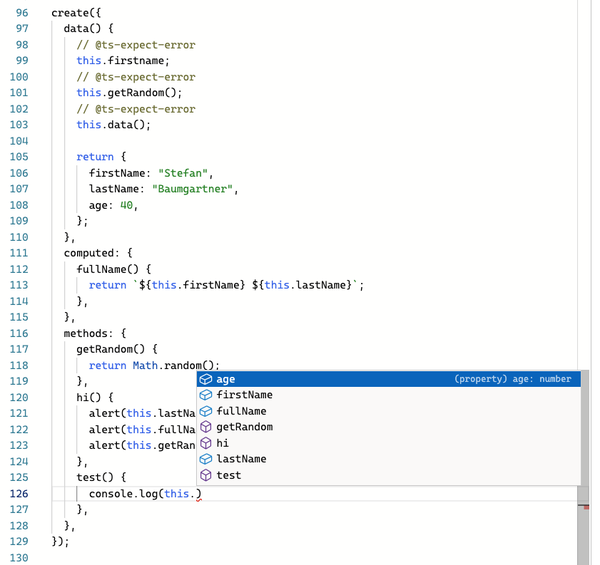
Figure 4-1. The methods configuration in the factory function having all the access to the correct properties.
This example shows wonderfully how TypeScript can be used to type elaborate APIs where a lot of object manipulation is happening underneath:footnote[Special thanks to the creators of Type Challenges for this beautiful example.].
4.9 Adding const Context to Generic Type Parameters
Problem
When you pass complex, literal values to a function, TypeScript widens the type to something more general. While this is desired behavior in a lot of cases, in some you want to work on the literal types rather than the widened type.
Solution
Add a const modifier in front of your generic type parameter to keep the passed values in const context.
Discussion
Single-Page Application frameworks tend to reimplement a lot of browser functionality in JavaScript. For example, features like the History API made it possible to override the regular navigation behavior, which SPA frameworks use to switch between pages without a real page reload, just by swapping the content of the page and changing the URL in the browser.
Imagine working on a minimalistic SPA framework that uses a so-called router to navigate between pages. Pages are defined as components, and a ComponentConstructor interface knows how to instantiate and render new elements on your website.
interfaceComponentConstructor{new():Component;}interfaceComponent{render():HTMLElement;}
The router should take a list of components and associated paths, stored as string. When creating a router through the router function, it should return an object that lets you navigate the desired path.
typeRoute={path:string;component:ComponentConstructor;};functionrouter(routes:Route[]){return{navigate(path:string){// ...},};}
How the actual navigation is implemented is of no concern to us right now, we want to focus on the typings of the function interface.
The router works as intended, it takes an array of Route objects, and returns an object with a navigate function, which allows us to trigger the navigation from one URL to the other, and renders the new component.
constrtr=router([{path:"/",component:Main,},{path:"/about",component:About,},])rtr.navigate("/faq");
What you immediately see though is that the types are way too broad. If we allow navigating to every string available, nothing keeps us from using bogus routes that lead to nowhere. We would need to implement some sort of error handling for information that is already ready and available. So why not use it?
Our first idea would be to replace the concrete type with a generic type parameter. The way TypeScript deals with generic substitution is that if we have a literal type, TypeScript will sub-type accordingly. Introducing T for Route and using T["path"] instead of string comes close to what we want to achieve.
functionrouter<TextendsRoute>(routes:T[]){return{navigate(path:T["path"]){// ...},};}
In theory, this should work. If we remind ourselves what TypeScript does with literal, primitives types in that case, we would expect the value to be narrowed down to the literal type.
functiongetPath<Textendsstring>(route:T):T{returnroute;}constpath=getPath("/");// "/"
You can read more on that in Recipe 4.3. One important detail is that path in the previous example is in a const context, due to the fact the returned value is immutable.
The only problem is that we are working with objects and arrays, and TypeScript tends to widen types in objects and arrays to something more general to allow for the mutability of values. If we look at a similar example, but with a nested object, we see that TypeScript takes the broader type instead.
typeRoutes={paths:string[];};functiongetPaths<TextendsRoutes>(routes:T):T["paths"]{returnroutes.paths;}constpaths=getPaths({paths:["/","/about"]});// string[]
For objects, the const context for paths is only for the binding of the variable, not for its contents. This eventually leads us to lose some of the information we need to correctly type navigate.
A way to work around this limitation is to manually apply const context, which needs us to re-define the input parameter to be readonly.
functionrouter<TextendsRoute>(routes:readonlyT[]){return{navigate(path:T["path"]){history.pushState({},"",path);},};}constrtr=router([{path:"/",component:Main,},{path:"/about",component:About,},]asconst);rtr.navigate("/about");
This works, but also requires us to not forget a very important detail when coding. And actively remembering workarounds is always a recipe for disaster.
Thankfully, TypeScript allows us to request const context from generic type parameters. Instead of applying it to the value, we substitute the generic type parameter for a concrete value but in const context by adding the const modifier to the generic type parameter.
functionrouter<constTextendsRoute>(routes:T[]){return{navigate(path:T["path"]){// tbd},};}
With that, we can use our router just as we are used to, and even get autocomplete for possible paths.
constrtr=router([{path:"/",component:Main,},{path:"/about",component:About,},])rtr.navigate("/about");
Even better, we get proper errors when we pass in something bogus.
constrtr=router([{path:"/",component:Main,},{path:"/about",component:About,},])rtr.navigate("/faq");// ^// Argument of type '"/faq"' is not assignable to// parameter of type '"/" | "/about"'.(2345)
The beautiful thing is that all is hidden in the function’s API. What we expect becomes clearer, the interface tells us the constraints, and we don’t have to do anything extra when using router to ensure type safety.