Chapter 3. The Type System
In the previous chapter you learned about the basic building blocks that allow you to make your JavaScript code more expressive. But if you are experienced in JavaScript, you understand that TypeScript’s fundamental types and annotations only cover a small set of its inherent flexibility.
TypeScript is supposed to make intentions in JavaScript clearer, and it wants to do so without sacrificing this flexibility, especially since it allowed developers to design fantastic APIs that are used and loved by millions. Think of TypeScript more as a way to formalize JavaScript, rather than restricting it. Enter TypeScript’s type system.
In this chapter, you will develop a mental model on how to think of types. You will learn how to define sets of values as wide or narrow as you need them to be, and how to change their scope throughout your control flow. You will also learn how to leverage a structural type system, and when to break with the rules.
This chapter marks the line between TypeScript foundations and advanced type techniques. No matter if you are an experienced TypeScript developer or just starting out, this mental model will be the baseline for everything to come.
3.1 Modeling Data with Union and Intersection Types
Problem
You have an elaborate data model you want to describe in TypeScript.
Solution
Use union and intersection types to model your data. Use literal types to define specific variants.
Discussion
You are creating a data model for a toy shop. Each item in this toy shop has some basic properties like name, quantity, or the recommended minimum age. There are additional properties just relevant for each particular type of toy, which requires you to create several derivations.
typeBoardGame={name:string;price:number;quantity:number;minimumAge:number;players:number;};typePuzzle={name:string;price:number;quantity:number;minimumAge:number;pieces:number;};typeDoll={name:string;price:number;quantity:number;minimumAge:number;material:string;};
For the functions you create, you need a type that is representative for all toys. A super-type, that contains just the basic properties common to all toys.
typeToyBase={name:string;price:number;quantity:number;minimumAge:number;};functionprintToy(toy:ToyBase){/* ... */}constdoll:Doll={name:"Mickey Mouse",price:9.99,quantity:10000,minimumAge:2,material:"plush",};printToy(doll);// works
This works, as you can print all dolls, board games, or puzzles with that function, but there’s one caveat: You lose the information of the original toy within printToy. You can only print common properties, not specific ones.
To tell TypeScript that the toys for printToy can be either one of those, you can create a union type.
// Union ToytypeToy=Doll|BoardGame|Puzzle;functionprintToy(toy:Toy){/* ... */}
A good way to think of a type is as a set of compatible values. For each value that you have, either annotated or not, TypeScript checks if this value is compatible to a certain type. For objects, this also includes values with more properties than defined in their type. Through inference, values with more properties are assigned a sub-type in the structural type system. And values of sub-types are also part of the super-type set.
A union type is a union of sets. The number of compatible values gets broader, and there is also some overlap between types. E.g. an object that has both material and players can be compatible to both Doll and BoardGame. This is a detail to look out for, we see a method to work with that detail in Recipe 3.2.
Figure 3-1 tries to visualize the concept of a union type in form of a Venn diagram. Set theory analogies work really well here.
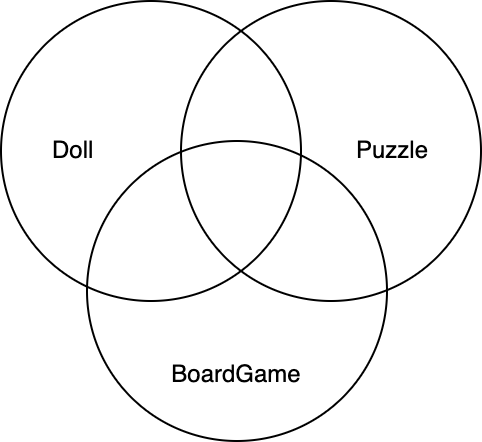
Figure 3-1. Visualization of a Union Type. Each type represents a set of compatible values. A union type represents the union sets.
You can create union types everywhere, also with primitive types.
functiontakesNumberOrString(value:number|string){/* ... */}takesNumberOrString(2);// oktakesNumberOrString("Hello");// ok
This allows you to widen the set of values as much as you like.
What you also see in the toy shop example is that there is some redundancy. The ToyBase properties are repeated over and over again. It would be much nicer if we could use ToyBase as the basis of each union part. And we can, using intersection types.
typeToyBase={name:string;price:number;quantity:number;minimumAge:number;};// Intersection of ToyBase and { players: number }typeBoardGame=ToyBase&{players:number;};// Intersection of ToyBase and { pieces: number }typePuzzle=ToyBase&{pieces:number;};// Intersection of ToyBase and { material: string }typeDoll=ToyBase&{material:string;};
Just like union types, intersection types resemble their counter parts from set theory. They tell TypeScript that compatible values need to be of type A and type B. The type now accepts a narrower set of values, one that includes all properties from both types, including their subtypes. Figure 3-2 shows a visualization of an intersection type.
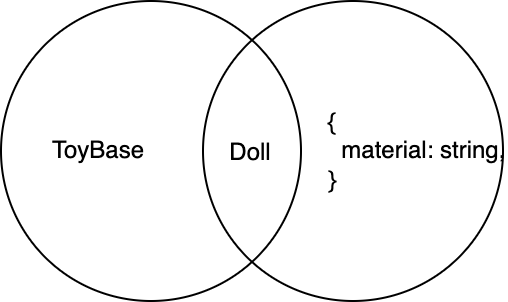
Figure 3-2. Visualization of an intersection type of two types. The set of possible values gets narrower.
Intersection types also work on primitive types, but are of no good use. An intersection of string & number results in never, as no value satisfies both string and number properties.
Note
Instead of type aliases and intersection types you can also define your models with interfaces. In Recipe 2.5 we talk about the differences between both, and there are just a few that you need to look out for. So a type BoardGame = ToyBase & { /* ... */ } can easily be described as interface BoardGame extends ToyBase { /* ... */ }. However, you can’t define an interface that is a union type. You can define a union of interfaces, tough.
Those are already great ways to model data within TypeScript, but we can do a little more. In TypeScript, literal values can be represented as a literal type. We can define a type that is just e.g. the number 1, and the only compatible value is 1.
typeOne=1;constone:One=1;// nothing else can be assigned.
This is called a literal type, and while it doesn’t seem to be quite useful alone, it is of great use when you combine multiple literal types to a union. For the Doll type, we can e.g. explicitly set allowed values for material.
typeDoll=ToyBase&{material:"plush"|"plastic";};functioncheckDoll(doll:Doll){if(doll.material==="plush"){// do something with plush}else{// doll.material is "plastic", there are no other options}}
This makes assignment of any other value than "plush" or "plastic" impossible, and our code much more robust.
With union types, intersection types, and literal types, it becomes much easier to define even elaborate models.
3.2 Explicitly Defining Models with Discriminated Union Types
Problem
Parts of your modelled union type have a huge overlap in their properties, so it becomes really cumbersome to distinguish them in control flow.
Solution
Add a kind property to each union part with a string literal type, and check for its contents.
Discussion
Let’s look at a data model similar to what we created in Recipe 3.1. This time, we want to define various shapes for a graphics software.
typeCircle={radius:number;};typeSquare={x:number;};typeTriangle={x:number;y:number;};typeShape=Circle|Triangle|Square;
There are some similarities between the types, but also still enough information to differentiate between them in an area function.
functionarea(shape:Shape){if("radius"inshape){// shape is CirclereturnMath.PI*shape.radius*shape.radius;}elseif("y"inshape){// shape is Trianglereturn(shape.x*shape.y)/2;}else{// shape is Squarereturnshape.x*shape.x;}}
It works, but it also comes with a few caveats. While Circle is the only type with a radius property, Triangle and Square share the x property. Since Square only consists of the x property, this makes Triangle a subtype of Square.
Given how we defined the control flow to check for the distinguishing subtype property y first, this is not an issue, but it’s just too easy to check for x alone and create a branch in the control flow that computes the area for both Triangle and Square in the same manner, which is just outright wrong.
It is also hard to extend Shape. If we look at the required properties for a rectangle, we see that it contains the same properties as Triangle.
typeRectangle={x:number;y:number;};typeShape=Circle|Triangle|Square|Rectangle;
There is no clear way to differentiate between each part of a union. To make sure each part of a union is distinguishable, we need to extend our models with an identifying property, that makes absolutely clear what we are dealing with.
This can happen through the addition of a kind property. This property takes a string literal type identifying the part of the model.
As seen in Recipe 3.1, TypeScript allows you to subset primitive types like string, number, bigint, and boolean to concrete values. Which means that every value is also a type. A set that consists of exactly one compatible value.
So for our model to be clearly defined, we add a kind property to each model part and set it to an exact literal type identifying this part.
typeCircle={radius:number;kind:"circle";};typeSquare={x:number;kind:"square";};typeTriangle={x:number;y:number;kind:"triangle";};typeShape=Circle|Triangle|Square;
Note that we don’t set kind to string, but to the exact literal type "circle" (or "square" and "triangle" respectively). This is a type, not a value, but the only compatible value is the literal string.
Adding the kind property with string literal types makes sure that there can’t be any overlap between parts of the union, as the literal types are not compatible with each other. This technique is called discriminated union types and effectively tears away each set that’s part of the union type Shape, pointing to an exact set.
This is fantastic for the area function, as we can effectively distinguish in e.g. a switch statement.
functionarea(shape:Shape){switch(shape.kind){case"circle":// shape is CirclereturnMath.PI*shape.radius*shape.radius;case"triangle":// shape is Trianglereturn(shape.x*shape.y)/2;case"square":// shape is Squarereturnshape.x*shape.x;default:throwError("not possible");}}
Not only does it become absolutely clear what we are dealing with, it is also very future proof to upcoming changes, as we are going to see in Recipe 3.3.
3.3 Exhaustiveness Checking with the Assert never Technique
Problem
Your discriminated union types change over time, adding new parts to the union. It becomes hard to track all occurrences in your code where you need to adapt to these changes.
Solution
Create exhaustiveness checks where you assert that all remaining cases can never happen with an assertNever function.
Discussion
Let’s look at the full example from Recipe 3.2.
typeCircle={radius:number;kind:"circle";};typeSquare={x:number;kind:"square";};typeTriangle={x:number;y:number;kind:"triangle";};typeShape=Circle|Triangle|Square;functionarea(shape:Shape){switch(shape.kind){case"circle":// shape is CirclereturnMath.PI*shape.radius*shape.radius;case"triangle":// shape is Trianglereturn(shape.x*shape.y)/2;case"square":// shape is Squarereturnshape.x*shape.x;default:throwError("not possible");}}
Using discriminated unions, we are able to distinguish between each part of a union. The area function uses a switch-case statement to handle each case separately. Thanks to string literal types for the kind property, there can be no overlap between types.
Once all options are exhausted, in the default case, we throw an error, indicating that we reached an invalid situation that should never occur. If our types are right throughout the codebase, this error should never be thrown.
Even the type system tells us that the default case is an impossible scenario. If we add shape in the default case and hover over it, TypeScript tells us that shape is of type never.
functionarea(shape:Shape){switch(shape.kind){case"circle":// shape is CirclereturnMath.PI*shape.radius*shape.radius;case"triangle":// shape is Trianglereturn(shape.x*shape.y)/2;case"square":// shape is Squarereturnshape.x*shape.x;default:console.error("Shape not defined:",shape);// shape is neverthrowError("not possible");}}
never is an interesting type. It’s TypeScript bottom type, meaning that it’s at the very end of the type hierarchy. Where any and unknown include every possible value, no value is compatible to never. It’s the empty set. Which explains the name: If one of your values happens to be of type never you are in a situation that should never happen.
The type of shape in the default cases changes immediately if we extend the type Shape with e.g. a Rectangle.
typeRectangle={x:number;y:number;kind:"rectangle";};typeShape=Circle|Triangle|Square|Rectangle;functionarea(shape:Shape){switch(shape.kind){case"circle":// shape is CirclereturnMath.PI*shape.radius*shape.radius;case"triangle":// shape is Trianglereturn(shape.x*shape.y)/2;case"square":// shape is Squarereturnshape.x*shape.x;default:console.error("Shape not defined:",shape);// shape is RectanglethrowError("not possible");}}
Control flow analysis at its best: TypeScript knows at exactly every point in time what types your values have. In the default branch, shape is of type Rectangle, but we are expected to deal with rectangles. Wouldn’t it be great if TypeScript could tell us that we missed to take care of a potential type? With the change we now run into it every time we calculate the shape of a rectangle. The default case was meant to handle (from the perspective of the type system) impossible situations, we’d like to keep it that way.
This is already bad in one situation, and it gets worse if you use the exhaustiveness checking pattern multiple times in your codebase. You can’t tell for sure that you didn’t miss one spot where your software will ultimately crash.
One technique to ensure that you handled all possible cases is to create a helper function that asserts that all options are exhausted. It should make sure that the only values possible are no values.
functionassertNever(value:never){console.error("Unknown value",value);throwError("Not possible");}
Usually, you see never as an indicator that you are in an impossible situation. Here, we use it as an explicit type annotation for a function signature. You might ask yourself: Which values are we supposed to pass? And the answer is: None! In the best case, this function will never get called.
However, if we substitute the original default case from our example with assertNever, we can make use of the type system to ensure that all possible values are compatible, even if there are no values:
functionarea(shape:Shape){switch(shape.kind){case"circle":// shape is CirclereturnMath.PI*shape.radius*shape.radius;case"triangle":// shape is Trianglereturn(shape.x*shape.y)/2;case"square":// shape is Squarereturnshape.x*shape.x;default:// shape is RectangleassertNever(shape);// ^-- Error: Argument of type 'Rectangle' is not// assignable to parameter of type 'never'}}
Great! We now get red squiggly lines whenever we forget to exhaust all options. TypeScript won’t compile this code without an error, and we can easily spot all occurences in our codebase where we need to add the Rectangle case.
functionarea(shape:Shape){switch(shape.kind){case"circle":// shape is CirclereturnMath.PI*shape.radius*shape.radius;case"triangle":// shape is Trianglereturn(shape.x*shape.y)/2;case"square":// shape is Squarereturnshape.x*shape.x;case"rectangle":returnshape.x*shape.y;default:// shape is neverassertNever(shape);// shape can be passed to assertNever!}}
Even though never has no compatible values and is used to indicate an — for the type system — impossible situation, we can use the type as type annotation to make sure we don’t forget about possible situations. Seeing types as sets of compatible values that can get broader or narrower based on control flow leads us to techniques like assertNever, a very helpful little function that can strengthen our codebase’s quality.
3.4 Pinning Types with const Context
Problem
You can’t assign object literals to your carefully modelled discriminated union types.
Solution
Pin the type of your literals using type assertions and const context.
Discussion
In TypeScript, it’s possible to use each value as its own type. They are called literal types and allow you to subset bigger sets to just a couple of valid values.
Literal types in TypeScript are not only a nice trick to point to specific values, but an essential part of how the type system works. This becomes obvious when you assign values of primitive types to different bindings via let or const.
If we assign the same value twice, once via let and once via const, TypeScript infers two different types. With the let binding, TypeScript will infer the broader primitive type.
letname="Stefan";// name is string
With a const binding, TypeScript will infer the exact literal type.
constname="Stefan";// name is "Stefan"
Object types behave slightly different. let bindings still infer the broader set.
// person is { name: string }letperson={name:"Stefan"};
But so do const bindings.
// person is { name: string }constperson={name:"Stefan"};
The reasoning behind this is that in JavaScript, while the binding itself is constant, which means I can’t reassign person, the values of an object’s property can change.
// person is { name: string }constperson={name:"Stefan"};person.name="Not Stefan";// works!
This behavior is correct in the sense that it mirrors the behavior of JavaScript, but it can cause problems when we are very exact with our data models.
In the previous recipes we modelled data using union and intersection types. We used discriminated union types to distinguish between types that are too similar.
The problem is that when we use literals for our data, TypeScript will usually infer the broader set, which makes the values incompatible to the types we defined. This produces a very lengthy error message.
typeCircle={radius:number;kind:"circle";};typeSquare={x:number;kind:"square";};typeTriangle={x:number;y:number;kind:"triangle";};typeShape=Circle|Triangle|Square;functionarea(shape:Shape){/* ... */}constcircle={radius:2,kind:"circle",};area(circle);// ^-- Argument of type '{ radius: number; kind: string; '// is not assignable to parameter of type 'Shape'.// Type '{ radius: number; kind: string; }' is not// assignable to type 'Circle'.// Types of property 'kind' are incompatible.// Type 'string' is not assignable to type '"circle"'.
There are several ways to solve this problem. First, we can use explicit annotations to ensure the type. As described in Recipe 2.1, each annotation is a type check. Which means that the value on the right hand side is checked for compatibility. Since there is no inference, Typescript will look at the exact values to decide whether an object literal is compatible or not.
// Exact typeconstcircle:Circle={radius:2,kind:"circle",};area(circle);// Works!// Broader setconstcircle:Shape={radius:2,kind:"circle",};area(circle);// Also works!
Instead of type annotations, we can also do type assertions at the end of the assignment.
// Type assertionconstcircle={radius:2,kind:"circle",}asCircle;area(circle);// Works!
But sometimes, annotations can limit us. Especially when we have to work with literals that contain more information and are used in different places with different semantics.
From the moment we annotate or assert as Circle, the binding will always be a circle, no matter which values circle actually carries.
But we can be much more fine grained with assertions. Instead of asserting that the entire object is of a certain type, we can assert single properties to be of a certain type.
constcircle={radius:2,kind:"circle"as"circle",};area(circle);// Works!
Another way to assert as exact values is to use const context with an as const type assertion, TypeScript locks the value in as literal type.
constcircle={radius:2,kind:"circle"asconst,};area(circle);// Works!
If we apply const context to the entire object, we also make sure that the values are read only and won’t be changed.
constcircle={radius:2,kind:"circle",}asconst;area2(circle);// Works!circle.kind="rectangle";// ^-- Cannot assign to 'kind' because// it is a read-only property.
const context type assertions are a very handy tool if we want to pin values to their exact literal type and keep them that way. Especially if there are a lot of object literals in your code base that are not suppose to change, but need to be consumed in various occasions, const context can help a lot!
3.5 Narrowing Types with Type Predicates
Problem
Based on certain conditions, you can assert that a value is of a narrower type than originally assigned, but TypeScript can’t narrow it for you.
Solution
Add type predicates to a helper function’s signature to indicate the impact of a boolean condition for the type system.
Discussion
With literal types and union types, TypeScript allows you to define very specific sets of values. For example, we can define a dice with six sides very easily.
typeDice=1|2|3|4|5|6;
While this notation is very expressive, and the type system can tell you exactly which values are valid, it requires some work to get to this type.
Let’s imagine we have some kind of game where users are allowed to input any number. If it’s a valid number of dots, we are doing certain actions.
We write a conditional check to see if the input number is part of a set of values.
functionrollDice(input:number){if([1,2,3,4,5,6].includes(input)){// `input` is still `number`, even though we know it// should be Dice}}
The problem is that even though we do a check to make sure the set of values is known, TypeScript still handles input as number. There is no way for the type system to make the connection between your check and the change in the type system.
But, you can help the type system. First, extract your check into its own helper function.
functionisDice(value:number):boolean{return[1,2,3,4,5,6].includes(value);}
Note that this check returns a boolean. Either this condition is true, or it’s false. For functions that return a boolean value, we can change the return type of the function signature to a type predicate.
We tell TypeScript that if this function returns true, we know more about the value that has been passed to the function. In our case, value is of type Dice.
functionisDice(value:number):valueisDice{return[1,2,3,4,5,6].includes(value);}
And with that, TypeScript gets a hint of what the actual types of your values are, allowing you to do more fine-grained operations on your values.
functionrollDice(input:number){if(isDice(input)){// Great! `input` is now `Dice`}else{// input is still `number`}}
TypeScript is restrictive and doesn’t allow any assertion with type predicates. It needs to be a type that is narrower than the original type. For example, getting a string input and asserting a subset of number as output will error.
typeDice=1|2|3|4|5|6;functionisDice(value:string):valueisDice{// Error: A type predicate's type must be assignable to// its parameter's type. Type 'number' is not assignable to type 'string'.return["1","2","3","4","5","6"].includes(value);}
This failsafe mechanism gives you some guarantee on the type level, but there is a caveat. It won’t check if your conditions make sense. The original check in isDice ensures that the value passed is included in an array of valid numbers.
The values in this array are up to your choosing. If you include a wrong number, TypeScript will still think value is a valid Dice, even though your check does not line up.
// Correct on a type-level// incorrect set of values on a value-levelfunctionisDice(value:number):valueisDice{return[1,2,3,4,5,7].includes(value);}
And this is easy to trip over. The condition in Example 3-1 is true for integer numbers, but wrong if you pass a floating point number. 3.1415 would be a valid Dice dot count!
Example 3-1. Incorrect logic for isDice for floating point numbers
// Correct on a type-level, incorrect logicfunctionisDice(value:number):valueisDice{returnvalue>=1&&value<=6;}
Actually, any condition works for TypeScript. Return true and TypeScript will think value is Dice.
functionisDice(value:number):valueisDice{returntrue;}
TypeScript puts type assertions in your hand. It is your duty to make sure those assertions are valid and sound. If you rely heavily on type assertions via type predicates, make sure that you test accordingly.
3.6 Understanding void
Problem
You know void as a concept from other programming languages, but in TypeScript it can behave a little bit differently.
Solution
Embrace void as a substitutable type for callbacks.
Discussion
You might know void from programming languages like Java or C#, where they indicate the absence of a return value. void also exists in TypeScript, and at a first glance it does the same thing: If your functions or methods aren’t returning something, the return type is void.
At a second glance, the behavior of void is a bit more nuanced, and so is its position in the type system. void in TypeScript is a subtype of undefined. Functions in JavaScript always return something. Either a function explicitly returns a value, or it implicitly returns undefined.
functioniHaveNoReturnValue(i){console.log(i);}letcheck=iHaveNoReturnValue(2);// check is undefined
If we would create a type for iHaveNoReturnValue, it would show a function type with void as return type.
functioniHaveNoReturnValue(i){console.log(i);}typeFn=typeofiHaveNoReturnValue;// type Fn = (i: any) => void
void as type can also be used for parameters and all other declarations. The only value that can be passed is undefined:
functioniTakeNoParameters(x:void):void{}iTakeNoParameters();// worksiTakeNoParameters(undefined);// worksiTakeNoParameters(void2);// works
void and undefined are pretty much the same. There’s one little difference though, and this difference is significant: void as a return type can be substituted with different types, to allow for advanced callback patterns. Let’s create a fetch function for example. It’s task is to get a set of numbers and pass the results to a callback function, provided as parameter.
functionfetchResults(callback:(statusCode:number,results:number[])=>void){// get results from somewhere ...callback(200,results);}
The callback function has two parameters in its signature — a status code and the results — and the return type is void. We can call fetchResults with callback functions that match the exact type of callback.
functionnormalHandler(statusCode:number,results:number[]):void{// do something with both parameters}fetchResults(normalHandler);
But if a function type specifies return type void, functions with a different, more specific, return type are also accepted.
functionhandler(statusCode:number):boolean{// evaluate the status code ...returntrue;}fetchResults(handler);// compiles, no problem!
The function signatures don’t match exactly, but the code still compiles. First, it’s okay to provide functions with a shorter argument list in their signature. JavaScript can call functions with excess parameters, and if they aren’t specified in the function, they’re simply ignored. No need to carry more parameters with you than you actually need.
Second, the return type is boolean, but TypeScript will still allow to pass this function along. This is special when declaring a void return type. The original caller fetchResults does not expect a return value when calling the callback. So for the type system, the return value of callback is still undefined, even though it could be something else.
As long as the type system won’t allow you to work with the return value, your code should be safe.
functionfetchResults(callback:(statusCode:number,results:number[])=>void){// get results from somewhere ...constdidItWork=callback(200,results);// didItWork is `undefined` in the type system,// even though it would be a boolean with `handler`.}
That’s why we can pass callbacks with any return type. Even if the callback returns something, this value isn’t used and goes into the void.
The power lies within the calling function. The calling function knows best what to expect from the callback function. And if the calling function doesn’t require a return value at all from the callback, anything goes!
TypeScript calls this feature “substitutability”. The ability to substitute one thing for another, wherever it makes sense. This might strike you odd at first. But especially when you work with libraries that you didn’t author, you will find this feature very valuable.
3.7 Dealing with Error Types in Catch Clauses
Problem
You can’t annotate explicit error types in try-catch blocks.
Solution
Annotate with any or unknown and use type predicates (see Recipe 3.5 to narrow to specific error types).
Discussion
When you are coming from languages like Java, C++, or C#, you are used to doing your error handling by throwing exceptions. And subsequently, catching them in a cascade of catch clauses. There are arguably better ways to do error handling:footnote[For example, the Rust Programming Language has been lauded for its error handling], but this one has been around for ages and given history and influences, has also found its way into JavaScript.
“Throwing” errors and “catching” them is a valid way of error in handling in JavaScript and TypeScript, but there is a big difference when it comes to specifying your catch clauses. When you try to catch a specific error type, TypeScript will error.
Example 3-2 uses the popular data fetching library Axios to show the problem.
Example 3-2. Catching explicit error types does not work.
try{// something with the popular fetching library Axios, for example}catch(e:AxiosError){// ^^^^^^^^^^ Error 1196: Catch clause variable// type annotation must be 'any' or// 'unknown' if specified.}
There are a couple of reasons for this:
1. Any type can be thrown
In JavaScript, you are allowed to throw every expression. Of course, you can throw “exceptions” (or errors, as we call them in JavaScript), but it’s also possible to throw any other value:
throw"What a weird error";// OKthrow404;// OKthrownewError("What a weird error");// OK
Since any valid value can be thrown, the possible values to catch are already broader than your usual sub-type of Error.
2. There is only one catch clause in JavaScript
JavaScript only has one catch clause per try statement. There have been proposals for multiple catch clauses and even conditional expressions in the distant past, but due to the lack of interest in JavaScript in the early 2000s, they never manifested.
Instead, you should use this one catch clause and do instanceof and typeof checks, like proposed on MDN.
This example below is also the only correct way to narrow down types for catch clauses in TypeScript.
try{myroutine();// There's a couple of errors thrown here}catch(e){if(einstanceofTypeError){// A TypeError}elseif(einstanceofRangeError){// Handle the RangeError}elseif(einstanceofEvalError){// you guessed it: EvalError}elseif(typeofe==="string"){// The error is a string}elseif(axios.isAxiosError(e)){// axios does an error check for us!}else{// everything elselogMyErrors(e);}}
Since all possible values can be thrown, and we only have one catch clause per try statement to handle them, the type range of e is exceptionally broad.
3. Any exception can happen
Since you know about every error that can happen, wouldn’t be a proper union type with all possible “throwables” work just as well? In theory, yes. In practice, there is no way to tell which types the exception will have.
Next to all your user-defined exceptions and errors, the system might throw errors when something is wrong with the memory when it encountered a type mismatch or one of your functions has been undefined. A simple function call could exceed your call stack and cause the infamous stack overflow.
The broad set of possible values, the single catch clause, and the uncertainty of errors that happen only allow two possible types for e: any and unknown.
All reasons apply if you reject a Promise. The only thing TypeScript allows you to specify is the type of a fulfilled Promise. A rejection can happen on your behalf, or through a system error:
constsomePromise=()=>newPromise((fulfil,reject)=>{if(someConditionIsValid()){fulfil(42);}else{reject("Oh no!");}});somePromise().then((val)=>console.log(val))// val is number.catch((e)=>console.log(e));// can be anything, really;
It becomes clearer if you call the same promise in an async/await flow:
try{constz=awaitsomePromise();// z is number}catch(e){// same thing, e can be anything!}
If you want to define your own errors and catch accordingly, you can either write error classes and do instance of checks, or you create helper functions that check for certain properties and tell the correct type via type predicates. Axios is again a good example for that.
functionisAxiosError(payload:any):payloadisAxiosError{returnpayload!==null&&typeofpayload==='object'&&payload.isAxiosError;}
Error handling in JavaScript and TypeScript can be a “false friend” if you come from other programming languages with similar features. Be aware of the differences, and trust the TypeScript team and type checker to give you the correct control flow to make sure your errors are handled well enough.
3.8 Creating Exclusive Or Models with Optional never
Problem
Your model requires you to have mutually exclusive parts of a union, but your API can’t rely on the kind property to differentiate.
Solution
Use the optional never technique to exclude certain properties.
Discussion
You want to write a function that handles the result of a select operation in your application. This select operation gives you the list of possible options, as well as the list of selected options. This function can deal with calls from a select operation that produces only a single value, as well as from a select operation that results in multiple values.
Since you need to adapt to an existing API, your function should be able to handle both, and decide for the single and multiple case within the function.
Note
Of course there are better ways to model APIs, and we can talk endlessly about that. But sometimes you have to deal with existing APIs which are not that great to begin with. And TypeScript gives you techniques and methods to correctly type your data in scenarios like this.
Your model mirrors that API, as you can either pass a single value, or multiple values.
typeSelectBase={options:string[];};typeSingleSelect=SelectBase&{value:string;};typeMultipleSelect=SelectBase&{values:string[];};typeSelectProperties=SingleSelect|MultipleSelect;functionselectCallback(params:SelectProperties){if("value"inparams){// handle single cases}elseif("values"inparams){// handle multiple cases}}selectCallback({options:["dracula","monokai","vscode"],value:"dracula",});selectCallback({options:["dracula","monokai","vscode"],values:["dracula","vscode"],});
This works as intended, but remember the structural type system features of TypeScript. Defining SingleSelect as a type contains allows also for values of all sub-types, which means that objects which have both the value property and the values property are also compatible to SingleSelect. The same goes for MultipleSelect. Nothing keeps you from using the selectCallback function with an object that contains both.
selectCallback({options:["dracula","monokai","vscode"],values:["dracula","vscode"],value:"dracula",});// still works! Which one to choose?
The value you pass here is valid, but it doesn’t make sense in your application. You couldn’t decide whether this is a multiple select operation or a single select operation.
In cases like this we again need to separate the two sets of values just enough so our model becomes clearer. We can do this by using the optional never technique:footnote[Shout-out to Dan Vanderkam who was first to call this technique “optional never” on his fantastic Effective TypeScript blog.]. It involves taking the properties which are exclusive to each branch of a union and adding them as optional properties of type never to the other branches.
typeSelectBase={options:string[];};typeSingleSelect=SelectBase&{value:string;values?:never;};typeMultipleSelect=SelectBase&{value?:never;values:string[];};
You tell TypeScript that this property is optional in this branch, and when it’s set, there is no compatible value for it. With that, all objects which contain both properties are invalid to SelectProperties.
selectCallback({options:["dracula","monokai","vscode"],values:["dracula","vscode"],value:"dracula",});// ^ Argument of type '{ options: string[]; values: string[]; value: string; }'// is not assignable to parameter of type 'SelectProperties'.
The union types are separated again, without the inclusion of a kind property. This works great for models where the discriminating properties are just a few. If your model has too many distinct properties, and you can afford to add a kind property, use discriminated union types as shown in Recipe 3.2.
3.9 Effectively Using Type Assertions
Problem
Your code produces the correct results, but the types are way too wide. You know better!
Solution
Use type assertions to narrow to a smaller set using the as keyword, indicating an unsafe operation.
Discussion
Think of rolling a dice, and producing a number between 1 and 6. The JavaScript function is a one line, using the Math library. You want to work with a narrowed type, a union of 6 literal number types indicating the results. However, your operation produces a number, and number is a type too wide for your results.
typeDice=1|2|3|4|5|6;functionrollDice():Dice{letnum=Math.floor(Math.random()*6)+1;returnnum;//^ Type 'number' is not assignable to type 'Dice'.(2322)}
Since number allows for more values than Dice, TypeScript won’t allow to narrow the type just by annotating the function signature. This only works if the type is wider, a super-type.
// All dice are numbersfunctionasNumber(dice:Dice):number{returndice;}
Instead, just like with type predicates from Recipe 3.5, we can tell TypeScript that we know better, by asserting that the type is narrower than expected.
typeDice=1|2|3|4|5|6;functionrollDice():Dice{letnum=Math.floor(Math.random()*6)+1;returnnumasDice;}
Just like type predicates, type assertions only work within the super-types and sub-types of an assumed type. We can either set the value to a wider super-type, or change it to a narrower sub-type. TypeScript won’t allow us to switch sets.
functionasString(num:number):string{returnnumasstring;// ^- Conversion of type 'number' to type 'string' may// be a mistake because neither type sufficiently// overlaps with the other.// If this was intentional, convert the expression to 'unknown' first.}
Using the as Dice syntax is quite handy. It indicates a type change that we as developers are responsible for. Which means that if something turns out wrong, we can easily scan our code for the as keyword and find possible culprits.
Note
In everyday language people tend to call type assertions type casts. This arguably comes from similarity to actual, explicit type casts in C, Java, and the likes. A type assertion is however very different from a type cast. A type cast not only changes the set of compatible values, but changes the memory layout, and even the values themselves. Casting a floating point number to an integer will cut off the mantissa. A type assertion in TypeScript on the other hand only changes the set of compatible values. The value stays the same. It’s called a type assertion because you assert that the type is something either narrower or wider, giving more hints to the type system. So if you are in a discussion on changing types, call them assertions, not casts.
Assertions are also often used when you assemble the properties of an object. You know that the shape is going to be of e.g. Person, but you need to set the properties first.
typePerson={name:string;age:number;};functioncreateDemoPerson(name:string){constperson={}asPerson;person.name=name;person.age=Math.floor(Math.random()*95);returnperson;}
A type assertion tells TypeScript that the empty object is supposed to be Person at the end. Subsequently TypeScript allows you to set properties. It’s also an unsafe operation, because you might forget setting a property, and TypeScript would not complain. Even worse: Person might change and get more properties and you get no indication at all that you are missing properties.
typePerson={name:string;age:number;profession:string;};functioncreateDemoPerson(name:string){constperson={}asPerson;person.name=name;person.age=Math.floor(Math.random()*95);// Where's Profession?returnperson;}
In situations like that, it’s better to opt for a safe object creation. Nothing keeps you from annotating and making sure that you set all the required properties with the assignment.
typePerson={name:string;age:number;};functioncreateDemoPerson(name:string){constperson:Person={name,age:Math.floor(Math.random()*95),};returnperson;}
While type annotations are safer than type assertions, there are situations like rollDice where we have no better choice. There are also scenarios in TypeScript where we do have a choice, but might want to prefer type assertions, even if you could annotate.
When we use the fetch API for example, getting JSON data from a backend. We can call fetch and assign the results to an annotated type.
typePerson={name:string;age:number;};constppl:Person[]=awaitfetch("/api/people").then((res)=>res.json());
res.json() results in any, and everything that is any can be changed to any other type through a type annotation. There is no guarantee that the results are actually Person[]. We can write the same line differently, by asserting that the result is a Person[], narrowing any to something more specific.
constppl=awaitfetch("/api/people").then((res)=>res.json())asPerson[];
For the type system, this is the same thing, but we can easily scan situations where there might be problems. What if the model in "/api/people" changes? It’s harder to spot errors if we are just looking for annotations. An assertion here is an indicator for an unsafe operation.
What really helps is to think of creating a set of models that works within your application boundaries. The moment you rely on something from the outside, like APIs, or the correct calculation of a number, type assertions can indicate crossing the boundaries.
Just like using type predicates (see Recipe 3.5), type assertions put the responsibility of a correct type in your hands. Use them wisely.
3.10 Using Index Signatures
Problem
You want to work with objects where you know the type of the values, but you don’t know all the property names upfront.
Solution
Use index signatures to define an open set of keys, but with defined value types.
Discussion
There is a style in web APIs where you get collections in form of a JavaScript object, where the property name is roughly equivalent to a unique identifier, and the values have the same shape. This style is great if you are mostly concerned about keys, as a simple Object.keys call gives you all relevant IDs, allowing you to quickly filter and index the values you are looking for.
Let’s think of a performance review across all your websites, where you gather relevant performance metrics and group them by the domain’s name.
consttimings={"fettblog.eu":{ttfb:300,fcp:1000,si:1200,lcp:1500,tti:1100,tbt:10,},"typescript-book.com":{ttfb:400,fcp:1100,si:1100,lcp:2200,tti:1100,tbt:0,},};
If we want to find the domain with the lowest timing for a given metric, we can create a function where we loop over all keys, index each metrics entry, and compare.
functionfindLowestTiming(collection,metric){letresult={domain:"",value:Number.MAX_VALUE,};for(constdomainincollection){consttiming=collection[domain];if(timing[metric]<result.value){result.domain=domain;result.value=timing[metric];}}returnresult.domain;}
As we are good programmers, we want to type our function accordingly so we make sure we don’t pass any data that doesn’t match our idea of a metric collection. Typing the value for the metrics on the right hand side is pretty straightforward.
typeMetrics={// Time to first bytettfb:number;// First contentful paintfcp:number;// Speed Indexsi:number;// Largest contentful paintlcp:number;// Time to interactivetti:number;// Total blocking timetbt:number;};
Defining a shape that has a yet to be defined set of keys is more tricky, but TypeScript has a tool for that: Index signatures. We can tell TypeScript that we don’t know which property names there are, but we know they will be of type string`, and they will point to Metrics.
typeMetricCollection={[domain:string]:Timings;};
And that’s all we need to type findLowestTiming. We annotate collection with MetricCollection, and make sure we only pass keys of Metrics for the second parameter.
functionfindLowestTiming(collection:MetricCollection,key:keyofMetrics):string{letresult={domain:"",value:Number.MAX_VALUE,};for(constdomainincollection){consttiming=collection[domain];if(timing[key]<result.value){result.domain=domain;result.value=timing[key];}}returnresult.domain;}
This is great, but there are some caveats. TypeScript allows you to read properties of any string, and does not do any checks if the property is actually available, so be aware!
constemptySet:MetricCollection={};lettiming=emptySet["typescript-cookbook.com"].fcp*2;// No type errors!
Changing your index signature type to be either Metrics or undefined is a more realistic representation. It says that you can index with all possible strings, but there might be no value, which results in a couple more safety guards but is ultimately the right choice.
typeMetricCollection={[domain:string]:Metrics|undefined;};functionfindLowestTiming(collection:MetricCollection,key:keyofMetrics):string{letresult={domain:"",value:Number.MAX_VALUE,};for(constdomainincollection){consttiming=collection[domain];// Metrics | undefined// extra check for undefined valuesif(timing&&timing[key]<result.value){result.domain=domain;result.value=timing[key];}}returnresult.domain;}constemptySet:MetricCollection={};// access with optional chaining and nullish coalescinglettiming=(emptySet["typescript-cookbook.com"]?.fcp??0)*2;
The value being either Metrics or undefined is not exactly like a missing property, but close enough and good enough for this use-case. You can read about the nuance between missing properties and undefined values in Recipe 3.11. To set the property keys optional, you tell TypeScript that domain is not the entire set of string, but a subset of string, with a so called mapped typed.
typeMetricCollection={[domaininstring]?:Metrics;};
You can define index signatures for everything that is a valid property key: string, number or symbol, and with mapped types also everything that is a subset of those. For example, you can define a type to index only valid faces of a die.
typeThrows={[xin1|2|3|4|5|6]:number;};
You can also add additional properties to your type. Take this ElementCollection for example, which allows you to index items via a number, but also has additional properties for get and filter functions, as well as a length property.
typeElementCollection={[y:number]:HTMLElement|undefined;get(index:number):HTMLElement|undefined;length:number;filter(callback:(element:HTMLElement)=>boolean):ElementCollection;};
If you combine your index signatures with other properties, you need to make sure that the broader set of your index signature includes the types from the specific properties. In the previous example there is no overlap between the number index signature and the string keys of your other properties, but if you would define an index signature of strings which maps to string and want to have a count property of type number next to it, TypeScript will error.
typeStringDictionary={[index:string]:string;count:number;// Error: Property 'count' of type 'number' is not assignable// to 'string' index type 'string'.(2411)};
And it makes sense, if all string keys would point to a string, why would count point to something else. There’s ambiguity, and TypeScript won’t allow this. You would have to widen the type of your index signature to make sure that the smaller set is part of the bigger set.
typeStringOrNumberDictionary={[index:string]:string|number;count:number;// works};
Now count subsets both the type from the index signature, as well as the type of the property’s value.
Index signatures and mapped types are a powerful tool that allow you to work with web APIs as well as data structures which allow for flexible access to elements. Something that we know and love from JavaScript, now securely typed in TypeScript.
3.11 Distinguishing Missing Properties and Undefined Values
Problem
Missing properties and undefined values are not the same! You run into situations where this difference matters.
Solution
Activate exactOptionalPropertyTypes in tsconfig to enable stricter handling of optional properties.
Discussion
We have user settings in our software where we can define the user’s language and their preferred color overrides. It’s an additional theme, which means that the basic colors are already set in a "default" style. This means that the user settings for theme is optional. Either it is available, or it isn’t. We use TypeScript’s optional properties for that.
typeSettings={language:"en"|"de"|"fr";theme?:"dracula"|"monokai"|"github";};
With strictNullChecks active, accessing theme somewhere in your code widens the number of possible values. Not only do you have the three theme overrides, but also the possibility of undefined.
functionapplySettings(settings:Settings){// theme is "dracula" | "monokai" | "github" | undefinedconsttheme=settings.theme;}
This is great behavior, as you really want to make sure that this property is set, otherwise it could result in runtime errors. TypeScript adding undefined to the list of possible values of optional properties is good, but doesn’t entirely mirror the behavior of JavaScript. Optional properties means that this key is missing from the object, which is nuanced, yes, but important. For example, a missing key would return false in property checks.
functiongetTheme(settings:Settings){if('theme'insettings){// only true if the property is set!returnsettings.theme;}return'default';}constsettings:Settings={language:"de",};constsettingsUndefinedTheme:Settings={language:"de",theme:undefined,};console.log(getTheme(settings))// "default"console.log(getTheme(settingsUndefinedTheme))// undefined
Here, we get entirely different results even though the two settings objects seem similar. What’s even worse is that an undefined theme is a value which we don’t consider valid. TypeScript doesn’t lie to us, though, as it’s fully aware that a in check only tells us if the property is available. The possible return values of getTheme include undefined as well.
typeFn=typeofgetTheme;// type Fn = (settings: Settings)// => "dracula" | "monokai" | "github" | "default" | undefined
And there are arguably better checks to see if the correct values are here or not. With nullish coalescing the code above becomes a one-liner.
functiongetTheme(settings:Settings){returnsettings.theme??"default";}typeFn=typeofgetTheme;// type Fn = (settings: Settings)// => "dracula" | "monokai" | "github" | "default"
Still, in-checks are valid and used by developers, and the way TypeScript interprets optional properties can cause ambiguity. Reading undefined from an optional property is correct, but setting optional properties to undefined isn’t. By switching on exactOptionalPropertyTypes, TypeScript changes this behavior.
// exactOptionalPropertyTypes is trueconstsettingsUndefinedTheme:Settings={language:"de",theme:undefined,};// Error: Type '{ language: "de"; theme: undefined; }' is// not assignable to type 'Settings' with 'exactOptionalPropertyTypes: true'.// Consider adding 'undefined' to the types of the target's properties.// Types of property 'theme' are incompatible.// Type 'undefined' is not assignable to type// '"dracula" | "monokai" | "github"'.(2375)
exactOptionalPropertyTypes aligns TypeScript’s behavior even more to JavaScript. This flag is however not within strict mode, you need to set it yourself if you encounter problems like this.
3.12 Working with Enums
Problem
TypeScript enums are a nice abstraction, but they seem to behave very differently compared to the rest of the type system.
Solution
Use them sparingly, prefer const enums, know their caveats, and maybe choose union types instead.
Discussion
Enums in TypeScript allow a developer to define a set of named constants, which makes it easier to document intent or create a set of distinct cases.
They’re defined using the enum keyword.
enumDirection{Up,Down,Left,Right,};
Like classes, they contribute to the value and type namespace, which means you can use Direction when annotating types, or in your JavaScript code as values.
// used as typefunctionmove(direction:Direction){// ...}// used as valuemove(Direction.Up);
They are a syntactic extension to JavaScript, which means they not only work on a type system level, but also emit JavaScript code.
varDirection;(function(Direction){Direction[Direction["Up"]=0]="Up";Direction[Direction["Down"]=1]="Down";Direction[Direction["Left"]=2]="Left";Direction[Direction["Right"]=3]="Right";})(Direction||(Direction={}));
When you define your enum as a const enum, TypeScript tries to substitute the usage with the actual values, getting rid of the emitted code.
constenumDirection{Up,Down,Left,Right,};// When having a const enum, TypeScript// transpiles move(Direction.Up) to this:move(0/* Direction.Up */);
TypeScript supports both string and numeric enums, and both variants behave hugely different.
TypeScript enums are by default numeric. Which means that every variant of that enum has a numeric value assigned, starting at 0. The starting point and actual values of enum variants can be a default or user-defined.
// DefaultenumDirection{Up,// 0Down,// 1Left,// 2Right,// 3};enumDirection{Up=1,// 1Down,// 2Left,// 3Right=5,// 5};
In a way, numeric enums define the same set as a union type of numbers.
typeDirection=0|1|2|3;
But there are significant differences. Where a union type of numbers only allows a strictly defined set of values, a numeric enum allows for every value to be assigned.
functionmove(direction:Direction){/* ... */}move(30);// This is ok!
The reason is that there is a use-case of implementing flags with numeric enums.
// Possible traits of a person, can be multipleenumTraits{None,// 0000Friendly=1,// 0001 or 1 << 0Mean=1<<1,// 0010Funny=1<<2,// 0100Boring=1<<3,// 1000}// (0010 | 0100) === 0110letaPersonsTraits=Traits.Mean|Traits.Funny;if((aPersonsTraits&Traits.Mean)===Traits.Mean){// Person is mean, amongst other things}
Enums provide syntactic sugar for this scenario. To make it easier for the compiler to see which values are allowed, TypeScript expands compatible values for numeric enums to the entire set of number.
Enums variants can also be initialized with strings instead of numbers, effectively creating a string enum. If you choose to write a string enum, you have to define each variant, as strings can’t be incremented.
enumStatus{Admin="Admin",User="User",Moderator="Moderator",};
String enums are more restrictive than numeric enums. They only allow to pass actual variants of the enum rather than the entire set of strings. However, they don’t allow to pass the string equivalent.
functioncloseThread(threadId:number,status:Status):{// ...}closeThread(10,"Admin");// ^-- Argument of type '"Admin"' is not assignable to// parameter of type 'Status'closeThread(10,Status.Admin);// This works
Other than every other type in TypeScript, string enums are nominal types. Which also means that two enums with the same set of values are not compatible with each other.
enumRoles{Admin="Admin",User="User",Moderator="Moderator",};closeThread(10,Roles.Admin);// ^-- Argument of type 'Roles.Admin' is not// assignable to parameter of type 'Status'
This can be a source of confusion and frustration, especially when values come from another source that don’t have knowledge of your enums, but the correct string values.
Use enums wisely and know what caveats they have. Enums are great for feature flags, and a set of named constants where you intentionally want people to use the data structure instead of just values.
Note
Since TypeScript 5.0 the interpretation of number enums has become much stricter, now they behave like string enums as nominal types and don’t include the entire set of numbers as values. You still might find codebases that rely on the unique features of pre-5.0 number enums, so be aware!
Also try to prefer const enums wherever possible, as non-const enums can add extra size to your code-base that might be redundant. I have seen projects with more than 2000 flags in a non const enum, resulting in huge tooling overhead, compile time overhead, and subsequently runtime overhead.
Or, don’t use them at all. A simple union type gives you something that works similarly and is much more aligned with the rest of the type system.
typeStatus="Admin"|"User"|"Moderator";functioncloseThread(threadId:number,status:Status){// ...}closeThread(10,"Admin");// All good
You get all the benefits from enums like proper tooling and type-safety without going the extra round and risking to output code that you don’t want. It also becomes clearer what you need to pass, and where to get the value from.
If you want to write your code enum-style, with an object and a named identifier, a const object with a Values helper type might just give you the desired behavior and is much closer to JavaScript. The same technique is also applicable to string unions.
constDirection={Up:0,Down:1,Left:2,Right:3,}asconst;// Get to the const values of DirectiontypeDirection=(typeofDirection)[keyoftypeofDirection];// (typeof Direction)[keyof typeof Direction] yields 0 | 1 | 2 | 3functionmove(direction:Direction){// ...}move(30);// This breaks!move(0);//This works!move(Direction.Left);// This also works!
This line is particularly interesting:
// = 0 | 1 | 2 | 3typeDirection=(typeofDirection)[keyoftypeofDirection];
A couple of things happen that are not that usual:
-
We declare a type with the same name as a value. This is possible because TypeScript has distinct value and type namespaces.
-
Using the
typeofoperator we grab the type fromDirection. AsDirectionis in const context, we get the literal type. -
We index the type of
Directionwith its own keys, leaving us to all the values on the right hand side of the object:0,1,2, and3. In short: a union type of numbers.
Using union types leave you to no surprises:
-
You know what code you end up with within the output.
-
You don’t end up with changed behavior because somebody decides to go from a string enum to a numeric enum.
-
You have type-safety where you need it.
-
And you give your colleagues and users the same conveniences that you get with enums.
But to be fair, a simple string union type does just what you need: Type-safety, auto-complete, predictable behavior.
3.13 Defining Nominal Types in a Structural Type System
Problem
Your application has several types which are aliases for the same primitive type, but with entirely different semantics. Structural typing treats them the same, but it shouldn’t!
Solution
Use wrapping classes or create an intersection of your primitive type with a literal object type, and use this to differentiate two integers.
Discussion
TypeScript’s type system is structural. This means that if two types have a similar shape, values of this type are compatible to each other.
typePerson={name:string;age:number;};typeStudent={name:string;age:number;};functionacceptsPerson(person:Person){// ...}conststudent:Student={name:"Hannah",age:27,};acceptsPerson(student);// all ok
JavaScript relies a lot on object literals and TypeScript tries to infer the type or shape of those literals. A structural type system makes a lot of sense in this scenario, as values can come from anywhere and need to be compatible to interface and type definitions.
However, there are situations where you need to be more definitive with your types. For object types, we learned about techniques like discriminated unions with the kind property in Recipe 3.2, or exclusive or with “optional never” in Recipe 3.8. string enums are also nominal, as we see in Recipe 3.12.
Those measurements are good enough for object types and enums, but don’t cover the problem if you have two independent types that use the same set of values as primitive types. What if your 8-digit account number and your balance all point to the number type and you mix them up? Getting an 8-figure number on our balance sheet is a nice surprise for everybody, but might ultimately be false.
Or you need to validate user input strings and want to make sure that you only carry around the validated user input in your program, not falling back to the original, probably unsafe string.
There are ways in TypeScript to mimic nominal types within the type system to get more security in that area. The trick is also to separate the sets of possible values with distinct properties just enough to make sure the same values don’t fall into the same set.
One way to achieve this would be wrapping classes. Instead of working with the values directly, we wrap each value in a class. With a private kind property we make sure that they don’t overlap.
classBalance{privatekind="balance";value:number;constructor(value:number){this.value=value;}}classAccountNumber{privatekind="account";value:number;constructor(value:number){this.value=value;}}
What’s interesting here is that since we use private properties, TypeScript will differentiate between the two classes already. Right now both kind properties are of type string. Even though they feature a different value, they can be changed internally. But classes work different. If private or protected members are present, TypeScript considers two types compatible if they originate from the same declaration. Otherwise, they aren’t considered compatible.
This allows us to refine this pattern with a more general approach. Instead of defining a kind member and setting it to a value, we define a _nominal member in each class declaration which is of type void. This separates both classes just enough, but keeps us from using _nominal in any way. void only allows us to set _nominal to undefined, and undefined is a falsy, so highly useless.
classBalance{private_nominal:void=undefined;value:number;constructor(value:number){this.value=value;}}classAccountNumber{private_nominal:void=undefined;value:number;constructor(value:number){this.value=value;}}constaccount=newAccountNumber(12345678);constbalance=newBalance(10000);functionacceptBalance(balance:Balance){// ...}acceptBalance(balance);// okacceptBalance(account);// ^ Argument of type 'AccountNumber' is not// assignable to parameter of type 'Balance'.// Types have separate declarations of a// private property '_nominal'.(2345)
This is great, we can now differentiate between two types that would have the same set of values. The only downside to this approach is that we wrap the original type. Which means that every time we want to work with the original value, we need to unwrap it.
A different way to mimic nominal types is to intersect the primitive type with a branded object type with a kind property. This way, we retain all the operations from the original type, but we need to require type assertions to tell TypeScript that we want to use those types differently.
As we learned in Recipe 3.9, we can safely assert another type if it is a subtype or supertype of the original.
typeCredits=number&{_kind:"credits"};typeAccountNumber=number&{_kind:"accountNumber"};constaccount=12345678asAccountNumber;letbalance=10000asCredits;constamount=3000asCredits;functionincrease(balance:Credits,amount:Credits):Credits{return(balance+amount)asCredits;}balance=increase(balance,amount);balance=increase(balance,account);// ^ Argument of type 'AccountNumber' is not// assignable to parameter of type 'Credits'.// Type 'AccountNumber' is not assignable to type '{ _kind: "credits"; }'.// Types of property '_kind' are incompatible.// Type '"accountNumber"' is not assignable to type '"credits"'.(2345)
Also note that the addition of balance and amount still works as originally intended, but produces a number again. This is why we need to add another assertion.
constresult=balance+amount;// result is numberconstcredits=(balance+amount)asCredits;// credits is Credits
Both approaches have their upsides and downsides, and it mostly depends on your scenario when you prefer one over the other. Also, both approaches are workarounds and techniques developed by the community with their understanding of the type system’s behavior.
There are discussions to open the type system up for nominal types on the TypeScript issue tracker on GitHub, and the possibility is constantly under investigation. One idea is be to use the unique keyword from Symbols to differentiate.
// Hypothetical code, this does not work!typeBalance=uniquenumber;typeAccountNumber=uniquenumber;
As time of writing, this idea — and many others — remain as a future possibility.
3.14 Enabling Loose Autocomplete for String Subsets
Problem
Your API allows for any string to be passed, but you still want to show a couple of string values for autocomplete.
Solution
Add string & {} to your union type of string literals.
Discussion
Let’s say you define an API for access to a content management system. There are pre-defined content types like post, page, asset, but developers can define their own.
You create a retrieve function with a single parameter, the content type, that allows entries to be loaded.
typeEntry={// tbd.};functionretrieve(contentType:string):Entry[]{// tbd.}
This works well enough, but you want to give your users a hint on the default options for content type. A possibility is to create a helper type that lists all pre-defined content types as string literals in a union with string.
typeContentType="post"|"page"|"asset"|string;functionretrieve(content:ContentType):Entry[]{// tbd}
This describes your situation very well, but comes with a downside: post, page, and asset are subtypes of string, so putting them in a union with string effectively swallows the detailed information into the broader set.
This means that you don’t get statement completion hints via your editor, as you can see in Figure 3-3.
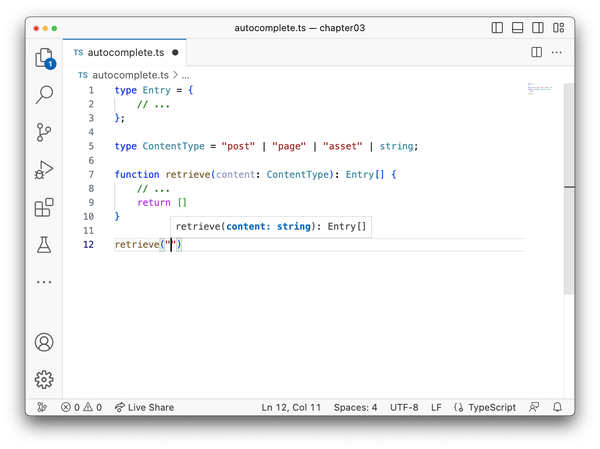
Figure 3-3. TypeScript widens ContentType to the entire set of string, thus swallowing autocomplete information
To retain autocomplete information and preserve the literal types, we need to intersect string with the empty object type {}.
typeContentType="post"|"page"|"asset"|string&{};
The effect of this change is more subtle. It doesn’t change the number of compatible values to ContentType, but it will set TypeScript into a mode that prevents subtype reduction and preserves the literal types.
You can see the effect in Figure 3-4, where ContentType is not reduced to string, and therefore all literal values are available for statement completion in the text editor.
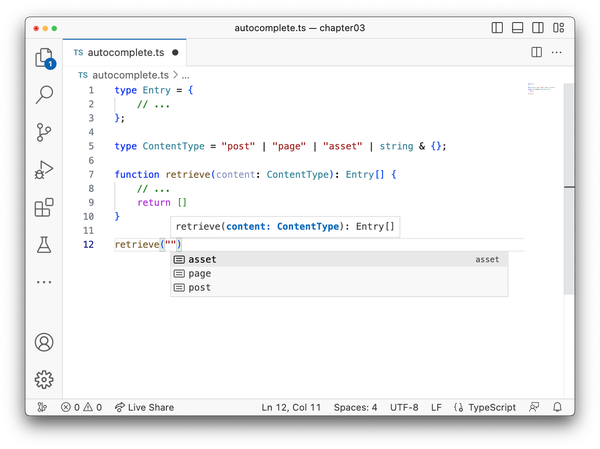
Figure 3-4. Intersecting string with the empty object retains statement completion hints
Still, every string is a valid ContentType, it just changes the developer experience of your API and gives hints where needed.
This technique is used by popular libraries like CSSType or the Definitely Typed type definitions for React.