Chapter 7. Variadic Tuple Types
Tuple types are arrays with a fixed length, and where every type of each element is defined. Tuples are heavily used in libraries like React as it’s easy to destructure and name elements but also outside of React they gain recognition as a nice alternative to objects.
A variadic tuple type is a tuple type that has the same properties — defined length and the type of each element is known — but where the exact shape is yet to be defined. They basically tell the type system that there will be some elements, but we don’t know yet which ones they will be. They are generic and meant to be substituted with real types.
What sounds like a fairly boring feature is much more exciting when we understand that tuple types can also be used to describe function signatures, as tuples can be spread out to function calls as arguments. This means that we can use variadic tuple types to get the most information out of functions and function calls, and functions that accept functions as parameters.
In this chapter, we see a lot of use cases on how we can use variadic tuple types to describe several scenarios where we use functions as parameters and need to get the most information out of them. Without variadic tuple types, a lot of those scenarios would be either hard to develop or outright impossible. After reading through its lessons, you will see variadic tuple types as a key feature for functional programming patterns.
7.1 Typing a concat Function
Problem
You have a concat function that takes two arrays and concatenates them. You want to have exact types, but using function overloads is way too cumbersome.
Solution
Use variadic tuple types.
Discussion
concat is a lovely little helper function that takes two arrays and combines them. It uses array spreading and is short, nice, and readable.
functionconcat(arr1,arr2){return[...arr1,...arr2];}
Creating types for this function can be hard, especially if you have certain expectations from your types. Passing in two arrays is easy, but what should the return type look like? Are you happy with a single array type in return or do you want to know the types of each element in this array?
Let’s go for the latter, we want to have tuples so we know the type of each element we pass to this function. To correctly type a function like this so it takes all possible edge cases into account, we would end up in a sea of overloads.
// 7 overloads for an empty second arrayfunctionconcat(arr1:[],arr2:[]):[];functionconcat<A>(arr1:[A],arr2:[]):[A];functionconcat<A,B>(arr1:[A,B],arr2:[]):[A,B];functionconcat<A,B,C>(arr1:[A,B,C],arr2:[]):[A,B,C];functionconcat<A,B,C,D>(arr1:[A,B,C,D],arr2:[]):[A,B,C,D];functionconcat<A,B,C,D,E>(arr1:[A,B,C,D,E],arr2:[]):[A,B,C,D,E];functionconcat<A,B,C,D,E,F>(arr1:[A,B,C,D,E,F],arr2:[]):[A,B,C,D,E,F];// 7 more for arr2 having one elementfunctionconcat<A2>(arr1:[],arr2:[A2]):[A2];functionconcat<A1,A2>(arr1:[A1],arr2:[A2]):[A1,A2];functionconcat<A1,B1,A2>(arr1:[A1,B1],arr2:[A2]):[A1,B1,A2];functionconcat<A1,B1,C1,A2>(arr1:[A1,B1,C1],arr2:[A2]):[A1,B1,C1,A2];functionconcat<A1,B1,C1,D1,A2>(arr1:[A1,B1,C1,D1],arr2:[A2]):[A1,B1,C1,D1,A2];functionconcat<A1,B1,C1,D1,E1,A2>(arr1:[A1,B1,C1,D1,E1],arr2:[A2]):[A1,B1,C1,D1,E1,A2];functionconcat<A1,B1,C1,D1,E1,F1,A2>(arr1:[A1,B1,C1,D1,E1,F1],arr2:[A2]):[A1,B1,C1,D1,E1,F1,A2];// and so on, and so forth
And this only takes into account arrays that have up to six elements. The combinations for typing a function like this with overloads is way too exhaustive. But there is an easier way: Variadic tuple types.
A tuple type in TypeScript is an array with the following features.
-
The length of the array is defined.
-
The type of each element is known (and does not have to be the same).
For example, this is a tuple type:
typePersonProps=[string,number];const[name,age]:PersonProps=['Stefan',37];
A variadic tuple type is a tuple type that has the same properties — defined length and the type of each element is known — but where the exact shape is yet to be defined. Since we don’t know the type and length, yet, we can only use variadic tuple types in generics.
typeFoo<Textendsunknown[]>=[string,...T,number];typeT1=Foo<[boolean]>;// [string, boolean, number]typeT2=Foo<[number,number]>;// [string, number, number, number]typeT3=Foo<[]>;// [string, number]
This is similar to rest elements in functions but the big difference is that variadic tuple types can happen anywhere in the tuple and multiple times.
typeBar<Textendsunknown[],Uextendsunknown[]>=[...T,string,...U];typeT4=Bar<[boolean],[number]>;// [boolean, string, number]typeT5=Bar<[number,number],[boolean]>;// [number, number, string, boolean]typeT6=Bar<[],[]>;// [string]
When we apply this to the concat function, we have to introduce two generic parameters, one for each array. Both need to be constrained to arrays. Then, we can create a return type that combines both array types in a newly created tuple type.
functionconcat<Textendsunknown[],Uextendsunknown[]>(arr1:T,arr2:U):[...T,...U]{return[...arr1,...arr2];}// const test: (string | number)[]consttest=concat([1,2,3],[6,7,"a"]);
The syntax is beautiful, it’s very similar to the actual concatenation in JavaScript. The result is also really good, we get a (string | number)[], which is already something we can work with.
But we work with tuple types. If we want to know exactly which elements we are concatenating, we have to transform the array types into tuple types, by spreading out the generic array type into a tuple type.
functionconcat<Textendsunknown[],Uextendsunknown[]>(arr1:[...T],arr2:[...U]):[...T,...U]{return[...arr1,...arr2];}
And with that, we also get a tuple type in return.
// const test: [number, number, number, number, number, string]consttest=concat([1,2,3],[6,7,"a"]);
The good thing is that we don’t lose anything. If we pass arrays where we don’t know each element upfront, we still get array types in return.
declareconsta:string[]declareconstb:number[]// const test: (string | number)[]consttest=concat(a,b);
Being able to describe this behavior in a single type is definitely much more flexible and readable than writing every possible combination in a function overload.
7.2 Typing a promisify Function
Problem
You want to convert callback-style functions to Promises and have them perfectly typed.
Solution
Function arguments are tuple types. Make them generic using variadic tuple types.
Discussion
Before Promises were a thing in JavaScript it was very common to do asynchronous programming using callbacks. Functions would usually take a list of arguments, followed by a callback function that will be executed once the results are here. For example functions to load a file or do a very simplified HTTP request:
functionloadFile(filename:string,encoding:string,callback:(result:File)=>void){// TODO}loadFile("./data.json","utf-8",(result)=>{// do something with the file});functionrequest(url:URL,callback:(result:JSON)=>void){// TODO}request("https://typescript-cookbook.com",(result)=>{// TODO});
Both follow the same pattern: Arguments first, a callback with the result last. This works but can be clumsy if you have lots of asynchronous calls that result in callbacks within callbacks, also known as the The Pyramid of Doom.
loadFile("./data.txt","utf-8",(file)=>{// pseudo APIfile.readText((url)=>{request(url,(data)=>{// do something with data})})})
Promises take care of that. Not only do they find a way to chain asynchronous calls instead of nesting them, they also are the gateway for async/await, allowing us to write asynchronous code in a synchronous form.
loadFilePromise("./data.txt","utf-8").then((file)=>file.text()).then((url)=>request(url)).then((data)=>{// do something with data});// with async/awaitconstfile=awaitloadFilePromise("./data.txt"."utf-8");consturl=awaitfile.text();constdata=awaitrequest(url);// do something with data.
Much nicer! Thankfully, it is possible to convert every function that adheres to the callback pattern to a Promise. We want to create a promisify function that does that for us automatically.
functionpromisify(fn:unknown):Promise<unknown>{// To be implemented}constloadFilePromise=promisify(loadFile);constrequestPromise=promisify(request);
But how do we type this? Variadic tuple types come to the rescue.
Every function head can be described as a tuple type. For example:
declarefunctionhello(name:string,msg:string):void;
Is the same as:
declarefunctionhello(...args:[string,string]):void;
And we can be very flexible in defining it:
declarefunctionh(a:string,b:string,c:string):void;// equal todeclarefunctionh(a:string,b:string,...r:[string]):void;// equal todeclarefunctionh(a:string,...r:[string,string]):void;// equal todeclarefunctionh(...r:[string,string,string]):void;
This is also known as rest elements, something that we have in JavaScript and that allows you to define functions with an almost limitless argument list, where the last element, the rest element sucks all excess arguments in.
We can use this, e.g. for this generic tuple function takes an argument list of any type and creates a tuple out of it:
functiontuple<Textendsany[]>(...args:T):T{returnargs;}constnumbers:number[]=getArrayOfNumbers();constt1=tuple("foo",1,true);// [string, number, boolean]constt2=tuple("bar",...numbers);// [string, ...number[]]
The thing is, rest elements always have to be last. In JavaScript, it’s not possible to define an almost endless argument list just somewhere in between. With variadic tuple types however, we can do this in TypeScript!
Let’s look at the loadFile and request functions again. If we would describe the parameters of both functions as tuples, they would look like this.
functionloadFile(...args:[string,string,(result:File)=>void]){// TODO}functionrequest2(...args:[URL,(result:JSON)=>void]){// TODO}
Let’s look for similarities. Both end with a callback with a varying result type. We can align the types for both callbacks by substituting the variations with a generic one. Later, in usage, we substitute generics for actual types. So JSON and File become the generic type parameter Res.
Now for the parameters before Res. They are arguably totally different, but even they have something in common: They are elements within a tuple. This calls for a variadic tuple: We know they will have a concrete length and concrete types, but right now we just take a placeholder for them. Let’s call them Args.
So a function type describing both function signatures could look like this:
typeFn<Argsextendsunknown[],Res>=(...args:[...Args,(result:Res)=>void])=>void;
Take your new type for a spin:
typeLoadFileFn=Fn<[string,string],File>;typeRequestFn=Fn<[URL],JSON>;
This is exactly what we need for the promisify function. We are able to extract all relevant parameters — the ones before the callback and the result type — and bring them into a new order.
Let’s start by inlining the newly created function type directly into the function signature of promisify.
functionpromisify<Argsextendsunknown[],Res>(fn:(...args:[...Args,(result:Res)=>void])=>void):(...args:Args)=>Promise<Res>{// soon}
promisify now reads:
-
There are two generic type parameters:
Argswhich needs to be an array (or tuple), andRes. -
The parameter of
promisifyis a function where the first arguments are the elements ofArgs, and the last argument is a function with a parameter of typeRes. -
promisifyreturns a function that takesArgsfor parameters and returns aPromiseofRes.
If you try out the new typings for promisify, you can already see that we get exactly the type we want. Fantastic.
But it gets even better. If you look at the function signature, it’s absolutely clear which arguments we expect, even if they are variadic and will be substituted with real types. we can use the same types for the implementation of promisify:
functionpromisify<Argsextendsunknown[],Res>(fn:(...args:[...Args,(result:Res)=>void])=>void):(...args:Args)=>Promise<Res>{returnfunction(...args:Args){// (1)returnnewPromise((resolve)=>{// (2)functioncallback(res:Res){// (3)resolve(res);}fn.call(null,...[...args,callback]);// (4)});};}
So what does it do?
-
We return a function that accepts all parameters except for the callback.
-
This function returns a newly created
Promise. -
Since we don’t have a callback yet, we need to construct it. What does it do? It calls the
resolvefunction from thePromise, producing a result. -
What has been split needs to be brought back together! We add the callback to the arguments and call the original function.
And that’s it. A working promisify function for functions that adhere to the callback pattern. Perfectly typed. And we even keep the parameter names.
7.3 Typing a curry Function
Problem
You write a curry function. Currying is a technique that converts a function that takes several arguments into a sequence of functions that each take a single argument. You want to provide excellent types.
Solution
Combine conditional types with variadic tuple types, always shaving off the first parameter.
Discussion
Currying is a technique that is very well-known in functional programming. Currying converts a function that takes several arguments into a sequence of functions that each take a single argument. The underlying concept is called “partial application of function arguments”. And we use it to maximize the reuse of functions. The “Hello, World!” of currying implements an add function that can partially apply the second argument later.
functionadd(a:number,b:number){returna+b;}constcurriedAdd=curry(add);// convert: (a: number) => (b: number) => numberconstadd5=curriedAdd(5);// apply first argument. (b: number) => numberconstresult1=add5(2);// second argument. Result: 7constresult2=add5(3);// second argument. Result: 8
What feels arbitrary at first is of good use when you work with long argument lists. The following function is a generalized function that either adds or removes classes to an HTMLElement. We can prepare everything except for the final event.
functionapplyClass(this:HTMLElement,// for TypeScript onlymethod:"remove"|"add",className:string,event:Event){if(this===event.target){this.classList[method](className);}}constapplyClassCurried=curry(applyClass);// convertconstremoveToggle=applyClassCurried("remove")("hidden");document.querySelector(".toggle")?.addEventListener("click",removeToggle);
This way, we can reuse removeToggle for several events on several elements. We can also use applyClass for many other situations.
Currying is a fundamental concept of the programming language Haskell and has little to do with the popular Indian dish, but more with the mathematician Haskell Brooks Curry, who was the namesake for both the programming language and the technique. In Haskell, every operation is curried, and programmers make good use of it.
JavaScript borrows heavily from functional programming languages, and it is possible to implement partial application with its built-in functionality of binding.
functionadd(a:number,b:number,c:number){returna+b+c;}// Partial applicationconstpartialAdd5And3=add.bind(this,5,3);constresult=partialAdd5And3(2);// third argument
Since functions are first-class citizens in JavaScript, we can create a curry function that takes a function as argument and collects all arguments before executing it.
functioncurry(fn){letcurried=(...args)=>{// if you haven't collected enough argumentsif(fn.length!==args.length){// partially apply arguments and// return the collector functionreturncurried.bind(null,...args);}// otherwise call all functionsreturnfn(...args);};returncurried;}
The trick is that every function stores the number of defined arguments in its length property. That’s how we can recursively collect all necessary arguments before applying them to the function passed. Great!
So what’s missing? Types! Let’s create a type that works for a currying pattern where every sequenced function can take exactly one argument. We can do this by creating a conditional type that does the inverse of what the curried function inside the curry function does: Removing arguments.
So let’s create a Curried<F> type. The first thing it does? Checks if the type is indeed a function.
typeCurried<F>=Fextends(...args:inferA)=>inferR?/* to be done */:never;// not a function, this should not happen
We also infer the arguments as A and the return type as R. Next step, we shave off the first parameter as F, and store all remaining parameters in L (for last).
typeCurried<F>=Fextends(...args:inferA)=>inferR?Aextends[inferF,...inferL]?/* to be done */:()=>R:never;
Should there be no arguments, we return a function that takes no arguments. Last check: We check if the remaining parameters are empty. This means that we reached the end of removing arguments from the argument list.
typeCurried<F>=Fextends(...args:inferA)=>inferR?Aextends[inferF,...inferL]?Lextends[]?(a:F)=>R:(a:F)=>Curried<(...args:L)=>R>:()=>R:never;
Should there be some parameters remaining, we call the Curried type again, but with the remaining parameters. This way, we shave off a parameter step-by-step, and if you take a good look at it, you can see that the process is almost identical to what we do in the curried function. Where we deconstruct parameters in Curried<F>, we collect them again in curried(fn).
With the type done, let’s add it to curry:
functioncurry<FextendsFunction>(fn:F):Curried<F>{letcurried:Function=(...args:any)=>{if(fn.length!==args.length){returncurried.bind(null,...args);}returnfn(...args);};returncurriedasCurried<F>;}
We need a few assertions and some any due to the flexible nature of the type. But with as and any as keywords, we mark which portions are considered unsafe types.
And that’s it! We can get curried away!
7.4 Typing a Flexible curry Function
Problem
The curry function from Recipe 7.3 allows for an arbitrary number of arguments to be passed, but your typings allow only to take one argument at a time.
Solution
Extend your typings to create function overloads for all possible tuple combinations.
Discussion
In Recipe 7.3 we ended up with function types that allow us to apply function arguments one at a time.
functionaddThree(a:number,b:number,c:number){returna+b+c;}constadder=curried(addThree);constadd7=adder(5)(2);constresult=add7(2);
However, the curry function itself can take an arbitrary list of arguments.
functionaddThree(a:number,b:number,c:number){returna+b+c;}constadder=curried(addThree);constadd7=adder(5,2);// this is the differenceconstresult=add7(2);
This allows us to work on the same use cases, but with a lot fewer function invocations. So let’s adapt our types to take advantage of the full curry experience.
Note
This example illustrates really well how the type system works as just a thin layer on top of JavaScript. By adding assertions and any at the right positions, we effectively defined the way how curry should work, whereas the function itself is much more flexible. Be aware that when you define complex types on top of complex functionality, you might cheat your way to the goal, and it’s in your hands how the types work in the end. Test accordingly.
Our goal is to create a type that can produce all possible function signatures for every partial application. For the addThree function, all possible types would look like this:
typeAdder=(a:number)=>(b:number)=>(c:number)=>number;typeAdder=(a:number)=>(b:number,c:number)=>number;typeAdder=(a:number,b:number)=>(c:number)=>number;typeAdder=(a:number,b:number,c:number)=>number;
See also Figure 7-1 for a visualization of all possible call graphs.
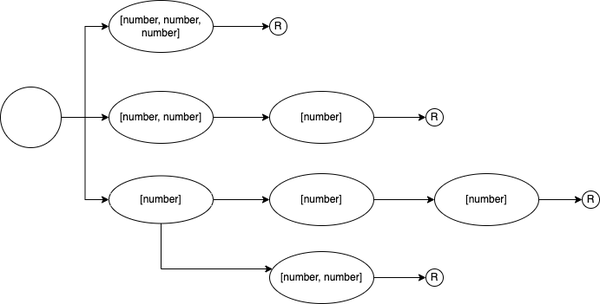
Figure 7-1. A graph showing all possible function call combinations of addThree when curried. There are three branches to start out, with a possible fourth branch.
The first thing we do is to slightly adapt the way we call the Curried helper type. In the original type, we do the inference of function arguments and return types in the helper type. Now we need to carry along the return value over multiple type invocations, so we extract the return type and arguments directly in the curry function.
functioncurry<Aextendsany[],Rextendsany>(fn:(...args:A)=>R):Curried<A,R>{// see before, we're not changing the implementation}
Next, we redefine the Curry type. It now features two generic type parameters: A for arguments, R for the return type. As a first step, we check if the arguments contain tuple elements. We extract the first element F, and all remaining elements L. If there are no elements left, we return the return type R.
typeCurried<Aextendsany[],Rextendsany>=Aextends[inferF,...inferL]?// to be done:R;
It’s not possible to extract multiple tuples via the rest operator. That’s why we still need to shave off the first element and collect the remaining elements in L. But that’s ok, we need at least one parameter to effectively do partial application.
When we are in the true branch, we create the function definitions. In the previous example, we returned a function that returns a recursive call, now we need to provide all possible partial applications.
Since function arguments are nothing but tuple types (see Recipe 7.2), arguments of function overloads can be described as a union of tuple types. A type Overloads takes a tuple of function arguments and creates all partial applications.
typeOverloads<Aextendsany[]>=Aextends[inferA,...inferL]?[A]|[A,...Overloads<L>]|[]:[];
If we pass a tuple, we get a union starting from the empty tuple and then growing to one argument, two, up until all arguments.
// type Overloaded = [] | [string, number, string] | [string] | [string, number]typeOverloaded=Overloads<[string,number,string]>;
Now that we can define all overloads, we take the remaining arguments of the original functions argument list and create all possible function calls that also include the first argument.
typeCurried<Aextendsany[],Rextendsany>=Aextends[inferF,...inferL]?<KextendsOverloads<L>>(arg:F,...args:K)=>/* to be done */:R;
Applied to the addThree example from above, this part would create the first argument F as number, and then combine it with [], [number], and [number, number].
Now for the return type. This is again a recursive call to Curried, just like in Recipe 7.2. Remember, we chain functions in a sequence. We pass in the same return type — we need to get there eventually — but also need to pass all remaining arguments that we haven’t spread out in the function overloads yet. So if we call addThree only with number, the two remaining numbers need to be arguments of the next iteration of Curried. This is how we create a tree of possible invocations.
To get to the possible combinations, we need to remove the arguments we already described in the function signature from the remaining arguments. A little helper type Remove<T, U> goes through both tuples and shaves off one element each, until one of the two tuples runs out of elements.
typeRemove<Textendsany[],Uextendsany[]>=Uextends[infer_,...inferUL]?Textends[infer_,...inferTL]?Remove<TL,UL>:never:T;
Wiring that up to Curried, and we end up with the final result.
typeCurried<Aextendsany[],Rextendsany>=Aextends[inferF,...inferL]?<KextendsOverloads<L>>(arg:F,...args:K)=>Curried<Remove<L,K>,R>:R;
Curried<A, R> now produces the same call graph as described in Figure 7-1, but is flexible for all possible functions that we pass in curry. Proper type safety for maximum flexibility. Shout-out to GitHub user Akira Matsuzaki who provided the missing piece in their Type Challenges solution.
7.5 Typing the Simplest curry function
Problem
The curry functions and their typings are impressive but come with a lot of caveats. Are there any simpler solutions?
Solution
Create a curry function with only a single sequential step. TypeScript can figure out the proper types on its own.
Discussion
In the last piece of the curry trilogy I want you to sit back and think a bit about what we saw in Recipe 7.3 and Recipe 7.4. We created very complex types that almost work like the actual implementation through TypeScript’s metaprogramming features. And while the results are impressive, there are some caveats that we have to think about:
-
The way the types are implemented for both Recipe 7.3 and Recipe 7.4 is a bit different, but the results vary a lot! Still, the
curryfunction underneath stays the same. The only way this works is by usinganyin arguments and type assertions for the return type. What this means is that we effectively disable type-checking by forcing TypeScript to adhere to our view of the world. It’s great that TypeScript can do that, and at times it’s also necessary (see the creation of new objects), but it can fire back, especially when both implementation and types get very complex. Tests for both types and implementation are a must. We talk about testing types in Recipe 12.4. -
You lose information. Especially when currying, keeping argument names is essential to know which arguments already have applied. Bot solutions in the earlier recipes couldn’t keep argument names, but defaulted to a generic sounding
aorargs. If your argument types resolve are e.g. all strings, you can’t say which string you are currently writing. -
Also, while the result in Recipe 7.4 gives you proper type-checking, autocomplete is limited due to the nature of the type. You only know that a second argument is needed the moment you type it. One of TypeScript’s main features is giving you the right tooling and information to make you more productive. The flexible
Curriedtype reduces your productivity to guesswork again.
Again, while those types are impressive, there is no denying that it comes with some huge trade-offs. This bears the question: Should we even go for it? I think it really depends on what you try to achieve.
In the case of currying and partial application, there are two camps. The first camp loves functional programming patterns and tries to leverage JavaScript’s functional capabilities to the max. They want to reuse partial applications as much as possible and need advanced currying functionalities. The other camp sees the benefit of functional programming patterns in certain situations, e.g waiting for the final parameter to give the same function to multiple events. They often are happy with applying as much as possible, but then provide the rest in a second step.
We only dealt with the first camp up until now. Let’s look at the second camp. They most likely only need a currying function that applies a few parameters partially, so you can pass in the rest in a second step. No sequence of parameters of one argument, and no flexible application of as many arguments as you like. An ideal interface would look like this:
functionapplyClass(this:HTMLElement,// for TypeScript onlymethod:"remove"|"add",className:string,event:Event){if(this===event.target){this.classList[method](className);}}constremoveToggle=curry(applyClass,"remove","hidden");document.querySelector("button")?.addEventListener("click",removeToggle);
curry is a function that takes another function f as an argument, and then a sequence t of parameters of f. It returns a function that takes the remaining parameters u of f, which calls f with all possible parameters. This is how this function could look in JavaScript:
functioncurry(f,...t){return(...u)=>f(...t,...u);}
Thanks to the rest and spread operator, curry becomes a one-liner. Now let’s type this! We will have to use generics, as we deal with parameters that we don’t know yet. There’s the return type R, as well as both parts of the function’s arguments, T and U. The latter are variadic tuple types and need to be defined as such.
With a generic type parameter T and U comprising the arguments of f, a type for f looks like this:
typeFn<Textendsany[],Uextendsany[]>=(...args:[...T,...U])=>any;
Function arguments can be described as tuples, and here we say those function arguments should be split into two parts. Let’s inline this type to curry, and use another generic type parameter for the return type R.
functioncurry<Textendsany[],Uextendsany[],R>(f:(...args:[...T,...U])=>R,...t:T){return(...u:U)=>f(...t,...u);}
And that’s all the types we need. Simple, straightforward, and again the types look very similar to the actual implementation. With a few variadic tuple types, TypeScript gives us a few things already:
-
100% type-safety. TypeScript directly infers the generic types from your usage and they are correct. No laboriously crafted types through conditional types and recursion.
-
We get auto-complete for all possible solutions. The moment you add a
,to announce the next step of your arguments, TypeScript will adapt types and give you a hint on what to expect. -
We don’t lose any information. Since we don’t construct new types, TypeScript keeps the labels from the original type and we know which arguments to expect.
Yes, curry is not as flexible as the original version, but for a lot of use cases, this might be the right choice. It’s all about the trade-offs we accept for our use case.
Tip
If you work with tuples a lot, you can name the elements of your tuple types: type Person = [name: string, age: number];. Those labels are just annotations and are removed after transpilation.
Ultimately, the curry function and its many different implementations stand for the many ways you can use TypeScript to solve a particular problem. You can go all out with the type system and use it for very complex and elaborate types, or you reduce the scope a bit and let the compiler do the work for you. It really depends on your goals and what you try to achieve.
7.6 Creating an Enum from a Tuple
Problem
You like how enums make it easy to select valid values, but after reading Recipe 3.12 you don’t want to buy into all their caveats.
Solution
Create your enums from a tuple. Use conditional types, variadic tuple types, and the "length" property to type the data structure.
Discussion
In Recipe 3.12 we discussed all possible caveats when using number and string enums. We ended up with a pattern that is much closer to the type system but gives you the same developer experience as regular enums.
constDirection={Up:0,Down:1,Left:2,Right:3,}asconst;// Get to the const values of DirectiontypeDirection=(typeofDirection)[keyoftypeofDirection];// (typeof Direction)[keyof typeof Direction] yields 0 | 1 | 2 | 3functionmove(direction:Direction){// tbd}move(30);// This breaks!move(0);//This works!move(Direction.Left);// This also works!
It’s a very straightforward pattern that has no surprises, but can result in a lot of work for you if you are dealing with lots of entries, especially if you want to have string enums.
constCommands={Shift:"shift",Xargs:"xargs",Tail:"tail",Head:"head",Uniq:"uniq",Cut:"cut",Awk:"awk",Sed:"sed",Grep:"grep",Echo:"echo",}asconst;
There is duplication, which may result in typos, which may lead to undefined behavior. A helper function that creates an enum like this for you helps deal with redundancy and duplication. Let’s say you have a collection of items like this.
constcommandItems=["echo","grep","sed","awk","cut","uniq","head","tail","xargs","shift",]asconst;
A helper function createEnum iterates through every item, create an object with capitalized keys that point either to a string value or to a number value, depending on your input parameters.
functioncapitalize(x:string):string{returnx.charAt(0).toUpperCase()+x.slice(1);}// Typings to be donefunctioncreateEnum(arr,numeric){letobj={};for(let[i,el]ofarr.entries()){obj[capitalize(el)]=numeric?i:el;}returnobj;}constCommand=createEnum(commandItems);// string enumconstCommandN=createEnum(commandItems,true);// number enum
Let’s create types for this! We need to take care of two things:
-
Create an object from a tuple. The keys are capitalized.
-
Set the values of each property key to either a string value or a number value. The number values should start at 0 and increase by one with each step.
To create object keys, we need a union type we can map out. To get all object keys, we need to convert our tuple to a union type. A little helper type TupleToUnion takes a string tuple and converts it to a union type. Why only string tuples? Because we need object keys, and string keys are the easiest to use.
TupleToUnion<T> is a recursive type. Like we did in other lessons, we are shaving off single elements — this time at the end of the tuple — and then calling the type again with the remaining elements. We put each call in a union, effectively getting a union type of tuple elements.
typeTupleToUnion<Textendsreadonlystring[]>=Textendsreadonly[...inferRestextendsstring[],inferKeyextendsstring]?Key|TupleToUnion<Rest>:never;
With a map type and a string manipulation type, we are able to create the string enum version of Enum<T>.
typeEnum<Textendsreadonlystring[],Nextendsboolean=false>=Readonly<{[KinTupleToUnion<T>asCapitalize<K>]:K}>;
For the number enum version, we need to get a numerical representation of each value. If we think about it, we have already stored somewhere in our original data. Let’s look at how TupleToUnion deals with a four-element tuple:
// The type we want to convert to a union typetypeDirection=["up","down","left","right"];// Calling the helper typetypeDirectionUnion=TupleToUnion<Direction>;// Extracting the last, recursively calling TupleToUnion with the ResttypeDirectionUnion="right"|TupleToUnion<["up","down","left"]>;// Extracting the last, recursively calling TupleToUnion with the ResttypeDirectionUnion="right"|"left"|TupleToUnion<["up",down"]>;// Extracting the last, recursively calling TupleToUnion with the Resttype DirectionUnion = "right" | "left" | "down" | TupleToUnion<["up"]>;// Extracting the last, recursively calling TupleToUnion with an empty tupletype DirectionUnion = "right" | "left" | "down" | "up" | TupleToUnion<[]>;// The conditional type goes into the else branch, adding never to the uniontype DirectionUnion = "right" | "left" | "down" | "up" | never;// never in a union is swallowedtype DirectionUnion = "right" | "left" | "down" | "up";
If you look closely, you can see that the length of the tuple is decreasing with each call. First, it’s 3 elements, then 2, then 1, and ultimately there are 0 elements left. Tuples are defined by the length of the array and the type at each position in the array. And TypeScript stores the length as a number for tuples, accessible via the length property.
typeDirectionLength=Direction["length"];// 4
So with each recursive call, we can get the length of the remaining elements and use this as a value for the enum. Instead of just returning the enum keys, we return an object with the key and its possible number value.
typeTupleToUnion<Textendsreadonlystring[]>=Textendsreadonly[...inferRestextendsstring[],inferKeyextendsstring]?{key:Key;val:Rest["length"]}|TupleToUnion<Rest>:never;
We use this newly created object to decide whether we want to have number values or string values in our enum.
typeEnum<Textendsreadonlystring[],Nextendsboolean=false>=Readonly<{[KinTupleToUnion<T>asCapitalize<K["key"]>]:Nextendstrue?K["val"]:K["key"];}>;
And that’s it! We wire up our new Enum<T, N> type to the createEnum function.
typeValues<T>=T[keyofT];functioncreateEnum<Textendsreadonlystring[],Bextendsboolean>(arr:T,numeric?:B){letobj:any={};for(let[i,el]ofarr.entries()){obj[capitalize(el)]=numeric?i:el;}returnobjasEnum<T,B>;}constCommand=createEnum(commandItems,false);typeCommand=Values<typeofCommand>;
Being able to access the length of a tuple within the type system is one of the hidden gems in TypeScript. This allows for many things as shown in this example, but also fun stuff like implementing calculators in the type system. As with all advanced features in TypeScript: Use them wisely.
7.7 Splitting All Elements of a Function Signature
Problem
You know how to grab argument types and return types from functions within a function, but you want to use the same types outside as well.
Solution
Use the built-in Parameters<F> and ReturnType<F> helper types.
Discussion
In this chapter, we dealt a lot with helper functions and how they can grab information from functions that are arguments. For example, this defer function takes a function and all its arguments and returns another function that will execute it. With some generic types, we can capture everything we need.
functiondefer<Parextendsunknown[],Ret>(fn:(...par:Par)=>Ret,...args:Par):()=>Ret{return()=>fn(...args);}constlog=defer(console.log,"Hello, world!");log();
This works great if we pass functions as arguments because we can easily pick the details and re-use them. But there are certain scenarios where you need a function’s arguments and its return type outside of a generic function. Thankfully, there are some TypeScript helper types built-in that we can leverage. With Parameters<F> we get a function’s arguments as a tuple, with ReturnType<F> we get the return type of a function. So the defer function from before could be written like that.
typeFn=(...args:any[])=>any;functiondefer<FextendsFn>(fn:F,...args:Parameters<F>):()=>ReturnType<F>{return()=>fn(...args);}
Both Parameters<F> and ReturnType<F> are conditional types that rely on function/tuple types and are very similar. In Parameters<F> we infer the arguments, in ReturnType<F> we infer the return type.
typeParameters<Fextends(...args:any)=>any>=Fextends(...args:inferP)=>any?P:never;typeReturnType<Fextends(...args:any)=>any>=Fextends(...args:any)=>inferR?R:any;
We can use those helper types to e.g. prepare function arguments outside of functions. Take this search function for example:
typeResult={page:URL;title:string;description:string;};functionsearch(query:string,tags:string[]):Promise<Result[]>{throw"to be done";}
With Parameters<typeof search> we get an idea of which parameters to expect. We define them outside of the function call, and spread them as arguments when calling.
constsearchParams:Parameters<typeofsearch>=["Variadic tuple tpyes",["TypeScript","JavaScript"],];search(...searchParams);constdeferredSearch=defer(search,...searchParams);
Both helpers come in really handy when you generate new types as well, see Recipe 4.8 for an example.