Chapter 8. Helper Types
One of TypeScript’s strengths is the ability to derive types from other types. This allows you to define relationships between types, where updates in one type trickle through to all derived types automatically. This reduces maintenance and ultimately results in more robust type setups.
When creating derived types, we usually apply the same type modifications, but in different combinations. TypeScript already has a set of built-in utility types, some of them which we’ve already seen in this book in various situations. But sometimes they are not enough. Some situations require you to either apply known techniques in a different manner or to dig deep into the inner workings of the type system to produce the desired result. You might need your own set of helper types.
This chapter introduces you to the concept of helper types and shows you some use cases where a little custom helper type expands your ability to derive types from others tremendously. Each type is designed to work in different situations, and each type should teach you a new aspect of the type system. Of course, the list of types you see here is by no means complete, but they give you a good entry point, and enough resources to branch out.
In the end, you will realize that TypeScript’s type system can be seen as its own functional meta-programming language, where you combine small, single-purpose helper types with bigger helper types, to make type derivates as easy as applying a single type to your existing models.
8.1 Setting Specific Properties Optional
Problem
You want to derive types where you set specific properties optional.
Solution
Create a custom helper type SetOptional that intersects two object types: One that maps over all selected properties using the optional mapped type modifier, and one that maps over all remaining properties.
Discussion
All your models in your TypeScript project are set and defined, and you want to refer to them throughout your code.
typePerson={name:string;age:number;profession:string;};
One situation that occurs pretty often is that you would need something that looks like Person, but does not require all properties to be set, some of them can be optional. This will make your API more open to other structures and types that are of similar shape but lack one or two fields. You don’t want to maintain different types (see Recipe 12.1), but rather derive them from the original model, which is still in use.
TypeScript has a built-in helper type called Partial<T> that modifies all properties to be optional.
typePartial<T>={[PinkeyofT]?:T[P];};
It’s a mapped type that maps out over all keys and uses the optional mapped type modifier to set each property to optional. The first step in making a SetOptional type is to reduce the set of keys that can be set as optional.
Note
The optional mapped type modifier applies the symbol for an optional property — the question mark — to a set of properties. We learn more about mapped type modifiers in Recipe 4.5.
typeSelectPartial<T,KextendskeyofT>={[PinK]?:T[P]};
In SelectPartial<T, K extends keyof T>, we don’t map over all keys, but just a subset of keys provided. With the extends keyof T generic constraint, we make sure that we only pass valid property keys. If we apply SelectPartial to Person to select "age", we end up with a type where we only see the age property, which is set to optional.
typeAge=SelectPartial<Person,"age">;// type Age = { age?: number | undefined };
The first half is done: Everything we want to set optional is optional. But the rest of the properties are missing. Let’s get them back to the object type.
The easiest way of extending an existing object type with more properties is to create an intersection type with another object type. So in our case, we take what we’ve written in SelectPartial and intersect it with a type that includes all remaining keys.
We can get all remaining keys by using the Exclude helper type. Exclude<T, U> is a conditional type that compares two sets. If elements from set T are in U, they will be removed using never, otherwise they stay in the type.
typeExclude<T,U>=TextendsU?never:T;
It works opposite to Extract<T, U> which we described in Recipe 5.3. Exclude<T, U> is a distributive conditional type (see Recipe 5.2) and distributes the conditional type over every element of a union.
// This example shows how TypeScript evaluates a// helper type step by step.typeExcludeAge=Exclude<"name"|"age","age">;// 1. DistributetypeExcludeAge="name"extends"age"?never:"name"|"age"extends"age"?never:"age";// 2. EvaluatetypeExcludeAge="name"|never;// 3. Remove unnecessary `never`typeExcludeAge="name";
This is exactly what we want! In SetOptional, we create one type that picks all selected keys and makes them optional, then we exclude the same keys from the bigger set of all of the object’s keys.
typeSetOptional<T,KextendskeyofT>={[PinK]?:T[P];}&{[PinExclude<keyofT,K>]:T[P];};
The intersection of both types is the new object type, which we can use with any model we like.
typeOptionalAge=SetOptional<Person,"age">;/*type OptionalAge = {name: string;age?: number | undefined;profession: string;};*/
If we want to make more than one key optional, we need to provide a union type with all desired property keys.
typeOptionalAgeAndProf=SetOptional<Person,"age"|"profession">;
TypeScript not only allows you to define types like this yourself, but it also has a set of built-in helper types that you can easily combine for a similar effect. We could write the same type SetOptional solely based on helper types:
typeSetOptional<T,KextendskeyofT>=Partial<Pick<T,K>>&Omit<T,K>;
-
Pick<T, K>selects keysKfrom objectT -
Omit<T, K>selects everything butKfrom objectT(usingExcludeunder the hood) -
And we already learned what
Partial<T>does.
Depending on how you like to read types, this combination of helper types can be easier to read and understand, especially since the built-in types are much better known amongst developers.
There is only one problem: If you hover over your newly generated types, TypeScript will show you how the type is made, and not what the actual properties are. With the Remap helper type from Recipe 8.3, we can make our types more readable and usable.
typeSetOptional<T,KextendskeyofT>=Remap<Partial<Pick<T,K>>&Omit<T,K>>;
If you think about your type arguments as a function interface, you might want to think about your type parameters as well. One optimization you could do is to set the second argument — the selected object keys — to a default value.
typeSetOptional<T,KextendskeyofT=keyofT>=Remap<Partial<Pick<T,K>>&Omit<T,K>>;
With K extends keyof T = keyof T, we can make sure that we can set all property keys optional, and only select specific ones if we have the need for it. Our helper type just became a little bit more flexible.
In the same vein, you can start creating types for other situations, like SetRequired, where you want to make sure that some keys are definitely required.
typeSetRequired<T,KextendskeyofT=keyofT>=Remap<Required<Pick<T,K>>&Omit<T,K>>;
Or OnlyRequired, where all keys you provide are required, but the rest is optional.
typeOnlyRequired<T,KextendskeyofT=keyofT>=Remap<Required<Pick<T,K>>&Partial<Omit<T,K>>>;
The best thing is: You end up with an arsenal of helper types, which can be used throughout multiple projects.
8.2 Modifying Nested Objects
Problem
Object helper types like Partial, Required, and Readonly only modify the first level of an object, and won’t touch nested object properties.
Solution
Create recursive helper types that do the same operation on nested objects.
Discussion
Say your application has different settings which can be configured by users. To make it easy for you to extend settings over time, you only store the difference between a set of defaults and the settings your user configured.
typeSettings={mode:"light"|"dark";playbackSpeed:number;subtitles:{active:boolean;color:string;};};constdefaults:Settings={mode:"dark",playbackSpeed:1.0,subtitles:{active:false,color:"white",},};
The function applySettings takes both the defaults and the settings from your users. You defined them as Partial<Settings>, since the user only needs to provide some keys, the rest will be taken from the default settings.
functionapplySettings(defaultSettings:Settings,userSettings:Partial<Settings>):Settings{return{...defaultSettings,...userSettings};}
This works really great if you need to set certain properties on the first level.
letsettings=applySettings(defaults,{mode:"light"});
But causes problems if you want to modify specific properties deeper down in your object, like settings subtitles to active.
letsettings=applySettings(defaults,{subtitles:{active:true}});// ^// Property 'color' is missing in type '{ active: true; }'// but required in type '{ active: boolean; color: string; }'.(2741)
TypeScript complains that for subtitles you need to provide the entire object. This is because Partial<T> — like its siblings Required<T> and Readonly<T> — modifies only the first level of an object. Nested objects will only be treated as simple values.
To change this, we need to create a new type called DeepPartial<T>, which recursively goes through every property and applies the optional mapped type modifier for each level as well.
typeDeepPartial<T>={[KinkeyofT]?:DeepPartial<T[K]>;};
The first draft already works pretty well, thanks to TypeScript stopping recursion at primitive values, but has the potential to result in unreadable output. A simple condition that checks that we only go deep if we are dealing with object makes our type much more robust and the result more readable.
typeDeepPartial<T>=Textendsobject?{[KinkeyofT]?:DeepPartial<T[K]>;}:T;
For example, DeepPartial<Settings> results in the following output:
typeDeepPartialSettings={mode?:"light"|"dark"|undefined;playbackSpeed?:number|undefined;subtitles?:{active?:boolean|undefined;color?:string|undefined;}|undefined;};
Which is exactly what we’ve been aiming for. If we use DeepPartial<T> in applySettings, we see that the actual usage of applySettings works, but TypeScript greets us with another error.
functionapplySettings(defaultSettings:Settings,userSettings:DeepPartial<Settings>):Settings{return{...defaultSettings,...userSettings};// ^// Type '{ mode: "light" | "dark"; playbackSpeed: number;// subtitles: { active?: boolean | undefined;// color?: string | undefined; }; }' is not assignable to type 'Settings'.}
Here, TypeScript complains that it can’t merge the two objects into something that results in Settings, as some of the DeepPartial set elements might not be assignable to Settings. And this is true! Object merge using destructuring also works only on the first level, just like Partial<T> has defined for us. This means that if we would call applySettings like before, we would get a totally different type than settings.
letsettings=applySettings(defaults,{subtitles:{active:true}});// results inletsettings={mode:"dark",playbackSpeed:1,subtitles:{active:true}};
color is all gone! This is one of the situations where TypeScript’s type might be unintuitive at first: Why do object modification types only go one level deep? Because JavaScript only goes one level deep! But ultimately, they prevent you from bugs you wouldn’t have caught otherwise.
To circumvent this situation, you need to apply your settings also recursively. This can be nasty to implement yourself, so we resort to lodash and its merge function for this functionality.
import{merge}from"lodash";functionapplySettings(defaultSettings:Settings,userSettings:DeepPartial<Settings>):Settings{returnmerge(defaultSettings,userSettings)}
merge defines its interface to produce an intersection of two objects:
functionmerge<TObject,TSource>(object:TObject,source:TSource):TObject&TSource{// ...}
Which is exactly what we are looking for. An intersection of Settings and DeepPartial<Settings> also produces an intersection of both, which is — due to the nature of the types — Settings again.
So we end up with speaking types that tell us exactly what to expect, correct results for the output, and another helper type for our arsenal. You can create DeepReadonly and DeepRequired in a similar fashion.
8.3 Remapping Types
Problem
Constructing types gives you flexible, self-maintaining types, but the editor hints leave a lot to be desired.
Solution
Use the Remap<T> and DeepRemap<T> helper types to improve editor hints.
Discussion
When you use TypeScript’s type system to construct new types, either by using helper types, complex conditional types, or even simple intersections, you might end up with editor hints which are hard to decipher.
Let’s look at OnlyRequired from Recipe 8.1. The type uses four helper types and one intersection to construct a new type where all keys provided as the second type parameter are set to required, while all others are set to optional.
typeOnlyRequired<T,KextendskeyofT=keyofT>=Required<Pick<T,K>>&Partial<Omit<T,K>>;
This way of writing types gives you a good idea of what’s happening. You can read the functionality based on how helper types are composed with each other. However, when you are actually using the types on your models, you might want to know more than the actual construction of the type.
typePerson={name:string;age:number;profession:string;};typeNameRequired=OnlyRequired<Person,"name">;
If you hover over NameRequired, you see that TypeScript will give you information on how the type was constructed based on the parameters you provide, but the editor hint won’t show you the result, the final type that is being constructed with those helper types. You can see in Figure 8-1 what the editor’s feedback is.

Figure 8-1. Editor hints on complex types only expand very shallowly. Without knowing the types underneath and their functionality, it becomes hard to understand the result.
To make the final result look like an actual type, and to spell out all the properties, we have to use a simple, yet effective type called Remap.
typeRemap<T>={[KinkeyofT]:T[K];};
Remap<T> is just an object type that goes through every property and maps it to the value defined. No modifications, no filters, just putting out what’s being put in. TypeScript will print out every property of mapped types, so instead of seeing the construction, you see the actual type, as shown in Figure 8-2
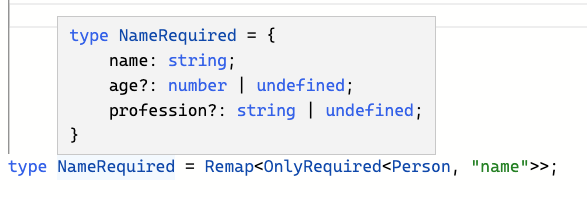
Figure 8-2. With Remap<T>, the presentation of NameRequired becomes much more readable.
Beautiful! This has become a staple in TypeScript utility type libraries. Some call it Debug, others call it Simplify. Remap is just another name for the same tool and the same effect: Getting an idea of how your result will look like.
Like other mapped types Partial<T>, Readonly<T>, and Required<T>, Remap<T> also works on the first level only. A nested type like Settings which includes the Subtitles type will be remapped to the same output, and the editor feedback will be the same regardless.
typeSubtitles={active:boolean;color:string;};typeSettings={mode:"light"|"dark";playbackSpeed:number;subtitles:Subtitles;};
But also, as shown in Recipe 8.2, we can create a recursive variation that remaps all nested object types.
typeDeepRemap<T>=Textendsobject?{[KinkeyofT]:DeepRemap<T[K]>;}:T;
Applying DeepRemap<T> to Settings, will also expand Subtitles.
typeSettingsRemapped=DeepRemap<Settings>;// results intypeSettingsRemapped={mode:"light"|"dark";playbackSpeed:number;subtitles:{active:boolean;color:string;};};
Using Remap is mostly a matter of taste. Sometimes you want to know about the implementation, and sometimes the terse view of nested types is more readable than the expanded versions. But in other scenarios, you actually care about the result itself. In those cases, having a Remap<T> helper type handy and available is definitely helpful.
8.4 Getting All Required keys
Problem
You want to create a type that extracts all required properties from an object.
Solution
Create a mapped helper type GetRequired<T> that filters keys based on a sub-type check against its required counterpart.
Discussion
Optional properties have a tremendous effect on type compatibility. A simple type modifier, the question mark, widens the original type significantly. They allow us to define fields that might be there, but they only can be used if we do additional checks.
This means that we can make our functions and interfaces compatible with types that lack certain properties entirely.
typePerson={name:string;age?:number;};functionprintPerson(person:Person):void{// ...}typeStudent={name:string;semester:number;};conststudent:Student={name:"Stefan",semester:37,};printPerson(student);// all good!
We see that age is defined in Person, but not at all defined in Student. Since it’s optional, it doesn’t keep us from using printPerson with objects of type Student. The set of compatible values is wider, as we can use objects of types that drop age entirely.
TypeScript solves that by attaching undefined to properties that are optional. This is the truest representation of “it might be there”.
This fact is important if we want to check if property keys are required or not. Let’s start by doing the most basic check. We have an object and want to check if all keys are required. We use the helper type Required<T> which modifies all properties to be required. The simplest check is to see if an object type, e.g. Name is a subset of its Required<T> counterpart.
typeName={name:string;};typeTest=NameextendsRequired<Name>?true:false;// type Test = true
Here, Test results in true, because if we change all properties to required using Required<T>, we still get the same type. However, things change if we introduce an optional property.
typePerson={name:string;age?:number;};typeTest=PersonextendsRequired<Person>?true:false;// type Test = false
Here, Test results in false, because type Person with the optional property age accepts a much broader set of values as Required<Person>, where age needs to be set. Contrary to this check, if we swap Person and Required<Person>, we can see that the narrower type Required<Person> is in fact a subset of Person.
typeTest=Required<Person>extendsPerson?true:false;// type Test = true
What we’ve checked so far is if the entire object has the required keys. But what we actually want is to get an object that only includes property keys that are set to required. This means that we need to do this check with each property key. The need to iterate the same check over a set of keys is a good indicator for mapped type.
Our next step is to create a mapped type that does the subset check for each property, to see if the resulting values include undefined.
typeRequiredPerson={[KinkeyofPerson]:Person[K]extendsRequired<Person[K]>?true:false;};/*type RequiredPerson = {name: true;age?: true | undefined;}*/
This is a good guess but gives us results that don’t work. Each property resolves to true, meaning that the subset checks only checks for the value types without undefined. This is because Required<T> works on objects, not on primitive types. Something that gets us more robust results is checking if Person[K] includes any nullable values. NonNullable<T> removes undefined and null.
typeRequiredPerson={[KinkeyofPerson]:Person[K]extendsNonNullable<Person[K]>?true:false;};/*type RequiredPerson = {name: true;age?: false | undefined;}*/
Better, but still not where we want it to be. undefined is back again, as it’s being added by the property modifier. Also, the property is still in the type, and we want to get rid of it.
What we need to do is to reduce the set of possible keys. So instead of checking for the values, we do a conditional check on each property while we are mapping out keys. We check if Person[K] is a subset of Required<Person>[K], doing a proper check against the bigger subset. If this is the case, we print out the key K, otherwise, we drop the property using never (see Recipe 5.2).
typeRequiredPerson={[KinkeyofPersonasPerson[K]extendsRequired<Person>[K]?K:never]:Person[K];};
Fantastic, this gives us the exact results we want. Now we substitute Person for a generic type parameter and our helper type GetRequired<T> is done.
typeGetRequired<T>={[KinkeyofTasT[K]extendsRequired<T>[K]?K:never]:T[K];};
From here on, we can derive variations like GetOptional<T>. Sadly, checking if something is optional is not as easy as check if some property keys are required, but we can use GetRequired<T> and a keyof operator to get all the required property keys.
typeRequiredKeys<T>=keyofGetRequired<T>;
After that, we use the RequiredKeys<T> to omit them from our target object.
typeGetOptional<T>=Omit<T,RequiredKeys<T>>;
Again a combination of multiple helper types produces derived, self-maintaining types.
8.5 Allowing at Least One Property
Problem
You have a type where you want to make sure that at least one property is set.
Solution
Create a Split<T> helper type that splits an object into a union of one-property objects.
Discussion
Your application stores a set of URLs, e.g. for video formats, in an object where each key identifies a different format.
typeVideoFormatURLs={format360p:URL;format480p:URL;format720p:URL;format1080p:URL;};
You want to create a function loadVideo that can load any of those video format URLs but needs to load at least one URL.
If loadVideo accepts parameters of type VideoFormatURLs, you need to provide all video format URLs.
functionloadVideo(formats:VideoFormatURLs){// tbd}loadVideo({format360p:newURL("..."),format480p:newURL("..."),format720p:newURL("..."),format1080p:newURL("..."),});
But some videos might not exist, so a subset of all available types is actually what you’re looking for. Partial<VideoFormatURLs> gives you that.
functionloadVideo(formats:Partial<VideoFormatURLs>){// tbd}loadVideo({format480p:newURL("..."),format720p:newURL("..."),});
But since all keys are optional, you would also allow the empty object as a valid parameter.
loadVideo({});
Which results in undefined behaviour. You want to have at least one URL so you can load that video.
We have to find a type that expresses that we expect at least one of the available video formats. A type that allows us to pass all of them, some of them, but also prevents us to pass none.
Let’s start with the “only one” cases. Instead of finding one type, let’s create a union type that combines all situations where there’s only one property set.
typeAvailableVideoFormats=|{format360p:URL;}|{format480p:URL;}|{format720p:URL;}|{format1080p:URL;};
Good, this allows us to pass in objects that only have one property set. Next step, let’s add the situations where we have two properties set.
typeAvailableVideoFormats=|{format360p:URL;}|{format480p:URL;}|{format720p:URL;}|{format1080p:URL;};
Wait! That’s the same type! That’s the way union types work. If they aren’t discriminated (see Recipe 3.2), union types will allow for values that are located at all intersections of the original set, as shown in image Figure 8-3.
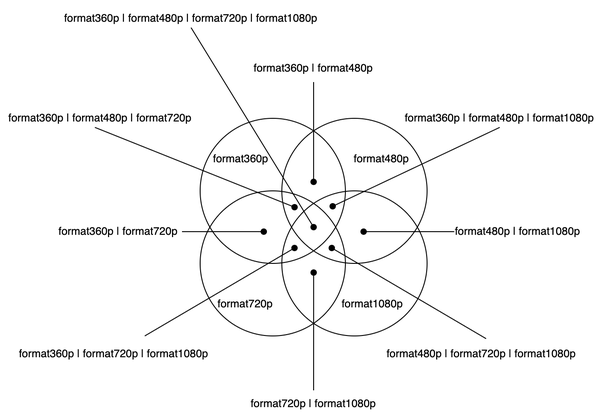
Figure 8-3. The union type AvailableVideoFormats. Each union member defines a set of possible values. The intersections describe the values where both types overlap. All possible combinations can be expressed with this union.
So now that we know the type, it would be fantastic to derive it from the original type. We want to split an object type into a union of types where each member contains exactly one property.
One way to get a union type that is related to VideoFormatURLs is to use the keyof operator.
typeAvailableVideoFormats=keyofVideoFormatURLs;
This yields "format360p" | "format480p" | "format720p" | "format1080p", a union of the keys. We can use the keyof operator to index access the original type.
typeAvailableVideoFormats=VideoFormatURLs[keyofVideoFormatURLs];
This yields URL, which is just one type, but in reality a union of the types of values. Now we only need to find a way to get proper values that represent an actual object type and are related to each property key.
Here’s this one sentence again: “Related to each property key”. This calls for a mapped type! We can map through all VideoFormatURLs to get the property key to the right-hand side of the object.
typeAvailableVideoFormats={[KinkeyofVideoFormatURLs]:K;};/* yieldstype AvailableVideoFormats = {format360p: "format360p";format480p: "format480p";format720p: "format720p";format1080p: "format1080p";}; */
With that, we can index access the mapped type and get value types for each element. But we’re not only setting the key to the right-hand side, we are creating another object type that takes this string as a property key and maps it to the respective value type.
typeAvailableVideoFormats={[KinkeyofVideoFormatURLs]:{[PinK]:VideoFormatURLs[P]};};/* yieldstypeAvailableVideoFormats={format360p:{format360p:URL;};format480p:{format480p:URL;};format720p:{format720p:URL;};format1080p:{format1080p:URL;};};
Now we can use index access again to grep each value type from the right-hand side into a union.
typeAvailableVideoFormats={[KinkeyofVideoFormatURLs]:{[PinK]:VideoFormatURLs[P]};}[keyofVideoFormatURLs];/* yieldstype AvailableVideoFormats =| {format360p: URL;}| {format480p: URL;}| {format720p: URL;}| {format1080p: URL;};*/
And that’s what we’ve been looking for! As a next step, we take the concrete types and substitute them with generics, resulting in the Split<T> helper type.
typeSplit<T>={[KinkeyofT]:{[PinK]:T[P];};}[keyofT];
Another helper type in our arsenal. Using it with loadVideo gives us exactly the behaviour we have been aiming for.
functionloadVideo(formats:Split<VideoFormatURLs>){// tbd}loadVideo({});// ^// Argument of type '{}' is not assignable to parameter// of type 'Split<VideoFormatURLs>'loadVideo({format480p:newURL("..."),});// all good
Split<T> is a nice way to see how basic type system functionality can change the behaviour of your interfaces significantly, and how some simple typing techniques like mapped types, index access types, and property keys can be used to get a tiny, yet powerful helper type.
8.6 Allowing Exactly One and All Or None
Problem
Next to requiring at least one like in Recipe 8.5, you also want to provide scenarios where users shall provide exactly one or all or none.
Solution
Create ExactlyOne<T> and AllOrNone<T, K>. Both rely on the optional never technique in combination with a derivate of Split<T>.
Discussion
With Split<T> from Recipe 8.5 we create a nice helper type that makes it possible to describe the scenario where we want to have at least one parameter provided. This is something that Partial<T> can’t provide for us, but regular union types can.
Starting from this idea we might also run into scenarios where we want our users to provide exactly one, making sure that they don’t add too many options.
One technique that can be used here is optional never, which we learned in Recipe 3.8: Next to all the properties you want to allow, you set all the properties you don’t want to allow to optional and their value to never. This means that the moment you write the property name, TypeScript wants you to set its value to something that is compatible never, which you can’t, as the never has no values.
A union type where we put all property names in an exclusive or relation is the key. We get a union type with each property already with Split<T>.
typeSplit<T>={[KinkeyofT]:{[PinK]:T[P];};}[keyofT];
All we need to do is to intersect each element with the remaining keys and set them to optional never.
typeExactlyOne<T>={[KinkeyofT]:{[PinK]:T[P];}&{[PinExclude<keyofT,K>]?:never;// optional never};}[keyofT];
With that, the resulting type is more extensive but tells us exactly which properties to exclude.
typeExactlyOneVideoFormat=({format360p:URL;}&{format480p?:never;format720p?:never;format1080p?:never;})|({format480p:URL;}&{format360p?:never;format720p?:never;format1080p?:never;})|({format720p:URL;}&{format320p?:never;format480p?:never;format1080p?:never;})|({format1080p:URL;}&{format320p?:never;format480p?:never;format720p?:never;});
And it works like expected.
functionloadVideo(formats:ExactlyOne<VideoFormatURLs>){// tbd}loadVideo({format360p:newURL("..."),});// worksloadVideo({format360p:newURL("..."),format1080p:newURL("..."),});// ^// Argument of type '{ format360p: URL; format1080p: URL; }'// is not assignable to parameter of type 'ExactlyOne<VideoFormatURLs>'.
ExactlyOne<T> is so much like Split<T> that we could think of extending Split<T> with the functionality to include the optional never pattern.
typeSplit<T,OptionalNeverextendsboolean=false>={[KinkeyofT]:{[PinK]:T[P];}&(OptionalNeverextendsfalse?{}:{[PinExclude<keyofT,K>]?:never;});}[keyofT];typeExactlyOne<T>=Split<T,true>;
We add a new generic type parameter OptionalNever which we default to false. We then intersect the part where we create new objects with a conditional type that checks if the parameter OptionalNever is actually false. If so, we intersect with the empty object (leaving the original object intact), otherwise, we add the optional never part to the object. ExactlyOne<T> is refactored to Split<T, true>, where we activate the OptionalNever flag.
Another scenario that is very similar to Split<T> or ExactlyOne<T> is to provide all arguments or no arguments. Think of splitting video formats into standard definition (SD: 360p and 480p), and high definition (HD: 720p and 1080p). In your app, you want to make sure that if your users provide standard definition formats, they should provide all possible formats. It’s ok to have a single HD format.
This is also where the optional never technique comes in. We define a type that requires all selected keys, or sets them to never if only one is provided.
typeAllOrNone<T,KeysextendskeyofT>=(|{[KinKeys]-?:T[K];// all available}|{[KinKeys]?:never;// or none});
If you want to make sure that you provide also all HD formats, add the rest to it via an intersection.
typeAllOrNone<T,KeysextendskeyofT>=(|{[KinKeys]-?:T[K];}|{[KinKeys]?:never;})&{[KinExclude<keyofT,Keys>]:T[K]// the rest, as it was defined}
Or if HD formats are totally optional, add them via a Partial<T>.
typeAllOrNone<T,KeysextendskeyofT>=(|{[KinKeys]-?:T[K];}|{[KinKeys]?:never;})&Partial<Omit<T,Keys>>;// the rest, but optional
But then you run into the same problem as in Recipe 8.5, where you can provide values that don’t include any formats at all. Intersecting the all or none variation with Split<T> is the solution we are aiming for.
typeAllOrNone<T,KeysextendskeyofT>=(|{[KinKeys]-?:T[K];}|{[KinKeys]?:never;})&Split<T>;
Which works as intended:
functionloadVideo(formats:AllOrNone<VideoFormatURLs,"format360p"|"format480p">){// TBD}loadVideo({format360p:newURL("..."),format480p:newURL("..."),});// OKloadVideo({format360p:newURL("..."),format480p:newURL("..."),format1080p:newURL("..."),});// OKloadVideo({format1080p:newURL("..."),});// OKloadVideo({format360p:newURL("..."),format1080p:newURL("..."),});// ^ Argument of type '{ format360p: URL; format1080p: URL; }' is// not assignable to parameter of type// '({ format360p: URL; format480p: URL; } & ... (abbreviated)
If we look closely at what AllOrNone does, we can easily rewrite it with built-in helper types.
typeAllOrNone<T,KeysextendskeyofT>=(|Required<Pick<T,Keys>>|Partial<Record<Keys,never>>)&Split<T>;
This is arguably more readable, but also more to the point of meta-programming in the type system. You have a set of helper types, and you can combine them to create new helper types. Almost like a functional programming language, but on sets of values, in the type system.
8.7 Converting Union To Intersection Types
Problem
Your model is defined as a union type of several variants. In order to derive other types from it, you first need to convert the union type to an intersection type.
Solution
Create a UnionToIntersection<T> helper type that makes use of contra-variant positions.
Discussion
In Recipe 8.5 we discussed how we can split a model type into a union of its variants. Depending on how your application works, you might want to define the model as a union type of several variants right from the beginning.
typeBasicVideoData={// tbd};typeFormat320={urls:{format320p:URL}};typeFormat480={urls:{format480p:URL}};typeFormat720={urls:{format720p:URL}};typeFormat1080={urls:{format1080p:URL}};typeVideo=BasicVideoData&(Format320|Format480|Format720|Format1080);
The type Video allows you to define several formats but requires you to define at least one.
constvideo1:Video={// ...urls:{format320p:newURL("https://..."),},};// OKconstvideo2:Video={// ...urls:{format320p:newURL("https://..."),format480p:newURL("https://..."),},};// OKconstvideo3:Video={// ...urls:{format1080p:newURL("https://..."),},};// OK
However, putting them in a union has some side effects when you need for example all available keys:
typeFormatKeys=keyofVideo["urls"];// FormatKeys = never// This is not what we want here!functionselectFormat(format:FormatKeys):void{// tbd.}
You’d might expect FormatKeys to provide a union type of all keys that are nested in urls. Index access on a union type however tries to find the lowest common denominator. And in this case, there is none. To get a union type of all format keys, you need to have all keys within one type.
typeVideo=BasicVideoData&{urls:{format320p:URL;format480p:URL;format720p:URL;format1080p:URL;};};typeFormatKeys=keyofVideo["urls"];// type FormatKeys =// "format320p" | "format480p" | "format720p" | "format1080p";
A way to create an object like this is to modify the union type to an intersection type.
Note
In Recipe 8.5 modeling data in a single type was the way to go, in this recipe, we see that modeling data as a union type is more to our liking. In reality, there is no real answer to how you define your models. Use the representation that best fits your application domain and which doesn’t get in your way too much. The important thing is to be able to derive other types as you need them. This reduces maintenance and allows you to create more robust types. In Chapter 12 and especially Recipe 12.1 we take a good look at the principle of “low maintenance types”.
Converting a union type to an intersection type is a quite peculiar task in TypeScript and requires some deep knowledge of the inner workings of the type system. To learn all these concepts, we look at the finished type, and then see what happens under the hood:
typeUnionToIntersection<T>=(Textendsany?(x:T)=>any:never)extends(x:inferR)=>any?R:never;
There is a lot to unpack here:
-
We have two conditional types. The first one seems to always result in the true branch, so why do we need it?
-
The first conditional type wraps the type in a function argument, and the second conditional type unwraps it again. Why is this necessary?
-
And how do both conditional types transform a union type to an intersection type?
Let’s analyze UnionToIntersection<T> step by step.
In the first conditional within UnionToIntersection<T>, we use the generic type argument as a naked type.
typeUnionToIntersection<T>=(Textendsany?(x:T)=>any:never)//...
This means that we check if T is in a sub-type condition without wrapping it in some other type.
typeNaked<T>=Textends...;// a naked typetypeNotNaked<T>={o:T}extends...;// a non-naked type
Naked types in conditional types have a certain feature. If T is a union, they run the conditional type for each constituent of the union. So with a naked type, a conditional of union types becomes a union of conditional types.
typeWrapNaked<T>=Textendsany?{o:T}:never;typeFoo=WrapNaked<string|number|boolean>;// A naked type, so this equals totypeFoo=WrapNaked<string>|WrapNaked<number>|WrapNaked<boolean>;// equals totypeFoo=stringextendsany?{o:string}:never|numberextendsany?{o:number}:never|booleanextendsany?{o:boolean}:never;typeFoo={o:string}|{o:number}|{o:boolean};
As compared to the non-naked version.
typeWrapNaked<T>={o:T}extendsany?{o:T}:never;typeFoo=WrapNaked<string|number|boolean>;// A non-naked type, so this equals totypeFoo={o:string|number|boolean}extendsany?{o:string|number|boolean}:never;typeFoo={o:string|number|boolean};
Subtle, but considerably different for complex types!
In our example, we use the naked type and ask if it extends any (which it always does, any is the allow-it-all top type).
typeUnionToIntersection<T>=(Textendsany?(x:T)=>any:never)//...
Since this condition is always true, we wrap our generic type in a function, where T is the type of the function’s parameter. But why are we doing that?
This leads to the second condition:
typeUnionToIntersection<T>=(Textendsany?(x:T)=>any:never)extends(x:inferR)=>any?R:never
As the first condition always yields true, meaning that we wrap our type in a function type, the other condition also always yields true. We are basically checking if the type we just created is a subtype of itself. But instead of passing through T, we infer a new type R, and return the inferred type.
What we do is wrap, and unwrap type T via a function type.
Doing this via function arguments brings the new inferred type R in a contra-variant position.
So what does contra-variance mean? The opposite of contra-variance is co-variance, and what you would expect from normal sub-typing.
declareletb:string;declareletc:string|number;c=b// OK
string is a sub-type of string | number, all elements of string appear in string | number, so we can assign b to c. c still behaves as we originally intended it. This is co-variance.
This on the other hand, won’t work:
typeFun<X>=(...args:X[])=>void;declareletf:Fun<string>;declareletg:Fun<string|number>;g=f// this cannot be assigned
We can’t assign f to g, because then we would also be able to call f with a number! We miss part of the contract of g. This is contra-variance. The interesting thing is that contra-variance effectively works like an intersection: If f accepts string and g accepts string | number, the type that is accepted by both is (string | number) & string, which is string.
When we put types in contra-variant positions within a conditional type, TypeScript creates an intersection out of it. Meaning that since we infer from a function argument, TypeScript knows that we have to fulfill the complete contract, creating an intersection of all constituents in the union.
Basically, union to intersection.
Let’s run it through.
typeUnionToIntersection<T>=(Textendsany?(x:T)=>any:never)extends(x:inferR)=>any?R:never;typeIntersected=UnionToIntersection<Video["urls"]>;// equals totypeIntersected=UnionToIntersection<{format320p:URL}|{format480p:URL}|{format720p:URL}|{format1080p:URL}>;
We have a naked type, this means we can do a union of conditionals.
typeIntersected=|UnionToIntersection<{format320p:URL}>|UnionToIntersection<{format480p:URL}>|UnionToIntersection<{format720p:URL}>|UnionToIntersection<{format1080p:URL}>;
Let’s expand UnionToIntersection<T>.
typeIntersected=|({format320p:URL}extendsany?(x:{format320p:URL})=>any:never)extends(x:inferR)=>any?R:never|({format480p:URL}extendsany?(x:{format480p:URL})=>any:never)extends(x:inferR)=>any?R:never|({format720p:URL}extendsany?(x:{format720p:URL})=>any:never)extends(x:inferR)=>any?R:never|({format1080p:URL}extendsany?(x:{format1080p:URL})=>any:never)extends(x:inferR)=>any?R:never;
And evaluate the first conditional.
typeIntersected=|((x:{format320p:URL})=>any)extends(x:inferR)=>any?R:never|((x:{format480p:URL})=>any)extends(x:inferR)=>any?R:never|((x:{format720p:URL})=>any)extends(x:inferR)=>any?R:never|((x:{format1080p:URL})=>any)extends(x:inferR)=>any?R:never;
Let’s evaluate conditional two, where we infer R.
typeIntersected=|{format320p:URL}|{format480p:URL}|{format720p:URL}|{format1080p:URL};
But wait! R is inferred from a contra-variant position. We have to make an intersection, otherwise, we lose type compatibility.
typeIntersected={format320p:URL}&{format480p:URL}&{format720p:URL}&{format1080p:URL};
And that’s what we have been looking for! So applied to our original example:
typeFormatKeys=keyofUnionToIntersection<Video["urls"]>;
FormatKeys is now "format320p" | "format480p" | "format720p" | "format1080p". Whenever we add another format to the original union, the FormatKeys type gets updated automatically. Maintain once, and use everywhere.
8.8 Using type-fest
Problem
You love your helper types so much that you want to create a utility library for easy access.
Solution
Chances are type-fest has everything you need already.
Discussion
The whole idea of this chapter was to introduce you to a couple of useful helper types that are not part of standard Typescript, but have proven to be highly flexible for many scenarios: Single purpose generic helper types, that can be combined and composed to derive types based on your existing models. You write your models once, and all other types get updated automatically. This idea of having low maintenance types, by deriving types from others is pretty unique to TypeScript and appreciated by tons of developers who create complex applications or libraries.
You might end up using your helper types a lot, so you start out combining them in a utility library for easy access, but chances are one of the existing libraries already has everything you need. Using a well-defined set of helper types is nothing new, and there are plenty out there which give you everything you’ve seen in this chapter. Sometimes it’s exactly the same but under a different name, other times it’s a similar idea but solved differently or under a different aspect. The basics are most likely covered by all type libraries, but there is one library that is not only useful but actively maintained, well documented, and widely used: type-fest.
type-fest has a few aspects which make it stand out. First, it’s extensively documented. Not only does its documentation include the usage of a certain helper type, but also includes use cases and scenarios that tell you where you might want to use this helper type. One example is Integer<T>, which makes sure that the number you provide does not have any decimals.
This is a utility type that would’ve almost made it into the TypeScript cookbook, but where I saw that giving you the snippet from type-fest tells you everything you need to know about the type:
/**A `number` that is an integer.You can't pass a `bigint` as they are already guaranteed to be integers.Use-case: Validating and documenting parameters.@example```import type {Integer} from 'type-fest';declare function setYear<T extends number>(length: Integer<T>): void;```@see NegativeInteger@see NonNegativeInteger@category Numeric*/// `${bigint}` is a type that matches a valid bigint// literal without the `n` (ex. 1, 0b1, 0o1, 0x1)// Because T is a number and not a string we can effectively use// this to filter out any numbers containing decimal pointsexporttypeInteger<Textendsnumber>=`${T}`extends`${bigint}`?T:never;
The rest of the file deals with negative integers, non-negative integers, floating point numbers, etc. A real treasure trove of information if you want to know more about how types are constructed.
Second, type-fest deals with edge cases. In Recipe 8.2, we learned about recursive types and defined DeepPartial<T>. It’s type-fest counterpart PartialDeep<T> is a bit more extensive.
exporttypePartialDeep<T,OptsextendsPartialDeepOptions={}>=TextendsBuiltIns?T:TextendsMap<inferKeyType,inferValueType>?PartialMapDeep<KeyType,ValueType,Opts>:TextendsSet<inferItemType>?PartialSetDeep<ItemType,Opts>:TextendsReadonlyMap<inferKeyType,inferValueType>?PartialReadonlyMapDeep<KeyType,ValueType,Opts>:TextendsReadonlySet<inferItemType>?PartialReadonlySetDeep<ItemType,Opts>:Textends((...arguments:any[])=>unknown)?T|undefined:Textendsobject?TextendsReadonlyArray<inferItemType>?Opts['recurseIntoArrays']extendstrue?ItemType[]extendsT?readonlyItemType[]extendsT?ReadonlyArray<PartialDeep<ItemType|undefined,Opts>>:Array<PartialDeep<ItemType|undefined,Opts>>:PartialObjectDeep<T,Opts>:T:PartialObjectDeep<T,Opts>:unknown;/**Same as `PartialDeep`, but accepts only `Map`s and as inputs.Internal helper for `PartialDeep`.*/typePartialMapDeep<KeyType,ValueType,OptionsextendsPartialDeepOptions>={}&Map<PartialDeep<KeyType,Options>,PartialDeep<ValueType,Options>>;/**Same as `PartialDeep`, but accepts only `Set`s as inputs.Internal helper for `PartialDeep`.*/typePartialSetDeep<T,OptionsextendsPartialDeepOptions>={}&Set<PartialDeep<T,Options>>;/**Same as `PartialDeep`, but accepts only `ReadonlyMap`s as inputs.Internal helper for `PartialDeep`.*/typePartialReadonlyMapDeep<KeyType,ValueType,OptionsextendsPartialDeepOptions>={}&ReadonlyMap<PartialDeep<KeyType,Options>,PartialDeep<ValueType,Options>>;/**Same as `PartialDeep`, but accepts only `ReadonlySet`s as inputs.Internal helper for `PartialDeep`.*/typePartialReadonlySetDeep<T,OptionsextendsPartialDeepOptions>={}&ReadonlySet<PartialDeep<T,Options>>;/**Same as `PartialDeep`, but accepts only `object`s as inputs.Internal helper for `PartialDeep`.*/typePartialObjectDeep<ObjectTypeextendsobject,OptionsextendsPartialDeepOptions>={[KeyTypeinkeyofObjectType]?:PartialDeep<ObjectType[KeyType],Options>};
There is no need to go through the entirety of this implementation, but it should give you an idea how hardened their implementations for certain utility types are.
Note
PartialDeep<T> is very extensive and deals with all possible edge cases, but it also comes at a cost of being very complex and hard to swallow for the TypeScript type checker. Depending on your use case the simpler version from Recipe 8.2 might be the one you’re looking for.
Third, they don’t add helper types just for the sake of adding them. Their Readme file has a list of declined types and the reasoning behind them. Either the use cases are limited, or better alternatives exist. Just like everything, they document their choices really, really well.
Fourth, type-fest educates on existing helper types. Helper types exist in TypeScript forever but have been hardly documented in the past. Years ago my blog attempted to be a resource on built-in helper types, until the official documentation added a chapter on utility types. Utility types are not something that you easily pick up by just using TypeScript. You need to understand that they exist and need to read up on them. type-fest has an entire section dedicated to built-ins, with examples and use cases.
Last, but not least, it’s widely adopted and developed by reliable open-source developers. Its creator, Sindre Sorhus works on open-source projects for decades and has a track record of fantastic projects. type-fest is just another stroke of genius. Chances are a lot of your work relies on his work.
With type-fest you get another resource of helper types you can add to your project. Decide for yourself if you want to keep a small set of helper types, or if you rely on the implementations by the community.