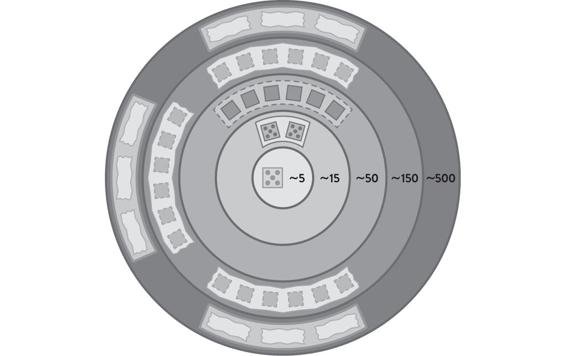
Figure 3.1: Scaling Teams Using Dunbar’s Number
Source: Matthew Skelton and Manuel Pais, Team Topologies: Organizing Business and Technology Teams for Fast Flow (Portland, OR: IT Revolution, 2019).
chapter 3
Setting Team Boundaries
Inter-team trust and behavior dynamics change depending on the size of the group. It’s important to avoid an “us and them” situation, so pay attention to the trust dynamics within and across teams and larger groups. This chapter provides some techniques for maintaining high trust within teams and groups in a remote-first world based on group size.
Group Trust Boundaries
When considering boundaries of teams and other groups within the organization, it is important to consider “group trust levels”—the amount of trust that can exist within groupings of a certain size. This is no different (but possibly harder) when it comes to remote-first teams, due to the lack of face-to-face contact. With high trust, groups can make decisions quickly and improve flow. However, there are well-recognized limits to trust that seem to relate to basic human evolutionary limits (like brain size).
The British anthropologist Robin Dunbar has done significant research on the size of social networks: the number of people with whom a person can have meaningful relationships. He found that an individual’s social network size is typically in the order of one hundred to two hundred individuals. This research was undertaken on different groups of humans across many different countries and contexts, and there are similar-sized groupings in historical records too. For example, the typical size of a village in England in the Domesday Book census of 1086 (nearly one thousand years ago) was 150 people.
Robin Dunbar has also done research into online social networks, and what’s really interesting is the same kind of trust boundaries—the same kind of social groupings—are present. A typical person maintains no more than about 150 meaningful relationships on social media (such as Facebook or Twitter). So even if you have five thousand Facebook friends, you actually tend to interact with only about 150. These trust boundaries, and how you can organize teams within them, are represented in the image below.
Figure 3.1: Scaling Teams Using Dunbar’s Number
Source: Matthew Skelton and Manuel Pais, Team Topologies: Organizing Business and Technology Teams for Fast Flow (Portland, OR: IT Revolution, 2019).
READ MORE
Read more about Dunbar’s number and trust boundaries in Team Topologies on pages 32–35.
But do these trust boundaries apply in a work context? Early in 2020, some new research by Emily Webber and Robin Dunbar found that these same trust boundaries are present inside organizations in the context of communities of practice (CoP), suggesting that other groups in a work context may also be affected. Specifically, CoP groups exhibited a similar “fractal” structure to that seen in other social contexts.
The research “suggests that professional work-oriented organizations may be subject to the same kinds of constraint imposed on human social organization by the social brain,”1 meaning that the sizes of CoPs tended to group around the “Dunbar” trust boundaries of 5, 15, 50, 150, 500 people, etc., and—by extension—the social dynamics of different-sized CoPs will also be different.
The manufacturing company W. L. Gore has over ten thousand employees. For many years, W. L. Gore has operated a policy of limiting the size of each factory or office to 150 people in order to maintain high trust within that location, choosing to build an additional 150-person factory if they need to increase capacity. This was the company policy even before Robin Dunbar published his research on social group sizes, and it continues to help W. L.Gore be one of the most innovative manufacturers in the world.
Example: Military Groupings
There have been distinct group sizes in the military for hundreds and even thousands of years. Ben Ford, a former Royal Marines Commando (part of the elite UK military forces) and now a software consultant, describes “social inflection points,” or group sizes, used in the military to enhance trust and operational effectiveness.2 Ford maps the group sizes in the Royal Marines to anthropological equivalents, as shown in the table below:
|
People |
Military name |
Anthropological equivalent |
|
8 |
Section |
Hunting party |
|
30–50 |
Troop |
Tribe |
|
100–150 |
Company |
Village |
The Section is the basic unit in the Royal Marines: eight people form a “single cohesive unit.” The Troop is a collection of three Sections plus supporting units totalling around thirty to fifty people. This is the way Sections are coordinated to achieve larger objectives. A Company is a grouping of around three Troops with some supporting units and capabilities. At a larger scale, a Commando Unit is a grouping of three Company groups.
What’s important is the fractal nature of these groupings: the patterns are self-similar at different scales. At each level, trust is maximized and there is no “us and them” within a grouping.
These kinds of trust boundaries have been effectively established by trial and error by the military over many, many hundreds of years in order to maximize trust and operational effectiveness. It’s clear that these groupings map closely to the groupings that Robin Dunbar has found within social networks and have important implications for how we think about groupings of people inside organizations.
Now Your Turn
As we’ve seen in this section, for organizations to be highly effective, they need to look at trust boundaries when growing, when aligning teams to work, and when considering spheres of influence. Groups within an organization that grow in size beyond one of these trust boundaries are likely to have difficulty maintaining cohesion and trust, leading to an “us and them” attitude and reduced effectiveness.
Trust Boundaries Exercise
Consider your current organization or another organization that you know well. Create a list or map of the different groups of people within the organization and the number of people in each group. Consider business units, divisions, departments, value streams, teams, and so on. How many people are inside each grouping?
Now use the Dunbar trust boundary numbers or “social inflection points” (e.g, 5, 15, 50, 150, 500, 1,500, 5,000, etc.). Which groupings within the organization are far from the Dunbar trust boundaries? For example, a department with 300 people would be very far from the two nearest Dunbar boundaries of 150 and 500.
Next, ask what the culture is like inside groupings with “non-Dunbar” numbers of people. What are the trust dynamics? Which groupings could be split at Dunbar boundaries to help increase trust within the groupings?
Use the below template to help assess the size of groups in an organization in relation to Dunbar number trust boundaries. Groups that are slightly smaller than the trust boundary are likely to have good trust in relation to the number of people; groups that are somewhat larger than the trust boundary are likely to have problems with low trust in relation to the number of people. These groups are candidates for splitting into smaller groups.
Resource
Download the Trust Boundaries Template as a starting point for this exercise: GitHub.com/TeamTopologies/Trust-Boundaries-Template
|
Group name |
Group size (people) |
Closest trust boundary (15/50/500) |
Likely trust problems? (Y/N) |
Online Space Setup
Applying the ideas of group trust boundaries to physical space is fairly straightforward: when a room, floor, building, or location reaches and exceeds a certain trust boundary size, expect trust dynamics to change. Expect “us and them” mentalities to emerge. However, we also need to apply these same principles to online spaces, especially chat tools and online documentation tools like wikis.
Too often, an online communication tool resembles something like a giant, open-plan office with people shouting across the building and expecting people to hear all the details. Communication in online spaces must be designed and nurtured for best outcomes.
What does this mean in practice? Much like how W. L. Gore builds a new factory when the number of people reaches 150, consider managing online spaces in a similar way. When the size of an online space reaches a trust boundary (such as 50 or 150 people), instead of adding more people to the same online space, create a new space. Each online space grouping should have people with a shared focus on a related flow of change.
Exactly what the boundary for this grouping is may differ from organization to organization: sometimes a 150-person boundary might be a single channel or channel group, and sometimes the boundary might be an entire workspace. The key thing is to design the online space with trust boundaries in mind. It’s important to note that each separate online space should also relate to a flow of change, not to different job “functions” within the organization.
Good candidates for separate online spaces would map to streams of change (or families of streams of change). Let’s say an organization provides services for buying, selling, and leasing vehicles. The separate online spaces might map to private vehicle sales, commercial vehicle sales, and vehicle leasing, corresponding to the three separate business lines within the organization. Every team involved in the private vehicle sales business line would be in the same online space: engineering, IT, sales, marketing, HR, legal, etc. This helps to focus the organization on a fast flow of change rather than functional specialisms. (Note: It is not recommended to create separate online spaces for functional specialisms like HR, legal, marketing, IT, etc., because that approach works against a fast flow of change.)
In Figure 3.2, we can see how we might create and align online spaces with groupings of related teams. For example, it would likely make sense to have a dedicated online space for each group of teams working on the same business area or value stream. We might also want to have a dedicated online space for all the teams that are part of an internal platform group, for example.
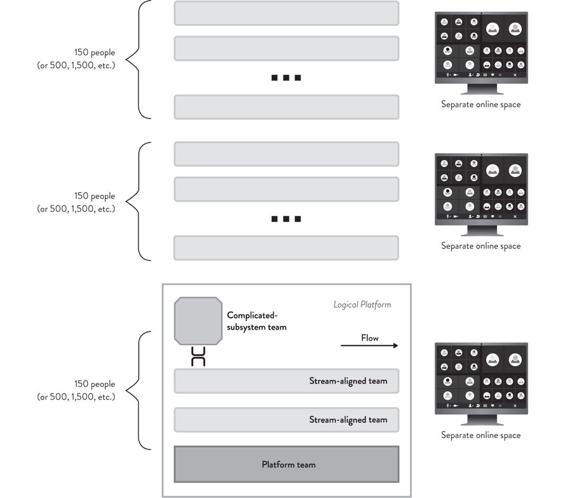
Figure 3.2: Separate Online Spaces Aligned to Groupings of Teams and Trust Boundaries
In this example, the separate online spaces help to remind people of the different boundaries within the architecture and therefore the boundaries within teams. We can still have shared channels between different online spaces to help create slightly porous boundaries between these spaces. Some examples include Slack Connect’s shared channels and Slack’s Enterprise Grid product, which allows for multiple workspaces to exist under one overarching oganizational container. This means explicit cross-space communication can still take place for sporadic needs across boundaries.
The inherent trust inside different organizations may be very different due to culture and practices, so one organization may find that online spaces of 500 people work well, but another organization may find more benefit in restricting each online space to only 150 people (See Figure 3.3). In short, optimize for trust within online spaces. Do not be tempted to optimize for manageability, ease of billing, or ease of observation across multiple groups, as this can impede flow.
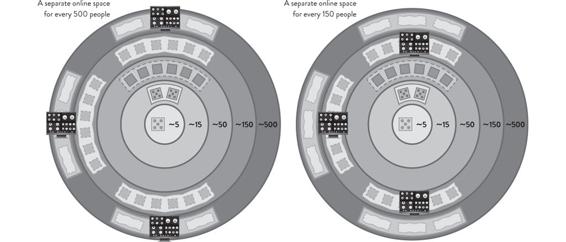
Figure 3.3: Online Spaces of Different Sizes According to the Organization’s Culture and Practices
READ MORE
Read more about setting up team-first physical and online/virtual spaces in Team Topologies, pages 50–55.
Example: Auto Trader
Auto Trader is the UK’s largest digital automotive marketplace. Starting life as a local classified magazine in 1977, it has grown and evolved alongside its customers. In 2013, it successfully completed the transition from a print title to a fully digital marketplace. Prior to the COVID-19 pandemic, Auto Trader had invested time and money in a first-class physical workplace in Manchester, UK. Interestingly, while many organizations consider having a single collaboration tool as an imperative, Auto Trader uses both Slack and Microsoft Teams simultaneously to complement each tool’s strengths.
READ MORE
This is detailed in the Auto Trader case study in Team Topologies on pages 53–55.
As may be expected from an organization that considered its team working practices carefully, Auto Trader has focused on optimizing tools and working practices to get the most out of remote and hybrid working. Andy Humphrey, Head of Customer Operations at Auto Trader UK, explains:
We’ve worked hard to adapt the way we use communication tools for times when remote working is mandatory and where hybrid working both in and out of the office has become the norm.
This is a challenge not just for a team’s or individual’s productivity, but to ensure our well-being is supported and we can continue to build the relationship and connections that are so important to our organizational culture.
We now heavily use Microsoft Teams for video calls, and it has developed into our main company live video broadcast tool to support the Auto Trader community—with every employee invited. For example, we had a bi-weekly update from the CEO and our leadership team in the midst of the pandemic, plus weekly talks where people presented different areas of work/interest. Microsoft Teams was also used for:
•The de facto replacement for team meetings such as stand-ups, retrospectives, kick-offs, etc.
•Department or tribe gatherings and events.
•Recruitment processes, including conducting interviews online where lockdown restricted face-to-face meetings or geography makes in-person meetings difficult.
•Customer meetings such as video calls and live broadcasts to build relationships and help training and communication.
Slack was heavily used within the technology department before the pandemic, but now its reach is wider across the organization and product areas. Slack is used in a number of different ways at Auto Trader, including:
•Interest based networks: We have a lot of communities of interest where people can join together in their workplace based on shared passions, characteristics, or life experiences, e.g., #sustainability-network; #womens-network; #social-mobility. These working groups are open to all but tend to have at least two leaders and often executive sponsors.
•Social/well-being: We have regular online reading groups, film clubs, Friday quizzes, pictures of pets, coffee chat areas, and even a personal trainer running regular online exercise classes. Again, these are open to all.
•Business focus networks: We have Slack channels for project areas and business-focused areas—like different teams sitting together to focus on a customer group, such as leasing, new cars, etc.
•Team networks: Regular conversation—from updates on work, getting help with problems, organizing lunch rotas, just saying “hi” and “bye,” etc.—with your team is really important, especially for teams who are now working apart.
•Dynamic groups: Channels spin up for an incident (war room) or other temporary need, where previously we might have grabbed a few people and gone into a meeting room.
Often the needs of these Slack groups means that we need to branch off to other tools and formats for meetings, events, and working groups. But Slack is the place you look for updates and go to show your interest, contribute, and find out what’s going on.
The numbers involved in these chat groups can vary wildly from over five hundred in some channels where everyone wants an update to fewer than ten for smaller teams or niche interests!3
The considered approach to online spaces continued at Auto Trader during the following year. In August 2021, Karl Stoney, principal engineer at Auto Trader, tweeted about some updates to their Slack integration that enabled the dynamic creation of Slack groups based upon a service metadata file that is stored in each product repository. It also maintains an Active Directory group, which is useful for assigning permissions, single sign-on (SSO), etc.4
Prior to implementing this, each of these things represented a separate task to be undertaken for each of over 450 services, which, in an organization that often has new starters, caused significant toil. This is a great example of how automation can eliminate some of the more repetitive and mundane daily tasks, introduce consistency, and substantially improve productivity.
READ MORE
Read more about practices at Auto Trader in Team Topologies, pages 97–99.
Now Your Turn: Online Space Assessment
Consider your current organization or another organization that you know well. Identify the different tools used for online spaces within the organization. These are typically chat tools (such as Slack, Microsoft Teams, Twist, IRC, Yammer, Skype, etc.) but could be other immersive tools too.
For each separate instance of one of these tools (where an “instance” means different administrators or different permission sets), list the total number of members. Then, for each channel in that space, list the number of members of each channel or chat within that space. For each instance, and for each channel within that instance, determine whether the number of channel members is close to a trust boundary or whether the size falls between two trust boundaries.
Groups that are slightly smaller than a trust boundary are likely to have good trust in relation to the number of people; groups that are somewhat larger than a trust boundary are likely to have problems with low trust in relation to the number of people. These groups are candidates for splitting into smaller groups. Consider even splitting some of the online space instances into multiple smaller spaces to help maintain higher trust within the space.
Here are some templates to help you assess your online spaces.
|
Separate Online Space (Instances) |
||||
|
Online space name |
Online space URL |
Tool providing the service |
Number of members |
Likely trust problems? (Y/N) |
|
Channels Within an Online Space |
||||
|
Channel name |
Members (# of people) |
Closest trust boundary (15, 50, 150, etc.) |
Number of members |
Likely trust problems? (Y/N) |
RESOURCE
You can download this template at GitHub.com/TeamTopologies/Online-Space-Assessment.
Team-Focused Conventions for Chat Tools
There are many different chat tools available for remote-first working, and most organizations are using a chat tool (or several) these days. However, simply providing all staff access to a chat tool is only the first step in making remote-first working a success.
Too many organizations allow a kind of free rein within the chat tool, with little or no consistency about channel names, display names, the meanings of emoji, or even etiquette. This can rapidly lead to the chat tool becoming both essential to watch (in case you miss a vital message) and incredibly confusing and difficult to use.
For effective remote work, some chat tool conventions are needed. The virtual space inside the chat tool needs to be predictable and discoverable. Arbitrary channel names like #homepage_discussion, #increase-conversions, and #ninjas make it difficult to know where to go to discuss a topic. If this is combined with multiple private channels, finding the right people to speak to is a game of cat and mouse.
Instead, define a set of conventions that improve predictability and discoverability. For example, include the team name and type of team in the channel name for the team’s main outward-facing chat channel.
•#streamteam-green: the public channel for the stream-aligned team “Green”
•#streamteam-blue: the public channel for the stream-aligned team “Blue”
•#platformteam-data: the public channel for the platform team “Data”
•#platformteam-infra: the public channel for the platform team “Infra”
•#enablingteam-k8s: the public channel for the enabling team “k8s”
The three team interaction modes from Team Topologies can help to further increase the clarity of purpose for teams working together.
•Collaboration: two teams working together for a defined discovery period to achieve a specific goal)
•X-as-a-Service: one team provides something as a service, another team consumes)
•Facilitating: one team helps another to detect capability gaps or increase skills and awareness)
The Introduction and Chapter 4 of this workbook have more details on the three team interaction modes.
Furthermore, it can be hugely helpful to have channel names that make it clear where to get support or help for common or shared infrastructure or tools:
•#support-environments: the support channel for environments
•#support-logging: the support channel for logging
This makes it easy for people to “self-serve” and discover the best place to ask a question or ask for help. Once the channel is found, to facilitate X-as-a-Service interaction, consider adding bookmarks to the channel header that provide instructions on how to consume the services offered by the team. Most chat tools also provide a simple way to standardize the structure of requests coming into the team. For example, teams can use Slack Workflow builder templates.
Similarly, set some conventions around the display name that shows in the chat for each person. A display name of “Jim” or “sara_b” provides much less context than something like “Jim Ngo (Infra Platform Team)” or “Sara Brown (Green Stream Team).” With the more descriptive display names, we have immediate context for who a person is and how they are related to us in the organization.
Example
For example, a stream-aligned team might be interacting with two other teams: a test automation enabling team (using facilitating interaction) and a face recognition complicated-subsystem team (using collaboration interaction). In this case, there would be two temporary chat tool channels that are named to clarify these interactions:
•#testautomation-facilitating-green: for communication between the test automation enabling team and the green stream-aligned team in the context of the facilitating interaction taking place
•#facerecognition-collaboration-green: for communication between the face recognition complicated-subsystem team and the green stream-aligned team in the context of the collaboration interaction taking place
The channel names make it easy to discover where to hold discussions between the teams involved. The discussions in these channels relate only to the interaction between the teams involved, so the chat is focused and not “polluted” with other unrelated discussions.
Now Your Turn
Look at the channel names in the chat tool within your current organization and choose ten to twenty channel names as examples. How well do the channel names convey the purpose of the channel? What combination of information (such as team name, team type, and interaction mode) in the channel name would help to clarify the purpose of the channel? What channel names would make it easy to discover where interactions between two teams are taking place?
RESOURCE
Use the Online Space Assessment template shown in the previous section or download at GitHub.com/TeamTopologies/Online-Space-Assessment.