chapter 4
Purposeful Interactions
“More collaboration” is often suggested as a solution to ineffective organizations; but, in reality, collaboration needs to be carefully curated to avoid unintended effects and cognitive overload. This chapter explains some techniques to use to help make team interactions more purposeful (whether remote or in person), including detecting ineffective team interactions.
Team Interaction Modes: A Review
As we discuss in Team Topologies, it is a common myth that we just need to communicate and collaborate more—just tell everybody everything! Unfortunately, it is not quite that simple.
Research by Harvard Business School published in 2018 found that in a knowledge work context, where there is discovery and innovation taking place, organizations that had everyone talking to everyone else all the time actually performed worse than in situations where teams or groups of people communicated and collaborated on a more occasional basis.1 This supports the idea that we actually need to create more purposeful interactions between teams.
In a remote work context, we tend to see the opposite: intentional communications between teams can drastically diminish in favor of a “broadcasting” approach to information sharing.
Regardless of whether we’re over or under communicating, we can enable effective teams by being more purposeful about the type of communication and the type of interactions that we have with other groups in the organization, and, therefore, we can achieve better outcomes. The key is to have well-defined interactions between each of the teams whether they are colocated or remote.
In Team Topologies, we define three core team interaction modes:
|
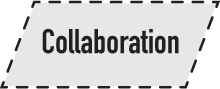
Collaboration: two teams working together for a specific period of time in order to achieve a well-defined outcome.
|
|
|
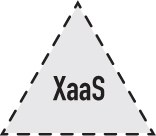
X-as-a-Service: one team providing and one team consuming something.
|
|
|
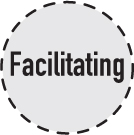
Facilitating: one team helping another team to improve or discover something.
|
|
Resource
You can download the team and interaction modes shapes to create your own team interaction diagrams at Shapes.TeamTopologies.com.
Collaboration between two teams over a short period of time can yield effective results. However, if that collaboration continues over a longer period of time, it is probably less effective. Collaboration between two teams with different skills over a long period can be quite intense and can suggest that there is potentially a missing capability or functionality within one of the teams. In this situation, we should look for ways to reduce the dependency between those teams that causes a recurring need for collaboration.
X-as-a-Service is a more long-lived interaction mode, provided that the service being supplied is (or continues to be) easily consumed by the receiving team. It is the consumption of the service by the receiving team that will determine whether the service can be considered a good fit for X-as-a-Service. However, it is important for the providing team to continually listen to feedback from the receiving teams and ensure that what worked before is still working now. They should be testing whether the service boundary is in the right place.
To determine this, both teams should try answering the following questions: If the business context has changed, do we need to shift where the boundary of responsibility lies for that thing that is being consumed? Should we be doing more as a team or should the service provider be doing more work? Both the providing team and consuming teams should always be thinking about whether the current service being provided is still the right thing. Is this interaction still the right kind of interaction? It was six months ago, but is it still?
The use of the facilitating interaction mode, where one team helps another team, is similar to that of collaboration. Short effective periods, maybe two to three weeks, of facilitation between the two teams is probably a good thing. But if that facilitating interaction is still going on after six months, it suggests something isn’t quite right.
In Figure 4.1, you can see that we have captured a snapshot in time of the current interaction modes between a set of fictitious teams.
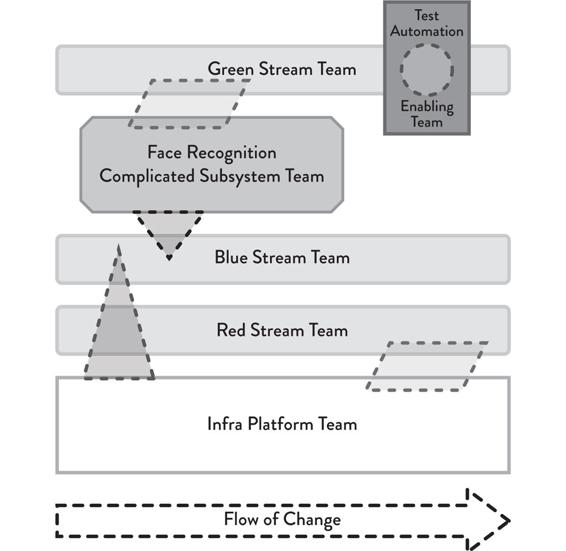
Figure 4.1: A Snapshot in Time of the Interactions Happening between a Set of Teams
It is clear that Green Stream Team is currently collaborating with the complicated subsystem team. We should expect this to be a short-term collaboration in order to define and develop a future X-as-a-Service interaction allowing the Green Stream Team to deliver value faster in the future.
We can also see that both the Blue Stream Team and the Red Stream Team consume services from the Infra Platform Team, but the Red Stream Team is also collaborating with the Infra Platform Team. Again, this may be to develop another service that the Red Stream Team could consume in the future.
In this case, the Green Stream Team is also receiving some facilitation from the Test Automation Enabling Team, which may be to help with the integrating tests in a CI/CD pipeline or kickstarting an automation test suite, for example.
The important thing to remember at this stage is that this figure is just a snapshot. This is not a static model for the organization to follow mindlessly from now and into the future. It may represent what is happening today or perhaps what is expected to happen in two months from now, but it is essential to recognize that it represents a moment in time rather than a fixed team design.
Diagrams like the one in Figure 4.1 are useful as visual prompts to help promote robust discussions around how teams are currently interacting or how the team interaction modes could or should change after a period of time. However, it is important for each team to recognize and record their current interactions as well as their expected future interactions, and then to make these easily available for others within the organization to see via their team API.
Please see Chapter 2 of this workbook for more details and examples of the Team API.
Example
There are two sections of the team API that are useful in helping to determine the necessary team interaction modes between teams: “teams we currently interact with” and “teams we expect to interact with soon.” Both are in the tables on the following page.
We can see in the examples provided on the next page that the team API has been completed by this team at a specific moment in time. They have captured that they are currently interacting with the Test Automation Enabling Team and that they are currently using the facilitating interaction mode. Their stated purpose or goal is to gain a better understanding of test automation for iOS.
This interaction occurs one day per week and is planned to last approximately two months. During this period, the team is also going to be collaborating with the Video Calls Stream Team. The purpose of their interaction is to determine how to handle authentication workflow errors in the Video Calls service. There is an expectation that this will require interactions of up to two hours per day over a three-week period.
Being clear about the purpose and interaction type enables us to ask questions like: Is the interaction truly one of collaboration? Does it feel right? Is the projected duration correct? Does it look like we are going to need much more time? If it is looking that way, what is that telling us?
Teams we currently interact with:
|
Team name
|
Interaction mode
|
Purpose
|
Duration
|
Interaction location
|
|
Test Automation Enabling Team
|
Facilitating
|
Understand test automation and data mgmt examples for iOS
|
2 months (from Mar 30 to May 29, 1 day per week)
|
Miro
|
|
Video Calls Stream Team
|
Collaboration
|
Define workflow for authentication errors in Video Calls service
|
3 weeks (from Apr 13 to Apr 30, 2h per day)
|
Zoom
|
Teams we expect to interact with soon:
|
Team name
|
Interaction mode
|
Purpose
|
Duration
|
Interactin location
|
|
Call Admin Stream Team
|
Collaboration
|
Clarify and test authentication permissions for new Call Admin standalone app
|
2 weeks (from May 1 to May 14, 2h per day)
|
Microsoft Teams
|
Just because it is taking longer than expected doesn’t mean that an interaction is necessarily good or bad, but it is a signal that we should listen for and pay attention to. Perhaps the original problem was misunderstood. Or maybe one of the teams has a gap in skills or capabilities that prevents collaboration from being effective. The key is that we are defining and observing the interactions, making it much easier to have sensible conversations about the results of the interaction.
Now Your Turn
If you haven’t already created a team API, as defined in Chapter 2 of this workbook, now might be a good time to create one.
Starting with one of your teams, think about which other teams they are currently interacting with and ask yourself the following questions:
•What is the type of the interaction: collaboration, facilitating, or X-as-a-Service?
•What is the purpose of the interaction?
•How many hours or days per week should the teams be interacting?
•What should be the duration of the interaction?
Make sure you capture the answers to these questions in the team API artifact and set a reminder to revisit each interaction some time in the near future, maybe in a month or two, to check that the captured interactions are still relevant. Repeat this with each of your teams.
Listening to Team Interactions
Difficulties or awkwardness in team interactions can be used as a kind of sensing mechanism to help evolve the organization in the right way. For example, a platform team has produced a new service to help stream-aligned teams. If those stream-aligned teams struggle to understand the service or require a lot of help to use that service, then perhaps the service is a bit too complicated. Maybe the developer experience isn’t good enough or the abstraction point is not quite right. In this case, we may require the help of an enabling team to work out where to put the abstraction by moving the API responsibility.
In the previous section, we defined and captured how these interactions should happen, which allows us to listen for when they go wrong. This can be a leading indicator for potential architectural and software delivery problems that we can spot, enabling us to identify and address them as early as possible.
The blocks connected by thin lines in Figure 4.2 show a typical organizational chart with a very hierarchical view that does not truly represent the communication that occurs within the organization. The actual communication lines that happen within an organization are shown in thick lines with arrows. People from different departments communicate with each other. At the same time, some parts of the organization might be isolated (shown with the curved line on the right-hand side).
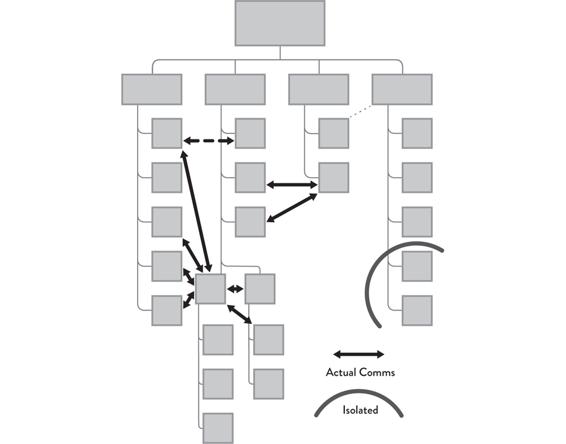
Figure 4.2: Org Chart with Lines of Actual Communication
Organizational charts like these are not fundamentally problematic as they can be very useful for certain situations, such as regulatory reporting. However, the problem with the organizational chart is that for a lot of knowledge work and discovery activities, we cannot have communication only happening up and down the different branches.
This problem is explained very well in the book Team of Teams by former US Army General Stanley McChrystal. The book centers around a time when the US Army was in Iraq fighting Al Qaeda. It describes how the Army was organized very hierarchically (like the org chart in Figure 4.2). However, they were facing a threat that had a very different decision-making and execution structure, which meant they had to radically change their organization to be able to respond to the situation on the ground at a much faster pace than the hierarchy could ever achieve.
You can see in Figure 4.3 the difference between the communication structure that the Army had been designed for versus the reality of what they were facing.
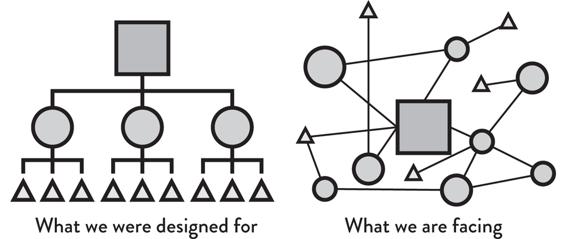
Figure 4.3: US Army Organizational Structure vs. Al Qaeda Organizational Structure
McChrystal et al., Team of Teams: New Rules of Engagement for a Complex World (NY: Penguin, 2015).
The key thing is that we need to let real needs drive the interactions between teams, not formal processes or organizational chart decisions. By “real needs,” we mean meeting the needs of customers and people who are actually using the software systems. A focus on flow will help meet those needs as effectively and quickly as possible.
This focus on flow—guided by Team Topologies principles like decoupling, domain-centric boundaries, limiting cognitive load, and so forth—helps to make asynchronous, remote work happen more effectively precisely because people in separate locations have the context, trust, and focus to be able to work effectively: partly independently and partly synchronizing on key decisions and explorations.
We want to avoid situations where the organizational chart restricts communication between teams. Instead, use the well-defined interactions and team APIs to make clear why there is a need to communicate with other teams in order to build different parts of the system.
In the context of remote work, it is too easy to accidentally fall into a swamp of direct private messages and people contacting specific individuals because chat tools make this possible. If the work were office-based, people would have to leave their desk and walk to the person. This higher bar often helps people pause and consider their communication first. To avoid the tempting swamp of direct messages in the context of remote work, we need clearly defined interaction models.
Example
Let’s look at an example. Imagine a situation where a stream-aligned team in an organization is interacting with a platform team that provides cloud infrastructure as a service, as in the team API below.
|
Team name
|
Interaction mode
|
Purpose
|
Duration
|
Notes
|
|
Infra Platform Team
|
X-as-a-Service
|
Cloud infrastructure on-demand services
|
Ongoing
|
We seem to be spending a lot of time reinventing the wheel and researching how to do things, the developer experience and documentation could be improved
|
However, when the stream-aligned team assesses whether the service provided by the platform team is easy to use and consume, they note that the current service seems to require that the stream-aligned team spend a lot of time researching how to get things done, and the documentation is not easily discoverable and consumable.
This suggests that the platform team might not really be listening to the needs of its users. Time should be spent improving that part of the service to reduce the cognitive load required from the stream-aligned team today.
While there could be a number of reasons to explain this situation (which will require further investigation), it is important to note that this type of awkward interaction could signify that the platform team may require the help of an enabling team to better understand the platform users (the stream-aligned teams).
Now Your Turn
Take a look at some of the team interactions that are happening within your organization. Make a record of what the expected interactions should be using in the team API (see Chapter 2 of this workbook) and question whether these expectations are being met: Are teams spending a long time trying to use a given service or component? Is there a lack of interaction between teams that should be collaborating to reduce their dependencies? Does work spend a lot of time waiting in queues? Is the team throughput slowing down?
Once you have identified potential awkward interactions, think about what might be causing them. This could include things like the service or component not being well specified or too difficult to use. Or maybe the team is missing a capability, doesn’t understand the value of the collaboration, or the boundary that the teams are trying to bridge is too large.
Read More
Read more about awkward team interactions in Team Topologies on pages 150–151.
Clarify Communication Purpose and Channels
In order for an organization to be effective, especially in a remote context, it is essential for the purpose and channel of any communication to be clear and obvious.
In Chapter 2 of this workbook, we discussed how we can use consistent naming conventions in tools such as Slack or Mircosoft Teams to help channels become more discoverable. But it is equally important to ensure consistency of purpose for those channels. Should a channel be public or private? Should it support a community or team, or focus on a specific topic?
Public channels should be created to enable people outside of a team to ask questions to the team rather than to individuals within the team. Doing this helps reinforce the concept of team-based ownership and reduce occurrences of people reaching out to individuals, which can be disruptive for both those individuals as well as the team. (Of course, each team will need their own private channel for internal discussions.)
Other than team-specific channels, another type you may want to consider is the community channel. These channels allow people in the communities within your organization to talk to each other, as well as for external people to ask questions to the community. Communities tend to form around areas of practice, such as UX, testing, architecture, or specific technologies and tools.
Another type of channel is a topic channel. This type of channel could be short or long lived and should be focused around trying to solve a specific issue or an immediate problem/incident that is being investigated. After the problem has been solved, a topic channel will typically be archived so that it no longer clutters the channel list but is still accessible if needed at a later date.
It is important to define usage guidelines for tools such as Slack and Microsoft Teams so everyone in the organization has a reference for recommended good practices when using them. Consider having a “public by default” policy to help provide the best opportunity to learn from any discussions but curate the experience to ensure that, where appropriate, people’s focus is narrowed to the relevant information that is useful to them.
Example
A company in the telecommunications sector has over 120 teams across three countries. The company uses Slack for internal communication and aims to make it easy and straightforward to “discover the best place to communicate” through channel naming conventions. Some conventions that seem to work include grouping by Tribe (a collection of teams), grouping by community of practice, grouping by incident, and grouping by management initiative. This results in channels named like this:
|
Channel name
|
Interpretation
|
Notes
|
|
#tribe-payments-card-management
|
The Card Management team within the Payments tribe
|
Search for #tribe- finds all Tribe-related channels
|
|
#tribe-payments-cde
|
The CDE (card data environment) team within the Payments tribe
|
Search for #tribe-payments finds all channels relating to the Payments Tribe
|
|
#tribe-myprofile-orderhistory
|
The Order History team within the My Profile tribe
|
Search for #myprofile finds all channels relating to the My Profile, including all the Tribe Channels
|
|
#cop-ux
|
The UX Community of Practice
|
Search for #cop finds all channels relating to communities of practice
|
|
#cop-testability
|
The Testability Community of Practice
|
Search for #test finds all channels relating to testing, testability, etc. and so discovers this CoP
|
|
#in-67351-2021-09-15
|
Incident channel for incident number 67351 that started on 15 September 2021
|
Search for #in- finds all channels relating to incidents
|
|
#mgt-learning-vle
|
Discussion around VLE (virtual learning environment) as part of the learning initiatives
|
Search for #mgt finds all channels relating to management initiatives
|
For discoverability to work well, channels typically need to be public (or searchable organization-wide, rather than open to the outside world). Keeping channels discoverable requires some effort in design and curation of the chat workspace.
Now Your Turn
Take a random sample of twenty to thirty channel names in the chat communication tool used within your organization. Can you decipher the purpose of each channel? Could a new member of staff decipher the purpose of the channels? What kind of naming schemes appear to be in use? Do different parts of the organization use different naming conventions? How “discoverable” are the right places to have conversations?
Ensuring Clarity of Purpose of Platforms and Services
The team API is useful for surfacing information about a team’s purpose and how that team interacts with other teams, but it is equally important for platforms and services within the organization to have a clearly defined interface that speaks to people and allows them to understand how they can interact with them.
In Team Topologies, we discuss the introduction of a thinnest viable platform (TVP), which can be as simple as a wiki page that captures key information about how to consume external services.
Read More
Read more about thinnest viable platforms in Team Topologies on pages 101, 184, and 188.
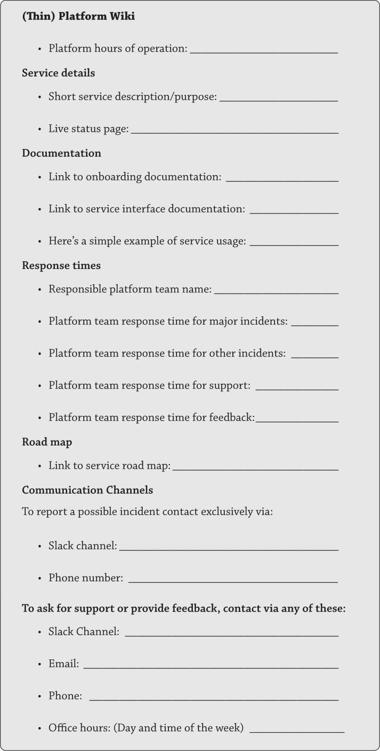
Once there is a need for a dedicated platform team responsible for the TVP, we need to expose the “interfaces” to that team. You can start by detailing your thinnest viable platform, including information such as:
•hours of operation
•brief description of the service(s) provided
•documentation for onboarding
•examples of typical response times
•road map of features being developed
•preferred ways to contact the support team
•details about communication channels, e.g., chat tools, email, phone
The thinnest viable platform is effectively a socio-technical API around a given service. It is not just the code-level API; it is the connection that speaks to human beings, allowing them to understand how they can interact with the platform.
Example: Equal Experts & ITV
Equal Experts has a great example of a Slack usage guide that you can use as a basis for defining your own (see the resources below). In their guide, they outline principles and guidelines to help users get the most shared benefit out of the tool. But it is also evolving as the organization evolves (it is not static). They used the following principles when creating their usage guidelines:2
•Give everyone the bigger picture by making information and conversations public
»Widen people’s context
»Make channels public by default, it provides the greatest opportunity for others to learn from any discussion and it documents tribal knowledge.
•Increase the signal to noise ratio of the information and conversations
»Narrow people’s focus
»Ensure people are reading information that is relevant and useful to them
»Efficiently use people’s time
•Respect the amount of information anyone can tolerate reading
»Do not overwhelm people with a high volume of messages that they are expected to read
»Avoid communication burnout
•Optimize for the whole of the global organization rather than local optimizations for parts of the organization
»Avoid creating a disjointed experience for people by focusing on overall simplicity rather than local simplicity
They have also created an open-source tool called the Equal Experts Gardener Tool, which curates and maintains channels to ensure their users have a good communication experience. This tool is used to automatically archive inactive channels to help improve the visibility of conversations and makes it easier for new joiners to find channels that are relevant to them.
Another example comes from ITV. Tom Clark, their head of common platform at the time, talked frankly about some of the issues they encountered when trying to develop their internal platform that supported all of their product teams at the DevOps Enterprise Summit–London in 2019.3 After realizing that version one of the common platform focused mainly on infrastructure hosting rather than helpful services for product development, they staged an intervention with the goal to “provide a brilliant hosting and development platform.”4 In order to achieve this, they reached out to their customers (the product teams) and asked the question, “What can we do better to support you?”
One of the key responses was to be more transparent and communicate what they were doing more clearly. So, as they embarked on version two of the platform development, they ensured that they set up a public road map and backlog, and they publicized its existence, allowing anyone to see progress. They created a specific Slack channel for the project, allowing other members of the team to join the conversation. They also set up a contributors group, allowing a mechanism for constant feedback from their customers.
All of this enabled the team to create a new, compelling platform version that resulted in Dave Smith, a principal developer at ITV, sending an email to his team encouraging them to use the new platform: “The performance is better, it’s cheaper to run, the config is nicer, the deployment timers are delightful and the scaling is sublime.”5
Obviously, there was more to the development of the platform than just the communication channels, but being transparent and engaging with customers of the platform in a focused and relevant way was a key contributor to its success.
Now Your Turn
Take a look at the channels in Slack or Microsoft Teams (or other chat tools) that you are currently using within your organization. Are they focused and relevant? Or are people bombarded with messages and notifications that they simply do not care about? Are people likely to unsubscribe from channels because they are too noisy?
Consider how you might create channels for teams that enable public communication with the whole team combined with private channels for the teams to engage in private conversations.
•Does it make sense to create channels around certain communities?
•Would the introduction of temporary, topic-specific channels help keep communication concise?
•If a new person is onboarded to your team, how easy would it be for them to learn which channels are relevant to the work they will be doing?
•Would the introduction of a Slack usage guide be beneficial within your organization to help keep remote communication consistent among all users?
Think about some of the platforms or services within your organization.
•How easy is it for people to discover what it is and how they should interact with it?
•How are you currently making that information consumable?
•Are there ways in which it could be improved?
You can use the thinnest viable platform template provided below as a basis to describe them.
Example Wiki Page: Thinnest Viable Platform Template
A simple but comprehensive wiki page provides a single point of entry for anyone wanting to know more about a service, report an issue, or find out the current status, road map, and so on. In this example for a thinnest viable platform, each team responsible for a platform service should answer the questions and fill in the details below. Repeat the Service Details section for each service that the team builds and runs.