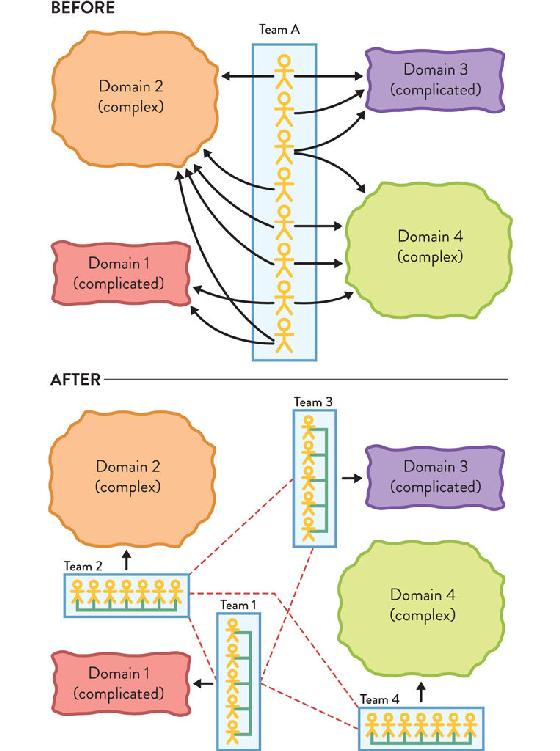
Figure 3.2: No More than One Complicated or Complex Domain per Team
Before: a larger team is spread thin across four domains (two complicated and two complex) and struggles to perform well. Intra-team morale is negatively affected, with frequent context switches and individual disengagement. After: with multiple smaller teams each focusing on a single domain, motivation rises and the team delivers faster and more predictably. Low bandwidth inter-team collaboration allows solving occasional issues affecting two or more domains.
As always, these are only recommendations, not a definitive path to success. Use these guidelines as a starting point from which to adapt as your organization evolves and learns. Always remember that, in the end, even if the allocation of domains seems to make sense, if the teams doing the work are still feeling overwhelmed, stress builds up and morale weakens, leading to poor results.
Match Software Boundary Size to Team Cognitive Load
To keep software delivery teams effective and able to own and evolve parts of the software systems, we need to take a team-first approach to the size of software subsystems and the placement of boundaries. Instead of designing a system in the abstract, we need to design the system and its software boundaries to fit the available cognitive load within delivery teams.
Instead of choosing between a monolithic architecture or a microservices architecture, design the software to fit the maximum team cognitive load. Only then can we hope to achieve sustainable, safe, rapid software delivery. This team-first approach to software boundaries leads to favoring certain styles of software architecture, such as small, decoupled services. We can visualize this team-first approach to software subsystem boundaries in Figure 3.3 (see page 45).
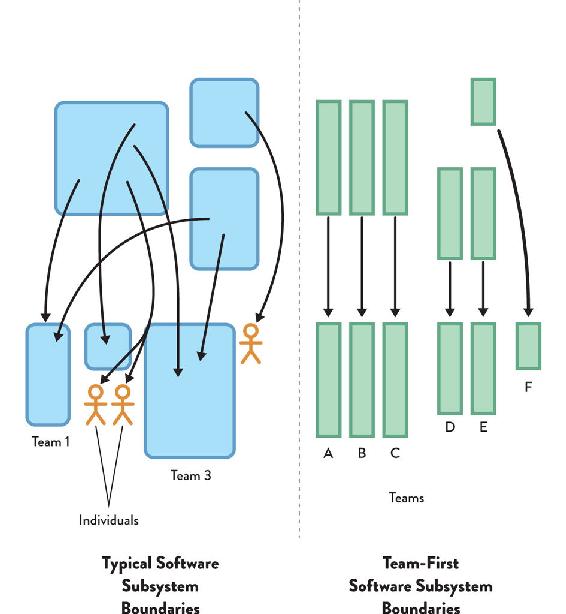
Figure 3.3: Typical vs. Team-First Software Subsystem Boundaries
On the left, we see typical software subsystem boundaries, with different parts of systems or products assigned to a mix of multiple teams, single teams, and individuals. On the right, we see the Team Topologies’ team-first approach to software subsystem boundaries, with every part of the system being team sized and owned by one team.
To increase the size of a software subsystem or domain for which a team is responsible, tune the ecosystem in which the team works in order to maximize the cognitive capacity of the team (by reducing the intrinsic and extraneous types of load):
By actively reducing extraneous mental overheads for teams and team members through these and similar approaches, organizations can give teams more cognitive space to take on more challenging parts of the software systems. Conversely, if an organization does not have team-first office space, good management practices, and especially a team-first platform, then the size of software subsystems that teams can take on will be smaller. A larger number of smaller parts requires more teams to work on them, costing more. Taking a team-first approach to software subsystem boundaries by designing for cognitive load means happier teams and (eventually) lower costs.
Albert Bertilsson, Solution Team Lead, and Gustaf Nilsson Kotte, Web Developer, felt the weight of a continuously increasing cognitive load on the mobile team they were leading at IKEA back in 2017. As they relayed to us, in the previous year, the team kept growing as a result of successful delivery of multiple projects in a short period of time and across multiple markets.
This high-performing team kept adding more and more responsibilities on their shoulders, as the number of software products they maintained kept increasing. Eventually, they started to run into problems due to some work streams preventing the releases of others. Despite understandable pushback from the team, Bertilsson and Kotte managed to convince team members that they really had two products in the same codebase and needed to split the team in two, following Conway’s law. An interesting bit to retain here is that this was a high-performing team with all the intrinsic motivators (autonomy, mastery, and purpose), yet they were still feeling the pains of cognitive overload.
A further benefit of taking a team-first approach to software boundaries is that the team tends to easily develop a shared mental model of the software being worked on. Research has shown that the similarity of team mental models is a good predictor of team performance, meaning fewer mistakes, more coherent code, and more rapid delivery of outcomes.27 As we begin to optimize more and more for the team, the benefits begin to compound in a positive way.
TIP
“Minimize cognitive load for others” is one of the most useful heuristics for good software development.
Design “Team APIs” and Facilitate Team Interactions
Now that we see the team as the fundamental means of delivery, we can begin to design other things around the team. In this section, we explore concepts such as the team API and well-defined team interactions as ways to produce a coherent, dynamic network of cleanly communicating teams.
Define “Team APIs” that Include Code, Documentation, and User Experience
With stable, long-lived teams that own specific bits of the software systems, we can begin to build a stable team API: an API surrounding each team. An API (application programming interface) is a description and specification for how to interact programmatically with software, so we extend this idea to entire interactions with the team. The team API includes:
The team API should explicitly consider usability by other teams: Will other teams find it easy and straightforward to interact with us, or will it be difficult and confusing? How easy will it be for a new team to get on board with our code and working practices? How do we respond to pull requests and other suggestions from other teams? Is our team backlog and product roadmap easily visible and understandable by other teams?
For effective team-first ownership of software, teams need to continuously define, advertise, test, and evolve their team API to ensure that it is fit for purpose for the consumers of that API: other teams. In Dynamic Reteaming (by Heidi Helfand), Evan Wiley, Director of Program Management at Pivotal Cloud Foundry (PCF), a major enterprise Platform-as-a-Service (PaaS) provider, describes how more than fifty teams are seen at PCF:
We really try to maintain as much contract based, API-based separation of concerns between teams [emphasis added] as we can. We try not to share code bases between teams. All the git repos for a particular team’s feature are wholly owned by that team and if another team is going to make an addition or change to that code base, they’ll either do it with a pull request or through cross-team pairing, where we would kind of send one half of a pair over to the dependency holding team and one half of that team’s pair back to the upstream team to work on that feature.28
An even more stringent team API approach is taken at cloud vendor AWS, where CEO Jeff Bezos insisted on almost paranoid levels of separation between teams. For example, each team at AWS must assume that “every [other team] becomes a potential DOS [denial of service] attacker requiring service levels, quotas, and throttling.”29
Many of the behaviors and patterns that make a good team API also make for a good platform and good team interactions in general. (See Chapter 5 for more details about what makes a good platform, and Chapter 7 for details about promise theory, a team-based approach to cooperation in sociotechnical systems.)
Facilitate Team Interactions for Trust, Awareness, and Learning
It is important to provide time, space, and money to enable and encourage people from different teams with similar skills and expertise to come together to learn from each other and to develop their professional competencies.
By explicitly setting aside time and space for teams and people to intercommunicate and learn, organizations can make learning and trust building part of the rhythm that facilitates effective team interactions. Two critical ways this can help teams build trust and awareness and learn new things are: (1) a consciously designed physical and virtual environment; and (2) time away from desks at guilds, communities of practice (a group of people who regularly get together on a voluntary basis to collectively learn and share knowledge about a domain of interest, internal tech conferences, etc.
Because this team interaction is outside the everyday building and running of the main software systems, Conway’s law plays a much less obvious role, and a freer cross-association between teams can take place. Crucially, teams that have a chance to rehearse their team interactions in these contexts tend to find it easier to interact with other teams when building and running software systems, as found in the groundbreaking research by Robert Axelrod and author Mark Burgess.30
Explicitly Design the Physical and Virtual Environments to Help Team Interactions
Consciously designed physical and virtual environments are necessary for teams to learn and build trust. However, different people need different environments at different times to be productive. Some tasks (e.g., implementing and testing a complicated algorithm) might require full concentration and low levels of noise. Other tasks require a very collaborative approach (e.g., defining user stories and acceptance criteria). People who work all day with headphones on are seen as anti-social, and their behavior does not promote interaction and collaboration; but it could well be that the office environment is generally noisy and these people require a quiet environment to be effective.
Neither individual cubicles nor fully open-plan seating is generally suitable for teams: we need something better. Teams need the ability to collaborate frequently, internally and only occasionally externally (with other teams). This balance is hard to achieve both in an open-plan layout (no dedicated work area for the team) and in an individual-workspaces layout (time together needs to be planned ahead of time and meeting rooms are often scarce). Spotify recognized this early on in their growth and arranged their office space to support both needs.31 Back in 2012, Henrik Kniberg and Anders Ivarsson—then working at Spotify—talked about how “squads in a tribe are all physically in the same office, normally right next to each other, and the lounge areas nearby promote collaboration between the squads.”32
Office design for effective software delivery should accommodate all of the following modes of work: focused individual work, collaborative intra-team work, and collaborative inter-team work.
Having workspaces that clearly indicate the type of work going on also helps reduce disturbance and unnecessary interruptions.
CASE STUDY: TEAM-FOCUSED OFFICE SPACE AT CDL
Michael Lambert, Head of Development, CDL
Andy Rubio, Development Team Leader, CDL
CDL is a UK-based company that is a market leader in the highly competitive retail-insurance sector.
Here at CDL, our Agile journey has seen us evolve in many ways. One aspect many people are interested in is how we organize the working environment for our teams. From the start, we have always had the luxury of being able to colocate our Agile teams. After moving to new offices and then quickly outgrowing them, we moved many of our development project teams back to our old headquarters, which gave us multiple small project rooms where a development team could set up home. We liked the space and ownership this brought, but cross-team communication and visibility of other teams was less optimal. When our new home, “The Codeworks,” was built, we thought long and hard about what the layout of the development areas should be.
We visualized everything, so lots of magnetic whiteboards [were] essential. We liked the team space our old building gave us, but we needed less isolation of teams, and we had the usual physical numbers and space constraints. If teams did not have enough space or only had small cubical clusters or tight horseshoe arrangements, then availability of meeting rooms for team ceremonies would become a big problem. Ideally, we wanted both: team space for the team to get their stuff done and openness for the teams to collaborate and share.
What we came up with was a “benched bay” approach, with one long bench for each team, and each bench was flanked by whiteboard partitions. Where a team butted up to an end wall, we painted it with smart-surface paint so we could draw on it (see Figure 3.4 on page 52).