Chapter 8. Deployment
Deploying a single-process monolithic application is a fairly straightforward process. Microservices, with their interdependence and wealth of technology options, are a different kettle of fish altogether. When I wrote the first edition of this book, this chapter already had a lot to say about the huge variety of options available to you. Since then, Kubernetes has come to the fore, and Function as a Service (FaaS) platforms have given us even more ways to think about how to actually ship our software.
Although the technology may have changed over the last decade, I think many of the core principles associated with building software haven’t changed. In fact, I think it’s all the more important that we thoroughly understand these foundational ideas, as they can help us understand how to navigate this chaotic landscape of new technology. With that in mind, this chapter will highlight some core principles related to deployment that are important to understand, while also showing how the different tools available to you may help (or hinder) in regard to putting these principles into practice.
To start off with, though, let’s peek behind the curtain a bit and look at what happens as we move from a logical view of our systems architecture toward a real physical deployment topology.
From Logical to Physical
To this point, when we’ve discussed microservices, we’ve spoken about them in a logical sense rather than in a physical sense. We could talk about how our Invoice microservice communicates with the Order microservice, as shown in Figure 8-1, without actually looking at the physical topology of how these services are deployed. A logical view of an architecture typically abstracts away underlying physical deployment concerns—that notion needs to change for the scope of this chapter.
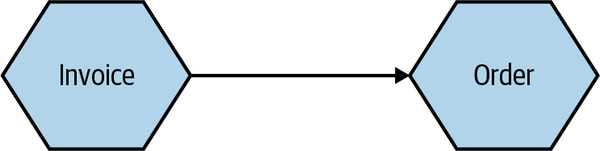
Figure 8-1. A simple, logical view of two microservices
This logical view of our microservices can hide a wealth of complexity when it comes to actually running them on real infrastructure. Let’s take a look at what sorts of details might be hidden by a diagram like this.
Multiple Instances
When we think about the deployment topology of the two microservices (in Figure 8-2), it’s not as simple as one thing talking to another. To start with, it seems quite likely that we’ll have more than one instance of each service. Having multiple instances of a service allows you to handle more load and can also improve the robustness of your system, as you can more easily tolerate the failure of a single instance. So we potentially have one or more instances of Invoice talking to one or more instances of Order. Exactly how the communication between these instances is handled will depend on the nature of the communication mechanism, but if we assume that in this situation we’re using some form of HTTP-based API, a load balancer would be enough to handle routing of requests to different instances, as we see in Figure 8-2.
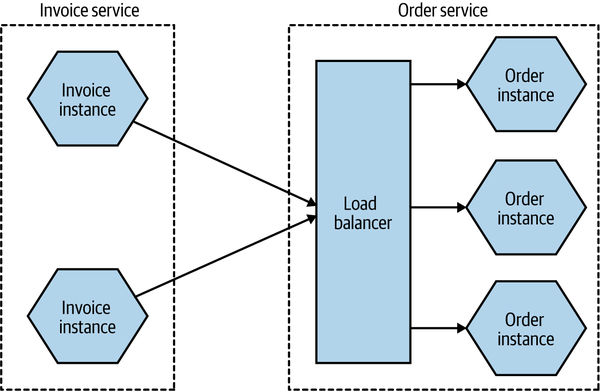
Figure 8-2. Using a load balancer to map requests to specific instances of the Order microservice
The number of instances you’ll want will depend on the nature of your application—you’ll need to assess the required redundancy, expected load levels, and the like to come up with a workable number. You may also need to take into account where these instances will run. If you have multiple instances of a service for robustness reasons, you likely want to make sure that these instances aren’t all on the same underlying hardware. Taken further, this might require that you have different instances distributed not only across multiple machines but also across different data centers, to give you protection against a whole data center being made unavailable. This might lead to a deployment topology like the one in Figure 8-3.
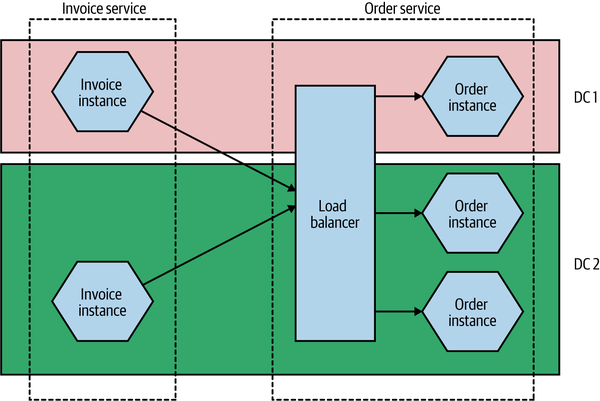
Figure 8-3. Distributing instances across multiple different data centers
This might seem overly cautious—what are the chances of an entire data center being unavailable? Well, I can’t answer that question for every situation, but at least when dealing with the main cloud providers, this is absolutely something you have to take account of. When it comes to something like a managed virtual machine, neither AWS nor Azure nor Google will give you an SLA for a single machine, nor do they give you an SLA for a single availability zone (which is the closest equivalent to a data center for these providers). In practice, this means that any solution you deploy should be distributed across multiple availability zones.
The Database
Taking this further, there is another major component that we’ve ignored up until this point—the database. As I’ve already discussed, we want a microservice to hide its internal state management, so any database used by a microservice for managing its state is considered to be hidden inside the microservice. This leads to the oft-stated mantra of “don’t share databases,” the case for which I hope has already been made sufficiently by now.
But how does this work when we consider the fact that I have multiple microservice instances? Should each microservice instance have its own database? In a word, no. In most cases, if I go to any instance of my Order service, I want to be able to get information about the same order. So we need some degree of shared state between different instances of the same logical service. This is shown in Figure 8-4.
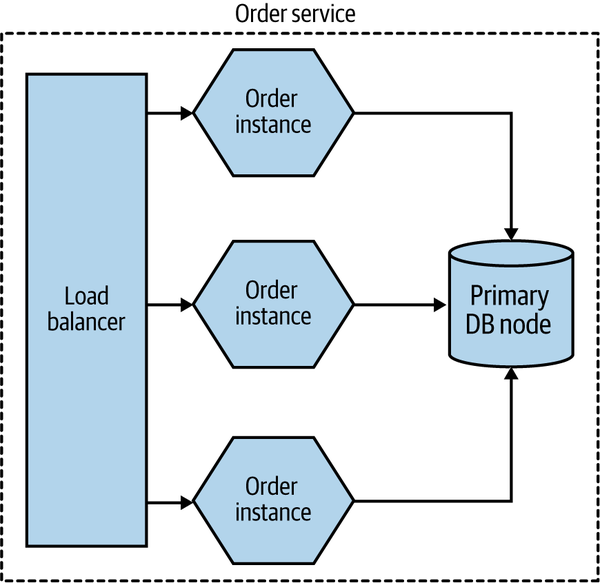
Figure 8-4. Multiple instances of the same microservice can share a database
But doesn’t this violate our “don’t share databases” rule? Not really. One of our major concerns is that when sharing a database across multiple different microservices, the logic associated with accessing and manipulating that state is now spread across different microservices. But here the data is being shared by different instances of the same microservice. The logic for accessing and manipulating state is still held within a single logical microservice.
Database deployment and scaling
As with our microservices, we’ve so far mostly talked about a database in a logical sense. In Figure 8-3, we ignored any concerns about the redundancy or scaling needs of the underlying database.
Broadly speaking, a physical database deployment might be hosted on multiple machines, for a host of reasons. A common example would be to split load for reads and writes between a primary node and one or more nodes that are designated for read-only purposes (these nodes are typically referred to as read replicas). If we were implementing this idea for our Order service, we might end up with a situation like the one shown in Figure 8-5.
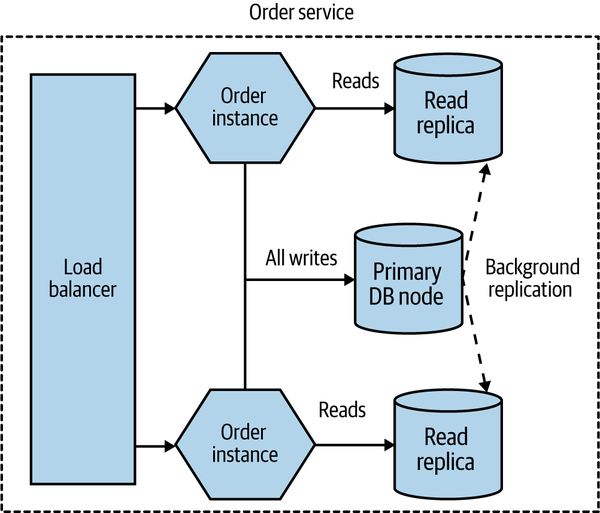
Figure 8-5. Using read replicas to distribute load
All read-only traffic goes to one of the read replica nodes, and you can further scale read traffic by adding additional read nodes. Due to the way that relational databases work, it’s more difficult to scale writes by adding additional machines (typically sharding models are required, which adds additional complexity), so moving read-only traffic to these read replicas can often free up more capacity on the write node to allow for more scaling.
Added to this complex picture is the fact that the same database infrastructure can support multiple logically isolated databases. So the databases for Invoice and Order might both be served by the same underlying database engine and hardware, as shown in Figure 8-6. This can have significant benefits—it allows you to pool hardware to serve multiple microservices, it can reduce licensing costs, and it can also help reduce the work around management of the database itself.
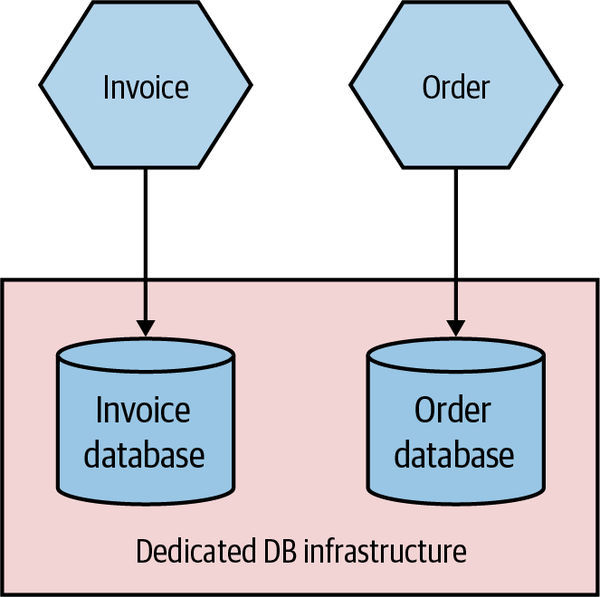
Figure 8-6. The same physical database infrastructure hosting two logically isolated databases
The important thing to realize here is that although these two databases might be run from the same hardware and database engine, they are still logically isolated databases. They cannot interfere with each other (unless you allow that). The one major thing to consider is that if this shared database infrastructure fails, you might impact multiple microservices, which could have catastrophic impact.
In my experience, organizations that manage their own infrastructure and run in an “on-prem” fashion tend to be much more likely to have multiple different databases hosted from shared database infrastructure, for the cost reasons I outlined before. Provisioning and managing hardware is painful (and historically at least, databases are less likely to run on virtualized infrastructure), so you want less of that.
On the other hand, teams that run on public cloud providers are much more likely to provision dedicated database infrastructure on a per-microservice basis, as shown in Figure 8-7. The costs of provisioning and managing this infrastructure are much lower. AWS’s Relational Database Service (RDS), for example, can automatically handle concerns like backups, upgrades, and multiavailability zone failover, and similar products are available from the other public cloud providers. This makes it much more cost effective to have more isolated infrastructure for your microservice, giving each microservice owner more control rather than having to rely on a shared service.
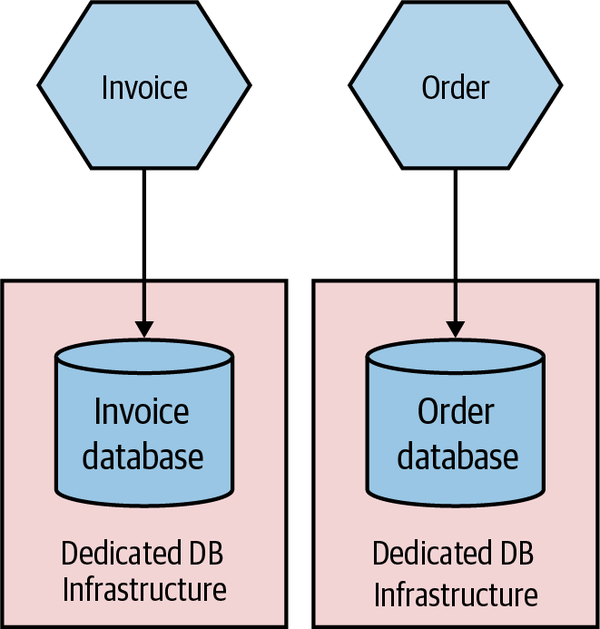
Figure 8-7. Each microservice making use of its own dedicated DB infrastructure
Environments
When you deploy your software, it runs in an environment. Each environment will typically serve different purposes, and the exact number of environments you might have will vary greatly based on how you develop software and how your software is deployed to your end user. Some environments will have production data, while others won’t. Some environments may have all services in them; others might have just a small number of services, with any nonpresent services replaced with fake ones for the purposes of testing.
Typically, we think of our software as moving through a number of preproduction environments, with each one serving some purpose to allow the software to be developed and its readiness for production to be tested—we explored this in “Trade-Offs and Environments”. From a developer laptop to a continuous integration server, an integrated test environment, and beyond—the exact nature and number of your environments will depend on a host of factors but will be driven primarily by how you choose to develop software. In Figure 8-8, we see a pipeline for
MusicCorp’s Catalog microservice. The microservice moves through different environments before it finally gets into a production environment, where our users will get to use the new software.
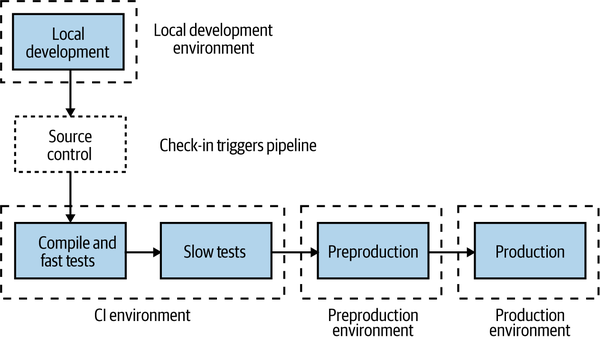
Figure 8-8. Different environments used for different parts of the pipeline
The first environment our microservice runs in is wherever the developer was working on the code prior to check-in—probably their local laptop. After committing the code, the CI process kicks off with the fast tests. Both the fast and slow test stages deploy into our CI environment. If the slow tests pass, the microservice is deployed into the preproduction environment to allow for manual verification (which is entirely optional but still important for many). If this manual verification passes, the microservice is then deployed into production.
Ideally, each environment in this process would be an exact copy of the production environment. This would give us even more confidence that our software will work when it reaches production. However, in reality, we often can’t afford to run multiple copies of our entire production environment due to how expensive this is.
We also want to tune environments earlier in this process to allow for fast feedback. It’s vital that we know as early as possible whether or not our software works so that we can fix things quickly, if needed. The earlier we know about a problem with our software, the faster it is to fix it, and the lower the impact of the break. It’s much better to find a problem on our local laptop than pick it up in preproduction testing, but likewise picking up a problem in preproduction testing might be much better for us than picking something up in production (although we will explore some important trade-offs around this in Chapter 9).
This means that environments closer to the developer will be tuned to provide fast feedback, which may compromise how “production-like” they are. But as environments get closer to production, we will want them to be more and more like the end production environment to ensure that we catch problems.
As a simple example of this in action, let’s revisit our earlier example of the Catalog service and take a look at the different environments. In Figure 8-9, the local developer laptop has our service deployed as a single instance running locally. The software is fast to build but is deployed as a single instance running on very different hardware from what we expect in production. In the CI environment, we deploy two copies of our service to test against, making sure our load balancing logic is working OK. We deploy both instances to the same machine—this keeps costs down and makes things faster, and it still gives us enough feedback at this stage in the process.
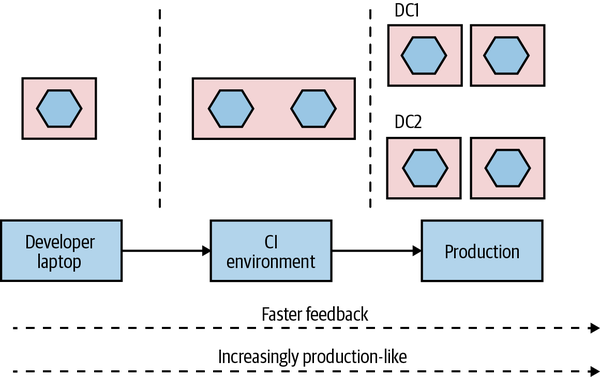
Figure 8-9. A microservice can vary in how it is deployed from one environment to the next
Finally, in production, our microservice is deployed as four instances, spread across four machines, which in turn are distributed across two different data centers.
This is just an example of how you might use environments; exactly what setup you’ll need will vary greatly depending on what you are building and how you deploy it. You might, for example, have multiple production environments if you need to deploy one copy of your software for each customer.
The key thing, though, is that the exact topology of your microservice will change from environment to environment. You therefore need to find ways to change the number of instances from one environment to another, along with any environment-specific configuration. You also want to build your service instances once and once only, so it follows that any environment-specific information needs to be separate from the deployed service artifact.
How you go about varying the topology of your microservice from one environment to another will depend greatly on the mechanism you use for deployment, and also on how much the topologies vary. If the only thing that changes from one environment to another is the number of microservice instances, this might be as simple as parameterizing this value to allow for different numbers to be passed in as part of the deployment activity.
So, to summarize, a single logical microservice can be deployed into multiple environments. From one environment to the next, the number of instances of each microservice can vary based on the requirements of each environment.
Principles of Microservice Deployment
With so many options before you for how to deploy your microservices, I think it’s important that I establish some core principles in this area. A solid understanding of these principles will stand you in good stead no matter the choices you end up making. We’ll look at each principle in detail shortly, but just to get us started, here are the core ideas we’ll be covering:
- Isolated execution
-
Run microservice instances in an isolated fashion such that they have their own computing resources, and their execution cannot impact other microservice instances running nearby.
- Focus on automation
-
As the number of microservices increases, automation becomes increasingly important. Focus on choosing technology that allows for a high degree of automation, and adopt automation as a core part of your culture.
- Infrastructure as code
-
Represent the configuration for your infrastructure to ease automation and promote information sharing. Store this code in source control to allow for environments to be re-created.
- Zero-downtime deployment
-
Take independent deployability further and ensure that deploying a new version of a microservice can be done without any downtime to users of your service (be they humans or other microservices).
- Desired state management
-
Use a platform that maintains your microservice in a defined state, launching new instances if required in the event of outages or traffic increases.
Isolated Execution
You may be tempted, especially early on in your microservices journey, to just put all of your microservice instances on a single machine (which could be a single physical machine or a single VM), as shown in Figure 8-10. Purely from a host management point of view, this model is simpler. In a world in which one team manages the infrastructure and another team manages the software, the infrastructure team’s workload is often a function of the number of hosts it has to manage. If more services are packed on to a single host, the host management workload doesn’t increase as the number of services increases.
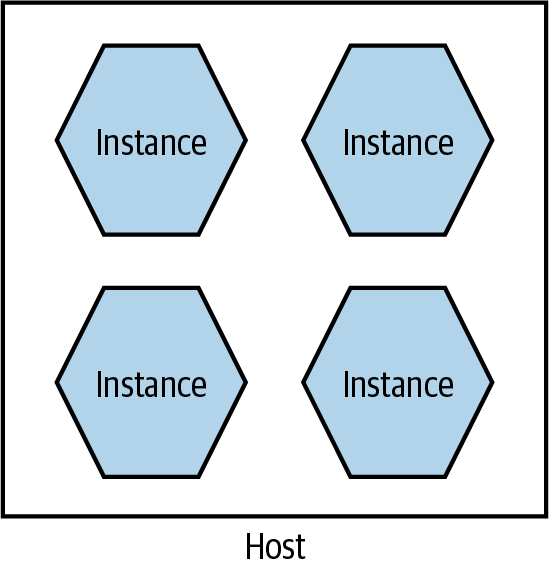
Figure 8-10. Multiple microservices per host
There are some challenges with this model, though. First, it can make monitoring more difficult. For example, when tracking CPU, do I need to track the CPU of one service independent of the others? Or do I care about the CPU of the host as a whole? Side effects can also be hard to avoid. If one service is under significant load, it can end up reducing the resources available to other parts of the system. This was an issue that Gilt, an online fashion retailer, encountered. Starting with a Ruby on Rails monolith, Gilt decided to move to microservices to make it easier to scale the application and also to better accomodate a growing number of developers. Initially Gilt coexisted many microservices on a single box, but uneven load on one of the microservices would have an adverse impact on everything else running on that host. This made impact analysis of host failures more complex as well—taking a single host out of commission can have a large ripple effect.
Deployment of services can be somewhat more complex too, as ensuring one deployment doesn’t affect another leads to additional headaches. For example, if each microservice has different (and potentially contradictory) dependencies that need to be installed on the shared host, how can I make that work?
This model can also inhibit the autonomy of teams. If services for different teams are installed on the same host, who gets to configure the host for their services? In all likelihood, this ends up getting handled by a centralized team, meaning it takes more coordination to get services deployed.
Fundamentally, running lots of microservice instances on the same machine (virtual or physical) ends up drastically undermining one of the key principles of microservices as a whole—independent deployability. It follows, therefore, that we really want to run microservice instances in isolation, as we see in Figure 8-11.
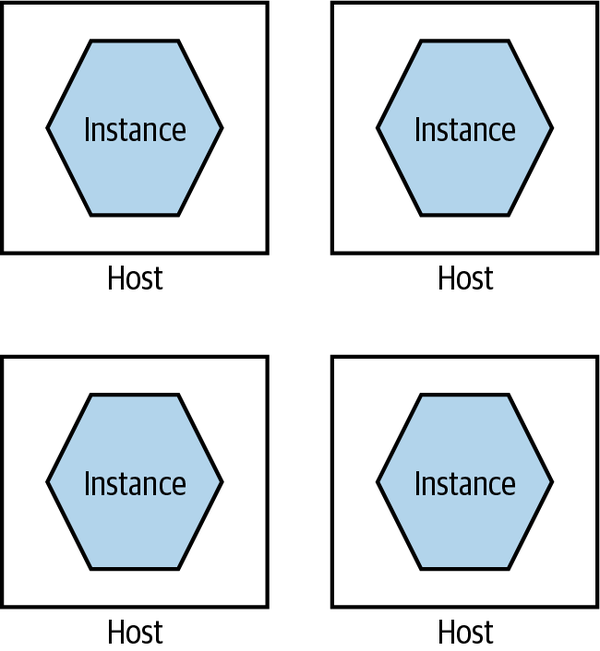
Figure 8-11. A single microservice per host
Each microservice instance gets its own isolated execution environment. It can install its own dependencies, and have its own set of ring-fenced resources.
As my old colleague Neal Ford puts it, many of our working practices around deployment and host management are an attempt to optimize for scarcity of resources. In the past, if we wanted another machine to achieve isolation, our only option was to buy or rent another physical machine. This often had a large lead time to it and resulted in a long-term financial commitment. In my experience, it’s not uncommon for clients to provision new servers only every two to three years, and trying to get additional machines outside of these timelines is difficult. But on-demand computing platforms have drastically reduced the costs of computing resources, and improvements in virtualization technology mean there is more flexibility, even for in-house hosted infrastructure.
With containerization joining the mix, we have more options than ever before for provisioning an isolated execution environment. As Figure 8-12 shows, broadly speaking, we go from the extreme of having dedicated physical machines for our services, which gives us the best isolation but probably the highest cost, to containers at the other end, which gives us weaker isolation but tends to be more cost effective and much faster to provision. We’ll come back to some of the specifics around technology such as containerization later in this chapter.
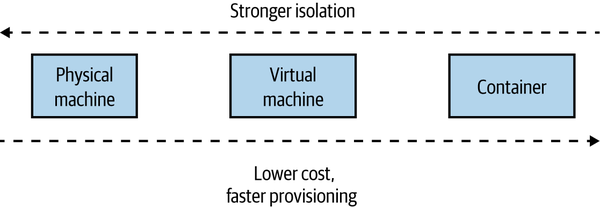
Figure 8-12. Different trade-offs around isolation models
If you were deploying your microservices onto more abstracted platforms such as AWS Lambda or Heroku, this isolation would be provided for you. Depending on the nature of the platform itself, you could likely expect your microservice instance to end up running inside a container or dedicated VM behind the scenes.
In general, the isolation around containers has improved sufficiently to make them a more natural choice for microservice workloads. The difference in isolation between containers and VMs has reduced to the point that for the vast majority of workloads, containers are “good enough,” which is in large part why they are such a popular choice and why they tend to be my default choice in most situations.
Focus on Automation
As you add more microservices, you’ll have more moving parts to deal with—more processes, more things to configure, more instances to monitor. Moving to microservices pushes a lot of complexity into the operational space, and if you are managing your operational processes in a mostly manual way, this means that more services will require more and more people to do things.
Instead, you need a relentless focus on automation. Select tooling and technology that allows for things to be done in an automatic fashion, ideally with a view to working with infrastructure as code (which we’ll cover shortly).
As the number of microservices increases, automation becomes increasingly important. Give serious consideration to technology that allows for a high degree of automation, and adopt automation as a core part of your culture.
Automation is also how you can make sure that your developers still remain productive. Giving developers the ability to self-service-provision individual services or groups of services is the key to making their lives easier.
Picking technology that enables automation starts with the tools used to manage hosts. Can you write a line of code to launch a virtual machine, or shut one down? Can you deploy the software you have written automatically? Can you deploy database changes without manual intervention? Embracing a culture of automation is key if you want to keep the complexities of microservice architectures in check.
Two case studies on the power of automation
It will probably be helpful to give you a couple of concrete examples that explain the power of good automation. The Australian company realestate.com.au (REA) provides real estate listings for retail and commercial customers in Australia and elsewhere in the Asia-Pacific region. Over a number of years, it had been moving its platform toward a distributed microservices design. When it started on this journey, it had to spend a lot of time getting the tooling around the services just right—making it easy for developers to provision machines, deploy their code, and monitor their services. This caused a front-loading of work to get things started.
In the first three months of this exercise, REA was able to move just two new microservices into production, with the development team taking full responsibility for the entire build, deployment, and support of the services. In the next three months, between 10 to 15 services went live in a similar manner. By the end of an 18-month period, REA had more than 70 services in production.
This sort of pattern is also borne out by the experiences of Gilt, which we mentioned earlier. Again, automation, especially tooling to help developers, drove the explosion in Gilt’s use of microservices. A year after starting its migration to microservices, Gilt had around 10 microservices live; by 2012, over 100; and in 2014, over 450 microservices were live—or around three microservices for every developer in Gilt. This sort of ratio of microservices to developers is not uncommon among organizations that are mature in their use of microservices, the Financial Times being a company with a similar ratio.
Infrastructure as Code (IAC)
Taking the concept of automation further, infrastructure as code (IAC) is a concept whereby your infrastructure is configured by using machine-readable code. You might define your service configuration in a chef or puppet file, or perhaps write some bash scripts to set things up—but whatever tool you end up using, your system can be brought into a known state through the use of source code. Arguably, the concept of IAC could be considered one way to implement automation. I think, though, that it’s worth calling it out as its own thing, because it speaks to how automation should be done. Infrastructure as code has brought concepts from software development into the operations space. By defining our infrastructure via code, this configuration can be version controlled, tested, and repeated at will. For more on this topic, I recommend Infrastructure as Code, 2nd edition, by Kief Morris.1
Theoretically, you could use any programming language to apply the ideas of infrastructure as code, but there are specialist tools in this area such as Puppet, Chef, Ansible, and others, all of which took their lead from the earlier CFEngine. These tools are declarative—they allow you to define in textual form what you expect a machine (or other set of resources) to look like, and when these scripts are applied, the infrastructure is brought into that state. More recent tools have gone beyond looking at configuring a machine and moved into looking at how to configure entire sets of cloud resources—Terraform has been very successful in this space, and I’m excited to see the potential of Pulumi, which is aiming to do something similar, albeit by allowing people to use normal programming languages rather than the domain-specific languages that often get used by these tools. AWS CloudFormation and the AWS Cloud Development Kit (CDK) are examples of platform-specific tools, in this case supporting only AWS—although it’s worth noting that even if I was working only with AWS, I’d prefer the flexibility of a cross-platform tool like Terraform.
Version controlling your infrastructure code gives you transparency over who has made changes, something that auditors love. It also makes it easier to reproduce an environment at a given point in time. This is something that can be especially useful when trying to track down defects. In one memorable example, one of my clients, as part of a court case, had to re-create an entire running system as of a specific time some years before, down to the patch levels of the operating systems and the contents of message brokers. If the environment configuration had been stored in version control, their job would have been much easier—as it was, they ended up spending over three months painstakingly trying to rebuild a mirror image of an earlier production environment by wading through emails and release notes to try and work out what was done by whom. The court case, which had already been going for a long period of time, was still not resolved by the time I ended my work with the client.
Zero-Downtime Deployment
As you are probably sick and tired of hearing me say, independent deployability is really important. It is, however, also not an absolute quality. How independent is something exactly? Before this chapter, we’d primarily looked at independent deployability in terms of avoiding implementation coupling. Earlier in this chapter, we spoke about the importance of providing a microservice instance with an isolated execution environment, to ensure it has a degree of independence at the physical deployment level. But we can go further.
Implementing the ability for zero-downtime deployment can be a huge step up in allowing microservices to be developed and deployed. Without zero-downtime deployment, I may have to coordinate with upstream consumers when I release software to alert them of a potential outage.
Sarah Wells at the Financial Times cites the ability to implement zero-downtime deployment as being the single biggest benefit in terms of improving the speed of delivery. With the confidence that releases wouldn’t interrupt its users, the Financial Times was able to drastically increase the frequency of releases. In addition, a zero-downtime release can be much more easily done during working hours. Quite aside from the fact that doing so improves the quality of life of the people involved with the release (compared to working evenings and weekends), a well-rested team working during the day is less likely to make mistakes and will have support from many of their colleagues when they need to fix issues.
The goal here is that upstream consumers shouldn’t notice at all when you do a release. Making this possible can depend greatly on the nature of your microservice. If you’re already making use of middleware-backed asynchronous communication between your microservice and your consumers, this might be trivial to implement—messages sent to you will be delivered when you are back up. If you’re making use of synchronous-based communication, though, this can be more problematic.
Concepts like rolling upgrades can be handy here, and this is one area where the use of a platform like Kubernetes makes your life much easier. With a rolling upgrade, your microservice isn’t totally shut down before the new version is deployed, instead instances of your microservice are slowly ramped down as new instances running new versions of your software are ramped up. It’s worth noting, though, that if the only thing you are looking for is something to help with zero-downtime deployments, then implementing Kubernetes is likely huge overkill. Something simple like a blue-green deployment mechanism (which we’ll explore more in “Separating Deployment from Release”) can work just as effectively.
There can be additional challenges in terms of dealing with problems like long-lived connections and the like. It’s certainly true that if you build a microservice with zero-downtime deployment in mind, you’ll likely have a much easier time of it than if you took an existing systems architecture and attempted to retrofit this concept afterwards. Whether or not you are able to implement a zero-downtime deployment for your services initially, if you can get there you’ll certainly appreciate that increased level of independence.
Desired State Management
Desired state management is the ability to specify the infrastructure requirements you have for your application, and for those requirements to be maintained without manual intervention. If the running system changes in such a way that your desired state is no longer maintained, the underlying platform takes the required steps to bring the system back into desired state.
As a simple example of how desired state management might work, you could specify the number of instances your microservice requires, perhaps also specifying how much memory and CPU those instances need. Some underlying platform takes this configuration and applies it, bringing the system into the desired state. It’s up to the platform to, among other things, identify which machines have spare resources that can be allocated to run the requested number of instances. As Figure 8-13 shows, if one of those instances dies, the platform recognizes that the current state doesn’t match the desired state and takes appropriate action by launching a replacement instance.
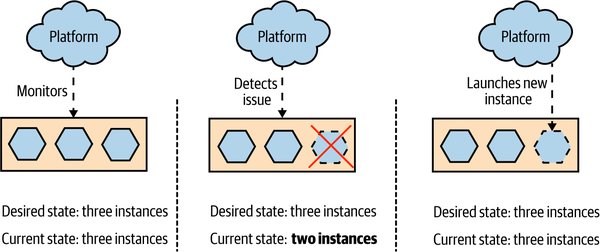
Figure 8-13. A platform providing desired state management, spinning up a new instance when one dies
The beauty of desired state management is that the platform itself manages how the desired state is maintained. It frees development and operations people alike from having to worry about exactly how things are being done—they just have to focus on getting the desired state definition right in the first place. It also means that in the event of a problem occurring, such as an instance dying, the underlying hardware failing, or a data center shutting down, the platform can handle the issue for you without human intervention being required.
While it’s possible to build your own toolchain to apply desired state management, typically you use a platform that already supports it. Kubernetes is one such tool that embraces this idea, and you can also achieve something similar using concepts such as autoscaling groups on a public cloud provider like Azure or AWS. Another platform that can provide this capability is Nomad. Unlike Kubernetes, which is focused on deploying and managing container-based workloads, Nomad has a very flexible model around running other sorts of application workloads as well, such as Java applications, VMs, Hadoop jobs, and more. It may be worth a look if you want a platform for managing mixed workloads that still makes use of concepts like desired state management.
These platforms are aware of the underlying availability of resources and are able to match the requests for desired state to the available resources (or else tell you this isn’t possible). As an operator, you are distanced from the low-level configuration—you can say something simple like “I want four instances spread across both data centers” and rely on your platform to ensure this is done for you. Different platforms provide different levels of control—you can get much more complex with your desired state definition if you want.
The use of desired state management can occasionally cause you problems if you forget you’re making use of it. I remember a situation in which I was shutting down a development cluster on AWS before I went home. I was shutting down the managed virtual machine instances (provided by AWS’s EC2 product) to save money—they weren’t going to be used overnight. However, I found that as soon as I killed one of the instances, another instance popped back up. It took me a while to realize that I had configured an autoscaling group to ensure that there was a minimum number of machines. AWS was seeing an instance die and spinning up a replacement. It took me 15 minutes of playing whack-a-mole like this before I realized what was up. The problem was that we were charged for EC2 on a per-hour basis. Even if an instance ran for only a minute, we got charged for the full hour. So my flailing around at the end of the day ended up being quite costly. In a way, this was a sign of success (at least that’s what I told myself)—we’d set up the autoscaling group some time before, and they had just worked to the point that we had forgotten they were there. It was simply a matter of writing a script to disable the autoscaling group as part of the cluster shutdown to fix the problem in the future.
Prerequisites
To take advantage of desired state management, the platform needs some way to automatically launch instances of your microservice. So having a fully automated deployment for microservice instances is a clear prerequisite for desired state management. You may also need to give careful thought to how long it takes your instances to launch. If you are using desired state management to ensure there are enough computing resources to handle user load, then if an instance dies, you’ll want a replacement instance as quickly as possible to fill the gap. If provisioning a new instance takes a long time, you may need to have excess capacity in place to handle the load in the event of an instance dying so as to give yourself enough breathing room to bring up a new copy.
Although you could hack together a desired state management solution for yourself, I’m not convinced it’s a good use of your time. If you want to embrace this concept, I think you are better off adopting a platform that embraces it as a first-class concept. As this means coming to grips with what might represent a new deployment platform and all the associated ideas and tooling, you might want to delay adopting desired state management until you already have a few microservices up and running. This will allow you to get familiar with the basics of microservices before becoming overloaded with new technology. Platforms like Kubernetes really help when you have lots of things to manage—if you only have a few processes to worry about, you could wait till later on to adopt these tools.
GitOps
GitOps, a fairly recent concept pioneered by Weaveworks, brings together the concepts of desired state management and infrastructure as code. GitOps was originally conceived in the context of working with Kubernetes, and this is where the related tooling is focused, although arguably it describes a workflow that others have used before.
With GitOps, your desired state for your infrastructure is defined in code and stored in source control. When changes are made to this desired state, some tooling ensures that this updated desired state is applied to the running system. The idea is to give developers a simplified workflow for working with their applications.
If you’ve used infrastructure configuration tools like Chef or Puppet, this model is familiar for managing infrastructure. When using Chef Server or Puppet Master, you had a centralized system capable of pushing out changes dynamically when they were made. The shift with GitOps is that this tooling is making use of capabilities inside Kubernetes to help manage applications rather than just infrastructure.
Tools like Flux are making it much easier to embrace these ideas. It’s worth noting, of course, that while tools can make it easier for you to change the way you work, they can’t force you into adopting new working approaches. Put differently, just because you have Flux (or another GitOps tool), it doesn’t mean you’re embracing the ideas of desired state management or infrastructure as code.
If you’re in the world of Kubernetes, adopting a tool like Flux and the workflows it promotes may well speed up the introduction of concepts like desired state management and infrastructure as code. Just make sure you don’t lose sight of the goals of the underlying concepts and get blinded by all the new technology in this space!
Deployment Options
When it comes to the approaches and tooling we can use for our microservice workloads, we have loads of options. But we should look at these options in terms of the principles I just outlined. We want our microservices to run in an isolated fashion and to ideally be deployed in a way that avoids downtime. We want the tooling we pick to allow us to embrace a culture of automation, define our infrastructure and application configuration in code, and ideally also manage desired state for us.
Let’s briefly summarize the various deployment options before looking at how well they deliver on these ideas:
- Physical machine
-
A microservice instance is deployed directly onto a physical machine, with no virtualization.
- Virtual machine
-
A microservice instance is deployed on to a virtual machine.
- Container
-
A microservice instance runs as a separate container on a virtual or physical machine. That container runtime may be managed by a container orchestration tool like Kubernetes.
- Application container
-
A microservice instance is run inside an application container that manages other application instances, typically on the same runtime.
- Platform as a Service (PaaS)
-
A more highly abstracted platform is used to deploy microservice instances, often abstracting away all concepts of the underlying servers used to run your microservices. Examples include Heroku, Google App Engine, and AWS Beanstalk.
- Function as a Service (FaaS)
-
A microservice instance is deployed as one or more functions, which are run and managed by an underlying platform like AWS Lambda or Azure Functions. Arguably, FaaS is a specific type of PaaS, but it deserves exploration in its own right given the recent popularity of the idea and the questions it raises about mapping from a microservice to a deployed artifact.
Physical Machines
An increasingly rare option, you may find yourself deploying microservices directly onto physical machines. By “directly,” I mean that there are no layers of virtualization or containerization between you and the underlying hardware. This has become less and less common for a few different reasons. Firstly, deploying directly onto physical hardware can lead to lower utilization across your estate. If I have a single instance of a microservice running on a physical machine and I use only half the CPU, memory, or I/O provided by the hardware, then the remaining resources are wasted. This problem has led to the virtualization of most computing infrastructure, allowing you to coexist multiple virtual machines on the same physical machine. It gives you much higher utilization of your infrastructure, which has some obvious benefits in terms of cost effectiveness.
If you have direct access to physical hardware without the option for virtualization, the temptation is to then pack multiple microservices on the same machine—of course, this violates the principle we talked about regarding having an isolated execution environment for your services. You could use tools like Puppet or Chef to configure the machine—helping implement infrastructure as code. The problem is that if you are working only at the level of a single physical machine, implementing concepts like desired state management, zero-downtime deployment, and so on requires us to work at a higher level of abstraction, using some sort of management layer on top. These types of systems are more commonly used in conjunction with virtual machines, something we’ll explore further in a moment.
In general, directly deploying microservices onto physical machines is something I almost never see nowadays, and you’ll likely need to have some very specific requirements (or constraints) in your situation to justify this approach over the increased flexibility that either virtualization or containerization may bring.
Virtual Machines
Virtualization has transformed data centers, by allowing us to chunk up existing physical machines into smaller, virtual machines. Traditional virtualization like VMware or that used by the main cloud providers, managed virtual machine infrastructure (such as AWS’s EC2 service) has yielded huge benefits in increasing the utilization of computing infrastructure, while at the same time reducing the overhead of host management.
Fundamentally, virtualization allows you to split up an underlying machine into multiple smaller “virtual” machines that act just like normal servers to the software running inside the virtual machines. You can assign portions of the underlying CPU, memory, I/O, and storage capability to each virtual machine, which in our context allows you to cram many more isolated execution environments for your microservice instances onto a single physical machine.
Each virtual machine contains a full operating system and set of resources that can be used by the software running inside the VM. This ensures that you have a very good degree of isolation between instances when each instance is deployed onto a separate VM. Each microservice instance can fully configure the operating system in the VM to its own local needs. We still have the issue, though, that if the underlying hardware running these virtual machines fails, we can lose multiple microservice instances. There are ways to help solve that particular problem, including things like desired state management, which we discussed earlier.
Cost of virtualization
As you pack more and more virtual machines onto the same underlying hardware, you will find that you get diminishing returns in terms of the computing resources available to the VMs themselves. Why is this?
Think of our physical machine as a sock drawer. If we put lots of wooden dividers into our drawer, can we store more socks or fewer? The answer is fewer: the dividers themselves take up room too! Our drawer might be easier to deal with and organize, and perhaps we could decide to put T-shirts in one of the spaces now rather than just socks, but more dividers means less overall space.
In the world of virtualization, we have a similar overhead as our sock drawer dividers. To understand where this overhead comes from, let’s look at how most virtualization is done. Figure 8-14 shows a comparison of two types of virtualization. On the left, we see the various layers involved in what is called type 2 virtualization, and on the right we see container-based virtualization, which we’ll explore more shortly.
Type 2 virtualization is the sort implemented by AWS, VMware, vSphere, Xen, and KVM. (Type 1 virtualization refers to technology in which the VMs run directly on hardware, not on top of another operating system.) On our physical infrastructure we have a host operating system. On this OS we run something called a hypervisor, which has two key jobs. First, it maps resources like CPU and memory from the virtual host to the physical host. Second, it acts as a control layer, allowing us to manipulate the virtual machines themselves.
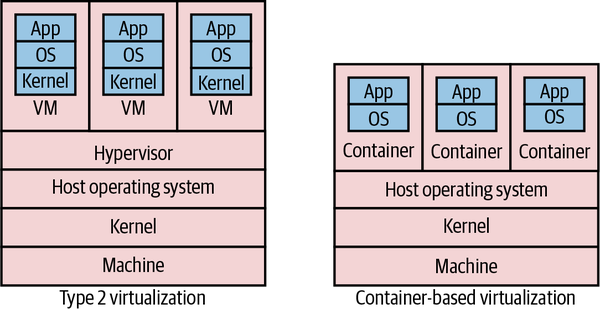
Figure 8-14. Comparison of standard type 2 virtualization and lightweight containers
Inside the VMs, we get what look like completely different hosts. They can run their own operating systems, with their own kernels. They can be considered almost hermetically sealed machines, kept isolated from the underlying physical host and the other virtual machines by the hypervisor.
The problem with type 2 virtualization is that the hypervisor here needs to set aside resources to do its job. This takes away CPU, I/O, and memory that could be used elsewhere. The more hosts the hypervisor manages, the more resources it needs. At a certain point, this overhead becomes a constraint in slicing up your physical infrastructure any further. In practice, this means that there are often diminishing returns in slicing up a physical box into smaller and smaller parts, as proportionally more and more resources go into the overhead of the hypervisor.
Good for microservices?
Coming back to our principles, virtual machines do very well in terms of isolation, but at a cost. Their ease of automation can vary based on the exact technology being used—managed VMs on Google Cloud, Azure, or AWS, for example, are all easy to automate via well-supported APIs and an ecosystem of tools that build on these APIs. In addition, these platforms provide concepts like autoscaling groups, helping implement desired state management. Implementing zero-downtime deployment is going to take more work, but if the VM platform you are using gives you a good API, the building blocks are there. The issue is that many people are making use of managed VMs provided by traditional virtualization platforms like the ones provided by VMware, which, while they may theoretically allow for automation, are typically not used in this context. Instead these platforms tend to be under the central control of a dedicated operations team, and the ability to directly automate against them can be restricted as a result.
Although containers are proving to be more popular in general for microservice workloads, many organizations have used virtual machines for running large-scale microservice systems, to great effect. Netflix, one of the poster children for microservices, built out much of its microservices on top of AWS’s managed virtual machines via EC2. If you need the stricter isolation levels that they can bring, or you don’t have the ability to containerize your application, VMs can be a great choice.
Containers
Since the first edition of this book, containers have become a dominant concept in server-side software deployment and for many are the de facto choice for packaging and running microservice architectures. The container concept, popularized by Docker, and allied with a supporting container orchestration platform like Kubernetes, has become many people’s go-to choice for running microservice architectures at scale.
Before we get to why this has happened and to the relationship between containers, Kubernetes, and Docker, we should first explore what a container is exactly, and look specifically at how it differs from virtual machines.
Isolated, differently
Containers first emerged on UNIX-style operating systems and for many years were really only a viable prospect on those operating systems, such as Linux. Although Windows containers are very much a thing, it has been Linux operating systems that containers have had the biggest impact on so far.
On Linux, processes are run by a given user and have certain capabilities based on how the permissions are set. Processes can spawn other processes. For example, if I launch a process in a terminal, that process is generally considered a child of the terminal process. The Linux kernel’s job is maintaining this tree of processes, ensuring that only permitted users can access the processes. Additionally, the Linux kernel is capable of assigning resources to these different processes—this is all part and parcel of building a viable multiuser operating system, where you don’t want the activities of one user to kill the rest of the system.
Containers running on the same machine make use of the same underlying kernel (although there are exceptions to this rule that we’ll explore shortly). Rather than managing processes directly, you can think of a container as an abstraction over a subtree of the overall system process tree, with the kernel doing all the hard work. These containers can have physical resources allocated to them, something the kernel handles for us. This general approach has been around in many forms, such as Solaris Zones and OpenVZ, but it was with LXC that this idea made its way into the mainstream of Linux operating systems. The concept of Linux containers was further advanced when Docker provided yet a higher level of abstraction over containers, initially using LXC under the hood and then replacing it altogether.
If we look at the stack diagram for a host running a container in Figure 8-14, we see a few differences when comparing it with type 2 virtualization. First, we don’t need a hypervisor. Second, the container doesn’t seem to have a kernel—that’s because it makes use of the kernel of the underlying machine. In Figure 8-15 we see this more clearly. A container can run its own operating system, but that operating system makes use of a part of the shared kernel—it’s in this kernel that the process tree for each container lives. This means that our host operating system could run Ubuntu, and our containers CentOS, as long as they could both run as part of the same underlying kernel.
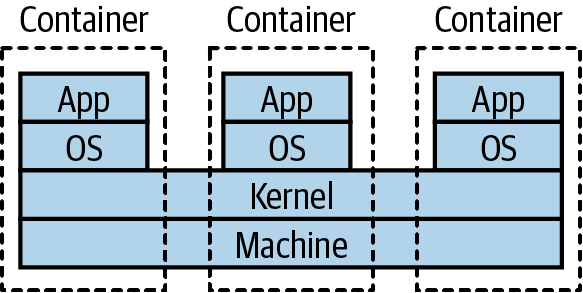
Figure 8-15. Normally, containers on the same machine share the same kernel
With containers, we don’t just benefit from the resources saved by not needing a hypervisor; we also gain in terms of feedback. Linux containers are much faster to provision than full-fat virtual machines. It isn’t uncommon for a VM to take many minutes to start—but with Linux containers, startup can take just a few seconds. You also have finer-grained control over the containers themselves in terms of assigning resources to them, which makes it much easier to tweak the settings to get the most out of the underlying hardware.
Due to the more lightweight nature of containers, we can have many more of them running on the same hardware than would be possible with VMs. By deploying one service per container, as in Figure 8-16, we get a degree of isolation from other containers (although this isn’t perfect) and can do so much more cost-effectively than would be possible if we wanted to run each service in its own VM. Coming back to our sock drawer analogy from earlier, with containers the sock drawer dividers are much thinner than they are for VMs, meaning a higher proportion of the sock drawer gets used for socks.
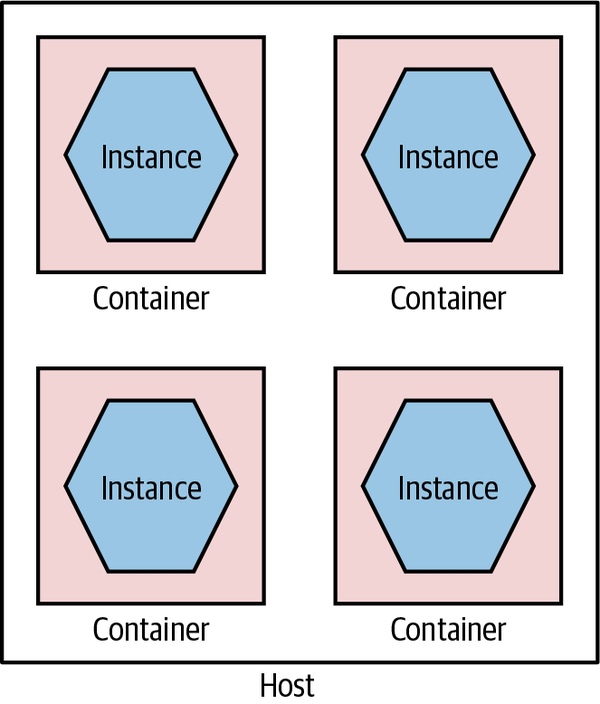
Figure 8-16. Running services in separate containers
Containers can be used well with full-fat virtualization too; in fact, this is common. I’ve seen more than one project provision a large AWS EC2 instance and run multiple containers on it to get the best of both worlds: an on-demand ephemeral compute platform in the form of EC2, coupled with highly flexible and fast containers running on top of it.
Not perfect
Linux containers aren’t without some problems, however. Imagine I have lots of microservices running in their own containers on a host. How does the outside world see them? You need some way to route the outside world through to the underlying containers, something many of the hypervisors do for you with normal virtualization. With earlier technology like LXC, this was something you had to handle yourself—this is one area where Docker’s take on containers has helped hugely.
Another point to bear in mind is that these containers can be considered isolated from a resource point of view—I can allocate ring-fenced sets of CPU, memory, and so on to each container—but this is not necessarily the same degree of isolation as you get from virtual machines, or for that matter by having separate physical machines. Early on, there were a number of documented and known ways in which a process from one container could bust out and interact with other containers or the underlying host.
A huge amount of work has gone into resolving these issues, and the container orchestration systems and underlying container runtimes have done a good job of examining how to better run container workloads so this isolation is improved, but you will need to give due thought to the sorts of workloads you want to run. My own guidance here is that in general you should view containers as a great way of isolating execution of trusted software. If you are running code written by others and are concerned about a malicious party trying to bypass container-level isolation, then you’ll want to do some deeper examination yourself regarding the current state of the art for handling such situations—some of which we’ll touch on in a moment.
Windows containers
Historically, Windows users would look longingly at their Linux-using contemporaries, as containers were something denied to the Windows operating system. Over the last few years, however, this has changed, with containers now being a fully supported concept. The delay was really about the underlying Windows operating system and kernel supporting the same kinds of capabilities as existed in the land of Linux to make containers work. It was with the delivery of Windows Server 2016 that a lot of this changed, and since then Windows containers have continued to evolve.
One of the initial stumbling blocks in the adoption of Windows containers has been the size of the Windows operating system itself. Remember that you need to run an operating system inside each container, so when downloading a container image, you’re also downloading an operating system. Windows, though, is big—so big that it made containers very heavy, not just in terms of the size of the images but also in terms of the resources required to run them.
Microsoft reacted to this by creating a cut-down operating system called Windows Nano Server. The idea is that Nano Server should have a small-footprint OS and be capable of running things like microservice instances. Alongside this, Microsoft also support a larger Windows Server Core, which is there to support running legacy Windows applications as containers. The issue is that these things are still pretty big when compared to their Linux equivalents—early versions of Nano Server would still be well over 1 GB in size, compared to small-footprint Linux operating systems like Alpine that would take up only a few megabytes.
While Microsoft has continued to try and reduce the size of Nano Server, this size disparity still exists. In practice, though, due to the way that common layers across container images can be cached, this may not be a massive issue.
Of special interest in the world of Windows containers is the fact that they support different levels of isolation. A standard Windows container uses process isolation, much like its Linux counterparts. With process isolation, each container runs in part of the same underlying kernel, which manages the isolation between the containers. With Windows containers, you also have the option of providing more isolation by running containers inside their own Hyper-V VM. This gives you something closer to the isolation level of full virtualization, but the nice thing is that you can choose between Hyper-V or process isolation when you launch the container—the image doesn’t need to change.
Having flexibility about running images in different types of isolation can have its benefits. In some situations, your threat model may dictate that you want stronger isolation between your running processes than simple process-level isolation. For example, you might be running “untrusted” third-party code alongside your own processes. In such a situation, being able to run those container workloads as Hyper-V containers is very useful. Note, of course, that Hyper-V isolation is likely to have an impact in terms of spin-up time and a runtime cost closer to that of normal virtualization.
Docker
Containers were in limited use before the emergence of Docker pushed the concept mainstream. The Docker toolchain handles much of the work around containers. Docker manages the container provisioning, handles some of the networking problems for you, and even provides its own registry concept that allows you to store Docker applications. Before Docker, we didn’t have the concept of an “image” for containers—this aspect, along with a much nicer set of tools for working with containers, helped containers become much easier to use.
The Docker image abstraction is a useful one for us, as the details of how our microservice is implemented are hidden. We have the builds for our microservice create a Docker image as a build artifact and store the image in the Docker registry, and away we go. When you launch an instance of a Docker image, you have a generic set of tools for managing that instance, no matter the underlying technology used—microservices written in Go, Python, NodeJS, or whatever can all be treated the same.
Docker can also alleviate some of the downsides of running lots of services locally for dev and test purposes. Previously, I might have used a tool like Vagrant that allows me to host multiple independent VMs on my development machine. This would allow me to have a production-like VM running my service instances locally. This was a pretty heavyweight approach, though, and I’d be limited in how many VMs I could run. With Docker, it’s easy just to run Docker directly on my developer machine, probably using Docker Desktop. Now I can just build a Docker image for my microservice instance, or pull down a prebuilt image, and run it locally. These Docker images can (and should) be identical to the container image that I will eventually run in production.
When Docker first emerged, its scope was limited to managing containers on one machine. This was of limited use—what if you wanted to manage containers across multiple machines? This is something that is essential if you want to maintain system health, if you have a machine die on you, or if you just want to run enough containers to handle the system’s load. Docker came out with two totally different products of its own to solve this problem, confusingly called “Docker Swarm” and “Docker Swarm Mode”—who said naming stuff was hard again? Really, though, when it comes to managing lots of containers across many machines, Kubernetes is king here, even if you might use the Docker toolchain for building and managing individual containers.
Fitness for microservices
Containers as a concept work wonderfully well for microservices, and Docker made containers significantly more viable as a concept. We get our isolation but at a manageable cost. We also hide underlying technology, allowing us to mix different tech stacks. When it comes to implementing concepts like desired state management, though, we’ll need something like Kubernetes to handle it for us.
Kubernetes is important enough to warrant a more detailed discussion, so we’ll come back to it later in the chapter. But for now just think of it as a way of managing containers across lots of machines, which is enough for the moment.
Application Containers
If you’re familiar with deploying .NET applications behind IIS or Java applications into something like Weblogic or Tomcat, you will be well acquainted with the model in which multiple distinct services or applications sit inside a single application container, which in turn sits on a single host, as we see in Figure 8-17. The idea is that the application container your services live in gives you benefits in terms of improved manageability, such as clustering support to handle grouping multiple instances together, monitoring tools, and the like.
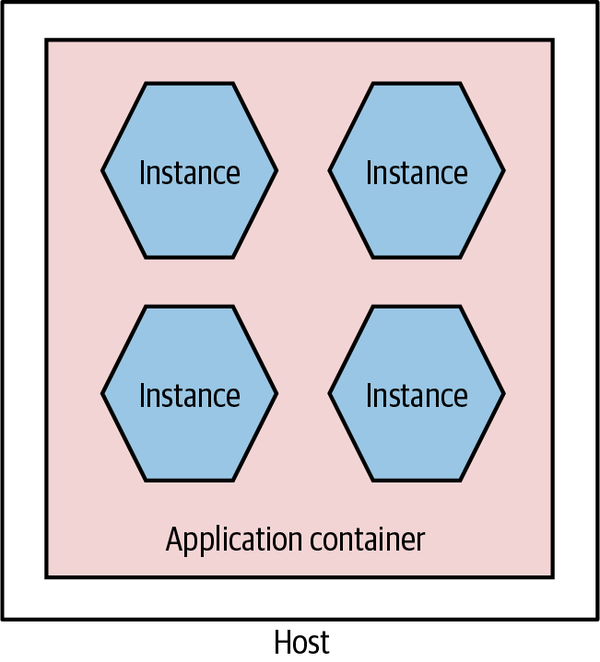
Figure 8-17. Multiple microservices per application container
This setup can also yield benefits in terms of reducing overhead of language runtimes. Consider running five Java services in a single Java servlet container. I have the overhead of only a single JVM. Compare this with running five independent JVMs on the same host when using containers. That said, I still feel that these application containers have enough downsides that you should challenge yourself to see whether they are really required.
First among the downsides is that they inevitably constrain technology choice. You have to buy into a technology stack. This can limit not only the technology choices for the implementation of the service itself but also the options you have in terms of automation and management of your systems. As we’ll discuss shortly, one of the ways we can address the overhead of managing multiple hosts is with automation, and so constraining our options for resolving this may well be doubly damaging.
I would also question some of the value of the features provided by these application containers. Many of them tout the ability to manage clusters to support shared in-memory session state, something we absolutely want to avoid in any case due to the challenges this creates when scaling our services. And the monitoring capabilities they provide won’t be sufficient when we consider the sorts of joined-up monitoring we want to do in a microservices world, as we’ll see in Chapter 10. Many of them also have quite slow spin-up times, impacting developer feedback cycles.
There are other sets of problems too. Attempting to do proper life-cycle management of applications on top of platforms like the JVM can be problematic and more complex than simply restarting a JVM. Analyzing resource use and threads is also much more complex, as you have multiple applications sharing the same process. And remember, even if you do get value from technology-specific containers, they aren’t free. Aside from the fact that many of them are commercial and thus have a cost implication, they add a resource overhead in and of themselves.
Ultimately, this approach is again an attempt to optimize for scarcity of resources that simply may not hold up anymore. Whether or not you decide to have multiple services per host as a deployment model, I would strongly suggest looking at self-contained deployable microservices as artifacts, with each microservice instance running as its own isolated process.
Fundamentally, the lack of isolation this model provides is one of the main reasons why this model is increasingly rare for people adopting microservice architectures.
Platform as a Service (PaaS)
When using Platform as a Service (PaaS), you are working at a higher-level abstraction than a single host. Some of these platforms rely on taking a technology-specific artifact, such as a Java WAR file or Ruby gem, and automatically provisioning and running it for you. Some of these platforms will transparently attempt to handle scaling the system up and down for you; others will allow you some control over how many nodes your service might run on, but they handle the rest.
As was the case when I wrote the first edition, most of the best, most polished PaaS solutions are hosted. Heroku set the benchmark for delivering a developer-friendly interface and arguably has remained the gold standard for PaaS, despite limited growth in terms of its featureset over the last few years. Platforms like Heroku don’t just run your application instance; they also provide capabilities such as running database instances for you—something that can be very painful to do yourself.
When PaaS solutions work well, they work very well indeed. However, when they don’t quite work for you, you often don’t have much control in terms of getting under the hood to fix things. This is part of the trade-off you make. I would say that in my experience the smarter the PaaS solutions try to be, the more they go wrong. I’ve used more than one PaaS that attempts to autoscale based on application use, but does it badly. Invariably the heuristics that drive these smarts tend to be tailored for the average application rather than your specific use case. The more nonstandard your application, the more likely it is that it might not play nicely with a PaaS.
As the good PaaS solutions handle so much for you, they can be an excellent way of handling the increased overhead we get with having many more moving parts. That said, I’m still not sure that we have all the models right in this space yet, and the limited self-hosted options mean that this approach might not work for you. When I wrote the first edition, I was hopeful that we’d see more growth in this space, but it hasn’t happened in the way that I expected. Instead, I think the growth of serverless products offered primarily by the public cloud providers has started to fill this need. Rather than offering black-box platforms for hosting an application, they instead provide turnkey managed solutions for things like message brokers, databases, storage, and such that allow us to mix and match the parts we like to build what we need. It is against this backdrop that Function as a Service, a specific type of serverless product, has been getting a lot of traction.
Assessing the suitability of PaaS offerings for microservices is difficult, as they come in many shapes and sizes. Heroku looks quite different from Netlify, for example, but both could work for you as a deployment platform for your microservices, depending on the nature of your application.
Function as a Service (FaaS)
In the last few years, the only technology to get even close to Kubernetes in terms of generating hype (at least in the context of microservices) is serverless. Serverless is actually an umbrella term for a host of different technologies where, from the point of view of the person using them, the underlying computers don’t matter. The detail of managing and configuring machines is taken away from you. In the words of Ken Fromm (who as far as I can tell coined the term serverless):
The phrase “serverless” doesn’t mean servers are no longer involved. It simply means that developers no longer have to think that much about them. Computing resources get used as services without having to manage around physical capacities or limits. Service providers increasingly take on the responsibility of managing servers, data stores and other infrastructure resources. Developers could set up their own open source solutions, but that means they have to manage the servers and the queues and the loads.
Ken Fromm, “Why the Future of Software and Apps Is Serverless”
Function as a Service, or FaaS, has become such a major part of serverless that for many the two terms are interchangeable. This is unfortunate, as it overlooks the importance of other serverless products like databases, queues, storage solutions, and the like. Nonetheless, it speaks to the excitement that FaaS has generated that it’s dominated the discussion.
It was AWS’s Lambda product, launched in 2014, that ignited the excitement around FaaS. At one level, the concept is delightfully simple. You deploy some code (a “function”). That code is dormant, until something happens to trigger that code. You’re in charge of deciding what that trigger might be—it could be a file arriving in a certain location, an item appearing on a message queue, a call coming in via HTTP, or something else.
When your function triggers, it runs, and when it finishes, it shuts down. The underlying platform handles spinning these functions up or down on demand and will handle concurrent executions of your functions so that you can have multiple copies running at once where appropriate.
The benefits here are numerous. Code that isn’t running isn’t costing you money—you pay only for what you use. This can make FaaS a great option for situations in which you have low or unpredictable load. The underlying platform handles spinning the functions up and down for you, giving you some degree of implicit high availability and robustness without you having to do any work. Fundamentally, the use of a FaaS platform, as with many of the other serverless offerings, allows you to drastically reduce the amount of operational overhead you need to worry about.
Limitations
Under the hood, all the FaaS implementations I’m aware of make use of some sort of container technology. This is hidden from you—typically you don’t have to worry about building a container that will be run, you just provide some packaged form of the code. This means, though, that you lack a degree of control over what exactly can be run; as a result you need the FaaS provider to support your language of choice. Azure Functions have done the best here in terms of the major cloud vendors, supporting a wide variety of different runtimes, whereas Google Cloud’s own Cloud Functions offering supports very few languages by comparison (at the time of writing, Google supports only Go, some Node versions, and Python). It’s worth noting that AWS does now allow you to define your own custom runtime for your functions, theoretically enabling you to implement support for languages that aren’t provided out of the box, although this then becomes another piece of operational overhead you have to maintain.
This lack of control over the underlying runtime also extends to the lack of control over the resources given to each function invocation. Across Google Cloud, Azure, and AWS, you can only control the memory given to each function. This in turn seems to imply that a certain amount of CPU and I/O is given to your function runtime, but you can’t control those aspects directly. This may mean that you end up having to give more memory to a function even if it doesn’t need it just to get the CPU you need. Ultimately, if you feel that you need to do a lot of fine tuning around resources available to your functions, then I feel that, at this stage at least, FaaS is probably not a great option for you.
Another limitation to be aware of is that function invocations can provide limits in terms of how long they can run for. Google Cloud functions, for example, are currently capped at 9 minutes of execution, while AWS Lambda functions can run for up to 15 minutes. Azure functions can run forever if you want (depending on the type of plan you are on). Personally, I think if you have functions running for long periods of time, this probably points to the sort of problem that functions aren’t a good fit for.
Finally, most function invocations are considered to be stateless. Conceptually, this means that a function cannot access state left by a previous function invocation unless that state is stored elsewhere (for example, in a database). This has made it hard to have multiple functions chained together—consider one function orchestrating a series of calls to other downstream functions. A notable exception is Azure Durable Functions, which solves this problem in a really interesting way. Durable Functions supports the ability to suspend the state of a given function and allow it to restart where the invocation left off—this is all handled transparently through the use of reactive extensions. This is a solution that I think is significantly more developer friendly than AWS’s own Step Functions, which ties together multiple functions using JSON-based configuration.
Challenges
Aside from the limitations we’ve just looked at, there are some other challenges you may experience when using FaaS.
Firstly, it’s important to address a concern that is often raised with FaaS, and that is the notion of spin-up time. Conceptually, functions are not running at all unless they are needed. This means they have to be launched to serve an incoming request. Now, for some runtimes, it takes a long time to spin up a new version of the runtime—often called a “cold start” time. JVM and .NET runtimes suffer a lot from this, so a cold start time for functions using these runtimes can often be significant.
In reality, though, these runtimes rarely cold start. On AWS at least, the runtimes are kept “warm,” so that requests that come in are served by already launched and running instances. This happens to such an extent that it can be difficult to gauge the impact of a “cold start” nowadays due to the optimizations being done under the hood by the FaaS providers. Nonetheless, if this is a concern, sticking to languages whose runtimes have fast spin-up times (Go, Python, Node, and Ruby come to mind) can sidestep this issue effectively.
Finally, the dynamic scaling aspect of functions can actually end up being an issue. Functions are launched when triggered. All the platforms I’ve used have a hard limit on the maximum number of concurrent function invocations, which is something you might have to take careful note of. I’ve spoken to more than one team that has had the issue of functions scaling up and overwhelming other parts of its infrastructure that didn’t have the same scaling properties. Steve Faulkner from Bustle shared one such example, where scaling functions overloaded Bustle’s Redis infrastructure, causing production issues. If one part of your system can dynamically scale but the other parts of your system don’t, then you might find that this mismatch can cause significant headaches.
Mapping to microservices
So far in our discussions of the various deployment options, the mapping from a microservice instance to a deployment mechanism has been pretty straightforward. A single microservice instance could be deployed onto a virtual machine, packaged as a single container, or even dropped onto an application container like Tomcat or IIS. With FaaS, things get a bit more confused.
Function per microservice
Now obviously a single microservice instance can be deployed as a single function, as shown in Figure 8-18. This is probably a sensible place to start. This keeps the concept of a microservice instance as a unit of deployment, which is the model we’ve been exploring the most so far.
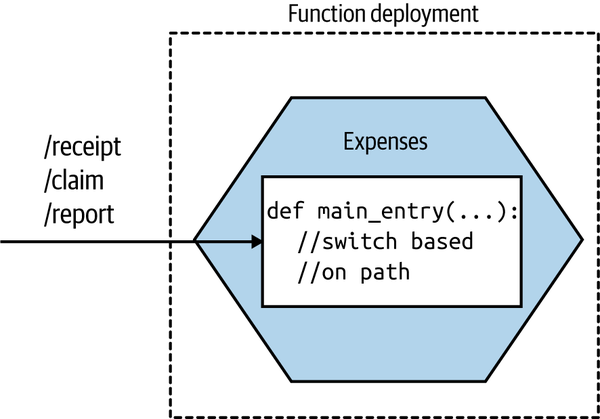
Figure 8-18. Our Expenses service is implemented as a single function
When invoked, the FaaS platform will trigger a single entry point in your deployed function. This means that if you’re going to have a single function deployment for your entire service, you’ll need to have some way of dispatching from that entry point to the different pieces of functionality in your microservice. If you were implementing the Expenses service as a REST-based microservice, you might have various resources exposed, like /receipt, /claim, or /report. With this model, a request for any of these resources would come in through this same entry point, so you’d need to direct the inbound call to the appropriate piece of functionality based on the inbound request path.
Function per aggregate
So how would we break up a microservice instance into smaller functions? If you’re making use of domain-driven design, you may already have explicitly modeled your aggregates (a collection of objects that are managed as a single entity, typically referring to real-world concepts). If your microservice instance handles multiple aggregates, one model that makes sense to me is to break out a function for each aggregate, as shown in Figure 8-19. This ensures that all the logic for a single aggregate is self-contained inside the function, making it easier to ensure a consistent implementation of the life-cycle management of the aggregate.
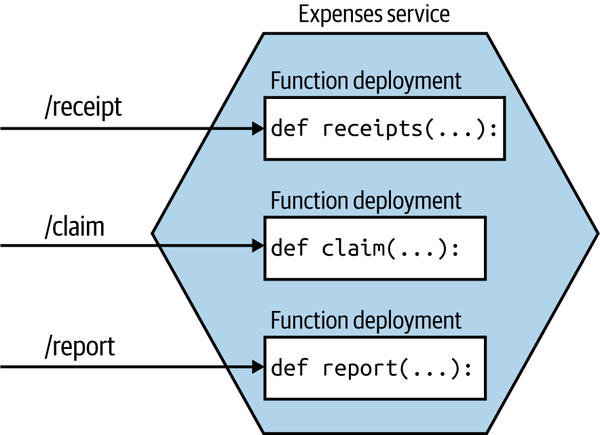
Figure 8-19. An Expenses service being deployed as multiple functions, each one handling a different aggregate
With this model, our microservice instance no longer maps to a single unit of deployment. Instead, our microservice is now more of a logical concept consisting of multiple different functions that can theoretically be deployed independently of each other.
A few caveats here. Firstly, I would strongly urge you to maintain a coarser-grained external interface. To upstream consumers, they are still talking to the Expenses service—they are unaware that requests get mapped to smaller-scoped aggregates. This ensures that should you change your mind and want to recombine things or even restructure the aggregate model, you won’t impact upstream consumers.
The second issue relates to data. Should these aggregates continue to use a shared database? On this issue, I am somewhat relaxed. Assuming that the same team manages all these functions, and that conceptually it remains a single “service,” I’d be OK with them still using the same database, as Figure 8-20 shows.
Over time, though, if the needs of each aggregate function diverge, I’d be inclined to look to separate out their data usage, as seen in Figure 8-21, especially if you start to see coupling in the data tier impair your ability to change them easily. At this stage, you could argue that these functions would now be microservices in their own right—although as I’ve just explained, there may be value in still representing them as a single microservice to upstream consumers.
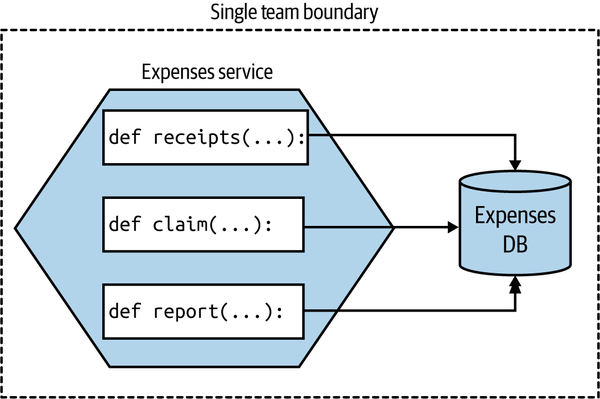
Figure 8-20. Different functions using the same database, as they are all logically part of the same microservice and are managed by the same team
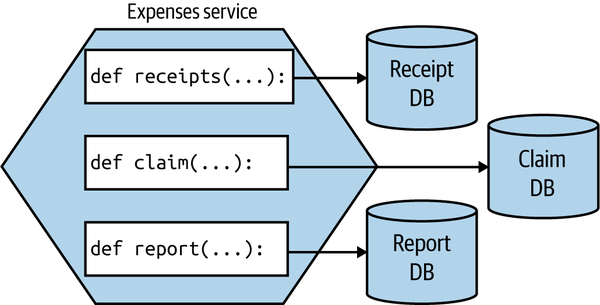
Figure 8-21. Each function using its own database
This mapping from a single microservice to multiple finer-grained deployable units warps our previous definition of a microservice somewhat. We normally consider a microservice as being an independently deployable unit—now one microservice is made up of multiple different independently deployable units. Conceptually, in this example, the microservice moves toward being more of a logical than a physical concept.
Get even more fine-grained
If you wanted to go even smaller, there is a temptation to break down your functions per aggregate into smaller pieces. I am much more cautious here. Aside from the explosion of functions this will likely create, it also violates one of the core principles of an aggregate—that we want to treat it as a single unit to ensure we can better manage the integrity of the aggregate itself.
I’ve previously entertained the idea of making each state transition of an aggregate its own function, but I’ve backed out of this idea due to the problems associated with inconsistency. When you have different independently deployable things, each managing a different part of an overall state transition, ensuring things are done properly gets really quite difficult. It puts us into the space of sagas, which we discussed in Chapter 6. When implementing complex business processes, concepts like sagas are important, and the work is justifiable. I struggle, though, to see the value in adding this complexity at the level of managing a single aggregate that could easily be handled by a single function.
The way forward
I remain convinced that the future for most developers is using a platform that hides much of the underlying detail from them. For many years, Heroku was the closest thing I could point to in terms of something that found the right balance, but now we have FaaS and the wider ecosystem of turnkey serverless offerings that chart a different path.
There are still issues to be ironed out with FaaS, but I feel that, while the current crop of offerings still need to change to resolve the issues with them, this is the sort of platform that most developers will end up using. Not all applications will fit neatly into a FaaS ecosystem given the constraints, but for those that do, people are already seeing significant benefits. With more and more work going into Kubernetes-backed FaaS offerings, people who are unable to make direct use of the FaaS solutions provided by the main cloud providers will increasingly be able to take advantage of this new way of working.
So, while FaS may not work for everything, it’s certainly something I urge people to explore. And for my clients who are looking at moving to cloud-based Kubernetes solutions, I’ve been urging many of them to explore FaaS first, as it may give them everything they need while hiding significant complexity and offloading a lot of work.
I’m seeing more organizations making use of FaaS as part of a wider solution, picking FaaS for specific use cases where it fits well. A good example would be the BBC, which makes use of Lambda functions as part of its core technology stack that provides the BBC News website. The overall system uses a mix of Lambda and EC2 instances—with the EC2 instances often being used in situations in which Lambda function invocations would be too expensive.3
Which Deployment Option Is Right for You?
Yikes. So we have a lot of options, right? And I probably haven’t helped too much by going out of my way to share loads of pros and cons for each approach. If you’ve gotten this far, you might be a bit bewildered about what you should do.
Tip
Well, before I go any further, I really hope that it goes without saying that if what you are currently doing works for you, then keep doing it! Don’t let fashion dictate your technical decisions.
If you think you do need to change how you deploy microservices, then let me try and distill down much of what we’ve already discussed and come up with some useful guidance.
Revisiting our principles of microservice deployment, one of the most important aspects we focused on was that of ensuring isolation of our microservices. But just using that as a guiding principle might guide us toward using dedicated physical machines for each microservice instance! That of course would likely be very expensive, and as we’ve already discussed, there are some very powerful tools that we wouldn’t be able to use if we went down this route.
Trade-offs abound here. Balancing cost against ease of use, isolation, familiarity…it can become overwhelming. So let’s review a set of rules I like to call Sam’s Really Basic Rules of Thumb for Working Out Where to Deploy Stuff:
-
If it ain’t broke, don’t fix it.4
-
Give up as much control as you feel happy with, and then give away just a little bit more. If you can offload all your work to a good PaaS like Heroku (or a FaaS platform), then do it and be happy. Do you really need to tinker with every last setting?
-
Containerizing your microservices it is not pain-free, but is a really good compromise around cost of isolation and has some fantastic benefits for local development, while still giving you a degree of control over what happens. Expect Kubernetes in your future.
Many people are proclaiming “Kubernetes or bust!” which I feel is unhelpful. If you’re on the public cloud, and your problem fits FaaS as a deployment model, do that instead and skip Kubernetes. Your developers will likely end up being much more productive. As we’ll discuss more in Chapter 16, don’t let the fear of lock-in keep you trapped in a mess of your own making.
Found an awesome PaaS like Heroku or Zeit, and have an application that fits the constraints of the platform? Push all the work to the platform and spend more time working on your product. Both Heroku and Zeit are pretty fantastic platforms with awesome usability from a developer point of view. Don’t your developers deserve to be happy after all?
For the rest of you, containerization is the way to go, which means we need to talk about Kubernetes.
Kubernetes and Container Orchestration
As containers started gaining traction, many people started looking at solutions for how to manage containers across multiple machines. Docker had two attempts at this (with Docker Swarm and Docker Swarm Mode, respectively); companies like Rancher and CoreOS came up with their own takes; and more general purpose platforms like Mesos were used to run containers alongside other sorts of workloads. Ultimately, though, despite a lot of effort on these products, Kubernetes has in the last couple of years come to dominate this space.
Before we speak to Kubernetes itself, we should discuss why there’s a need for a tool like it in the first place.
The Case for Container Orchestration
Broadly speaking, Kubernetes can variously be described as a container orchestration platform or, to use a term that has fallen out of favor, a container scheduler. So what are these platforms, and why might we want them?
Containers are created by isolating a set of resources on an underlying machine. Tools like Docker allow us to define what a container should look like and create an instance of that container on a machine. But most solutions require that our software be defined on multiple machines, perhaps to handle sufficient load, or to ensure that the system has redundancy in place to tolerate the failure of a single node. Container orchestration platforms handle how and where container workloads are run. The term “scheduling” starts to make more sense in this context. The operator says, “I want this thing to run,” and the orchestrator works out how to schedule that job—finding available resources, reallocating them if necessary, and handling the details for the operator.
The various container orchestration platforms also handle desired state management for us, ensuring that the expected state of a set of containers (microservice instances, in our case) is maintained. They also allow us to specify how we want these workloads to be distributed, allowing us to optimize for resource utilization, latency between processes, or robustness reasons.
Without such a tool, you’ll have to manage the distribution of your containers, something that I can tell you from firsthand experience gets old very fast. Writing scripts to manage launching and networking container instances is not fun.
Broadly speaking, all of the container orchestration platforms, including Kubernetes, provide these capabilities in some shape or form. If you look at general purpose schedulers like Mesos or Nomad, managed solutions like AWS’s ECS, Docker Swarm Mode, and so on, you’ll see a similar featureset. But for reasons we’ll explore shortly, Kubernetes has won this space. It also has one or two interesting concepts that are worth exploring briefly.
A Simplified View of Kubernetes Concepts
There are many other concepts in Kubernetes, so you’ll forgive me for not going into all of them (that would definitely justify a book in itself). What I’ll try to do here is outline the key ideas you’ll need to engage with when you first start working with the tool. Let’s look into the concept of a cluster first, as shown in Figure 8-22.
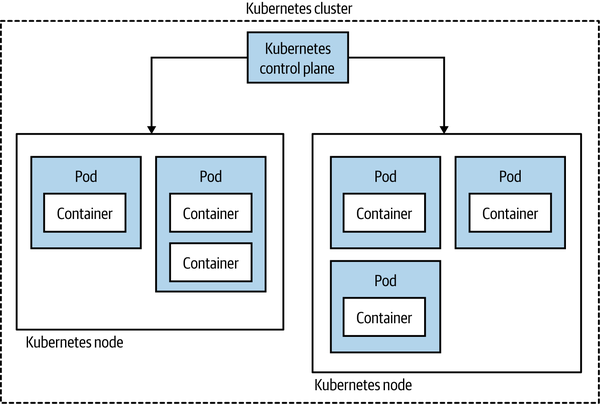
Figure 8-22. A simple overview of Kubernetes topology
Fundamentally, a Kubernetes cluster consists of two things. First, there’s a set of machines that the workloads will run on called the nodes. Secondly, there’s a set of controlling software that manages these nodes and is referred to as the control plane. These nodes could be running physical machines or virtual machines under the hood. Rather than scheduling a container, Kubernetes instead schedules something it calls a pod. A pod consists of one or more containers that will be deployed together.
Commonly, you’ll have only one container in a pod—for example, an instance of your microservice. There are some occasions (rare, in my experience) where having multiple containers deployed together can make sense though. A good example of this is the use of sidecar proxies such as Envoy, often as part of a service mesh—a topic we discussed in “Service Meshes and API Gateways”.
The next concept that is useful to know about is called a service. In the context of Kubernetes, you can think of a service as a stable routing endpoint—basically, a way to map from the pods you have running to a stable network interface that is available within the cluster. Kubernetes handles routing within the cluster, as we see in Figure 8-23.
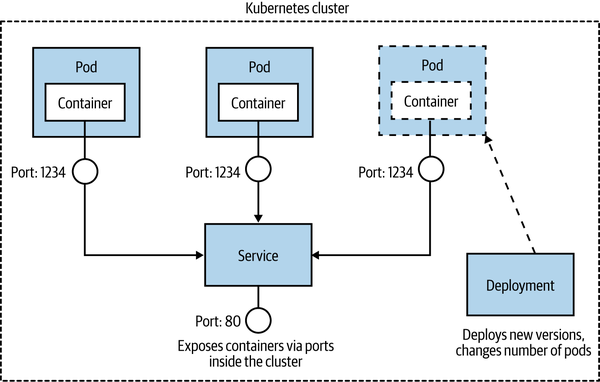
Figure 8-23. How a pod, a service, and a deployment work together
The idea is that a given pod can be considered ephemeral—it be might shut down for any number of reasons—whereas a service as a whole lives on. The service exists to route calls to and from the pods and can handle pods being shut down or new pods being launched. Purely from a terminology point of view, this can be confusing. We talk more generally about deploying a service, but in Kubernetes you don’t deploy a service—you deploy pods that map to a service. It can take a while to get your head around this.
Next, we have a replica set. With a replica set, you define the desired state of a set of pods. This is where you say, “I want four of these pods,” and Kubernetes handles the rest. In practice, you are no longer expected to work with replica sets directly; instead, they are handled for you via a deployment, the last concept we’ll look at. A deployment is how you apply changes to your pods and replica sets. With a deployment, you can do things like issue rolling upgrades (so you replace pods with a newer version in a gradual fashion to avoid downtime), rollbacks, scaling up the number of nodes, and more.
So, to deploy your microservice, you define a pod, which will contain your microservice instance inside it; you define a service, which will let Kubernetes know how your microservice will be accessed; and you apply changes to the running pods using a deployment. It seems easy when I say that, doesn’t it? Let’s just say I’ve left out quite a bit of stuff here for the sake of brevity.
Multitenancy and Federation
From an efficiency point of view, you’d want to pool all the computing resources available to you in a single Kubernetes cluster and have all workloads run there from all across your organization. This would likely give you a higher utilization of the underlying resources, as unused resources could be freely reallocated to whomever needs them. This in turn should reduce costs accordingly.
The challenge is that while Kubernetes is well able to manage different microservices for different purposes, it has limitations regarding how “multitenanted” the platform is. Different departments in your organization might want different degrees of control over various resources. These sorts of controls were not built into Kubernetes, a decision that seems sensible in terms of trying to keep the scope of Kubernetes somewhat limited. To work around this problem, organizations seem to explore a couple of different paths.
The first option is to adopt a platform built on top of Kubernetes that provides these capabilities—OpenShift from Red Hat, for example, has a rich set of access controls and other capabilities that are built with larger organizations in mind and can make the concept of multitenancy somewhat easier. Aside from any financial implication of using these sorts of platforms, for them to work you’ll sometimes have to work with the abstractions given to you by the vendor you chose—meaning your developers need to know not only how to use Kubernetes but also how to use that specific vendor’s platform.
Another approach is to consider a federated model, outlined in Figure 8-24. With federation, you have multiple separate clusters, with some layer of software that sits on top allowing you to make changes across all the clusters if needed. In many cases, people would work directly against one cluster, giving them a pretty familiar Kubernetes experience, but in some situations, you may want to distribute an application across multiple clusters, perhaps if those clusters were in different geographies and you wanted your application deployed with some ability to handle the loss of an entire cluster.
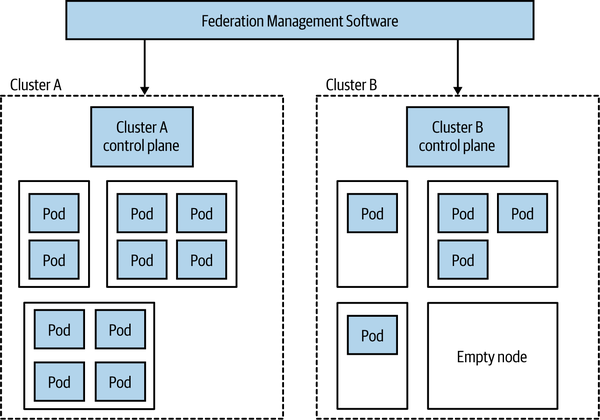
Figure 8-24. An example of federation in Kubernetes
The federated nature makes resource pooling more challenging. As we see in Figure 8-24, Cluster A is fully utilized, whereas Cluster B has lots of unused capacity. If we wanted to run more workloads on Cluster A, doing so would be possible only if we could give it more resources, such as moving the empty node on Cluster B over to Cluster A. How easy it will be to move the node from one cluster to the other will depend on the nature of the federation software being used, but I can well imagine this being a nontrivial change. Bear in mind that a single node can be part of either one cluster or another and so cannot run pods for both Cluster A and Cluster B.
It’s worth noting that having multiple clusters can be beneficial when we consider the challenges of upgrading the cluster itself. It may be easier and safer to move a microservice over to a newly upgraded cluster than to upgrade the cluster in-place.
Fundamentally, these are challenges of scale. For some organizations, you’ll never have these issues, as you’re happy to share a single cluster. For other organizations looking to get efficiencies at larger scale, this is certainly an area that you’ll want to explore in more detail. It should be noted that there are a number of different visions for what Kubernetes federation should look like, and a number of different toolchains out there for managing them.
The Cloud Native Computing Federation
The Cloud Native Computing Foundation (CNCF for short) is an offshoot of the nonprofit Linux Foundation. The CNCF focuses on curating the ecosystem of projects to help promote cloud native development, although in practice this means supporting Kubernetes and projects that work with or build on Kubernetes itself. The projects themselves aren’t created or directly developed by the CNCF; instead, you can see the CNCF as a place where these projects that might otherwise be developed in isolation can be hosted together in the same place, and where common standards and interoperability can be developed.
In this way, the CNCF reminds me of the role of the Apache Software Foundation—as with the CNCF, a project being part of the Apache Software Foundation normally implies a level of quality and wider community support. All of the projects hosted by the CNCF are open source, although the development of these projects may well be driven by commercial entities.
Aside from helping guide the development of these associated projects, the CNCF also runs events, provides documentation and training materials, and defines the various certification programs around Kubernetes. The group itself has members from across the industry, and although it can be difficult for smaller groups or independents to play much of a role in the organization itself, the degree of cross-industry support (including many companies who are competitors with each other) is impressive.
As an outsider, the CNCF seems to have had great success in helping spread the word regarding the usefulness of the projects it curates. It’s also acted as a place where the evolution of major projects can be discussed in the open, ensuring a lot of broad input. The CNCF has played a huge part in the success of Kubernetes—it’s easy to imagine that without it, we’d still have a fragmented landscape in this area.
Platforms and Portability
You’ll often hear Kubernetes described as a “platform.” It’s not really a platform in the sense that a developer would understand the term, though. Out of the box, all it really gives you is the ability to run container workloads. Most folks using Kubernetes end up assembling their own platform by installing supporting software such as service meshes, message brokers, log aggregation tools, and more. In larger organizations, this ends up being the responsibility of a platform engineering team, who put this platform together and manage it, and help developers use the platform effectively.
This can be both a blessing and a curse. This pick-and-mix approach is made possible due to a fairly compatible ecosystem of tools (thanks in large part to the work by the CNCF). This means you can select your favorite tools for specific tasks if you want. But it can also lead to the tyranny of choice—we can easily become overwhelmed with so many options. Products like Red Hat’s OpenShift partly take this choice away from us, as they give us a ready-made platform with some decisions already made for us.
What this means is that although at the base level Kubernetes offers a portable abstraction for container execution, in practice it’s not as simple as taking an application that works on one cluster and expecting it will work elsewhere. Your application, your operations and developer workflow, may well rely on your own custom platform. Moving from one Kubernetes cluster to another may well also require that you rebuild that platform on your new destination. I’ve spoken to many organizations that have adopted Kubernetes primarily because they’re worried about being locked in to a single vendor, but these organizations haven’t understood this nuance—applications built on Kubernetes are portable across Kubernetes clusters in theory, but not always in practice.
Helm, Operators, and CRDs, Oh My!
One area of continuing confusion in the space of Kubernetes is how to manage the deployment and life cycle of third-party applications and subsystems. Consider the need to run Kafka on your Kubernetes cluster. You could create your own pod, service, and deployment specifications and run them yourself. But what about managing an upgrade to your Kafka setup? What about other common maintenance tasks you might want to deal with, like upgrading running stateful software?
A number of tools have emerged that aim to give you the ability to manage these types of applications at a more sensible level of abstraction. The idea is that someone creates something akin to a package for Kafka, and you run it on your Kubernetes cluster in a more black-box manner. Two of the best-known solutions in this space are Operator and Helm. Helm bills itself as “the missing package manager” for Kubernetes, and while Operator can manage initial installation, it seems to be focused more on the ongoing management of the application. Confusingly, while you can see Operator and Helm as being alternatives to one another, you can also use both of them together in some situations (Helm for initial install, Operator for life-cycle operations).
A more recent evolution in this space is something called custom resource definitions, or CRDs. With CRDs you can extend the core Kubernetes APIs, allowing you to plug in new behavior to your cluster. The nice thing about CRDs is that they integrate fairly seamlessly into the existing command-line interface, access controls, and more—so your custom extension doesn’t feel like an alien addition. They basically allow you to implement your own Kubernetes abstractions. Think of the pod, replica set, service, and deployment abstractions we discussed earlier—with CRDs, you could add your own into the mix.
You can use CRDs for everything from managing small bits of configuration to controlling service meshes like Istio or cluster-based software like Kafka. With such a flexible and powerful concept, I find it difficult to understand where CRDs would best be used, and there doesn’t seem to be a general consensus out there among the experts I’ve chatted to either. This whole space still doesn’t seem to be settling down as quickly as I’d hoped, and there isn’t as much consensus as I’d like—a trend in the Kubernetes ecosystem.
And Knative
Knative is an open source project that aims to provide FaaS-style workflows to developers, using Kubernetes under the hood. Fundamentally, Kubernetes isn’t terribly developer friendly, especially if we compare it to the usability of things like Heroku or similar platforms. The aim with Knative is to bring the developer experience of FaaS to Kubernetes, hiding the complexity of Kubernetes from developers. In turn, this should mean development teams are able to more easily manage the full life cycle of their software.
We’ve already discussed service meshes, and specifically mentioned Istio, back in Chapter 5. A service mesh is essential for Knative to run. While Knative theoretically allows you to plug in different service meshes, only Istio is considered stable at this time (with support for other meshes like Ambassador and Gloo still in alpha). In practice, this means that if you want to adopt Knative, you’ll also already have to have bought into Istio.
With both Kubernetes and Istio, projects driven largely by Google, it took a very long time for them to get to a stage where they could be considered stable. Kubernetes still had major shifts after its 1.0 release, and only very recently Istio, which is going to underpin Knative, was completely rearchitected. This track record of delivering stable, production-ready projects makes me think that Knative may well take a lot longer to be ready for use by most of us. While some organizations are using it, and you could probably use it too, experience says it will be only so long before some major shift will take place that will require painful migration. It’s partly for this reason that I’ve suggested that more conservative organizations who are considering an FaaS-like offering for their Kubernetes cluster look elsewhere—projects like OpenFaaS are already being used in production by organizations all over the world and don’t require an underlying service mesh. But if you do jump on the Knative train right now, don’t be surprised if you have the odd derailment in your future.
One other note: it’s been a shame to see that Google has decided not to make Knative a part of the CNCF—one can only assume this is because Google wants to drive the direction of the tool itself. Kubernetes was a confusing prospect for many when launched, partly because it reflected Google’s mindset around how containers should be managed. It benefited hugely from involvement from a broader set of the industry, and it’s too bad that at this stage at least, Google has decided it isn’t interested in the same broad industry involvement for Knative.
The Future
Going forward, I see no signs that the rampaging juggernaut of Kubernetes will halt any time soon, and I fully expect to see more organizations implementing their own Kubernetes clusters for private clouds or making use of managed clusters in public cloud settings. However, I think what we’re seeing now, with developers having to learn how to use Kubernetes directly, will be a relatively short-lived blip. Kubernetes is great at managing container workloads and providing a platform for other things to be built on. It isn’t what could be considered a developer-friendly experience, though. Google itself has shown us that with the push behind Knative, and I think we’ll continue to see Kubernetes hidden under higher-level abstraction layers. So in the future, I expect Kubernetes to be everywhere. You just won’t know it.
This isn’t to say that developers can forget they are building a distributed system. They’ll still need to understand the myriad challenges that this type of architecture brings. It’s just that they won’t have to worry as much about the detail of how their software is mapped to underlying computing resources.
Should You Use It?
So for those of you who aren’t already fully paid-up members of the Kubernetes club, should you join? Well, let me share a few guidelines. Firstly, implementing and managing your own Kubernetes cluster is not for the faint of heart—it is a significant undertaking. So much of the quality of experience that your developers will have using your Kubernetes install will depend on the effectiveness of the team running the cluster. For this reason, a number of the larger organizations I’ve spoken to who have gone down the Kubernetes on-prem path have outsourced this work to specialized companies.
Even better, use a fully managed cluster. If you can make use of the public cloud, then use fully managed solutions like those provided by Google, Azure, and AWS. What I would say, though, is that if you are able to use the public cloud, then consider whether Kubernetes is actually what you want. If you’re after a developer-friendly platform for handling the deployment and life cycle of your microservices, then the FaaS platforms we’ve already looked at could be a great fit. You could also look at the other PaaS-like offerings, like Azure Web Apps, Google App Engine, or some of the smaller providers like Zeit or Heroku.
Before you decide to start using Kubernetes, get some of your administrators and developers using it. The developers can get started running something lightweight locally, such as minikube or MicroK8s, giving them something pretty close to a full Kubernetes experience, but on their laptops. The people you’ll have managing the platform may need a deeper dive. Katacoda has some great online tutorials for coming to grips with the core concepts, and the CNCF helps put out a lot of training materials in this space. Make sure the people who will actually use this stuff get to play with it before you make up your mind.
Don’t get trapped into thinking that you have to have Kubernetes “because everyone else is doing it.” This is just as dangerous a justification for picking Kubernetes as it is for picking microservices. As good as Kubernetes is, it isn’t for everyone—carry out your own assessment. But let’s be frank—if you’ve got a handful of developers and only a few microservices, Kubernetes is likely to be huge overkill, even if using a fully managed platform.
Progressive Delivery
Over the last decade or so, we’ve become smarter at deploying software to our users. New techniques have emerged that were driven by a number of different use cases and came from many different parts of the IT industry, but primarily they were all focused around making the act of pushing out new software much less risky. And if releasing software becomes less risky, we can release software more frequently.
There are a host of activities we carry out before sending our software live that can help us pick up problems before they impact real users. Preproduction testing is a huge part of this, although, as we’ll discuss in Chapter 9, this can only take us so far.
In their book Accelerate,6 Nicole Forsgren, Jez Humble, and Gene Kim show clear evidence drawn from extensive research that high-performing companies deploy more frequently than their low-performing counterparts and at the same time have much lower change failure rates.
The idea that you “go fast and break stuff” doesn’t really seem to apply when it comes to shipping software—shipping frequently and having lower failure rates goes hand in hand, and organizations that have realized this have changed how they think about releasing software.
These organizations make use of techniques like feature toggles, canary releases, parallel runs, and more, which we’ll detail in this section. This shift in how we think about releasing functionality falls under the banner of what is called progressive delivery. Functionality is released to users in a controlled manner; instead of a big-bang deployment, we can be smart about who sees what functionality—for example, by rolling out a new version of our software to a subset of our users.
Fundamentally, what all these techniques have at their heart is a simple shift in how we think about shipping software. Namely, that we can separate the concept of deployment from that of release.
Separating Deployment from Release
Jez Humble, coauthor of Continuous Delivery, makes the case for separating these two ideas, and he makes this a core principle for low-risk software releases:
Deployment is what happens when you install some version of your software into a particular environment (the production environment is often implied). Release is when you make a system or some part of it (for example, a feature) available to users.
Jez argues that by separating these two ideas, we can ensure that our software works in its production setting without failures being seen by our users. Blue-green deployment is one of the simplest examples of this concept in action—you have one version of your software live (blue), and then you deploy a new version alongside the old version in production (green). You check to make sure that the new version is working as expected, and if it is, you redirect customers to see the new version of your software. If you find a problem before the switchover, no customer is impacted.
While blue-green deployments are among the simplest examples of this principle, there are a number of more sophisticated techniques we can use when we embrace this concept.
On to Progressive Delivery
James Governor, cofounder of developer-focused industry analyst firm RedMonk, first coined the term progressive delivery to cover a number of different techniques being used in this space. He has gone on to describe progressive delivery as “continuous delivery with fine-grained control over the blast radius”—so it’s an extension of continuous delivery but also a technique that gives us the ability to control the potential impact of our newly released software.
Picking up this theme, Adam Zimman from LaunchDarkly describes how progressive delivery impacts “the business.” From that point of view, we require a shift in thinking about how new functionality reaches our customers. It’s no longer a single rollout—it can now be a phased activity. Importantly, though, progressive delivery can empower the product owner by, as Adam puts it, “delegating the control of the feature to the owner that is most closely responsible for the outcome.” For this to work, however, the product owner in question needs to understand the mechanics of the progressive delivery technique being used, implying a somewhat technically savvy product owner, or else support from a suitably savvy set of people.
We’ve already touched on blue-green deployments as one progressive delivery technique. Let’s briefly take a look at a few more.
Feature Toggles
With feature toggles (otherwise known as feature flags), we hide deployed functionality behind a toggle that can be used to switch functionality off or on. This is most commonly used as part of trunk-based development, where functionality that isn’t yet finished can be checked in and deployed but still hidden from end users, but it has lots of applications outside of this. This could be useful to turn on a feature at a specified time, or turn off a feature that is causing problems.
You can also use feature toggles in a more fine-grained manner, perhaps allowing a flag to have a different state based on the nature of the user making a request. So you could for example have a group of customers that see a feature turned on (perhaps a beta test group), whereas most people see the feature as being turned off—this could help you implement a canary rollout, something we discuss next. Fully managed solutions exist for managing feature toggles, including LaunchDarkly and Split. Impressive as these platforms are, I think you can get started with something much simpler—just a configuration file can do for a start, then look at these technologies as you start pushing how you want to use the toggles.
For a much deeper dive into the world of feature toggles, I can heartily recommend Pete Hodgson’s writeup “Feature Toggles (aka Feature Flags)”, which goes into a lot of detail regarding how to implement them and the many different ways they can be used.
Canary Release
To err is human, but to really foul things up you need a computer.7
We all make mistakes, and computers can let us make mistakes faster and at larger scale than ever before. Given that mistakes are unavoidable (and trust me, they are), then it makes sense to do things that allow us to limit the impact of these mistakes. Canary releases are one such technique.
Named for the canaries taken into mines as an early warning system for miners to warn them of the presence of dangerous gases, with a canary rollout the idea is that a limited subset of our customers see new functionality. If there is a problem with the rollout, then only that portion of our customers is impacted. If the feature works for that canary group, then it can be rolled out to more of your customers until everyone sees the new version.
For a microservice architecture, a toggle could be configured at an individual microservice level, turning functionality on (or off) for requests to that functionality from the outside world or other microservices. Another technique is to have two different versions of a microservice running side by side, and use the toggle to route to either the old or the new version. Here, the canary implementation has to be somewhere in the routing/networking path, rather than being in one microservice.
When I first did a canary release we controlled the rollout manually. We could configure the percentage of our traffic seeing the new functionality, and over a period of a week we gradually increased this until everyone saw the new functionality. Over the week, we kept an eye on our error rates, bug reports, and the like. Nowadays, it’s more common to see this process handled in an automated fashion. Tools like Spinnaker for example have the ability to automatically ramp up calls based on metrics, such as increasing the percentage of calls to a new microservice version if the error rates are at an acceptable level.
Parallel Run
With a canary release, a request to a piece of functionality will be served by either the old or the new version. This means we can’t compare how the two versions of functionality would handle the same request, something that can be important if you want to make sure that the new functionality works in exactly the same way as the old version of functionality.
With a parallel run you do exactly that—you run two different implementations of the same functionality side by side, and send a request to the functionality to both implementations. With a microservice architecture, the most obvious approach might be to dispatch a service call to two different versions of the same service and compare the results. An alternative is to coexist both implementations of the functionality inside the same service, which can often make comparison easier.
When executing both implementations, it’s important to realize that you likely only want the results of one of the invocations. One implementation is considered the source of truth—this is the implementation you currently trust, and is typically the existing implementation. Depending on the nature of the functionality you are comparing with a parallel run, you might have to give this nuance careful thought—you wouldn’t want to send two identical order updates to a customer, or pay an invoice twice for example!
I explore the parallel run pattern in a lot more detail in Chapter 3 of my book Monolith to Microservices.8 There I explore its use in helping migrate functionality from a monolithic system to a microservice architecture, where we want to ensure that our new microservice behaves in the same way as the equivilent monolith functionality. In another context, GitHub makes use of this pattern when reworking core parts of its codebase, and have released an open source tool Scientist to help with this process. Here, the parallel run is done within a single process, with Scientist helping to compare the invocations.
Tip
With blue-green deployment, feature toggles, canary releases, and parallel runs we’ve just scratched the surface of the field of progressive delivery. These ideas can work well together (we’ve already touched on how you could use feature toggles to implement a canary rollout for example), but you probably want to ease yourself in. To start off, just remember to separate the two concepts of deployment and release. Next, start looking for ways to help you deploy your software more frequently, but in a safe manner. Work with your product owner or other business stakeholders to understand how some of these techniques can help you go faster, but also help reduce failures too.
Summary
OK, so we covered a lot of ground here. Let’s briefly recap before we move on. Firstly, let’s remind ourselves of the principles for deployment that I outlined earlier:
- Isolated execution
-
Run microservice instances in an isolated fashion where they have their own computing resources, and their execution cannot impact other microservice instances running nearby.
- Focus on automation
-
Choose technology that allows for a high degree of automation, and adopt automation as a core part of your culture.
- Infrastructure as code
-
Represent the configuration for your infrastructure to ease automation and promote information sharing. Store this code in source control to allow for environments to be re-created.
- Aim for zero-downtime deployment
-
Take independent deployability further, and ensure that deploying a new version of a microservice can be done without any downtime to users of your service (be it humans or other microservices).
- Desired state management
-
Use a platform that maintains your microservice in a defined state, launching new instances if required in the event of outage or traffic increases.
In addition, I shared my own guidelines for selecting the right deployment platform:
-
If it ain’t broke, don’t fix it.9
-
Give up as much control as you feel happy with, then give away just a little bit more. If you can offload all your work to a good PaaS like Heroku (or FaaS platform), then do it and be happy. Do you really need to tinker with every last setting?
-
Containerizing your microservices is not pain-free, but is a really good compromise around cost of isolation and has some fantastic benefits for local development, while still giving you a degree of control over what happens. Expect Kubernetes in your future.
It’s also important to understand your requirements. Kubernetes could be a great fit for you, but perhaps something simpler would work just as well. Don’t feel ashamed for picking a simpler solution, and also don’t worry too much about offloading work to someone else—if I can push work to the public cloud, then I’ll do it, as it lets me focus on my own work.
Above all, this space is going through a lot of churn. I hope I’ve given you some insights into the key technology in this space, but also shared some principles that are likely to outlive the current crop of hot technology. Whatever comes next, hopefully you’re much more prepared to take it in stride.
In the next chapter, we’ll be going deeper into a topic we touched on briefly here: testing our microservices to make sure they actually work.
1 Kief Morris, Infrastructure as Code, 2nd edition (Sebastopol: O’Reilly, 2020).
2 Senthil Padmanabhan and Pranav Jha, “WebAssembly at eBay: A Real-World Use Case,” eBay, May 22, 2019, https://oreil.ly/SfvHT.
3 Johnathan Ishmael, “Optimising Serverless for BBC Online,” Technology and Creativity at the BBC (blog), BBC, January 26, 2021, https://oreil.ly/gkSdp.
4 I might not have come up with this rule.
5 Daniel Bryant, “Apple Rebuilds Siri Backend Services Using Apache Mesos,” InfoQ, May 3, 2015, https://oreil.ly/NLUMX.
6 Nicole Forsgren, Jez Humble, and Gene Kim, Accelerate: The Science of Building and Scaling High Performing Technology Organizations (Portland, OR: IT Revolution, 2018).
7 This quote is often attributed to biologist Paul Ehrlich, but its actual origins are unclear.
8 Sam Newman, Monolith to Microservices (Sebastopol: O’Reilly, 2019).
9 I might not have come up with this rule.