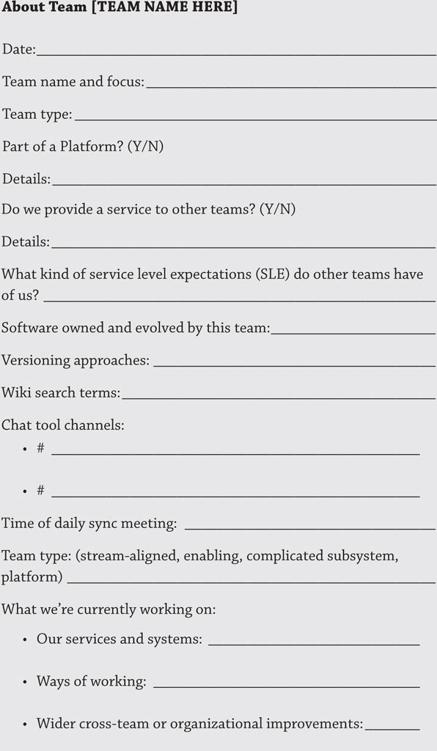
As you work on your team APIs, make sure you categorize each team as one of the fundamental team types (stream-aligned, platform, enabling, or complicated subsystem). Then detail how you would expect other teams to communicate with them using chat tools, etc.
Also consider the following:
•What about the team’s current road map?
•What are they currently working on and what are they planning to work on in the near future that may affect other teams in your organization?
•Who would need to know about that and how could they best be notified?
•Perhaps a specific chat tool channel could be used, allowing those interested to follow the channel and keep up to date with the latest news.
Read More
The four fundamental team types are discussed on pages 79–110 of Team Topologies.
Tracking Dependencies
Since all teams are part of a wider socio-technical system, it is inevitable that teams will depend on each other at some point in time. When applying the principles of Team Topologies, one of the goals is to reduce dependencies between teams by increasing or giving full ownership of end-to-end systems or services to individual teams. However, completely eradicating all dependencies is hardly ever 100% achievable. It is important to recognize this.
It is also important to recognize that there are different types of dependencies. There are blocking dependencies (they stop the flow of work, introducing wait times) versus non-blocking, healthy versus unhealthy, frequent versus infrequent, and more. Since dependencies can never be fully eradicated, it is important to track dependencies between teams and their type now and over time.
For example, something that starts as a blocking dependency could evolve into a non-blocking dependency. This is a good thing, as it should result in increased autonomy for the dependent team. Unfortunately, it is equally possible for healthy dependencies to transition into unhealthy ones, which can begin to slow down a dependent team too much.
In practice, we should look to record the dependencies that a team has and identify which ones are “under control” (for the time being, at least) and which ones are problematic and need to be addressed or even removed. Problematic dependencies can result in significant delays, introduce unpredictability, and increase the amount of work in progress (WIP) for the dependent team.
When tracking dependencies, the important thing to note is not the documentation in and of itself but rather that the tracker can be used to assess how dependencies should change. Are we okay with a blocking dependency on this other team? What could we change to avoid a blocking dependency? Is it possible to collaborate with the other team for a period of time to make the dependency non-blocking or at least less frequent?
By making the dependencies visible, each team is able to visualize their different dependencies, allowing them to work on reducing the ones that are negatively affecting the flow of work.
Of course, there are different ways to track dependencies between teams, such as with dependency boards or dependency tags as exemplified in Making Work Visible by Dominica DeGrandis.
One of DeGrandis’s examples is the Physical Dependency Matrix (featured on the next page). This matrix helps teams organize and visualize dependencies, and could be easily recreated using an online tool for remote teams.
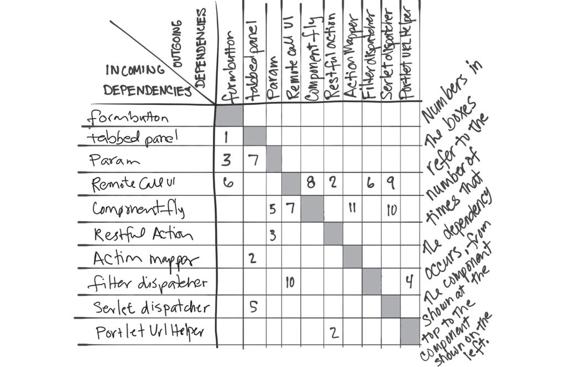
Physical Dependency Matrix
Source: Dominica DeGrandis, Making Work Visible: Exposing Time Theft to Optimize Work & Flow (Portland, OR: IT Revolution, 2017), 79.
She also shows how teams can use simple kanban boards to visualize dependencies (two examples are provided below). With multiple tools available for online kanban boards, this can be a great option for remote teams.
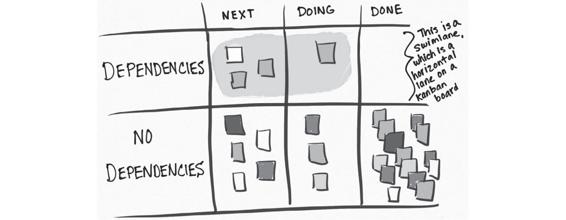
Dependency Swimlane Board
Source: Dominica DeGrandis, Making Work Visible: Exposing Time Theft to Optimize Work & Flow (Portland, OR: IT Revolution, 2017), 81.
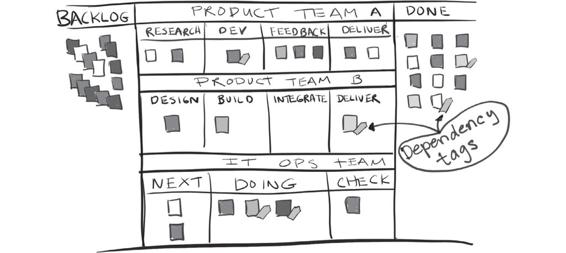
Dependency Tags on Kanban Cards
Source: Dominica DeGrandis, Making Work Visible: Exposing Time Theft to Optimize Work & Flow (Portland, OR: IT Revolution, 2017), 81.
Many of the examples in Making Work Visible can be easily adjusted for remote-first teams using tools such as Mural, Miro, Trello, and more.
READ MORE
Read more about dependencies between teams in Team Topologies on pages 74–75.
Example: Dependency Tracker for Teams
Below is an example team dependency tracker. In this example, a team is working on content for a music streaming service. Their work also requires that they interact with many other teams across the value stream, such as Operations, Storage, Recommendations, and Data Admin.
|
Team name/focus
|
Depends on team
|
Type (blocking/ slowing/ok)
|
Short description of dependency (artifacts, approvals, other)
|
|
Music Content
|
Ops
|
Slowing
|
Need machines, connections, help to set up things. Generally works well, but at times the workload on Ops causes the lead times to grow and slow us down.
|
|
Music Content
|
Storage
|
No problem
|
Storage. Not big, mostly information/communication needs to happen.
|
|
Music Content
|
Recommendations
|
No problem
|
Recommendations service integration when there’s a new type of content.
|
|
Music Content
|
Data Admin
|
Blocking
|
Waiting for necessary data dumps for our analytics.
|
Now Your Turn
Using the above example as a starting point, think about some of the teams within your organization. How do they currently interact? What are the dependencies between them? Are they slowing or blocking another team from getting work done? What is the reason for the dependency?
Populate a team dependency tracker for each of the teams so you have a clear record that can be used to monitor those dependencies over time.
Team Dependencies Tracking Exercise
In the famous “Spotify Model,” Spotify tracked dependencies between teams over time with a simple spreadsheet. They would ask all their squads which other squads they depended on and to what extent those dependencies were blocking or slowing them down.
They would then address the blocking and cross-tribe dependencies (namely through reorganization, architectural changes, or technical solutions), while continuing to monitor the remaining ones.2 This same method can be used to track team dependencies at any organization.
Based on work from Spotify, this team dependencies tracker template helps teams to frame conversations around improving flow, avoiding blocking waits, and ultimately moving to a more autonomous delivery model.
|
Team name/focus
|
Depends on Team
|
Type (blocking/slowing/ok)
|
Short description of dependency (artifacts, approvals, other)
|
|
|
|
|
|
|
|
|
|
|
|
|
Building Networks: Coffee, Talks, Internal Conferences
Anyone familiar with working in an office environment has probably experienced informal social networks. These tend to occur within the office during the working day, such as when you go to the coffee machine and meet someone or when you chat with someone at lunchtime or by the water cooler.
In the physical world, you may have had lunchtime talks or maybe departmental or whole company conferences, all of which were aimed at sharing knowledge and keeping people interacting with one another, making social contact. In remote settings, it is important to keep those types of interactions running. The format will need to be different and you may need to work harder to include people, but don’t just drop them because you are no longer in the same building.
A 2021 study of 61,182 Microsoft employees’ interactions over the first six months of 2020 (when the COVID-19 pandemic caused lockdowns in many parts of the world) showed that Microsoft’s “firm-wide remote work caused the collaboration network of workers to become more static and siloed, with fewer bridges between disparate parts.”3 As a consequence, it was “harder for employees to acquire and share new information across the network.”4
To counter the tendency for isolation when working remotely, teams in some companies have deliberately created a fifteen- or twenty-minute virtual coffee break. Participants each agree to grab a coffee or their drink of choice and then join a virtual video call to talk about random stuff that has nothing to do with work. David Heath, lead developer at the UK’s Government Digital Service, mentioned in a tweet that they experimented with “speed networking” sessions (three five-minute pairwise conversations using video breakout rooms) across the organization.5
These types of activities can be very valuable. They help foster informal networks of people who will be able to rely on each other down the line. They help form trust between the participants. And they help create an awareness of what else is happening outside of the confines of any individual team. During a facilitating phase (one of the three interaction modes of Team Topologies) between teams, enabling teams are able to provide targeted, on-the-ground knowledge that product or stream-aligned teams need.
However, there are opportunities for the wider sharing of knowledge by using communities of practice (CoP) or guilds to help increase awareness and capabilities within other teams. A CoP provides more widespread knowledge sharing that can help foster a sharing culture and a feeling of belonging for people with similar interests.
In her book Building Successful Communities of Practice, Emily Webber says “Communities of practice create the right environment for social learning, experiential learning, and a rounded curriculum, leading to accelerated learning for members.”6 It is therefore very important in the remote world that you maintain these types of meetings and encourage attendance and interaction on a regular basis, such as weekly or monthly.
One final option within larger organizations is the use of internal conferences. These can make a significant impact on an organization’s level of sharing, learning, and communication by accelerating multi-team learning across departments. The need for these kinds of events is greater than ever before in a remote-first world. Being able to put on a good internal conference has always been crucial, but it is important to recognize that how you run these events will need to be adapted for the remote world.
RESOURCE
The book Internal Tech Conferences by Victoria Morgan-Smith and Matthew Skelton has a wealth of advice on running internal conferences. For example, you will need to consider how you achieve interaction between the speaker and attendees, and whether to use prerecorded talks to help avoid the need for expensive broadcast technology. It may be necessary to train and mentor speakers on how to give online talks. Your speakers may even require new equipment to avoid poor audio or video, which can distract or even impede the ability of your audience to fully engage with the content.
It is also important to note that live-streaming talks can exclude people in regions with limited bandwidth, or create conflicts with organizations who have staff across multiple time zones. Visit InternalTechConf.com to discover more about the book and find advice on remote-first conferences.
Ultimately, what we want to achieve, whether it be through informal chats at the coffee machine, communities of practice, lunchtime talks, or internal conferences, is to help build and develop networks for informal knowledge sharing that can help support potential future collaborations. If, for example, there is a need to suddenly work with a different team, there is at least some level of trust already established between individuals within the organization.
Below is a table that breaks down multiple types of mechanisms for networking and knowledge sharing at different levels in the organization.
|
Type
|
Knowledge sharing type (targeted or diffuse)
|
Networking opportunity (yes or no)
|
Community (individuals, team, group, org wide)
|
|
Communities of practice
|
Diffuse
|
Yes
|
Group
|
|
Internal tech events
|
Diffuse
|
Yes
|
Org wide
|
|
Lunchtime talks
|
Diffuse
|
No
|
Group
|
|
Coffee breaks
|
—
|
Yes
|
Individuals
|
|
Enabling teams
|
Targeted
|
No
|
Team
|
Example
Throughout 2020–2021, numerous businesses and conference organizers had to adapt how they delivered their conferences from huge, physical, in-person events to remotely run online events.
A great example of this was the Engine Room conference put on by the Financial Times. Their goal was to primarily build connections and create space for conversation. It included education and some idea-sparking, but they really put a great deal of focus on sharing a space with the wider community at Financial Times. Feedback from their attendees was extremely positive.
Sarah Wells, then Technical Director for Operations and Reliability at the Financial Times, summarized some of their key learnings:7
•Use familiar tools: don’t add unnecessary cognitive load.
•Keep it shorter and sharper: it’s harder to hold people’s attention remotely.
•Create space for hanging out: people don’t get much chance to interact beyond their team when working remotely.
•Always strive for inclusivity.
Now Your Turn
Do you currently run any of the types of network-building events mentioned in this section? Did you used to have the water cooler and coffee machine chats, lunchtime talks, communities of practice, or internal conferences, but in the remote world, they have just stopped? Why not consider organizing a small event online where a few teams can talk about their work and discuss challenges with other members of the organization?
It doesn’t need to be a large investment of time and effort. Start with a small group of people, perhaps a couple of teams or departments, while you evaluate how the format works. Then ask yourself these questions: Are there any obstacles, political or technical, that might get in the way of you doing this more broadly? What can you do to mitigate those issues to ensure everyone is able to take away valuable knowledge sharing and trust building?
Aim to keep the content as simple and easy as possible while you de-risk the delivery mechanism. After you have delivered a few sessions, begin to expand to a wider audience.