Holds details of object-relational mapping in metadata.
Much of the code that deals with object-relational mapping describes how fields in the database correspond to fields in in-memory objects. The resulting code tends to be tedious and repetitive to write. A Metadata Mapping allows developers to define the mappings in a simple tabular form, which can then be processed by generic code to carry out the details of reading, inserting, and updating the data.
The biggest decision in using Metadata Mapping is how the information in the metadata manifests itself in terms of running code. There are two main routes to take: code generation and reflective programming.
With code generation you write a program whose input is the metadata and whose output is the source code of classes that do the mapping. These classes look as though they’re hand-written, but they’re entirely generated during the build process, usually just prior to compilation. The resulting mapper classes are deployed with the server code.
If you use code generation, you should make sure that it’s fully integrated into your build process with whatever build scripts you’re using. The generated classes should never be edited by hand and thus shouldn’t need to be held in source code control.
A reflective program may ask an object for a method named setName, and then run an invoke method on the setName method passing in the appropriate argument. By treating methods (and fields) as data the reflective program can read in field and method names from a metadata file and use them to carry out the mapping. I usually counsel against reflection, partly because it’s slow but mainly because it often causes code that’s hard to debug. Even so, reflection is actually quite appropriate for database mapping. Since you’re reading in the names of fields and methods from a file, you’re taking full advantage of reflection’s flexibility.
Code generation is a less dynamic approach since any changes to the mapping require recompiling and redeploying at least that part of the software. With a reflective approach, you can just change the mapping data file and the existing classes will use the new metadata. You can even do this during runtime, rereading the metadata when you get a particular kind of interrupt. As it turns out, mapping changes should be pretty rare, since they imply database or code changes. Modern environments also make it easy to redeploy part of an application.
Reflective programming often suffers in speed, although the problem here depends very much on the actual environment you’re using—in some a reflective call can be an order of magnitude slower. Remember, though, that the reflection is being done in the context of an SQL call, so its slower speed may not make that much difference considering the slow speed of the remote call. As with any performance issue, you need to measure within your environment to find out how much of a factor this is.
Both approaches can be a little awkward to debug. The comparison between them depends very much on how used to generated and reflective code developers are. Generated code is more explicit so you can see what’s going on in the debugger; as a result I usually prefer generation to reflection, and I think it’s usually easier for less sophisticated developers (which I guess makes me unsophisticated).
On most occasions you keep the metadata in a separate file format. These days XML is a popular choice as it provides hierarchic structuring while freeing you from writing your own parsers and other tools. A loading step takes this metadata and turns it into programming language structure, which then drive either the code generation output or the reflective mapping.
In simpler cases you can skip the external file format and create the metadata representation directly in source code. This saves you from having to parse, but it makes editing the metadata somewhat harder.
Another alternative is to hold the mapping information in the database itself, which keeps it together with the data. If the database schema changes, the mapping information is right there.
When you’re deciding which way to hold the metadata information, you can mostly neglect the performance of access and parsing. If you use code generation, access and parsing take place only during the build and not during execution. If you use reflective programming, you’ll typically access and parse during execution but only once during system startup; then you can keep the in-memory representation.
How complex to make your metadata is one of your biggest decisions. When you’re faced with a general relational mapping problem, there are a lot of different factors to keep in metadata, but many projects can manage with much less than a fully general scheme and so their metadata can be much simpler. On the whole it’s worth evolving your design as your needs grow, as it isn’t hard to add new capabilities to metadata-driven software.
One of the challenges of metadata is that although a simple metadata scheme often works well 90 percent of the time, there are often special cases that make life much more tricky. To handle these minority cases you often have to add a lot of complexity to metadata. A useful alternative is to override the generic code with subclasses where the special code is handwritten. Such special-case subclasses would be subclasses of either the generated code or the reflective routines. Since these special cases are ... well ... special, it isn’t easy to describe in general terms how you arrange things to support the overriding. My advice is to handle them on a case-by-case basis. As you need the overriding, alter the generated/reflective code to isolate a single method that should be overridden and then override it in your special case.
Metadata Mapping can greatly reduce the amount of work needed to handle database mapping. However, some setup work is required to prepare the Metadata Mapping framework. Also, while it’s often easy to handle most cases with Metadata Mapping, you can find exceptions that really tangle the metadata.
It’s no surprise that the commercial object-relational mapping tools use Metadata Mapping—when selling a product producing a sophisticated Metadata Mapping is always worth the effort.
If you’re building your own system, you should evaluate the trade-offs yourself. Compare adding new mappings using handwritten code with using Metadata Mapping. If you use reflection, look into its consequences for performance; sometimes it causes slowdowns, but sometimes it doesn’t. Your own measurements will reveal whether this is an issue for you.
The extra work of hand-coding can be greatly reduced by creating a good Layer Supertype (475) that handles all the common behavior. That way you should only have a few hook routines to add in for each mapping. Usually Metadata Mapping can further reduce the number.
Metadata Mapping can interfere with refactoring, particularly if you’re using automated tools. If you change the name of a private field, it can break an application unexpectedly. Even automated refactoring tools won’t be able to find the field name hidden in a XML data file of a map. Using code generation is a little easier, since search mechanisms can find the usage. Still, any automated update will get lost when you regenerate the code. A tool can warn you of a problem, but it’s up to you to change the metadata yourself. If you use reflection, you won’t even get the warning.
On the other hand, Metadata Mapping can make refactoring the database easier, since the metadata represents a statement of the interface of your database schema. Thus, alterations to the database can be contained by changes in the Metadata Mapping.
Most examples in this book use explicit code because it’s the easiest to understand. However, it does lead to pretty tedious programming, and tedious programming is a sign that something is wrong. You can remove a lot of tedious programming by using metadata.
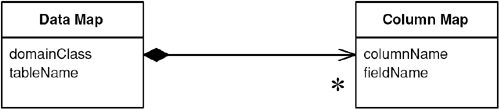
The first question to ask about metadata is how it’s going to be kept. Here I’m keeping it in two classes. The data map corresponds to the mapping of one class to one table. This is a simple mapping, but it will do for illustration.
class DataMap...
private Class domainClass;
private String tableName;
private List columnMaps = new ArrayList();
The data map contains a collection of column maps that map columns in the table to fields.
class ColumnMap...
private String columnName;
private String fieldName;
private Field field;
private DataMap dataMap;
This isn’t a terribly sophisticated mapping. I’m just using the default Java type mappings, which means there’s no type conversion between fields and columns. I’m also forcing a one-to-one relationship between tables and classes.
These structures hold the mappings. The next question is how they’re populated. For this example I’m going to populate them with Java code in specific mapper classes. That may seem a little odd, but it buys most of the benefit of metadata—avoiding repetitive code.
class PersonMapper...
protected void loadDataMap(){
dataMap = new DataMap (Person.class, "people");
dataMap.addColumn ("lastname", "varchar", "lastName");
dataMap.addColumn ("firstname", "varchar", "firstName");
dataMap.addColumn ("number_of_dependents", "int", "numberOfDependents");
}
During construction of the column mapper, I build the link to the field. Strictly speaking, this is an optimization so you may not have to calculate the fields. However, doing so reduces the subsequent accesses by an order of magnitude on my little laptop.
class ColumnMap...
public ColumnMap(String columnName, String fieldName, DataMap dataMap) {
this.columnName = columnName;
this.fieldName = fieldName;
this.dataMap = dataMap;
initField();
}
private void initField() {
try {
field = dataMap.getDomainClass().getDeclaredField(getFieldName());
field.setAccessible(true);
} catch (Exception e) {
throw new ApplicationException ("unable to set up field: " + fieldName, e);
}
}
It’s not much of a challenge to see how I can write a routine to load the map from an XML file or from a metadata database. Paltry that challenge may be, but I’ll decline it and leave it to you.
Now that the mappings are defined, I can make use of them. The strength of the metadata approach is that all of the code that actually manipulates things is in a superclass, so I don’t have to write the mapping code that I wrote in the explicit cases.
I’ll begin with the find by ID method.
class Mapper...
public Object findObject (Long key) {
if (uow.isLoaded(key)) return uow.getObject(key);
String sql = "SELECT" + dataMap.columnList() + " FROM " + dataMap.getTableName() + " WHERE
ID = ?";
PreparedStatement stmt = null;
ResultSet rs = null;
DomainObject result = null;
try {
stmt = DB.prepare(sql);
stmt.setLong(1, key.longValue());
rs = stmt.executeQuery();
rs.next();
result = load(rs);
} catch (Exception e) {throw new ApplicationException (e);
} finally {DB.cleanUp(stmt, rs);
}
return result;
}
private UnitOfWork uow;
protected DataMap dataMap;
class DataMap...
public String columnList() {
StringBuffer result = new StringBuffer(" ID");
for (Iterator it = columnMaps.iterator(); it.hasNext();) {
result.append(",");
ColumnMap columnMap = (ColumnMap)it.next();
result.append(columnMap.getColumnName());
}
return result.toString();
}
public String getTableName() {
return tableName;
}
The select is built more dynamically than the other examples, but it’s still worth preparing in a way that allows the database session to cache it properly. If it’s an issue, the column list can be calculated during construction and cached, since there’s no call for updating the columns during the life of the data map. For this example I’m using a Unit of Work (184) to handle the database session.
As is common with the examples in this book I’ve separated the load from the find, so that we can use the same load method from other find methods.
class Mapper...
public DomainObject load(ResultSet rs)
throwsInstantiationException, IllegalAccessException, SQLException
{
Long key = new Long(rs.getLong("ID"));
if (uow.isLoaded(key)) return uow.getObject(key);
DomainObject result = (DomainObject) dataMap.getDomainClass().newInstance();
result.setID(key);
uow.registerClean(result);
loadFields(rs, result);
return result;
}
private void loadFields(ResultSet rs, DomainObject result) throws SQLException {
for (Iterator it = dataMap.getColumns(); it.hasNext();) {
ColumnMap columnMap = (ColumnMap)it.next();
Object columnValue = rs.getObject(columnMap.getColumnName());
columnMap.setField(result, columnValue);
}
}
class ColumnMap...
public void setField(Object result, Object columnValue) {
try {
field.set(result, columnValue);
} catch (Exception e) { throw new ApplicationException ("Error in setting " + fieldName, e);
}
}
This is a classic reflected program. We go through each of the column maps and use them to load the field in the domain object. I separated the loadFields method to show how we might extend this for more complicated cases. If we have a class and a table where the simple assumptions of the metadata don’t hold, I can just override loadFields in a subclass mapper to put in arbitrarily complex code. This is a common technique with metadata—providing a hook to override for more wacky cases. It’s usually a lot easier to override the wacky cases with subclasses than it is to build metadata sophisticated enough to hold a few rare special cases.
Of course, if we have a subclass, we might as well use it to avoid downcasting.
class PersonMapper...
public Person find(Long key) {
return (Person) findObject(key);
}
For updates I have a single update routine.
class Mapper...
public void update (DomainObject obj) {
String sql = "UPDATE " + dataMap.getTableName() + dataMap.updateList() + " WHERE ID = ?";
PreparedStatement stmt = null;
try {
stmt = DB.prepare(sql);
int argCount = 1;
for (Iterator it = dataMap.getColumns(); it.hasNext();) {
ColumnMap col = (ColumnMap) it.next();
stmt.setObject(argCount++, col.getValue(obj));
}
stmt.setLong(argCount, obj.getID().longValue());
stmt.executeUpdate();
} catch (SQLException e) {throw new ApplicationException (e);
} finally {DB.cleanUp(stmt);
}
}
class DataMap...
public String updateList() {
StringBuffer result = new StringBuffer(" SET ");
for (Iterator it = columnMaps.iterator(); it.hasNext();) {
ColumnMap columnMap = (ColumnMap)it.next();
result.append(columnMap.getColumnName());
result.append("=?,");
}
result.setLength(result.length() - 1);
return result.toString();
}
public Iterator getColumns() {
return Collections.unmodifiableCollection(columnMaps).iterator();
}
class ColumnMap...
public Object getValue (Object subject) {
try {
return field.get(subject);
} catch (Exception e) {
throw new ApplicationException (e);
}
}
Inserts use a similar scheme.
class Mpper...
public Long insert (DomainObject obj) {
String sql = "INSERT INTO " + dataMap.getTableName() + " VALUES (?" + dataMap.insertList()
+ ")";
PreparedStatement stmt = null;
try {
stmt = DB.prepare(sql);
stmt.setObject(1, obj.getID());
int argCount = 2;
for (Iterator it = dataMap.getColumns(); it.hasNext();) {
ColumnMap col = (ColumnMap) it.next();
stmt.setObject(argCount++, col.getValue(obj));
}
stmt.executeUpdate();
} catch (SQLException e) {throw new ApplicationException (e);
} finally {DB.cleanUp(stmt);
}
return obj.getID();
}
class DataMap...
public String insertList() {
StringBuffer result = new StringBuffer();
for (int i = 0; i < columnMaps.size(); i++) {
result.append(",");
result.append("?");
}
return result.toString();
}
There are a couple of routes you can take to get multiple objects with a query. If you want a generic query capability on the generic mapper, you can have a query that takes a SQL where clause as an argument.
class Mapper...
public Set findObjectsWhere (String whereClause) {
String sql = "SELECT" + dataMap.columnList() + " FROM " + dataMap.getTableName() + " WHERE "
+ whereClause;
PreparedStatement stmt = null;
ResultSet rs = null;
Set result = new HashSet();
try {
stmt = DB.prepare(sql);
rs = stmt.executeQuery();
result = loadAll(rs);
} catch (Exception e) {
throw new ApplicationException (e);
} finally {DB.cleanUp(stmt, rs);
}
return result;
}
public Set loadAll(ResultSet rs) throws SQLException, InstantiationException,
IllegalAccessException {
Set result = new HashSet();
while (rs.next()) {
DomainObject newObj = (DomainObject) dataMap.getDomainClass().newInstance();
newObj = load (rs);
result.add(newObj);
}
return result;
}
An alternative is to provide special case finders on the mapper subtypes.
class PersonMapper...
public Set findLastNamesLike (String pattern) {
String sql =
"SELECT" + dataMap.columnList() +
" FROM " + dataMap.getTableName() +
" WHERE UPPER(lastName) like UPPER(?)";
PreparedStatement stmt = null;
ResultSet rs = null;
try {
stmt = DB.prepare(sql);
stmt.setString(1, pattern);
rs = stmt.executeQuery();
return loadAll(rs);
} catch (Exception e) {throw new ApplicationException (e);
} finally {DB.cleanUp(stmt, rs);
}
}
A further alternative for general selects is a Query Object (316).
On the whole, the great advantage of the metadata approach is that I can now add new tables and classes to my data mapping and all I have to do is to provide a loadMap method and any specialized finders that I may fancy.
An object that represents a database query.
SQL can be an involved language, and many developers aren’t particularly familiar with it. Furthermore, you need to know what the database schema looks like to form queries. You can avoid this by creating specialized finder methods that hide the SQL inside parameterized methods, but that makes it difficult to form more ad hoc queries. It also leads to duplication in the SQL statements should the database schema change.
A Query Object is an interpreter [Gang of Four], that is, a structure of objects that can form itself into a SQL query. You can create this query by referring to classes and fields rather than tables and columns. In this way those who write the queries can do so independently of the database schema and changes to the schema can be localized in a single place.
A Query Object is an application of the Interpreter pattern geared to represent a SQL query. Its primary roles are to allow a client to form queries of various kinds and to turn those object structures into the appropriate SQL string.
In order to represent any query, you need a flexible Query Object. Often, however, applications can make do with a lot less than the full power of SQL, in which case your Query Object can be simpler. It won’t be able to represent anything, but it can satisfy your particular needs. Moreover, it’s usually no more work to enhance it when you need more capability than it is to create a fully capable Query Object right from the beginning. As a result you should create a minimally functional Query Object for your current needs and evolve it as those needs grow.
A common feature of Query Object is that it can represent queries in the language of the in-memory objects rather than the database schema. That means that, instead of using table and column names, you can use object and field names. While this isn’t important if your objects and database have the same structure, it can be very useful if you get variations between the two. In order to perform this change of view, the Query Object needs to know how the database structure maps to the object structure, a capability that really needs Metadata Mapping (306).
For multiple databases you can design your Query Object so that it produces different SQL depending on which database the query is running against. At it’s simplest level it can take into account the annoying differences in SQL syntax that keep cropping up; at a more ambitious level it can use different mappings to cope with the same classes being stored in different database schemas.
A particularly sophisticated use of Query Object is to eliminate redundant queries against a database. If you see that you’ve run the same query earlier in a session, you can use it to select objects from the Identity Map (195) and avoid a trip to the database. A more sophisticated approach can detect whether one query is a particular case of an earlier query, such as a query that is the same as an earlier one but with an additional clause linked with an AND.
Exactly how to achieve these more sophisticated features is beyond the scope of this book, but they’re the kind of features that O/R mapping tools may provide.
A variation on the Query Object is to allow a query to be specified by an example domain object. Thus, you might have a person object whose last name is set to Fowler but all of those other attributes are set to null. You can treat it as a query by example that’s processed like the Interpreter-style Query Object. That returns all people in the database whose last name is Fowler, and it’s very simple and convenient to use. However, it breaks down for complex queries.
Query Objects are a pretty sophisticated pattern to put together, so most projects don’t use them if they have a handbuilt data source layer. You only really need them when you’re using Domain Model (116) and Data Mapper (165); you also really need Metadata Mapping (306) to make serious use of them.
Even then Query Objects aren’t always necessary, as many developers are comfortable with SQL. You can hide many of the details of the database schema behind specific finder methods.
The advantages of Query Object come with more sophisticated needs: keeping database schemas encapsulated, supporting multiple databases, supporting multiple schemas, and optimizing to avoid multiple queries. Some projects with a particularly sophisticated data source team might want to build these capabilities themselves, but most people who use Query Object do so with a commercial tool. My inclination is that you’re almost always better off buying a tool.
All that said, you may find that a limited Query Object fulfills your needs without being difficult to build on a project that doesn’t justify a fully featured version. The trick is to pare down the functionality to no more than you actually use.
You can find an example of Query Object in [Alpert et al.] in the discussion of interpreters. Query Object is also closely linked to the Specification pattern in [Evans and Fowler] and [Evans].
This is a simple example of a Query Object—rather less than would be useful for most situations but enough to give you an idea of what a Query Object is about. It can query a single table based on set of criteria “AND’ed” together (in slightly more technical language, it can handle a conjunction of elementary predicates).
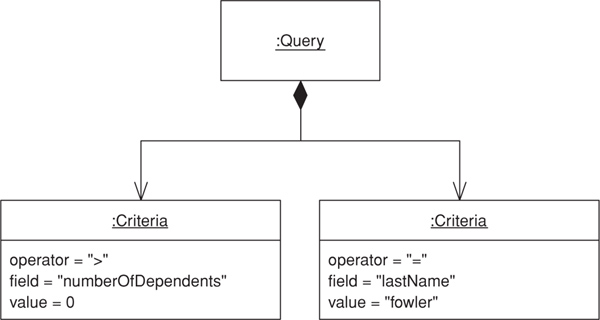
The Query Object is set up using the language of domain objects rather than that of the table structure. Thus, a query knows the class that it’s for and a collection of criteria that correspond to the clauses of a where clause.
class QueryObject...
private Class klass;
private List criteria = new ArrayList();
A simple criterion is one that takes a field and a value and an SQL operator to compare them.
class Criteria...
private String sqlOperator;
protected String field;
protected Object value;
To make it easier to create the right criteria, I can provide an appropriate creation method.
class Criteria...
public static Criteria greaterThan(String fieldName, int value) {
return Criteria.greaterThan(fieldName, new Integer(value));
}
public static Criteria greaterThan(String fieldName, Object value) {
return new Criteria(" > ", fieldName, value);
}
private Criteria(String sql, String field, Object value) {
this.sqlOperator = sql;
this.field = field;
this.value = value;
}
This allows me to find everyone with dependents by forming a query such as
class Criteria...
QueryObject query = new QueryObject(Person.class);
query.addCriteria(Criteria.greaterThan("numberOfDependents", 0));
Thus, if I have a person object such as this:
class Person...
private String lastName;
private String firstName;
private int numberOfDependents;
I can ask for all people with dependents by creating a query for person and adding a criterion.
QueryObject query = new QueryObject(Person.class);
query.addCriteria(Criteria.greaterThan("numberOfDependents", 0));
That’s enough to describe the query. Now the query needs to execute by turning itself into a SQL select. In this case I assume that my mapper class supports a method that finds objects based on a string that’s a where clause.
class QueryObject...
public Set execute(UnitOfWork uow) {
this.uow = uow;
return uow.getMapper(klass).findObjectsWhere(generateWhereClause());
}
class Mapper...
public Set findObjectsWhere (String whereClause) {
String sql = "SELECT" + dataMap.columnList() + " FROM " + dataMap.getTableName() + " WHERE "
+ whereClause;
PreparedStatement stmt = null;
ResultSet rs = null;
Set result = new HashSet();
try {
stmt = DB.prepare(sql);
rs = stmt.executeQuery();
result = loadAll(rs);
} catch (Exception e) {
throw new ApplicationException (e);
} finally {DB.cleanUp(stmt, rs);
}
return result;
}
Here I’m using a Unit of Work (184) that holds mappers indexed by the class and a mapper that uses Metadata Mapping (306). The code is the same as that in the example in Metadata Mapping (306) to save repeating the code in this section.
To generate the where clause, the query iterates through the criteria and has each one print itself out, tying them together with ANDs.
class QueryObject...
private String generateWhereClause() {
StringBuffer result = new StringBuffer();
for (Iterator it = criteria.iterator(); it.hasNext();) {
Criteria c = (Criteria)it.next();
if (result.length() != 0)
result.append(" AND ");
result.append(c.generateSql(uow.getMapper(klass).getDataMap()));
}
return result.toString();
}
class Criteria...
public String generateSql(DataMap dataMap) {
return dataMap.getColumnForField(field) + sqlOperator + value;
}
class DataMap...
public String getColumnForField (String fieldName) {
for (Iterator it = getColumns(); it.hasNext();) {
ColumnMap columnMap = (ColumnMap)it.next();
if (columnMap.getFieldName().equals(fieldName))
return columnMap.getColumnName();
}
throw new ApplicationException ("Unable to find column for " + fieldName);
}
As well as criteria with simple SQL operators, we can create more complex criteria classes that do a little more. Consider a case-insensitive pattern match query, like one that finds all people whose last names start with F. We can form a query object for all people with such dependents.
QueryObject query = new QueryObject(Person.class);
query.addCriteria(Criteria.greaterThan("numberOfDependents", 0));
query.addCriteria(Criteria.matches("lastName", "f%"));
This uses a different criteria class that forms a more complex clause in the where statement.
class Criteria...
public static Criteria matches(String fieldName, String pattern){
return new MatchCriteria(fieldName, pattern);
}
class MatchCriteria extends Criteria...
public String generateSql(DataMap dataMap) {
return "UPPER(" + dataMap.getColumnForField(field) + ") LIKE UPPER('" + value + "')";
}
Mediates between the domain and data mapping layers using a collection-like interface for accessing domain objects.
A system with a complex domain model often benefits from a layer, such as the one provided by Data Mapper (165), that isolates domain objects from details of the database access code. In such systems it can be worthwhile to build another layer of abstraction over the mapping layer where query construction code is concentrated. This becomes more important when there are a large number of domain classes or heavy querying. In these cases particularly, adding this layer helps minimize duplicate query logic.
A Repository mediates between the domain and data mapping layers, acting like an in-memory domain object collection. Client objects construct query specifications declaratively and submit them to Repository for satisfaction. Objects can be added to and removed from the Repository, as they can from a simple collection of objects, and the mapping code encapsulated by the Repository will carry out the appropriate operations behind the scenes. Conceptually, a Repository encapsulates the set of objects persisted in a data store and the operations performed over them, providing a more object-oriented view of the persistence layer. Repository also supports the objective of achieving a clean separation and one-way dependency between the domain and data mapping layers.
Repository is a sophisticated pattern that makes use of a fair number of the other patterns described in this book. In fact, it looks like a small piece of an object-oriented database and in that way it’s similar to Query Object (316), which development teams may be more likely to encounter in an object-relational mapping tool than to build themselves. However, if a team has taken the leap and built Query Object (316), it isn’t a huge step to add a Repository capability. When used in conjunction with Query Object (316), Repository adds a large measure of usability to the object-relational mapping layer without a lot of effort.
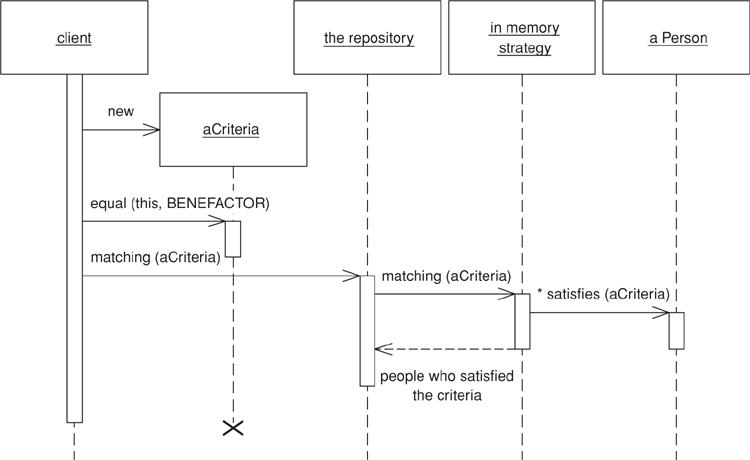
In spite of all the machinery behind the scenes, Repository presents a simple interface. Clients create a criteria object specifying the characteristics of the objects they want returned from a query. For example, to find person objects by name we first create a criteria object, setting each individual criterion like so: criteria.equals(Person.LAST_NAME, "Fowler"), and criteria.like(Person.FIRST_NAME, "M"). Then we invoke repository.matching(criteria) to return a list of domain objects representing people with the last name Fowler and a first name starting with M. Various convenience methods similar to matching (criteria) can be defined on an abstract repository; for example, when only one match is expected soleMatch(criteria) might return the found object rather than a collection. Other common methods include byObjectId(id), which can be trivially implemented using soleMatch.
To code that uses a Repository, it appears as a simple in-memory collection of domain objects. The fact that the domain objects themselves typically aren’t stored directly in the Repository is not exposed to the client code. Of course, code that uses Repository should be aware that this apparent collection of objects might very well map to a product table with hundreds of thousands of records. Invoking all() on a catalog system’s ProductRepository might not be such a good idea.
Repository replaces specialized finder methods on Data Mapper (165) classes with a specification-based approach to object selection [Evans and Fowler]. Compare this with the direct use of Query Object (316), in which client code may construct a criteria object (a simple example of the specification pattern), add() that directly to the Query Object (316), and execute the query. With a Repository, client code constructs the criteria and then passes them to the Repository, asking it to select those of its objects that match. From the client code’s perspective, there’s no notion of query “execution”; rather there’s the selection of appropriate objects through the “satisfaction” of the query’s specification. This may seem an academic distinction, but it illustrates the declarative flavor of object interaction with Repository, which is a large part of its conceptual power.
Under the covers, Repository combines Metadata Mapping (329) with a Query Object (316) to automatically generate SQL code from the criteria. Whether the criteria know how to add themselves to a query, the Query Object (316) knows how to incorporate criteria objects, or the Metadata Mapping (306) itself controls the interaction is an implementation detail.
The object source for the Repository may not be a relational database at all, which is fine as Repository lends itself quite readily to the replacement of the data-mapping component via specialized strategy objects. For this reason it can be especially useful in systems with multiple database schemas or sources for domain objects, as well as during testing when use of exclusively in-memory objects is desirable for speed.
Repository can be a good mechanism for improving readability and clarity in code that uses querying extensively. For example, a browser-based system featuring a lot of query pages needs a clean mechanism to process HttpRequest objects into query results. The handler code for the request can usually convert the HttpRequest into a criteria object without much fuss, if not automatically; submitting the criteria to the appropriate Repository should require only an additional line or two of code.
In a large system with many domain object types and many possible queries, Repository reduces the amount of code needed to deal with all the querying that goes on. Repository promotes the Specification pattern (in the form of the criteria object in the examples here), which encapsulates the query to be performed in a pure object-oriented way. Therefore, all the code for setting up a query object in specific cases can be removed. Clients need never think in SQL and can write code purely in terms of objects.
However, situations with multiple data sources are where we really see Repository coming into its own. Suppose, for example, that we’re sometimes interested in using a simple in-memory data store, commonly when we wants to run a suite of unit tests entirely in memory for better performance. With no database access, many lengthy test suites run significantly faster. Creating fixture for unit tests can also be more straightforward if all we have to do is construct some domain objects and throw them in a collection rather than having to save them to the database in setup and delete them at teardown.
It’s also conceivable, when the application is running normally, that certain types of domain objects should always be stored in memory. One such example is immutable domain objects (those that can’t be changed by the user), which once in memory, should remain there and never be queried for again. As we’ll see later in this chapter, a simple extension to the Repository pattern allows different querying strategies to be employed depending on the situation.
Another example where Repository might be useful is when a data feed is used as a source of domain objects—say, an XML stream over the Internet, perhaps using SOAP, might be available as a source. An XMLFeedRepositoryStrategy might be implemented that reads from the feed and creates domain objects from the XML.
The specification pattern hasn’t made it into a really good reference source yet. The best published description so far is [Evans and Fowler]. A better description is currently in the works in [Evans].
From the client object’s perspective, using a Repository is simple. To retrieve its dependents from the database a person object creates a criteria object representing the search criteria to be matched and sends it to the appropriate Repository.
public class Person {
public List dependents() {
Repository repository = Registry.personRepository();
Criteria criteria = new Criteria();
criteria.equal(Person.BENEFACTOR, this);
return repository.matching(criteria);
}
}
Common queries can be accommodated with specialized subclasses of Repository. In the previous example we might make a PersonRepository subclass of Repository and move the creation of the search criteria into the Repository itself.
public class PersonRepository extends Repository {
public List list dependentsOf(Person aPerson) {
Criteria criteria = new Criteria();
criteria.equal(Person.BENEFACTOR, aPerson);
return matching(criteria);
}
}
The person object then calls the dependents() method directly on its Repository.
public class Person {
public List dependents() {
return Registry.personRepository().dependentsOf(this);
}
}
Because Repository’s interface shields the domain layer from awareness of the data source, we can refactor the implementation of the querying code inside the Repository without changing any calls from clients. Indeed, the domain code needn’t care about the source or destination of domain objects. In the case of the in-memory store, we want to change the matching() method to select from a collection of domain objects the ones satisfy the criteria. However, we’re not interested in permanently changing the data store used but rather in being able to switch between data stores at will. From this comes the need to change the implementation of the matching() method to delegate to a strategy object that does the querying. The power of this, of course, is that we can have multiple strategies and we can set the strategy as desired. In our case, it’s appropriate to have two: RelationalStrategy, which queries the database, and InMemoryStrategy, which queries the in-memory collection of domain objects. Each strategy implements the RepositoryStrategy interface, which exposes the matching() method, so we get the following implementation of the Repository class:
abstract class Repository {
private RepositoryStrategy strategy;
protected List matching(Criteria aCriteria) {
return strategy.matching(aCriteria);
}
}
A RelationalStrategy implements matching() by creating a Query Object from the criteria and then querying the database using it. We can set it up with the appropriate fields and values as defined by the criteria, assuming here that the Query Object knows how to populate itself from criteria:
public class RelationalStrategy implements RepositoryStrategy {
protected List matching(Criteria criteria) {
Query query = new Query(myDomainObjectClass())
query.addCriteria(criteria);
return query.execute(unitOfWork());
}
}
An InMemoryStrategy implements matching() by iterating over a collection of domain objects and asking the criteria at each domain object if it’s satisfied by it. The criteria can implement the satisfaction code using reflection to interrogate the domain objects for the values of specific fields. The code to do the selection looks like this:
public class InMemoryStrategy implements RepositoryStrategy {
private Set domainObjects;
protected List matching(Criteria criteria) {
List results = new ArrayList();
Iterator it = domainObjects.iterator();
while (it.hasNext()) {
DomainObject each = (DomainObject) it.next();
if (criteria.isSatisfiedBy(each))
results.add(each);
}
return results;
}
}