15.3 Setting Up a Central Stylesheet
You may have seen CSS files on the web that you thought were pretty large. Especially if you’re actively developing a more extensive website, it can be useful to initially distribute the various style statements across multiple CSS files.
The principle is simple: You use a central stylesheet, which you include in the HTML document as usual via the link element. In Figure 15.9, style.css is the central stylesheet. However, this central stylesheet doesn’t contain any ordinary CSS content, but again only loads the other CSS files (e.g., reset.css, print.css, layout.css, navi.css, and iebrowser. css in the example of the figure) by using the @import rule. At first, this may sound a bit cumbersome, but during the development of extensive web projects, it’s rather a relief to divide the stylesheets into meaningful units such as layout of header and footer, navigation, content, layout for printing, layout for old web browsers and so on—here you must decide by yourself according to sense and personal taste how (and if) you want to divide the stylesheets.
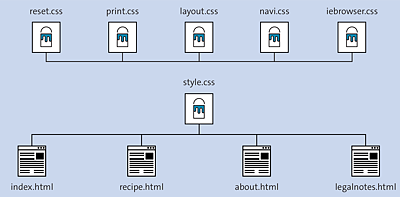
Figure 15.9 A Central Stylesheet Helps to Keep an Overview during Development and to Track Down Errors More Quickly
With reference to the example in Figure 15.9, such a central stylesheet style.css could look like the following:
/* Example of a central stylesheet, style.css */

/* Instead of reset.css, normalize.css would also work,
   which often makes more sense than reset.css.
   For more information, see Section 15.4.2 */

@import url("reset.css");

/* Basic design */
@import url("layout.css");

/* Navigation */
@import url("navi.css");

/* Print version */
@import url("print.css");
...
CSS Files in a Separate Folder
In practice, it’s also recommended to store CSS files generally in a separate directory. For this reason, you can often find the directory name CSS.
15.3.1 Combining Everything Back into One File to Shorten the Load Time
Keep in mind that the emphasis was on development. The disadvantage of multiple individual CSS files is that multiple server requests (one for each file) become necessary, which of course can increase the load time of the website significantly. So, when you’re done with the website and want to make it public, you should combine the individual CSS files into one file for speed reasons. As in Figure 15.9, you can leave it at style.css because this file was included in the HTML document anyway.
Usually, you need to copy the style statements of each CSS file (as in Figure 15.9 with reset.css, print.css, layout.css, and navi.css) to the clipboard and paste them into style.css. However, if you use CSS statements for old web browsers, as in the iebrowser.css example, they should still be provided in a separate file.
If you want to avoid this kind of effort in the future and automate the development process a little more, you should take a look at the development tools Grunt (http://gruntjs.com) or Gulp (http://gulpjs.com).
CSS Compression
To reduce the file size of the CSS file again a bit and thus improve the load time, you could remove all superfluous lines of code with white spaces, line breaks, and comments. For such tasks, there are online tools available such as CSS Compressor (https://cssminifier.com) or YUI Compressor (http://refresh-sf.com). Before you do that, you should make a backup copy of your CSS file, which you’ll need again if you want to change anything. The CSS file is no longer pleasant to read and edit after a CSS compression.