15.4 CSS Reset or Normalization?
The goal and purpose of a reset or normalization is to put the different basic browser settings on a common basis as much as possible, so that the website contains as few differences as possible in the different web browsers. To create such a CSS base, two ways have been established: reset and normalization.
15.4.1 Built-In Style Presets of the Web Browser and CSS Reset
When viewing the HTML document in different web browsers, you may have noticed that the display differs slightly. This is because all web browsers have built-in stylesheet defaults. One option would be to override the defaults with a CSS reset, so that when you start designing stylesheets, you’re virtually doing everything yourself from the start.
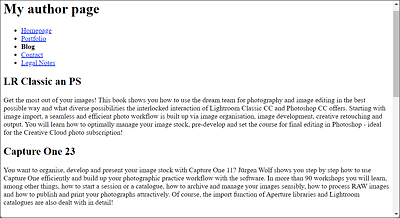
Figure 15.10 For Example, This Is What the Built-In Stylesheet Looks Like in the Chrome Web Browser
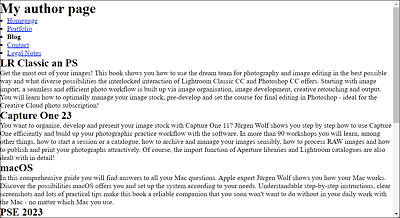
Figure 15.11 This Is What the Built-In Stylesheet Looks Like When You Use a CSS Reset to Override the Built-In Stylesheet
In Figure 15.11, the built-in stylesheet of the web browser was reset using the * selector (= universal selector) with the following CSS statements:
This removes all external and internal spacings and borders on all elements. In practice, this will have to be done at many points in a project anyway. Such a CSS reset is often a bit too radical because here even the lists are without indentation, and you have to set spacing again yourself for every smallest detail. However, because of the lists, it wouldn’t be too much effort if you summarized the CSS reset as follows:
...
/* Minimal version of a CSS reset */
* {
    margin: 0;
    padding: 0;
}
ul, ol {
margin-left: 1em;
}
...
Listing 15.2 /examples/chapter015/15_4/css/reset.css
A much better and ready solution for a reset stylesheet by Eric Meyer can be found at http://meyerweb.com/eric/tools/css/reset/. You can copy and paste this CSS code to your project and modify it if necessary.
15.4.2 Normalization: The Alternative to CSS Reset
The gentler and arguably better alternative to the hard CSS reset of the web browser’s built-in stylesheet defaults is normalization. Although normalization overrides many built-in stylesheet defaults of the web browser, it does so while respecting useful CSS defaults. Fortunately, you don’t have to start by thinking about what constitutes useful defaults yourself because others have already done that for you. You can find multiple normalization projects on the internet, which you can download and include in your project. And if you don’t like some of the defaults, you can and should modify them and adapt them to your own needs.
Probably the most famous normalization project is normalize.css by Nicolas Gallagher, which you can download from the website, https://necolas.github.io/normalize.css/. What’s particularly nice about this project is that it fixes several web browser bugs right away.
The Evolution of Normalization: “sanitize.css”
From the normalization project with normalize.css, the sanitize.css project by Jonathan Neal has emerged. Unlike normalize.css, the project no longer takes into account older web browsers such as Safari 8 or Internet Explorer 10 and instead introduces constructs from newer web browsers. The sanitize.css project can be found at https://csstools.github.io/sanitize.css/.
CSS Reset, Normalization, or Leave Everything as It Is?
At this point, as with the central stylesheet setup, I should mention that these are all mere suggestions. Depending on their preferences, some web designers do a hard CSS reset and take over all tasks themselves, leaving nothing to chance or default settings, whereas others use one of the normalization projects and adapt the template to their own needs. Still others aren’t fond of a CSS reset or normalization at all and prefer to work with their own styles.
There has been discussion about the need for a CSS reset for some time. Many web developers question the sense of first defining a complete CSS reset and then immediately overwriting it with their own styles. You’ll come across a lot of pros and cons on the web and will probably have to ultimately decide for yourself what works best for you personally.