Chapter 14. User Interfaces
So far, we haven’t really touched on the world of the user interface. A few of you out there might just be providing a cold, hard, clinical API to your customers, but many of us find ourselves wanting to create beautiful, functional user interfaces that will delight our customers. The user interface, after all, is where we’ll be pulling all these microservices together into something that makes sense to our customers.
When I first started computing, we were mostly talking about big, fat clients that ran on our desktops. I spent many hours with Motif and then Swing trying to make my software as nice to use as possible. Often these systems were just for the creation and manipulation of local files, but many of them had a server-side component. My first job at Thoughtworks involved creating a Swing-based electronic point-of-sale system that was just one of a large number of moving parts, most of which were on the server.
Then came the web. We instead started thinking of our UIs as being “thin,” with more logic on the server side. In the beginning, our server-side programs rendered the entire page and sent it to the client browser, which did very little. Any interactions were handled on the server side via GETs and POSTs triggered by the user clicking on links or filling in forms. Over time, JavaScript became a more popular option to add dynamic behavior to the browser-based UI, and some applications could arguably be as “fat” as the old desktop clients. We subsequently had the rise of the mobile application, and today we have a varied landscape for delivering graphical user interfaces to our users—different platforms, and different technologies for those platforms. This range of technologies gives us a host of options for how we can make effective user interfaces backed by microservices. We’ll be exploring all of this and more in this chapter.
Toward Digital
Over the last couple of years, organizations have started to move away from thinking that web or mobile should be treated differently; they are instead thinking about digital more holistically. What is the best way for our customers to use the services we offer? And what does that do to our system architecture? The understanding that we cannot predict exactly how a customer might end up interacting with our products has driven adoption of more granular APIs, like those delivered by microservices. By combining the capabilities our microservices expose in different ways, we can curate different experiences for our customers on their desktop application, mobile device, and wearable device and even in physical form if they visit our brick-and-mortar store.
So think of user interfaces as the places where we weave together the various strands of the capabilities we want to offer our users. With that in mind, how do we pull all these strands together? We need to look at this problem from two sides: the who and the how. Firstly, we’ll consider the organizational aspects—who owns what responsibilities when it comes to delivering user interfaces? Secondly, we’ll look at a set of patterns that can be used to implement these interfaces.
Ownership Models
As we discussed way back in Chapter 1, the traditional layered architecture can cause issues when it comes to delivering software effectively. In Figure 14-1, we see an example in which responsibility for the user interface layer is owned by a single frontend team, with the backend services work done by another. In this example, adding a simple control involves work being done by three different teams. These sorts of tiered organizational structures can significantly impact our speed of delivery due to the need to constantly coordinate changes and hand off work between teams.
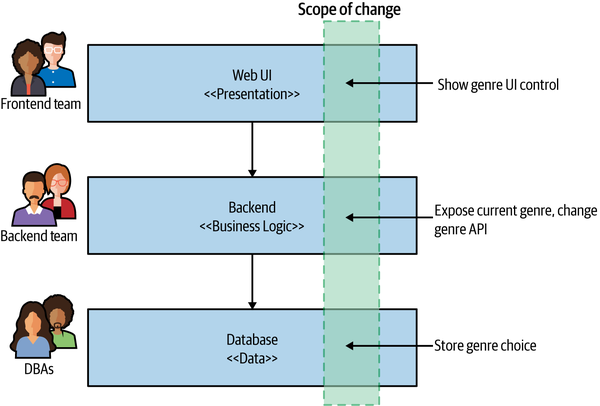
Figure 14-1. Making a change across all three tiers is more involved
The model that I greatly prefer and feel is better aligned to achieving the goal of independent deployability is to have the UI broken apart and managed by a team that also manages the server-side components, as we see in Figure 14-2. Here, a single team ends up being responsible for all the changes we need to make to add our new control.
Teams with full ownership of the end-to-end functionality are able to make changes more quickly. Having full ownership encourages each team to have a direct contact point with an end user of the software. With backend teams, it’s easy to lose track of who the end user is.
Despite the drawbacks, I (unfortunately) still see the dedicated frontend team as being the more common organizational pattern among companies who make use of microservices. Why is this?
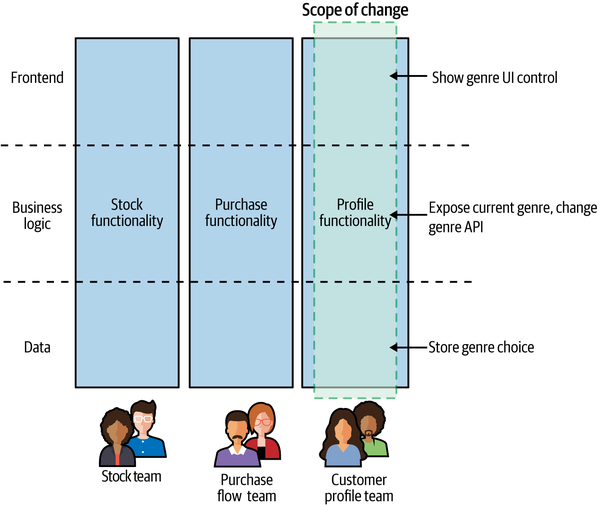
Figure 14-2. The UI is broken apart and is owned by a team that also manages the server-side functionality that supports the UI
Drivers for Dedicated Frontend Teams
The desire for dedicated frontend teams seems to come down to three key factors: scarcity of specialists, a drive for consistency, and technical challenges.
Firstly, delivering a user interface requires a degree of specialized skills. There are the interaction and graphical design aspects, and then there is the technical know-how required to deliver a great web or native application experience. Specialists with these skills can be hard to come by, and as these folks are such a rare commodity, the temptation is to stick them all together so you can make sure they are focusing only on their specialty.
The second driver for a separate frontend team is consistency. If you have one team responsible for delivering your customer-facing user interface, you can ensure your UI has a consistent look and feel. You use a consistent set of controls to solve similar problems so that the user interface looks and feels like a single, cohesive entity.
Finally, some user interface technology can be challenging to work with in a non-monolithic fashion. Here I’m thinking specifically of single-page applications (SPAs), which historically at least haven’t been easy to break apart. Traditionally, a web user interface would consist of multiple web pages, and you would navigate from one page to another. With SPAs, the entire application is instead served up inside a single web page. Frameworks like Angular, React, and Vue theoretically allow for the creation of more sophisticated user interfaces than “old-fashioned” websites. We’ll be looking at a set of patterns that can give you different options for how to decompose a user interface later in this chapter, and in terms of SPAs I will show how the micro frontend concept can allow you to use SPA frameworks while still avoiding the need for a monolithic user interface.
Toward Stream-Aligned Teams
I think that having a dedicated frontend team is in general a mistake if you are trying to optimize for good throughput—it creates new handoff points in your organization, slowing things down. Ideally, our teams are aligned around end-to-end slices of functionality, allowing each team to deliver new features to its customers while reducing the amount of coordinaton needed. My preferred model is a team owning the end-to-end delivery of functionality in a specific part of the domain. This matches what Matthew Skelton and Manuel Pais describe as stream-aligned teams in their book Team Topologies.1 As they describe it:
A stream-aligned team is a team aligned to a single, valuable stream of work...[T]he team is empowered to build and deliver customer or user value as quickly, safely, and independently as possible, without requiring hand-offs to other teams to perform parts of the work.
In a sense, we are talking about full stack teams (rather than full stack developers).2 A team with end-to-end responsibility for delivery of user-facing functionality is also going to have a more obvious, direct connection to the end user as well. All too often I’ve seen “backend” teams with a hazy idea of what the software does or what the users need, which can cause all sorts of misunderstandings when it comes to implementing new functionality. On the other hand, the end-to-end teams will find it much easier to build a direct connection with the people using the software they create—they can be more focused on making sure that the people they are serving are getting what they need.
As a concrete example, I spent some time working with FinanceCo, a successful and growing Fintech firm based in Europe. At FinanceCo, virtually all teams work on software that directly impacts the customer experience and have customer-oriented key performance indicators (KPIs)—the success of a given team is driven less by how many features it has shipped and more by helping to improve the experience of the people using the software. It becomes very clear as to how a change can impact customers. This is only possible due to the fact that the majority of the teams have direct, customer-facing responsibilities in terms of the software they deliver. When you are more removed from the end user, it becomes harder to understand whether your contributions are successful, and you can end up focusing on goals that are a long way removed from things the people using your software care about.
Let’s revisit the reasons why dedicated frontend teams exist—specialists, consistency, and technical challenges—and now let’s look at how these issues can be addressed.
Sharing Specialists
Good developers can be hard to find, and finding them is further complicated when you need developers with a certain specialty. In the area of user interfaces, for example, if you are providing native mobile as well as web interfaces, you could find yourself needing people who are experienced with iOS and Android as well as with modern web development. This is quite aside from the fact that you may want dedicated interaction designers, graphic designers, accessibility experts, and the like. People with the right depth of skills for these more “narrow” fields may be thin on the ground, and they may always have more work than there is time for.
As we’ve touched on previously, the traditional approach to organizational structures would have you putting all the people who possess the same skill set in the same team, allowing you to tightly control what they work on. But as we’ve also discussed, this leads to siloed organizations.
Putting people with specialized skills in their own dedicated team also deprives you of opportunities for other developers to pick up these in-demand skills. You don’t need every developer to learn to become an expert iOS developer, for example, but it can still be useful for some of your developers to learn enough skills in that area to help out with the easy stuff, leaving your specialists free to tackle the really hard tasks. Skill sharing can also be helped by establishing communities of practice—you might consider having a UI community that cuts across your teams, enabling people to share ideas and challenges with their peers.
I remember when all database changes had to be done by a central pool of database administrators (DBAs). Developers had little awareness of how databases worked as a result, and would more frequently create software that used the database poorly. Furthermore, much of the work the experienced DBAs were being asked to do consisted of trivial changes. As more database work got pulled into delivery teams, developers in general got a better appreciation for databases and could start doing the trivial work themselves, freeing up the valuable DBAs to focus on more complex database issues, which made better use of their deeper skills and experience. A similar shift has happened in the space of operations and testers, with more of this work being pulled into teams.
So, on the contrary, moving specialists out of dedicated teams won’t inhibit the specialists’ ability to do their job; in fact, it will likely increase the bandwidth they have to focus on the difficult problems that really need their attention.
The trick is to find a more effective way to deploy your specialists. Ideally, they would be embedded in the teams. Sometimes, though, there might not be enough work to justify their full-time presence in a given team, in which case they may well split their time between multiple teams. Another model is to have a dedicated team with these skills whose explicit job is to enable other teams. In Team Topologies, Skelton and Pais describe these teams as enabling teams. Their job is to go out and help other teams who are focused on delivering new features to do their job. You can think of these teams as a bit more like an internal consultancy—they can come in and spend targeted time with a stream-aligned team, helping it become more self-sufficient in a particular area or else providing some dedicated time to help roll out a particularly difficult piece of work.
So whether your specialists are embedded full-time in a given team, or work to enable others to do the same work, you can remove organizational silos and also help skill up your colleagues at the same time.
Ensuring Consistency
The second issue often cited as a reason for dedicated frontend teams is that of consistency. By having a single team responsible for a user interface, you ensure that the UI has a consistent look and feel. This can extend from easy things like using the same colors and fonts to solving the same interface problems in the same way—using a consistent design and interaction language that helps users interact with the system. This consistency doesn’t just help communicate a degree of polish regarding the product itself but also ensures that users will find it easier to use new functionality when it is delivered.
There are ways, though, to help ensure a degree of consistency across teams. If you are using the enabling team model, with specialists spending time with multiple teams, they can help ensure that the work done by each team is consistent. The creation of shared resources like a living CSS style guide or shared UI components can also help.
As a concrete example of an enabling team being used to help with consistency, the Financial Times Origami team builds web components in collaboration with the design team, which encapsulates the brand identity—ensuring a consistent look and feel across the stream-aligned teams. This type of enabling team provides two forms of aid—firstly, it shares its expertise in delivering already-built components, and secondly, it helps ensure that the UIs deliver a consistent user experience.
It’s worth noting, however, that the driver for consistency shouldn’t be considered universally right. Some organizations make seemingly conscious decisions to not require consistency in their user interfaces, because they feel that allowing for more autonomy of teams is preferable. Amazon is one such organization. Earlier versions of its main shopping site had large degrees of inconsistency, with widgets using quite different styles of controls.
This is shown to an even greater degree when you look at the web control panel for Amazon Web Services (AWS). Different products in AWS have massively different interaction models, making the user interface quite bewildering. This, however, seems to be a logical extension of Amazon’s drive to reduce internal coordination between teams.
The increased autonomy of product teams in AWS appears to manifest itself in other ways as well, not just in terms of an often disjointed user experience. There frequently are multiple different ways to achieve the same task (by running a container workload, for example), with different product teams inside AWS often overlapping with one another with similar but incompatible solutions. You might criticize the end result, but AWS has shown that by having these highly autonomous product-oriented teams, it has created a company that has a clear market lead. Speed of delivery trumps a consistency of user experience, at least as far as AWS is concerned.
Working Through Technical Challenges
We’ve gone through some interesting evolutions when it comes to the development of user interfaces—from green-screen terminal-based textual user interfaces to rich desktop applications, the web, and now native mobile experiences. In many ways, we have gone full circle and then some—our client applications are now built with such complexity and sophistication that they absolutely rival the complexity of the rich desktop applications that were the mainstay of user interface development well into the first decade of the twenty-first century.
To some degree, the more things change, the more they stay the same. We often are still working with the same UI controls as 20 years ago—buttons, checkboxes, forms, combo boxes, and the like. We’ve added a few more components to this space, but far fewer than you might think. What has changed is the technology we use to create these graphical user interfaces in the first place.
Some newer technology in this space, specifically single-page applications, cause us issues when it comes to decomposing a user interface. In addition, the wider variety of devices on which we expect the same user interface to be delivered cause other problems that need to be solved.
Fundamentally, our users want to engage with our software in as seamless a way as possible. Be that through a browser on a desktop, or through a native or web mobile app, the result is the same—users interact with our software through a single pane of glass. They shouldn’t care whether the user interface is built in a modular or monolithic way. So we have to look at ways to break apart our user interface functionality and bring it all back together again, all while resolving the challenges caused by single-page applications, mobile devices, and more. These issues will occupy us for the rest of this chapter.
Pattern: Monolithic Frontend
The monolithic frontend pattern describes an architecture in which all the UI state and behavior is defined in the UI itself, with calls made to backing microservices to get required data or carry out required operations. Figure 14-3 shows an example of this. Our screen wants to display information about an album and its track listing, so the UI makes a request to pull this data from the Album microservice. We also display information about the most recent special offers by requesting information from the Promotions microservice. In this example, our microservices return JSON that the UI uses to update the displayed information.
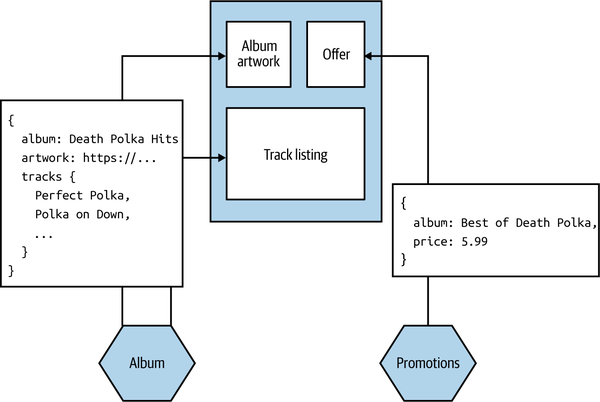
Figure 14-3. Our Album details screen pulls information from downstream microservices to render the UI
This model is the most common one for people building monolithic single-page applications, often with a dedicated frontend team. The requirements of our microservices are pretty straightforward—they just need to share information in a form that can be easily interpreted by the UI. In the case of a web-based UI, this means our microservices would likely need to provide data in a textual format, JSON being the most likely choice. The UI would then need to create the various components that make up the interface, handling synchronization of state and the like with the backend. Using a binary protocol for service-to-service communication would be more difficult for web-based clients but could be fine for native mobile devices or “thick” desktop applications.
When to Use It
There are some downsides to this approach. Firstly, by its nature as a monolithic entity, it can become a driver for (or be caused by) a dedicated frontend team. Having multiple teams share responsibility for this monolithic frontend can be challenging due to the multiple sources of contention. Secondly, we have little ability to tailor the responses for different sorts of devices. If using web technology, we can change the layout of a screen to accommodate different device constraints, but this doesn’t necessarily extend to changing the calls being made to the supporting microservices. My mobile client may only be able to display 10 fields of an order, but if the microservice pulls back all one hundred fields of the order, we end up retrieving unnecessary data. One solution to this approach is for the user interface to specify what fields to pull back when it makes a request, but this assumes that each supporting microservice supports this form of interaction. In “GraphQL”, we’ll look at how the use of both the backend for frontend pattern and GraphQL can help in this case.
Really, this pattern works best when you want all of the implementation and behavior of your UI in one deployable unit. For a single team developing both the frontend and all supporting microservices, that might be fine. Personally, if you have more than one team working on your software, I think you should fight against that urge, as it can result in you slipping into a layered architecture with the associated organizational silos. If, however, you are unable to avoid a layered architecture and matching organizational structure, this is probably the pattern you’ll end up using.
Pattern: Micro Frontends
The micro frontend approach is an organizational pattern whereby different parts of a frontend can be worked on and deployed independently. To quote from a highly recommended article by Cam Jackson on the topic,3 we can define micro frontends as follows: “An architectural style where independently deliverable frontend applications are composed into a greater whole.”
It becomes an essential pattern for stream-aligned teams who want to own delivery of both backend microservices and the supporting UI. Where microservices deliver independent deployability for the backend functionality, micro frontends deliver independent deployability for the frontend.
The micro frontend concept has gained popularity due to the challenges created by monolithic, JavaScript-heavy web UIs, as typified by single-page applications. With a micro frontend, different teams can work on and make changes to different parts of the frontend. Coming back to Figure 14-2, the stock team, purchase flow team, and customer profile team are each able to change the frontend functionality associated with their stream of work independent of the other teams.
Implementation
For web-based frontends, we can consider two key decompositional techniques that can aid implementation of the micro frontend pattern. Widget-based decomposition involves splicing different parts of a frontend together into a single screen. Page-based decomposition, on the other hand, has the frontend split apart into independent web pages. Both approaches are worthy of further exploration, which we’ll get to shortly.
When to Use It
The micro frontend pattern is essential if you want to adopt end-to-end, stream-aligned teams where you are trying to move away from a layered architecture. I could also imagine it being useful in a situation in which you want to retain a layered architecture, but the functionality of the frontend is now so large that multiple dedicated frontend teams are required.
There is one key problem with this approach that I’m not sure can be solved. Sometimes the capabilities offered by a microservice do not fit neatly into a widget or a page. Sure, I might want to surface recommendations in a box on a page on our website, but what if I want to weave in dynamic recommendations elsewhere? When I search, I want the type ahead to automatically trigger fresh recommendations, for example. The more cross-cutting a form of interaction is, the less likely this model will fit, and the more likely it is that we’ll fall back to just making API calls.
Pattern: Page-Based Decomposition
In page-based decomposition, our UI is decomposed into multiple web pages. Different sets of pages can be served from different microservices. In Figure 14-4, we see an example of this pattern for MusicCorp. Requests for pages in /albums/ are routed directly to the Albums microservice, which handles serving up those pages, and we do something similar with /artists/. A common navigation is used to help stitch together these pages. These microservices in turn might fetch information that is needed to construct these pages—for example, fetching stock levels from the Inventory microservice to show on the UI what items are in stock.
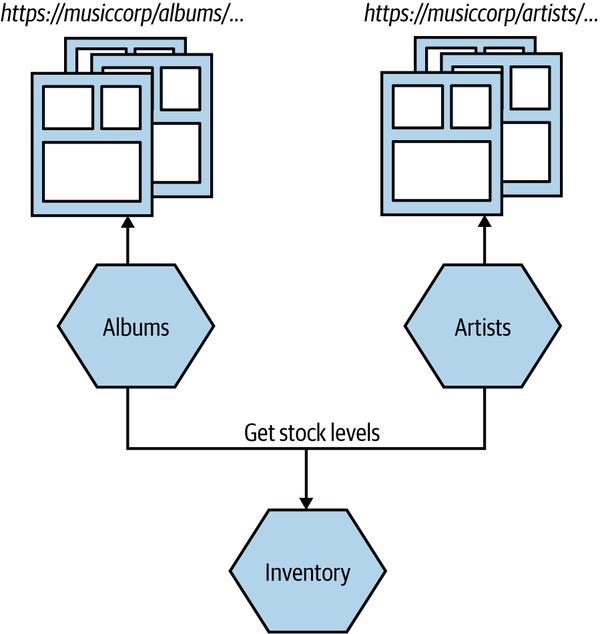
Figure 14-4. The user interface consists of multiple pages, with different groups of pages served up from different microservices
With this model, a team owning the Albums microservice would be able to render a full UI end to end, making it easy for the team to understand how its changes would impact the user.
In terms of dealing with different types of clients, there is nothing to stop the page adapting what it shows based on the nature of the device requesting the page. The concepts of progressive enhancement (or graceful degradation) should be well understood by now.
The simplicity of page-based decomposition from a technical implementation point of view is a real appeal here. You don’t need any fancy JavaScript running in the browser, nor do you need to use problematic iFrames. The user clicks a link, and a new page is requested.
Where to Use It
Useful for either a monolithic frontend or a micro frontend approach, page-based decomposition would be my default choice for user-interface decomposition if my user interface was a website. The web page as a unit of decomposition is such a core concept of the web as a whole that it becomes a simple and obvious technique for breaking down a large web-based user interface.
I think the problem is that in the rush to use single-page application technology, these user interfaces are becoming increasingly rare, to the extent that user experiences that in my opinion would better fit a website implementation end up being shoehorned into a single-page application.4 You can of course combine page-based decomposition with some of the other patterns we have covered. I could have a page that contains widgets, for example—something we’ll look at next.
Pattern: Widget-Based Decomposition
With widget-based decomposition, a screen in a graphical interface contains widgets that can be independently changed. In Figure 14-5, we see an example of MusicCorp’s frontend, with two widgets providing the UI functionality for the shopping basket and the recommendations.
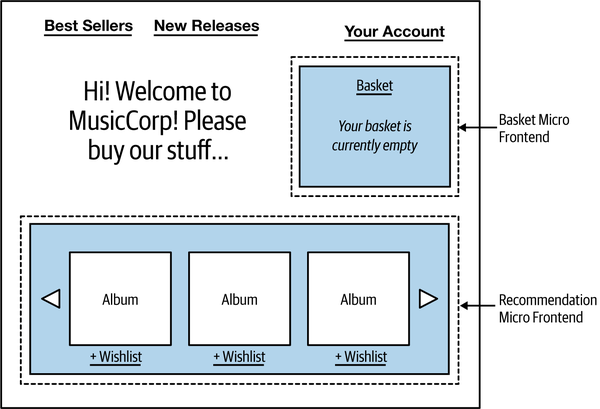
Figure 14-5. Basket and recommendation widgets being used on MusicCorp
The recommendation widget for MusicCorp pulls back a carousel of recommendations that can be cycled through and filtered. As we see in Figure 14-6, when the user interacts with the recommendation widget—cycling through to the next set of recommendations, for example, or adding items to their wishlist—it may result in calls being made to backing microservices, perhaps in this case the Recommendations and Wishlist microservices. This could align well with a team that owns both those backing microservices and the component itself.
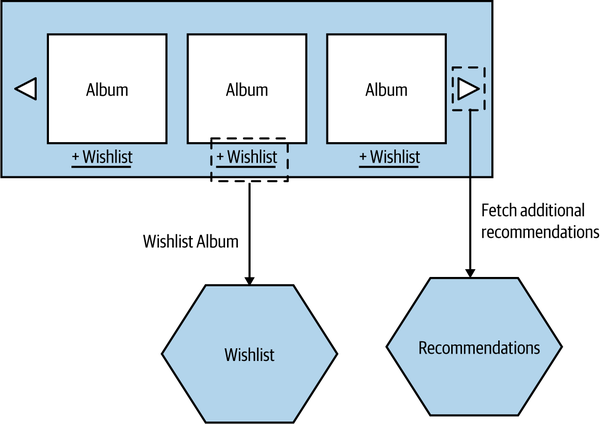
Figure 14-6. Interactions between the recommendation micro frontend and supporting microservices
Generally speaking, you’ll need a “container” application that defines things like the core navigation for the interface and which widgets need to be included. If we were thinking in terms of end-to-end stream-oriented teams, we could imagine a single team providing the recommendation widget and also being responsible for a supporting Recommendations microservice.
This pattern is found a lot in the real world. The Spotify user interface, for example, makes heavy use of this pattern. One widget might hold a playlist, another might hold information about an artist, and a third widget might hold information about the artists and other Spotify users that you follow. These widgets are combined in different ways in different situations.
You still need some sort of assembly layer to pull these parts together. This could be as simple as making use of server-side or client-side templates, though.
Implementation
How to splice a widget into your UI will depend largely on how your UI is created. With a simple website, including widgets as HTML fragments using either client-side or server-side templating can be pretty straightforward, although you can incur problems if the widgets have more complex behavior. As an example, if our recommendation widget contains lots of JavaScript functionality, how would we ensure that this doesn’t clash with behavior loaded into the rest of the web page? Ideally, the whole widget could be packaged in such a way that it wouldn’t break other aspects of the UI.
The issue of how to deliver self-contained functionality into a UI without breaking other functionality has historically been especially problematic with single-page apps, partly because the concept of modularization doesn’t appear to have been a prime concern for how the supporting SPA frameworks were created. These challenges are worth exploring in more depth.
Dependencies
Although iFrames have been a heavily used technique in the past, we tend to avoid using them to splice different widgets into a single web page. iFrames have a host of challenges regarding sizing and in terms of making it difficult to communicate between the different parts of the frontend. Instead, widgets are normally either spliced into the UI using server-side templating or else dynamically inserted into the browser on the client side. In both cases, the challenge is that the widget is running in the same browser page with other parts of the frontend, meaning that you need to be careful that the different widgets don’t conflict with one another.
For example, our recommendation widget might make use of React v16, whereas the basket widget is still using React v15. This can be a blessing, of course, as it can help us try out different technology (we could use different SPA frameworks for different widgets), but it can also help when it comes to updating the versions of frameworks being used. I’ve spoken to a number of teams that have had challenges in moving between Angular or React versions, largely due to the differences in conventions used in the newer framework versions. Upgrading an entire monolithic UI could be daunting, but if you can do it incrementally, updating parts of your frontend piece by piece, you can break the work up and also mitigate the risk of the upgrade introducing new problems.
The downside is that you can end up with a lot of duplication between dependencies, which in turn can lead to a large bloat in terms of page load size. I could end up including multiple different versions of the React framework and its associated transitive dependencies, for example. It is unsurprising that many websites now have a page load size several times greater than the size of some operating systems. As a quick unscientific study, I checked the page load of the CNN website at the time of writing, and it was 7.9 MB, which is a great deal larger than the 5 MB for Alpine Linux for example. 7.9 MB is actually at the small end of some of the page load sizes I see.
Communication between in-page widgets
Although our widgets can be built and deployed independently, we still want them to be able to interact with one another. As an example from MusicCorp, when a user selects one of the albums in the best seller chart, we want other parts of the UI to update based on the selection, as shown in Figure 14-7.
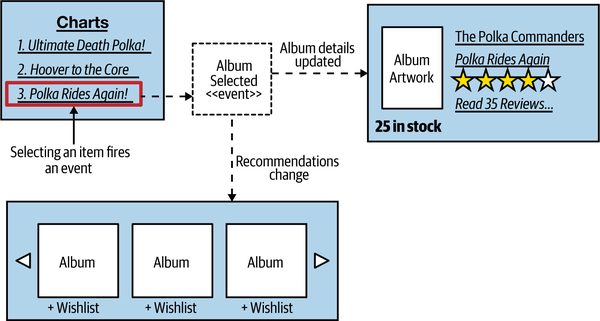
Figure 14-7. The charts widget can emit events that other parts of the UI listen to
The way we’d achieve this would be to have the charts widget emit a custom event. Browsers already support a number of standard events that we can use to trigger behavior. These events allow us to react to buttons being pressed, the mouse being scrolled, and the like, and you’ve probably already made heavy use of such event handling if you’ve spent any time building JavaScript frontends. It’s a simple step to create your own custom events.
So in our case, when an item is selected in the chart, that widget raises a custom Album Selected event. The recommendation and album details widgets both subscribe to the event and react accordingly, with the recommendations updating based on the selection, and the album details being loaded up. This interaction should of course already be familiar to us, as it mimics the event-driven interaction between microservices that we discussed in “Pattern: Event-Driven Communication”. The only real difference is that these event interactions happen inside the browser.
When to Use It
This pattern makes it easy for multiple stream-aligned teams to contribute to the same UI. It allows for more flexibility than does page-based decomposition, as the widgets delivered by different teams can all coexist in the UI at the same time. It also creates the opportunity for enabling teams to provide reusable widgets that can be used by stream-aligned teams—an example of which I shared earlier when mentioning the role of the Financial Times Origami team.
The widget decomposition pattern is incredibly useful if you are building a rich web-based user interface, and I would strongly suggest the use of widgets in any situation in which you are making use of a SPA framework and want to break up responsibilities for the frontend, moving toward a micro frontend approach. The techniques and supporting technology around this concept have improved markedly over the last few years, to the extent that, when building an SPA-based web interface, breaking down my UI into micro frontends would be my default approach.
My main concerns around widget decomposition in the context of SPAs have to do with the work required to set up the separate bundling of components and the issues around payload size. The former issue is likely a one-time cost and just involves working out what style of packaging best suits your existing toolchain. The latter issue is more problematic. A simple small change in the dependencies of one widget could result in a whole host of new dependencies being included in the application, drastically inflating the page size. If you are building a user interface where page weight is a concern, I’d suggest putting some automated checks in place to alert you if the page weight goes above a certain acceptable threshold.
On the other hand, if the widgets are simpler in nature and are largely static components, the ability to include them using something as simple as client-side or server-side templating is very straightforward by comparison.
Constraints
Before moving on to discuss our next pattern, I want to address the topic of constraints. Increasingly, the users of our software interact with it from a variety of different devices. Each of these devices imposes different constraints that our software has to accommodate. On a desktop web application, for example, we consider constraints such as what browser visitors are using, or their screen resolution. People with impaired sight may make use of our software via screen readers, and people with restricted mobility may be more likely to use keyboard-style inputs to navigate the screen.
So although our core services—our core offering—might be the same, we need a way to adapt them for the different constraints that exist for each type of interface, and for the different needs of our users. This can be driven purely from a financial standpoint if you want—more happy customers means more money. But there is also a human, ethical consideration that comes to the fore: when we ignore customers that have specific needs, we deny them the chance to use our services. In some contexts, making it impossible for people to navigate a UI due to design decisions has led to legal action and fines—for example, the UK, with a number of other countries, rightly has legislation in place to ensure access to websites for people with disabilities.5
Mobile devices have brought a whole host of new constraints. The way our mobile applications communicate with a server can have an impact. It isn’t just about pure bandwidth concerns, where the limitations of mobile networks can play a part. Different sorts of interactions can drain battery life, leading to some angry customers.
The nature of interactions changes according to the device, too. I can’t easily right-click on a tablet. On a mobile phone, I may want to design my interface for mostly one-handed use, with most operations being controlled by a thumb. Elsewhere, I might allow people to interact with services via SMS in places where bandwidth is at a premium—the use of SMS as an interface is huge in the global south, for example.
A wider discussion on the accessibility of user interfaces is outside the scope of this book, but we can at least explore the specific challenges caused by different types of clients, such as mobile devices. A common solution to handling the different needs of client devices is to perform some sort of filtering and call aggregation on the client side. Data that isn’t required can be stripped and doesn’t need to be sent to the device, and multiple calls can be combined into a single call.
Next, we’ll look at two patterns that can be useful in this space—the central aggregating gateway and the backend for frontend pattern. We’ll also look at how GraphQL is being used to help tailor responses for different types of interfaces.
Pattern: Central Aggregating Gateway
A central-purpose aggregating gateway sits between external user interfaces and downstream microservices and performs call filtering and aggregation for all user interfaces. Without aggregation, a user interface may have to make multiple calls to fetch required information, often throwing away data that was retrieved but not needed.
In Figure 14-8, we see such a situation. We want to display a screen with information about a customer’s recent orders. The screen needs to display some general information about a customer and then list a number of their orders in date order, along with summary information, showing the date and status of each order as well as the price.
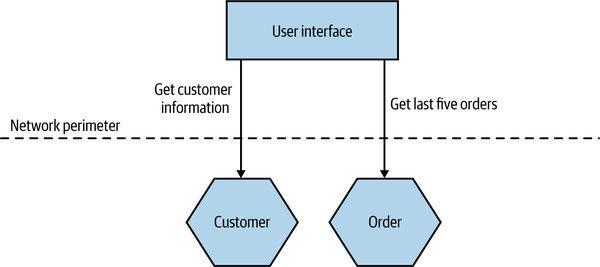
Figure 14-8. Making multiple calls to fetch information for a single screen
We make a direct call to the Customer microservice, pulling back the full information about the customer, even though we need only a few fields. We then fetch the order details from the Order microservice. We could improve the situation somewhat, perhaps by changing the Customer or Order microservice to return data that better fits our requirements in this specific case, but that would still require two calls to be made.
With an aggregating gateway, we can instead issue a single call from the user interface to the gateway. The aggregating gateway then carries out all the required calls, combines the results into a single response, and throws away any data that the user interface doesn’t require (Figure 14-9).
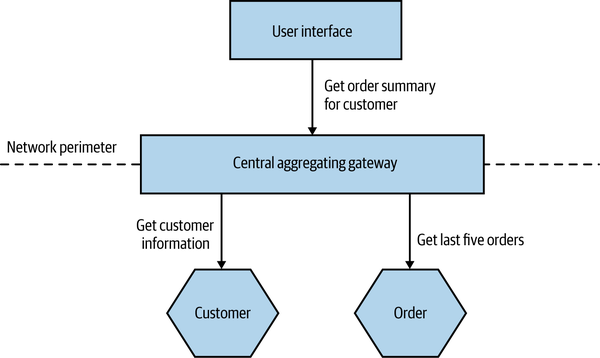
Figure 14-9. The server-side central gateway handles filtering and aggregation of calls to downstream microservices
Such a gateway could also help batch calls as well. For example, rather than needing to look up 10 order IDs via separate calls, I could send one batch request to the aggregating gateway, and it could handle the rest.
Fundamentally, having some sort of aggregating gateway can reduce the number of calls that the external client needs to make and reduce the amount of data that needs to be sent back. This can lead to significant benefits in terms of reducing bandwidth use and improving the latency of the application.
Ownership
As more user interfaces make use of the central gateway, and as more microservices need call aggregation and filtering logic for those user interfaces, the gateway becomes a potential source of contention. Who owns the gateway? Is it owned by the people creating the user interfaces, or by the people who own the microservices? Often I find that the central aggregating gateway does so much that it ends up being owned by a dedicated team. Hello, siloed layered architecture!
Fundamentally, the nature of the call aggregation and filtering is largely driven by the requirements of the external user interfaces. As such, it would make natural sense for the gateway to be owned by the team(s) creating the UI. Unfortunately, especially in an organization in which you have a dedicated frontend team, that team may not have the skills to build such a vital backend component.
Regardless of who ends up owning the central gateway, it has the potential to become a bottleneck for delivery. If multiple teams need to make changes to the gateway, development on it will require coordination between those teams, slowing things down. If one team owns it, that team can become a bottleneck when it comes to delivery. We’ll see how the backend for frontend pattern can help resolve these issues shortly.
Different Types of User Interfaces
If the challenges around ownership can be managed, a central aggregating gateway might still work well, until we consider the issue of different devices and their different needs. As we’ve discussed, the affordances of a mobile device are very different. We have less screen real estate, which means we can display less data. Opening lots of connections to server-side resources can drain battery life and limited data plans. Additionally, the nature of the interactions we want to provide on a mobile device can differ drastically. Think of a typical bricks-and-mortar retailer. On a desktop app, I might allow you to look at the items for sale and order them online or reserve them in a store. On the mobile device, though, I might want to allow you to scan bar codes to do price comparisons or give you context-based offers while in store. As we’ve built more and more mobile applications, we’ve come to realize that people use them very differently, and therefore the functionality we need to expose will differ too.
So in practice, our mobile devices will want to make different and fewer calls and will want to display different (and probably less) data than their desktop counterparts. This means that we need to add additional functionality to our API backend to support different types of user interfaces. In Figure 14-10, we see MusicCorp’s web interface and mobile interface both using the same gateway for the customer summary screen, but each client wants a different set of information. The web interface wants more information about the customer and also has a brief summary of the items in each order. This leads us to implement two different aggregating and filtering calls in our backend gateway.
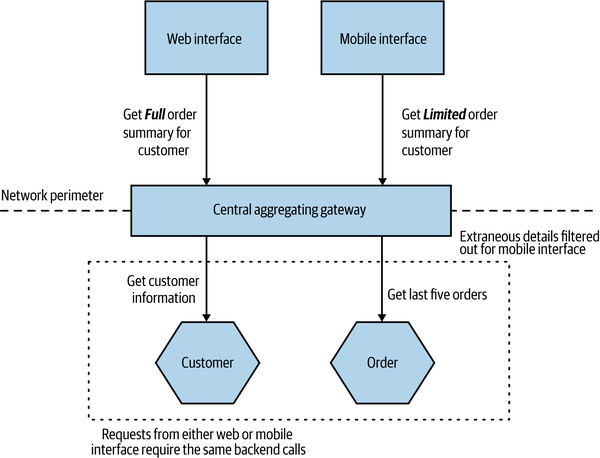
Figure 14-10. Supporting different aggregating calls for different devices
This can lead to a lot of bloat in the gateway, especially if we consider different native mobile applications, customer-facing websites, internal administration interfaces, and the like. We also have the problem, of course, that while these different UIs might be owned by different teams, the gateway is a single unit—we have the same old problems of multiple teams having to work on the same deployed unit. Our single aggregating backend can become a bottleneck, as so many changes are trying to be made to the same deployable artifact.
Multiple Concerns
There are a whole host of concerns that may need to be addressed on the server side when it comes to handling API calls. Aside from the call aggregation and filtering, we can think of more generic concerns like API key management, user authentication, or call routing. Often these generic concerns can be handled by API gateway products, which are available in many sizes and for many different price points (some of which are eye-wateringly high!). Depending on the sophistication you require, it can make a lot of sense to purchase a product (or license a service) to handle some of these concerns for you. Do you really want to manage API key issuing, tracking, rate limiting, and so on yourself? By all means, look at products in this space to solve these generic concerns, but be wary about also trying to use these products to do your call aggregation and filtering, even if they claim they can.
When customizing a product built by someone else, you often have to work in their world. Your toolchain is restricted because you may not be able to use your programming language and your development practices. Rather than writing Java code, you’re configuring routing rules in some odd product-specific DSL (probably using JSON). It can be a frustrating experience, and you are baking some of the smarts of your system into a third-party product. This can reduce your ability to move this behavior later. It’s common to realize that a pattern of call aggregation actually relates to some domain functionality that could justify a microservice in its own right (something we’ll explore more shortly when we talk about BFFs). If this behavior is in a vendor-specific configuration, moving this functionality can be more problematic, as you’d likely have to reinvent it.
The situation can become even worse if the aggregating gateway becomes complex enough to require a dedicated team to own and manage it. At worst, adopting more horizontal team ownership can lead to a situation in which to roll out some new functionality you have to get a frontend team to make changes, the aggregating gateway team to make changes, and the team(s) that owns the microservice to also make its changes. Suddenly everything starts going much more slowly.
So if you want to make use of a dedicated API gateway, go ahead—but strongly consider having your filtering and aggregation logic elsewhere.
When to Use It
For a solution owned by a single team, where one team develops the user interface and the backend microservices, I would be OK with having a single central aggregating gateway. That said, this team sounds like it is doing a LOT of work—in such situations, I tend to see a large degree of conformity across the user interfaces, which often removes the need for these aggregation points in the first place.
If you do decide to adopt a single central aggregating gateway, please be careful to limit what functionality you put inside it. I’d be extremely wary of pushing this functionality into a more generic API gateway product, for example, for reasons outlined previously.
The concept of doing some form of call filtering and aggregation on the backend can be really important, though, in terms of optimizing the user’s experience of our user interfaces. The issue is that in a delivery organization with multiple teams, a central gateway can lead to requirements for lots of coordination among those teams.
So if we still want do to aggregation and filtering on the backend but want to remove the problems associated with the ownership model of a central gateway, what can we do? That’s where the backend for frontend pattern comes in.
Pattern: Backend for Frontend (BFF)
The main distinction between a BFF and a central aggregating gateway is that a BFF is single purpose in nature—it is developed for a specific user interface. This pattern has proved to be very successful in helping handle the differing concerns of user interfaces, and I’ve seen it work well at a number of organizations, including SoundCloud6 and REA. As we see in Figure 14-11, where we revisit MusicCorp, the web and mobile shopping interfaces now have their own aggregating backends.
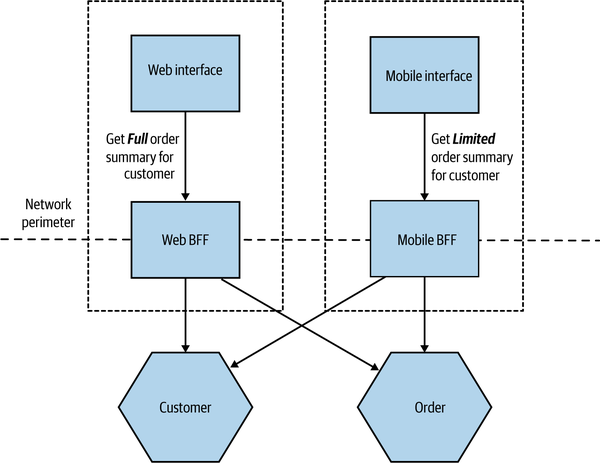
Figure 14-11. Each user interface has its own BFF
Due to its specific nature, the BFF sidesteps some of the concerns around the central aggregating gateway. As we aren’t trying to be all things to all people, a BFF avoids becoming a bottleneck for development, with multiple teams all trying to share ownership. We are also less worried about coupling with the user interface, as coupling is much more acceptable. A given BFF is for a specific user interface—assuming they are owned by the same team, then the inherent coupling is far easier to manage. I often describe the use of a BFF with a user interface as though the UI is actually split into two parts. One part sits on the client device (the web interface or native mobile application), with the second part, the BFF, being embedded on the server side.
The BFF is tightly coupled to a specific user experience and will typically be maintained by the same team as the user interface, thereby making it easier to define and adapt the API as the UI requires, while also simplifying the process of lining up release of both the client and server components.
How Many BFFs?
When it comes to delivering the same (or similar) user experience on different platforms, I have seen two different approaches. The model I prefer (and the model I see most often) is to strictly have a single BFF for each different type of client—this is a model I saw used at REA, as outlined in Figure 14-12. The Android and iOS applications, while covering similar functionality, each had their own BFF.
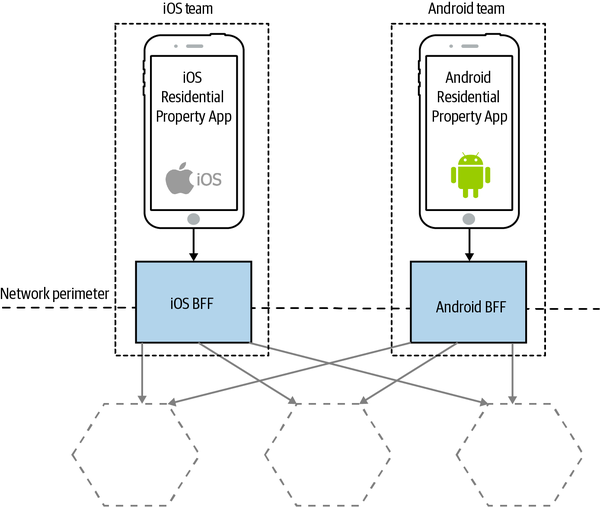
Figure 14-12. The REA iOS and Android applications have different BFFs
A variation is to look for opportunities to use the same BFF for more than one type of client, albeit for the same type of user interface. SoundCloud’s Listener application allows people to listen to content on their Android or iOS devices. SoundCloud uses a single BFF for both Android and iOS, as shown in Figure 14-13.
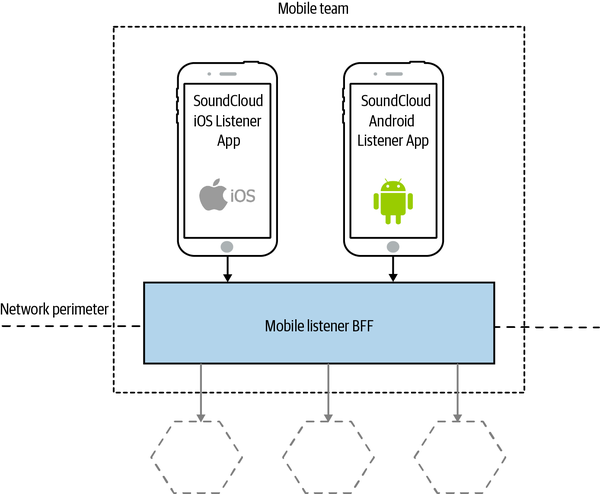
Figure 14-13. SoundCloud sharing a BFF between iOS and Android applications
My main concern with this second model is that the more types of clients you have using a single BFF, the more temptation there may be for the BFF to become bloated by handling multiple concerns. The key thing to understand here, though, is that even when clients share a BFF, it is for the same class of user interface—so while SoundCloud’s native Listener applications for iOS and Android use the same BFF, other native applications would use different BFFs. I’m more relaxed about using this model if the same team owns both the Android and iOS applications and owns the BFF too—if these applications are maintained by different teams, I’m more inclined to recommend the more strict model. So you can see your organizational structure as being one of the main drivers for deciding which model makes the most sense (Conway’s law wins again).
Stewart Gleadow from REA has suggested the guideline “one experience, one BFF.” So if the iOS and Android experiences are very similar, then it is easier to justify having a single BFF.7 If, however, they diverge greatly, then having separate BFFs makes more sense. In the case of REA, although there was overlap between the two experiences, different teams owned them and rolled out similar features in different ways. Sometimes the same feature might be deployed differently on a different mobile device—what amounts to a native experience for an Android application might need to be reworked to feel native on iOS.
Another lesson from the REA story (and one we’ve covered many times already) is that software often works best when aligned around team boundaries, and BFFs are no exception. SoundCloud having a single mobile team makes having a single BFF seem sensible at first glance, as does REA having two different BFFs for the two separate teams. It’s worth noting that the SoundCloud engineers I spoke to suggested that having one BFF for the Android and iOS listener applications was something they might reconsider—they had a single mobile team, but in reality they were a mix of Android and iOS specialists, and they found themselves mostly working on one or the other application, which implies they were really two teams in effect.
Often the driver toward having a smaller number of BFFs is a desire to reuse server-side functionality to avoid too much duplication, but there are other ways to handle this, which we’ll cover next.
Reuse and BFFs
One of the concerns of having a single BFF per user interface is that you can end up with lots of duplication among the BFFs. For example, they may end up performing the same types of aggregation, have the same or similar code for interfacing with downstream services, and so on. If you are looking to extract common functionality, then often one of the challenges is in finding it. That duplication may occur in the BFFs themselves, but it can also end up being baked into the different clients. Due to the fact that these clients use very different technology stacks, identifying the fact that this duplication is occurring can be difficult. With organizations tending to have a common technology stack for server-side components, having multiple BFFs with duplication may be easier to spot and factor out.
Some people react to this by wanting to merge the BFFs back together, and they end up with a general-purpose aggregating gateway. My concern around regressing to a single aggregating gateway is that we can end up losing more than we gain, especially as there can be other ways to approach this duplication.
As I have said before, I am fairly relaxed about duplicated code across microservices. Which is to say that, while in a single microservice boundary I will typically do whatever I can to refactor out duplication into suitable abstractions, I don’t have the same reaction when confronted by duplication across microservices. This is mostly because I am often more worried about the potential for the extraction of shared code to lead to tight coupling between services (a topic we explored in “DRY and the Perils of Code Reuse in a Microservice World”). That said, there are certainly cases where this is warranted.
When the time does arise to extract common code to enable reuse between BFFs, there are two obvious options. The first, which is often cheaper but more fraught, is to extract a shared library of some sort. The reason this can be problematic is that shared libraries are a prime source of coupling, especially when used to generate client libraries for calling downstream services. Nonetheless, there are situations in which this feels right—especially when the code being abstracted is purely a concern inside the service.
The other option is to extract the shared functionality into a new microservice. This can work well if the functionality being extracted represents business domain functionality. A variation of this approach might be to push aggregation responsibilities to microservices further downstream. Let’s consider a situation in which we want to display a list of the items in a customer’s wishlist, along with information about whether or not those items are in stock and the current price, as shown in Table 14-1.
The Brakes, Give Blood |
In Stock! |
$5.99 |
Blue Juice, Retrospectable |
Out of Stock |
$7.50 |
Hot Chip, Why Make Sense? |
Going Fast! (2 left) |
$9.99 |
The Customer microservice stores information about the wishlist and the ID of each item. The Catalog microservice stores the name and price of each item, and the stock levels are stored in our Inventory microservice. To display this same control on both the iOS and Android applications, each BFF would need to make the same three calls to the supporting microservices, as shown in Figure 14-14.
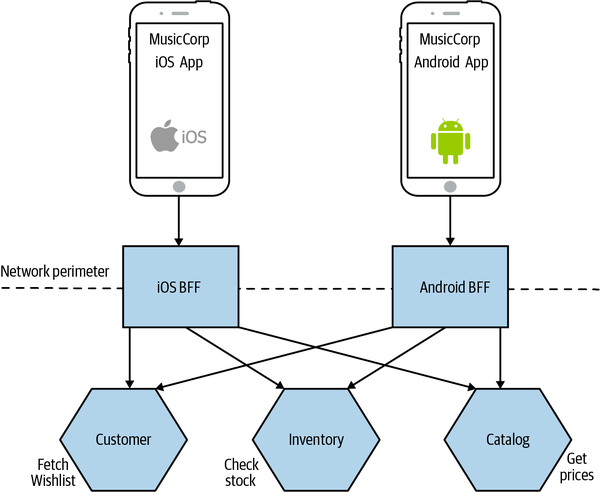
Figure 14-14. Both BFFs are performing the same operations to display a wishlist
A way to reduce the duplication in functionality here would be to extract this common behavior into a new microservice. In Figure 14-15, we see our new dedicated Wishlist microservice that our Android and iOS applications can both make use of.
I have to say that the same code being used in two places wouldn’t automatically cause me to want to extract out a service in this way, but I’d certainly be considering it if the transaction cost of creating a new service was low enough, or if I was using the code in more than a couple of places—in this specific situation, if we were also showing wishlists on our web interface, for example, a dedicated microservice would start to look even more appealing. I think the old adage of creating an abstraction when you’re about to implement something for the third time still feels like a good rule of thumb, even at the service level.
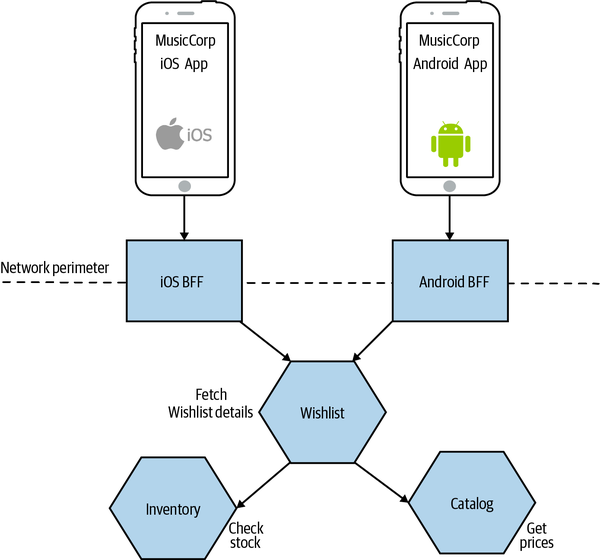
Figure 14-15. Common functionality is extracted into a Wishlist microservice, allowing for reuse across BFFs
BFFs for Desktop Web and Beyond
You can think of BFFs as just having a use in solving the constraints of mobile devices. The desktop web experience is typically delivered on more powerful devices with better connectivity, where the cost of making multiple downstream calls is manageable. This can allow your web application to make multiple calls directly to downstream services without the need for a BFF.
I have seen situations, though, in which the use of a BFF for the web too can be useful. When you are generating a larger portion of the web UI on the server side (e.g., using server-side templating), a BFF is the obvious place where this can be done. This approach can also simplify caching somewhat, as you can place a reverse proxy in front of the BFF, allowing you to cache the results of aggregated calls.
I’ve seen at least one organization use BFFs for other external parties that need to make calls. Coming back to my perennial example of MusicCorp, I might expose a BFF to allow third parties to extract royalty payment information, or to allow streaming to a range of set-top box devices, as we see in Figure 14-16. These aren’t really BFFs anymore, as the external parties aren’t presenting a “user interface,” but this is an example of the same pattern being used in a different context, so I thought it worth sharing.
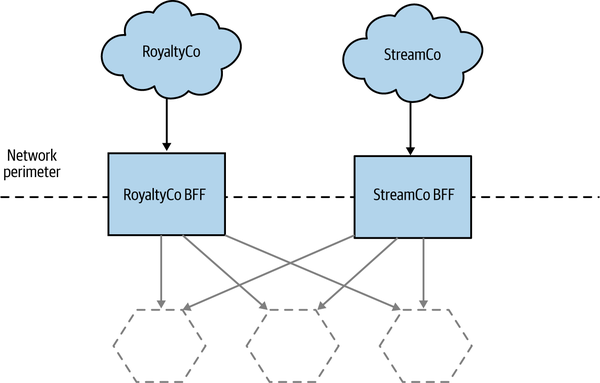
Figure 14-16. Using BFFs to manage external APIs
This approach can be especially effective, as third parties often have limited to no ability (or desire) to use or change the API calls they make. With a central API backend, you may have to keep old versions of the API around just to satisfy a small subset of your outside parties unable to make a change; with a BFF, this problem is substantially reduced. It also limits the impact of breaking changes. You could change the API for Facebook in a way that would break compatibility with other parties, but as they use a different BFF, they aren’t impacted by this change.
When to Use
For an application that is only providing a web UI, I suspect a BFF will make sense only if and when you have a significant amount of aggregation required on the server side. Otherwise, I think some of the other UI composition techniques we’ve already covered can work just as well without requiring an additional server-side component.
The moment that you need to provide specific functionality for a mobile UI or third party, though, I would strongly consider using BFFs for each client from the outset. I might reconsider if the cost of deploying additional services is high, but the separation of concerns that a BFF can bring make it a fairly compelling proposition in most cases. I’d be even more inclined to use a BFF if there is significant separation between the people building the UI and downstream services, for reasons I’ve outlined.
We then come to the question of how to implement the BFF—let’s look at GraphQL and the role it can play.
GraphQL
GraphQL is a query language that allows clients to issue queries to access or mutate data. Like SQL, GraphQL allows these queries to be changed dynamically, allowing the client to define exactly what information it wants back. With a standard REST over HTTP call, for example, when issuing a GET request for an Order resource you’d get back all the fields for that order. But what if, in that particular situation, you only wanted the total amount of the order? You could just ignore the other fields, of course, or else provide an alternative resource (an Order Summary, perhaps) that contains just the information you need. With GraphQL, you could issue a request asking for only the fields you need, as we see in Example 14-1.
Example 14-1. A example GraphQL query being used to fetch order information
{order(id:123){datetotalstatusdelivery{companydriverduedate}}}
In this query, we’ve asked for order 123, and we’ve asked for the total price and the status of the order. We’ve gone further and asked for information about the delivery of this order, so we can get information on the name of the driver who will deliver our package, the company they work for, and when the package is expected to arrive. With a normal REST API, unless the delivery information was contained inside the Order resource, we may have to make an additional call to fetch this information. So not only is GraphQL helping us ask for exactly the fields we want, but it can also reduce round trips. A query like this requires that we define the various data types we are accessing—explicitly defining types is a key part of GraphQL.
To implement GraphQL, we need a resolver to handle the queries. A GraphQL resolver sits on the server side and maps the GraphQL queries into calls to actually fetch the information. So in the case of a microservice architecture, we’d need a resolver that would be capable of mapping the request for the order with ID 123 into an equivalent call to a microservice.
In this way, we can use GraphQL to implement an aggregating gateway, or even a BFF. The benefit of GraphQL is that we can easily change the aggregation and filtering we want simply by changing the query from the client; no changes are needed at the GraphQL server side of things as long as the GraphQL types support the query we want to make. If we no longer wanted to see the driver name in the example query, we could just omit this from the query itself and it would no longer be sent. On the other hand, if we wanted to see the number of points we were awarded for this order, assuming this information is available in the order type, we could just add this to the query and the information would be returned. This is a significant advantage over BFF implementations that require changes in aggregation logic to also be applied to the BFF itself.
The flexibility that GraphQL gives for the client device to dynamically change the queries being made without server-side changes means that there is less chance of your GraphQL server becoming a shared, contended resource, as we discussed with the general-purpose aggregating gateway. That said, server-side changes will still be needed if you need to expose new types or add fields to existing types. As such, you may still want multiple GraphQL server backends to align along team boundaries—so GraphQL becomes a way of implementing a BFF.
I do have concerns around GraphQL, which I outlined in detail in Chapter 5. That said, it is a neat solution allowing for dynamic querying to suit the needs of different types of user interfaces.
A Hybrid Approach
Many of the aforementioned options don’t need to be one-size-fits-all. I could see an organization adopting the approach of widget-based decomposition to create a website but using a backend for frontend approach when it comes to its mobile application. The key point is that we need to retain cohesion of the underlying capabilities that we offer our users. We need to ensure that logic associated with ordering music or changing customer details lives inside those services that handle those operations and doesn’t get smeared all over our system. Avoiding the trap of putting too much behavior into any intermediate layers is a tricky balancing act.
Summary
As I hope I have shown, decomposition of functionality doesn’t have to stop at the server side, and having dedicated frontend teams isn’t inevitable. I’ve shared a number of different ways to construct a user interface that can make use of supporting microservices while enabling focused end-to-end delivery.
In our next chapter, we move from the technical to the people side of things when we explore in greater detail the interplay of microservices and organizational structures.
1 Matthew Skelton and Manuel Pais, Team Topologies (Portland, OR: IT Revolution, 2019).
2 As Charity Majors says, “You’re not a full stack developer unless you build the chips.”
3 Cam Jackson, “Micro Frontends,” martinfowler.com, June 19, 2019, https://oreil.ly/U3K40.
4 I’m looking at you, Sydney Morning Herald!
5 I hope it goes without saying that I am not a lawyer, but should you wish to look at the legislation that covers this in the UK, it’s the Equality Act 2010, specifically section 20. The W3C also has a good overview of accessibility guidelines.
6 See the article “BFF @ SoundCloud” by Lukasz Plotnicki for a great overview of how SoundCloud uses the BFF pattern.
7 Stewart has in turn credited Phil Calçado and Mustafa Sezgin for this recommendation.