19.3 DOM Programming Interface
As you’ve already learned, you can use JavaScript to access the individual nodes of the DOM. For this, DOM provides various methods and properties for each object in the DOM tree. Here’s a short example that demonstrates the interaction of the programming interface of the DOM with a method and a property. First the HTML code:
<!DOCTYPE html>
<html>
<head>
  <meta charset="UTF-8">
  <title>DOM interfaces</title>
</head>
<body>
  <h1>The DOM interface</h1>
  <p>The paragraph text</p>

  <script src="js/script.js"></script>
</body>
</html>
Listing 19.1 /examples/chapter019/19_3/index.html
And here’s the JavaScript code:
let text = document.querySelector('p').innerHTML;
if (text) {
    text += " " + "has been extended!";
    document.querySelector('p').innerHTML = text;
}
Listing 19.2 /examples/chapter019/19_3/js/script.js
In this example, querySelector() is a method and innerHTML is a property of the document object. The querySelector() method is used to get access to an HTML element. The innerHTML property, on the other hand, can be used to read the content of the HTML element or replace it with new content.
In this example, you search for the first p element in the current HTML document using the querySelector() method and assign the content contained in the innerHTML property to the text variable. After this assignment, text contains the string, "The paragraph text". In the second line, you expand the contents of text so that the complete string is "The paragraph text has been extended!". In the last line of the script, you change the content (text node) of the p element and pass or replace the old content with the newly extended content using the innerHTML property with the text string. You can see the example during execution in Figure 19.3.
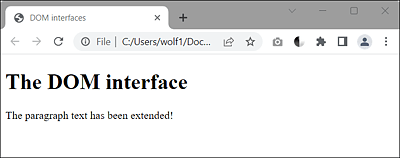
Figure 19.3 The Content of a <p> Element Was Manipulated Using the “querySelector()” Method and the “innerHTML” Property