19 Changing Web Pages Dynamically
Once a web page has been loaded, the web browser generates the Document Object Model (DOM) from the page. This enables you to dynamically generate HTML using JavaScript, which is a good reason to look into the topic of DOM and DOM manipulation.
The Document Object Model (DOM) allows you to access all HTML elements of the document via JavaScript. This, in turn, enables you to use JavaScript to manipulate all HTML elements, the HTML attributes, and even all CSS styles of a web page. Additionally, you can add new HTML elements or attributes and remove existing ones. Likewise, the DOM makes it possible to respond to all existing HTML events of a web page.
In a nutshell, here’s what you’ll learn in this chapter:
-
How to search for specific HTML elements
-
How to change the content of an HTML element
-
How to change the stylesheet of HTML elements
-
How to respond to events of the DOM
-
How to add new HTML elements to the document
-
How to change or even remove existing elements
-
How to access the individual values of a form element with JavaScript
19.1 Introduction to the DOM of an HTML Document
You already know from HTML that the HTML elements of a document are composed into a hierarchical tree structure. At the top of the tree, you’ll find the document object, followed by the root of the tree, which is usually the html element. Below the html element, you’ll find the head and body elements.
In Figure 19.1, you can see the diagram of such a hierarchical tree structure. There you can see in a family tree how HTML documents are logically represented. All individual elements of this family tree are nodes and are related to each other. For example, the head element has two children: the title and meta elements.
Because the title and meta elements are the descendants of the same parent element, they are also referred to as siblings. The same is true for the descendants of the body element, where in the figure, the header, nav, article, and footer elements have the same parent element (body) and are thus also siblings.
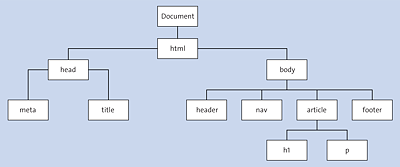
Figure 19.1 Diagram of a DOM Tree with Objects
It’s not only the HTML elements that represent a node in a DOM tree. The HTML attributes and the contents of the HTML elements themselves are also nodes of a DOM tree that can be accessed using JavaScript. The following simple HTML construct shows all three important node types:
<p lang="en">The paragraph text ...</p>
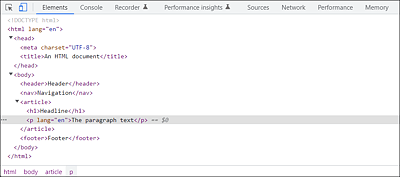
Figure 19.2 The Representation of the Tree Structure in the DOM Inspector of the Web Browser
Here, you have the HTML element node with the p element. Additionally included is the HTML attribute node with lang="en". In addition, the content (here, The paragraph text ...) of the p element is a genuine node (also called a text node) that can be accessed in the DOM tree using JavaScript.
Due to this division into node objects, where all HTML elements, HTML attributes, and the content represent a node, and these nodes are related to each other in the tree by parent, child or sibling relationships, it’s possible to access each of these nodes using various DOM methods and DOM properties. On the following pages, you’ll learn how this works.