17 A Brief Introduction to JavaScript
JavaScript, Ajax, and jQuery are often mentioned in the same breath in the context of web development. For beginners, it’s often frustrating to be confronted with many different terms. In this chapter, you’ll first get to know some basics about JavaScript as a programming language.
When it comes to web development, JavaScript has become indispensable. While you can use HTML to create the content of your website and CSS to design the layout and formatting, you’re still missing a way to dynamically influence the behavior of a website within the web browser. JavaScript enables you to perform Document Object Model (DOM) manipulations such as changing HTML elements, HTML attributes, and HTML styles, as well as checking entered data in HTML forms for correctness. Let’s not forget the now numerous JavaScript application programming interfaces (APIs; also called web APIs) in HTML. Even for the use of many frameworks, such as React, Angular, or Vue.js, you can’t get around sound JavaScript knowledge.
This chapter is intended to give you a basic and simple introduction to the world of JavaScript. To avoid raising false hopes here, I should mention that this chapter will only introduce you to JavaScript as a scripting language. JavaScript is a programming language that can’t be described quickly in its entirety within one chapter. The introduction to JavaScript in this book only goes so far as to let you use JavaScript for client-side applications of the DOM, the interfaces between HTML, and dynamic JavaScript—more specifically—you’ll learn how to write programs that run in the web browser.
Not only is JavaScript now suitable for client-side applications, as described in this book, but the language has become very versatile. For example, JavaScript is also used today for server-side applications, desktop applications, mobile applications, and even embedded applications. Even games and 3D applications can now be developed with JavaScript. However, this is only mentioned here in passing to show you that, with JavaScript, you learn a fairly ubiquitous language that can be used not only in the web browser.
For the professional handling of JavaScript I recommend you read JavaScript (SAP PRESS, 2022) by Philip Ackermann, who was also an expert reviewer for this book.
17.1 JavaScript in Web Development
The JavaScript language has been around since 1995 and has been constantly evolving ever since. In the beginning, language was seen more as a toy that could be used for all kinds of mischief. JavaScript only really got going as years passed. With Ajax, the language experienced a real boom, and there were first meaningful applications that would have been impossible without JavaScript on the client side.
JavaScript is a genuine and ubiquitous programming language, and if you’ve never programmed in another language such as PHP, Java, or C++ before, this is probably your first real programming language that you’ll learn here. If you already have experience in another programming language, this chapter will be easy for you.
JavaScript Is an Interpreted Programming Language
JavaScript is an interpreted programming language where the source code is executed by an interpreter on the computer. The interpreter, in turn, converts the source code into machine code, statement by statement. Usually, you don’t have to worry about anything. You can write the source code with any text editor, and the interpreter is provided and executed in the web browser.
The counterpart to an interpreted programming language is the compiled programming language. Here, the source code is translated into machine code by a compiler. You can then run the programs created in this way on the operating system for which you compiled it, without any further tools (e.g., an interpreter). Examples of a compiled language include C, C++, or Swift.
With interpreted programming languages such as JavaScript, the program can thus be executed directly and doesn’t need to be recompiled each time. However, this also means that a syntax error in interpreted languages is often detected only at program runtime. The performance of compiled programming languages is usually somewhat better because no more source code has to be converted at runtime. However, with interpreted programming languages, a just-in-time compiler (JIT) is used, which converts frequently executed source code into machine code that is then executed faster.
JavaScript allows you to access the HTML document displayed in the web browser and respond to user input, for example. In response to user input (e.g., a button has been pressed), you can make content or presentation-specific changes to the HTML document. The change applies only to the HTML document in the memory while the HTML file on the web server remains untouched. This dynamic read access to the HTML document is provided by the DOM.
Here are a few lines about where JavaScript fits in between HTML and CSS in modern web design. As you already know, HTML is used for structured content. CSS is responsible for the presentation. HTML is thus the foundation for web development on top of which CSS is built. And in the same way as CSS is built on top of HTML, you can view JavaScript. JavaScript is also built on top of HTML (in web development) and is responsible for the behavior of the website (more precisely, the interaction). JavaScript extends HTML in the sense of bringing dynamics to websites. To avoid any misunderstanding, JavaScript doesn’t extend the HTML language. Where CSS improves the presentation of the website and thus the overview, JavaScript aims to improve the usability of the document with a specific behavior on an interaction.
LiveScript, JavaScript, JScript ECMAScript, ECMA
JavaScript was developed by Netscape under the name LiveScript for Netscape Navigator 2 and only later was renamed to JavaScript. In what’s referred to as the web browser war between Netscape and Microsoft at the time, Microsoft also designed a similar scripting language to JavaScript: JScript. With two scripting languages now in circulation—JavaScript and JScript—it was time for JavaScript to be standardized. This standard was quickly found and called ECMAScript. Today, the ECMA (European Computer Manufacturers Association) defines the core of the JavaScript specification. The versions were numbered from 1 (ECMAScript 1) to 6 (ECMAScript 6) until 2015. Since 2015, the year gets appended to the name (ECMAScript 2015). When this book went into print, ECMAScript 2022 was the latest version. We can probably expect ECMAScript 2023 in the summer of 2023.
In Figure 17.1, you can see a basic model on the basis of which modern websites are created. Apart from HTML for structuring content, the other techniques aren’t mandatory for a website to work. So, you can create websites that contain only HTML and CSS, just as you can create websites that use only HTML and JavaScript. In common practice, you’ll mainly use a combination of all three web techniques with HTML as the base and CSS and JavaScript as add-ons, but you can also use HTML on its own. Web developers also talk about the three layers: Content layer (HTML), presentation layer (CSS), and behavior layer (JavaScript).
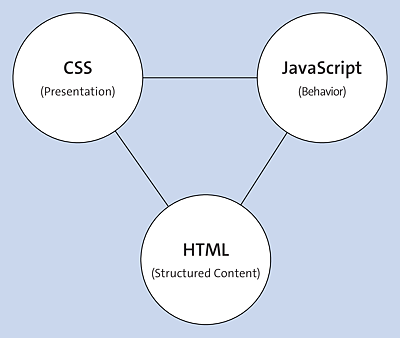
Figure 17.1 Building Blocks of a Modern Website
Like HTML and CSS, JavaScript is readable in plain text and can be written in an ordinary text editor. The JavaScript runtime is already built into every web browser, so you don’t need any additional tools.
JavaScript Engine
While you’ll be using the web browser as the runtime environment for your JavaScripts in this book anyway, I still want to make you a little more aware of the topic so that you don’t perceive JavaScript as just an ordinary part of a web browser. As you can guess, different browser vendors use their own runtime environment for JavaScript. For example, Google uses a V8 engine written in C++, which is used in Google Chrome. The latest Microsoft Edge now also uses Google’s V8 engine. Firefox, on the other hand, uses a JavaScript runtime written in C called SpiderMonkey. Based on the SpiderMonkey runtime environment, additional modules have been added over time, primarily to improve performance. Apple also uses its own runtime environment, JavaScriptCore (also called Nitro), which is used in the Safari web browser, for example.