9.2 Combinators: Concatenating the Selectors
A combinator is a character between two selectors that concatenates these selectors. Here, the first selector represents the condition, while the second selector forms the target to be selected if the condition is true. In CSS, you have four such combinators, which in turn you can concatenate with other combinators.
|
Combinator |
Name |
Meaning |
|---|---|---|
|
E F |
Descendant selector |
F gets selected if it’s a descendant of an E element. |
|
E > F |
Child selector |
F gets selected only if it’s a direct descendant of an E element. |
|
E + F |
Adjacent sibling selector |
F gets selected only if it occurs directly after E (in the same parent element). |
|
E ~ F |
General sibling selector |
F gets selected only if it occurs after E (in the same parent element). |
Table 9.12 Quick Overview of the Different Combinators
For illustration purposes, all four combinators are used in a simple way in the following example. In practice, of course, such combinators can become far more complex in the way they are used. In our example, simple type selectors are combined, but you can also combine class or ID selectors, for example. Inside the negation pseudo-class :not(), you can’t use any combinators.
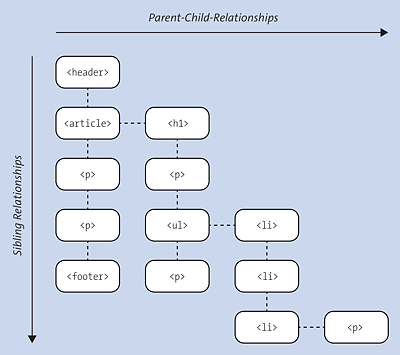
Figure 9.19 Document Structure Tree of the Example
...
  <body>
    <header>Header</header>
    <article>
        <h1>Article 1</h1>
        <p>1. Paragraph text for article</p>
        <ul>
          <li>List item 1</li>
          <li>List item 2</li>
          <li>
            <p>A paragraph text in the list item</p>
          </li>
        </ul>
        <p>2. Paragraph text for article</p>
    </article>
    <p>1. Paragraph text after the article</p>
    <p>2. Paragraph text after the article</p>
    <footer>Footer</footer>
  </body>
...
Listing 9.29 /examples/chapter009/9_2/index.html
The goal in this example is to access the individual p elements. For this purpose, the article element should be the condition and the p element the target. For a better understanding, the document structure tree is shown in Figure 9.19, which demonstrates this source code a bit more clearly in the hierarchy of the individual HTML elements.
9.2.1 The Descendant Combinator (E1 E2)
The descendant combinator is the oldest of all combinators and connects two selectors with one space. It allows you to select all children and children’s children of an element. With regard to the /examples/chapter009/9_2/index.html example, the descendant combinator should be used as follows:
article p { background: lightblue; }
Listing 9.30 /examples/chapter009/9_2_1/css/style.css
This code listing specifies that all p elements located within an article element will be selected and assigned a light blue background color. Figure 9.20 shows this process in the document structure tree, and Figure 9.21 shows the example in actual use.
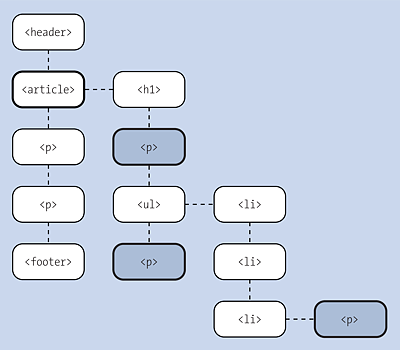
Figure 9.20 You Can Use the Descendant Combinator to Select All Child and Children’s Children Elements That Were Specified as the Target (i.e., <p> Element)
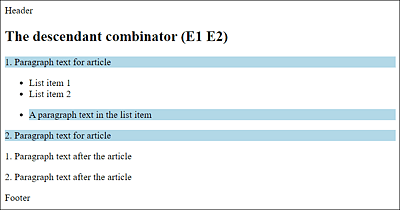
Figure 9.21 The Example of the Descendant Combinator in use
|
Combinator |
Name |
Meaning |
|---|---|---|
|
E F |
Descendant selector |
F gets selected if it’s a descendant of an E element. |
Table 9.13 The Descendant Combinator (E1 E2)
Warning: A Common Mistake!
A common error occurs when you separate multiple selectors with or without commas. Let's look at an intentional notation such as the following:
h2, p {...}This addresses all h2 and p elements in an HTML document. If the comma gets omitted by mistake such as the following:
h2 p {...}Then, this expression receives a different meaning with the space combinator, and theoretically only those p elements would be selected that are located inside <h2> and </h2>, which doesn’t make any sense in that case. Although for this purpose, the W3C suggests for selectors (level 4) to use the >> character for the descendant combinator (i.e., E >> F corresponds to E F), this hasn’t been implemented by any browser vendor up to now.
9.2.2 The Child Combinator (E1 > E2)
The child combinator is represented by a closing angle bracket (>) and connects two selectors. By connecting to the child combinator, you select only elements that are direct descendants of the parent element. Children’s children are no longer selected here. With regard to the /examples/chapter009/9_2/index.html example, the child combinator can be demonstrated as follows:
article > p { background: lightblue; }
Listing 9.31 /examples/chapter009/9_2_2/css/style.css
This way, you can select all p elements that are direct descendants of the article element and style them with a light blue background. Figure 9.22 shows this process in the document structure tree, while Figure 9.23 shows the example in actual use.
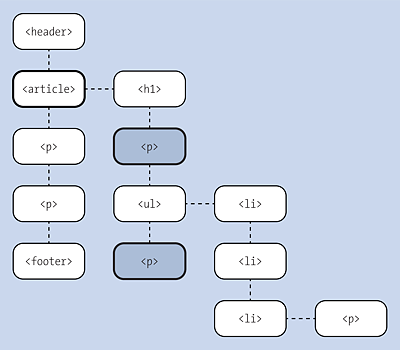
Figure 9.22 You Can Use the Child Combinator (with “article > p {...}”) to Select Only the Direct Child Elements
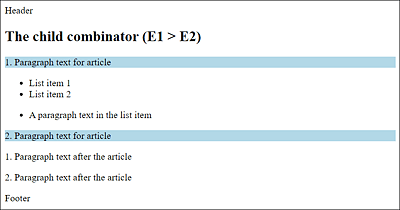
Figure 9.23 The Example of the Child Combinator in Use: Only the Direct Child Elements Are Selected
|
Name |
Meaning |
|
|---|---|---|
|
E > F |
Child selector |
F gets selected only if it’s a direct descendant of an E element. |
Table 9.14 The Child Combinator (E1 > E2)
9.2.3 The Adjacent Sibling Combinator (E1 + E2)
In the adjacent sibling combinator, sometimes called a direct sibling selector, two selectors can be connected with each other by means of the plus sign (+). This way, you can only address elements that are immediate neighbors on the same level (i.e., they have the same parent element). Once again, we can use the /examples/chapter009/9_2/index.html example to illustrate the adjacent sibling combinator:
article + p { background: lightblue; }
Listing 9.32 /examples/chapter009/9_2_3/css/style.css
Here, only the p element is selected, which is a descendant of the article element. The article and p elements have the same parent element (the body element in the example). Figure 9.24 shows this process in the document structure tree, and Figure 9.25 shows the example in actual use.
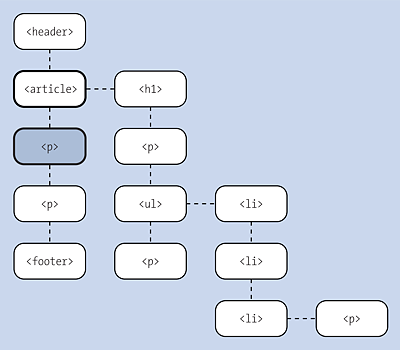
Figure 9.24 With the Adjacent Sibling Combinator, Only Elements That Are Immediate Neighbors on the Same Level (i.e., Have the Same Parent Element) Are Selected
|
Name |
Meaning |
|
|---|---|---|
|
E + F |
Adjacent sibling selector |
F gets selected only if it occurs directly after E (in the same parent element). |
Table 9.15 The Adjacent Sibling Combinator
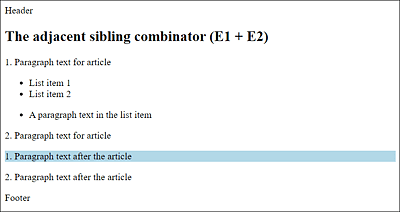
Figure 9.25 The Example of the Adjacent Sibling Combinator in Use
9.2.4 The General Sibling Combinator (E1 ~ E2)
The (indirect) general sibling combinator allows you to connect two selectors by means of the tilde character (~). This means it also allows you to address elements that are neighbors on the same level (= have the same parent element). In contrast to the adjacent sibling combinator (+) (or direct sibling selector), these elements don’t need to follow each other directly, and other elements can also be located between them. This sounds more complex than it really is, which is why the document /examples/chapter009/9_2/index.html is used again here for illustration purposes:
article ~ p { background: lightblue; }
Listing 9.33 /examples/chapter009/9_2_4/css/style.css
This selects all p elements that follow an article element and are at the same level in the document tree. Figure 9.26 shows this process in the document structure tree, while Figure 9.27 shows the example in actual use. The general sibling combinator selects all adjacent <p> elements after the <article> element that are on the same level. It doesn’t matter if there are other elements like <p> in between.
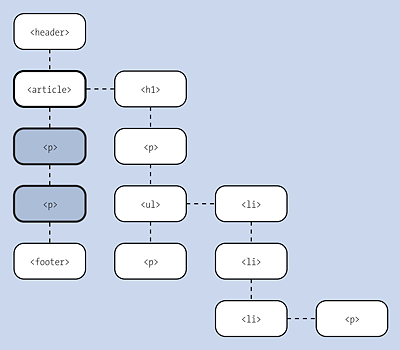
Figure 9.26 General Sibling Combinator Selects All Adjacent <p> Elements
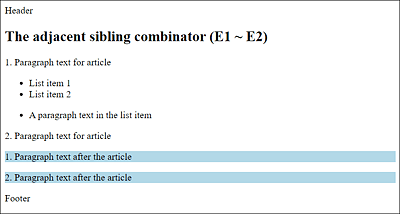
Figure 9.27 The General Sibling Combinator in Use
|
Combinator |
Name |
Meaning |
|---|---|---|
|
E ~ F |
(Indirect) sibling selector |
F gets selected only if it occurs after E (in the same parent element). |
Table 9.16 Overview of the General Sibling Combinator