8.4 Analyzing CSS in the Web Browser
The developer tools provided by each web browser represent good learning and support tools. Besides analyzing HTML, they also enable you to analyze the CSS, which is particularly useful if you want to learn how other websites have designed a particular element. In almost all web browsers you can access the developer tools by pressing the (Ctrl) + (Shift) + (I) shortcut.
If, for example, you want to examine a styled HTML element, you can select it as shown in Figure 8.8 with <header>; for this, you then get the corresponding style (here, with Styles) displayed on the right side. The highlight is that you can (de)activate the style there on a test basis or change the values. The changes are only visual as the files remain untouched. The value of user agent stylesheet is the fixed stylesheet of the web browser.
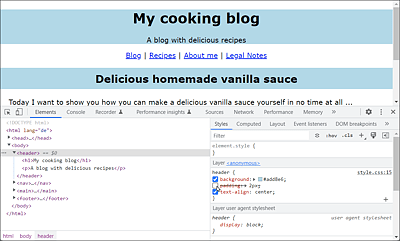
Figure 8.8 The Developer Tools of Web Browsers Are Also Very Useful with Regard to Analyzing and Learning CSS