8.2 The Basic Principle of Using CSS
To use the CSS principle so that it makes sense, you should first create the HTML document with logical and semantic HTML elements. You’ve already learned in detail how to create a proper HTML document with HTML elements in the previous chapters. With CSS, you can use rules for the individual HTML elements to determine their appearance. As an example (see Figure 8.2), we’ll use a header element, which has been written as shown here in the HTML document, index.html:
...
  <header>
  <h1>My cooking blog</h1>
  <p>A blog with delicious recipes ...</p>
  </header>
...
Listing 8.1 /examples/chapter008/8_2/index.html
You’ll assign a new style to this HTML element using CSS, which will determine the formatting and appearance of the header element. In this example, you can find this formatting rule described in the external style.css file as follows:
/* File: style.css */
...
header {
  background: #add8e6;
  padding: 2px;
  text-align:center;
}
...
Listing 8.2 /examples/chapter008/8_2/style.css
At this point, it isn’t important to understand what is written in style.css. The only important thing is that you can see here how to apply CSS rules to an HTML element. In the example, you create the rule in the style.css file with the header selector (i.e., type selector) and the declarations between the curly brackets. For this CSS rule to really affect index.html and the header elements it contains, the HTML document must know where the CSS file (style.css) was stored. In the example, you inform the web browser about this using the link element.
Using this CSS rule in the style.css file for the header element(s) in the index.html file, you specify that for the content between the HTML tags <header> and </header>, the background color should be blue (#add8e6). The inner spacing (padding) is 2 pixels, and the text alignment (text-align) is center. But as I said, these declarations aren’t yet really important in this example. Figure 8.2 demonstrates this process.
If you apply the principle of CSS rules with selectors and declarations to several HTML elements, the outer appearance will change significantly, as you can see in Figure 8.3. This example shown here can be found in /examples/chapter008/8_2/ with index.html and style.css.
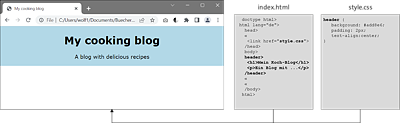
Figure 8.2 A CSS Rule Is Defined with a Selector and the Declarations It Contains

Figure 8.3 Several CSS Rules Have Been Applied to the Individual HTML Elements
8.2.1 Structure of a CSS Rule
As you’ve already learned, you can define a CSS rule with a selector and a declaration. Selectors are an essential building block of CSS, and there are many different types of them. In this section, I’m not going to cover these selectors in detail yet, but you’ll learn how you can construct such a CSS rule in general:
-
Selectors
You can use the selector to specify the HTML element to which the CSS rule should be applied. It’s also possible to apply a rule to multiple HTML elements by separating the individual HTML elements with commas:h1, h2, h3, p { color: blue; }
This sets the CSS rule that the font color is blue for the HTML elements h1, h2, h3, and p at the same time.
-
Declarations
You can use the declarations to specify how you want to format the HTML elements selected via the selector. The declaration itself also consists of two parts, a property and a value. The property is separated from the value by a colon.
In Figure 8.4, you can see the structure and the individual components of a CSS rule.
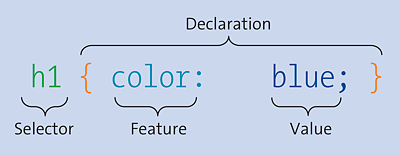
Figure 8.4 Structure of a Simple CSS Rule (CSS Statement)
8.2.2 Declaring a Selector
The declaration inside the curly brackets of a CSS rule consists of at least one property and one value, with a colon between the property and the value. If you want to use several such property-value pairs, you must close each pair with a semicolon:
h1 {
  font-family: "Arial";
  color: red;
  text-align: center;
}

h2, h3 {
  font-family: "Courier";
  color: blue;
}
Here, you specify that all h1 elements are displayed in Arial font, in red text color, and centered. Furthermore, you set a CSS rule for h2 and h3 elements, which are to be displayed in Courier font and in blue color. You can choose the order of the statements as you like. For example, you can also define the color first and then the font.
You could omit the semicolon from the last (or only) property-value pair, but common practice has shown that you usually add more CSS features to a CSS rule, and people tend to forget the omitted semicolon to separate two property-value pairs. A missing semicolon between two property-value pairs is an error.
Let’s return to the two components of a CSS declaration:
-
Properties
You specify a CSS feature (e.g., color, font, alignment) that you want to change for the HTML element selected with the selector. CSS has a tremendous number of features, many of which you’ll get to know throughout the book. -
Values
You specify the value for the CSS feature used. Again, what you can use here depends on the CSS feature you’re using. For example, if the property is color, you can specify the value of a color. In addition to CSS features, you’ll also learn about many different possible value specifications.
8.2.3 Using Comments for CSS Code
If you maintain more CSS code and larger web projects, you should comment your CSS code as clearly as possible so that even after a few weeks, you’ll still know what it is and what you’ve done there. You can introduce a comment via /* and close it with */. Everything in between (including line breaks) will be ignored by the web browser, for example:
/* Creates a circle */
/* Warning! Does not work with IE8 or older */
.circle {
  height: 50px;
  width: 50px;
  border-radius: 50px;
}
Such comments are also useful if you divide your stylesheets into individual sections to be able to orient yourself more quickly in the CSS code, for example:
/*------------------------------------*/
/*        Header and footer area      */
/*------------------------------------*/
...
CSS statements for header and footer
...
/*------------------------------------*/
/*              Contents              */
/*------------------------------------*/
...
CSS statements for the main content
...
8.2.4 A Few Notes on Formatting CSS Code
While formatting CSS code is a matter of personal taste, I’ll nevertheless give you a few pointers on this. At the least, if you want to change or fix something, you might have some problems finding what you’re looking for quickly with the following formatting of the CSS code:
/* All right, but very confusing */
h2,h3{font-family:"Courier";color:blue;text-align:center;}
A general recommendation for this is to use an extra line for each declaration and indent it. You should put the closing bracket on a separate line. The following is much better to read than the previously shown formatting of the CSS code:
/* Much better to read */
h2,
h3  {
   font-family: "Courier";
   color: blue;
   text-align: center;
}
For CSS rules with only one declaration, on the other hand, you could write everything in one line:
h1 { color: blue; }
As mentioned, everyone has their own style, which they develop and continue to use over time.