3 Head Data of an HTML Document
The head data between <head> and </head> contains important information and data about an HTML document that’s used by web browsers or search engines. In this chapter, you’ll get to know the HTML elements for the head data of an HTML document in more detail.
In the head of the HTML document between <head> and </head>, you can insert various HTML elements that enable you to control the content and the display of a web page. You can also establish the relationships between the web browser and other pages or documents here. The content you write in the head element doesn’t get displayed by the web browser, except for the title element. An overview of the different HTML elements, which you can write in the head section between <head> and </head>, is followed by the description of the individual HTML elements.
This chapter may not be spectacular and exciting, but even the nonvisible parts in the head of an HTML document are part of the essential basics of HTML. If you’re in a rush, I recommend that you at least take a look at the sections on the <meta> elements (Section 3.8.1, specifically the character encoding) and <title> (Section 3.2). For the time being, these two headers are the most important elements for the next chapters. For all other HTML elements for head data, you can always look them up here if needed.
3.1 Overview of HTML Elements for the Head
You must write the head element with the head data of an HTML document directly after the opening <html> tag and before the document body with the body element. You can use the elements from Table 3.1 or Figure 3.1 between <head> and </head> (the order doesn’t matter). Of the elements listed in Table 3.1, you must specify at least the title element.
|
HTML Element |
Meaning |
|---|---|
|
<title>...</title> |
Contains the title of the HTML document. |
|
<base> |
Sets base URLs/targets for all relative URLs in a web page. |
|
Sets logical links of the HTML document to other files to be included. |
|
|
<style> |
Sets the local stylesheet rules for the HTML document. |
|
<script> |
Integrates the client-side scripts. The script element isn’t restricted to the HTML document header and may also appear (multiple times) in the document body. |
|
<meta> |
Sets the metadata such as keywords, descriptions, or the character set for the HTML document. |
Table 3.1 Elements That Can Be Used in the HTML Document Head between <head> and </head>
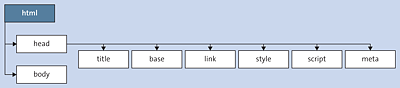
Figure 3.1 In the Head Element between the <head> and </head> Tags, You Can Use the <title>, <base>, <link>, <style>, <script>, and <meta> Elements