1.4 Languages for Designing and Developing on the Web
Now that we’ve covered the different types of websites, this section gives you an overview of the languages you need to know as a web developer and will learn about in this book:
-
HTML
You’ll use this language to create the content of a website. -
CSS
You’ll use this language to create the layout of the website. -
JavaScript
You’ll use this language to program the behavior of the website.
1.4.1 HTML: Text-Based Hypertext Markup Language
HTML is a purely text-based markup language for the structured representation of text, graphics, and hyperlinks in HTML documents. HTML documents can be displayed by any web browser and are therefore also considered the basis for the internet. Because HTML is a purely text-based language (plain text format), HTML documents can be edited and saved with any text editor. In addition to the data displayed in the web browser, an HTML document can contain other meta information. Occasionally you hear that websites are programmed with “HTML commands.” However, it’s wrong to speak of HTML as a programming language because in a programming language, certain tasks are solved by a sequence of commands. HTML doesn’t have any commands or statements, but instead uses markers (also referred to as tags). These markers are used to structure the individual sections of an HTML document. Even though there will still be talk of “programming HTML,” you should try to remain technically correct here because HTML isn’t programmed, but written.
Meta Information
Meta information (or metadata) is data that’s not usually displayed but contains information about the characteristics of the data (in this case, the HTML document), such as the language or author of the document.
1.4.2 CSS: Design Language
Although over the years elements were added to HTML that dealt with the visual design of a document, fortunately the decision was made to separate structuring and layout by defining them with CSS. Thus, in common practice, HTML is used only for the logical structuring of web pages.
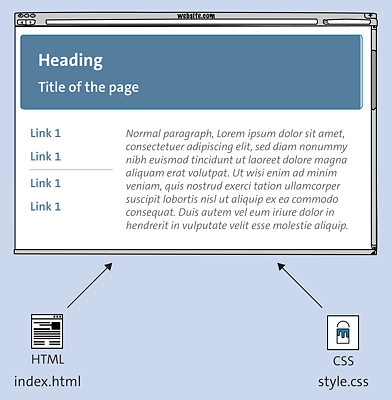
Figure 1.3 Usually, HTML Code for Semantic Structuring Is in One File, and the CSS Code for Styling and Laying Out Is in Another
It’s of course possible to display HTML in the browser without CSS specifications. For example, if you use heading text in the h1 element (e.g., <h1>heading</h1>), this text is displayed larger than the rest of the text in the HTML document between <h1> and </h1>. If you use HTML elements for tables, they are visibly structured as a table. Texts can also be displayed in bold or italics in HTML. The way in which these HTML elements (without CSS) are ultimately displayed in the web browser is determined by the web browser provider. The HTML specification only contains recommendations on what such a default setting might look like in the browser. HTML is only used to semantically structure an HTML document with the HTML elements and should be used exclusively for this purpose in practice. CSS is used for layout and styling.
By separating HTML and CSS, content and layout are separated from each other. In practice, the HTML code (for structuring) is usually in one file, and the CSS code (for formatting and styling) in another. If you apply this separation consistently to all web pages, you can change the complete layout of all web pages with just one CSS file. The HTML files don’t need to be changed. For this reason, you ideally control the visual presentation and styling of the HTML elements via CSS. CSS can be edited with a plain text editor just like HTML.
1.4.3 JavaScript: Client-Side Scripting Language of the Web Browser
Client-side scripting languages are referred to as web-based scripts that are executed on the local computer, usually by the web browser. In common practice, JavaScript is the most significant client-side scripting language. JavaScript allows you to extend the limited capabilities of HTML with user interactions, for example, to evaluate, dynamically modify, and create content. Nowadays, no modern website can do without JavaScript.
Unfortunately, JavaScript has been abused for all sorts of mischief in the past, so the reputation of this programming language hasn’t necessarily been the best. In addition, there was a browser dispute between Netscape and Internet Explorer, in which Microsoft wanted to push through its own JavaScript language, JScript.
By now, the tide has turned in favor of JavaScript on one hand due to the World Wide Web Consortium (W3C) with the introduction of a Document Object Model (DOM), which was gradually adopted by web browser manufacturers, and on the other hand to the many JavaScript frameworks. Much of the innovation in standard HTML has nothing to do with ordinary HTML elements, but rather with JavaScript APIs.
Even if you get to know JavaScript in this book primarily as a way to extend HTML and CSS, you can already find this language outside of web browsers for mobile applications and desktop applications or on servers or microcontrollers.
1.4.4 Server-Side Scripting Languages and Databases
Server-side scripting languages aren’t directly covered in this book, but should be mentioned briefly anyway because only with server-side scripting languages can web pages be generated dynamically. I’ve already briefly explained dynamic websites in Section 1.3.2. Well-known and common server-side scripting languages are PHP, Python, and Ruby. These scripting languages can be used to implement blogs, forums, form mails, guestbooks, and wikis, for example. Most larger websites today are equipped with server-side techniques and often use a database connection to MySQL or PostgreSQL as well.
Many larger blogs or CMSs such as WordPress, Drupal, TYPO3, Contao, and Joomla! are based on such server-side scripting languages with database connectivity. Most of the time, these systems are based on PHP as the scripting language and MySQL as the database.
It can be quite helpful if you have basic knowledge of a scripting language such as PHP to be able to create form mails, guest books, and surveys for smaller web presences, for example. Dealing with databases such as MySQL is also quite useful. Once you’re familiar with HTML, CSS, and JavaScript after reading this book, nothing can stop you from moving on to a scripting language such as PHP and a database such as MySQL to dive even deeper into web development.