1.3 Dynamic and Static Websites
In the preceding section, we often referred to the terms content management systems (CMSs) and blog systems. Well-known representatives of such systems include WordPress, Joomla!, Drupal, Contao, and TYPO3. Once such systems have been installed on a server or web space, hardly any further knowledge is required in principle, but, as always, it’s still pretty useful. CMSs are run on the server side, are programmed with modern web programming languages (mostly PHP, Ruby, and Python), and often also require a server-side database (e.g., MySQL or PostgreSQL). This assumes that appropriate resources (PHP, Ruby, Python, and/or MySQL) are available on the server and may be used. Such CMSs create dynamic websites. For this purpose, the difference between static and dynamic websites should first be explained.
1.3.1 Static Websites
In a static website, all content (e.g., text and image information) is stored unchangeably in individual files on the web server. The content of such a file is created using HTML. When you make changes to static websites, the file in question usually needs to be changed manually on the local machine and then uploaded back to the web server. The use of static websites is therefore likely to be worthwhile for smaller web presences where changes are needed relatively infrequently.
Potential advantages of static websites include the following:
-
The cost of web hosting is cheaper because no special features such as databases or scripting languages are needed. Note, however, that the professional features no longer cost a fortune with the larger web hosts.
-
Page load and load time may be faster because the page can be returned immediately from the web server in response to the request.
-
Developing static websites can be easier and less expensive. However, this depends on the scope of the project and your skills.
Possible disadvantages of static websites include the following:
-
A good knowledge of HTML is required to update the website. If you plan to create a web presence for someone using static web pages, you should be aware that you’ll have to make the changes yourself most of the time.
-
The initial creation of many individual files for the static website can become very time-consuming.
-
Changing the design of the website can be quite expensive. In the worst-case scenario, you need to change every single file. Ideally, however, the web design of a static website is based on CSS, so only this CSS file would need to be changed.
In Figure 1.1, you can see a simplified representation of how a static web page is returned. Here, the web browser first sends a request for a web page to the web server that hosts the website. The web server finds this page and sends it back to the web browser as a response. If this web page isn’t found on the web server, it returns an error message (usually with error code 404) stating that the resource couldn’t be found on the server.
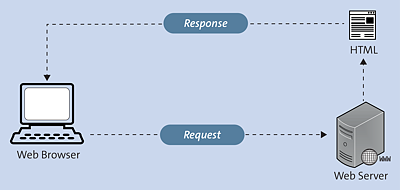
Figure 1.1 Request from the Web Browser and Return of a Static Web Page Stored on a Web Server
1.3.2 Dynamic Websites
For dynamic websites, a CMS usually generates the web pages. This usually involves keeping the content, such as text and images, separate from the technical elements, such as the layout or scripts. When a visitor visits the website, the content and technical elements on the web server are read from a database and dynamically assembled into a web page before being returned to the visitor.
In any case, such a CMS must be installed and reside in a web server environment where, depending on the CMS, different scripting languages (e.g., PHP or Python) and mostly databases (e.g., MySQL or PostgreSQL) must be present before you can install/use the CMS.
Potential advantages of dynamic websites include the following:
-
Updating and adding new content can be done much faster via a web-based UI. As a rule, you no longer have to bother about data storage (where and how).
-
Design modifications and design changes can be made in one central location. Often there are many ready-made templates available. Design changes affect all existing web pages at the same time.
-
Such systems can be maintained without HTML and other programming skills and can even be managed by several people. New functionalities can be added at any time thanks to many existing modules/plug-ins (e.g., search feature, sitemap, online store, and forum).
Possible disadvantages of a dynamic website include the following:
-
Web hosting incurs higher costs due to the need for special features such as scripting languages and databases. However, the costs are no longer significantly higher than for a static website, which they still were a few years ago.
-
If you need to create your own or special modules or plug-ins, knowledge of programming with scripting languages becomes necessary. This could make the development take a little longer and be more expensive.
Figure 1.2 shows a very simplified representation of how a web page is dynamically generated. A web browser makes a request for a web page to a web server by entering a web address. The web server searches for and finds the page and then passes it to the application server. The application server searches the found page for commands and completes the web page. Additionally, statements for a database query can be included here. In this case, such a query to the database (more precisely, the database driver) is started. The database driver then returns the requested record (also called recordset) to the application server, where this data is inserted into the web page. The dynamic web page thus created on the web server gets sent to the web browser as a response.
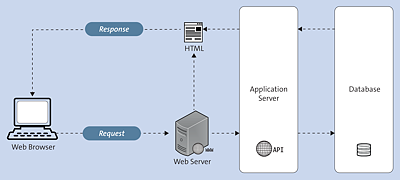
Figure 1.2 Simplified Representation of How a Web Page Is Assembled and Returned after a Web Browser Request on the Web Server
Web Server, Application Server, Database
Admittedly, I’ve thrown around a lot of terms here, so they should be explained briefly. While you won’t have much to do with dynamic websites in this book, it can still be helpful to know these terms a little better.
-
Web server
This is a computer on which web server software (and usually nothing else) is installed. Such a web server is typically used to make documents available locally, on an intranet, or over the internet, as well as to transmit them to clients such as a web browser. The most important web servers are probably the Apache HTTP Server and Microsoft Internet Information Services (IIS). By the way, the location of the web server can be anywhere in the world. -
Application server
An application server provides an environment for client-server applications and a web server. For example, in a web application, the web browser represents the client part of the application. The application server provides certain services (e.g., access to databases and authentication). -
Database
A database is used to store a large amount of data as efficiently as possible and make it available on demand. Usually, a database consists of a database management system and the data itself. The management system of a database takes care of the structured storage and accesses to the data. Database systems provide their own database language for managing and querying the data. There are many different database systems, with MySQL and PostgreSQL currently having the largest market shares on the web.